
Our biggest-ever sale. 60% off AI & data skills
Buy Now
AI coding tools are changing the way people build software. Tools like GitHub Copilot and Cursor AI have quickly become staples in many people's workflows, speeding up the coding process, suggesting lines of code, fixing bugs, and even predicting what comes next.
However, while they’re great for code completion and small improvements, there’s still a gap when it comes to managing the full lifecycle of an app - setting up environments, installing dependencies, and deploying the final product. That’s where Replit Agent comes in.

Replit Agent is a coding assistant built right into the Replit IDE. Unlike other AI tools, it goes beyond just suggesting code snippets. It's designed to work within the Replit platform, letting you not only write code but also run and deploy apps in one place.
This makes Replit Agent an all-in-one tool that links coding directly to real-world deployment.
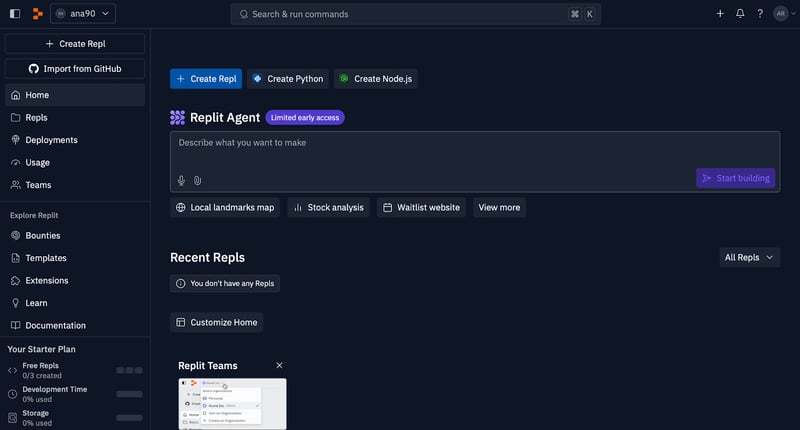
The Replit Agent feature is highlighted in the Replit IDE, offering users the ability to create projects using simple prompts. The interface allows for quick access to AI-powered coding solutions, including building apps like local landmark maps, stock analysis tools, and websites, all with limited early access availability.
But Replit Agent is more than just a code-completion helper. Sure, it writes code, but it also does project scaffolding, meaning it helps you set up the structure of your entire project from scratch.
If you need a database connected or want to configure a server, Replit Agent can do it. It also offers chat-based interaction, so you can ask it to perform tasks, and it will handle everything from coding to deployment.
One standout feature is the ability to manage multi-step tasks. Instead of being limited to one-off code suggestions, Replit Agent can think ahead and execute a full sequence of actions, like installing dependencies, setting up environments, and deploying apps to the cloud—all in one go.
One of the most powerful aspects of Replit Agent is how well it integrates into the Replit environment. Replit itself is known for combining coding, testing, and deployment in one platform, and Replit Agent is built right into that experience.
You don’t have to install any third-party tools or switch between different apps- just open Replit and start interacting with the agent right alongside your code editor. This integration makes it especially convenient because everything you need is available in one place, from writing the first line of code to deploying it live.
Replit Agent has a great natural language interface. You don’t have to know complicated syntax or scripting commands to get started. Simply type a plain English prompt like “Create a to-do app using React” and the agent gets to work.
It’s as easy as having a conversation, and if you need something more specific, you can ask questions like “How do I connect a database to this project?” or “Can you add a search bar?” Replit Agent responds in a way that’s understandable and actionable.
Beyond just writing snippets of code, Replit Agent is capable of handling complex tasks. It can scaffold entire projects, generate code for new features, and even provide detailed explanations of how things work.
For example, you can ask it to create a to-do list app, and it will not only generate the front-end interface but also set up the backend, integrate a database for saving tasks, and deploy the app, all in one process.
Replit Agent is designed for developers at all levels. For beginners, the natural language interface makes coding more accessible. You can focus on learning concepts without getting slowed down by complex setups.
Meanwhile, more experienced developers can use Replit Agent to speed up project scaffolding, automate routine tasks, and focus on higher-level challenges.
Educators can also benefit from Replit Agent. It offers an intuitive way to introduce coding to students, without the need for in-depth setup. Instead of spending class time on configuring environments, teachers can use the agent to help students get hands-on with projects quickly and efficiently.
Replit Agent supports a wide range of programming languages and can assist with different types of projects. Some of the languages it supports include:
You can also combine languages in the same project, and the agent will handle the setup and integration.
Replit Agent comes built directly into the Replit platform, making it ready to use as soon as you sign in.
If you don’t already have an account, head over to Replit and sign up for a free account. If you’re an existing user, simply log in.
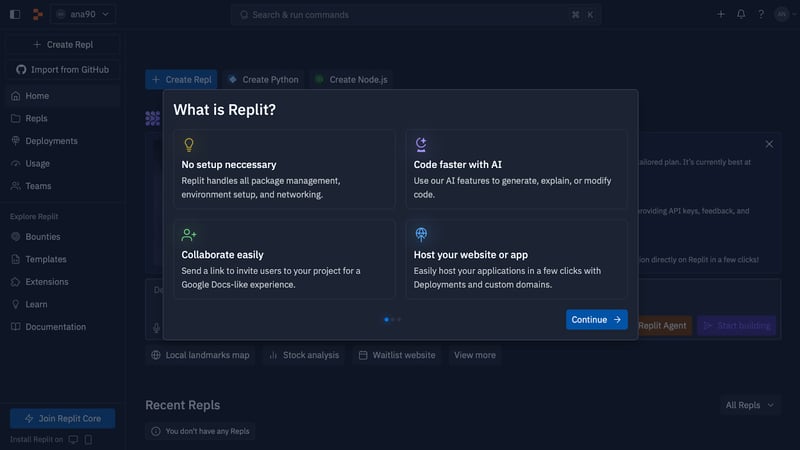
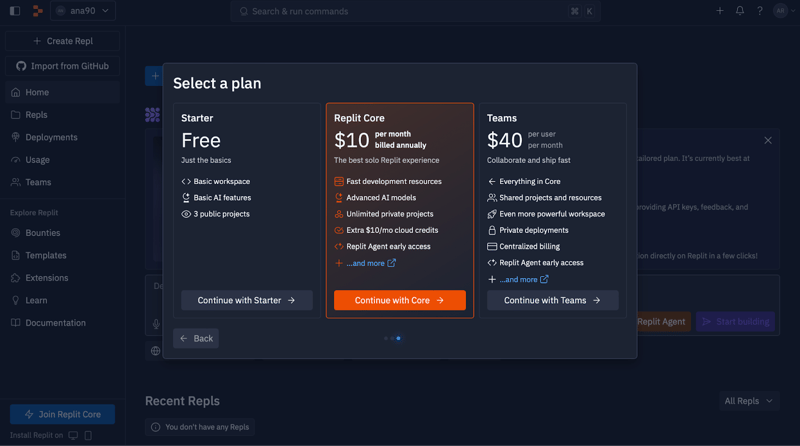
Replit Agent is available for Replit Core subscribers, so make sure you have access to this plan to unlock all its features.
Once you’re logged in, you’ll notice a “Replit Agent” button in the Replit IDE. It’s prominently displayed for Core users in the dashboard, so you won’t miss it. Clicking this button opens up the agent interface, where you can start interacting with it right away.
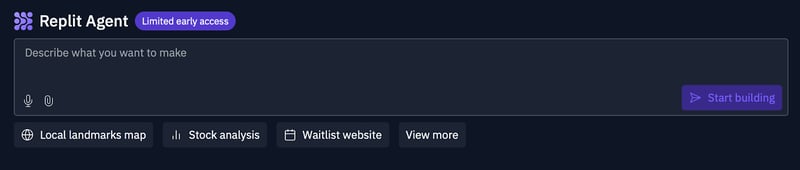
Now that the Replit Agent interface is open, you’re ready to start coding! You can type in your requests in plain English, and the agent will take care of the rest. From there, you can give it further instructions, add features, or ask questions about the code it generates.
That’s it! No downloads, no installations—just log in, and you’re all set to begin working with Replit Agent directly within the Replit environment.
Let’s learn how to use Replit Agent through a practical example. We can enter a simple prompt like “Make an app that displays a map of local landmarks,” and Replit Agent will start generating the code.

After submitting the prompt, Replit Agent automatically creates the code for the app. Here, it’s generating the necessary files, including the backend using Flask and the front-end with HTML/CSS/JavaScript. The agent even fetches nearby landmarks using Wikipedia's API and displays them on an interactive map—all while keeping us updated on its progress.
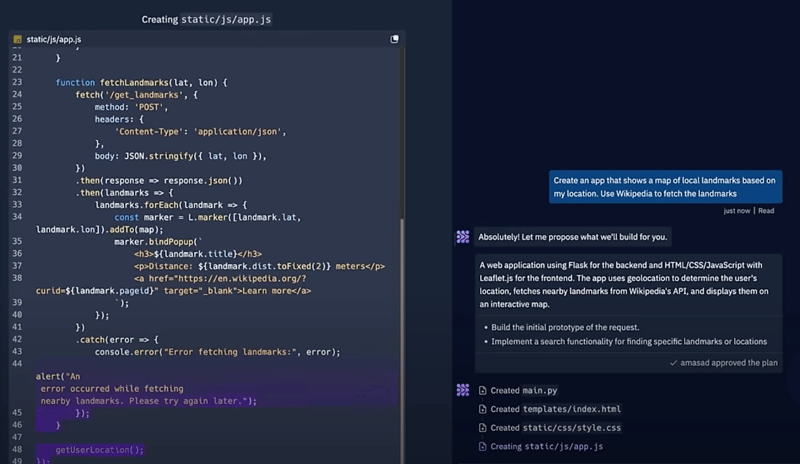
Once the basic map is created, Replit Agent continues refining the app based on our requests. Here, the agent has added short descriptions to each landmark using data from Wikipedia. You can see the map is interactive, allowing users to click on landmarks and view additional details, like the name, distance, and a link to learn more. The agent also checks that the app is functioning correctly by asking if the map is centered, if landmarks are displaying, and if descriptions are visible.
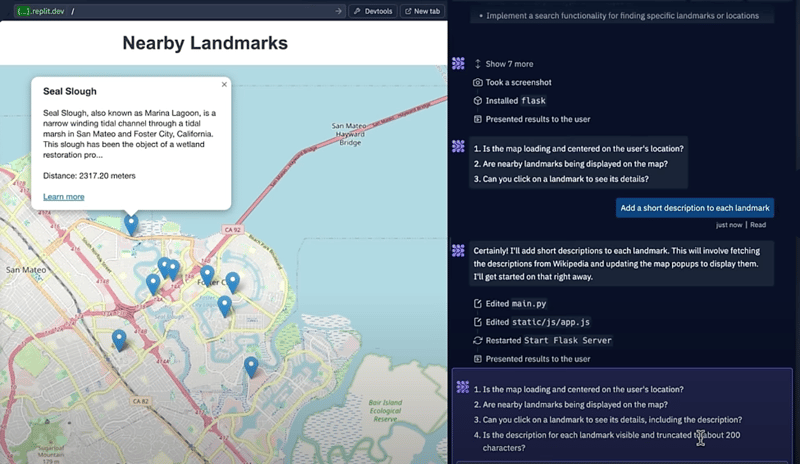
After completing the search functionality and ensuring everything works, it's time to deploy the app. Replit Agent suggests deployment options, including reserved VMs, autoscaling, and static sites.
With just a few clicks, you can deploy your project to a production environment, making it live and accessible to users. In this step, the app is deployed with search functionality to find specific landmarks, allowing users to interact with the final product in real time.
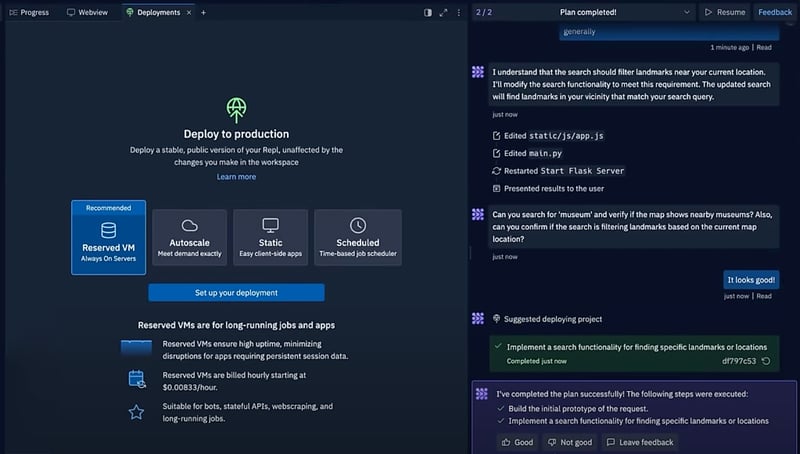
In this step, Replit Agent helps configure deployment settings, including setting up database credentials, defining build and run commands, and choosing the appropriate app type (e.g., web server). Here, we see the secrets like DATABASE_URLand PGUSER securely configured for the deployment. Once everything is set, you can finalize and launch your app, making it live and accessible to users.
This section provides an overview of various real-world use cases that demonstrate the versatility and power of Replit Agent. Each use case highlights a specific problem, a relevant prompt, and how Replit Agent provides a solution.
Problem: Starting a new project can be a hassle, with multiple steps involved in setting up file structures and installing dependencies.
Prompt: “Create a basic React app” or “Set up a Flask project”
Solution: Replit Agent generates the entire project setup, including folders, files, and necessary packages, enabling quick and efficient project scaffolding.
Problem: You need a quick app for a personal project or prototype with both front-end and back-end components.
Prompt: “Create a guestbook for my website”
Solution: Replit Agent builds the front-end, back-end, connects a database, and deploys the app to the web, streamlining the full-stack application development process.
Problem: Repetitive tasks like installing dependencies or setting up routes can be time-consuming.
Prompt: “Install Tailwind CSS and configure it for my project”
Solution: Replit Agent installs the required packages and updates the necessary project files automatically, saving you time on routine coding tasks.
Problem: Squashing bugs or understanding why code doesn’t work as expected can be challenging.
Prompt: “Find and fix issues in my code” or “Explain this function”
Solution: Replit Agent analyzes the code, suggests fixes, and provides explanations, offering valuable assistance in debugging and troubleshooting code issues.
Problem: Refactoring code for better performance or readability can be time-consuming and requires careful attention.
Prompt: “Refactor my Python code for better performance”
Solution: Replit Agent refactors your code to improve performance and readability, ensuring that your project follows best practices for optimization.
Problem: Adding new features like authentication or payment gateways requires setup and coding from scratch.
Prompt: “Add user authentication” or “Integrate a payment gateway”
Solution: Replit Agent adds features such as user authentication or payment gateways, handling both the code and necessary configurations to enhance your app.
Problem: Users may want to understand the technologies being used or compare alternatives while building an app.
Prompt: “Why are we using Flask?” or “What’s React vs vanilla JS?”
Solution: Replit Agent provides clear and simple explanations to help you understand the technologies being used and make informed decisions during development.
Problem: Documenting code or APIs is important for future use but can be tedious to write.
Prompt: “Write comments for this function” or “Generate API docs”
Solution: Replit Agent generates detailed comments or API documentation for your project, easing the burden of manual documentation and improving project maintainability.
Problem: Setting up and configuring a database manually can be time-consuming and error-prone.
Prompt: “Set up a Postgres database for this app”
Solution: Replit Agent sets up the database, configures the connection, and integrates it into your app, simplifying the process of database management.
Problem: Deploying apps manually can be complex, involving server setup and configuration.
Prompt: “Deploy this app to the cloud”
Solution: Replit Agent handles all the necessary configurations and deploys your app to a live environment, making the deployment process seamless and efficient.
To get the most out of Replit Agent, here are some best practices:
If you run into issues while using Replit Agent, here are some common troubleshooting tips:
For more detailed help, you can explore the following resources:
With the growing number of AI-powered coding tools, it’s important to understand how they compare and what makes each unique. Replit AI, Cursor AI, and Github Coilot are all designed to help people code faster and more efficiently, but they approach the task in different ways. Let’s look at their differences.
One of the major differences is how each tool integrates with its development environment.
All three tools are great at generating code, but Replit Agent goes beyond simple code completion as it handles full-project execution.
All three tools allow you to interact with them using natural language, but there are key differences in how they handle more complex prompts.
Replit Agent stands out when it comes to deploying apps and setting up environments, offering an all-in-one solution for developers who prefer handling everything within a single platform.
Lastly, let’s address Replit Agent’s shortcomings.
One of the most common questions around AI tools like Replit Agent is the cost. Replit offers a free plan, but the Replit Agent is only available for Core subscribers. This paid plan gives you access to the agent and includes access to advanced features like project scaffolding, multi-step task execution, and integrated deployment.
Keep in mind, usage limits might apply to API calls or certain features, depending on the pricing tier you choose, so it's important to check the details based on your needs.
Understandably, people might worry about the privacy and security of their code when using AI-powered tools.
The code written using Replit Agent stays within the Replit platform and is stored securely in your own workspace. Replit has strict privacy policies to safeguard your data, making sure that your code isn’t used for training models or exposed to third parties without your consent. Also, Replit uses industry-standard encryption methods to protect user data, keeping your projects safe from unauthorized access.
For people working on sensitive projects or proprietary code, it’s always good practice to review Replit’s privacy policies or consult with legal teams to ensure compliance with company policies.
While Replit Agent is a powerful tool, it’s important to acknowledge that AI-generated code may not always be perfect. Like any other AI system, Replit Agent can sometimes make mistakes or produce code that isn’t perfectly optimized for your specific project. It’s designed to assist and speed up the development process, but you should always review and test the output thoroughly before deploying.
Just as you would with code written by a human developer, it's important to validate the AI’s work, especially in critical areas like security, performance, and scalability. Replit Agent can be a huge time-saver, but people are still responsible for ensuring the quality and reliability of their final product.
Replit Agent brings a fresh approach to the world of AI-powered coding tools, making app development faster and more accessible than ever.
While it’s not without its limitations, Replit Agent stands out in simplifying the development process. As AI continues to evolve, tools like Replit Agent are contributing to a more intuitive and efficient approach to coding.
Now that you’ve learned about how Replit Agent works and how it compares to other tools like GitHub Copilot and Cursor AI, the best way to understand its potential is to try it for yourself!
Replit Agent is an AI-powered coding assistant integrated into the Replit online IDE. It utilizes LLMs to provide code suggestions, completions, explanations, and even generate entire code snippets or projects based on your natural language instructions.
Basic functionality is available to all Replit users. However, accessing the full power of Replit Agent requires a Replit Core subscription, unlocking advanced features like project scaffolding and deployment.
Replit Agent goes beyond code completion and suggestions, focusing on multi-step task execution and full-project automation. It integrates seamlessly with Replit's platform, offering a complete development environment from coding to deployment.
Replit Agent supports a wide variety of languages and frameworks, including JavaScript/TypeScript, Python, HTML/CSS, Node.js, and SQL, making it versatile for different types of projects.
Replit Agent is built-in to the Replit platform. Once you're logged in with a Core subscription, you can access it directly from the IDE. Simply provide natural language prompts and the agent will generate code, set up environments, or handle other tasks as requested.
Your code is stored securely within the Replit platform and isn't used for training models or shared with third parties without your consent. Replit also employs industry-standard encryption to protect your data.
Ana Rojo Echeburúa is an AI and data specialist with a PhD in Applied Mathematics. She loves turning data into actionable insights and has extensive experience leading technical teams. Ana enjoys working closely with clients to solve their business problems and create innovative AI solutions. Known for her problem-solving skills and clear communication, she is passionate about AI, especially generative AI. Ana is dedicated to continuous learning and ethical AI development, as well as simplifying complex problems and explaining technology in accessible ways.

บล็อก
 Tom Farnschläder• 8 นาที

บทแนะนำ
 Bexruz (Bex) Tuychiev• 8 นาที

บทแนะนำ
 François Aubry• 8 นาที
Learn AI with these courses!
แทร็ก
เรียนรู้การสร้างแอปพลิเคชันที่ขับเคลื่อนด้วย AI ด้วยเครื่องมือสำหรับนักพัฒนา AI ล่าสุด รวมถึง OpenAI API, Hugging Face และ LangChain
คอร์ส
ใช้ OpenAI API เพื่อเตรียมแอป AI ของคุณให้พร้อมใช้งานจริง
คอร์ส
ในคอร์สนี้ คุณจะได้สำรวจเฟรมเวิร์ก MLOps สมัยใหม่ ครอบคลุมวงจรชีวิตและการนำโมเดลแมชชีนเลิร์นนิงไปใช้งาน






What if building apps could be as simple as having a conversation? No setting up complicated development environments, no digging into obscure configuration files.
For many people, the process of turning ideas into apps can be a frustrating experience. You have to install dependencies, configure databases, and figure out how to deploy everything just right. Even experienced coders often get stuck on these repetitive and time-consuming steps!
That's where Replit Agent tries to make a difference.
Replit Agent is an AI tool that not only writes code but also handles everything from setting up environments to deploying apps. Imagine telling the agent to build a guestbook for your website and watching it generate code, set up a database, and deploy the app in just a few minutes. Sounds like a dream, right?
In this article, I’ll explain how Replit Agent works and how it differs from traditional coding tools. I’ll also explore a few real-world use cases and what early users say about it.
Let’s get into it!