

什么是 Chainlit?
Chainlit 可帮助您为 AI 聊天机器人、工具和 LLM 工作流创建前端。它屏蔽了前端复杂性,让您专注于 Python 逻辑,同时支持添加按钮、滑块、文件上传,甚至通过 模型上下文协议(MCP)对接外部工具。
Chainlit 非常适合:
- 原型设计基于 LLM 的应用
- 创建内部工具
- 构建教学演示
- 将您的模型连接到外部工具或 API
Chainlit 组件
每个 Chainlit 应用都建立在几项关键特性之上:
- 聊天生命周期钩子:这些钩子让您控制聊天在不同阶段的行为。例如:
@cl.on_chat_start在聊天开始时运行。@cl.on_message在用户发送消息时运行。@cl.on_chat_end在聊天结束时运行。- UI 操作:Chainlit 允许您使用
cl.Action添加按钮,并用@cl.action_callback处理它们。无需用户输入文本,即可构建简洁、交互性强的 UI。 - 消息流式传输:对于支持 token 流式输出的 LLM,您可以使用
stream=True实时流式返回响应,使应用更具动态和响应性。 - 使用
config.toml配置:该文件可启用聊天持久化、文件上传、主题定制与易用性优化等功能——无需修改 Python 代码。
我将通过上手示例逐一讲解这些概念,帮助您了解其工作方式,并将其集成到您的 Chainlit 应用中。我们从第一步开始。
先决条件
请确保已安装 Python 3.8+,然后使用 pip 安装 Chainlit。我们还将为 Ollama 演示使用 Langchain,请一并安装。在终端中运行以下命令:
pip install chainlit langchain langchain-community通过示例理解 Chainlit 基础
本节将介绍 Chainlit 的核心构建模块,它们是任何项目的基础。
聊天生命周期钩子
每当用户连接到您的 Chainlit 应用时,都会创建一个聊天会话。您可以使用 Chainlit 提供的装饰器在会话的不同阶段进行介入。包括:
使用 @cl.on_chat_start 构建
该钩子会在新聊天会话开始时运行。您可以用它来向用户致意、显示欢迎消息,或初始化会话状态。
import chainlit as cl
@cl.on_chat_start
def on_chat_start():
print("A new chat session has started!")
使用 @cl.on_message 构建
该消息钩子在用户发送新消息时运行。我们用它来处理用户输入、调用 LLM 或返回响应。
import chainlit as cl
@cl.on_message
async def on_message(msg: cl.Message):
print("The user sent:", msg.content)
await cl.Message(content=f"You said: {msg.content}").send()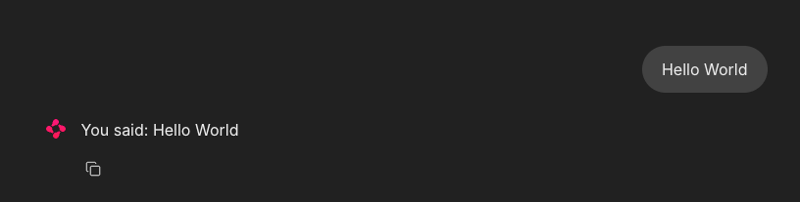
使用 @cl.on_stop
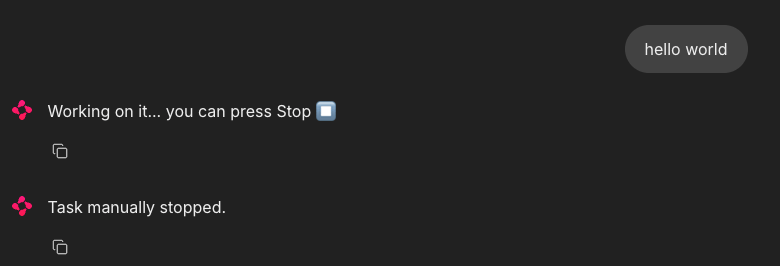
当用户在任务运行期间点击停止按钮(⏹)时,on_stop 钩子会触发。它用于取消长耗时操作或清理被中断的会话。
import chainlit as cl
import asyncio
@cl.on_chat_start
async def start():
await cl.Message("Type anything and I'll pretend to work on it.").send()
@cl.on_message
async def on_message(msg: cl.Message):
await cl.Message("Working on it... you can press Stop").send()
try:
# Simulate a long task
await asyncio.sleep(10)
await cl.Message("Task complete!").send()
except asyncio.CancelledError:
print("Task was interrupted!")
# This is optional, just logs in the server
raise
@cl.on_stop
async def on_stop():
print("The user clicked Stop!")当用户发送消息时,Chainlit 使用 asyncio.sleep(10) 模拟任务。若用户点击停止按钮(⏹),任务会被取消,并触发 @cl.on_stop 来记录中断。
使用 @cl.on_chat_end 构建
当会话结束时(用户刷新、关闭标签页或开启新会话),该钩子会触发。通常用于记录断开连接或保存状态。
import chainlit as cl
@cl.on_chat_start
async def on_chat_start():
await cl.Message("Welcome! Feel free to leave anytime").send()
@cl.on_chat_end
async def on_chat_end():
print("The user disconnected!")当本地服务打开后,您即可与其交互。当您关闭该本地服务的标签页或窗口时,终端会显示如下内容:

UI 操作(按钮)
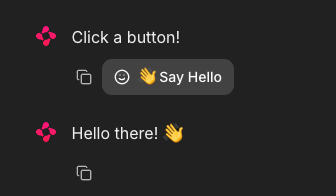
Chainlit 允许您在聊天界面中直接添加交互式按钮。每个按钮都被定义为一个操作,并连接到一个 Python 回调函数。您可以通过 Message 的 actions 参数发送按钮:
import chainlit as cl
@cl.on_chat_start
async def start():
actions = [
cl.Action(
name="hello",
label="👋 Say Hello",
icon="smile",
payload={"value": "hi"}
)
]
await cl.Message("Click a button!", actions=actions).send()以下是处理按钮点击的方式:
@cl.action_callback("hello")
async def on_hello(action: cl.Action):
await cl.Message("Hello there! 👋").send()@cl.action_callback("hello") 装饰器指示 Chainlit 监听名为 "hello" 的按钮点击。被点击时,会在聊天界面向用户发送一条友好的消息。
提示: 您可以使用任意数据自定义 payload 以回传到服务器。
消息流式传输
Chainlit 支持 LLM 响应的实时流式传输。这意味着您可以在内容生成的同时,按步增量地将其发送给用户。
@cl.on_message
async def on_message(message: cl.Message):
await cl.Message(content="Thinking...").send()
async for chunk in llm.astream(message.content):
await cl.Message(content=chunk, author="LLM", stream=True).send()让我们来分解一下:
- 首先会立即显示一条 “Thinking...” 消息,让用户知道应用正在工作。
- 然后将用户消息发送到支持流式传输的 LLM。
- 随着模型生成输出,它会将每个片段(chunk)实时流回到 UI。
stream=True参数确保分段增量显示,而不是等待完整响应。
注意: 此功能在支持流式输出的模型上效果最佳。
Chainlit 配置(config.toml)
要解锁聊天持久化、文件上传、主题定制等强大功能,您可以通过 config.toml 文件自定义 Chainlit 应用。该文件位于项目根目录(.chainlit 文件夹下),允许您在不修改代码的情况下调整运行时行为。
持久化
该参数允许 Chainlit 持久化聊天记录和会话状态。它会激活 @cl.on_chat_resume 钩子,适用于用户可能断开后再返回的应用。
[persistence]
enabled = true文件上传
该设置允许用户在聊天界面上传文件。您可以限制允许的文件类型与大小,以确保安全与性能。
[features.spontaneous_file_upload]
enabled = true
accept = ["*/*"]
max_files = 5
max_size_mb = 500以下是 Chainlit 可接受的几类文件类型。
# 1. For specific file types:
# accept = ["image/jpeg", "image/png", "application/pdf"]
# 2. For all files of a certain type:
# accept = ["image/*", "audio/*", "video/*"]
# 3. For specific file extensions:
# accept = { "application/octet-stream" = [".xyz", ".pdb"] }这样您即可根据安全性、性能或特定领域需求定制上传策略。
UI 定制
此设置会在 UI 参数下更改助手名称,并在渲染模式中启用 思维链(CoT),便于逐步推理或调试。
[UI]
name = "Assistant"
cot = "full"易用性优化
这些设置可提升用户体验,如自动滚动至新消息、允许编辑消息。
[features]
user_message_autoscroll = true
edit_message = true上述易用性优化允许用户在 UI 中启用自动滚动与消息编辑功能。
项目:Surprise Me 机器人(无 LLM)
了解了 Chainlit 的基础组件后,我们来构建一个简单的基于 UI 的应用,使用按钮显示预设的冷知识或开发者激励消息。
import chainlit as cl
import random
FUN_FACTS = [
"💡 Did you know? Chainlit supports file uploads and custom themes!",
"💡 You can add buttons, sliders, and images directly in your chatbot UI!",
"💡 Chainlit supports real-time tool execution with LangChain and LLMs!",
"💡 You can customize the look of your chatbot with just a CSS file!",
"💡 Chainlit lets you connect to tools using Model Context Protocol (MCP)!"
]
SUPRISES = [
"🎉 Surprise! You're doing great!",
"🚀 Keep it up, you're making awesome progress!",
"🌟 Fun fact: Someone out there just smiled because of you. Why not make it two?",
"👏 Bravo! You just unlocked +10 imaginary developer XP!",
"💪 Remember: Even bugs fear your debugging skills!"
]
@cl.on_chat_start
async def start():
actions = [
cl.Action(
name="surprise_button",
label="🎁 Surprise Me",
icon="gift",
payload={"value": "surprise"}
),
cl.Action(
name="fact_button",
label="💡 Did You Know?",
icon="lightbulb",
payload={"value": "fact"}
)
]
await cl.Message(content="Choose an action:", actions=actions).send()
@cl.action_callback("surprise_button")
async def on_surprise(action: cl.Action):
suprise = random.choice(SUPRISES)
await cl.Message(content=suprise).send()
@cl.action_callback("fact_button")
async def on_fact(action: cl.Action):
fact = random.choice(FUN_FACTS)
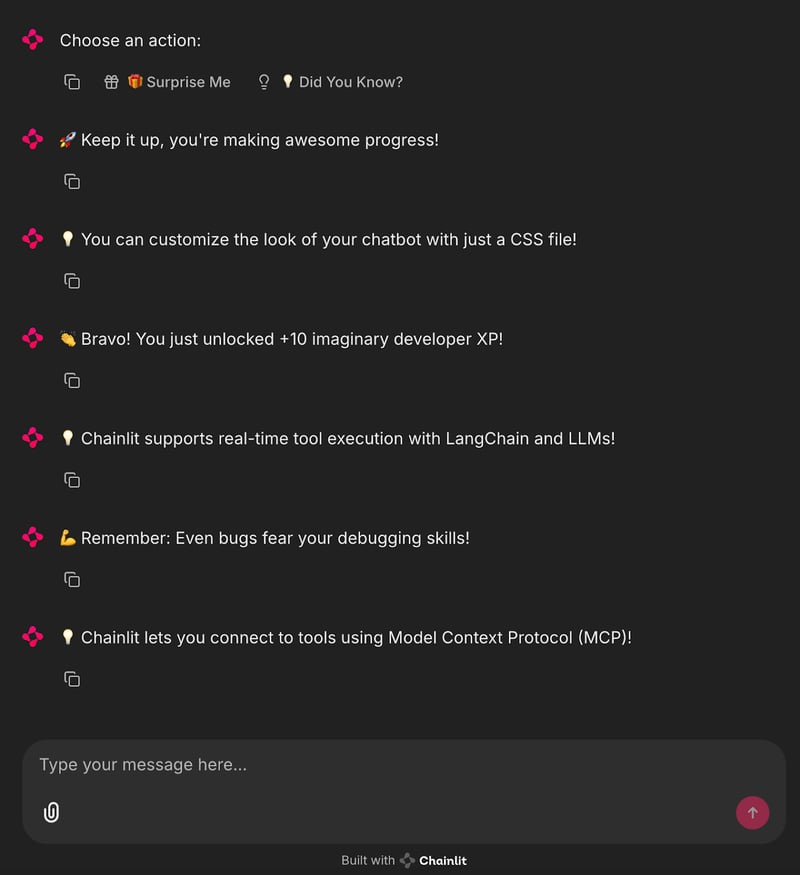
await cl.Message(content=fact).send()上述代码定义了两个列表:“FUN_FACTS” 包含有趣的 Chainlit 小贴士,“SUPRISES” 包含激励性的消息。
- 当新聊天开始时,会显示两个按钮:"Surprise Me" 和 "Did You Know?"——使用
cl.Action. ' - 点击 "Surprise Me" 会触发 @cl.action_callback("surprise_button")
,它会发送一条随机惊喜消息。 - 点击 "Did You Know?" 会触发 @cl.action_callback("fact_button")`,它会发送一条随机冷知识。
这样即可用按钮创建一个简单的交互式聊天机器人,无需 LLM,非常适合学习 Chainlit 的操作与回调机制。
要运行该应用,只需在终端执行:
chainlit run main.py您将在 UI 中看到交互式按钮,可触发显示冷知识或趣味消息!
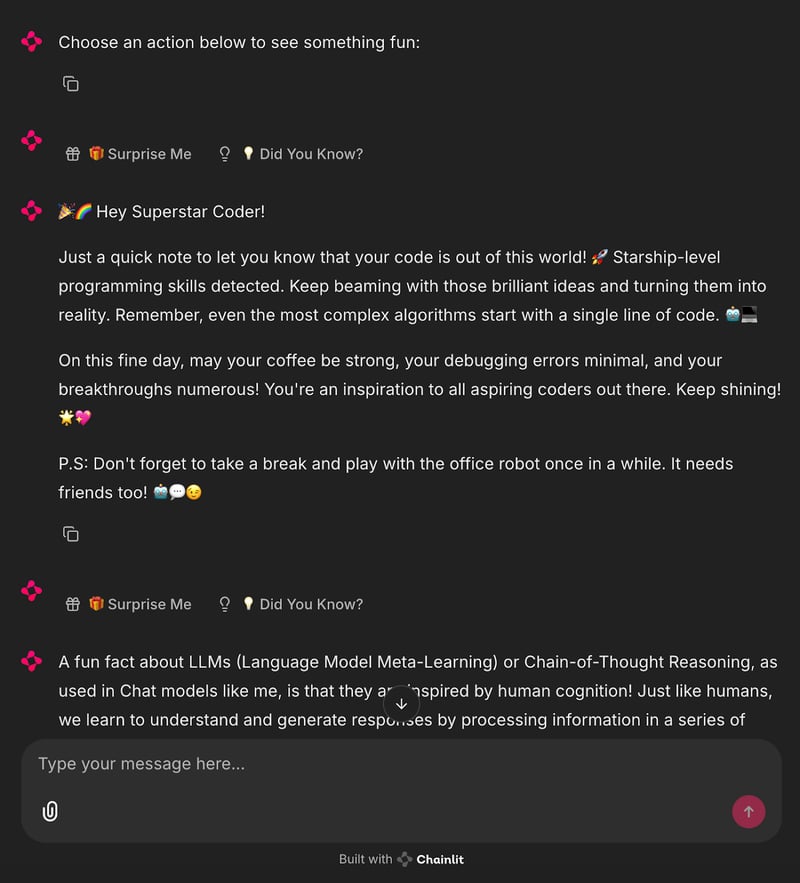
项目:由 Ollama 驱动的 Surprise Me 机器人
现在,我们将把这一过程自动化,通过 Ollama 使用本地 LLM 来生成惊喜与冷知识消息。
import chainlit as cl
from langchain_community.llms import Ollama
import random
llm = Ollama(model="mistral", temperature=0.7) # Use any lightweight local model
# Reusable action buttons
def get_action_buttons():
return [
cl.Action(
name="surprise_button",
label="🎁 Surprise Me",
icon="gift",
payload={"value": "surprise"}
),
cl.Action(
name="fact_button",
label="💡 Did You Know?",
icon="lightbulb",
payload={"value": "fact"}
)
]
@cl.on_chat_start
async def start():
await cl.Message(content="Choose an action below to see something fun:").send()
await cl.Message(content="", actions=get_action_buttons()).send()
@cl.action_callback("surprise_button")
async def on_surprise(action: cl.Action):
prompt = "Give a short, uplifting surprise message to a developer. Make it fun."
try:
surprise = llm.invoke(prompt).strip()
except Exception:
surprise = "🎉 Surprise! You're doing great!"
await cl.Message(content=surprise).send()
await cl.Message(content="", actions=get_action_buttons()).send()
@cl.action_callback("fact_button")
async def on_fact(action: cl.Action):
prompt = "Give a fun and helpful fact about LLMs or Chainlit."
try:
fact = llm.invoke(prompt).strip()
except Exception:
fact = "💡 Did you know? You can add sliders and buttons to Chainlit with just a few lines of code!"
await cl.Message(content=fact).send()
await cl.Message(content="", actions=get_action_buttons()).send() 该 Chainlit 应用集成本地 LLM(通过 Ollama 使用 Mistral 模型),依据用户交互动态生成响应。
- 使用可复用的
get_action_buttons()函数定义了两个cl.Action按钮——“Surprise Me” 与 “Did You Know?”。 - 聊天初始化(
@cl.on_chat_start)时发送包含这些交互按钮的消息。 - 当用户点击 “Surprise Me” 按钮时,
@cl.action_callback处理器会向 LLM 发送提示,索要简短积极的开发者鼓励信息。通过.strip()清理响应后返回聊天。 - 类似地,点击 “Did You Know?” 会向 LLM 发送提示,请求关于 Chainlit 或 LLM 的科普事实。
- 若 LLM 失败,则返回静态的兜底响应。
- 每次交互后都会重新发送按钮,以维持对话循环。
这展示了如何将 Chainlit 的 UI 与基于 LLM 的内容生成相结合,为本地 AI 助手类应用提供模块化、可扩展的基础。
在终端运行以下命令:
ollama run mistral
chainlit run main.py现在,您已经拥有一个本地在线的 AI 助手,它能够自动生成消息。
结语
Chainlit 在原型化聊天工具、构建助手以及集成实时 LLM 输出方面潜力十足——而且无需接触 JavaScript。若需进阶用法,请查看 Chainlit Cookbook。
若想继续学习新的 AI 工具,请参阅以下博客:

我是一名 Google Developers 机器学习(生成式 AI)领域的专家、Kaggle 三项专家,以及 Women Techmakers 大使,拥有 3 年以上的技术从业经验。2020 年我共同创办了一家健康科技初创公司,目前在佐治亚理工学院攻读计算机科学硕士,专攻机器学习。
Chainlit 是一款功能强大的开源 Python 框架,几乎无需编写代码、无需处理前端,即可为您的 LLM 驱动应用构建交互式界面。
在本教程中,我将介绍: