%22%3E%3Cpath%20d%3D%22m-369%200h408v79h-408z%22%20fill%3D%22%237933ff%22%2F%3E%3Cpath%20d%3D%22m-148%200h306v45h-306z%22%20fill%3D%22%23974dff%22%2F%3E%3C%2Fg%3E%3C%2Fsvg%3E)
%22%2F%3E%3C%2FclipPath%3E%3Cg%20clip-path%3D%22url(%23a)%22%3E%3Cpath%20d%3D%22m76%200h484v36h-484z%22%20fill%3D%22%23974dff%22%2F%3E%3Cpath%20d%3D%22m0%200h384v24h-384z%22%20fill%3D%22%2306bdfc%22%20transform%3D%22matrix(1%200%200%20-1%200%2060)%22%2F%3E%3C%2Fg%3E%3C%2Fsvg%3E)
开始使用 Grok 4 API
在发出第一条用户请求之前,我们需要一个 API 密钥,以及能够连接 Grok API 的 Python 环境。
创建您的 API 密钥
要创建一个可用于通过 API 认证客户端的 API 密钥,您可以按以下步骤操作:
- 访问官方 xAI 文档网站。
- 使用您的 X、xAI 或 Google 账号登录。若尚无账号,可注册新的 xAI 账号。
- 找到“Create an API key”选项。输入密钥名称并点击“save”。
- 密钥显示后请立即复制。之后将无法再次查看,但如有需要,您可重新生成新的密钥。
- 在项目目录中创建名为 .env 的文件。将 API 密钥按如下格式粘贴进去:
XAI_API_KEY=<your_api_key_here>Grok 4 API 定价
使用 API 可能比购买高级订阅更实惠,但并非免费。不同于按月固定收费、起价为 30 美元的 SuperGrok 方案,API 的费用完全取决于您的使用量。不过,如需访问 Grok 4 Heavy,规则有所不同:即便通过 API 使用,您也需要有效的 SuperGrok Heavy 订阅(每月 300 美元)。
有关潜在支出的详细分解,请查看 xAI 的定价页面。
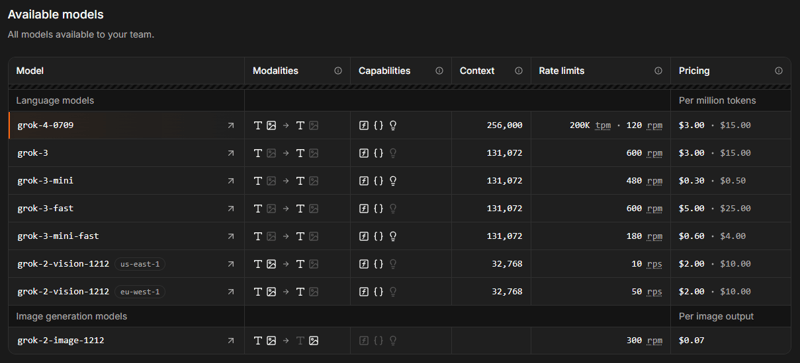
来源:xAI
Grok API 的定价基于使用量,按每百万个 token 计费。作为参考,一百万个 token 大致相当于 75 万个英文单词(无论作为输入还是输出)。尽管上下文窗口几乎翻倍,Grok 4 的价格与标准版 Grok 3 模型完全一致:每百万输入 token 收费 3 美元,每百万输出 token 收费 15 美元。
要访问 API,您需要购买额度。初期建议使用预付额度而非自动计费——这有助于避免意外收费。您可以在 xAI 控制台的 Invoices > Credits 页面购买 token 并跟踪用量。
Python 环境设置
当您准备好 API 密钥和额度后,下一步是配置 Python 环境。为顺畅集成 API,您需要安装两个软件包:
python-dotenv:将.env文件中的 API 密钥加载为环境变量。openai客户端:与 Grok 4 API 交互。
为保持项目依赖清晰,建议使用 Anaconda。安装 Anaconda 后,通过以下命令创建名为 grok4 的 Python 3.10 环境:
conda create -n grok4 python=3.10
conda activate grok4激活环境后,安装所需软件包:
pip install python-dotenv openai最后准备
让我们从编写第一个脚本开始。先从已安装的软件包中导入必要的函数,并导入 os 以访问您的 API 密钥:
import os
from dotenv import load_dotenv
from openai import OpenAI接着使用 dotenv 包中的 load_dotenv() 加载环境变量,使 API 密钥可被脚本读取:
# Load environment variables
load_dotenv()现在,通过向 OpenAI 类传入 API 密钥(来自 .env 文件)和 Grok 服务器 URL 来初始化 API 客户端(本教程使用 OpenAI SDK,但 Grok 4 也提供 xAI 原生 Python SDK,且也兼容 Antrhopic 的 SDK)。将其赋值给变量 client:
client = OpenAI(
api_key=os.getenv("XAI_API_KEY"),
base_url="https://api.x.ai/v1",
)完成上述步骤后,您的脚本即可向 Grok 4 发送请求。
使用 Grok 4 进行图像识别
准备工作就绪后,让我们测试 Grok 4 的一项新功能:图像识别。我们将上传下面这张素食千层面的照片,并让 Grok 识别可见食材。
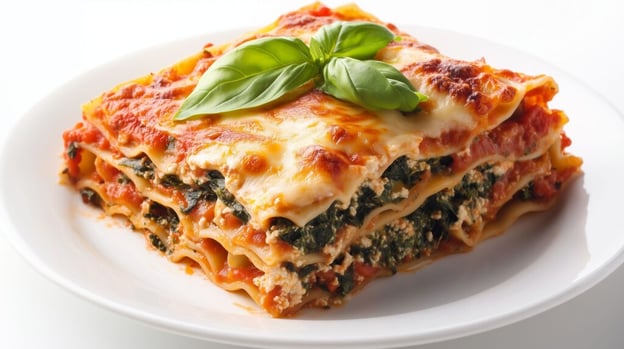
要用 Grok 4 API 分析图像,需要发送包含图像与提示词的请求。推荐方式是使用兼容 OpenAI 的 Python 客户端,指定模型为 grok-4,并在 messages 数组中包含图像 URL 和您的问题。API 将返回关于图像内容的详细描述,您可以从响应对象中获取。
在发送请求前,请确保图像满足 API 要求。仅支持 JPEG 和 PNG 格式,文件大小不超过 20 MB。图像必须可通过直接链接访问,且服务器需返回正确的 Content-Type 头(image/jpeg 或 image/png)。
在导入必要的软件包、加载环境变量并设置好客户端后,我们可以这样发送查询:
# Sending the query
response = client.chat.completions.create(
model="grok-4",
messages=[
{
"role": "user",
"content": [
{
"type": "image_url",
"image_url": {
"url": "https://shorturl.at/mVDEh",
"detail": "high"
}
},
{
"type": "text",
"text": "Which ingredients do you notice on the picture?"
}
]
}
],
max_tokens=2000,
temperature=0.2, # lower temperature for more deterministic answers
)
# Print the response
print(response.choices[0].message.content)Based on the picture, it looks like a delicious slice of vegetarian lasagna! Here's what I can clearly see in terms of ingredients (I'm basing this purely on visual cues, so it's not a full recipe—just what's noticeable):
### Main Visible Ingredients:
- **Pasta sheets/lasagna noodles**: The flat, layered pasta that's the base structure of the dish.
- **Tomato sauce**: A red, chunky sauce (likely marinara or similar) that's spread between layers and on top.
- **Cheese**:
- Melted, bubbly cheese on top (probably mozzarella or Parmesan, given the golden-brown spots).
- White, creamy cheese in the filling layers (looks like ricotta or cottage cheese).
- **Spinach (or similar greens)**: Dark green leaves mixed into the layers, giving it a veggie-packed look (this seems like a spinach lasagna variant).
- **Basil leaf**: A fresh green leaf garnishing the top for decoration and flavor.
It doesn't appear to have any meat (like ground beef or sausage), so it's likely a vegetarian version. If this is from a specific recipe or if you have more context, I could refine my observations! What do you think it is? 😊在这个例子中,Grok 甚至仅凭图片就识别出这是素食版本——颇为出色!
使用 Grok 4 进行推理
Grok 4 专为高级推理设计,能够逐步解决复杂问题。但与某些早期模型不同,Grok 4 不会暴露其内部推理轨迹,因此您无法从 API 响应中单独提取详细的“思考过程”或链式思维字段。您收到的是最终答案,而非模型的中间步骤或原始推理内容。
此外,Grok 4 不支持(例如在 Grok 3 mini 中使用的)reasoning_effort 参数(要了解如何使用该参数,请参阅这篇 Grok 3 API 教程)。这意味着您无法调节模型在得出最终结论前投入的“思考”量。因此,任何推理查询的构造方式与普通查询完全相同。
让我们用另一个与千层面相关的推理任务来测试 Grok,并在提示中要求其在输出中展示推理过程。
# Send a basic reasoning query
response = client.chat.completions.create(
model="grok-4",
messages=[
{"role": "user", "content": (
"You want to cook lasagna for a dinner party, but several guests have dietary restrictions. One is vegetarian, one is lactose-intolerant, and another cannot eat gluten. You have six different lasagna recipes (classic, vegetarian, vegan, gluten-free, cheese-heavy, and meat-based). Which recipe or combination of recipes would best satisfy everyone, and what specific ingredient substitutions would you need to make? Explain your reasoning step by step."
)}
],
max_tokens=5000,
temperature=0.2, # lower randomness
)
# Print the final answer
print(response.choices[0].message.content)Below, I'll explain my reasoning step by step for selecting the best recipe (or combination of recipes) to satisfy all guests at your dinner party, including the vegetarian, the lactose-intolerant person, the gluten-intolerant person, and everyone else (who presumably have no restrictions). I'll base this on logical inferences about what each recipe likely contains, since the problem doesn't provide exact ingredient lists. Then, I'll recommend specific ingredient substitutions and why this approach works.
(...)
### Step 3: Selecting the Best Recipe or Combination
- **Recommended approach**: Use a **combination of the vegan and gluten-free recipes** to create a single modified lasagna that everyone can eat. Start with the vegan recipe as your base (it already handles no meat and no lactose/dairy), then incorporate elements from the gluten-free recipe (e.g., ingredient swaps to eliminate gluten). This results in a **vegan, gluten-free lasagna**.
- Why not multiple lasagnas? Preparing separate dishes (e.g., one vegetarian, one gluten-free) could work but might not fully satisfy everyone in a shared meal—e.g., the lactose-intolerant guest couldn't eat a dairy-based vegetarian version. A single inclusive dish promotes unity at the party and simplifies cooking/serving. If you have time and oven space, you could make a small "classic" version on the side for unrestricted guests who prefer meat and cheese, but the modified vegan/gluten-free one would still be the core option.
- Why this combination over others? Vegan + gluten-free covers all restrictions without needing to add meat or dairy (which would violate rules). Starting with gluten-free and making it vegan would require more substitutions (e.g., removing meat and cheese), while vegan is already "80% there." Other combos (e.g., vegetarian + gluten-free) would still need dairy removals for lactose intolerance, making them less efficient.
This approach ensures:
- The vegetarian can eat it (no meat).
- The lactose-intolerant can eat it (no dairy/lactose).
- The gluten-intolerant can eat it (no gluten).
- Others can eat it (it's still a flavorful lasagna, though it won't have "real" meat or cheese—unrestricted guests might find it less indulgent, but it's a fair compromise).
(...)我对 Grok 的回答做了精简以突出要点,但即便是简化版本,也能清楚看出模型完成得很好。Grok 按部就班地
- 理解饮食限制
- 评估可用菜谱
- 选择最佳菜谱组合
- 提出具体食材替换建议
- 给出完整的改良菜谱框架
- 回扣为何能满足所有人
- 讨论潜在缺点与替代方案
使用 Grok 4 进行函数调用
与前代一样,Grok 4 支持函数调用,使模型可直接与外部工具和服务交互。这意味着 Grok 不仅能生成文本,还能执行诸如获取天气、查询活动时间、分析数据库记录,甚至操作智能家居设备等操作。
当您提交请求时,Grok 能判断是否需要额外数据,并请求以正确参数调用特定函数。Python 客户端会在本地运行该函数,将结果回传给 Grok,最终您会收到完整且有理有据的答案。
准备
要使用函数调用,我们需要导入 json 包,以便访问 Grok 调用的任何函数的参数结构。接着,定义一个回调函数,以便 Grok 在请求特定数据时调用。
在此示例中,suggest_lasagna_recipe 是一个简单的 Python 函数,返回固定的菜谱建议。此类硬编码做法便于演示,并避免依赖外部服务。
import json
# Define the callback function
def suggest_lasagna_recipe(ingredients: list) -> dict:
# Very simplified logic for demo purposes
if "zucchini" in ingredients:
return {"recipe": "Vegetarian Zucchini Lasagna"}
if "beef" in ingredients:
return {"recipe": "Classic Beef Lasagna"}
if "tofu" in ingredients:
return {"recipe": "Vegan Tofu Lasagna"}
return {"recipe": "Basic Cheese Lasagna"}我们还需要定义 Grok 可调用的工具。这需要在 JSON 架构中指定工具名称、用途和必需参数。该架构会随请求发送给 Grok,告知其在需要额外信息以支持推理时可以调用此工具。
# Define the JSON schema for the tool
tools = [
{
"type": "function",
"function": {
"name": "suggest_lasagna_recipe",
"description": "Suggests a lasagna recipe based on available ingredients.",
"parameters": {
"type": "object",
"properties": {
"ingredients": {
"type": "array",
"items": {"type": "string"},
"description": "List of available ingredients"
}
},
"required": ["ingredients"]
}
}
}
]最后,tools_map 字典将 Grok 使用的函数名映射到您代码中的实际 Python 函数。此映射使客户端能正确执行所请求的函数调用。
# link the function names to the functions
tools_map = {
"suggest_lasagna_recipe": suggest_lasagna_recipe
}虽然手动定义工具架构对简单项目而言可行,但随着项目规模扩大,强烈建议使用诸如 Pydantic 等数据校验库。Pydantic 可自动校验函数输入,改进错误处理,并让代码更简洁、易维护。
执行
让我们看看当被询问千层面菜谱时,Grok 是否会使用我们的函数。函数调用的工作流如下:
- 首先,我们将用户问题——“根据我的食材,我能做哪种千层面?”——与可用的
tools一起发送给 Grok。 - 随后 Grok 审阅请求,若判断需要函数调用,会触发我们的本地函数获取菜谱。若未调用工具,我们就直接采用 Grok 的初始回答。
- 当请求工具调用时,我们运行相应的本地函数,并将结果添加到持续的消息历史中。
- 随后将更新后的历史发送回 Grok,以便其完成推理并提供最终、具备上下文的答案。
# Step 1: Send the initial user request
messages = [
{"role": "user", "content": "I have beef, ricotta, and tomato sauce. Which lasagna can I make?"}
]
response = client.chat.completions.create(
model="grok-4",
messages=messages,
tools=tools,
tool_choice="auto",
)
# Step 2: Check if a tool call was requested
tool_calls = getattr(response.choices[0].message, "tool_calls", [])
if tool_calls:
for tool_call in tool_calls:
function_name = tool_call.function.name
print(f"{function_name} successfully called")
function_args = json.loads(tool_call.function.arguments)
# Find and call the matching local function
if function_name in tools_map:
function_result = tools_map[function_name](**function_args)
# Step 3: Add the function result back to the message history
messages.append(response.choices[0].message) # Assistant's tool call message
messages.append({
"role": "tool",
"tool_call_id": tool_call.id,
"content": json.dumps(function_result)
})
# Step 4: Send a new request including the tool response
final_response = client.chat.completions.create(
model="grok-4",
messages=messages,
tools=tools,
tool_choice="auto"
)
# Print the final answer
print("\nFinal Answer:")
print(final_response.choices[0].message.content)
else:
# No tool call: respond directly
print("\nNo tool call was requested. Final Answer:")
print(response.choices[0].message.content)suggest_lasagna_recipe successfully called
Final Answer:
Based on your available ingredients (beef, ricotta, and tomato sauce), you can make a **Classic Beef Lasagna**! (...)如上可见,Grok 调用了我们的函数,并给出了相应的菜谱建议。
您也许注意到了初始请求中的 tool_choice 参数。默认的“auto”允许 Grok 自主决定是否以及调用哪个函数。若您希望有更多控制权,可以强制调用特定函数、明确指定要使用的函数,或通过更改该参数完全关闭函数调用。
使用 Grok 4 的结构化输出
与函数调用类似,结构化输出是 Grok 3 引入的一项功能。它可让 Grok 以 JSON 等严格格式而非纯文本返回答案。这大大便于解析、校验并在您的应用或工作流程中使用模型响应。
通过预先设置架构,您可以确保 Grok 的输出始终一致、机器可读,并可直接进行后续处理。尤其当您需要从文档中提取结构化数据,或将 AI 生成内容直接写入数据库、看板或自动化工具时,无需担心不可靠的文本解析。
为定义输出架构,我们使用 Pydantic,这能让复杂数据的结构化更简单、更易读(此 Pydantic 教程可供深入学习)。为此,您需要从 pydantic 导入 BaseModel 和 Field。由于输出包含食材列表,我们还需从 Python 的 typing 模块导入 List,以明确指定每个列表元素的类型。
虽然也可以用纯 JSON 设置架构,但 Grok 有时会返回与预期结构不完全匹配的输出。含义可能一致,但架构略有差异,这在您的应用需要特定格式时会带来问题,尤其是涉及列表等嵌套元素时。因此我建议使用 Pydantic——它能确保结构化输出每次都得到可靠校验与解析。
在我们的示例中,架构(命名为 Recipe)包含菜名、份量以及食材列表。每种 Ingredient 均由其名称、菜谱所需用量、是否已在家中、每千克价格,以及其是否为素食、纯素或无麸质的信息定义。在架构中设置默认值(如份量)也很方便。
# import additionally needed packages
from pydantic import BaseModel, Field
from typing import List
# Define the schema for the structured output
class Ingredient(BaseModel):
name: str = Field(description="Name of the ingredient")
amount: int = Field(description="Amount in g needed for recipe")
is_at_home: bool = Field(description="Is the item already at home?")
price: float = Field(description="Price of the ingredient in USD per kg")
is_vegetarian: bool = Field(description="Is the ingredient vegetarian?")
is_vegan: bool = Field(description="Is the ingredient vegan?")
is_gluten_free: bool = Field(description="Is the ingredient gluten-free?")
class Recipe(BaseModel):
name: str = Field(description="The name of the recipe")
portions: int = Field(default=4, description="Amount of portions")
ingredients: List[Ingredient] = Field(description="List of ingredients for the recipe")发起请求时有几点细节需要注意。我们不再使用 client.chat.completions.create(),而是调用 client.beta.chat.completions.parse()。这会向 Grok 表明我们期待按特定格式返回输出,并将 Recipe 架构作为 response_format 参数传入。
此外,将任务的关键指令放在系统提示中也很有帮助,可让 Grok 4 在整个对话中更专注、更一致。由于架构单独定义,用户提示可以专注于任务本身,而无需罗列输出 JSON 的必填字段。
例如,您可以将 Grok 设定为意大利菜大师的角色,以确保给出的菜谱地道正宗,这样菠萝就不会“潜入”您的披萨!
# Send a prompt and request structured output
completion = client.beta.chat.completions.parse(
model="grok-4",
messages=[
{"role": "system", "content": (
"You are a master chef specialized in italian cuisine."
"When asked about recipes, return the output in structured JSON format following the provided schema, without any extra text."
)},
{"role": "user", "content": (
"I have beef, ricotta, and tomato sauce, and want to cook for 4 persons. Which lasagna can I make?"
)}
],
response_format=Recipe,
)一旦解析了 Grok 4 的结构化输出,其相较纯文本的优势便一目了然。我们可以轻松重排和定制信息,或将特定数据点直接输送至自动化流程。在本例中,这意味着我们可以快速将按千克计价的食材价格乘以所需用量,依据储藏情况汇总成本,并在几步之内计算每份的最终价格。
# Access the parsed result
recipe = completion.choices[0].message.parsed
price = 0 # initialize price variable
print(f"Recipe: {recipe.name}")
print("Ingredients:")
for i in recipe.ingredients:
print("- " + i.name + " " + str(i.amount) + " g")
if not i.is_at_home:
price += (i.price * i.amount / 1000)
print(f"Price per portion: USD {round((price/recipe.portions), 2)}")Recipe: Classic Beef Lasagna
Ingredients:
- Ground beef 500 g
- Ricotta cheese 400 g
- Tomato sauce 800 g
- Lasagna noodles 300 g
- Mozzarella cheese 300 g
- Parmesan cheese 100 g
- Onion 200 g
- Garlic 20 g
- Olive oil 30 g
- Egg 50 g
Price per portion: USD 1.7625结语
Grok 4 带来了更大的上下文窗口和更强的推理能力。其图像识别与函数调用为 AI 与现实世界数据与动作的结合打开了新可能,而结构化输出则确保了可靠、机器可读的响应。API 的设置也十分直接,只需少量依赖即可快速集成到您的 Python 项目中。
如果这些千层面的示例让您食欲大开,也不奇怪——我自己可能也要来一片了!
上周,xAI 发布了备受期待的 Grok 更新。与之前的版本一样,主模型可通过 API 便捷访问。
在本教程中,我将介绍 Grok 4 的功能,以及如何开始使用 Grok 4 API。我们将充分利用其高级功能,如图像处理、函数调用和结构化输出。
我们通过发送 The Median(每周五的免费通讯)为读者带来最新 AI 动态,梳理一周要闻。订阅后,每周只需几分钟即可保持信息敏锐:
Grok 4 有哪些新变化?
Grok 4 是 xAI 最新研发的 LLM,面向高级推理与问题求解。与前代不同,Grok 4 仅以推理模型运行——不再提供非推理模式。此前允许用户调节模型在回答前“思考”程度的
reasoning_effort参数已被移除。它有两个主要变体:Grok 4 和 Grok 4 Heavy。Grok 4 Heavy 是高性能的多代理变体,可并行运行多个 AI 代理以提升准确性并减少幻觉,因而在复杂分析任务和高风险应用中尤为强大。Grok 4 Heavy 的访问受限——即便通过 API 使用,您也需要有效的 SuperGrok Heavy 订阅。
上下文窗口几乎翻倍:从 Grok 3 的 131,072 个 token 提升至 256,000,能够处理并记忆更长的文档与对话,更适合高要求的应用场景。
如果您想了解更多功能与基准测试,推荐阅读这篇关于 Grok 4 和 最新的 Grok 4.1 的博文。若您更偏好视频概览,不妨看看这段视频: