Corso
Comprendere l'intelligenza artificiale
2 ore
426.1K
Fino a marzo 2026, Mistral aveva costruito solo metà di una pipeline vocale. I modelli Voxtral Transcribe gestivano lo speech-to-text, ma non c’era modo di andare nella direzione opposta. Se volevi che la tua applicazione parlasse, dovevi rivolgerti a un altro provider: in genere ElevenLabs per il voice cloning espressivo, TTS-1 di OpenAI per un’integrazione essenziale o Neural2 di Google Cloud se eri già in quell’ecosistema.
Voxtral TTS colma questa lacuna. È il primo modello text-to-speech di Mistral, un sistema da 4,1 miliardi di parametri che genera parlato in nove lingue a partire da un breve audio di riferimento. I pesi del modello sono disponibili su Hugging Face e l’API cloud è attiva a $0,016 per 1.000 caratteri, con pesi aperti disponibili per il self-hosting.
Una nota sui nomi: i modelli Voxtral di luglio 2025 sono modelli speech-to-text. Voxtral TTS, rilasciato il 26 marzo 2026, va nella direzione opposta.
Voxtral TTS è un modello text-to-speech che converte testo scritto in audio parlato in nove lingue: inglese, francese, tedesco, spagnolo, olandese, portoghese, italiano, hindi e arabo. Puoi usare una delle 20 voci preimpostate oppure fornire una clip audio di riferimento per clonare la voce di uno speaker specifico. La lunghezza consigliata per il cloning è tra 5 e 25 secondi, anche se il modello accetta anche soli 3 secondi.
La principale promessa di Mistral è un ingombro ridotto combinato con quella che descrive come qualità di frontiera. I pesi BF16 di default su Hugging Face sono circa 8 GB e il self-hosting richiede una GPU con almeno 16 GB di VRAM per coprire l’overhead d’inferenza. Il paper di ricerca segnala che versioni quantizzate possono ridurre i pesi a circa 3 GB, anche se non sono il rilascio predefinito. Pierre Stock, VP of Science di Mistral, ha detto a VentureBeat che il modello può persino girare su smartphone, ma dipende dalla quantizzazione e non ho potuto verificarlo in modo indipendente.
Il modello supporta anche ciò che Mistral chiama "Voice-as-an-instruction". Invece di affidarsi a tag SSML o etichette di emozione esplicite per controllare come deve suonare il parlato generato, Voxtral TTS deduce tono, ritmo e resa emotiva direttamente dalla voce di riferimento che fornisci. Se gli dai una clip di riferimento di qualcuno che parla con entusiasmo, il parlato generato tende a riflettere quella resa. È un approccio diverso da ElevenLabs, che usa tag di emozione espliciti per guidare la generazione.
Voxtral TTS è un modello autoregressivo basato su transformer e flow-matching, costruito su Ministral 3B. Ha tre componenti: un backbone decoder transformer da 3,4 miliardi di parametri che predice token semantici da input testuale e vocale; un transformer acustico flow-matching da 390 milioni di parametri che converte quei token in rappresentazioni audio; e un codec audio neurale da 300 milioni di parametri costruito da zero da Mistral, che opera a 12,5 Hz con frame da 80 millisecondi. Il codec è ciò che mantiene efficiente la rappresentazione audio: lavora in uno spazio latente fortemente compresso, ed è il motivo per cui l’intero modello da 4,1 miliardi di parametri può generare audio di alta qualità mantenendo i pesi BF16 a ~8 GB.
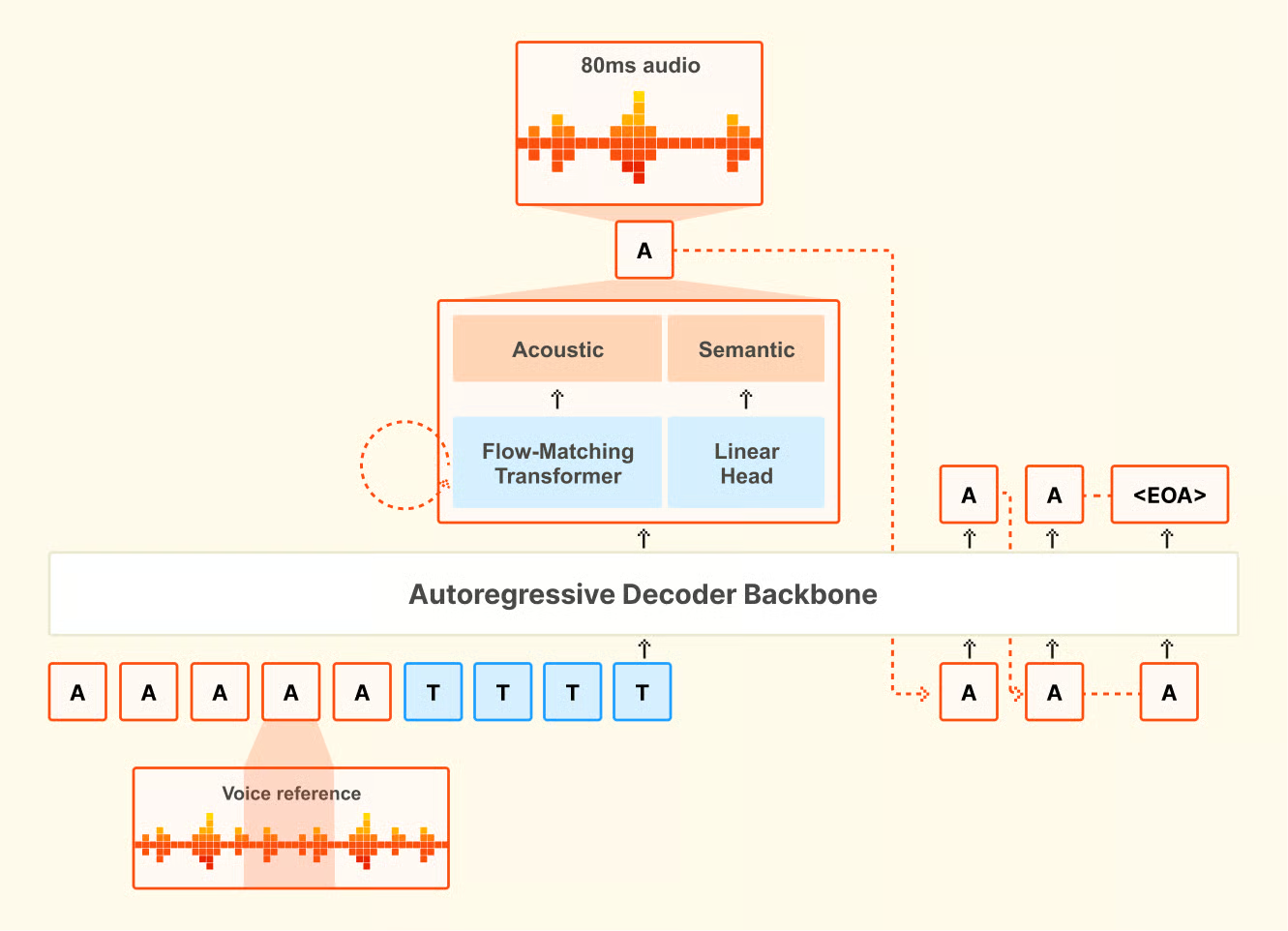
Panoramica dell’architettura di Voxtral TTS. Fonte: Mistral AI.
Questa pipeline in tre fasi è anche ciò che rende possibile il voice cloning: il codec cattura le caratteristiche dello speaker nello spazio latente, che il backbone e il transformer acustico usano poi per riprodurre quella voce su nuovo testo.
Con il voice cloning, fornisci una breve clip di riferimento e il modello genera parlato che cattura accento, intonazione e ritmo dello speaker, incluse pause e cadenze naturali.
Quello che mi ha sorpreso nella ricerca è la capacità cross-lingua. Se fornisci una voce di riferimento in francese e scrivi il prompt in tedesco, il modello tende a generare parlato in tedesco che suona simile allo speaker francese, riprendendone buona parte dell’accento e delle caratteristiche vocali. Non è qualcosa per cui il modello è stato addestrato esplicitamente. È un comportamento emergente e potrebbe essere utile per la traduzione speech-to-speech quando è importante mantenere la voce originale dello speaker tra lingue diverse.
Un dettaglio pratico: il voice cloning personalizzato richiede l’API di Mistral. Il rilascio con pesi aperti è limitato alle stesse 20 voci preimpostate. Se vuoi clonare una voce specifica nella versione self-hosted, ti serve l’endpoint di creazione voce dell’API.
Tutti i dati di benchmark qui riportati provengono dalle valutazioni interne di Mistral. Il modello è abbastanza recente e, al momento in cui scrivo, non sono stati pubblicati benchmark indipendenti di terze parti. L’Artificial Analysis Speech Arena Leaderboard, una classifica TTS indipendente, non ha ancora aggiunto Voxtral TTS.
Mistral ha usato valutazioni di preferenza umana invece di metriche automatizzate come il Mean Opinion Score (MOS), sostenendo nel paper di ricerca che i punteggi automatici non catturano in modo affidabile la naturalezza tra lingue e culture. I test erano confronti in ascolto alla cieca condotti da annotatori madrelingua in tutte e nove le lingue supportate.
Nei test che usavano le voci di punta integrate di ciascun modello, Voxtral TTS è stato preferito dagli annotatori umani nel 58,3% dei confronti. Nei test di voice cloning zero-shot, in cui entrambi i modelli ricevevano una breve clip di riferimento e generavano parlato dallo stesso testo, quel tasso è salito al 68,4%. Il divario era più ampio in hindi (circa 80% di preferenza) e spagnolo (circa 88%). L’olandese è stato invece un punto debole, al 49,4%, il che significa che ElevenLabs Flash v2.5 aveva il vantaggio in quella lingua.
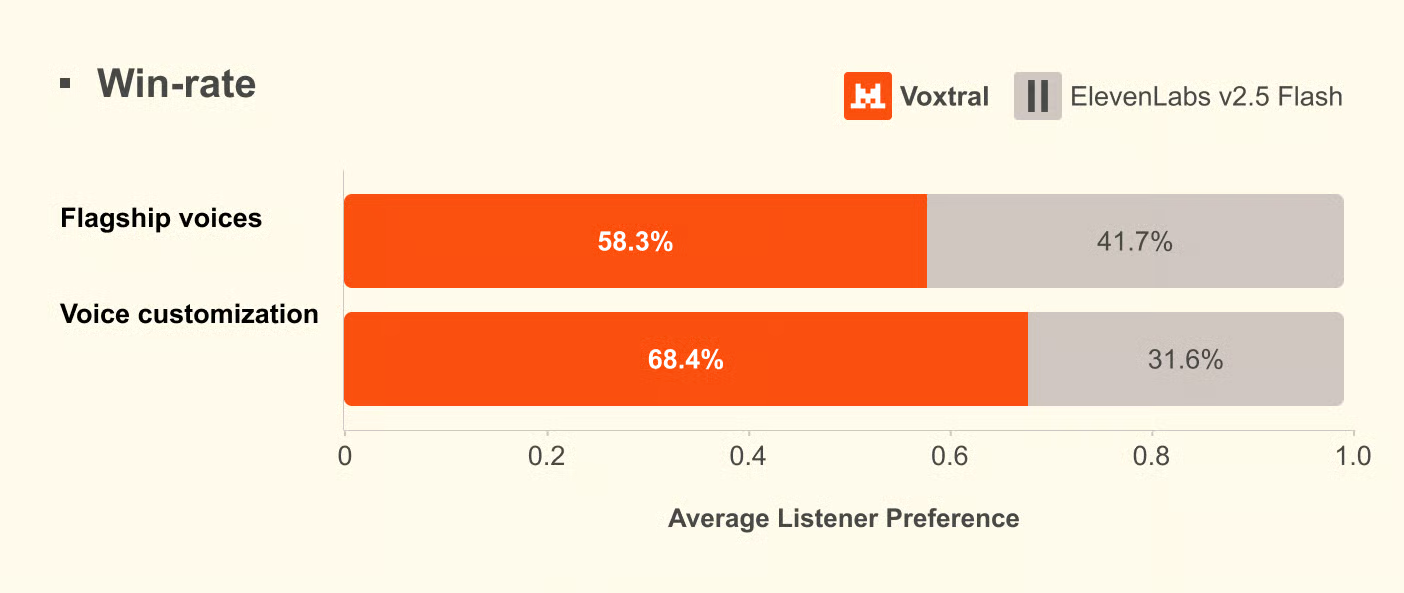
Risultati di preferenza umana dalle valutazioni Mistral. Fonte: Mistral AI.
Mistral ha anche eseguito una serie separata di test di controllo dell’emozione, stavolta confrontandosi con ElevenLabs v3 e Gemini 2.5 Flash TTS invece di Flash v2.5. Contro ElevenLabs v3, i due modelli erano più o meno alla pari nello steering esplicito; Voxtral aveva un leggero vantaggio nello steering implicito. Contro Gemini 2.5 Flash TTS, Gemini è risultato avanti di circa il 65%, rendendolo il migliore in quel confronto. Questi numeri, come tutti quelli in questa sezione, provengono dal paper di Mistral.
Sulla latenza, Mistral riporta 70 millisecondi su una singola NVIDIA H200. Il time-to-first-audio end-to-end dall’API è di circa 0,8 secondi con PCM e tra 1,5 e 2 secondi con MP3.
Mi sono concentrato su tre scenari. Primo, se una voce preimpostata regge per la narrazione generale, in particolare se la naturalezza cede nei punti in cui i sistemi TTS di solito falliscono. Secondo, quanto bene il voice cloning cattura uno speaker reale da una clip breve e quanto conta davvero la lunghezza della clip. Terzo, quanto il formato di output influisce sulla latenza nella pratica.
Per prima cosa, installa l’SDK Python ufficiale e imposta la tua chiave API. Ti servirà un account Mistral con billing attivo.
pip install mistralaiImposta la tua chiave API come variabile d’ambiente:
export MISTRAL_API_KEY="your-api-key-here"Le voci preimpostate coprono inglese americano, inglese britannico e dialetti francesi e sono un buon punto di partenza per la narrazione generale quando l’identità dello speaker non è importante.
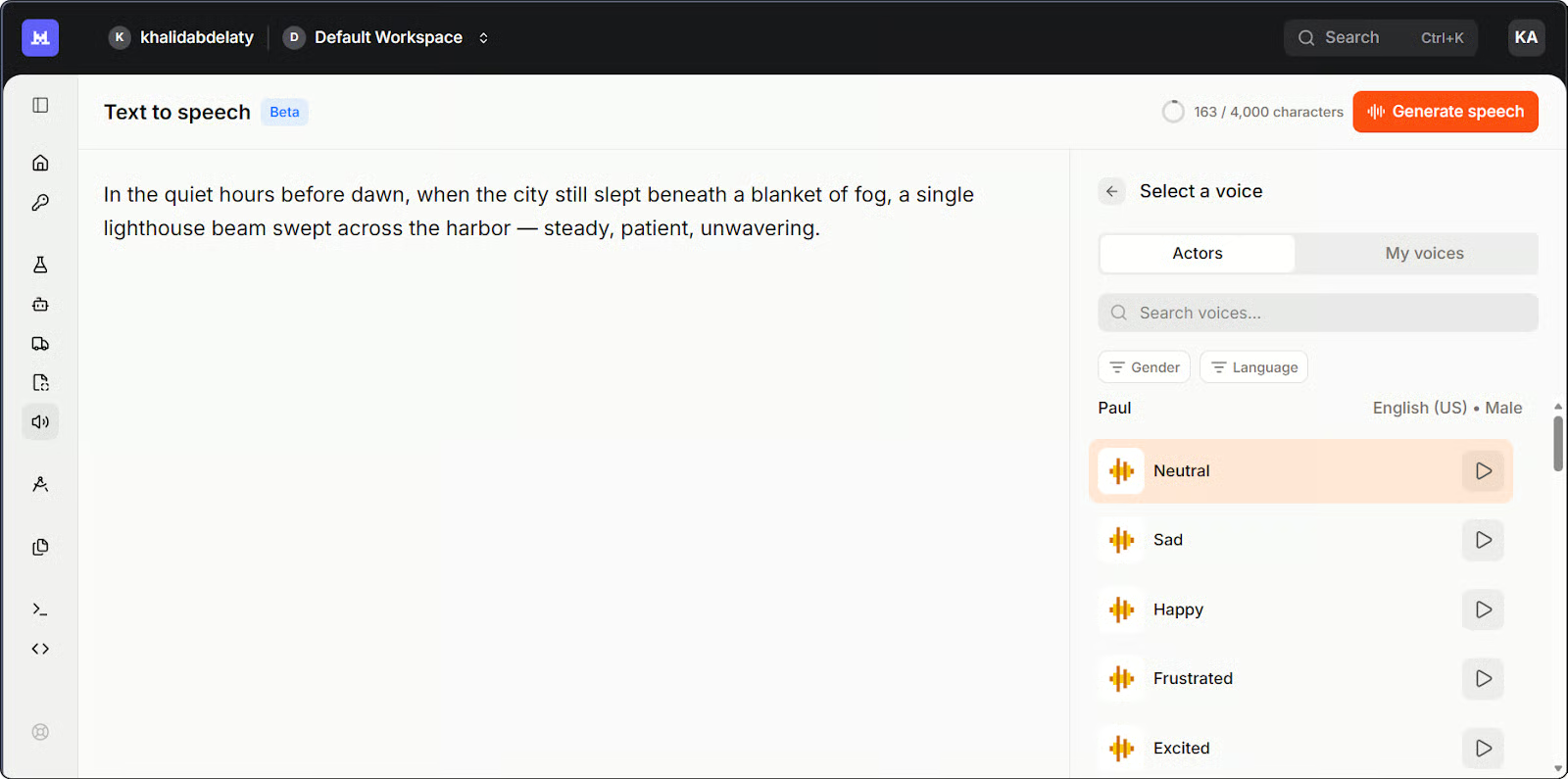
Playground Mistral Studio per Voxtral TTS. Immagine dell’autore.
Ecco la versione più semplice, usando una voce preimpostata:
import base64
import os
from pathlib import Path
from mistralai.client import Mistral

client = Mistral(api_key=os.getenv("MISTRAL_API_KEY"))

# Generate speech from text
response = client.audio.speech.complete(
    model="voxtral-mini-tts-2603",
    input="Welcome to Voxtral TTS. This is a basic speech generation test.",
    voice_id="your-voice-id",  # Use a voice ID from your account
    response_format="mp3",
)

# Save the audio file
Path("basic_output.mp3").write_bytes(base64.b64decode(response.audio_data))
print("Saved to basic_output.mp3")
Un paio di note. Il metodo è .complete(), non .create() come potresti aspettarti se arrivi dall’API TTS di OpenAI. La risposta restituisce audio codificato in base64 in response.audio_data, quindi devi decodificarlo prima di scriverlo su disco.
La prima cosa che ho controllato è stato il ritmo a fine frase. Molti modelli TTS calano meccanicamente all’ultimo punto, una cadenza piatta che tradisce subito la sinteticità. Qui ha retto. Mi hanno sorpreso le pause sulle virgole a metà frase: i sistemi più economici le trattano come stop netti, ma il ritmo è rimasto continuo. La pronuncia è stata precisa ovunque, compresa la parola "Voxtral" stessa, su cui mi aspettavo un inciampo.
Quando l’identità dello speaker conta, l’API ti permette di creare un profilo voce riutilizzabile a partire da una breve clip di riferimento.
import base64
import os
from pathlib import Path
from mistralai.client import Mistral

client = Mistral(api_key=os.getenv("MISTRAL_API_KEY"))

# Encode your reference audio as base64
sample_audio_b64 = base64.b64encode(
    Path("reference_voice.mp3").read_bytes()
).decode()

# Create a reusable voice profile
voice = client.audio.voices.create(
    name="my-custom-voice",
    sample_audio=sample_audio_b64,
    sample_filename="reference_voice.mp3",
    languages=["en"],
    gender="male",
)

print(f"Created voice with ID: {voice.id}")

# Generate speech using the cloned voice
response = client.audio.speech.complete(
    model="voxtral-mini-tts-2603",
    input="This sentence was generated using a cloned voice from just a few seconds of reference audio.",
    voice_id=voice.id,
    response_format="mp3",
)

Path("cloned_output.mp3").write_bytes(base64.b64decode(response.audio_data))
print("Saved to cloned_output.mp3")
Output del terminale dallo script di voice cloning. Immagine dell’autore.
Al primo tentativo ho usato una clip di circa tre secondi. L’output suonava plausibile ma generico: giusto registro vocale, ma mancavano quelle inflessioni specifiche che rendono una voce riconoscibile. Poteva essere chiunque. Quando sono passato a una clip da otto secondi, la differenza era netta: l’output clonato ha catturato l’accento dello speaker, il ritmo e la leggera impennata alla fine delle domande che la clip più corta aveva completamente appiattito.
La voce clonata non suonava identica alla sorgente, ma era chiaramente nello stesso registro con una cadenza simile. Dai miei test, 8–15 secondi sono un buon compromesso tra impegno e qualità del risultato.
Il formato di output influisce su quanto velocemente arriva il primo chunk audio. Ho testato due formati.
import os
import time
from mistralai.client import Mistral

client = Mistral(api_key=os.getenv("MISTRAL_API_KEY"))

text = "This is a latency test comparing PCM and MP3 output formats from Voxtral TTS."
voice_id = "your-voice-id"


def time_to_first_chunk(response_format):
    start = time.time()
    stream = client.audio.speech.complete(
        model="voxtral-mini-tts-2603",
        input=text,
        voice_id=voice_id,
        response_format=response_format,
        stream=True,
    )
    for _ in stream:
        return time.time() - start  # return on first chunk


pcm_time = time_to_first_chunk("pcm")
mp3_time = time_to_first_chunk("mp3")

print(f"PCM latency: {pcm_time:.2f}s")
print(f"MP3 latency: {mp3_time:.2f}s")
Confronto della latenza tra due formati di output. Immagine dell’autore.
Ho eseguito prima il test in MP3, dato che è il default naturale per la maggior parte dei workflow audio. Il risultato era funzionale, intorno a 1,5–2 secondi, ma per un voice agent è una pausa percepibile prima che parta l’audio. La documentazione di Mistral indica fino a 3 secondi per l’MP3; non l’ho riscontrato in pratica, anche se le condizioni di rete variano. Il PCM si è attestato attorno a 0,6–0,9 secondi, in linea con la cifra di ~0,8 secondi riportata da Mistral.
Il compromesso è che il PCM è audio grezzo non compresso, quindi la tua applicazione deve gestirlo o convertirlo prima della riproduzione standard. Se stai salvando su file o inviando a un player audio standard, l’MP3 è più semplice. Se controlli direttamente lo stack audio, come in una pipeline per voice agent, il PCM è la scelta pratica per la latenza.
L’API supporta cinque formati di output: MP3, WAV, PCM (float32 grezzo), FLAC e Opus. Il modello genera fino a due minuti di audio in un’unica passata. Per contenuti più lunghi, l’API gestisce automaticamente il tutto usando quello che Mistral chiama "smart interleaving": divide il testo in blocchi, sintetizza ciascuno e li unisce senza gap udibili.
Ho anche messo insieme una piccola app Streamlit che combina tutti e tre gli esempi in un’unica interfaccia. Ecco una breve panoramica di come funziona:
Impara l’AI con DataCamp
Corso
Corso
Corso
blog
Abid Ali Awan
10 min
blog
Abid Ali Awan
15 min
blog
Tim Lu
12 min