
कोर्स
Understanding Artificial Intelligence
2 घंटा
426.1K
मार्च 2026 तक, Mistral ने वॉइस पाइपलाइन का आधा हिस्सा बना लिया था। इसके Voxtral Transcribe मॉडल स्पीच-टू-टेक्स्ट संभालते थे, लेकिन दूसरी दिशा में जाने का कोई तरीका नहीं था। अगर आप चाहते थे कि आपका एप्लिकेशन बोले, तो आपको किसी और प्रदाता का सहारा लेना पड़ता—आम तौर पर एक्सप्रेसिव वॉइस क्लोनिंग के लिए ElevenLabs, न्यूनतम इंटीग्रेशन के लिए OpenAI का TTS-1, या अगर आप पहले से उस ईकोसिस्टम में हैं तो Google Cloud का Neural2।
Voxtral TTS उस कमी को पूरा करता है। यह Mistral का पहला टेक्स्ट-टू-स्पीच मॉडल है—4.1 अरब पैरामीटर का सिस्टम जो एक छोटे ऑडियो संदर्भ से नौ भाषाओं में स्पीच जनरेट करता है। मॉडल वेट्स Hugging Face पर उपलब्ध हैं, और क्लाउड API 1,000 कैरेक्टर पर $0.016 में लाइव है, साथ ही सेल्फ-होस्टिंग के लिए ओपन वेट्स भी उपलब्ध हैं।
नामकरण पर एक टिप्पणी: जुलाई 2025 के Voxtral मॉडल स्पीच-टू-टेक्स्ट मॉडल हैं। Voxtral TTS, जो 26 मार्च 2026 को जारी हुआ, विपरीत दिशा में जाता है।
Voxtral TTS एक टेक्स्ट-टू-स्पीच मॉडल है जो लिखित टेक्स्ट को नौ भाषाओं—अंग्रेज़ी, फ़्रांसीसी, जर्मन, स्पेनिश, डच, पुर्तगाली, इतालवी, हिंदी और अरबी—में बोले गए ऑडियो में बदलता है। आप 20 बिल्ट-इन प्रीसेट वॉइस में से चुन सकते हैं, या किसी विशिष्ट वक्ता की वॉइस क्लोन करने के लिए रेफ़रेंस ऑडियो क्लिप दे सकते हैं। क्लोनिंग के लिए 5 से 25 सेकंड की क्लिप लंबाई अनुशंसित है, हालांकि मॉडल कम से कम 3 सेकंड भी स्वीकार करता है।
Mistral का मुख्य दावा छोटा फ़ुटप्रिंट और उसके साथ फ्रंटियर-स्तरीय गुणवत्ता है। Hugging Face पर डिफ़ॉल्ट BF16 वेट्स लगभग 8 GB हैं, और सेल्फ-होस्टिंग के लिए इन्फेरेंस ओवरहेड को कवर करने हेतु कम से कम 16 GB VRAM वाला GPU चाहिए। शोध पत्र में उल्लेख है कि क्वांटाइज़्ड संस्करण वेट्स को लगभग 3 GB तक ला सकते हैं, हालांकि वे डिफ़ॉल्ट रिलीज़ नहीं हैं। Mistral के VP of Science पियरे स्टॉक ने VentureBeat को बताया कि मॉडल स्मार्टफ़ोन पर भी चल सकता है, हालांकि यह क्वांटाइज़ेशन पर निर्भर करता है और मैं इसे स्वतंत्र रूप से सत्यापित नहीं कर सका।
मॉडल "Voice-as-an-instruction" भी सपोर्ट करता है। SSML टैग्स या स्पष्ट इमोशन लेबल पर निर्भर होने के बजाय, Voxtral TTS आपके दिए गए वॉइस रेफ़रंस से सीधे टोन, रिदम और भावनात्मक डिलिवरी का अनुमान लगाता है। अगर आप किसी के उत्साह से बोलते हुए क्लिप देते हैं, तो जनरेटेड स्पीच में वही डिलिवरी झलकती है। यह ElevenLabs से अलग तरीका है, जो जेनरेशन को निर्देशित करने के लिए स्पष्ट इमोशन टैग्स का प्रयोग करता है।
Voxtral TTS एक ट्रांसफ़ॉर्मर-आधारित, ऑटो-रेग्रेसीव, फ्लो-मैचिंग मॉडल है जो Ministral 3B पर बना है। इसमें तीन घटक हैं: 3.4B-पैरामीटर ट्रांसफ़ॉर्मर डिकोडर बैकबोन, जो टेक्स्ट और वॉइस इनपुट से सेमांटिक टोकन्स की भविष्यवाणी करता है; 390M-पैरामीटर फ्लो-मैचिंग एकॉस्टिक ट्रांसफ़ॉर्मर, जो उन टोकन्स को ऑडियो रिप्रेज़ेंटेशन में बदलता है; और 300M-पैरामीटर न्यूरल ऑडियो कोडेक जिसे Mistral ने ज़ीरो से बनाया है, जो 12.5 Hz पर 80-मिलीसेकंड फ़्रेम्स के साथ ऑपरेट करता है। कोडेक ही ऑडियो रिप्रेज़ेंटेशन को कुशल रखता है: यह कड़े संकुचित लेटेंट स्पेस में ऑपरेट करता है, इसी वजह से पूरा 4.1B-पैरामीटर मॉडल उच्च-गुणवत्ता वाला ऑडियो जनरेट कर पाता है जबकि BF16 वेट्स ~8 GB पर बने रहते हैं।
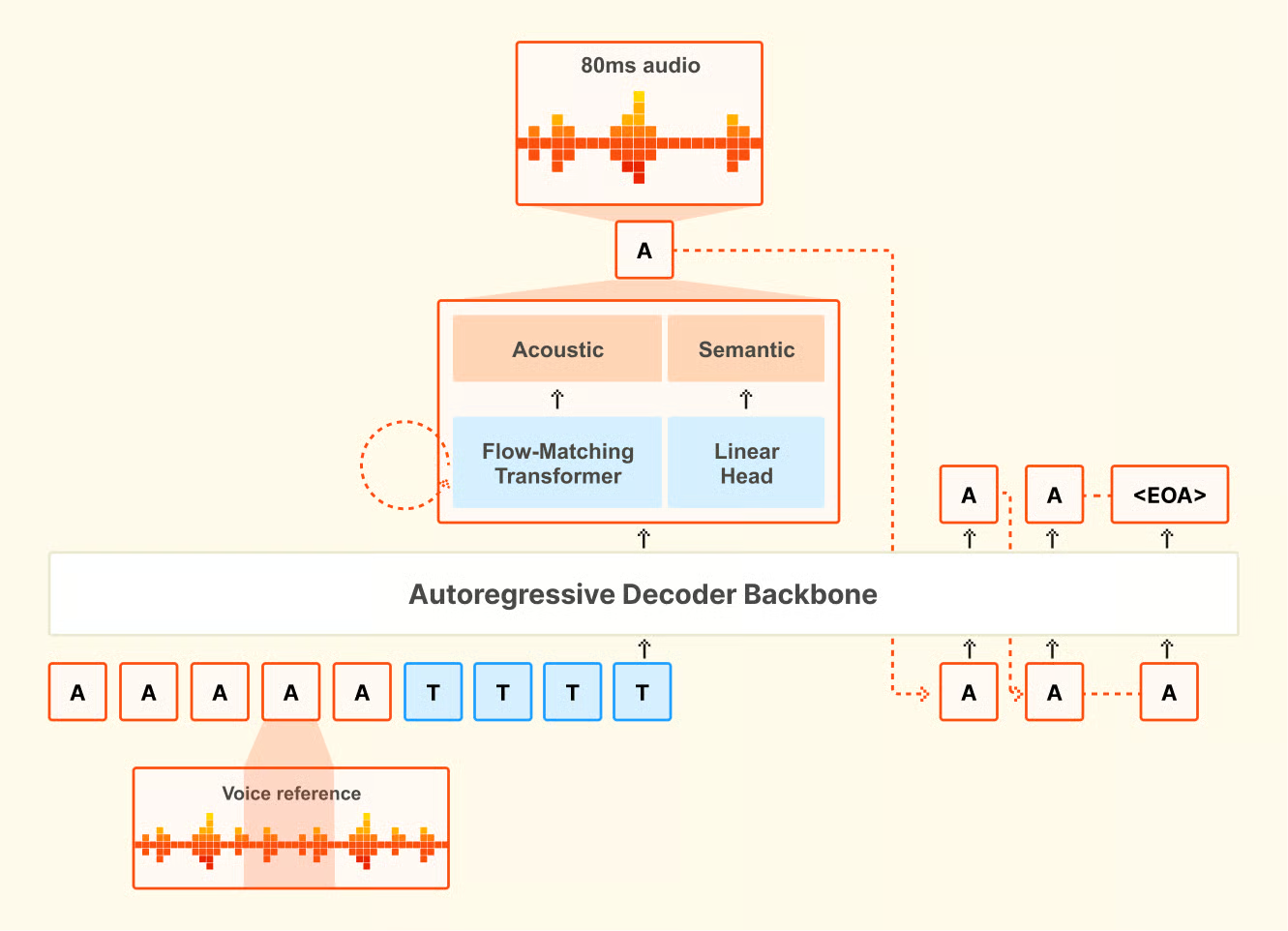
Voxtral TTS की आर्किटेक्चर का अवलोकन। स्रोत: Mistral AI.
यही तीन-चरणीय पाइपलाइन वॉइस क्लोनिंग को संभव बनाती है: कोडेक लेटेंट स्पेस में स्पीकर की विशेषताओं को कैप्चर करता है, जिसे बैकबोन और एकॉस्टिक ट्रांसफ़ॉर्मर नए टेक्स्ट पर वही वॉइस पुनर्निर्मित करने के लिए इस्तेमाल करते हैं।
वॉइस क्लोनिंग में, आप एक छोटा रेफ़रेंस क्लिप देते हैं और मॉडल ऐसी स्पीच जनरेट करता है जो वक्ता के उच्चारण, उतार-चढ़ाव और रिदम—स्वाभाविक ठहराव और पेसिंग सहित—को पकड़ लेती है।
शोध में जिसने मुझे चकित किया वह क्रॉस-लिंगुअल क्षमता है। अगर आप फ़्रेंच वॉइस रेफ़रंस दें और अपना प्रॉम्प्ट जर्मन में लिखें, तो मॉडल आम तौर पर जर्मन स्पीच जनरेट करता है जो फ़्रेंच वक्ता जैसी लगती है—उनका काफ़ी उच्चारण और वोकल विशेषताएँ पकड़े हुए। यह कुछ ऐसा नहीं है जिस पर मॉडल को स्पष्ट रूप से प्रशिक्षित किया गया था। यह उभरता हुआ व्यवहार है, और उन स्पीच-टू-स्पीच अनुवाद परिदृश्यों में उपयोगी हो सकता है जहाँ भाषाएँ बदलने पर भी मूल वक्ता की आवाज़ बनाए रखना महत्वपूर्ण है।
एक व्यावहारिक बात: कस्टम वॉइस क्लोनिंग के लिए Mistral API आवश्यक है। ओपन-वेट रिलीज़ उन्हीं 20 प्रीसेट वॉइस तक सीमित है। अगर आप सेल्फ-होस्टेड संस्करण पर किसी विशिष्ट वॉइस को क्लोन करना चाहते हैं, तो आपको API के वॉइस क्रिएशन एंडपॉइंट की ज़रूरत होगी।
यहाँ सभी बेंचमार्क डेटा Mistral के आंतरिक आकलनों से आता है। मॉडल इतना नया है कि, इस लेखन के समय, किसी स्वतंत्र तृतीय-पक्ष बेंचमार्क का प्रकाशन नहीं हुआ है। Artificial Analysis Speech Arena Leaderboard, जो एक स्वतंत्र TTS रैंकिंग है, ने अभी तक Voxtral TTS नहीं जोड़ा है।
Mistral ने स्वचालित मेट्रिक्स जैसे Mean Opinion Score (MOS) के बजाय मानवीय पसंद का आकलन इस्तेमाल किया, और शोध पत्र में तर्क दिया कि स्वचालित स्कोर विभिन्न भाषाओं और संस्कृतियों में नेचुरलनेस को भरोसेमंद रूप से नहीं पकड़ते। परीक्षण सभी नौ समर्थित भाषाओं में मूल वक्ताओं द्वारा ब्लाइंड लिसनिंग तुलना के रूप में चलाए गए।
प्रत्येक मॉडल की बिल्ट-इन फ़्लैगशिप वॉइस का उपयोग करते हुए परीक्षणों में, Voxtral TTS को 58.3% तुलनाओं में मानवीय एनोटेटरों ने प्राथमिकता दी। ज़ीरो-शॉट वॉइस क्लोनिंग परीक्षणों में, जहाँ दोनों मॉडलों को एक छोटा रेफ़रंस क्लिप दिया गया और एक ही टेक्स्ट से स्पीच जनरेट कराई गई, वह दर 68.4% तक बढ़ गई। अंतर हिंदी (लगभग 80% प्राथमिकता) और स्पेनिश (लगभग 88% प्राथमिकता) में सबसे अधिक था। डच एक कमज़ोर कड़ी रहा, 49.4% पर—मतलब उस भाषा में ElevenLabs Flash v2.5 को बढ़त मिली।
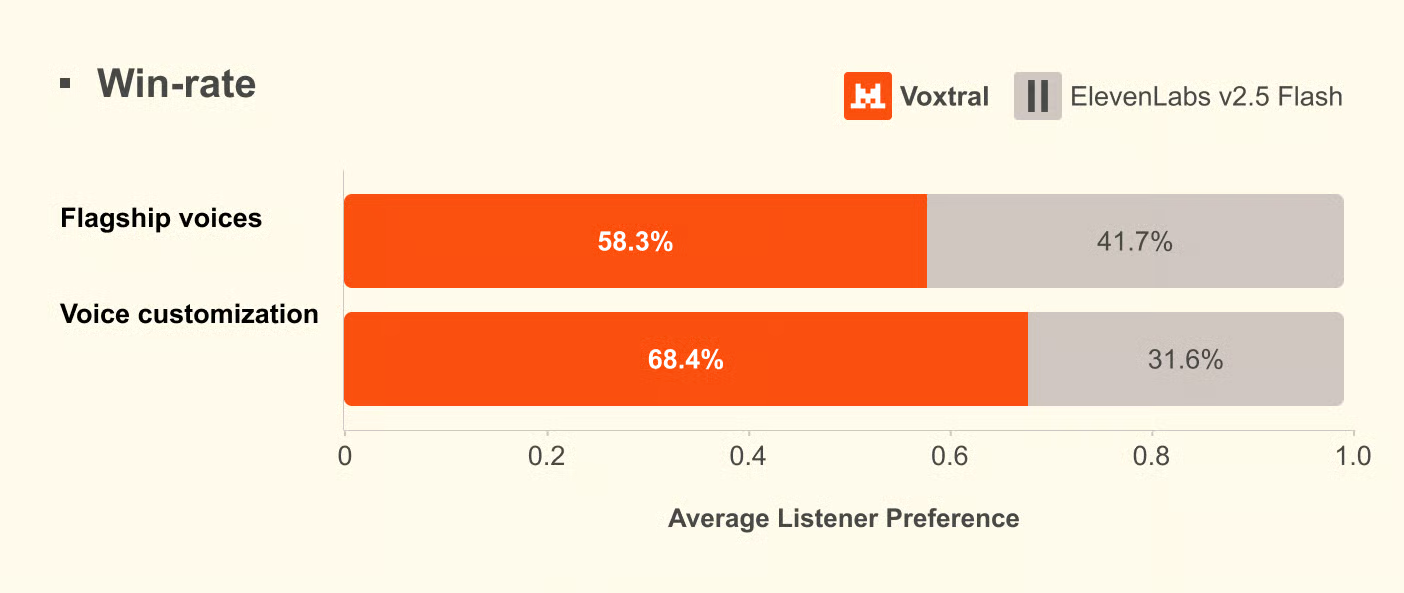
Mistral के आकलनों से मानवीय पसंद के परिणाम। स्रोत: Mistral AI.
Mistral ने इमोशन-स्टियरिंग के अलग परीक्षण भी चलाए, इस बार Flash v2.5 के बजाय ElevenLabs v3 और Gemini 2.5 Flash TTS से तुलना की। ElevenLabs v3 के मुकाबले, स्पष्ट स्टियरिंग पर दोनों मॉडल लगभग बराबर रहे; निहित स्टियरिंग पर Voxtral को हल्की बढ़त मिली। Gemini 2.5 Flash TTS के मुकाबले, Gemini लगभग 65% पर आगे रहा, जिससे उस तुलना में Gemini बेहतर परफ़ॉर्मर बना। ये संख्याएँ, जैसे कि इस सेक्शन की सभी, Mistral के अपने पेपर से हैं।
लेटेंसी पर, Mistral एकल NVIDIA H200 पर 70 मिलीसेकंड रिपोर्ट करता है। API से एंड-टू-एंड टाइम-टू-फर्स्ट-ऑडियो PCM के साथ लगभग 0.8 सेकंड और MP3 के साथ लगभग 1.5 से 2 सेकंड है।
मैंने तीन परिदृश्यों पर ध्यान केंद्रित किया। पहला, क्या प्रीसेट वॉइस सामान्य नैरेशन के लिए टिकाऊ है—ख़ासकर वहाँ जहाँ TTS सिस्टम आमतौर पर अस्वाभाविक लगते हैं। दूसरा, छोटी क्लिप से वॉइस क्लोनिंग किसी वास्तविक वक्ता को कितना अच्छी तरह पकड़ती है, और क्लिप की लंबाई वास्तव में कितनी मायने रखती है। तीसरा, आउटपुट फ़ॉर्मेट व्यवहार में लेटेंसी को कितना प्रभावित करता है।
सबसे पहले, आधिकारिक Python SDK इंस्टॉल करें और अपनी API कुंजी सेट करें। आपको बिलिंग सक्षम के साथ एक Mistral खाता चाहिए।
pip install mistralaiअपनी API कुंजी को एनवायरनमेंट वेरिएबल के रूप में सेट करें:
export MISTRAL_API_KEY="your-api-key-here"प्रीसेट वॉइस में अमेरिकन इंग्लिश, ब्रिटिश इंग्लिश और फ़्रेंच डॉयलेक्ट शामिल हैं और जहाँ स्पीकर की पहचान मायने नहीं रखती, वहाँ सामान्य नैरेशन के लिए यह एक अच्छा शुरुआती विकल्प है।
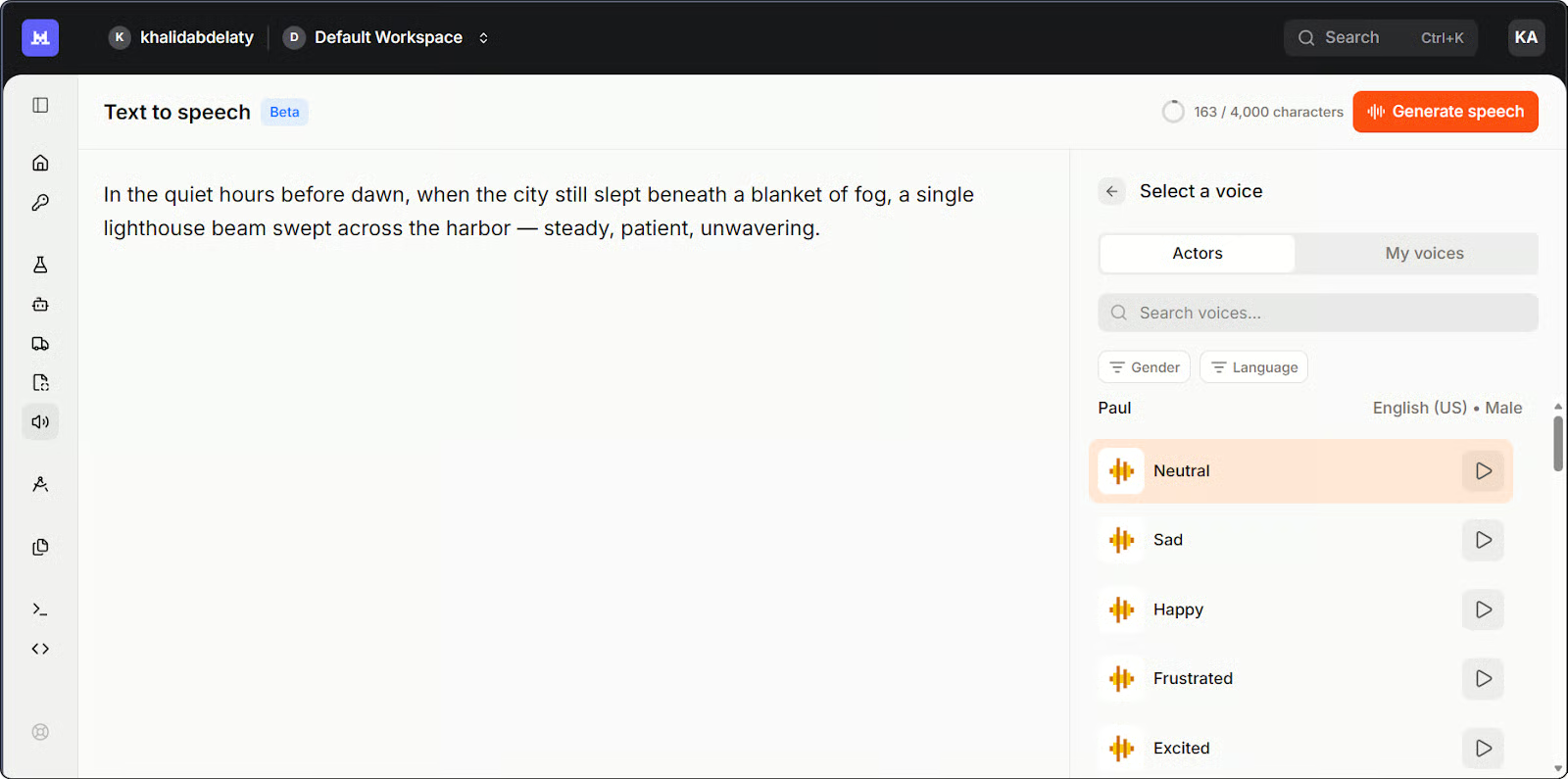
Voxtral TTS के लिए Mistral Studio प्लेग्राउंड। चित्र: लेखक।
यहाँ प्रीसेट वॉइस के साथ सबसे सरल संस्करण है:
import base64
import os
from pathlib import Path
from mistralai.client import Mistral

client = Mistral(api_key=os.getenv("MISTRAL_API_KEY"))

# Generate speech from text
response = client.audio.speech.complete(
    model="voxtral-mini-tts-2603",
    input="Welcome to Voxtral TTS. This is a basic speech generation test.",
    voice_id="your-voice-id",  # Use a voice ID from your account
    response_format="mp3",
)

# Save the audio file
Path("basic_output.mp3").write_bytes(base64.b64decode(response.audio_data))
print("Saved to basic_output.mp3")
कुछ बातें ध्यान देने लायक हैं। मेथड .complete() है, .create() नहीं—जैसा कि आप OpenAI के TTS API से आते हुए उम्मीद कर सकते हैं। रिस्पॉन्स response.audio_data में base64-एन्कोडेड ऑडियो लौटाता है, इसलिए डिस्क पर लिखने से पहले आपको इसे डिकोड करना होगा।
सबसे पहले मैंने वाक्य-समाप्ति की रिदम देखी। कई TTS मॉडल अंतिम पूर्ण विराम पर यांत्रिक रूप से नीचे गिरते हैं—एक सपाट कैडेंस जो तुरंत किसी चीज़ को सिंथेटिक साबित कर देता है। यहाँ वह ठीक रहा। जिसने मुझे चौंकाया वह वाक्य के बीच के कॉमा-पॉज़ थे: सस्ते सिस्टम उन्हें हार्ड स्टॉप की तरह मानते हैं, लेकिन यहाँ पेसिंग निरंतर रही। उच्चारण पूरे समय सटीक था, "Voxtral" शब्द पर भी, जहाँ मुझे अटकने की उम्मीद थी।
जब स्पीकर की पहचान मायने रखती है, तो API आपको छोटे रेफ़रंस क्लिप से एक पुन: प्रयोज्य वॉइस प्रोफ़ाइल बनाने देता है।
import base64
import os
from pathlib import Path
from mistralai.client import Mistral

client = Mistral(api_key=os.getenv("MISTRAL_API_KEY"))

# Encode your reference audio as base64
sample_audio_b64 = base64.b64encode(
    Path("reference_voice.mp3").read_bytes()
).decode()

# Create a reusable voice profile
voice = client.audio.voices.create(
    name="my-custom-voice",
    sample_audio=sample_audio_b64,
    sample_filename="reference_voice.mp3",
    languages=["en"],
    gender="male",
)

print(f"Created voice with ID: {voice.id}")

# Generate speech using the cloned voice
response = client.audio.speech.complete(
    model="voxtral-mini-tts-2603",
    input="This sentence was generated using a cloned voice from just a few seconds of reference audio.",
    voice_id=voice.id,
    response_format="mp3",
)

Path("cloned_output.mp3").write_bytes(base64.b64decode(response.audio_data))
print("Saved to cloned_output.mp3")
वॉइस क्लोनिंग स्क्रिप्ट का टर्मिनल आउटपुट। चित्र: लेखक।
मेरी पहली कोशिश में लगभग तीन सेकंड की क्लिप थी। आउटपुट सुनने में यथार्थवादी लगा, पर सामान्य—सही वोकल रेंज, लेकिन वे खास उतार-चढ़ाव नहीं थे जो किसी आवाज़ को पहचानने योग्य बनाते हैं। वह कोई भी हो सकता था। जब मैंने आठ सेकंड की क्लिप पर स्विच किया, तो फ़र्क़ साफ़ दिखा: क्लोन किया गया आउटपुट वक्ता के उच्चारण, रिदम, और सवालों के अंत में हल्का उठाव—जिन्हें छोटी क्लिप ने सपाट कर दिया था—को पकड़ रहा था।
क्लोन की गई वॉइस स्रोत के समान नहीं लगी, पर वही रजिस्टर और मिलती-जुलती पेसिंग में पहचानने योग्य थी। मेरे परीक्षण के आधार पर, 8 से 15 सेकंड प्रयास और गुणवत्ता के बीच अच्छा संतुलन देता है।
आउटपुट फ़ॉर्मेट इस बात को प्रभावित करता है कि पहला ऑडियो टुकड़ा कितनी जल्दी आता है। मैंने दो फ़ॉर्मेट्स पर परीक्षण किया।
import os
import time
from mistralai.client import Mistral

client = Mistral(api_key=os.getenv("MISTRAL_API_KEY"))

text = "This is a latency test comparing PCM and MP3 output formats from Voxtral TTS."
voice_id = "your-voice-id"


def time_to_first_chunk(response_format):
    start = time.time()
    stream = client.audio.speech.complete(
        model="voxtral-mini-tts-2603",
        input=text,
        voice_id=voice_id,
        response_format=response_format,
        stream=True,
    )
    for _ in stream:
        return time.time() - start  # return on first chunk


pcm_time = time_to_first_chunk("pcm")
mp3_time = time_to_first_chunk("mp3")

print(f"PCM latency: {pcm_time:.2f}s")
print(f"MP3 latency: {mp3_time:.2f}s")
दो आउटपुट फ़ॉर्मेट्स में लेटेंसी की तुलना। चित्र: लेखक।
मैंने MP3 परीक्षण पहले चलाया, क्योंकि अधिकांश ऑडियो वर्कफ़्लो के लिए वही स्वाभाविक डिफ़ॉल्ट है। परिणाम लगभग 1.5 से 2 सेकंड पर उपयोगी था, लेकिन वॉइस एजेंट के लिए यह ऐसा विराम है जो प्लेबैक शुरू होने से पहले महसूस होता है। Mistral के दस्तावेज़ MP3 के लिए अधिकतम 3 सेकंड का उल्लेख करते हैं; मुझे व्यवहार में इतना नहीं दिखा, हालांकि नेटवर्क परिस्थितियाँ बदलती रहती हैं। PCM लगभग 0.6 से 0.9 सेकंड में आया, जो Mistral के ~0.8 सेकंड के आँकड़े के अनुरूप है।
समझौता यह है कि PCM कच्चा, अनकम्प्रेस्ड ऑडियो है, इसलिए मानक प्लेबैक से पहले आपके एप्लिकेशन को इसे संभालना या कन्वर्ट करना होगा। अगर आप फ़ाइल सेव कर रहे हैं या किसी मानक ऑडियो प्लेयर को फ़ीड दे रहे हैं, तो MP3 सरल है। अगर आप ऑडियो स्टैक को सीधे नियंत्रित करते हैं—जैसे वॉइस एजेंट पाइपलाइन में—तो लेटेंसी पर PCM व्यावहारिक विकल्प है।
API पाँच आउटपुट फ़ॉर्मेट सपोर्ट करता है: MP3, WAV, PCM (raw float32), FLAC, और Opus। मॉडल एक पास में अधिकतम दो मिनट तक का ऑडियो जनरेट करता है। लंबे कंटेंट के लिए, API इसे स्वतः संभालता है—जिसे Mistral "स्मार्ट इंटरलीविंग" कहता है: यह टेक्स्ट को टुकड़ों में बाँटता है, हर टुकड़े का सिंथेसिस करता है, और बिना श्रव्य गैप के जोड़ देता है।
मैंने एक छोटा Streamlit ऐप भी बनाया है जो इन तीनों उदाहरणों को एक इंटरफ़ेस में जोड़ता है। यह रहा कि यह कैसे काम करता है—एक त्वरित वॉकथ्रू:
DataCamp के साथ एआई सीखें
कोर्स
कोर्स
कोर्स