You open a new chat in Cursor and paste the same block of instructions you've pasted a hundred times before. Your stack, your naming conventions, and the folder structure the AI keeps getting wrong. Then it generates a 40-line class with three layers of abstraction for something that needed a function.
Time to wake up from this nightmare. Cursor rules are project files that make pasting unnecessary. Write your conventions once, and the AI's output matches your codebase instead of fighting it.
This tutorial builds a set of .mdc rule files for a Python web project using FastAPI and pytest, covering project context, code simplicity, and API error formatting. If you're new to Cursor, I recommend taking our Software Development with Cursor course first, then open a project and follow along.
What Are Cursor Rules?
Cursor rules are markdown files with MDC-specific frontmatter that live in your project at .cursor/rules/. Before your prompt reaches the model, Cursor checks which rules match and prepends their content to the context window. Your instructions land first, every time.
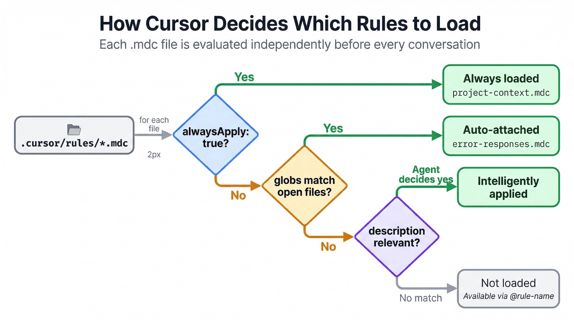
Each .mdc file has three frontmatter fields that control activation: description, globs, and alwaysApply. A rule can fire on every conversation or only when certain files are open. A third option, Apply Intelligently, lets the agent read the description and decide for itself whether the rule is relevant. The next section covers each type hands-on.
Cursor supports four categories of rules:
|
Type
|
Location
|
Scope
|
Shared via
|
Best for
|
|
Project Rules
|
.cursor/rules/*.mdc
|
Current repo
|
Git
|
Team-wide AI behavior per project
|
|
User Rules
|
Cursor Settings > Rules
|
All projects
|
Not shared
|
Personal preferences
|
|
Team Rules
|
Cursor dashboard
|
All team members
|
Dashboard (paid plans)
|
Org-wide enforcement
|
|
AGENTS.md
|
Project root or subdirs
|
Current repo
|
Git
|
Simple projects, cross-tool compatibility
|
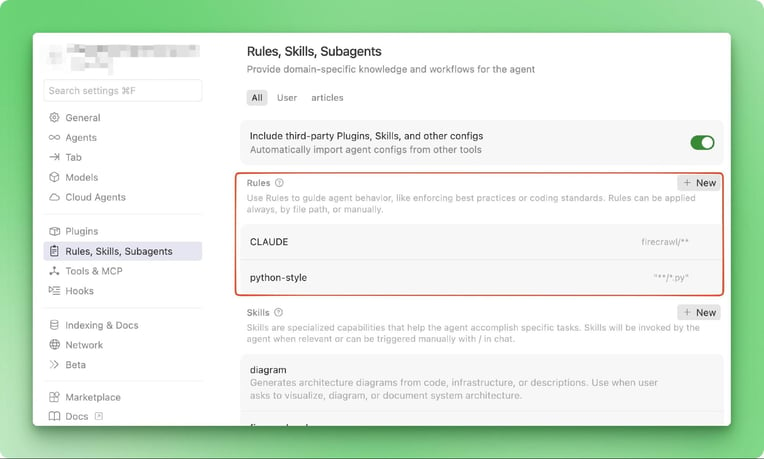
Project rules replaced the older .cursorrules file, a single root-level file with no scoping or metadata, by splitting rules into multiple .mdc files with frontmatter.
AGENTS.md is the simpler alternative for projects that don't need glob scoping. It's plain markdown recognized by AI coding tools beyond Cursor, and deeper files in subdirectories override parent ones.
You can learn more about how agent-based workflows connect to your development process in our AI Agent Fundamentals skill track.
Creating and Configuring Cursor Project Rules
The rest of this tutorial builds rule files for a FastAPI project using pytest. The patterns transfer to any stack.
Setting up the rules directory and files
Create a .cursor/rules/ directory in your project root. Every .mdc file you place here becomes a rule that Cursor picks up instantly, no restart needed.
The first rule file, project-context.mdc, gives the AI persistent awareness of your stack and folder layout:
---
description: ""
alwaysApply: true
globs:
---
This is a FastAPI web application with pytest for testing.
- Python 3.12, FastAPI, Pydantic v2, SQLAlchemy 2.0
- pytest with pytest-asyncio for async test support
- Alembic for database migrations
- app/main.py: FastAPI application entry point
- app/routers/: API route handlers
- app/models/: SQLAlchemy models
- app/schemas/: Pydantic request/response schemas
- tests/: pytest test files mirroring app/ structure
- All endpoints are async
- Use dependency injection for database sessions
- Response models are always Pydantic schemas, not raw dicts
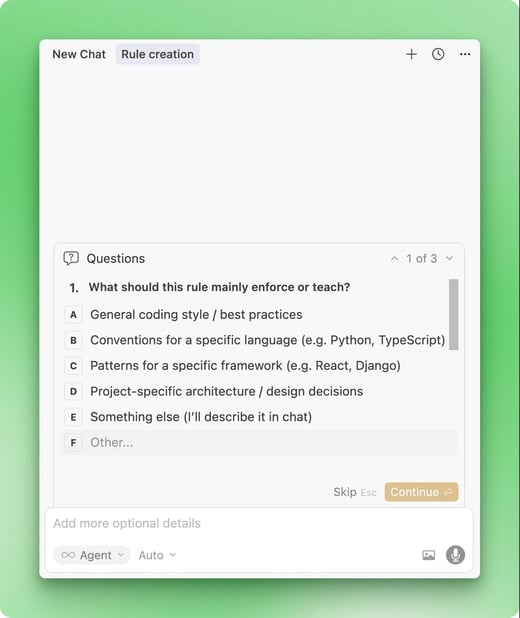
Typing /create-rule in an Agent chat is another way in: Cursor drafts one for you through a chat panel.
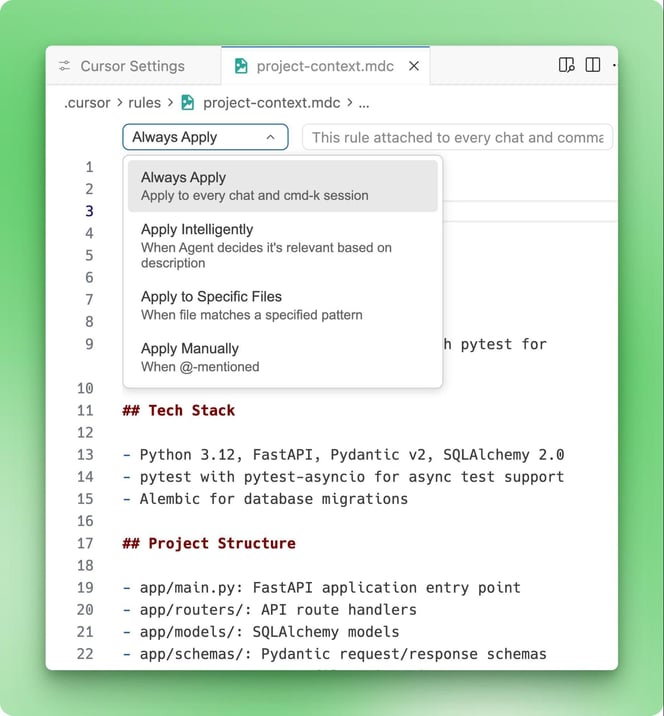
The alwaysApply: true frontmatter means this rule loads in every conversation. Name files in kebab-case by concern (project-context.mdc, simplicity.mdc, error-responses.mdc) and keep each one under 500 lines. A bloated rule file eats context window space you need for your actual code and prompts. Commit the .cursor/rules/ directory to git.
The project-context.mdc rule above uses alwaysApply: true, the simplest mode: every conversation loads it regardless of what files you're working on. That's the right choice for project-wide context.
Some rules apply only to certain parts of the codebase. Set alwaysApply: false and add glob patterns as a comma-separated list to scope them. A rule with globs: app/routers/**/*.py fires only when matching files (here: Python files in app/routers/ or subfolders) appear in context, keeping API conventions out of unrelated chats.
Apply Intelligently skips file patterns entirely. You leave globs empty and write a detailed description instead, and the agent decides whether the rule is relevant to the current conversation. Description quality matters: "Error handling rules" is too vague for the agent to match reliably, but "Conventions for FastAPI error responses including HTTP status codes, error body structure, and exception handler patterns" has clear signals.
Rules with no globs, no meaningful description, and alwaysApply: false become manual-only, loaded when you type @rule-name in chat. Good for reference material you pull in on demand.
Writing rule content and constraints
Rules written with soft language ("try to keep functions small," "prefer async endpoints") give the AI permission to ignore them. Write commands instead: "Functions must be under 30 lines. All endpoints must be async."
The intro mentioned the AI generating a 40-line class with three layers of abstraction. The rule that stops that behavior is simplicity.mdc:
---
description: ""
alwaysApply: true
globs:
---

# Code Simplicity

Write the simplest code that solves the problem. Every abstraction must earn its place.

## Constraints
- No base classes with one child class
- No interfaces or abstract classes with one implementation
- No factory or strategy patterns when an if statement works
- No wrapper functions that just call another function
- No configurable parameters that nothing passes
- No "just in case" error handling for impossible conditions

## When modifying existing code
- Match the patterns already in the codebase
- Do not refactor surrounding code unless asked
- Do not add type annotations to unchanged code
- Do not add docstrings to unchanged functions

## Code size
- Functions under 30 lines
- If a function needs a comment explaining what a block does, extract that block into a named function instead
The difference is immediate. The AI stops reaching for abstract base classes when there's only one implementation, and uses if-statements when there are two cases.
The third rule, error-responses.mdc, is glob-scoped to fire only when working with API route files:
---
description: "Standard error response format for all API endpoints"
alwaysApply: false
globs: app/routers/**/*.py
---

# API Error Responses

All error responses must follow this structure:

{
  "detail": "Human-readable error message",
  "code": "MACHINE_READABLE_CODE",
  "field": "optional_field_name"
}

## Rules
- Never return raw exception messages to clients
- Use HTTPException with a detail dict matching the structure above
- 400 for validation errors, 404 for missing resources, 409 for conflicts
- Log the full traceback server-side before returning the sanitized response
When possible, point to existing files in your codebase instead of copying code into rules. A line like "See app/routers/users.py for the canonicalendpoint structure" stays accurate as the code evolves, while a copied snippet goes stale the moment someone refactors the original.
Testing and verifying rule attachment
Cursor has no built-in indicator showing which rules are active in a conversation. You verify by testing behavior.
Open a new Agent chat and write a prompt that should trigger one of your rules. For error-responses.mdc, try: "Add a DELETE endpoint for removing a user by ID in app/routers/users.py." If the generated error handling looks nothing like your rule's JSON structure or skips HTTPException with the detail dict, something in the matching is off.
Glob-scoped rules need a matching file referenced in your prompt or open in the editor. Testing error-responses.mdc without mentioning any file under app/routers/ means the rule never activates.
"Apply Intelligently" rules are topic-based instead: try a prompt related to the rule's description, then one that's unrelated, and compare the outputs. The agent should follow the rule on the first and ignore it on the second.
Keeping Your Cursor Rules Effective
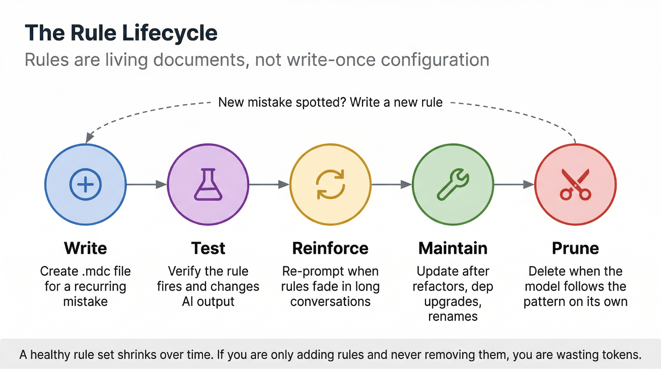
Rules that worked last month can mislead the AI after a refactor or a folder rename.
Troubleshooting matching failures
The most common reason a rule doesn't fire is the file extension: rules must use .mdc, and plain .md files in .cursor/rules/ get ignored silently.
Beyond that:
-
Overly broad globs like **/*.py attach the rule to every Python file in the project. Narrow to app/routers/**/*.py or tests/**/*.py, so the rule only fires where it belongs.
-
You'll notice "Apply Intelligently" rules missing conversations when the description is too generic. The good/bad description examples from the metadata section above apply here, too.
-
Conflicting rules are harder to spot. When two rules give contradictory instructions for the same files, the AI picks one (usually whichever is loaded last). Fix by narrowing glob scope so rules don't overlap, or consolidate related guidance into a single file.
One quirk worth knowing: changes to .mdc files sometimes disappear without saving. If edits aren't sticking, close Cursor completely, select "Override" on the unsaved changes pop-up, and reopen.
Making rules stick mid-conversation
A rule can fire correctly at the start of a conversation and still get ignored five messages later. Context window recency bias is the cause: as the conversation grows, the model prioritizes recent messages over instructions injected at the top. This is the most common complaint in the Cursor community, and there's no setting that fixes it.
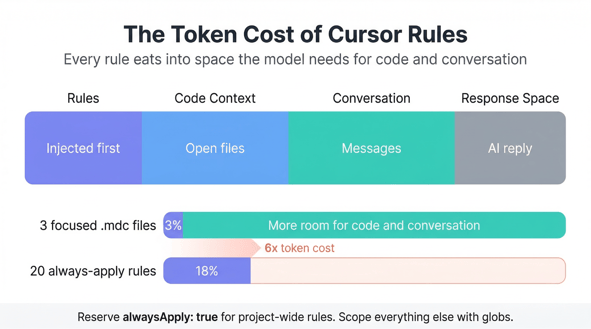
The workaround is reinforcement. When output starts drifting from your rules, add a line like "follow the project rules for error responses" to your next prompt. That moves the instruction back into the model's recent context.
For rules that matter on every response (formatting, naming), shorter and more direct phrasing holds up better across long conversations than detailed paragraphs.
Rules with code examples also resist drift better than text-only instructions. Instead of writing "use early returns for error handling," include a short before/after block showing the pattern you want. The model anchors to actual code more reliably than prose descriptions do, especially as context builds.
Maintaining and pruning rules
Review rules after any major refactor, dependency upgrade, or folder restructure. A rule that references deprecated APIs or removed files will feed the AI wrong instructions. Stale globs are even quieter about failing: rename app/api/ to app/routers/ and a rule scoped to the old path just stops firing with no warning.
Pruning goes the other direction, too. As models improve, they pick up common conventions without being told. If the AI is already following a rule's guidance unprompted, delete the rule and reclaim the tokens. A healthy rule set shrinks over time, not only grows.
Scaling rules for team environments
Treat rules like application code. Changes go through pull requests, and the team agrees on a pattern before it lands in .cursor/rules/.
For organizations on Business or Enterprise plans, Team Rules let admins enforce rules across all members from the Cursor dashboard. "Enable immediately" makes a rule active by default while letting users toggle it off. "Enforce this rule" removes the opt-out, which covers non-negotiable conventions such as security practices and compliance requirements.
Conclusion
Start with one or two rules for the patterns you correct most often. If you keep editing the same kind of AI output every session (wrong error format, unnecessary abstractions), that's a rule waiting to be written. Add more as you spot recurring mistakes, and trim ones that stop pulling their weight.
The .mdc files from this tutorial fit a FastAPI project. Yours will look different for a Next.js frontend or a Rust CLI tool, and that's the point: they encode your team's conventions, not generic best practices.
If you want to go deeper with Cursor, check out our Cursor 2.0 guide. For a comparison to other AI coding assistants, I recommend reading our comparative pieces:








You open a new chat in Cursor and paste the same block of instructions you've pasted a hundred times before. Your stack, your naming conventions, and the folder structure the AI keeps getting wrong. Then it generates a 40-line class with three layers of abstraction for something that needed a function.
Time to wake up from this nightmare. Cursor rules are project files that make pasting unnecessary. Write your conventions once, and the AI's output matches your codebase instead of fighting it.
This tutorial builds a set of
.mdcrule files for a Python web project using FastAPI and pytest, covering project context, code simplicity, and API error formatting. If you're new to Cursor, I recommend taking our Software Development with Cursor course first, then open a project and follow along.What Are Cursor Rules?
Cursor rules are markdown files with MDC-specific frontmatter that live in your project at
.cursor/rules/. Before your prompt reaches the model, Cursor checks which rules match and prepends their content to the context window. Your instructions land first, every time.Each
.mdcfile has three frontmatter fields that control activation:description,globs, andalwaysApply. A rule can fire on every conversation or only when certain files are open. A third option, Apply Intelligently, lets the agent read the description and decide for itself whether the rule is relevant. The next section covers each type hands-on.Cursor supports four categories of rules:
Type
Location
Scope
Shared via
Best for
Project Rules
.cursor/rules/*.mdcCurrent repo
Git
Team-wide AI behavior per project
User Rules
Cursor Settings > Rules
All projects
Not shared
Personal preferences
Team Rules
Cursor dashboard
All team members
Dashboard (paid plans)
Org-wide enforcement
AGENTS.mdProject root or subdirs
Current repo
Git
Simple projects, cross-tool compatibility
Project rules replaced the older
.cursorrulesfile, a single root-level file with no scoping or metadata, by splitting rules into multiple.mdcfiles with frontmatter.AGENTS.mdis the simpler alternative for projects that don't need glob scoping. It's plain markdown recognized by AI coding tools beyond Cursor, and deeper files in subdirectories override parent ones.You can learn more about how agent-based workflows connect to your development process in our AI Agent Fundamentals skill track.
Creating and Configuring Cursor Project Rules
The rest of this tutorial builds rule files for a FastAPI project using pytest. The patterns transfer to any stack.
Setting up the rules directory and files
Create a
.cursor/rules/directory in your project root. Every.mdcfile you place here becomes a rule that Cursor picks up instantly, no restart needed.The first rule file,
project-context.mdc, gives the AI persistent awareness of your stack and folder layout:Typing
/create-rulein an Agent chat is another way in: Cursor drafts one for you through a chat panel.The
alwaysApply: truefrontmatter means this rule loads in every conversation. Name files in kebab-case by concern (project-context.mdc,simplicity.mdc,error-responses.mdc) and keep each one under 500 lines. A bloated rule file eats context window space you need for your actual code and prompts. Commit the.cursor/rules/directory to git.Configuring rule metadata for accurate matching
The
project-context.mdcrule above usesalwaysApply: true, the simplest mode: every conversation loads it regardless of what files you're working on. That's the right choice for project-wide context.Some rules apply only to certain parts of the codebase. Set
alwaysApply: falseand add glob patterns as a comma-separated list to scope them. A rule withglobs: app/routers/**/*.pyfires only when matching files (here: Python files inapp/routers/or subfolders) appear in context, keeping API conventions out of unrelated chats.Apply Intelligently skips file patterns entirely. You leave
globsempty and write a detaileddescriptioninstead, and the agent decides whether the rule is relevant to the current conversation. Description quality matters:"Error handling rules"is too vague for the agent to match reliably, but"Conventions for FastAPI error responses including HTTP status codes, error body structure, and exception handler patterns"has clear signals.Rules with no globs, no meaningful description, and
alwaysApply: falsebecome manual-only, loaded when you type@rule-namein chat. Good for reference material you pull in on demand.Writing rule content and constraints
Rules written with soft language ("try to keep functions small," "prefer async endpoints") give the AI permission to ignore them. Write commands instead: "Functions must be under 30 lines. All endpoints must be async."
The intro mentioned the AI generating a 40-line class with three layers of abstraction. The rule that stops that behavior is
simplicity.mdc:The difference is immediate. The AI stops reaching for abstract base classes when there's only one implementation, and uses if-statements when there are two cases.
The third rule,
error-responses.mdc, is glob-scoped to fire only when working with API route files:When possible, point to existing files in your codebase instead of copying code into rules. A line like "See
app/routers/users.pyfor the canonicalendpoint structure" stays accurate as the code evolves, while a copied snippet goes stale the moment someone refactors the original.Testing and verifying rule attachment
Cursor has no built-in indicator showing which rules are active in a conversation. You verify by testing behavior.
Open a new Agent chat and write a prompt that should trigger one of your rules. For
error-responses.mdc, try: "Add a DELETE endpoint for removing a user by ID inapp/routers/users.py." If the generated error handling looks nothing like your rule's JSON structure or skipsHTTPExceptionwith the detail dict, something in the matching is off.Glob-scoped rules need a matching file referenced in your prompt or open in the editor. Testing
error-responses.mdcwithout mentioning any file underapp/routers/means the rule never activates."Apply Intelligently" rules are topic-based instead: try a prompt related to the rule's description, then one that's unrelated, and compare the outputs. The agent should follow the rule on the first and ignore it on the second.
Keeping Your Cursor Rules Effective
Rules that worked last month can mislead the AI after a refactor or a folder rename.
Troubleshooting matching failures
The most common reason a rule doesn't fire is the file extension: rules must use
.mdc, and plain.mdfiles in.cursor/rules/get ignored silently.Beyond that:
Overly broad globs like
**/*.pyattach the rule to every Python file in the project. Narrow toapp/routers/**/*.pyortests/**/*.py, so the rule only fires where it belongs.You'll notice "Apply Intelligently" rules missing conversations when the description is too generic. The good/bad description examples from the metadata section above apply here, too.
Conflicting rules are harder to spot. When two rules give contradictory instructions for the same files, the AI picks one (usually whichever is loaded last). Fix by narrowing glob scope so rules don't overlap, or consolidate related guidance into a single file.
One quirk worth knowing: changes to
.mdcfiles sometimes disappear without saving. If edits aren't sticking, close Cursor completely, select "Override" on the unsaved changes pop-up, and reopen.Making rules stick mid-conversation
A rule can fire correctly at the start of a conversation and still get ignored five messages later. Context window recency bias is the cause: as the conversation grows, the model prioritizes recent messages over instructions injected at the top. This is the most common complaint in the Cursor community, and there's no setting that fixes it.
The workaround is reinforcement. When output starts drifting from your rules, add a line like "follow the project rules for error responses" to your next prompt. That moves the instruction back into the model's recent context.
For rules that matter on every response (formatting, naming), shorter and more direct phrasing holds up better across long conversations than detailed paragraphs.
Rules with code examples also resist drift better than text-only instructions. Instead of writing "use early returns for error handling," include a short before/after block showing the pattern you want. The model anchors to actual code more reliably than prose descriptions do, especially as context builds.
Maintaining and pruning rules
Review rules after any major refactor, dependency upgrade, or folder restructure. A rule that references deprecated APIs or removed files will feed the AI wrong instructions. Stale globs are even quieter about failing: rename
app/api/toapp/routers/and a rule scoped to the old path just stops firing with no warning.Pruning goes the other direction, too. As models improve, they pick up common conventions without being told. If the AI is already following a rule's guidance unprompted, delete the rule and reclaim the tokens. A healthy rule set shrinks over time, not only grows.
Scaling rules for team environments
Treat rules like application code. Changes go through pull requests, and the team agrees on a pattern before it lands in
.cursor/rules/.For organizations on Business or Enterprise plans, Team Rules let admins enforce rules across all members from the Cursor dashboard. "Enable immediately" makes a rule active by default while letting users toggle it off. "Enforce this rule" removes the opt-out, which covers non-negotiable conventions such as security practices and compliance requirements.
Conclusion
Start with one or two rules for the patterns you correct most often. If you keep editing the same kind of AI output every session (wrong error format, unnecessary abstractions), that's a rule waiting to be written. Add more as you spot recurring mistakes, and trim ones that stop pulling their weight.
The
.mdcfiles from this tutorial fit a FastAPI project. Yours will look different for a Next.js frontend or a Rust CLI tool, and that's the point: they encode your team's conventions, not generic best practices.If you want to go deeper with Cursor, check out our Cursor 2.0 guide. For a comparison to other AI coding assistants, I recommend reading our comparative pieces: