
Our biggest-ever sale. 60% off AI & data skills
Buy Now
GitHub Models are AI models built directly into GitHub’s platform to help you work smarter and faster with code, repositories, and documentation. GitHub Models lets you:
.prompt.yml files for version control and reproducibility.Version control allows you to collaborate on prompts the same way as you can on code. When you commit a prompt file, it undergoes the same pull request flow, allowing your team to know who made the change, what was changed, and why.
GitHub Models is a useful platform built for software teams that want to use AI while keeping it closely integrated with their existing workflows.
Before we dive deeper into how to use GitHub Models, let’s cover briefly the core features:
To summarize, GitHub Models is designed to help you take your idea from concept to production. You can start with experiments, evaluate them, and then deploy. And all these steps in one place.
You can interact with GitHub Models in several ways. The right path depends on whether you’re experimenting, automating a workflow, or integrating AI into an application.
The following sections provide a detailed explanation of the various methods, along with relevant examples.
The playground is my favorite way to start. It’s a sandbox where you can experiment with prompts, adjust parameters, and compare models side by side.
You access it via GitHub Marketplace or directly from a repository.
Let’s first start with choosing a model. To open a model in the playground, go to GitHub Marketplace and select a model from the dropdown menu. You can click “View all models” to browse the catalog, then choose “Playground” on any model.
Once in the playground, you can adjust parameters such as temperature, maximum tokens, and presence or frequency penalties.
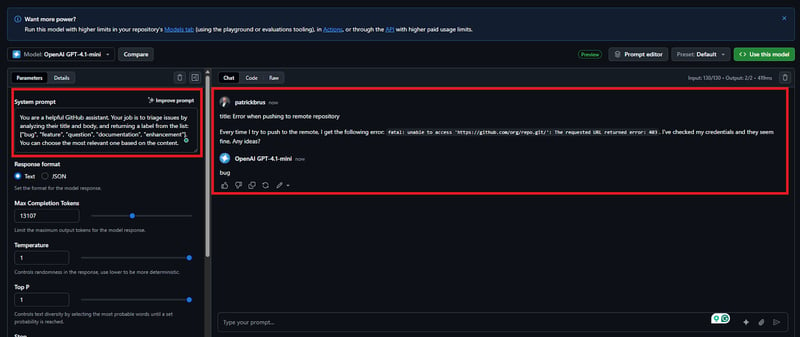
Screenshot of a system prompt and a user prompt that contains a description of a bug.
Switching to the “Code” tab displays the corresponding API call using a SDK in the programming language of your choice, allowing you to replicate it in your scripts.
And if you click "Compare" next to your model, you can select a second model to compare with it. The playground will then mirror your prompt to both models and display the responses side by side. This feature is excellent for comparing models for specific tasks.
However, you primarily want to compare two models, not just by intuition, but by objective metrics. This is where the evaluators come into play. You can apply evaluators like similarity or groundedness to each output, or even write custom evaluators for domain-specific metrics.
And if you find a prompt‑parameter combination you like, save it as a preset. Presets store your state, parameters, and optional chat history. You can load a preset later or share it via URL, which makes it perfect for collaborating with your teammates.
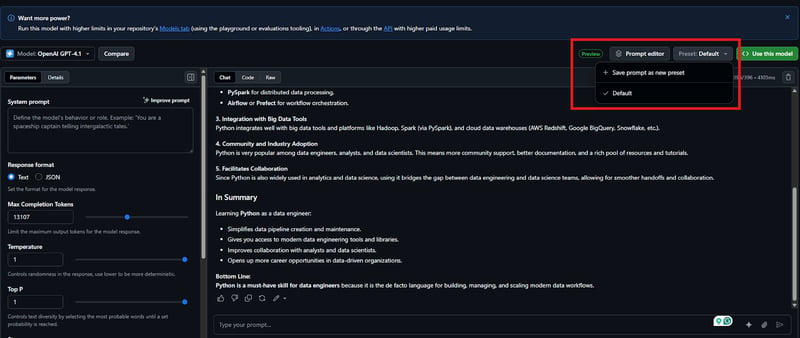
Creating a new preset that can be versioned and shared with your teammates.
In my private projects, I’ve used the playground to generate unit tests, create commit summaries, and even brainstorm error messages. It’s the fastest way to see what a model can do with your repository’s context.
Using the playground is nice for getting to know the models and exploring all their features, as well as playing around with them.
However, I suggest you take it one step further and utilize GitHub Models to automate your workflows or integrate them into your applications. In that case, you’ll need to use the GitHub Models API.
Here’s an overview of how to use the raw API:
/inference/chat/completions or /orgs/{org}/inference/chat/completions for organization‑scoped requests.models: read permission (a fine‑grained PAT or GitHub App token). The Authorization: Bearer <TOKEN> header is required.model ID (e.g., openai/gpt‑4.1) and an array of messages, each with a role (system, user, assistant, or developer) and content. You can also set parameters like max_tokens, temperature, frequency_penalty, presence_penalty, and response_format.choices array containing the model’s reply.Below is a simple Python example using requests (assuming you have a personal access token with models: read scope).
You can create the token in your GitHub settings.
import osimport requests# Replace with your fine-grained PATtoken = os.getenv('GITHUB_PAT')url = "https://models.github.ai/inference/chat/completions"payload = { "model": "openai/gpt-4.1", "messages": [ {"role": "system", "content": "You are a helpful coding assistant."}, {"role": "user", "content": "Explain the concept of recursion."} ], "max_tokens": 150, "temperature": 0.3}headers = { "Content-Type": "application/json", "Accept": "application/vnd.github+json", "Authorization": f"Bearer {token}"}response = requests.post(url, json=payload, headers=headers)print(response.json())This script sends a chat prompt to the GPT‑4.1 model and prints the assistant’s reply. In practice, you’d embed this call in a bot, a CI workflow, or a custom tool.
You can also check out the “Code” tab inside GitHub Models playground UI, if you want to make use of a higher-level Python library to communicate with your GitHub model, or if you even want to make use of another programming language. In the code tab, you can, for Python, even choose between using Azure AI Inference SDK or OpenAI SDK.
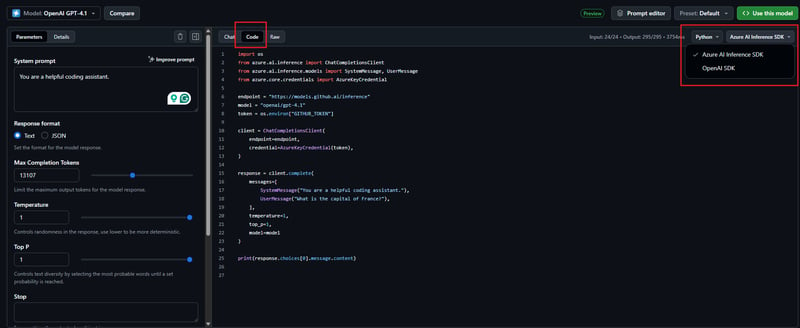
Code section for communicating with a GitHub Model using either the Azure AI Inference SDK or OpenAI SDK
I recommend this approach over using the raw requests package, as this abstracts some complexity away. But the code is not available for all models.
Once you’re comfortable with the playground and API, the real power comes from integrating models into your daily development processes. GitHub provides extensions for Copilot Chat, GitHub Actions, and the GitHub CLI.
If you have a Copilot subscription, install the GitHub Models Copilot Extension. It allows you to chat directly with specific models inside Copilot Chat and even ask the extension to recommend a model based on criteria (e.g., “What’s a low‑cost model that supports function calling?”). You can type @models YOUR‑PROMPT in chat and choose your model.
You can call the inference API inside a workflow file by setting the models: read permission and making an HTTP request. GitHub’s docs provide an example that uses curl to call the API and posts the response to the workflow output.
Here’s the snippet:
name: Use GitHub Modelson: [push]permissions: models: readjobs: call-model: runs-on: ubuntu-latest steps: - name: Call AI model env: GITHUB_TOKEN: ${{ secrets.GITHUB_TOKEN }} run: | curl "https://models.github.ai/inference/chat/completions" \ -H "Content-Type: application/json" \ -H "Authorization: Bearer $GITHUB_TOKEN" \ -d '{ "messages": [ { "role": "user", "content": "Explain the concept of recursion." } ], "model": "openai/gpt-4o" }'I sometimes prefer using the command line to send some queries to a model, as I’m a real developer nerd.
If you prefer the command line as well, install the CLI tool and the GitHub Models CLI extension.
You can find the instructions for installing the CLI tool in the official CLI docs.
First, run gh auth login to log in to your GitHub account.
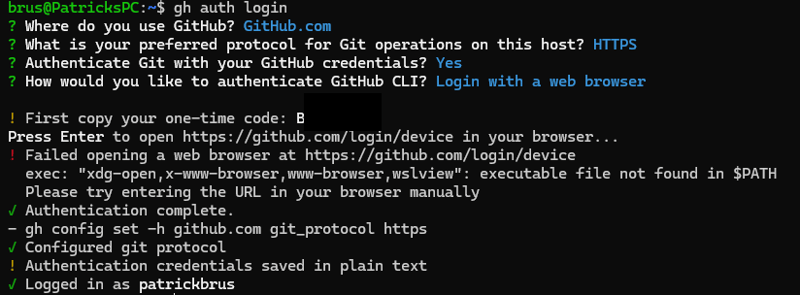
Output of running authentication with GitHub CLI (Image by author).
After authenticating, run gh extension install https://github.com/github/gh-models.
You can then prompt a model with a single command:
# ask GPT-4 why the sky is bluegh models run openai/gpt-4.1 "why is the sky blue?"# or start a chat sessiongh models runThis is perfect for scripting or when you need quick answers without leaving your terminal.
If you’re part of a larger organization, GitHub Models offers enterprise‑level controls and customization.
According to GitHub’s documentation, the benefits include:
In large projects I’ve worked on, these controls matter. When multiple teams are experimenting with AI, you don’t want 50 prompts for the same task or unbounded API bills. GitHub Models allows you to enforce consistent prompts and evaluate models across teams, ensuring the entire organization benefits from collective learning.
With so many AI tools available, when does it make sense to use GitHub Models over alternatives like OpenAI’s API directly or Copilot alone?
Here are some guidelines based on my experience:
On the other hand, if you already have a robust pipeline using a different AI provider or need a model that GitHub doesn’t host, you may want to stick with your existing setup. GitHub Models is an addition to your toolbox, not a replacement for everything related to AI.
With GitHub Models, developers can now go from prompt conception to production integration without even leaving their repositories.
You can experiment with models in the Playground, evaluate them with built‑in metrics, save prompts for versioned collaboration, and call the models via API, GitHub Actions, or CLI. For enterprise teams, GitHub adds governance, cost control, and the ability to bring your models, addressing many of the concerns large organizations have about AI adoption.
My recommendation? Start small. Use the playground to test prompts, summarize issues, or generate documentation. Then, integrate your best prompt into a GitHub Action for a repetitive task. Over time, you’ll discover where AI saves you the most time. And because everything is version‑controlled and transparent, you can build trust and refine your workflow as you go.
Not necessarily, as using the Playground is beginner-friendly, while the API is better suited for developers.
Yes, GitHub Models can assist in code completion, generation, and suggestions for everyday development tasks.
Some features are accessible with a free GitHub account, while others may require enterprise or paid tiers.

I am a Cloud Engineer with a strong Electrical Engineering, machine learning, and programming foundation. My career began in computer vision, focusing on image classification, before transitioning to MLOps and DataOps. I specialize in building MLOps platforms, supporting data scientists, and delivering Kubernetes-based solutions to streamline machine learning workflows.

blog
 Amberle McKee• 8 min

blog
 Abid Ali Awan• 10 min

Samouczek
 Aashi Dutt• 12 min
Learn AI with these courses!
Kurs
Buduj wydajne systemy wieloagentowe, stosując nowe wzorce projektowe agentów w frameworku LangGraph.
Kurs
Poznaj podstawy agentów AI, ich komponenty i zastosowania w praktyce — bez kodowania.
Kurs
Przyspiesz kodowanie z Windsurf, IDE oparte na AI, które pomaga szybciej tworzyć, debugować i wdrażać.


If you’re like me, constantly looking for ways to streamline repetitive dev tasks or make CI/CD less painful, then GitHub Models might be a powerful option for you to consider.
In this article, I’ll walk you through what GitHub Models are, how to use them effectively, and how they scale across teams and enterprises.
Whether you're experimenting on your own or managing multiple repositories for a development team, this article will provide you with valuable ideas that you can apply to your work and everyday life.