
Curso
Introdução à Engenharia de Dados
4 h
129.8K
Você está trabalhando em um projeto. O frontend está em um repositório, o backend em outro e as bibliotecas compartilhadas em um terceiro. Aí você fica alternando entre repos e torcendo para que as versões não se desencontrem.
Agora imagine tudo em um só lugar. Um único repo para todos os seus projetos, código compartilhado que atualiza na hora e mudanças que se propagam com um único commit.
Monorepos tornam isso possível. É por isso que muitas big techs também usam, como:
Neste guia, você vai entender o que é um monorepo, como ele se compara a polyrepos e os principais benefícios, desafios e boas práticas que valem a pena conhecer.
Monorepo (repositório monolítico) significa um único repositório. Em um monorepo, todos os seus projetos diferentes ficam no mesmo lugar, em vez de estarem espalhados por vários repositórios.
Mesmo lado a lado, os projetos continuam independentes. Ou seja, você pode construir, testar e implantar cada um separadamente — e ainda aproveitar o benefício de manter tudo reunido em um único ponto.
Mas vale notar: um aplicativo monolítico e um monorepo não são a mesma coisa:
Um monorepo não é um app monolítico. Na prática, monorepos costumam funcionar muito bem com microsserviços, porque cada serviço pode viver no mesmo repo e continuar independente.
A ideia de monorepo não é nova.
No início dos anos 2000, grandes empresas de tecnologia começaram a adotar uma abordagem de “código-base compartilhado”. A lógica era simples: em vez de espalhar o código por vários repos, colocar tudo em um só lugar para facilitar a colaboração.
Desde então, big techs como Google, Meta, Microsoft, Airbnb, Twitter (X), Uber e Pinterest adotaram monorepos para administrar seus códigos grandes e em rápida evolução.
O oposto de um monorepo é um polyrepo (multirepo). Vamos ver como eles se diferenciam.
Um polyrepo, também chamado de multirepo, é quando cada projeto tem seu próprio repositório separado.
Por exemplo, o código do frontend pode estar em um repo, o backend em outro e as bibliotecas compartilhadas em um terceiro. Cada repositório é gerenciado de forma independente, com suas próprias dependências e fluxos de trabalho.
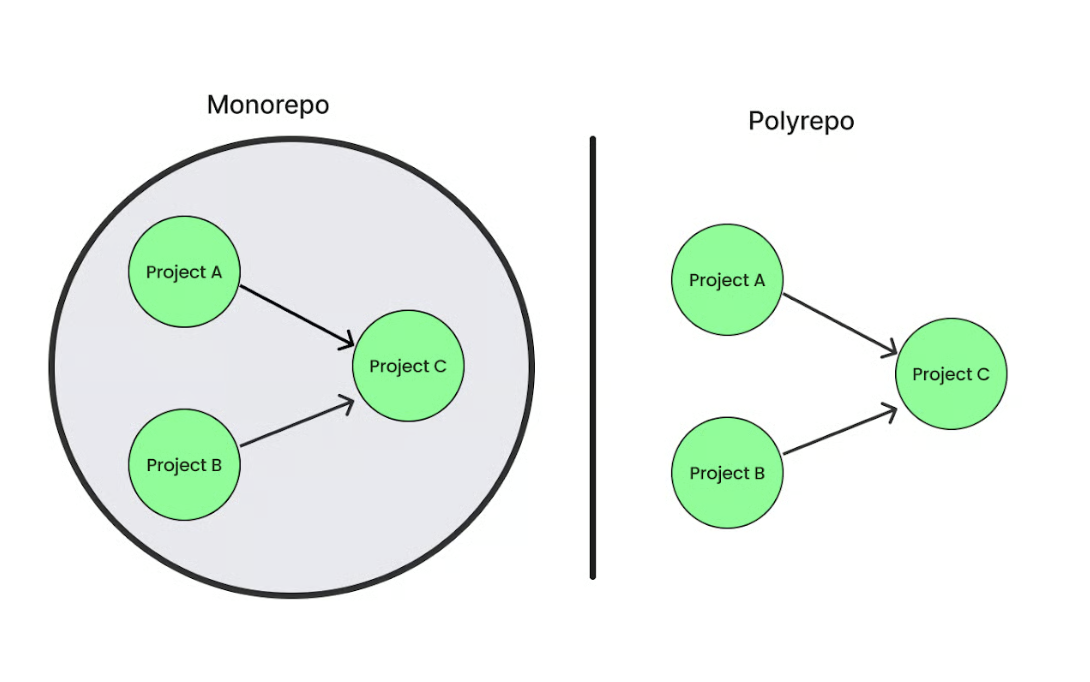
Monorepo vs. polyrepo. Imagem do autor.
Vamos ver quais são as principais diferenças entre monorepos e polyrepos:
|
Monorepo |
Polyrepo |
|
Um repositório para todos os projetos e código compartilhado. |
Cada projeto tem seu repositório próprio. |
|
Fácil compartilhar e reutilizar código porque tudo está em um único repo. |
Mais difícil compartilhar código, pois projetos podem duplicar trabalho ou sair de sincronia. |
|
Gerenciado em um só lugar, mantendo versões consistentes entre projetos. |
Cada repo gerencia suas próprias dependências, o que pode ser mais difícil de controlar. |
|
Você pode usar uma configuração unificada de CI/CD que detecta o que mudou e roda apenas os builds/testes impactados. |
Cada repo tem seu próprio pipeline. Mantém separado, mas dificulta unificar. |
|
Melhor para times pequenos ou médios, ou projetos com muito código compartilhado. |
Melhor quando os projetos são independentes, exigem acesso restrito ou são de times diferentes. |
Monorepos trazem muitos benefícios. Aqui vão alguns:
Com todo o código em um só lugar, todo mundo enxerga o que está acontecendo. Você pode explorar outros projetos, aprender com eles ou até dar uma força quando necessário.
Isso torna o trabalho em equipe mais fluido, aproxima times diferentes e reduz silos.
Se projetos diferentes usam as mesmas bibliotecas, mas mantêm versões próprias, a bagunça aparece rápido.
Por exemplo, um projeto usa uma versão antiga e outro, uma mais nova. Isso pode dificultar a execução do código e fazer você perder tempo corrigindo o mesmo problema em mais de um lugar.
Num monorepo, o código compartilhado fica em um único local. Você atualiza uma vez e todo projeto recebe a correção na hora. Não precisa correr atrás de desencontros de versão ou lidar com conflitos entre versões diferentes.
Às vezes, você precisa fazer uma mudança que afeta mais de um projeto. Por exemplo, atualizar uma biblioteca compartilhada. Com um monorepo, dá para atualizar esse código e aplicar as correções a todos os projetos em um único commit.
Assim, todos os projetos ficam em sincronia e você evita quebrar outras partes sem querer.
Com um repo, existe um jeito padrão de buildar, testar e fazer deploy. Você não precisa decorar setups diferentes para cada projeto. Isso facilita a entrada de novos membros sem confusão.
Se dois ou mais projetos dependem do mesmo código, como uma biblioteca ou utilitário compartilhado, você não precisa atualizar cada projeto separadamente em repos distintos.
Num monorepo, você atualiza o código uma vez e todos os projetos daquele repositório recebem a mudança imediatamente. Em vez de alternar entre repos, você altera em um ponto e vê o impacto em todos ao mesmo tempo.
Isso ajuda em várias situações do dia a dia:
Tudo isso reduz idas e vindas, diminui trocas de contexto e encurta ciclos de feedback. Resultado: você itera mais rápido, sem sobrecarga extra.
Monorepos trazem muitos ganhos, mas também alguns desafios. Os principais são:
Conforme o repo cresce, tarefas do dia a dia como clonar, buscar ou até abrir no editor começam a ficar lentas. Por quê? Porque o Git originalmente não foi feito para lidar com bases de código gigantes. Por isso, empresas grandes sentem o peso com frequência.
Como todos os projetos estão no mesmo lugar, uma pequena mudança pode disparar muito trabalho extra no pipeline de CI/CD. Com isso, desenvolvedores acabam esperando builds ou suítes de testes terminarem antes de poder fazer merge ou liberar código.
Com o tempo, esses atrasos podem gerar problemas adicionais, como bloquear outras tarefas e dificultar implementar mudanças pequenas e frequentes.
Veja o caso da Uber: quando o monorepo em Go atingiu milhões de linhas de código, alguns engenheiros esperavam horas pelos builds e validações antes de fazer merge.
Depois, eles aceleraram com ferramentas como Bazel e filas de build personalizadas. Ainda assim, isso mostra como o CI pode virar gargalo rápido quando todos os projetos compartilham um único repositório.
A main é a branch padrão no Git onde vive a versão estável mais recente do seu código. Num monorepo, todo mundo trabalha a partir dessa branch compartilhada; se uma mudança a quebrar, todo o time (ou empresa) pode ficar bloqueado até o conserto.
Pegue o Airbnb como exemplo. Eles adotaram um deployment democrático (qualquer engenheiro podia testar seu trabalho e colocar em produção sem esperar um release manager).
Parecia rápido no começo, mas conforme a empresa cresceu, ficou difícil administrar tudo porque o código estava em um único e grande monorepositório. As pessoas colocavam mudanças em produção ao mesmo tempo, updates colidiam e ficava mais difícil achar a causa dos problemas.
É difícil limitar acesso em um monorepo porque todo o código, arquivos de configuração, scripts de build e outros recursos ficam juntos. Por padrão, todo dev com acesso ao repo geralmente consegue ver e modificar todos esses componentes.
Isso é ótimo para colaboração aberta, mas complica quando certas partes — como chaves de segurança, scripts de deploy ou algoritmos proprietários — exigem permissões mais rígidas.
Por exemplo, uma empresa pode manter o código do site no mesmo monorepo. Desenvolvedores do site não precisam necessariamente de credenciais de servidor de produção, mas, como tudo vive no mesmo lugar, pode ser difícil evitar que vejam ou editem esses arquivos sensíveis por engano.
Para quem está chegando, um repo enorme com vários projetos pode ser intimidante. Por quê? Porque há muitos arquivos e pastas, e fica difícil saber por onde começar ou o que é relevante para o trabalho.
A pessoa também precisa aprender a estrutura do projeto, as ferramentas e as dependências antes de rodar builds com segurança ou fazer mudanças — o que pode desacelerar o início até ganhar familiaridade.
Para garantir que um monorepo funcione sem atritos, siga estas recomendações:
Um monorepo pode ficar complexo conforme os projetos crescem. Para simplificar, surgiram diversas ferramentas que ajudam com builds, dependências e organização.
Aqui estão algumas das mais usadas:
Bazel é um sistema de build open source criado no Google para lidar com bases de código muito grandes e complexas.
Alguns destaques:
Bazel é usado por empresas como Google, Stripe e Dropbox para buildar e testar infraestrutura e aplicações críticas.
Nx é um toolkit open source para gerenciar monorepos e é especialmente popular em JavaScript e TypeScript, com forte suporte a frameworks como React, Angular, Vue e NestJS. Ele ajuda times a organizar vários apps e bibliotecas em um só lugar, mantendo builds e testes rápidos.
Alguns destaques:
Lerna é uma das ferramentas mais antigas e confiáveis para gerenciar monorepos de JavaScript e TypeScript. Ela facilita organizar vários pacotes em um único repositório e ajuda a buildar, testar e publicá-los.
Inclusive, projetos bem conhecidos como Create React App, Jest e NestJS já usaram Lerna para gerenciar seus pacotes.
Alguns destaques:
Pants é um sistema de build rápido e fácil de usar, que funciona bem para monorepos de diversos tamanhos. Começou focado em Python e hoje também suporta Go, Java, Scala, Kotlin, Shell e Docker, com mais linguagens chegando.
Por isso é amplamente utilizado e confiável para empresas como Coinbase, IBM, Slack, Salesforce e Orca Security, além de muitos times menores.
Alguns destaques:
Rush é uma ferramenta de monorepo pensada para projetos JavaScript que precisam gerenciar múltiplos pacotes em um único repositório.
Alguns destaques:
Rush é open source e confiável, usado por produtos como Azure SDK, HBO Max, OneDrive, SharePoint, Office 365 e Wix.
Turborepo é um sistema de build de alta performance que torna monorepos de JavaScript e TypeScript mais rápidos e fáceis de gerenciar. Ele foca em resolver problemas clássicos de escala quando vários apps e pacotes convivem no mesmo repositório.
Alguns destaques:
Moon é uma ferramenta rápida de gestão de monorepo escrita em Rust. Suporta linguagens como JavaScript, TypeScript, Rust, Go e Ruby.
Alguns destaques:
Lage é um task runner criado para monorepos, com foco em velocidade e eficiência. Ajuda times a evitar rebuildar trabalho já feito.
Alguns destaques:
Yarn introduziu workspaces para facilitar o gerenciamento de projetos com vários pacotes dentro de um único repo (um monorepo).
Alguns destaques:
node_modules em cada pacote.Veja alguns cenários comuns em que um monorepo pode ser útil para você:
Se o seu time é pequeno e muito código é reutilizado entre projetos, um monorepo pode economizar tempo. Todo mundo trabalha no mesmo lugar e as bibliotecas compartilhadas ficam em sincronia sem esforço extra. É ganho dos dois lados.
Quando seus projetos dependem fortemente uns dos outros, mantenha-os em um repo. Assim, as mudanças acontecem juntas em um único commit, sem malabarismo entre vários repos.
Com um monorepo, você pode configurar um CI/CD unificado. Isso não significa ter um único pipeline para todos os projetos, mas sim otimizar para que só os builds e testes afetados por mudanças recentes rodem — economizando tempo e recursos.
Mas monorepos não são ideais para todos os casos. Se seus projetos são totalmente independentes ou se você precisa de controles de acesso rígidos (em que alguns times não devem ver partes específicas do código), polyrepos (múltiplos repos) podem ser a melhor escolha.
Aqui vai um resumo rápido das vantagens e desvantagens dos monorepos:
|
Prós |
Contras |
|
Mais fácil colaborar e ter visibilidade entre times. |
O repo pode ficar enorme e deixar Git/IDEs lentos. |
|
Bibliotecas compartilhadas permanecem consistentes, sem conflitos de versão. |
Builds e testes demoram mais à medida que o código cresce. |
|
Mudanças entre projetos em um único commit. |
Uma mudança quebrada pode travar todo mundo. |
|
Um jeito único de buildar, testar e fazer deploy (tooling consistente). |
Mais difícil aplicar controles de acesso granulares. |
|
Feedback mais rápido ao atualizar código compartilhado. |
Curva de aprendizado mais íngreme para novos devs. |
Um monorepo pode facilitar a colaboração, simplificar dependências e acelerar a iteração, mas também traz desafios reais de escala, performance e acesso. Adotar essa abordagem deve ser uma decisão estratégica baseada em como seus times se organizam, o quanto seus projetos dependem uns dos outros e se você está pronto para investir nas ferramentas certas.
Mas sem hábitos fortes de colaboração e ownership claro, nem o melhor setup de monorepo vai decolar. Se você está explorando esse caminho, vale reforçar seus fundamentos primeiro. O curso Software Engineering Principles in Python é um ótimo ponto de partida. Ele vai ajudar você a construir as práticas que fazem um monorepo dar certo.
Aprenda com a DataCamp
Curso
Curso
Programa
blog
Elena Kosourova
14 min
blog
Zoumana Keita
15 min
blog
Summer Worsley
14 min
blog
Mike Shakhomirov
11 min
Tutorial
Tutorial
Abid Ali Awan
9 min