
Cours
Introduction au data engineering
4 h
129.8K
Vous travaillez sur un projet. Le frontend est dans un dépôt, le backend dans un autre, et les bibliothèques partagées dans un troisième. Vous jonglez entre les dépôts en espérant que les versions ne dérivent pas.
Maintenant, imaginez tout au même endroit. Un seul dépôt pour tous vos projets, un code partagé mis à jour instantanément, et des modifications propagées en un seul commit.
Les monorepos rendent cela possible. C’est pourquoi de nombreuses grandes entreprises tech les utilisent, par exemple :
Dans ce guide, vous découvrirez ce qu’est un monorepo, comment il se compare aux polyrepos, ainsi que les principaux bénéfices, défis et bonnes pratiques à connaître.
Un monorepo (dépôt monolithique) signifie un dépôt unique. Dans un monorepo, tous vos projets résident au même endroit, au lieu d’être répartis dans des dépôts distincts.
Même côte à côte, les projets restent indépendants. Vous pouvez donc les construire, tester et déployer séparément, tout en bénéficiant du fait que tout soit regroupé en un seul espace.
À noter : une application monolithique et un monorepo ne sont pas la même chose :
Un monorepo n’est pas une application monolithique. En réalité, les monorepos fonctionnent très bien avec les microservices, car chaque service peut vivre dans le même dépôt tout en restant isolé.
Le concept de monorepo n’a rien de nouveau.
Au début des années 2000, de grands acteurs de la tech ont adopté une approche « base de code partagée ». L’idée était simple : au lieu d’éparpiller le code dans de multiples dépôts, tout centraliser pour faciliter la collaboration.
Depuis, de grandes entreprises comme Google, Meta, Microsoft, Airbnb, Twitter (X), Uber et Pinterest ont adopté des monorepos pour gérer des bases de code volumineuses et évolutives.
L’opposé d’un monorepo est un polyrepo (multirepo). Voyons la différence.
Un polyrepo, aussi appelé multirepo, signifie que chaque projet possède son propre dépôt distinct.
Par exemple, le code du frontend peut être dans un dépôt, le backend dans un autre, et les bibliothèques partagées à part. Chaque dépôt est géré indépendamment avec ses propres dépendances et workflows.
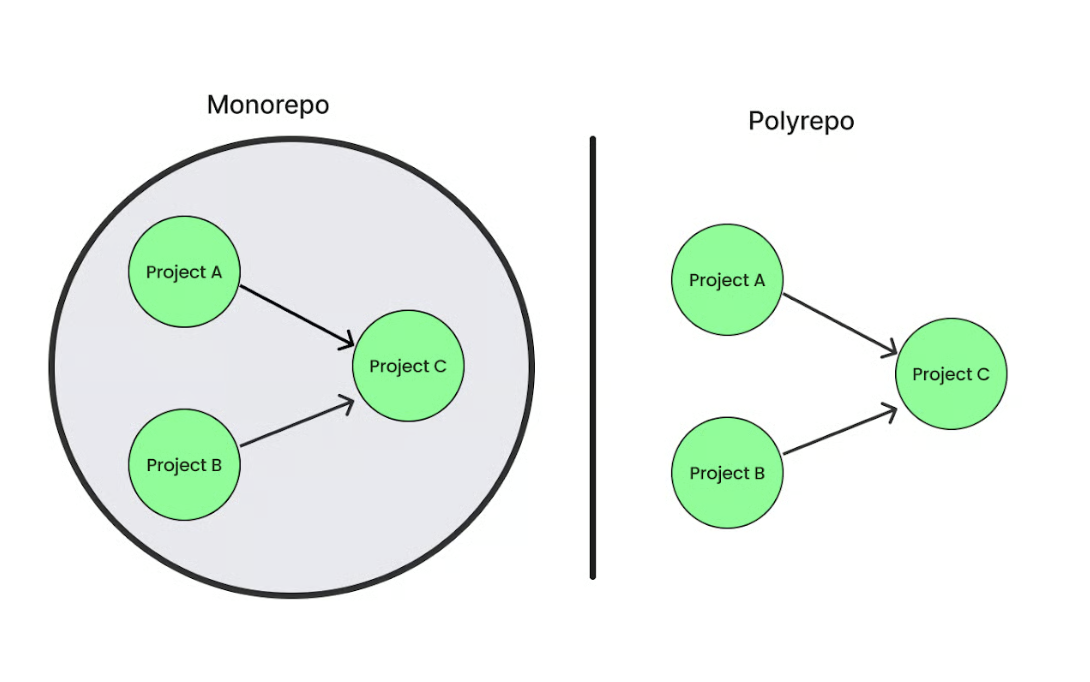
Monorepo vs polyrepo. Image de l’auteur.
Voyons les différences clés entre monorepos et polyrepos :
|
Monorepo |
Polyrepo |
|
Un seul dépôt pour tous les projets et le code partagé. |
Chaque projet a son propre dépôt séparé. |
|
Partage et réutilisation de code facilités, car tout est dans un seul dépôt. |
Partage de code plus difficile : duplication ou désynchronisation possibles entre projets. |
|
Géré en un seul endroit, donc des versions cohérentes entre projets. |
Chaque dépôt gère ses dépendances, plus difficile à harmoniser. |
|
CI/CD unifié : détecte les changements et n’exécute que les builds/tests impactés. |
Chaque dépôt a son pipeline : isolation préservée, unification plus complexe. |
|
Idéal pour des équipes petites à moyennes ou des projets avec beaucoup de code partagé. |
Pertinent quand les projets sont indépendants, nécessitent un accès strict, ou appartiennent à des équipes différentes. |
Les monorepos offrent de nombreux avantages. En voici quelques-uns :
Quand tout le code est au même endroit, chacun voit ce qui se passe. Vous pouvez consulter d’autres projets, en tirer des enseignements ou prêter main-forte si besoin.
Le travail d’équipe s’en trouve fluidifié, la collaboration interéquipes s’améliore et les silos se réduisent.
Si plusieurs projets utilisent les mêmes bibliothèques mais conservent leurs propres versions, cela devient vite ingérable.
Par exemple, un projet utilise une version plus ancienne quand un autre est déjà passé à la suivante. Le code devient plus difficile à exécuter, et vous passez du temps à corriger la même anomalie en plusieurs endroits.
Dans un monorepo, le code partagé vit à un seul endroit. Vous le mettez à jour une fois, et chaque projet bénéficie immédiatement du correctif. Fini la chasse aux décalages de versions ou aux conflits entre dépendances.
Parfois, vous devez modifier un élément qui impacte plusieurs projets, par exemple une bibliothèque partagée. Avec un monorepo, vous mettez à jour ce code et appliquez les correctifs à tous les projets en un seul commit.
Tous les projets restent ainsi synchronisés, sans risque de casser autre chose par inadvertance.
Avec un seul dépôt, il n’y a qu’une manière de builder, tester et déployer. Inutile de mémoriser des configurations différentes selon les projets. Les nouveaux arrivants montent en vitesse plus sereinement.
Si deux projets ou plus dépendent du même code (une bibliothèque ou un utilitaire partagé, par exemple), vous n’avez pas à mettre à jour chaque projet un par un dans des dépôts séparés.
Avec un monorepo, vous mettez à jour une fois, et toutes les applications concernées reçoivent le changement immédiatement. Plutôt que de naviguer entre plusieurs dépôts, vous intervenez en un seul endroit et voyez l’impact partout à la fois.
Cela aide dans plusieurs situations courantes :
Tout cela réduit les allers-retours, limite le changement de contexte et raccourcit les boucles de feedback. Résultat : des itérations plus rapides sans surcoût.
Les monorepos apportent beaucoup, mais posent aussi des défis. Voici les principaux :
À mesure que le dépôt grossit, les tâches quotidiennes comme le clonage, la recherche ou même l’ouverture dans l’éditeur ralentissent. Pourquoi ? Parce que Git n’a pas été pensé à l’origine pour des bases de code massives. Les grandes entreprises en ressentent vite les limites.
Comme tous les projets cohabitent, un petit changement peut déclencher beaucoup de travail supplémentaire sur votre pipeline CI/CD. Les développeurs se retrouvent à attendre la fin des builds ou des suites de tests avant de pouvoir merger ou publier leur code.
Avec le temps, ces délais peuvent bloquer d’autres tâches et compliquer la livraison fréquente de petits changements.
Prenez Uber : quand leur monorepo Go a atteint des millions de lignes de code, certains ingénieurs attendaient des heures la fin des builds et validations avant de merger.
Ils ont ensuite accéléré grâce à des outils comme Bazel et des files de builds personnalisées. Mais cela illustre à quelle vitesse la CI peut devenir un goulot d’étranglement quand tous les projets partagent un seul dépôt.
La branche principale est la branche par défaut dans Git où vit la dernière version stable de votre code. Dans un monorepo, tout le monde travaille à partir de cette branche partagée ; si un changement la casse, toute l’équipe (voire l’entreprise) peut être bloquée jusqu’à la correction.
Prenons Airbnb. Ils pratiquaient un déploiement démocratique (tout ingénieur pouvait tester et mettre en production sans attendre un release manager).
Au début, c’était rapide, mais avec la croissance, la gestion est devenue difficile car tout leur code se trouvait dans un unique monorepo volumineux. Les mises en production simultanées entraient en collision et compliquaient l’identification des causes.
Limiter l’accès dans un monorepo est complexe car le code, les fichiers de configuration, scripts de build et autres ressources sont regroupés. Par défaut, tout développeur ayant accès au dépôt peut souvent voir et modifier ces composants.
C’est bien pour collaborer ouvertement, mais problématique lorsque certaines parties (clés de sécurité, scripts de déploiement, algorithmes propriétaires) exigent des droits plus stricts.
Par exemple, une entreprise peut conserver le code de son site web dans le même monorepo. Les développeurs du site n’ont pas forcément besoin d’accéder aux identifiants de prod, mais comme tout vit au même endroit, il peut être difficile d’empêcher l’accès accidentel à ces fichiers sensibles.
Pour les nouveaux arrivants, un dépôt vaste et multi-projets peut être intimidant. Trop de fichiers et de dossiers rendent difficile l’identification des éléments pertinents pour leur travail.
Ils doivent aussi apprendre la structure, les outils et les dépendances avant de builder ou de contribuer sereinement, ce qui peut ralentir leur montée en puissance.
Pour que le monorepo fonctionne sans accroc, voici ce qu’il convient de mettre en place :
Un monorepo peut devenir complexe à mesure que les projets grandissent. Pour simplifier, de nombreux outils aident à gérer les builds, les dépendances et l’organisation.
Voici les plus courants :
Bazel est un système de build open source créé chez Google pour gérer des bases de code très vastes et complexes.
Voici quelques fonctionnalités clés :
Bazel est utilisé par des entreprises comme Google, Stripe et Dropbox pour builder et tester des infrastructures et applications critiques.
Nx est une boîte à outils open source pour gérer des monorepos, particulièrement populaire en JavaScript et TypeScript, avec un excellent support de React, Angular, Vue et NestJS. Il aide à organiser plusieurs applications et bibliothèques au même endroit tout en gardant des builds et tests rapides.
Ses atouts principaux :
Lerna est l’un des premiers et plus fiables outils pour gérer des monorepos JavaScript/TypeScript. Il facilite l’organisation de multiples packages dans un seul dépôt et aide à les builder, tester et publier.
De grands projets comme Create React App, Jest et NestJS ont utilisé Lerna pour gérer leurs packages.
Parmi ses points forts :
Pants est un système de build rapide et convivial, adapté aux monorepos de toutes tailles. Initialement centré sur Python, il supporte aussi Go, Java, Scala, Kotlin, Shell et Docker, avec d’autres langages en cours d’ajout.
Il est donc largement utilisé et approuvé par des entreprises comme Coinbase, IBM, Slack, Salesforce et Orca Security, ainsi que par de nombreuses petites équipes.
Ses atouts principaux :
Rush est un outil monorepo conçu pour les projets JavaScript qui doivent gérer plusieurs packages au sein d’un même dépôt.
Parmi ses fonctionnalités clés :
Rush est open source et éprouvé, utilisé par Azure SDK, HBO Max, OneDrive, SharePoint, Office 365 et Wix.
Turborepo est un système de build haute performance qui rend les monorepos JavaScript et TypeScript plus rapides et faciles à gérer. Il cible les problèmes d’échelle courants lorsque plusieurs apps et packages coexistent dans un même dépôt.
Fonctionnalités clés :
Moon est un outil rapide de gestion de monorepo, écrit en Rust. Il prend en charge JavaScript, TypeScript, Rust, Go et Ruby.
Fonctionnalités clés :
Lage est un exécuteur de tâches conçu pour les monorepos, axé sur la vitesse et l’efficacité. Il évite de rebâtir du travail déjà effectué.
Ses points forts :
Yarn a introduit les workspaces pour faciliter la gestion de projets composés de nombreux packages dans un seul dépôt (un monorepo).
Fonctionnalités clés :
node_modules gonflés partout.Voyons quelques scénarios fréquents où un monorepo vous sera utile :
Si votre équipe est réduite et que beaucoup de code est réutilisé entre projets, un monorepo vous fera gagner du temps. Tout le monde travaille au même endroit et les bibliothèques partagées restent alignées sans effort supplémentaire : c’est tout bénéfice.
Si vos projets dépendent étroitement les uns des autres, regroupez-les dans un dépôt. Les changements pourront ainsi se faire ensemble en un seul commit, sans jongler entre plusieurs repos.
Avec un monorepo, vous pouvez mettre en place une configuration CI/CD unifiée. Cela ne signifie pas un unique pipeline pour tous, mais des pipelines optimisés pour n’exécuter que les builds et tests affectés par les derniers changements, ce qui économise du temps et des ressources.
Mais les monorepos ne conviennent pas à tous les cas. Si vos projets sont totalement indépendants, ou si vous avez besoin d’un contrôle d’accès strict (certaines équipes ne doivent pas voir certains codes), des polyrepos (dépôts multiples) seront sans doute plus adaptés.
Voici un aperçu rapide des avantages et des inconvénients des monorepos :
|
Avantages |
Inconvénients |
|
Collaboration et visibilité facilitées entre équipes. |
Le dépôt peut devenir très volumineux et ralentir Git/les IDE. |
|
Cohérence des bibliothèques partagées, pas de conflits de versions. |
Builds et tests s’allongent avec la croissance du codebase. |
|
Modifications cross-projets en un seul commit. |
Un changement cassant peut bloquer tout le monde. |
|
Une seule manière de builder, tester et déployer (outillage cohérent). |
Contrôles d’accès fins plus difficiles à mettre en place. |
|
Feedback plus rapide lors des mises à jour du code partagé. |
Courbe d’apprentissage plus raide pour les nouveaux développeurs. |
Un monorepo peut faciliter la collaboration, simplifier les dépendances et accélérer l’itération, mais il impose aussi de vrais défis de taille, performance et accès. L’adopter doit être un choix stratégique, selon l’organisation de vos équipes, le degré d’interdépendance de vos projets et votre capacité à investir dans le bon outillage.
Sans habitudes de collaboration solides et une responsabilité claire, même le meilleur setup monorepo peinera. Si vous explorez cette voie, commencez par consolider vos fondamentaux. Le cours Software Engineering Principles in Python est un excellent point de départ pour mettre en place les bonnes pratiques qui font la réussite d’un monorepo.
Apprenez avec DataCamp
Cours
Cours
Cursus