
Free access is closing! 700+ free courses are waiting.
Ends in:
Start Now
Here are some of the benefits of using Azure Synapse Analytics:
Kickstart your cloud journey with the Azure Fundamentals Certification. Prepare for the Microsoft AZ-900 exam with DataCamp's expertly crafted track. Through DataCamp's partnership with Microsoft, you will also get 50% off the exam fee!
Azure Synapse is a versatile platform that can be applied to a broad range of data analytics use cases, making it a powerful tool for businesses seeking to unlock the full potential of their data.
Some of the most common use cases include:
|
Use case |
Description |
|
Data warehousing and ETL processes |
Azure Synapse consolidates data from various sources into a centralized data warehouse. It offers robust ETL capabilities to efficiently transform raw data into structured, usable formats. This centralized data repository is the backbone for enterprise reporting, ensuring decision-makers can access consistent and reliable data. |
|
Real-time data analytics |
Azure Synapse supports real-time data processing, enabling organizations to capture and analyze data as it’s generated. This capability is crucial for monitoring live events, detecting anomalies, or making instant decisions based on up-to-the-minute information. |
|
Predictive analytics and machine learning |
By integrating seamlessly with Azure Machine Learning, Azure Synapse allows businesses to perform advanced predictive analytics. Organizations can combine historical data with machine learning models to forecast trends, predict outcomes, and make data-driven decisions more accurately. |
|
Business intelligence reporting |
Azure Synapse integrates with Power BI to create rich, interactive data visualizations and reports. This integration helps organizations turn raw data into compelling dashboards and reports that provide actionable insights. |
Azure Synapse and Databricks are potent large-scale data processing and analytics platforms, but they excel in different areas.
|
Azure Synapse |
Databricks | |
|
Platform focus |
An all-in-one solution combining data integration, warehousing, and big data analytics. Ideal for holistic solutions. |
Focuses on Apache Spark-based big data processing and machine learning. Strong in collaborative data science, engineering, and model deployment. |
|
Data storage integration |
Seamless integration with Azure Data Lake and Blob Storage. |
Strong integration with cloud storage services like Azure Data Lake and Amazon S3. |
|
SQL support |
Native SQL support for data warehousing. |
It uses Apache Spark SQL and is optimized for big data scenarios. |
|
Ecosystem integration |
Close integration with other Azure services. |
Aligns more with the open-source Apache Spark ecosystem. |
If you are interested in learning more about comparable data science and AI offerings in the AWS, Azure, and GCP cloud, check out the free AWS, Azure, and GCP Service Comparison for Data Science & AI guide on Datacamp.
After a comprehensive overview of Azure Synapse, let’s get hands-on!
To get started with Azure Synapse, you'll need to have an active Azure account. Once your account is set up, you can create a new Synapse workspace and configure your data sources and connections.
If you're new to Azure, the first step is to create a subscription. Click the "Start" button under "Start with an Azure free trial."
During the signup process, you'll need to verify your account using a phone number and provide credit card information for verification purposes.
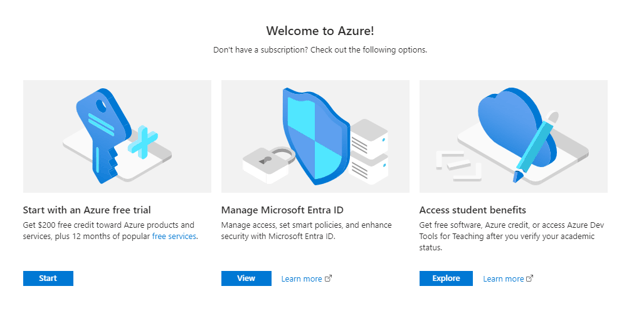
Start with an Azure free trial.
Before proceeding with Azure Synapse, you must create a Data Lake Storage Gen2 account to store and manage your data.
Start by navigating to the Azure portal and selecting "Create a resource." Choose "Storage account" and fill in the required details, such as the resource group, storage account name, and region.
Ensure that "Azure Blob Storage or Azure Data Lake Storage Gen2" is selected as the primary service, and configure other settings like performance and redundancy as per your use-case.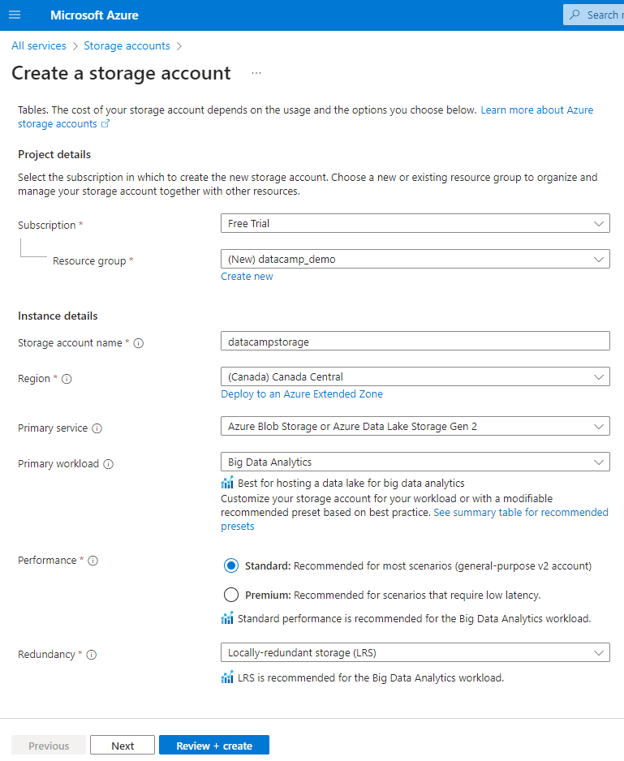
Create an Azure storage account.
After filling in the details, click "Review + create" to deploy the storage account. It can take several minutes before the storage deployment is complete.
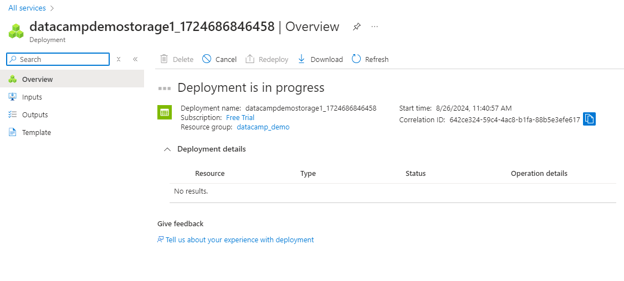
Storage account deployment in progress.
Once the deployment is complete, your new Data Lake Storage Gen2 account will be listed under the Storage Accounts section and will be ready for use with Azure Synapse.
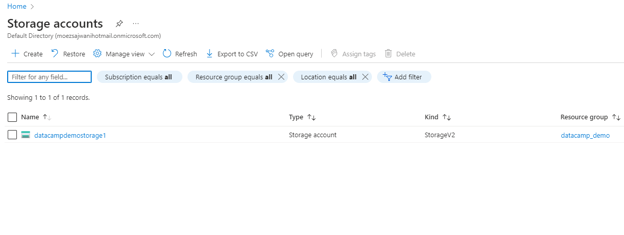
Active storage accounts in Azure.
Azure Synapse workspace is the foundational environment where you can set up, organize, and manage all the resources and services needed for data integration, analytics, and storage within Azure Synapse. It acts as the central hub for configuring and accessing various tools and data assets in your Synapse project.
Create Azure Synapse workspace by clicking the “Create Synapse Workspace” button.
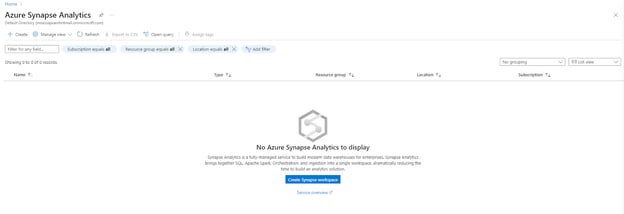
Creating Synapse workspace.
In the next step, you'll need to fill out the form to create your Azure Synapse workspace.
Start by selecting your subscription and resource group, then enter a name for your workspace and choose the appropriate region.
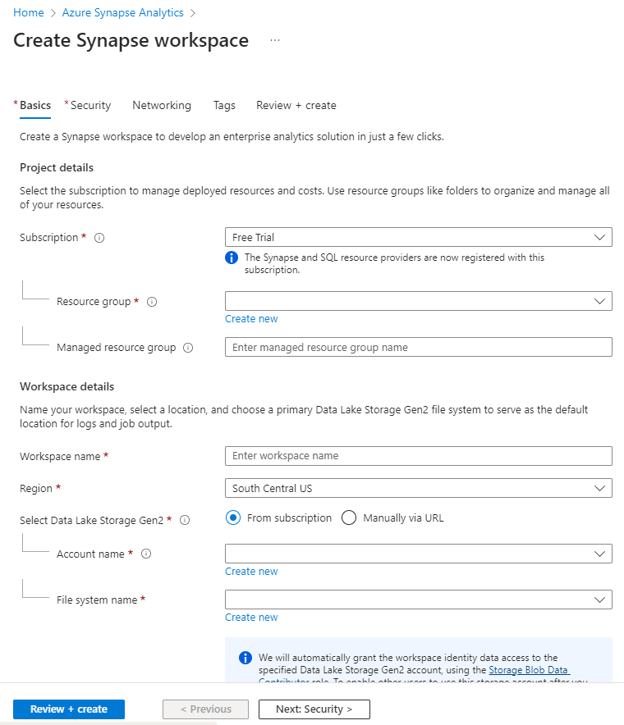
Creating a Synapse workspace - filling in details.
Review the details on the final tab before clicking the “Create” button.
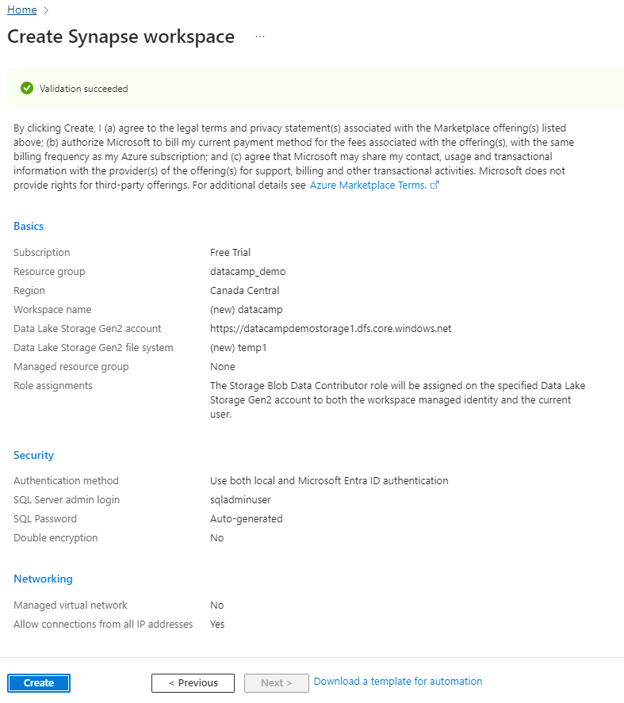
Validating the Synapse workspace.
It can take several minutes before the Azure Synapse workspace is deployed.
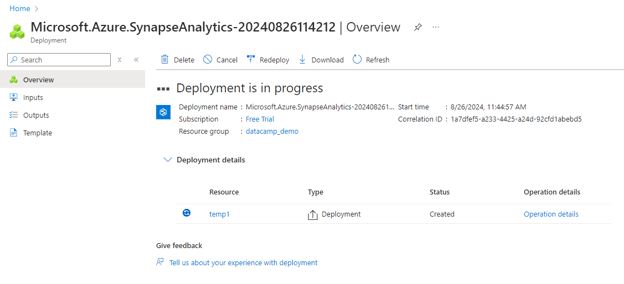
Azure Synapse Analytics deployment in progress.
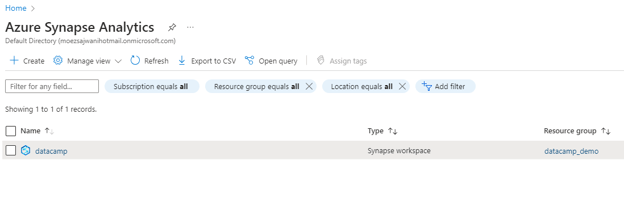
Azure Synapse Analytics workspace “datacamp” created.
Once the workspace is deployed, click on its name to open it.
Azure Synapse Studio is the web-based interface for managing and interacting with your Azure Synapse workspace. It provides a unified workspace where you can perform data integration, big data analytics, and data warehousing tasks all in one place.
Synapse Studio is essential because it lets you quickly develop, manage, and monitor your data pipelines, SQL scripts, Spark jobs, and more without switching between different tools or environments.
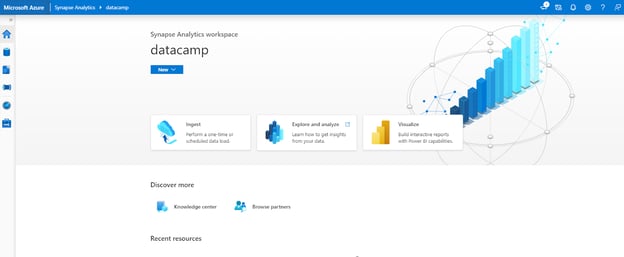
Synapse Studio.
In Synapse Studio, you can import the data from several different sources. You can import it from a Gen2 storage account linked to the Synapse workspace (see step 2 above), from a SQL server database, or external sources.
For this tutorial, we will use one of the sample datasets, “Bing COVID-19 Data,” available in the Synapse Gallery.
To import, click on “Dataset” on the left-hand side navigation menu and then click on “+ sign” → "Gallery."
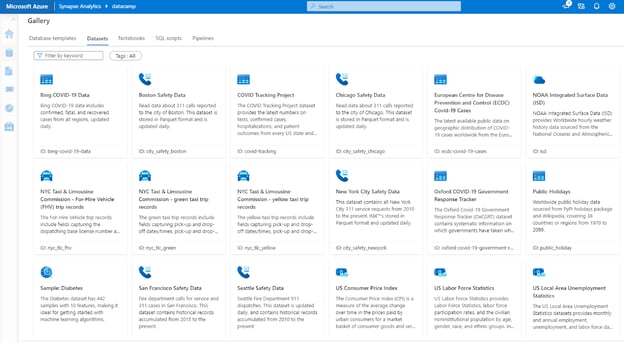
Dataset Gallery in Synapse Studio.
You can review the metadata and sample rows from the data before clicking the “Add dataset” button to import this data.
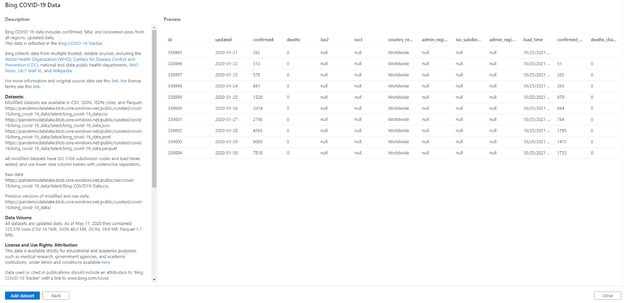
Review dataset in Synapse Studio.
Once the import is successful, you will be able to see the dataset under “Data.”
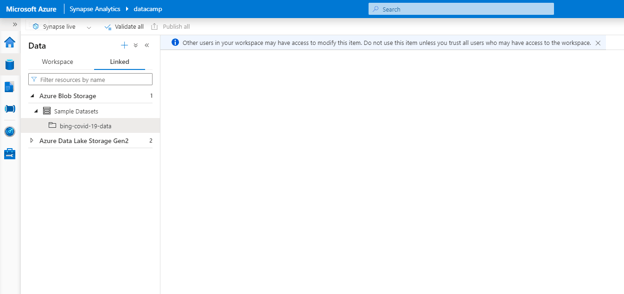
Data tab in Synapse Studio.
Azure Synapse Studio provides a user-friendly interface for writing and running queries. You can use SQL to perform a wide range of data analysis tasks, from simple data retrieval to more complex analytics.
Synapse Studio also allows you to save and manage your queries and view and handle the results of your queries.
You can analyze this dataset using an SQL script or by creating a Notebook. In a Notebook, you can load the dataset as a Spark DataFrame and use Spark for data manipulation and analysis.
To run SQL queries on this dataset, click the three dots next to the dataset name.
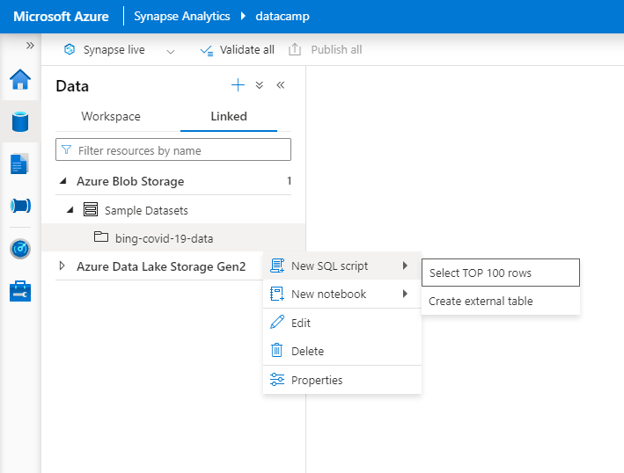
Analyzing Data in Synapse Studio with SQL.
Clicking “Select TOP 100 rows” will open an SQL editor where you can write SQL queries and execute them to view the results.
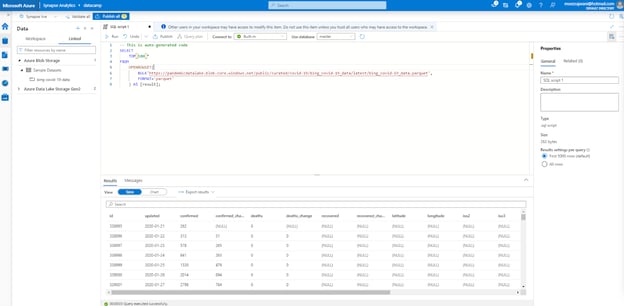
SQL editor in Synapse Studio.
If you want to visualize the output instead of a table view, click “Chart” under “Results”.
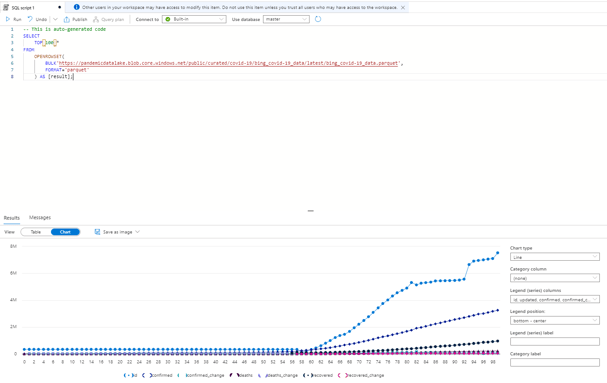
Viewing query results as Chart in Synapse Studio.
Those changes are initially saved as drafts when you create or modify a SQL script. Publishing the script by clicking the “Publish” button on top commits those changes, ensuring the latest version is stored in the workspace.
Publishing an SQL script in Synapse Studio means saving your script to the Synapse workspace, making it available for future use, collaboration, and version control.
Let’s run an SQL query on this dataset to analyze the daily increase in COVID-19 confirmed cases worldwide.
The query retrieves data from the “Bing COVID-19 dataset”, calculates the number of new cases reported each day by comparing the current day's confirmed cases to the previous day's count, and orders the results by date.
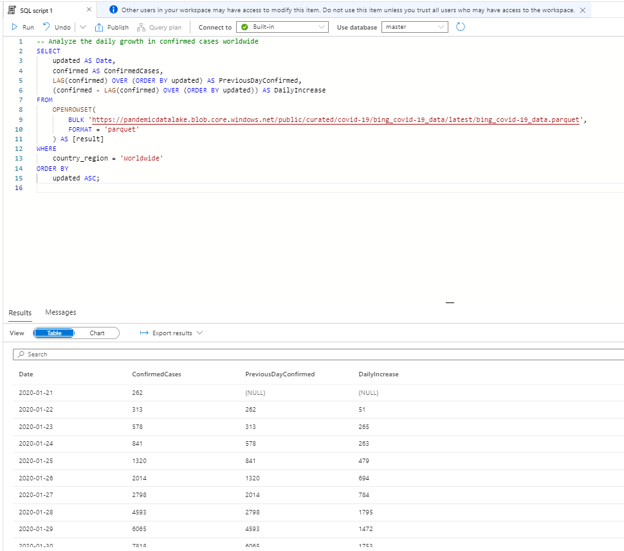
SQL query in Synapse Studio SQL editor.
In Synapse Studio, you can analyze data using notebooks, which provide an interactive environment for running code, visualizing results, and conducting data analysis.
Notebooks in Synapse Studio support multiple languages, including PySpark, which is particularly powerful for big data processing.
To run a Notebook in Synapse Studio, attach it to an Apache Spark pool, which provides the necessary distributed computing resources to process large datasets efficiently.
An Apache Spark pool is a collection of compute nodes that are dynamically allocated to run your Spark jobs. If you don't already have a Spark pool, you can create one by navigating to the "Manage pools" section in Synapse Studio, where you can specify the number of nodes, their size, and other configurations.
Once your Spark pool is set up and attached to the notebook, you can execute code cells within the notebook to load, manipulate, and analyze data, as shown in the screenshot below.
This setup enables you to leverage the full power of Spark for large-scale data analysis directly within Azure Synapse.
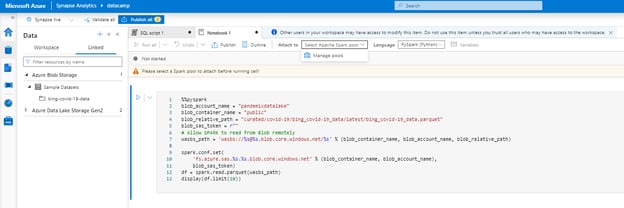
Analyze data using Notebooks in Synapse Studio.
Azure Synapse integrates seamlessly with other Azure services, enabling you to build comprehensive data analytics solutions.
Some key integrations include:
To get the most out of Azure Synapse, it's important to follow best practices, such as:
Azure Synapse Analytics stands as a powerful and versatile solution for organizations seeking to harness the full potential of their data. By unifying data integration, big data analytics, and enterprise data warehousing into a single, comprehensive platform, Azure Synapse empowers businesses to streamline their data operations and extract valuable insights with unprecedented efficiency.
The platform's flexibility, scalability, and seamless integration with other Azure services make it ideal for various data-driven tasks, from real-time analytics to complex machine learning projects. As data grows in volume and importance, Azure Synapse positions itself as a crucial tool for organizations looking to stay competitive in an increasingly data-centric world.
By adopting Azure Synapse, businesses can optimize their current data processes and pave the way for future innovations in data analytics. As we move forward, the ability to quickly and effectively turn data into actionable insights will be a key differentiator for successful organizations. Azure Synapse provides the robust foundation needed to meet this challenge head-on, enabling businesses to unlock new opportunities and drive growth through the power of data.
Want to empower your data science career? Check out The 13 Best Azure Certifications For 2024 at Datacamp.
Azure Synapse offers comprehensive data governance and compliance features through its integration with Azure Purview. This allows organizations to classify, label, and protect sensitive data within their Synapse environment. It also supports various compliance standards such as GDPR, HIPAA, and ISO, ensuring that organizations can manage and audit their data effectively while meeting regulatory requirements.
Yes, Azure Synapse can be used for IoT data analytics. By integrating with Azure IoT Hub and Azure Stream Analytics, Synapse enables the ingestion and processing of large volumes of IoT data in real time. This capability is essential for applications that require continuous monitoring and analysis of IoT sensor data, such as predictive maintenance, smart manufacturing, and connected devices.
Azure Synapse ensures high availability and disaster recovery through its integration with Azure's global infrastructure. It provides features like geo-redundancy and automated backups, allowing organizations to replicate their Synapse environment across multiple regions. In the event of a failure, Synapse can automatically fail over to a secondary region, minimizing downtime and data loss.
Key performance optimization strategies in Azure Synapse include using materialized views, the result set caching, and query optimization techniques such as distribution keys and partitioning. Additionally, leveraging Synapse's built-in workload management tools can help balance resource allocation and prioritize critical tasks, enhancing performance.
Azure Synapse supports hybrid cloud environments by enabling seamless data integration between on-premises systems and the cloud. With features like Azure Synapse Link for SQL and Cosmos DB, organizations can perform near-real-time analytics on their on-premises data without complex ETL processes. This allows for a hybrid approach where critical data remains on-premises while leveraging cloud analytics for scalability and advanced processing.

blogg
 Gus Frazer• 14 min

blogg
 Josep Ferrer• 14 min

Handledning
 Florin Angelescu• 8 min
Learn more about Azure and data engineering with these courses!
Kurs
Lär dig kraften i Microsoft Azure och molnbaserad programvara för att förbättra dina färdigheter inom data engineering.
Kurs
Bemästra Azure Management och Governance med vår omfattande kurs, perfekt för dataexperter som vill ha molnkompetens.
Kurs
Den här kursen går djupare in i Azures ryggrad med ämnen som containers, virtuella datorer och mycket mer.





As we continue to amass large volumes of data from various sources, the real challenge lies in transforming this data into actionable insights that drive decision-making and growth. It’s not just about data collection; it’s about finding the most efficient way to manage, analyze, and leverage this data at scale.
As organizations explore solutions to these challenges, several platforms rise to the forefront. In 2024, Databricks, Azure Synapse, Google BigQuery, and Snowflake are among the top choices in the industry.
Azure Synapse Analytics has distinguished itself from other players by offering a comprehensive platform comprising data integration, big data analytics, and enterprise data warehousing into a unified solution.
In this blog, we’ll explore why Azure Synapse has become a compelling choice in 2024 for organizations aiming to streamline their data operations and how you can leverage it to solve some of your organization's complex data analysis challenges.
What is Azure Synapse?
Azure Synapse is a powerful, end-to-end analytics service from Microsoft that unifies data integration, big data, and data warehousing into a single cohesive platform.
Unlike traditional analytics services that often require multiple tools for different stages of data processing, Azure Synapse brings these capabilities together, enabling organizations to streamline their data workflows.
Azure Synapse Analytics architecture diagram. Image source: Microsoft Learn
Whether ingesting large datasets, preparing data for analysis, or running complex queries, Azure Synapse provides a unified experience that simplifies the entire process.
One of Azure Synapse's key strengths is its flexibility. Users can query data on their terms, choosing between serverless options for on-demand queries or dedicated resources for more intensive workloads. This adaptability allows businesses to tailor their analytics environment to meet specific needs, whether scaling up for high-performance scenarios or optimizing costs for less demanding tasks.
Azure Synapse integrates seamlessly with other Azure services, such as Power BI and Azure Machine Learning, enabling a holistic approach to data analytics and fostering collaboration across data teams.
If you want to learn about the power of Microsoft Azure and cloud computing and how they can help companies improve their data analytics, data science, and engineering workload, check out this amazing free Introduction to Azure course on Datacamp.
Features of Azure Synapse