Chuyển đến nội dung chính

What Is Claude Design? Anthropic’s AI Design Tool Explained

Learn what Claude Design is, how it works, what you can build with it, and where Anthropic's new design workspace fits into real product, marketing, and prototyping workflows.
28 thg 4, 2026

On April 17, 2026, Anthropic Labs released Claude Design, a research-preview workspace that gives Claude a visual canvas. Instead of staying in a chat window, you describe what you want, review a first version, then refine it through chat, inline comments, direct edits, and adjustment sliders Claude generates for the layout.

That sounds close to the usual prompt-to-design story, but the more useful question is what happens after the first draft. Claude Design has its own export menu, a design-system setup path, and a handoff to Claude Code, while Anthropic still treats it as a preview with limits.

In this article, I will cover what Claude Design is, how the workflow works, what it can build, how it differs from Claude Code, and what to watch before using it with a team.

To get started with the ins and outs of Anthropic’s models, I recommend taking our Introduction to Claude Models course.

What Is Claude Design?

Claude Design is a new product from Anthropic Labs, the team inside Anthropic that works on experimental Claude products. The launch post describes it as a workspace for visual work such as designs, prototypes, slides, and one-pagers. It uses Claude Opus 4.7, which Anthropic frames around vision work and agentic coding in the announcement.

It is not a feature buried inside the regular chat interface. It lives at its own URL, has its own canvas, has its own export options, and its usage is metered separately. It is also in research preview.

The product is aimed at both designers (more exploration) and at people without a design background (a way to turn an idea into something visual). One thing to flag early: it is not meant to stand in for Figma or Canva. Anthropic describes it as a complement to those tools and includes a Canva handoff.

Master AI for Business

Learn how to extract business value from AI and LLMs.

Advance My Career

How Does Claude Design Work?

Two panes: chat on the left, live canvas on the right. You write a prompt, Claude generates the design on the canvas, and you keep refining. Anthropic describes the loop in five steps: 

  1. Create a project with a relevant context
  2. Describe what you want
  3. Review the output
  4. Iterate through chat and comments
  5. Export or share

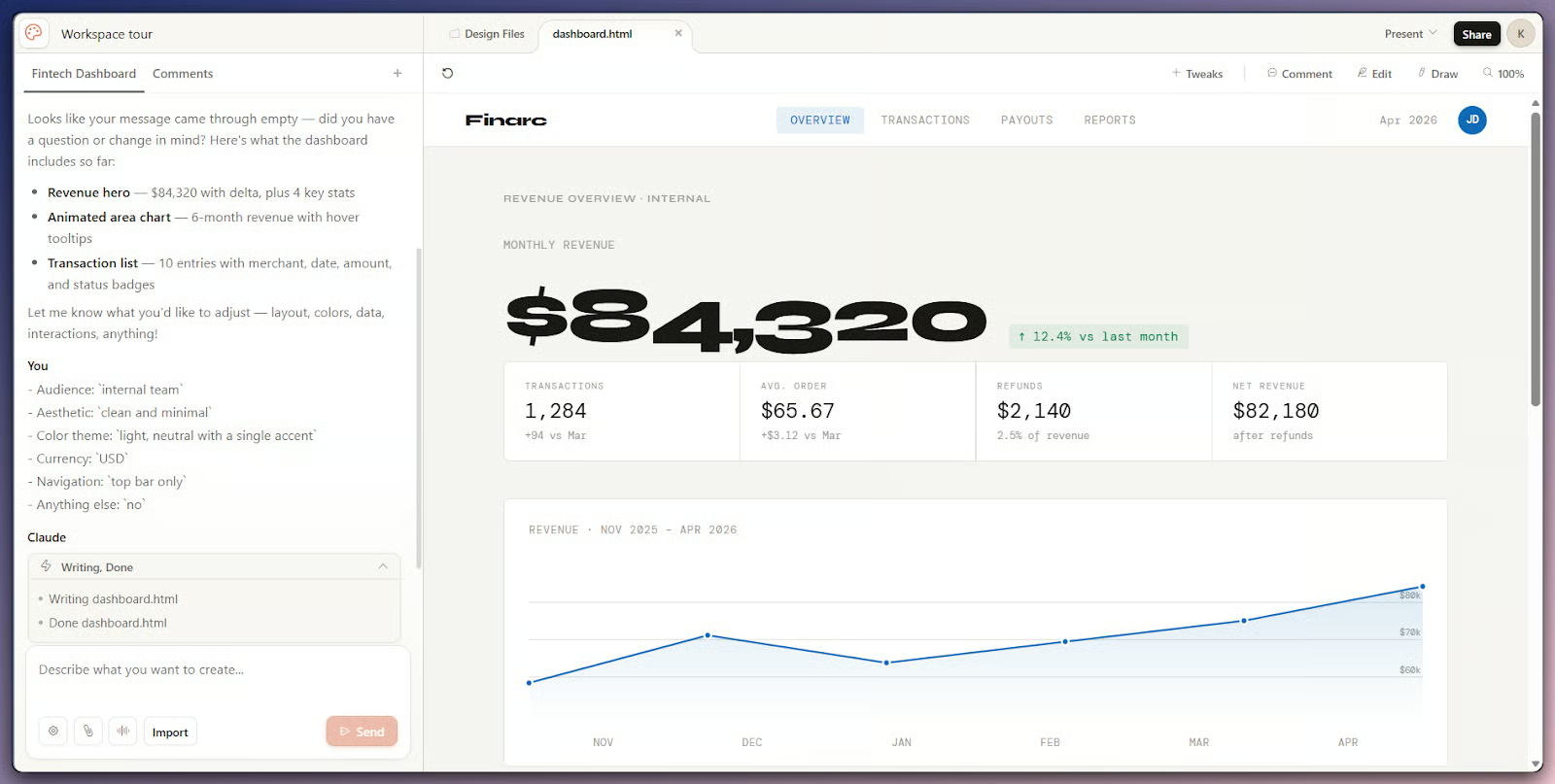
What stood out to me is the clarifying-question behavior. When a prompt is vague, Claude may pause to ask what it still needs instead of drawing the first thing it infers.

Claude Design two-pane interface with chat conversation on the left and a generated dashboard design on the canvas on the right.

Chat panel left, generated canvas right. Image by Author.

Now let's look at how each part of that loop feels in practice.

Setting up a project and adding context

New projects inherit the published organization design system, so brand assets should not need to be re-uploaded once that setup exists. 

The setup guide recommends feeding Claude real context up front: screenshots, mockups, slide decks with a style you like, and a code repository if one exists. Claude may ask clarifying questions before drawing if it needs more information, which surfaces details you forgot to specify.

Good prompts cover four things: goal, layout, content, and audience. Example prompts include "Create a dashboard showing monthly revenue with filters for region and product line" and "Design a mobile app onboarding flow with 4 screens."

Iterating on the canvas

Several paths push the design forward after the first draft. 

  • Chat handles broad changes (darker theme, two or three layout alternatives)
  • Inline comments target a specific element without explaining where it sits
  • Direct text edits fix copy without prompting
  • Custom adjustment sliders handle spacing, color, and layout tweaks live

One day-one quirk: comments occasionally disappear before Claude reads them. Pasting the text into chat is the documented workaround. Annoying, but better to know before you rely on comments for a review.

Versions, sharing, and export

To keep the current draft and try something different, Anthropic suggests telling Claude something like "save what we have and try a completely different approach." 

Sharing is organization-scoped, with private, view-only, comment, and edit access; edit access lets a teammate modify the design and chat with Claude in the same conversation. 

The Export menu sits in the upper right and covers common file formats, a Canva handoff, and a packaged handoff to Claude Code.

What Can You Build with Claude Design?

The launch announcement names six output types from pre-release customer use. Here is each one with a short note:

  • Realistic prototypes: turning static mockups into interactive prototypes you can share and user-test without code review or pull requests.
  • Product wireframes and mockups: feature flows that you can either hand off to Claude Code or pass to a designer for polish.
  • Design explorations: several directions tried quickly, for designers who normally have to ration exploration.
  • Pitch decks and presentations: rough outline to on-brand deck, with PPTX export or a send-to-Canva option.
  • Marketing collateral: landing pages, social assets, and campaign visuals.
  • Frontier design: code-powered prototypes with voice, video, shaders, 3D, or built-in AI. This is the most experimental of the six, and I will come back to its open questions in the limits section.

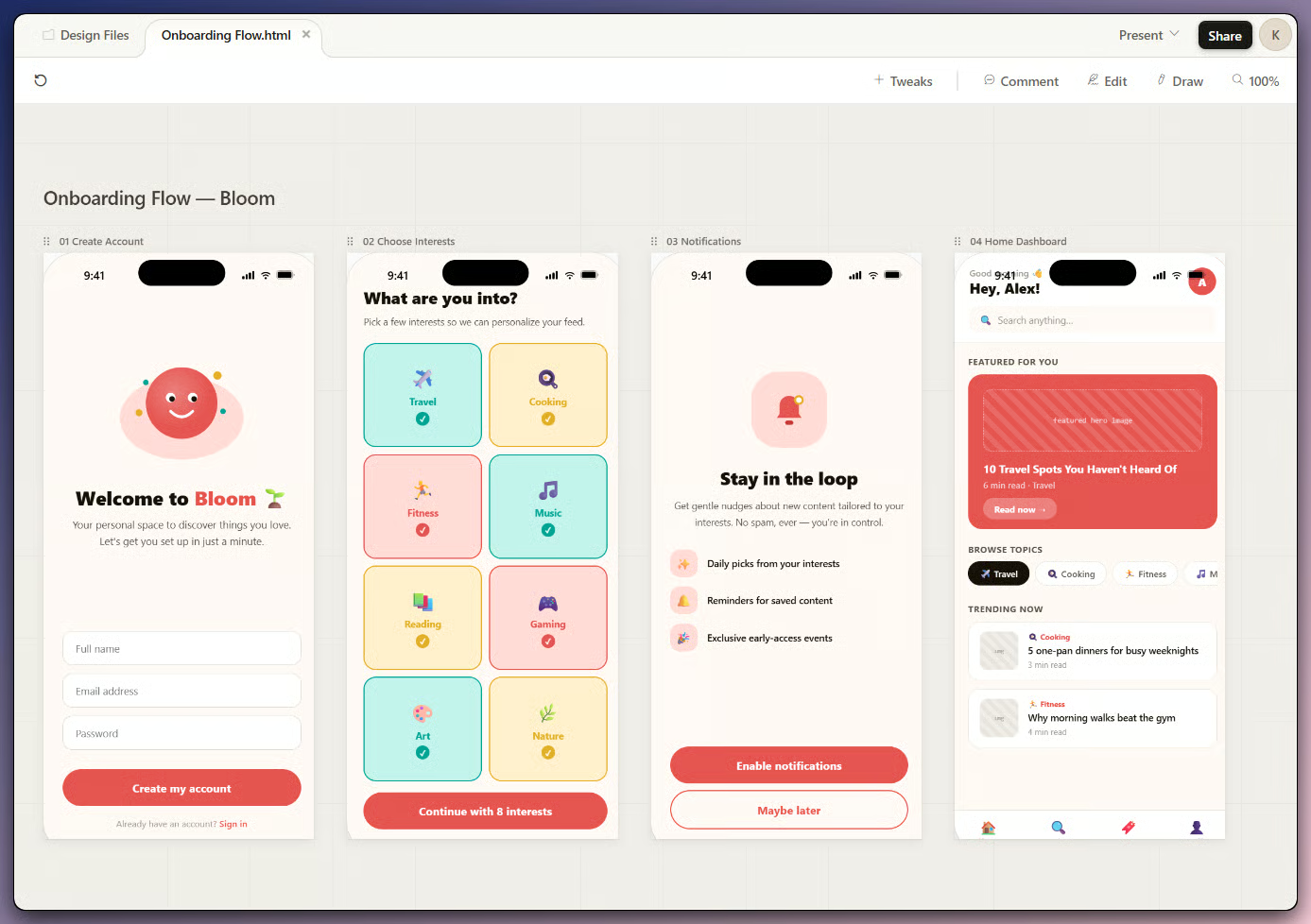
Claude Design canvas showing a finished mobile onboarding prototype with multiple screens, navigation arrows between screens, and a brand-aware color palette.

Generated mobile onboarding prototype on canvas. Image by Author.

The admin guide adds microsites and landing pages as a separate category. Anthropic's launch testimonials focus on speed and on going from idea to prototype inside a single meeting; treat those as illustrative rather than universal, since the same docs flag rough edges in the more experimental outputs.

How Claude Design Uses Brand and Design Systems

This part matters because it changes the default output. Anthropic warns that without a design system, teams get "functional but generic" output. With one published, new projects pick up your colors, typography, and components. The catch is that the extracted system is only as good as the source assets you upload, so messy inputs will give a messy starting system.

Now let's look at how the system gets built.

How the system is created

Setup happens once per organization. The design system article walks through four moves: create your organization, upload brand and product assets, review what Claude generated, and publish it for the team. Source material can be a code repository, existing design files, slide decks reflecting your visual identity, or individual assets like logos and palette files. One source is enough to start.

Anthropic says the generated system typically covers a color palette, a typography scale, components (buttons, cards, navigation), and layout patterns. Test it with prompts like "Create a landing page for [your product]" to see how the brand reads in practice.

Design system review with extracted tokens. Video by Author.

Publishing, multiple systems, and updates

Once you are happy, flip the "Published" toggle so new projects in that organization pick it up by default. Teams can hold more than one system for sub-brands or separate product lines. To update one, the design system article points users to the "Remix" button, which opens a chat where Claude can change parts of it.

The admin guide is clear about the order: turning on Claude Design without a published system gives "functional but generic" output, which is why the recommended rollout puts design system setup first.

What Kind of Input Does Claude Design Accept?

You are not limited to a one-line prompt. Claude Design accepts several input types that combine well, and a more real context tends to produce a better first draft.

Inputs documented today include:

  • Plain text prompts in the chat panel.
  • Screenshots, images, or existing assets, including slide decks and documents with a style you want to copy.
  • Documents in DOCX, PPTX, and XLSX formats, named in the launch post.
  • Codebases, either by linking a code repository or attaching a local folder through the import flow.
  • Web captures: you can capture elements from an existing website, so Claude can mirror real interface patterns more closely.

Two things often get reported wrong. Anthropic mentions "existing design files" but does not list native design tool formats, and there is no current claim of native Figma import or export; the export menu does not include a .fig file. If your workflow depends on going back and forth with Figma, that is worth checking against the live product before you commit.

If the first draft misses the mark, come back to that four-part checklist from earlier: goal, layout, content, and audience.

Claude Design vs. Claude Code

They share the Claude name, the underlying model, and a handoff bridge, but they are not the same tool. Mixing them up is one of the more common confusions I have seen since launch. The names sound similar; the products do different jobs.

Let's look at the actual difference.

What is each tool for?

Claude Design is a web product for creating and refining visual outputs on a canvas: prototypes, decks, microsites, and marketing pages. It can read a code repository to understand your brand, but it does not edit your codebase or run commands.

Claude Code is an agentic coding tool. The official overview describes it as a tool that reads your codebase, edits files, and runs commands inside your existing dev workflow. It runs in your terminal, IDE, desktop app, or browser, and its job is to work on code. Different jobs, same process.

How do Claude Design and Claude Code connect?

When a project is ready to build, the Export menu has a handoff to Claude Code, either to a local coding agent or to Claude Code Web. Anthropic says Claude packages the design intent into a bundle that the receiving agent picks up with a single instruction. The exact click path appears in the walkthrough below.

The right mental model is a sequence: idea, prototype, code. The two products also have separate usage limits, which I will cover later under access.

Who Is Claude Design For?

Anthropic splits the audience into two: experienced designers who usually have to ration exploration time, and "everyone else" who needs to produce visual work without a design background. Its rollout guidance also names UX researchers, product managers, marketers, and adjacent functions.

Reading the source material and customer quotes, the product seems built for designers testing directions early, product managers sketching feature flows, and founders or account executives who need a deck without spending a weekend in slides. 

It also fits marketers working on landing pages, social assets, and campaign visuals as starting points, plus non-designers who need to communicate an idea visually without picking up Figma.

Wide, but not "everyone equally." Designers working against strict component libraries and exact specs will still need a real design tool for later work. The fit is clearer for teams that already have a brand system in place and care about first drafts.

Where Does Claude Design Fit?

The product sits in the early-to-mid part of the design workflow, where first drafts matter more than final polish. The use cases below come from Anthropic's positioning, the official tutorials, and the launch testimonials.

The patterns that show up most are early prototype exploration, internal demos that need to feel real but do not need to become code, and decks for founders, sales teams, or account executives. 

The same logic applies to campaign concepts, landing page first drafts, brand-aware mockups, and handoff prep, where Anthropic says a finished prototype can be bundled to Claude Code or Claude Code Web for implementation.

The common thread across most of these is the path from idea to a first draft you can show. The product does not try to solve the entire design process. Not every case on that list will land on the first try, either, which is why most of the early wins people share look like two or three iterations, not one.

Testing Claude Design In Practice

Reading about the workflow only goes so far. Here is a short pass through the full loop, using a prompt you can reproduce if your account has access. If you already understand the flow, skip to the export step; that is the part most people confuse with Claude Code.

Open claude.ai/design, click New project, name it Workspace tour, and pick High fidelity. Paste this prompt into the chat panel:

Create a dashboard for a small fintech app. 
It should show monthly revenue at the top, a chart of revenue over the last six months in the middle, and a list of recent transactions below. 
Keep it clean and readable. Single page, no sidebar.

Claude may ask a few clarifying questions first: audience, aesthetic, currency, and navigation pattern. Simple answers work fine (internal team, clean and minimal, USD, top bar only). The canvas should then fill in after a short wait.

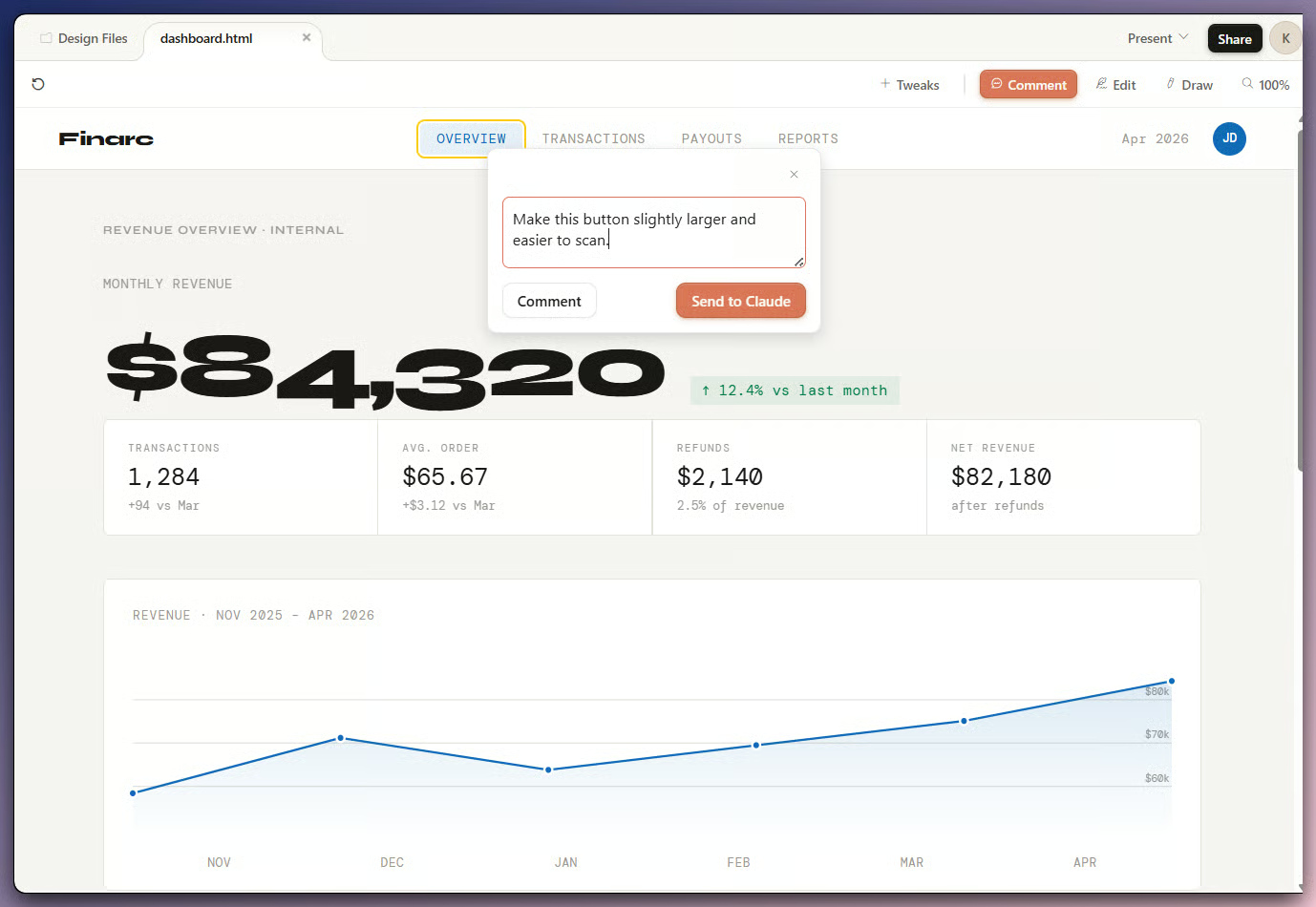
Next, iterate. Switch the canvas to Comment mode, click the primary call-to-action button, and type a one-line request like "Increase the horizontal padding on this button." This is the inline comment behavior I described earlier.

Inline comment pinned on a button inside a Claude Design canvas with the comment popover open and showing a request to adjust spacing.

Inline comment pinned to canvas element. Image by Author.

When the design is where you want it, click Export and pick Hand off to Claude Code. This is the handoff path I mentioned earlier.

Export menu open showing handoff options. Video by Author.

If you keep the example narrow, the point is not the clock time. It is seeing where the prompt, comments, export menu, and handoff sit in one flow. The first run will have issues; a couple of iterations are usually enough to see whether the tool matches how you work.

Limitations of Claude Design and Open Questions

As I mentioned earlier, Claude Design is a research preview, so expect movement. Anthropic documents dropped comments, compact-view save errors, large-codebase lag, and chat upstream errors. The fixes are plain: paste dropped comments into chat, switch to full view, link a subdirectory instead of a whole monorepo, or start a new chat tab.

For organizations, the limits are more about governance. As currently documented, Claude Design has no audit logs or admin usage reporting yet, runs only on the web, and has weekly allowances that may change after the beta period. Anthropic also says uploaded assets are stored persistently and that Claude Design does not currently support data residency requirements.

The design-system point from earlier belongs here too: without that setup, the output stays generic. The frontier design category I flagged earlier sits in a similar spot: voice, video, shaders, and 3D outputs are real, but Anthropic lists them as experimental rather than finished. 

The open questions are still the same ones: how far frontier design goes, how much hands-on designer control arrives, and whether the product ever connects more deeply with established design tools.

How to Access Claude Design

Access is straightforward until you get to team controls and usage.

Claude Design lives at claude.ai/design. It is web-only and available on Pro, Max, Team, and Enterprise plans, with no Free access. Enterprise has it off by default; an admin turns it on under Organization Settings, then Capabilities, in the Anthropic Labs section. As I covered earlier, the rollout order matters: design system first, broader access after.

The launch post calls Claude Design "included" with subscription limits, but the pricing article is the more current source.

The pricing article says usage is metered separately from chat and Claude Code. Allowances reset weekly and sit with each user, not in a shared team pool. For usage-based Enterprise customers, Anthropic describes standard API-rate billing after a one-time onboarding credit of approximately 20 typical prompts, which expires July 17. 

Conclusion

The prompt-to-design framing holds up, but only if you treat the first result as a draft. Without brand context, Anthropic says the output stays generic. With a published design system, Claude Design has a clearer job: turn an idea into something visual enough to review, share, or hand off.

The handoff to Claude Code feels like the main workflow point. The design is not the end state; it can become a bundle that carries design intent into a coding tool. That is different from treating Claude Design as another canvas for static mockups.

One finding that matters for teams is less exciting but more practical: the admin story is still early. No audit logs, no admin usage reporting yet, no data residency support, and persistent uploaded assets are not small details if your team works with brand or product material.

So the honest read is narrow. Claude Design makes sense for first drafts, design exploration, early decks, landing page ideas, and handoff prep. For late-stage design work, keep the preview label in mind and keep a real design process around it.

For a broader introduction to AI and what you can do with it, I recommend enrolling in our AI Fundamentals skill track.

Claude Design FAQs

What is Claude Design?

Claude Design is Anthropic's visual workspace at claude.ai/design, where Claude turns prompts and context into canvas drafts you can share, export, or hand off.

How is Claude Design different from Claude Code?

Claude Design is for shaping visual drafts. Claude Code is for working on code. The overlap is the handoff path when a prototype is ready to build.

Who can access Claude Design today?

Pro, Max, Team, and Enterprise subscribers. Free users don't have access, and Enterprise admins must turn it on before teams can use it.

Does Claude Design use my brand system?

Yes, if the organization has a published design system. Without that setup, Anthropic says teams get "functional but generic" output.

Is Claude Design a finished product?

No. Anthropic calls it a research preview, and the docs still list issues like dropped comments, save errors, and governance gaps.


Khalid Abdelaty's photo
Author
Khalid Abdelaty
LinkedIn

I’m a data engineer and community builder who works across data pipelines, cloud, and AI tooling while writing practical, high-impact tutorials for DataCamp and emerging developers.

Chủ đề

Top AI Courses

Tracks

Cơ bản về Trí tuệ Nhân tạo

10 giờ
Khám phá những kiến thức cơ bản về Trí tuệ Nhân tạo (AI), học cách ứng dụng AI một cách hiệu quả trong công việc, và tìm hiểu sâu về các mô hình như ChatGPT để nắm bắt xu hướng phát triển của lĩnh vực AI.
Xem chi tiếtRight Arrow
Bắt đầu khóa học
Xem thêmRight Arrow
Có liên quan

blogs

Anthropic Computer Use: Automate Your Desktop With Claude 3.5

Discover Anthropic’s new computer use feature and let Claude manage your workspace and automate your tasks. Simply type the prompt, and Claude will handle the rest.
Abid Ali Awan's photo

Abid Ali Awan

9 phút

blogs

Claude Artifacts 101: Types, Use Cases, Sharing, and Remixing

Explore Claude Artifacts, a new way to work with AI-generated content. Create, edit, and share interactive documents, code snippets, and website designs directly in Claude.
Ryan Ong's photo

Ryan Ong

8 phút

blogs

Claude Code vs. Antigravity: Which AI Coding Tool Should You Use?

Learn how Claude Code and Antigravity work, how they compare on real tasks, and which one fits your workflow and budget.
Khalid Abdelaty's photo

Khalid Abdelaty

15 phút

Tutorials

Imagine with Claude: A Guide With Practical Examples

Learn how Anthropic's Imagine with Claude introduces a new paradigm for AI-assisted software development, generating functionality on the fly.
François Aubry's photo

François Aubry

Tutorials

Claude Cowork Tutorial: How to Use Anthropic's AI Desktop Agent

Learn what Claude Cowork is and how to use for file organization, document generation, and browser automation. Hands-on tutorial with real examples and limitations.
Bex Tuychiev's photo

Bex Tuychiev

Tutorials

Claude in Excel: Anthropic's AI Excel Assistant

A beginner-friendly guide to using Claude inside Excel. You’ll learn what it actually does, where it's most helpful, and how to use it safely in real spreadsheets without breaking anything.
Laiba Siddiqui's photo

Laiba Siddiqui

Xem thêmXem thêm