

设置 Gemini 2.0 Pro
目前,Gemini 2.0 Pro 只能通过 Google AI Studio 访问,需使用 Google 账号登录。开始之前,请按以下步骤操作:
1. 登录 Google AI Studio
访问Google AI Studio 网站,并使用您的 Google 账号登录。登录后,您将被重定向至 Google AI Studio 仪表盘。
2. 生成 API 密钥
- 在仪表盘左上角找到并点击“Get API Key”按钮。
- 接着,点击“Create API Key”按钮以生成您的第一个 API 密钥。
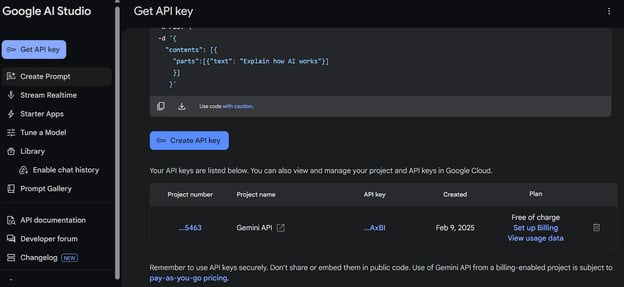
3. 设置环境变量
创建名为 GEMINI_API_KEY 的环境变量,并将其值设为您刚生成的 API 密钥。
4. 安装所需的 Python 包
在终端运行以下命令来安装必要的 Python 包:
pip install google-genai
pip install gradio测试 Gemini 2.0 Pro 功能
现在,我们将使用 Gemini 的 Python 客户端来调用 Gemini 2.0 Pro 模型的多项功能,包括文本理解、图像处理、音频分析与文档理解。
此外,我们还将测试代码执行功能,它可以在云端 Python 内核中直接生成并运行代码。
1. 文本生成
我们会从环境变量加载 API 密钥,并据此初始化客户端。该客户端将作为访问各类模型与功能的接口。
接着,我们向模型提供一个问题,并生成流式响应。这意味着 token 一旦生成就会逐步在终端显示,提供实时反馈。
import os
from google import genai
API_KEY = os.environ.get("GEMINI_API_KEY")
client = genai.Client(api_key=API_KEY)
response = client.models.generate_content_stream(
model="gemini-2.0-pro-exp-02-05",
contents=["Explain how Stock Market works"])
for chunk in response:
print(chunk.text, end="")模型生成了详尽且准确的回答。
The stock market is a complex system, but here's a breakdown of how it works in a simplified way, covering the key concepts:
**1. What are Stocks (Shares)?**
* **Ownership:** Stocks, also called shares or equities, represent ownership in a company. When you buy a stock, you're buying a tiny piece of that company.
* **Claim on Assets and Earnings:** As a shareholder, you have a claim on the company's assets and earnings. You're entitled to a portion of the company's profits (often distributed as dividends, though not always) and, in theory, a share of the company's value if it were to be liquidated.
* **Voting Rights (Sometimes):** Many stocks (but not all) come with voting rights, allowing you to have a say in certain company decisions (like electing the board of directors).
**2. Why Companies Issue Stock (Go Public)?**2. 图像理解
在图像理解部分,我们会用 Python 的 Pillow 库加载图像,并将其加入 contents 参数中。contents 同时包含关于图像的问题与图像对象本身。
from google import genai
from google.genai import types
import PIL.Image
image = PIL.Image.open('image.png')
response = client.models.generate_content_stream(
model="gemini-2.0-pro-exp-02-05",
contents=["Explain the image", image])
for chunk in response:
print(chunk.text, end="")模型对图像的理解非常准确,甚至涵盖了一些细节。
The image is a stylized, abstract graphic. It looks like a simplified diagram or node network, with a black background.
Here's a breakdown:
* **Nodes:** There are four circular nodes. Each node is a different color:
* Light Blue (Top Left)
* Light Green (Bottom Left)
* White (Top Right)
* Red (Bottom Right)
* **Node outline:** There is a thick outline around each of the circles.
* **Shadow:** Each circle appears to be casting a white shadow.3. 音频理解
Gemini 2.0 Pro 能直接理解音频,无需转换为文本。只需加载音频,并与相关问题一起传入 content 参数即可。
with open('audio.wav', 'rb') as f:
audio_bytes = f.read()
response = client.models.generate_content_stream(
model='gemini-2.0-pro-exp-02-05',
contents=[
'Describe this audio',
types.Part.from_bytes(
data=audio_bytes,
mime_type='audio/wav',
)
]
)
for chunk in response:
print(chunk.text, end="")同样,它给出了对音频高度准确的描述。
The audio appears to be a collection of short, spoken phrases or sentences. There is only one speaker, a male, and he seems to be reading or reciting these phrases, possibly as part of a list or exercise. The content focuses on food and related concepts like smell and temperature.4. 文档理解
无需使用Langchain 或任何RAG 框架,我们可以直接将文档提供给 Gemini 2.0 Pro,模型会进行解析与索引,然后我们即可围绕其内容提问。
我们加载了一个 PDF 文件,并基于其内容提出问题。就是这么简单。
from google import genai
from google.genai import types
import pathlib
prompt = "What the document is about"
response = client.models.generate_content_stream(
model="gemini-2.0-pro-exp-02-05",
contents=[
types.Part.from_bytes(
data=pathlib.Path('cv.pdf').read_bytes(),
mime_type='application/pdf',
),
prompt])
for chunk in response:
print(chunk.text, end="")最终,它精准地概述了该文档的主要内容。
Based on the OCR output, the document is **Abid Ali Awan's Curriculum Vitae (CV) or resume**. It details his:
* **Contact Information:** Name, address, email, and phone number.
* **Work Experience:** A chronological list of his professional roles, including job titles, companies, locations, dates of employment, and brief descriptions of his responsibilities. This includes experience in data science, freelancing, research, media, and network engineering.
* **Education:** His academic background, listing degrees earned, institutions attended, graduation dates, GPAs, and areas of specialization.
* **Gap Year:** Explaining the time that have taken for medical/personal issues.
* **Professional Skills:** A list of his technical and soft skills, categorized and rated5. 代码生成与执行
Gemini API 最出色的一点在于,您可以用同一个 API 既生成代码又执行代码。这意味着代码会被生成并测试;如果存在错误,模型会修复并重新运行,直到得到正确结果。
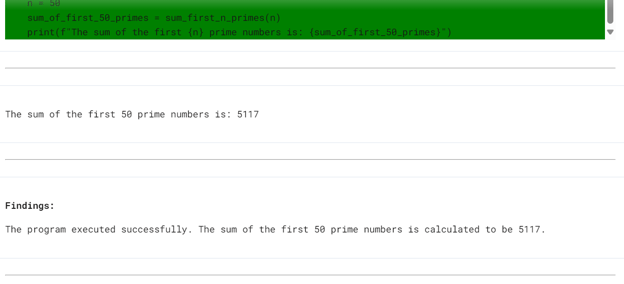
我们向 Gemini 2.0 Pro 提出了一个编程问题,并要求其在最后执行代码。查看 config 参数,您会发现我们已包含用于在云端运行代码的代码执行工具。
from google import genai
from google.genai import types
from IPython.display import Markdown, HTML, Image, display
response = client.models.generate_content(
model='gemini-2.0-pro-exp-02-05',
contents="""
Write a Python program to calculate the sum of the first 50 prime numbers. The program should:
- Use a function to check if a number is prime.
- Use another function to find and sum the first n prime numbers, where n is 50 in this case.
- Ensure the code is efficient and readable.
- Print the result clearly.
After writing the code, execute it to verify that the sum of the first 50 prime numbers is correct.
""",
config=types.GenerateContentConfig(
tools=[types.Tool(
code_execution=types.ToolCodeExecution
)]
)
)
def display_code_execution_result(response):
for part in response.candidates[0].content.parts:
if part.text is not None:
display(Markdown(part.text))
if part.executable_code is not None:
code_html = f'<pre style="background-color: green;">{part.executable_code.code}</pre>' # Change code color
display(HTML(code_html))
if part.code_execution_result is not None:
display(Markdown(part.code_execution_result.output))
if part.inline_data is not None:
display(Image(data=part.inline_data.data, format="png"))
display(Markdown("---"))
display_code_execution_result(response)模型先生成了代码,但首次运行失败。随后它修复问题并重新运行,最终成功输出结果。
构建 Gemini 2.0 Pro 应用
接下来,我们将构建一个集成先前全部测试功能的 Gradio Web 应用。任何人都可以通过上传文件并提出问题来测试图像、音频、文档,甚至执行代码。
app.py 的代码可在 GitHub 仓库Gemini-2-Pro-Chat 中找到。您可以查看其实现细节。
简而言之,应用包含:
- 多模态输入处理: 聊天机器人可处理文本、图像、音频与文档。
- 动态响应生成: 使用 Google GenAI 的
generate_content_stream方法进行流式输出。 - 代码执行: 用户可生成代码,并让聊天机器人执行并返回结果。
- 图像与音频处理: 图像会被调整大小并转换为 base64 以嵌入 HTML,音频文件则会被编码并通过音频播放器展示。
- 文档上传: PDF 文件会被处理并加入会话历史。
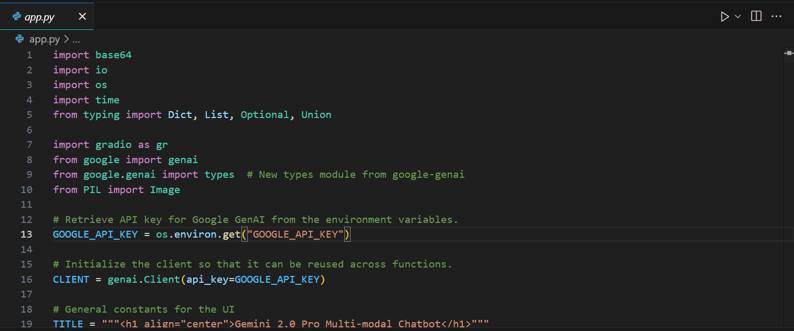
将远程仓库代码复制到本地项目后,即可在本地运行。
python app.py
测试 Gemini 2.0 Pro 应用
现在我们来测试该 Web 应用,确保一切正常运行。将通过前端界面逐一体验所有功能。
1. 输入您的问题并按 [Enter] 键。响应会立即开始生成,几秒钟内即可得到答案。
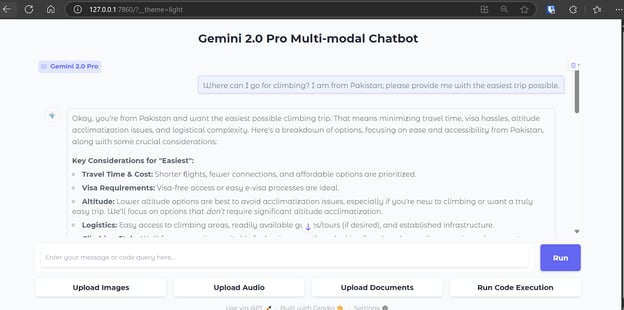
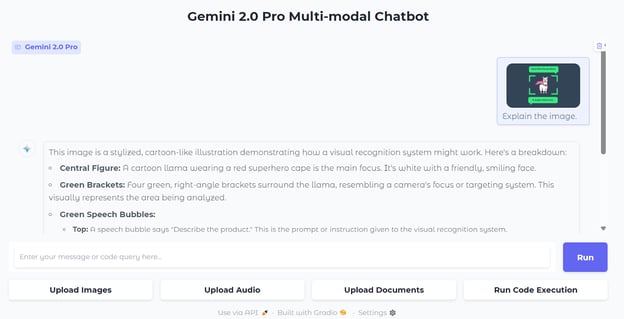
2. 要上传图像,点击“Upload Images”按钮并从目录中选择文件。随后就图像提出问题,Gemini 2.0 Pro 将开始生成准确且非常详细的回答。
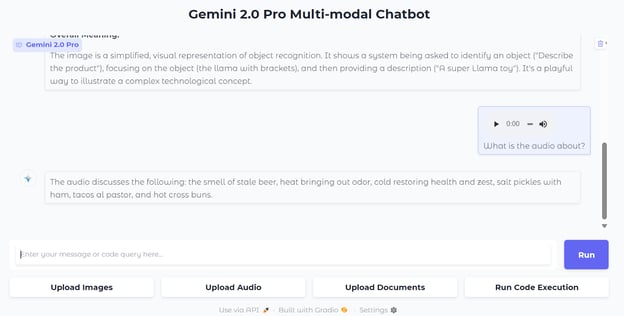
3. 点击“Upload Audio”按钮选择音频文件进行上传。随后就音频提出问题,模型将给出高度准确的回答。
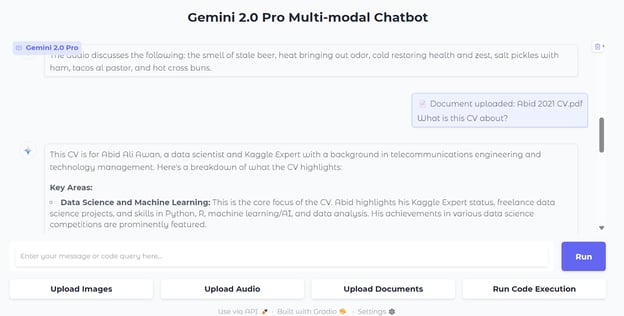
4. 您也可以上传文档。点击“Upload Documents”按钮选择 PDF 文件,然后就文档提出问题。
5. 代码执行稍有不同。为避免冲突,它不保留历史,意味着您需要在同一条提示中同时让其生成并执行代码。
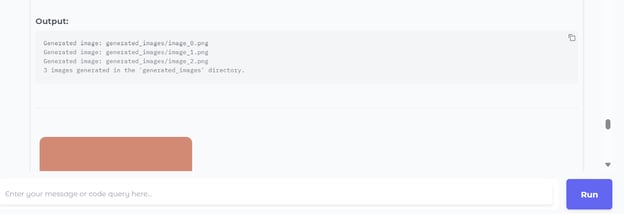
例如,我们让它生成并执行示例 Python 代码来创建 PNG 格式的随机图像,然后点击“Run Code Execution”按钮。
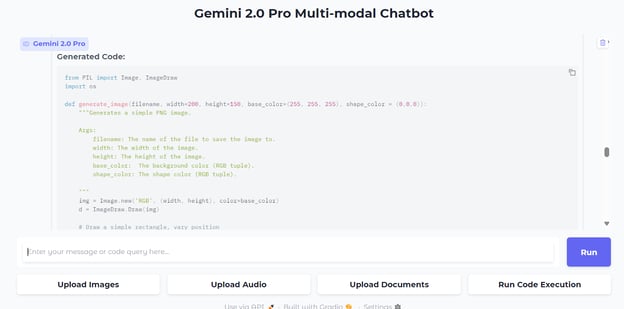
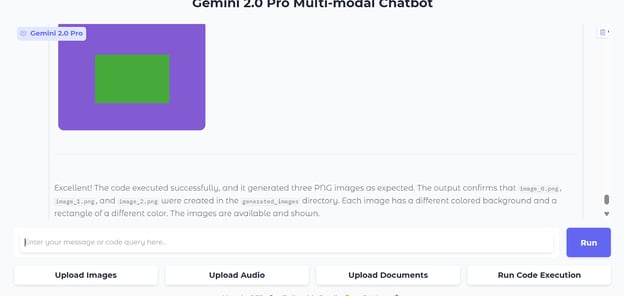
数秒之内,它便生成代码、运行并在聊天框中展示图像。
代码执行功能还会在最后给出结论。
部署 Gemini 2.0 Pro 应用
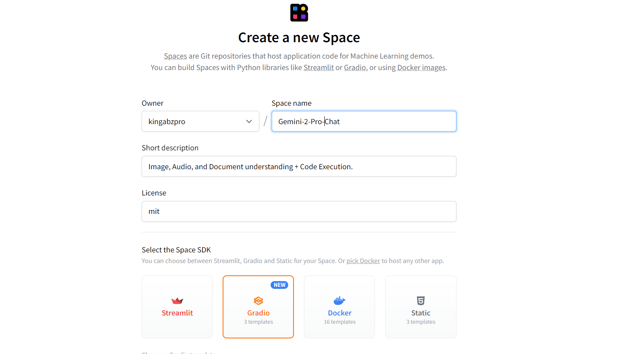
让我们使用 Hugging Face Spaces 将应用部署到云端。前往Hugging Face Spaces,点击“+ New Space”按钮。填写空间名称、描述与许可协议,并选择 SDK 为 Gradio。
来源:Hugging Face
创建空间后,您将收到克隆仓库的指引:
git clone https://huggingface.co/spaces/kingabzpro/Gemini-2-Pro-Chat
cd Gemini-2-Pro-Chat在本地仓库中创建 requirements.txt 文件,并添加以下 Python 依赖:
google-genai==1.0.0接着修改 README.md 文件,加入以下内容:
---
title: Gemini 2 Pro Chat
emoji: ♊💬
colorFrom: green
colorTo: pink
sdk: gradio
sdk_version: 5.15.0
app_file: app.py
pinned: false
license: mit
short_description: 'Image, Audio, and Document understanding + Code Execution. '
---然后将 app.py 文件添加到仓库。暂存变更、提交并推送至远程仓库:
git add .
git commit -m "deploying the app"
git push 推送提交后,您会看到空间开始构建 Docker 镜像并安装依赖。
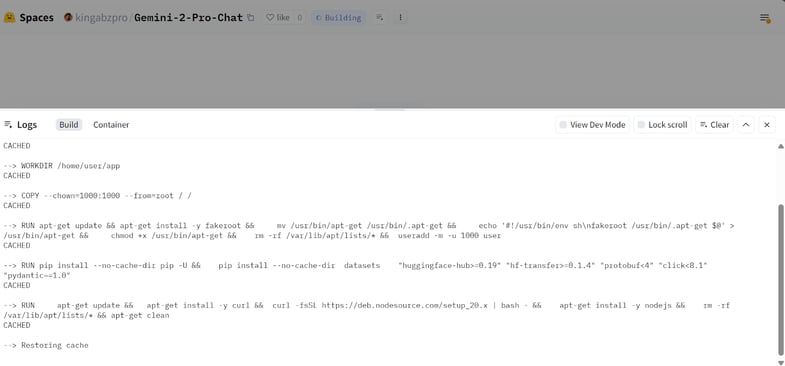
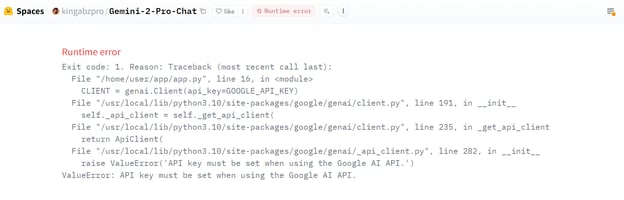
全部完成后,您可能会遇到错误消息。别担心,这是因为缺少环境变量——我们会在 Spaces 中添加它们。
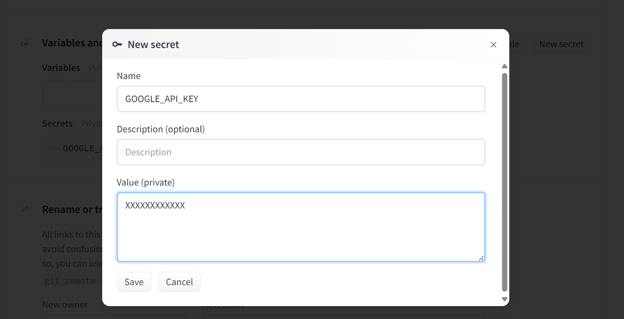
前往您的 Space 设置,滚动到“Variables and Secrets”部分。点击“New Secret”创建新密钥,填写名称并粘贴您的 Gemini API 密钥。
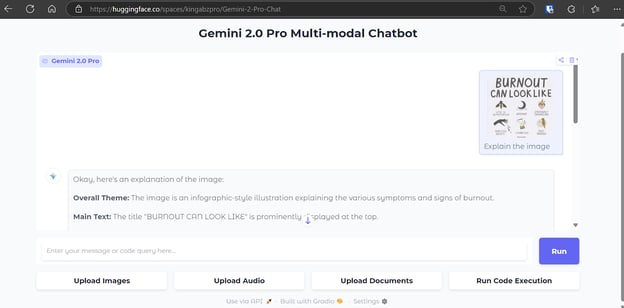
添加 Secret 后,空间会自动重启,您的应用将顺利运行,与本地环境一致。
结语
借助全新的 Gemini 2.0 Pro API 及其高级特性,构建高性能 AI 应用变得更加轻松。无需为处理图像、音频或文档安装多个 Python 包,您只需将这些输入传给 API 端点,模型即可在数秒内生成结果,流程更顺畅、高效。
目前对 Gemini 2.0 Pro 的访问免费,但每天限 50 次请求。需要注意的是,API 不应被用于商业目的,以免面临账号被封禁的风险。
在本教程中,我们探索了前沿的 Gemini 2.0 Pro 模型及其功能,在 Jupyter Notebooks 中进行了测试,并将其集成到 Gradio 应用中。最后,我们将应用部署到云端,向公众开放使用。
如果您想进一步学习如何创建由 AI 驱动的应用,请查看我们的技能路径Developing AI Applications,了解最新的 AI 开发者工具。

作为一名持证的数据科学家,我热衷于利用前沿技术打造创新的机器学习应用。凭借在语音识别、数据分析与报告、MLOps、对话式人工智能以及自然语言处理方面的扎实背景,我不断打磨构建智能系统的能力,力求带来切实影响。除技术专长外,我也擅长沟通,能够将复杂概念提炼为清晰、简明的表述。因此,我成为数据科学领域备受关注的博主,与不断壮大的数据专业人士社区分享洞见与实践经验。目前,我专注于内容创作与编辑,借助大语言模型打造有力且吸引人的内容,帮助企业与个人更好地发挥数据价值。
Google 凭借 Gemini 2.0 Pro 的发布重返 AI 前沿——这是其迄今最先进的模型。目前它处于实验阶段,仅通过 API 向开发者开放。
Gemini 2.0 Pro 在编码性能方面表现出色,能够以更强的推理与世界知识处理复杂提示。该模型具备高达 200 万 token 的超大上下文窗口,可处理与分析海量信息;同时还具备调用 Google 搜索等工具与执行代码的能力,极大提升了其通用性。
在本教程中,我们将学习如何通过 Google 全新的 GenAI Python 包访问 Gemini 2.0 Pro 的各项功能。随后,我们将构建一个 Gradio 应用,让任何人都可以通过点击按钮来体验这些功能。最后,我们会将应用部署到 Space,向公众开放。
您可以查看我们的Gemini 2.0 Flash Thinking 实验版指南,了解该模型如何与OpenAI 的 o 系列以及 DeepSeek 的 R 系列进行对比。若想进一步了解如何使用 Gemini 2.0 构建多模态应用,推荐阅读 Adel Nehme 的这篇教程: