

课程
Claude 模型入门
3 小时
15K
实践并学习路径你的进步。
使用 Google 继续上周,Claude Opus 4.7 发布,这是 Anthropic 旗舰模型的最新版本。得益于大约三倍的视觉分辨率提升,以及对复杂提示更为“字面”的遵循,Opus 4.7 能够以更高的精度操控复杂的用户界面,并以“手术刀”般的细致解析高保真技术图示。
在本教程中,我将带您了解 Claude Opus 4.7 的主要变化。我们将探讨该模型是什么、它引入的关键新特性,以及如何使用 Python 在本地搭建环境。最后,我们会构建一个完整可用的多步骤演示项目:一款自动化的高分辨率可视化图表数字化工具。
如果您想进一步了解 Anthropic 的大语言模型(LLM),建议学习我们的课程 Introduction to Claude Models。
Claude Opus 4.7 是 Anthropic 最新的旗舰 LLM。由于公司将更强大的 Claude Mythos Preview 限制在经过批准的安全专家范围内,Opus 4.7 仍是面向广大开发者的主要、广泛可用的应用程序接口。
该版本在多个方面带来了升级:
开发者注意到它在遵循严格指令和避免重复处理循环方面有显著提升。Opus 4.7 会在写代码前内置二次检查并复核假设,从而大幅降低智能体陷入连续错误循环的概率。
在基准测试中,有一项结果尤为突出。在要求严苛的 SWE-bench Pro 测试中(评估 AI 修复真实开源 GitHub 软件缺陷的能力),Opus 4.7 相比其前代提升了 10.9 个百分点。这一跃升巩固了 Opus 系列作为“代理式编程”领军者的地位。
如需进一步了解该模型,请查阅我们的 Claude Opus 4.7 指南。
迁移到 Opus 4.7 引入了若干全新的控制平面以管理算力资源,同时提示工程也有所变动。以下是您需要了解的主要变化与新特性:
高分辨率多模态视觉:模型将可接受图像的最长边尺寸提升至 2,576 像素,有效分辨率约为 3.75 百万像素。几何坐标映射经过重构,现在边界框坐标与实际图像像素严格 1:1 对应,不再需要复杂的缩放系数计算。
自适应思考:扩展思考预算(如 budget_tokens)已完全移除。提交旧版请求会返回 HTTP 400 拒绝错误。取而代之,Opus 4.7 强制使用“自适应思考”(thinking: {"type": "adaptive"}),模型会根据提示复杂度动态分配内部推理预算。
精细的努力等级控制:新增参数取值 xhigh(超高),在标准 high 与最大 max 努力之间。Anthropic 强烈推荐将 xhigh 作为进行代理式编码与复杂问题求解的最佳起点。模型也更趋向“绝对字面”,即严格执行提供的文字,不再“读懂言外之意”。
任务预算:为在数学上缓解失控的代理循环,Opus 4.7 引入“任务预算”(公开测试中)。通过定义 task_budget,开发者可明确告知模型整个任务生命周期的总令牌上限。模型会持续追踪倒计时并自我调节,以确保任务平稳完成。
客户端内存工具:Opus 4.7 在读写托管记事本方面表现出色。为此,Anthropic 增强了客户端内存工具,提供针对 MemFS(内存文件系统)工作流优化的、以 git 为后端的同步能力。
在开始编写演示项目之前,我们需要搭建支持 Opus 4.7 的环境。本文将使用异步 Python,因为它是数据密集型、高并发工作流的行业标准。
我们需要在系统上安装 Python 3.8 或更高版本。强烈建议构建隔离的虚拟环境,以避免依赖冲突。
以下是在 Anaconda 中创建并激活名为 opus_4_7 的此类环境的方法:
conda create -n opus_4_7 python=3.10 -y
conda activate opus_4_7为了将 Claude Opus 4.7 的理论能力落地为实用应用,我们将构建一款自动化的高分辨率图表数字化工具。
数据科学家经常会遇到被锁定为静态图像或 PDF 的有价值数据(如散点图、柱状图或折线图)。在旧模型下,若要自动化从这些图表中提取数据,往往需要编写复杂的缩放系数数学计算。
在这个项目中,我们将编写一个 Python 脚本,截取任意图表的屏幕截图,并生成包含原始数据的 CSV 文件。
我们将明确地:
利用全新的 3.75MP 视觉与 1:1 像素映射来精准读取图表。
在 xhigh 努力等级下使用自适应思考,严格推导 X 与 Y 轴。
输出干净的 Pandas DataFrame,包含精确的数据点。
我将分步骤引导您完成整个过程。本文教程是自成体系的,但如果您想进一步了解模型能力,或在实现自己的代理时遇到问题,请查阅其官方文档。
首先需要启用身份验证。为此,我们需要在 Anthropic 开发者控制台中创建 API 密钥。
切勿将 API 凭据硬编码到源代码仓库中。请在项目根目录生成一个安全的 .env 文件:
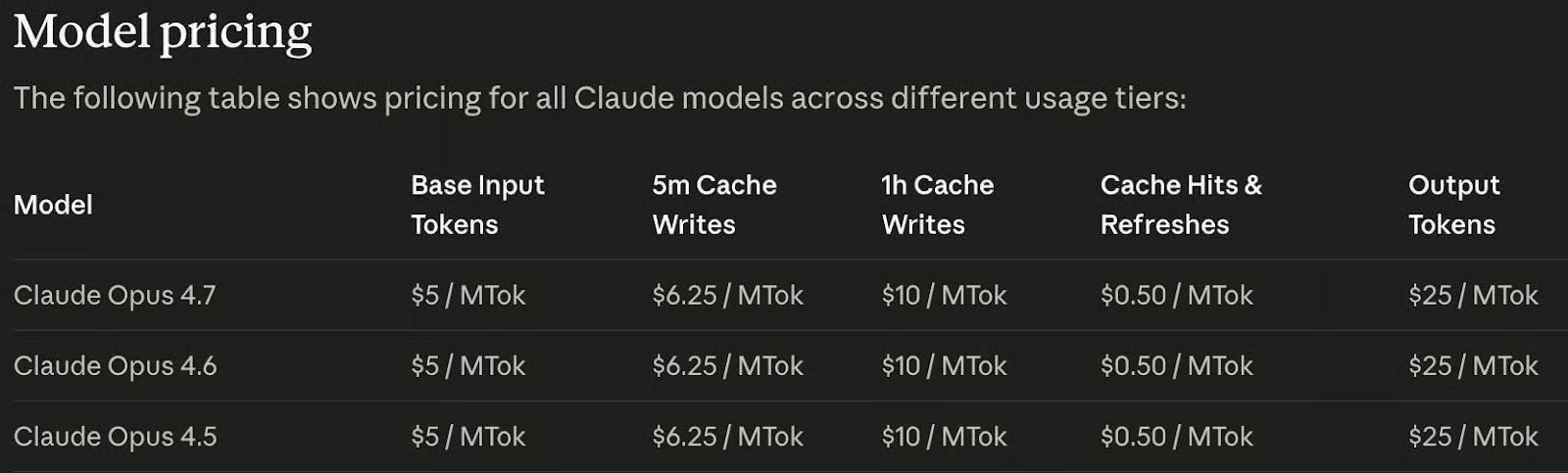
ANTHROPIC_API_KEY=<paste_your_api_key_here>请注意,该模型并非免费。要启用 API 密钥,我们需要为账户充值。好消息是其定价与前两代模型相同:
接下来安装必要的库。我们需要:
anthropic:官方 Anthropic SDK,用于集成 API;
python-dotenv:用于管理环境变量;
pandas:用于组织我们提取的数据。
打开终端并运行以下命令(确保我们上面创建的 opus_4_7 环境已激活):
pip install anthropic python-dotenv pandas我们先从构建一个基础的异步命令行界面打底。此步骤将引入 Opus 4.7 的新 xhigh 努力等级与自适应思考架构。创建名为 chart_digitizer.py 的文件,并加入以下代码:
import os
import asyncio
from dotenv import load_dotenv
from anthropic import AsyncAnthropic

# Ingest secure environment variables
load_dotenv()

# Initialize the asynchronous Anthropic client
client = AsyncAnthropic(
    api_key=os.environ.get("ANTHROPIC_API_KEY")
)

async def test_adaptive_thinking():
    print("Initiating Text Agent with Adaptive Thinking...")

    response = await client.messages.create(
        model="claude-opus-4-7",
        max_tokens=64000,
        stream=True, # Required for long responses
        thinking={"type": "adaptive"}, # NEW: Replaces budget_tokens
        output_config={"effort": "xhigh"}, # NEW: Extra high effort level
        messages=[
            {"role": "user", "content": "Explain why 1:1 pixel mapping is crucial for data extraction."}
        ]
    )

    # Parse the streaming response structure
    async with response as stream:
        async for event in stream:
            if event.type == "content_block_start":
                if event.content_block.type == "thinking":
                    print("\n--- Internal Reasoning Trace ---")
                elif event.content_block.type == "text":
                    print("\n--- Final Output ---")
            elif event.type == "content_block_delta":
                if event.delta.type == "thinking_delta":
                    print(event.delta.thinking, end="", flush=True)
                elif event.delta.type == "text_delta":
                    print(event.delta.text, end="", flush=True)

if __name__ == "__main__":
    asyncio.run(test_adaptive_thinking())
我们可以用以下命令运行它:
python chart_digitizer.py该脚本展示了如何向 Claude Opus 4.7 发送请求,但尚未从图表中提取数据。它只是发送了如下提示:
Explain why 1:1 pixel mapping is crucial for data extraction.为确保模型返回可在 Pandas 中使用的干净数据,我们将使用“工具”来强制结构化输出。我们定义一个 JSON 模式,明确告知 Claude 应如何格式化提取的图表坐标。
在客户端初始化之后,更新 chart_digitizer.py 文件,加入工具模式与系统提示:
# Define the JSON schema to force structured data extraction
extraction_tool = {
    "name": "save_chart_data",
    "description": "Saves the extracted data points from the chart into a structured format.",
    "input_schema": {
        "type": "object",
        "properties": {
            "x_axis_label": {"type": "string", "description": "The label for the X axis"},
            "y_axis_label": {"type": "string", "description": "The label for the Y axis"},
            "data_points": {
                "type": "array",
                "items": {
                    "type": "object",
                    "properties": {
                        "x": {"type": "number", "description": "X-axis value"},
                        "y": {"type": "number", "description": "Y-axis value"}
                    },
                    "required": ["x", "y"]
                }
            }
        },
        "required": ["x_axis_label", "y_axis_label", "data_points"]
    }
}

SYSTEM_PROMPT = """
You are an expert Data Scientist. Your task is to digitize the provided chart image.
Execute the following strict, literal directives:
1. Scan the image using your 1:1 pixel mapping capabilities to identify the X and Y axes, their scales, and all plotted data points.
2. Utilize your adaptive thinking space to perform the mathematical conversions from visual pixel locations to the actual chart values.
3. You MUST use the 'save_chart_data' tool to output the final extracted data points.
Do not guess. Be highly precise.
"""
为强制模型使用该工具与系统提示,我们在请求中加入 tool 与 system 参数:
response = await client.messages.create(
        model="claude-opus-4-7",
        max_tokens=64000,
        stream=True,
        thinking={"type": "adaptive"},
        system=SYSTEM_PROMPT, # Add to enable the system prompt
        tools=[extraction_tool], # Add to provide the tool to the model
        messages=messages,
        output_config={
            "effort": "xhigh",
        }
)将数百个数据点进行可视化映射并计算其精确数值需要巨大的认知处理。为保护我们的算力额度,我们引入任务预算。本次操作我们设定建议上限为 80,000 个 token。
我们可在请求中通过在 output_config 中添加 task_budget 来设置该限制:
response = await client.messages.create(
        model="claude-opus-4-7",
        max_tokens=64000,
        stream=True,
        thinking={"type": "adaptive"},
        system=SYSTEM_PROMPT,
        tools=[extraction_tool],
        messages=messages,
        output_config={
            "effort": "xhigh",
            "task_budget": {"type": "tokens", "total": 80000} # Add to limit output tokens
        }
    )
请注意,启用此功能需要设置测试版请求头。为此,我们需要将智能体初始化方式更新为:
client = AsyncAnthropic(
    api_key=os.environ.get("ANTHROPIC_API_KEY"),
    default_headers={"anthropic-beta": "task-budgets-2026-03-13"}
)在最后阶段,我们集成 3.75MP 的视觉能力。我们将构建一个健壮的实用函数来处理图像导入,并完善代码以输出包含数据的 CSV 文件。
以下是我们的视觉数字化器的完整最终代码:
import os
import asyncio
import mimetypes
import sys
from dotenv import load_dotenv
from anthropic import AsyncAnthropic
import base64
import pandas as pd

# Ingest secure environment variables
load_dotenv()

# Initialize the asynchronous Anthropic client
client = AsyncAnthropic(
    api_key=os.environ.get("ANTHROPIC_API_KEY"),
    default_headers={"anthropic-beta": "task-budgets-2026-03-13"}
)

# Define the JSON schema to force structured data extraction
extraction_tool = {
    "name": "save_chart_data",
    "description": "Saves the extracted data points from the chart into a structured format.",
    "input_schema": {
        "type": "object",
        "properties": {
            "x_axis_label": {"type": "string", "description": "The label for the X axis"},
            "y_axis_label": {"type": "string", "description": "The label for the Y axis"},
            "data_points": {
                "type": "array",
                "items": {
                    "type": "object",
                    "properties": {
                        "x": {"type": "number", "description": "X-axis value"},
                        "y": {"type": "number", "description": "Y-axis value"}
                    },
                    "required": ["x", "y"]
                }
            }
        },
        "required": ["x_axis_label", "y_axis_label", "data_points"]
    }
}

SYSTEM_PROMPT = """
You are an expert Data Scientist. Your task is to digitize the provided chart image.
Execute the following strict, literal directives:
1. Scan the image using your 1:1 pixel mapping capabilities to identify the X and Y axes, their scales, and all plotted data points.
2. Utilize your adaptive thinking space to perform the mathematical conversions from visual pixel locations to the actual chart values.
3. You MUST use the 'save_chart_data' tool to output the final extracted data points.
Do not guess. Be highly precise.
"""

def encode_high_res_image(image_path: str) -> tuple[str, str]:
    if not os.path.exists(image_path):
        raise FileNotFoundError(f"Critical Error: Image not located at {image_path}")
    with open(image_path, "rb") as image_file:
        base64_data = base64.b64encode(image_file.read()).decode("utf-8")

    media_type, _ = mimetypes.guess_type(image_path)
    if not media_type or not media_type.startswith("image/"):
        media_type = "image/png"
    return base64_data, media_type

async def digitize_chart(image_path: str = "chart.jpg"):
    print("\nInitiating Opus 4.7 Autonomous Chart Digitization...")
    IMAGE_PATH = image_path
    base64_image_data, media_type = encode_high_res_image(IMAGE_PATH)

    messages = [
        {
            "role": "user",
            "content": [
                {
                    "type": "image",
                    "source": {
                        "type": "base64",
                        "media_type": media_type,
                        "data": base64_image_data
                    }
                },
                {
                    "type": "text",
                    "text": "Please digitize this chart and extract the data points."
                }
            ]
        }
    ]

    response = await client.messages.create(
        model="claude-opus-4-7",
        max_tokens=64000,
        stream=True,
        thinking={"type": "adaptive"},
        system=SYSTEM_PROMPT,
        tools=[extraction_tool],
        messages=messages,
        output_config={
            "effort": "xhigh",
            "task_budget": {"type": "tokens", "total": 80000}
        }
    )

    # Accumulate tool input and thinking from the stream
    import json
    tool_name = None
    tool_input_json = ""
    thinking_text = ""

    async with response as stream:
        async for event in stream:
            if event.type == "content_block_start":
                if event.content_block.type == "tool_use":
                    tool_name = event.content_block.name
                    tool_input_json = ""
                elif event.content_block.type == "thinking":
                    thinking_text = ""
            elif event.type == "content_block_delta":
                if event.delta.type == "input_json_delta":
                    tool_input_json += event.delta.partial_json
                elif event.delta.type == "thinking_delta":
                    thinking_text += event.delta.thinking

    if thinking_text:
        print("\n--- Internal Thinking (Math & Scaling) ---")
        print(thinking_text[:500] + "...\n[Cognitive trace truncated]")

    if tool_name == "save_chart_data" and tool_input_json:
        print("\n--- Data Extraction Complete! ---")
        chart_data = json.loads(tool_input_json)
        df = pd.DataFrame(chart_data["data_points"])

        print(f"\nX-Axis: {chart_data['x_axis_label']}")
        print(f"Y-Axis: {chart_data['y_axis_label']}")
        print("\nExtracted DataFrame:")
        print(df.head(10))

        output_path = "chart_data.csv"
        df.to_csv(output_path, index=False)
        print(f"\nDataFrame saved to {output_path}")

if __name__ == "__main__":
    image_path = sys.argv[1] if len(sys.argv) > 1 else "chart.jpg"
    asyncio.run(digitize_chart(image_path))
为进行测试,我从 Yahoo Sports 下载了这张按年份显示 FIFA 世界杯观众人数的图表,保存为 fifa.webp:
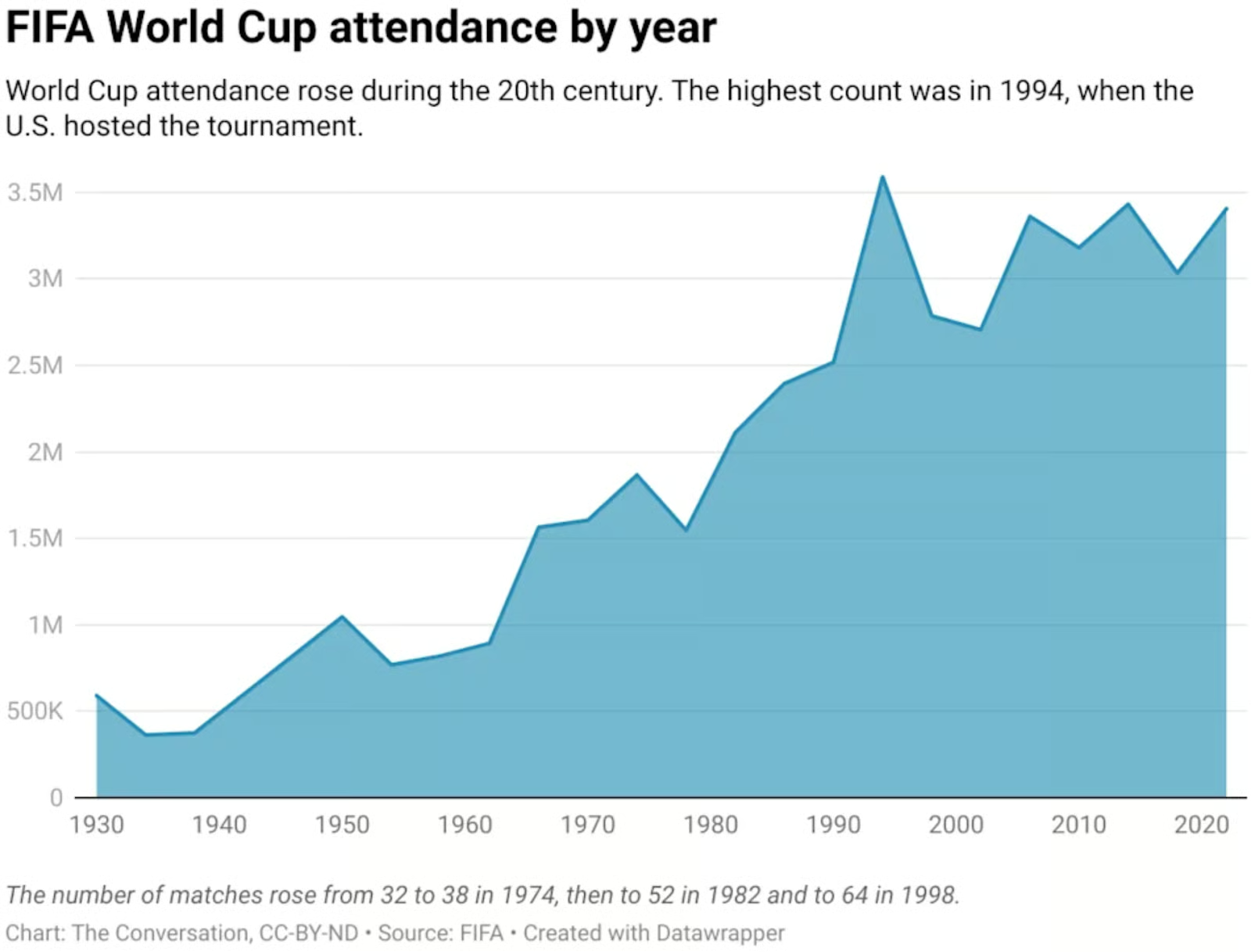
像之前一样执行脚本,但这次将图表图像文件名作为参数传入:
python chart_digitizer.py fifa.webp 结果如下:
Extracted DataFrame:
      x        y
0  1930   590000
1  1934   375000
2  1938   375000
3  1950  1040000
4  1954   770000
5  1958   820000
6  1962   890000
7  1966  1560000
8  1970  1600000
9  1974  1870000
如果我们将其绘制出来,可以验证其精度非常高,即便原始图表的 y 轴并无刻度标签。
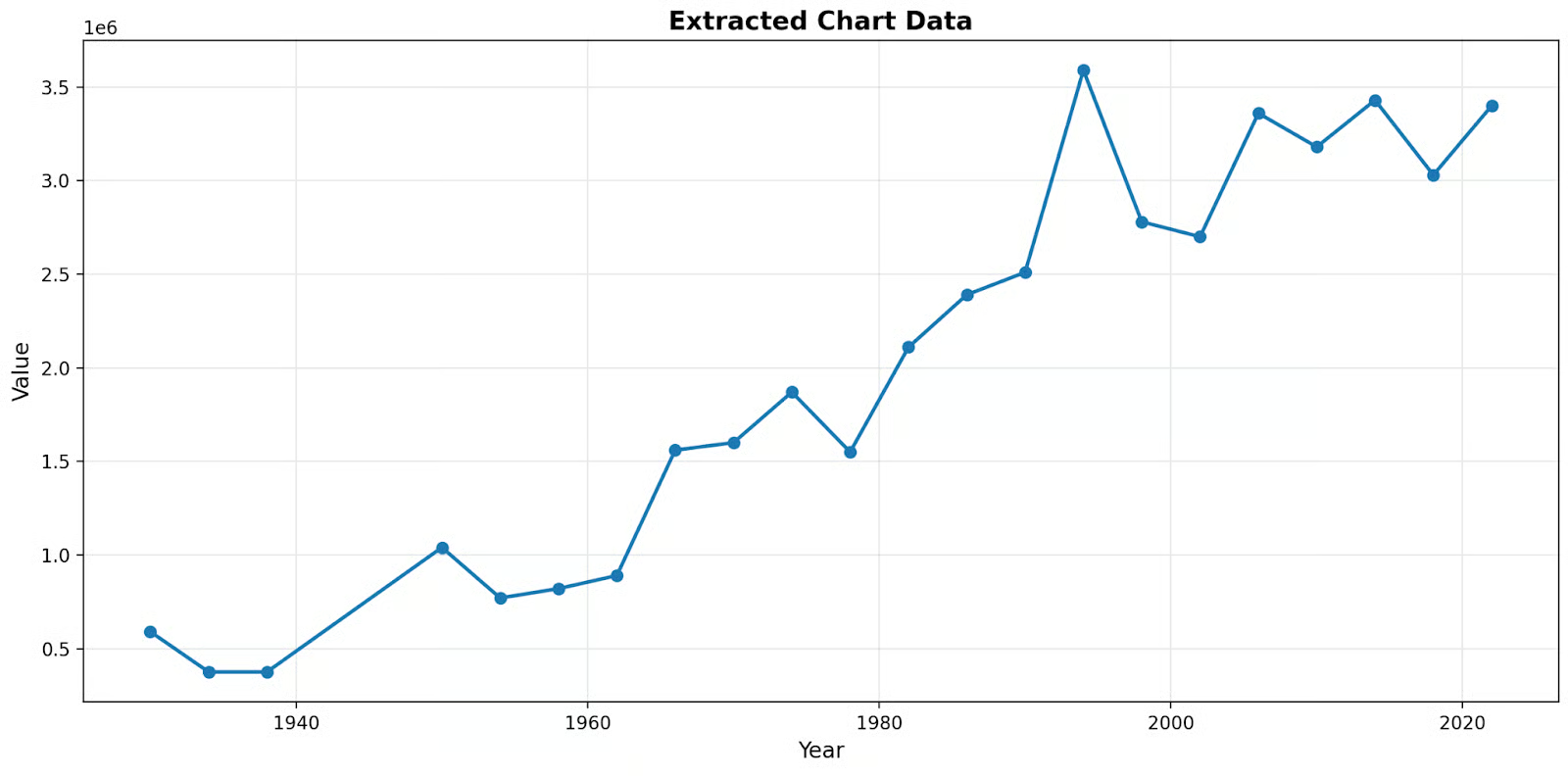
我们已成功从一个简单的异步聊天机器人,发展到构建一个高度稳健的数据科学可视化推理引擎。
由于模型无需降采样,它能够在不损失亚像素级保真度的情况下读取复杂图表。建议用各类复杂图表测试这套代码,以真正体会其能力!
在对多张图表进行测试后,我对其准确性尤为印象深刻。需要说明的是,该脚本不应被视为最终产品,仍有大量改进空间。若您想练习提升技能,以下是一些建议:
如果您对使用 Anthropic 的模型进行编程感兴趣,强烈推荐学习我们的课程 Software Development with Claude Code!
Agentic AI 课程
课程
课程
实践并学习路径你的进步。
使用 Google 继续