
Track
Associate AI Engineer for Developers
29 hr
While your Python script patiently waits for API responses, database queries, or file operations to finish, that time often goes unused. With Python async programming, your code can handle several tasks at once. So while one operation waits, others move forward, turning idle moments into productive work and often reducing minutes of waiting to just seconds.
In this guide, I will teach you async programming essentials in Python by working through mini-projects. You'll see how coroutines, event loops, and async I/O can make your code far more responsive.
If you want to learn how to build asynchronous web APIs, make sure to check out this course on FastAPI.
In traditional synchronous Python, your code executes one line at a time. For example, when you call an API, your program stops and waits for the response. If that takes two seconds, your entire program sits idle for two seconds. Asynchronous programming allows your code to initiate an API call and then proceed with other tasks.
When the response arrives, your code picks up where it left off. Instead of waiting for each operation to complete, you can run multiple operations at the same time. This matters most when your code spends time waiting for external systems like databases, APIs, or file systems to respond.
To make this work, Python's async system uses a few core concepts:
Coroutines: Functions defined with async def instead of def. They can pause and resume execution, making them perfect for operations that involve waiting.
await: This keyword tells Python, "pause this coroutine until this operation completes, but let other code run in the meantime."
Event loop: The engine that manages all your coroutines, deciding which one to run and when to switch between them.
Tasks: Coroutines wrapped for concurrent execution. You create them with asyncio.create_task() to run multiple operations at once.
To avoid confusion, what async programming can (and can’t) do, please keep this in mind:
Async works best with I/O-bound work like HTTP requests, database queries, and file operations, where your code waits for external systems.
Async doesn't help with CPU-bound work such as complex calculations or data processing, where your code actively computes rather than waits.
The best way to internalize these concepts is to write actual async code. In the next section, you'll create your first async function and see exactly how coroutines and the event loop work together.
Before writing async code, let's look at a regular synchronous function that waits before doing something:
import time

def greet_after_delay():
    print("Starting...")
    time.sleep(2)  # Blocks for 2 seconds
    print("Hello!")

greet_after_delay()
Starting...
Hello!The function works, but time.sleep(2) blocks your entire program. Nothing else can run during those two seconds.
Now here's the async version:
import asyncio

async def greet_after_delay():
    print("Starting...")
    await asyncio.sleep(2)  # Pauses, but doesn't block
    print("Hello!")

asyncio.run(greet_after_delay())
Starting...
Hello!The output looks identical, but something different is happening under the hood. Three changes made this async:
async def instead of def declares this as a coroutine.
await asyncio.sleep(2) instead of time.sleep(2) pauses without blocking.
asyncio.run() starts the event loop and runs the coroutine.
Notice that asyncio.sleep() is itself an async function, which is why it needs await. This is a key rule: every async function must be called with await. Whether it's a built-in like asyncio.sleep() or one you write yourself, forgetting await means it won't actually execute.
Right now, the async version doesn't seem faster. That's because we only have one task. The real benefit shows up when you run multiple coroutines at once, which we'll cover in the next section.
Another important thing to know: you can't call an async function directly like a regular function. Let’s try it:
result = greet_after_delay()
print(result)
print(type(result))
<coroutine object greet_after_delay at 0x...>
<class 'coroutine'>Calling greet_after_delay() returns a coroutine object, not the result. The function doesn't actually run. You need asyncio.run() or await to execute it inside another function.
The event loop is the engine behind async programming. It manages your coroutines and decides what runs when. Here's what happens step-by-step when you run the async greet_after_delay() function:
asyncio.run() creates an event loop.
Event loop starts greet_after_delay().
"Starting..." prints.
Hits await asyncio.sleep(2) → coroutine pauses.
Event loop checks: "Any other tasks to run?" (none right now).
2 seconds pass, sleep completes.
Event loop resumes greet_after_delay().
"Hello!" prints.
Function finishes → event loop exits.
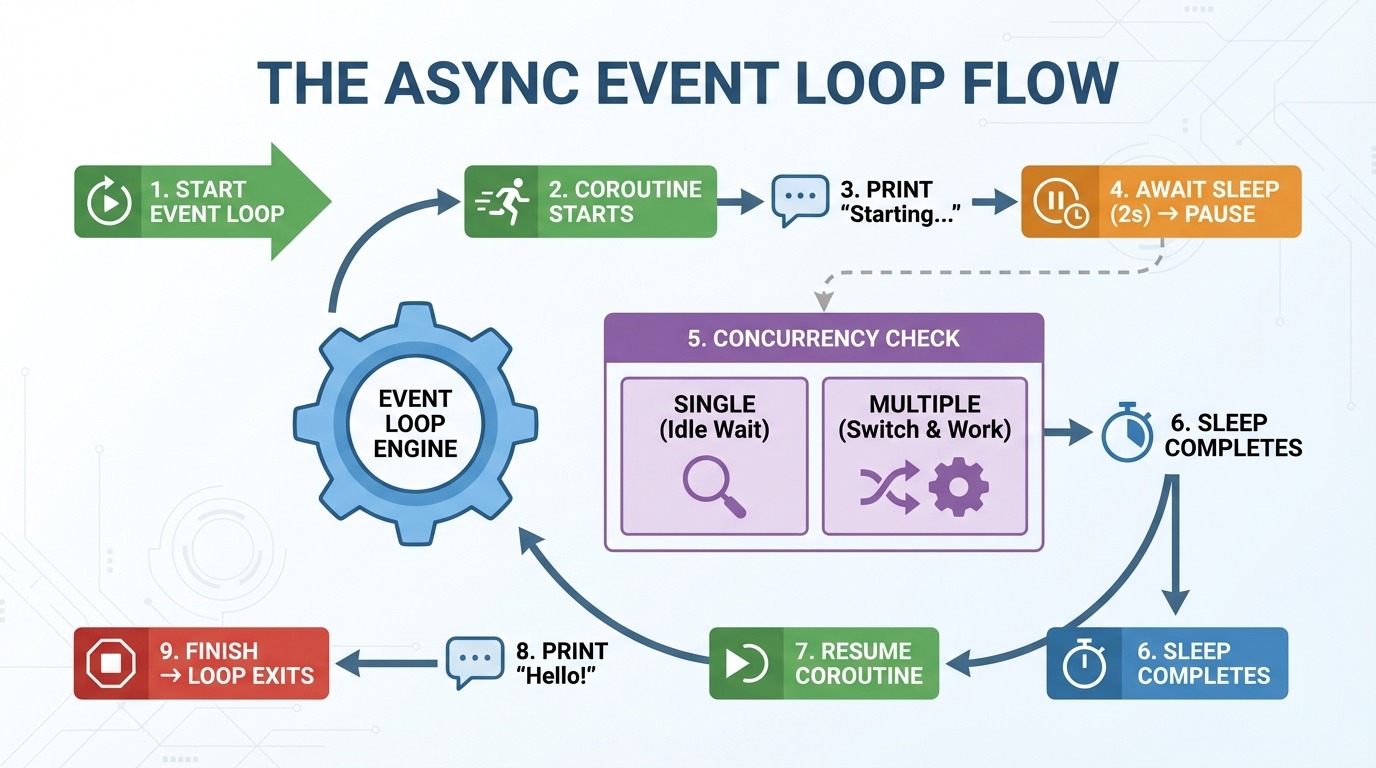
Step 5 is where async gets interesting. With one coroutine, there's nothing else to do. But when you have multiple coroutines, the event loop switches to other work while one waits. Instead of sitting idle during a two-second sleep, it can run other code.
Think of the event loop as a traffic controller. It doesn't make individual cars faster. It keeps traffic moving by letting other cars go while one is stopped.
A common beginner mistake is forgetting await when calling a coroutine inside another async function:
import asyncio

async def get_message():
    await asyncio.sleep(1)
    return "Hello!"

async def main():
    message = get_message()  # Missing await!
    print(message)

asyncio.run(main())
<coroutine object get_message at 0x...>
RuntimeWarning: coroutine 'get_message' was never awaitedWithout await, you get the coroutine object instead of the return value. Python also warns you that the coroutine was never executed.
The fix is simple:
async def main():
    message = await get_message()  # Added await
    print(message)

asyncio.run(main())Hello!When you see a RuntimeWarning about an unawaited coroutine, check that you used await on every async function call.
In the previous section, we converted a sync function to async. But it wasn't any faster. That's because we only ran one coroutine. The real power of async shows up when you run multiple coroutines at the same time.
You might think calling multiple async functions would automatically run them concurrently. But look what happens when we call greet_after_delay() three times:
import asyncio
import time

async def greet_after_delay(name):
    print(f"Starting {name}...")
    await asyncio.sleep(2)
    print(f"Hello, {name}!")

async def main():
    start = time.perf_counter()

    await greet_after_delay("Alice")
    await greet_after_delay("Bob")
    await greet_after_delay("Charlie")

    elapsed = time.perf_counter() - start
    print(f"Total time: {elapsed:.2f} seconds")

asyncio.run(main())
Starting Alice...
Hello, Alice!
Starting Bob...
Hello, Bob!
Starting Charlie...
Hello, Charlie!
Total time: 6.01 secondsSix seconds for three two-second tasks. Each await waits for its coroutine to finish before moving to the next line. The code is async, but it's running sequentially.
To run coroutines at the same time, use asyncio.gather(). It takes multiple coroutines and runs them concurrently:
async def main():
    start = time.perf_counter()

    await asyncio.gather(
        greet_after_delay("Alice"),
        greet_after_delay("Bob"),
        greet_after_delay("Charlie"),
    )

    elapsed = time.perf_counter() - start
    print(f"Total time: {elapsed:.2f} seconds")

asyncio.run(main())
Starting Alice...
Starting Bob...
Starting Charlie...
Hello, Alice!
Hello, Bob!
Hello, Charlie!
Total time: 2.00 secondsTwo seconds instead of six. All three coroutines started immediately, slept simultaneously, and finished together. That's a 3x speedup with one change.
Notice the output order: all three "Starting..." messages print before any "Hello..." messages. This shows all coroutines are running during the same two-second window rather than waiting for each other.
asyncio.gather() returns a list of results in the same order you passed the coroutines. If your coroutines return values, you can capture them:
async def fetch_number(n):
    await asyncio.sleep(1)
    return n * 10

async def main():
    results = await asyncio.gather(
        fetch_number(1),
        fetch_number(2),
        fetch_number(3),
    )
    print(results)

asyncio.run(main())
[10, 20, 30]The results come back in order [10, 20, 30], matching the order of the coroutines passed to gather().
So far, we've used asyncio.sleep() to simulate delays. Now let's make real HTTP requests. You might reach for the requests library, but it won't work here. requests is synchronous and blocks the event loop, defeating the purpose of async.
Instead, use aiohttp, an async HTTP client built for this purpose.
Here's how to fetch a URL with aiohttp:
import aiohttp
import asyncio

async def fetch(url):
    async with aiohttp.ClientSession() as session:
        async with session.get(url) as response:
            return await response.text()

async def main():
    html = await fetch("https://example.com")
    print(f"Fetched {len(html)} characters")

asyncio.run(main())
Fetched 513 charactersNotice the two nested async with blocks. Each one manages a different resource, and understanding what they do is key to using aiohttp correctly.
Here's what happens step-by-step when you make requests with aiohttp:
aiohttp.ClientSession() creates a connection pool (empty at first).
session.get(url) checks the pool: "Any open connection to this host (the website's server)?"
If no connection exists, a new TCP connection (the basic protocol for sending data over the internet) and an SSL handshake (the encryption setup for HTTPS) are created.
An HTTP request is sent, and we wait for the response headers.
The response object holds the connection.
await response.text() reads the body data from the network.
Exit of inner async with loop: The connection returns to the pool (stays open!).
The next request to the same host is made, reusing the connection from the pool (skips step 3).
Exit outer async with loop: All pooled connections close.
Steps 7 and 8 are the key insights. The connection pool keeps connections alive between requests. When you make another request to the same host, it skips the TCP and SSL handshake entirely.

This matters because establishing a new connection is slow. A TCP handshake takes one round-trip to the server. An SSL handshake takes two more. Depending on latency, that's 100-300ms before you even send your first byte of data.
Now you can see why creating a new session for each request is a problem:
# Wrong: new session for each request
async def fetch_bad(url):
    async with aiohttp.ClientSession() as session:
        async with session.get(url) as response:
            return await response.text()

async def main():
    urls = ["https://example.com"] * 10
    results = await asyncio.gather(*[fetch_bad(url) for url in urls])
Each call to fetch_bad() creates a new session with an empty pool. Every request pays the full handshake cost, even though they're all going to the same host.
The fix is to create one session and pass it to your fetch function:
# Right: reuse a single session
async def fetch_good(session, url):
    async with session.get(url) as response:
        return await response.text()

async def main():
    urls = ["https://example.com"] * 10
    async with aiohttp.ClientSession() as session:
        results = await asyncio.gather(*[fetch_good(session, url) for url in urls])
With a shared session, the first request establishes the connection, and the remaining nine requests reuse it. One handshake instead of ten.
Let's put this into practice with the Hacker News API. This API is perfect for demonstrating asynchronous behavior because fetching stories requires multiple requests. If you're new to working with REST APIs in Python, check out Python APIs: A Guide to Building and Using APIs for foundational concepts.
The Hacker News API structure:
https://hacker-news.firebaseio.com/v0/topstories.json returns a list of story IDs (just numbers)
https://hacker-news.firebaseio.com/v0/item/{id}.json returns details for one story
To get 10 stories, you need 11 requests: one for the ID list, then one for each story. That's exactly where async programming shines.
First, let's see what the API returns if we try to retrieve the first story:
import aiohttp
import asyncio

HN_API = "https://hacker-news.firebaseio.com/v0"

async def main():
    async with aiohttp.ClientSession() as session:
        # Get top story IDs
        async with session.get(f"{HN_API}/topstories.json") as response:
            story_ids = await response.json()

        print(f"Found {len(story_ids)} stories")
        print(f"First 5 IDs: {story_ids[:5]}")

        # Fetch first story details
        first_id = story_ids[0]
        async with session.get(f"{HN_API}/item/{first_id}.json") as response:
            story = await response.json()

        print(f"\nStory structure:")
        for key, value in story.items():
            print(f"  {key}: {repr(value)[:50]}")

asyncio.run(main())
Found 500 stories
First 5 IDs: [46051449, 46055298, 46021577, 46053566, 45984864]
Story structure:
by: 'mikeayles'
descendants: 22
id: 46051449
kids: [46054027, 46053889, 46053275, 46053515, 46053002,
score: 217
text: 'I got DOOM running in KiCad by rendering it with
time: 1764108815
title: 'Show HN: KiDoom – Running DOOM on PCB Traces'
type: 'story'
url: 'https://www.mikeayles.com/#kidoom'The API returns 500 story IDs, and each story has fields like title, url, score, and by (the author).
Now let's fetch 10 stories sequentially:
import aiohttp
import asyncio
import time

HN_API = "https://hacker-news.firebaseio.com/v0"

async def fetch_story(session, story_id):
    async with session.get(f"{HN_API}/item/{story_id}.json") as response:
        return await response.json()

async def main():
    async with aiohttp.ClientSession() as session:
        async with session.get(f"{HN_API}/topstories.json") as response:
            story_ids = await response.json()

        start = time.perf_counter()
        stories = []
        for story_id in story_ids[:10]:
            story = await fetch_story(session, story_id)
            stories.append(story)
        elapsed = time.perf_counter() - start

        print(f"Sequential: Fetched {len(stories)} stories in {elapsed:.2f} seconds")

asyncio.run(main())
Sequential: Fetched 10 stories in 2.41 secondsNow let's fetch the same stories concurrently:
async def main():
    async with aiohttp.ClientSession() as session:
        async with session.get(f"{HN_API}/topstories.json") as response:
            story_ids = await response.json()

        start = time.perf_counter()
        tasks = [fetch_story(session, story_id) for story_id in story_ids[:10]]
        stories = await asyncio.gather(*tasks)
        elapsed = time.perf_counter() - start

        print(f"Concurrent: Fetched {len(stories)} stories in {elapsed:.2f} seconds")
        print("\nTop 3 stories:")
        for story in stories[:3]:
            print(f"  - {story.get('title', 'No title')}")

asyncio.run(main())
Concurrent: Fetched 10 stories in 0.69 seconds
Top 3 stories:
- Show HN: KiDoom – Running DOOM on PCB Traces
- AWS is 10x slower than a dedicated server for the same price [video]
- Surprisingly, Emacs on Android is pretty goodThe concurrent version is 3.5x faster. Instead of waiting for each request to complete before starting the next, all 10 requests run at the same time. This is where async programming pays off with real network I/O.
When fetching data concurrently, several things can go wrong. You might overwhelm the server with too many requests. Some requests might hang forever. Others might fail outright. And when failures happen, you need a recovery strategy.
This section walks through each concern in the order they happen: controlling how many requests go out, setting time limits, handling failures, and retrying when it makes sense. If you need a refresher on Python's exception handling fundamentals, see Exception & Error Handling in Python. We'll use this base setup throughout:
import aiohttp
import asyncio
import time

HN_API = "https://hacker-news.firebaseio.com/v0"

async def fetch_story(session, story_id):
    async with session.get(f"{HN_API}/item/{story_id}.json") as response:
return await response.json()In the previous section, we fired 10 requests at once. That worked fine. But what happens when you need to fetch 500 stories? Or scrape 10,000 pages?
Most APIs enforce rate limits. They might allow 10 requests per second, or 100 concurrent connections. Exceed those limits, and you'll get blocked, throttled, or banned. Even if the API doesn't enforce limits, firing thousands of requests simultaneously can overwhelm your own system or the server.
You need a way to control how many requests are "in flight" at any moment. That's what a semaphore does.
A semaphore works like a permit system. Imagine you have three permits. Any task that wants to make a request must first obtain a permit. When it finishes, it returns the permit, so a new request can use it. If no permits are available, the task waits until one frees up.

Here's how it plays out with 3 permits and 4 or more tasks:
Three permits are available.
Task A takes a permit (2 remaining), starts its request.
Task B takes a permit (1 remaining), starts its request.
Task C takes a permit (0 remaining), starts its request.
Task D wants a permit, but none are available—it waits.
Task A finishes, returns its permit (1 available).
Task D takes that permit and starts its request.
This continues until all tasks are complete.
The waiting in step 5 is efficient. The task doesn't spin in a loop checking "is a permit free yet?" It suspends and lets other code run. The event loop wakes it only when a permit becomes available.
Now let's look at the code. In asyncio, you create a semaphore with asyncio.Semaphore(n), where n is the number of permits. To use it, wrap your code in async with semaphore:. This acquires a permit when entering the block and automatically releases it when exiting:
async def fetch_story_limited(session, story_id, semaphore):
    async with semaphore:  # Acquire permit (or wait if none available)
        async with session.get(f"{HN_API}/item/{story_id}.json") as response:
            return await response.json()
    # Permit automatically released here
Let's compare fetching 30 stories with and without a semaphore:
async def main():
    async with aiohttp.ClientSession() as session:
        async with session.get(f"{HN_API}/topstories.json") as response:
            story_ids = (await response.json())[:30]

        # Without rate limiting: all 30 at once
        start = time.perf_counter()
        await asyncio.gather(*[fetch_story(session, sid) for sid in story_ids])
        print(f"No limit: {time.perf_counter() - start:.2f}s (30 concurrent)")

        # With Semaphore(5): max 5 at a time
        semaphore = asyncio.Semaphore(5)
        start = time.perf_counter()
        await asyncio.gather(*[fetch_story_limited(session, sid, semaphore) for sid in story_ids])
        print(f"Semaphore(5): {time.perf_counter() - start:.2f}s (5 concurrent)")

asyncio.run(main())
No limit: 0.62s (30 concurrent)
Semaphore(5): 1.50s (5 concurrent)The semaphore version is slower because it processes requests in batches of five. But that's the tradeoff: you sacrifice speed for predictable, server-friendly behavior.
One thing to note: a semaphore limits concurrent requests, not requests per time unit. Semaphore(10) means "at most 10 requests in flight at once," not "10 requests per second." If you need strict time-based rate limiting (like exactly 10 requests per second), you can combine a semaphore with delays between batches, or use a library like aiolimiter.
Even with controlled concurrency, individual requests can hang. A server might accept your connection but never respond. Without a timeout, your program waits indefinitely.
The asyncio.wait_for() function wraps any coroutine with a deadline. You pass it the coroutine and a timeout in seconds. If the operation doesn't complete in time, it raises asyncio.TimeoutError:
async def slow_operation():
    print("Starting slow operation...")
    await asyncio.sleep(5)
    return "Done"

async def main():
    try:
        result = await asyncio.wait_for(slow_operation(), timeout=2.0)
        print(f"Success: {result}")
    except asyncio.TimeoutError:
        print("Operation timed out after 2 seconds")

asyncio.run(main())
Starting slow operation...
Operation timed out after 2 secondsWhen the timeout expires, wait_for() cancels the coroutine. You can catch TimeoutError and decide what to do: skip the request, return a default value, or retry.
For concurrent requests, wrap each one individually. Here's a helper that returns an error dictionary instead of raising an error:
async def fetch_story_with_timeout(session, story_id, timeout=5.0):
    try:
        coro = fetch_story(session, story_id)
        return await asyncio.wait_for(coro, timeout=timeout)
    except asyncio.TimeoutError:
        return {"error": f"Story {story_id} timed out"}
When a coroutine gets cancelled (by timeout or any other reason), Python raises asyncio.CancelledError inside it. If your coroutine holds resources like file handles or connections, use try/finally to ensure cleanup happens even on cancellation:
async def fetch_with_cleanup(session, url):
    print("Starting fetch...")
    try:
        async with session.get(url) as response:
            return await response.text()
    finally:
print("Cleanup complete") # Runs even on cancellationTimeouts catch slow requests. But some requests fail immediately with an error. Let's see what happens when one request in a batch fails.
First, we need a version of fetch_story() that raises an exception on invalid IDs:
async def fetch_story_strict(session, story_id):
    story = await fetch_story(session, story_id)
    if story is None:
        raise ValueError(f"Story not found: {story_id}")
    return story
Now let's fetch four valid stories plus one invalid ID:
async def main():
    async with aiohttp.ClientSession() as session:
        async with session.get(f"{HN_API}/topstories.json") as response:
            story_ids = await response.json()

        ids_to_fetch = story_ids[:4] + [99999999999]  # 4 valid + 1 invalid

        try:
            stories = await asyncio.gather(
                *[fetch_story_strict(session, sid) for sid in ids_to_fetch]
            )
            print(f"Got {len(stories)} stories")
        except ValueError as e:
            print(f"ERROR: {e}")

asyncio.run(main())
ERROR: Story not found: 99999999999With one invalid ID, we lose all four successful results. By default, gather() uses fail-fast behavior: one exception cancels everything and propagates up.
To keep partial results, add return_exceptions=True. This changes gather()'s behavior: instead of raising exceptions, it returns them as items in the results list alongside successful values:
async def main():
    async with aiohttp.ClientSession() as session:
        async with session.get(f"{HN_API}/topstories.json") as response:
            story_ids = await response.json()

        ids_to_fetch = story_ids[:4] + [99999999999]

        results = await asyncio.gather(
            *[fetch_story_strict(session, sid) for sid in ids_to_fetch],
            return_exceptions=True  # Don't raise, return exceptions in list
        )

        # Separate successes from failures using isinstance()
        stories = [r for r in results if not isinstance(r, Exception)]
        errors = [r for r in results if isinstance(r, Exception)]

        print(f"Got {len(stories)} stories, {len(errors)} failed")

asyncio.run(main())
Got 4 stories, 1 failedThe isinstance(result, Exception) check lets you separate successful results from errors. You can then process what worked and log or retry the failures.
Some failures are temporary. A server might be briefly overloaded, or a network hiccup might drop your connection. For these cases, retrying makes sense.
But retrying immediately can make things worse. If a server is struggling, hammering it with retries adds to the problem. Exponential backoff solves this by waiting longer between each attempt.
The pattern uses 2 ** attempt to calculate wait times: attempt 0 waits one second (2⁰), attempt 1 waits two seconds (2¹), attempt 2 waits four seconds (2²), and so on. This gives the server increasingly more time to recover:
async def fetch_with_retry(session, story_id, max_retries=3):
    for attempt in range(max_retries):
        try:
            story = await fetch_story(session, story_id)
            if story is None:
                raise ValueError(f"Story {story_id} not found")
            return story
        except (aiohttp.ClientError, ValueError):  # Catch specific exceptions
            if attempt == max_retries - 1:
                print(f"Story {story_id}: Failed after {max_retries} attempts")
                return None

            backoff = 2 ** attempt  # 1s, 2s, 4s...
            print(f"Story {story_id}: Attempt {attempt + 1} failed, retrying in {backoff}s...")
            await asyncio.sleep(backoff)
Notice we catch specific exceptions (aiohttp.ClientError, ValueError) rather than a bare except. This ensures we only retry on errors that might be transient. A KeyError from bad code shouldn't trigger retries.
Let's test with a mix of valid and invalid IDs:
async def main():
    async with aiohttp.ClientSession() as session:
        async with session.get(f"{HN_API}/topstories.json") as response:
            story_ids = await response.json()

        test_ids = [story_ids[0], 99999999999, story_ids[1], 88888888888, story_ids[2]]

        results = await asyncio.gather(*[fetch_with_retry(session, sid) for sid in test_ids])

        successful = [r for r in results if r is not None]
        print(f"\nSuccessful: {len(successful)}, Failed: {len(test_ids) - len(successful)}")

asyncio.run(main())
Story 99999999999: Attempt 1 failed, retrying in 1s...
Story 88888888888: Attempt 1 failed, retrying in 1s...
Story 99999999999: Attempt 2 failed, retrying in 2s...
Story 88888888888: Attempt 2 failed, retrying in 2s...
Story 99999999999: Failed after 3 attempts
Story 88888888888: Failed after 3 attempts
Successful: 3, Failed: 2In production, you'd also add jitter (adding small random delays) to prevent multiple failed requests from retrying at the exact same moment. Additionally, you would only retry transient errors (server-side network issues, such as 503) while giving up immediately on permanent ones (for example, 404 or 401).
We've been fetching Hacker News stories with proper rate limiting, timeouts, and error handling. Now let's store them in a database.
Using a regular synchronous database library like sqlite3 would block the event loop during queries, defeating the purpose of asynchronous programming. While your code waits for the database, no other coroutines can run. For async applications, you need an async database library.
aiosqlite wraps Python's built-in sqlite3 in an async interface. It runs database operations in a thread pool so they don't block the event loop. SQLite requires no server setup—it's just a file—so you can run this code immediately. If you're new to working with databases in Python, the Introduction to Databases in Python course covers the synchronous foundations that aiosqlite builds upon.
The pattern should look familiar. Just like aiohttp.ClientSession, you use async with to manage the connection:
import aiosqlite

async def init_db(db_path):
    async with aiosqlite.connect(db_path) as db:
        await db.execute("""
            CREATE TABLE IF NOT EXISTS stories (
                id INTEGER PRIMARY KEY,
                title TEXT,
                url TEXT,
                score INTEGER,
                fetched_at TIMESTAMP DEFAULT CURRENT_TIMESTAMP
            )
        """)
        await db.commit()

asyncio.run(init_db("stories.db"))
The key functions:
aiosqlite.connect(path) opens (or creates) a database file.
await db.execute(sql) runs a SQL statement.
await db.commit() saves changes to the disk.
Here's a function to save a single story:
async def save_story(db, story):
    await db.execute(
        "INSERT OR REPLACE INTO stories (id, title, url, score) VALUES (?, ?, ?, ?)",
        (story["id"], story.get("title", ""), story.get("url", ""), story.get("score", 0))
    )
The ? placeholders prevent SQL injection—never use f-strings to insert values into SQL. INSERT OR REPLACE updates existing stories if we fetch them again.
Now let's combine everything from this tutorial into a complete pipeline. We'll fetch 20 Hacker News stories with rate limiting and store them in a database:
import aiohttp
import aiosqlite
import asyncio

HN_API = "https://hacker-news.firebaseio.com/v0"

async def fetch_story(session, story_id):
    async with session.get(f"{HN_API}/item/{story_id}.json") as response:
        return await response.json()

async def fetch_story_limited(session, story_id, semaphore):
    async with semaphore:
        story = await fetch_story(session, story_id)
        if story:
            return story
        return None

async def save_story(db, story):
    await db.execute(
        "INSERT OR REPLACE INTO stories (id, title, url, score) VALUES (?, ?, ?, ?)",
        (story["id"], story.get("title", ""), story.get("url", ""), story.get("score", 0))
    )

async def main():
    # Initialize database
    async with aiosqlite.connect("hn_stories.db") as db:
        await db.execute("""
            CREATE TABLE IF NOT EXISTS stories (
                id INTEGER PRIMARY KEY,
                title TEXT,
                url TEXT,
                score INTEGER,
                fetched_at TIMESTAMP DEFAULT CURRENT_TIMESTAMP
            )
        """)

        # Fetch stories
        async with aiohttp.ClientSession() as session:
            async with session.get(f"{HN_API}/topstories.json") as response:
                story_ids = await response.json()

            semaphore = asyncio.Semaphore(5)
            tasks = [fetch_story_limited(session, sid, semaphore) for sid in story_ids[:20]]
            stories = await asyncio.gather(*tasks)

        # Save to database
        for story in stories:
            if story:
                await save_story(db, story)
        await db.commit()

        # Query and display
        cursor = await db.execute("SELECT id, title, score FROM stories ORDER BY score DESC LIMIT 5")
        rows = await cursor.fetchall()

        print(f"Saved {len([s for s in stories if s])} stories. Top 5 by score:")
        for row in rows:
            print(f"  [{row[2]}] {row[1][:50]}")

asyncio.run(main())
Saved 20 stories. Top 5 by score:
[671] Google Antigravity exfiltrates data via indirect p
[453] Trillions spent and big software projects are stil
[319] Ilya Sutskever: We're moving from the age of scali
[311] Show HN: We built an open source, zero webhooks pa
[306] FLUX.2: Frontier Visual IntelligenceThe pipeline uses patterns from every section: ClientSession for connection pooling, Semaphore(5) for rate limiting, gather() for concurrent fetching, and now aiosqlite for async storage. Each component handles its part without blocking the others.
Whenever you run this workflow, you will receive the top stories of the day.
This tutorial took you from basic async/await syntax to a complete data pipeline. You learned how coroutines pause and resume, how the event loop manages concurrent tasks, and how asyncio.gather() runs multiple operations at once. You added real HTTP requests with aiohttp, controlled concurrency with semaphores, handled failures with timeouts and retries, and stored results in a database with aiosqlite.
Use async when your code waits on external systems: HTTP APIs, databases, file I/O, or network sockets. For CPU-heavy work like data processing or number crunching, async won't help—look into multiprocessing or concurrent.futures instead. To go further, you can explore the asyncio documentation and consider FastAPI for building async web APIs.
If you want to build on top of this knowledge and learn to design intelligent applications, make sure to check out the Associate AI Engineer for Developers career track.
Python Courses
Track
Course
Course
Tutorial
DataCamp Team
12 min
Tutorial
Serhii Orlivskyi
15 min
Tutorial
Mark Pedigo
13 min
Tutorial
Oluseye Jeremiah
15 min
Tutorial
Aditya Sharma
12 min
Tutorial
Austin Chia
12 min