

学习路径
开发 AI 应用程序
21 小时
实践并学习路径你的进步。
使用 Google 继续DeepSeek-V3-0324 基于其前身 DeepSeek-V3 打造,在推理、前端生成与工具增强能力方面都有重大改进。
如果您问我,我觉得如果把新模型命名为 3.5 而不是 0324(确实不太好记),声势会更大些。就名字来看似乎只是小幅升级,但基准测试讲述了不同的故事:
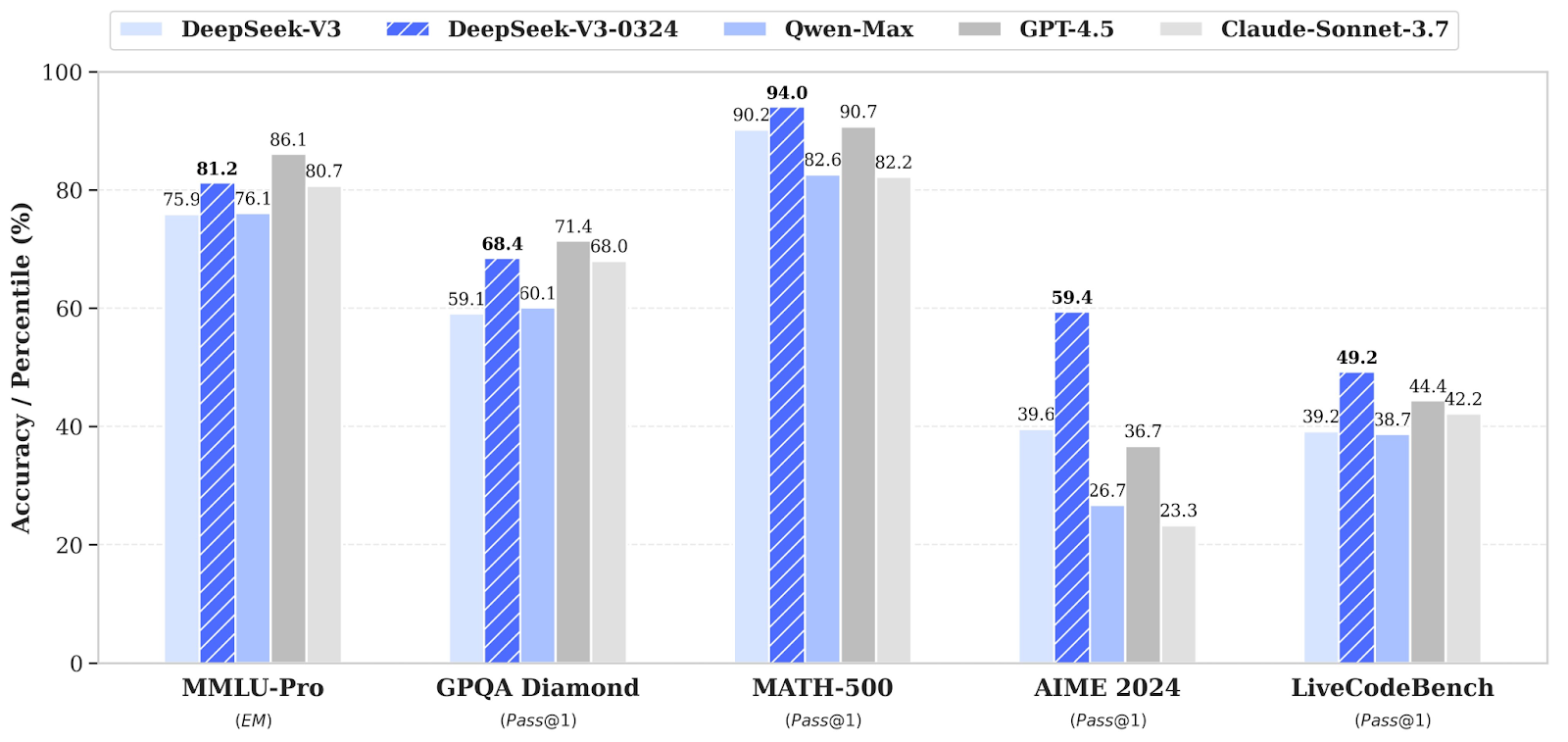
来源:DeepSeek
上面的柱状图结果显示,在逻辑推理、数学解题与代码生成方面都有大幅提升。
DeepSeek-V3-0324 在生成可用的 HTML/CSS/JS 方面有切实改进,尤其适用于以下任务:
升级后的模型还带来增强的工具使用特性,包括:
与 DeepSeek-R1 一样,V3-0324:
为检验 DeepSeek-V3-0324 的前端能力,我用 Streamlit 与 Tailwind CSS 搭建了一个小型演示。该项目是一个自然语言到 UI 组件的生成器,工作流程如下:
在开始前,确保已安装以下工具与库:
python3 --version  # Python 3.8+
pip install requests streamlit
检查 Python 版本,应不低于 3.8。然后安装上述依赖。
接下来,我们需要在终端中将 DeepSeek API 密钥设置为环境变量。要获取 API 密钥:
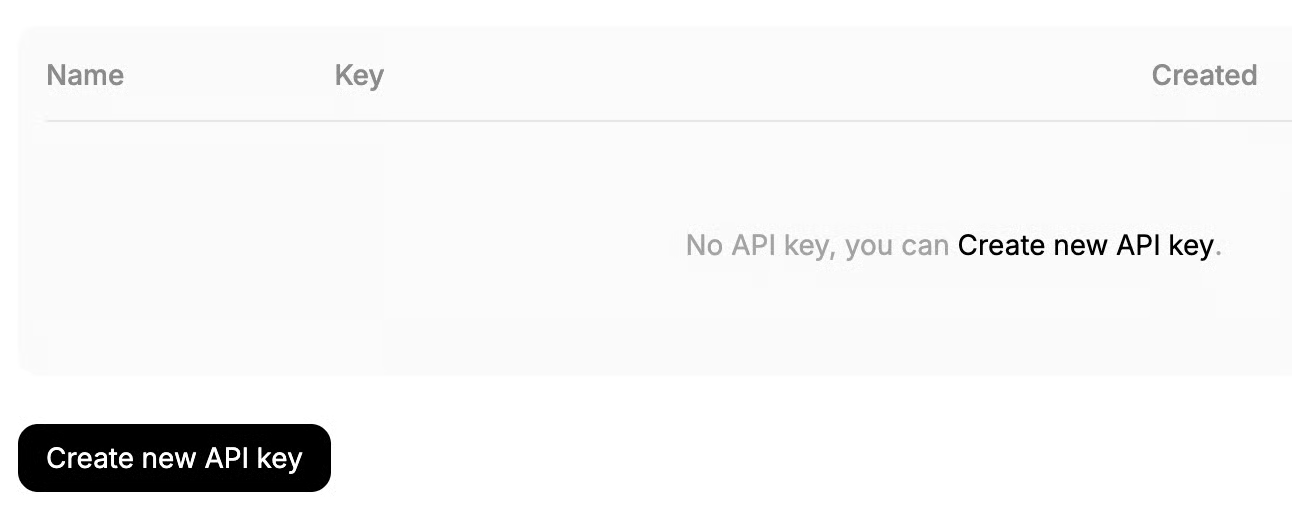
如果您需要进一步了解如何使用 API,推荐这篇关于 DeepSeek API 的教程。
现在需要在终端中将 DeepSeek API 密钥设置为环境变量:
export DEEPSEEK_API_KEY=”Your_API_Key”至此,我们的应用所需依赖已就绪,接下来开始构建 UI 生成器。
首先创建一个 frontend_generator.py 文件,它作为后端封装器,用 DeepSeek-V3-0324 生成前端组件代码。
先设置依赖项的导入。
import requests
import json
import os
导入 requests、json 与 os 库,分别用于处理 HTTP 通信、JSON 序列化,以及通过环境变量访问 API 密钥。
接着为应用设置 DeepSeek 的 API 密钥与 API URL。
API_KEY = os.getenv("DEEPSEEK_API_KEY")
API_URL = "https://api.deepseek.com/chat/completions"
headers = {
    "Content-Type": "application/json",
    "Authorization": f"Bearer {API_KEY}"
}
通过 API_KEY 与 API_URL(已在前面设置)来完成认证并指向 DeepSeek 的聊天补全端点。请求头指定内容类型,并包含用于授权的 Bearer 令牌。
SYSTEM_PROMPT 用于定义助手行为。它引导模型使用 Tailwind CSS 类生成可读、结构良好的 HTML,确保元素美观且居中对齐。
SYSTEM_PROMPT = """
Generate clean HTML with Tailwind CSS classes. Focus on:
1. Use appropriate Tailwind utility classes
2. Ensure text is centered
3. Use clear, visible colors
4. Make content readable
Example for "red button with white text":
<button class="bg-red-500 text-white px-4 py-2 rounded">Click me</button>
Prompt: "A gray box with the text "Hello World" centered inside"
Expected Output:
<div class="bg-gray-300 flex items-center justify-center p-6 rounded-lg">
    <p class="text-black text-xl">Hello World</p>
</div>
"""最后,来构建载荷(即发送给 DeepSeek API 请求响应的结构化数据)。
def get_component_code(user_prompt: str) -> str:
    payload = {
        "model": "deepseek-chat",
        "messages": [
            {"role": "system", "content": SYSTEM_PROMPT},
            {"role": "user", "content": user_prompt}
        ],
        "stream": False
    }
    response = requests.post(API_URL, headers=headers, data=json.dumps(payload))
    if response.status_code == 200:
        content = response.json()['choices'][0]['message']['content']
        # Remove markdown code block markers if present
        if "```"in content:
            content = content.split("```")[1].strip()
        return content.strip() or f"""
            <div class="bg-gray-300 flex items-center justify-center p-6 rounded-lg">
                <p class="text-black text-xl">{user_prompt}</p>
            </div>
        """
    else:
        raise Exception(f"DeepSeek API error {response.status_code}: {response.text}")
get_component_code() 函数接收用户定义的提示(例如:“蓝色卡片,白色文字”),并构建符合 DeepSeek 与 OpenAI 兼容消息格式的载荷。该载荷包含:
stream=False,一次性接收完整响应requests.post() 会向 DeepSeek API 发送 POST 请求。若请求成功,则从 choices[0].message.content 字段中提取模型输出。
注意:“deepseek-chat” 默认使用最新的 DeepSeek V3-0324 版本(无需指定精确模型)。
前端代码生成器已经就绪,接下来构建将一切串联起来的 Streamlit 界面。
首先导入应用的依赖。Streamlit 负责构建 UI 并处理用户交互,而 html 用于安全地在 iframe 中嵌入 HTML 内容。
import streamlit as st
from frontend_generator import get_component_code
import html我们来实现应用的组件预览功能,使用户能在 Streamlit 窗口中预览组件。
def create_component_preview(raw_code: str) -> str:
    clean_code = raw_code.strip()
    return f"""
    <!DOCTYPE html>
    <html>
    <head>
        <script src="https://cdn.tailwindcss.com"></script>
        <meta name="viewport" content="width=device-width, initial-scale=1.0">
        <style>
            html, body {{


                height: 100%;
                display: flex;
                justify-content: center;
                align-items: center;
                background-
            }}
            .preview-container {{
                width: 100%;
                height: 100%;
                display: flex;
                justify-content: center;
                align-items: center;

                box-sizing: border-box;
            }}
            .component-wrapper {{
                width: 100%;
                max-width: 300px;
                display: flex;
                justify-content: center;
                align-items: center;
            }}
        </style>
    </head>
    <body>
        <div class="preview-container">
            <div class="component-wrapper">
                {clean_code}
            </div>
        </div>
    </body>
    </html>
    """
get_component_code() 函数从我们先前创建的 frontend_generator.py 文件导入。它连接 DeepSeek API,并基于用户提示生成 Tailwind CSS 组件。
随后,create_component_preview() 函数将模型返回的原始 HTML 代码包装进一个完整、已启用 Tailwind 的 HTML 文档中。它应用基础样式以实现居中,并将 UI 组件置于响应式布局内。
现在组件都已就位,需要用 Streamlit 应用将它们组装起来。
st.set_page_config(page_title="UI Generator", layout="centered")
st.markdown("## Generate UI Components with AI")
prompt = st.text_input("Describe your component", value="A red button with Hello text")
if st.button("⚡ Generate"):
    try:
        code = get_component_code(prompt)
        st.subheader("Generated Code")
        st.code(code, language="html")
        preview_html = create_component_preview(code)
        iframe_html = f'<iframe srcdoc="{html.escape(preview_html)}" width="100%" height="300" style="border:none;"></iframe>'
        st.subheader("Live Preview")
        st.components.v1.html(iframe_html, height=320)
    except Exception as e:
        st.error(f"Error generating component: {str(e)}")
st.text_input() 使用了一个预填示例,例如"A red button with Hello text",以引导用户。当用户点击 “Generate” 按钮时,应用将执行以下操作:
get_component_code(prompt) 获取生成的 HTML。create_component_preview() 将其包装为完整预览布局。st.components.v1.html() 将结果嵌入 iframe,实现实时渲染。在 iframe 中使用 srcdoc,可以让 Tailwind 的脚本和样式在隔离的预览框架内加载,解决了在 Streamlit 中直接渲染原生 HTML 的限制。
该设置实现了从提示到预览的顺畅流程:用户用自然语言描述 UI 组件,即可立即看到底层代码与渲染结果。
现在组件已齐备,运行我们的 Streamlit 应用。在终端执行以下命令:
streamlit run streamlit_app.py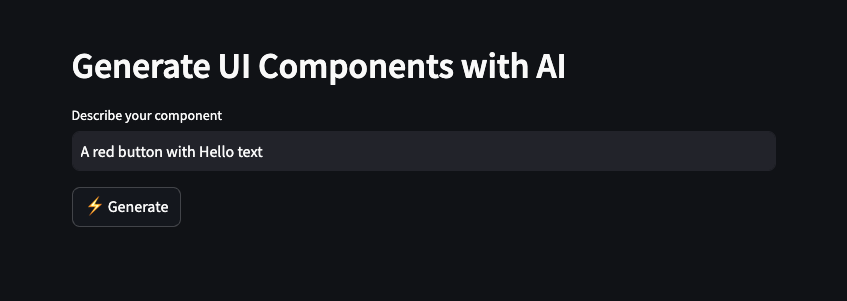
我们可以用文字描述组件并点击 Generate。这会触发 DeepSeek V3-0324 生成基于 Tailwind 的 HTML 代码,并渲染为实时可视化预览。
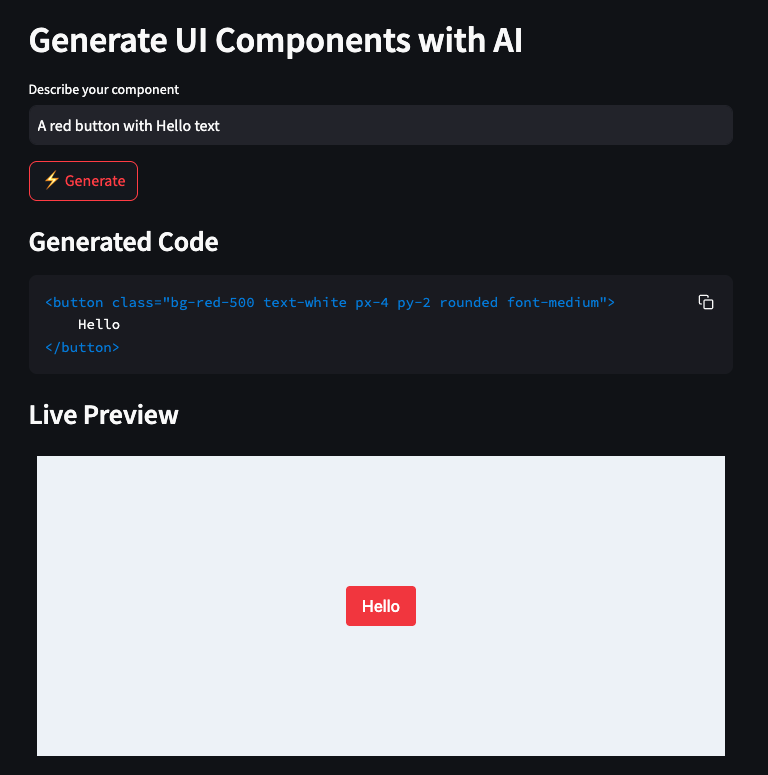
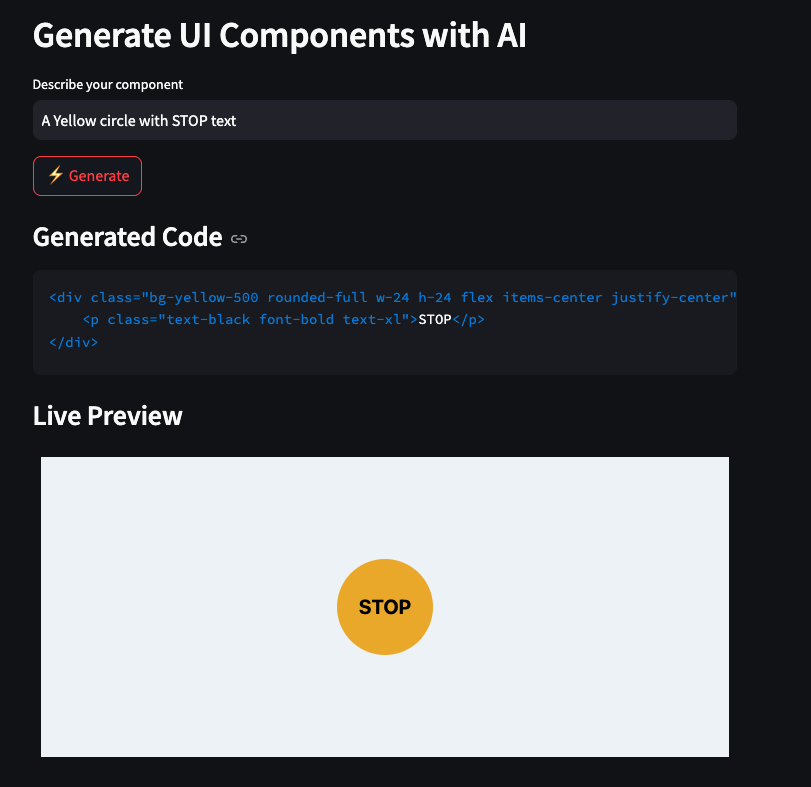
DeepSeek V3-0324 在实用推理、代码执行、UI 生成以及多模态提示工程方面迈出了实质性步伐。凭借其开源特性与极高速度,对于从事以下方向的开发者而言是极佳之选:
若想探索更多新的 AI 工具与模型,推荐阅读以下博文:
用这些课程学习 AI!
学习路径
课程
实践并学习路径你的进步。
使用 Google 继续