

如何通过 API 访问 DeepSeek R1 与 V3
要通过 API 使用 DeepSeek 模型:
- 获取 API 密钥:在 DeepSeek API 平台注册并生成您的密钥。
- 使用 OpenAI SDK(软件开发工具包): 通过正确设置,使用 OpenAI 的 SDK 连接到 DeepSeek API。SDK 是一组工具、库、文档与示例代码,帮助您为特定平台、框架或 API 构建应用。API SDK(如 OpenAI SDK)提供现成的函数,简化 API 调用,开发者无需从头编写。
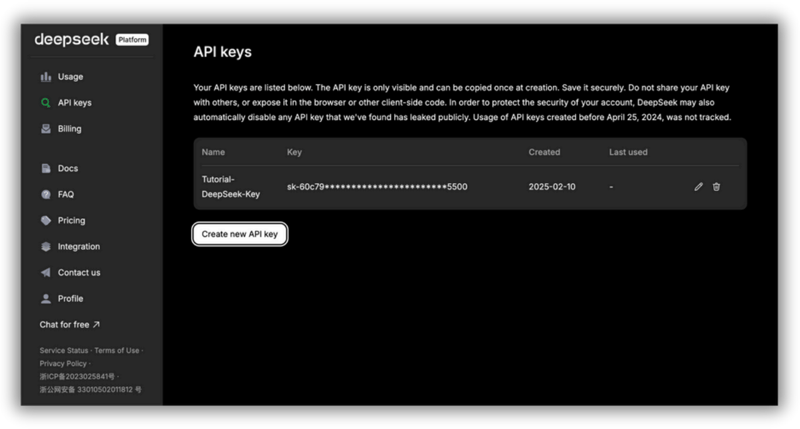
DeepSeek API 平台的 API 密钥管理页面。您可以在此生成并管理用于访问 DeepSeek AI 服务的 API 密钥。API 密钥仅在创建时可见,必须妥善保存;公开分享可能带来安全风险。
使用 DeepSeek-V3 需要设置 model='deepseek-chat',使用 DeepSeek-R1 需要设置 model='deepseek-reasoner'。
以下展示如何使用 OpenAI SDK 访问 DeepSeek API:
from openai import OpenAI
client = OpenAI(api_key="<DeepSeek API Key>", base_url="https://api.deepseek.com")
response = client.chat.completions.create(
model="deepseek-chat",
messages=[
{"role": "system", "content": "You are a helpful assistant"},
{"role": "user", "content": "Hello"},
],
stream=False
)
print(response.choices[0].message.content)我们来更仔细地看看这段代码在做什么。
这段代码的目标是向 DeepSeek 模型发送一条聊天消息,并打印模型的回复。
首先,from openai import OpenAI 从 openai 库中导入 OpenAI 类。
然后,client = OpenAI(...) 创建一个 OpenAI 客户端对象。该客户端是您与 DeepSeek API 的连接。它使用您的 API 密钥(身份验证)并指定 DeepSeek API 的基础 URL 来配置连接。
重要提示:将 <DeepSeek API Key> 替换为您真实的 DeepSeek API 密钥!
response 这一部分会把您的聊天消息发送给 DeepSeek 模型,并获取回复。client.chat.completions.create(...) 是调用 DeepSeek API 以从模型获取响应。
来看一下 messages=[...],这部分定义了对话历史:
- 系统消息:{"role": "system", "content": "You are a helpful assistant"}:设置模型的行为,让它充当一个乐于助人的助手。
- 用户消息:{"role": "user", "content": "Hello"}:这是真正的用户输入(您的提示),AI 将对此作出回应("Hello")。
请注意,此示例使用的是 DeepSeek-V3,因为我们设置了 model='deepseek-chat’,但您也可以通过设置 model='deepseek-reasoner' 来使用 DeepSeek-R1。
stream=False 的意思是“把完整答案一次性给我”。也就是说,当您设置 stream=False 时,模型会等到生成完整回复后再返回。如果您想一次性展示或分析完整回复,请使用此设置。
不过,对于较长的回复,您可能需要稍微等待输出。 若设置 stream=True,模型会在生成过程中逐步显示词(严格说是 token),您可以实时看到回复,而无需等待完整答案。
最后,print(response.choices.message.content) 从响应对象中提取模型的回复并打印到控制台。响应对象包含大量信息,但您主要关心的是模型的消息。API 有时会返回多个可能的答案(choices),这里选择第一个。
在本文发布时,DeepSeek 因服务器资源紧张,已暂停为 API 账户新增充值。这意味着目前您无法往 API 余额中再充值。如果您已有余额,仍可正常使用 API。一旦服务器容量增加,DeepSeek 可能会恢复充值,请留意后续更新!
通过参数管理控制输出与成本
DeepSeek 团队宣称其模型比竞品更便宜。但要想低成本且高性能地使用,仍需合理配置。以下是使用 DeepSeek 模型时,为控制输出与定价需要了解与考虑的要点。
选择合适的模型
各个 DeepSeek 模型针对不同任务而设计。根据需求选择正确的模型,有助于在成本与性能之间取得平衡。简要对比如下:
- deepseek-chat(V3):更便宜,适合一般聊天与对话。
- deepseek-reasoner(R1) → 更昂贵,但擅长复杂推理与高级任务。
Token 成本
Token 是模型处理文本的最小单位,可以是一个单词、数字,甚至是标点。使用的 token 数量取决于语言以及模型处理文本的方式。
以下是字符到 token 的大致换算:
- 1 个英文字符 ≈ 0.3 个 token(100 个字符的句子约为 30 个 token)。
- 1 个中文字符 ≈ 0.6 个 token(因为中文单字承载的信息量更高)。
要获得准确估计,最好在运行请求后查看使用详情。理解 token 的计数方式,有助于在使用 DeepSeek 模型时更好地管理成本并优化性能。
以下是每 100 万个 token 的价格(注意:为本文发布时的价格——请在此处查看最新成本):
|
模型 |
上下文长度 |
最大 CoT token |
最大输出 token |
每 100 万输入 token 价格(命中缓存) |
每 100 万输入 token 价格(未命中缓存) |
每 100 万输出 token 价格 |
|
deepseek-chat |
64k |
- |
8k |
$0.07 |
$0.27 |
$1.10 |
|
deepseek-reasoner |
64k |
32k |
8k |
$0.14 |
$0.55 |
$2.19 |
如前所述,DeepSeek 提供 deepseek-chat 与 deepseek-reasoner 两个模型,但它们的优势与成本不同。了解它们如何处理信息与如何按 token 收费,有助于更高效地使用并控制成本。
两个模型都可在一次会话中处理最多 64,000 个 token,也就是能记住更多上下文,从而给出更相关的回复。不过,它们的工作方式不同。
deepseek-chat 面向通用对话,不进行高级推理。相比之下,deepseek-reasoner 在给出最终答案前,可用于逐步思考的链式推理(Chain-of-Thought,稍后详述)最多达 32,000 个 token。这使其擅长解决复杂问题,但也会增加 token 用量,从而提高成本。
在回复长度方面,两者单次回复最多可生成 8,000 个 token。这个上限有助于避免回复过长并导致费用过高。
从定价看,deepseek-chat 更加经济。如果输入命中缓存(即之前用过),每百万 token 费用为 $0.07;若为新输入,费用升至 $0.27;输出为每百万 token $1.10。
deepseek-reasoner 因具备更深入的推理能力而更贵。命中缓存的输入为每百万 token $0.14,新的输入为 $0.55;其输出为每百万 token $2.19,反映了生成回复的复杂度。
那么,您该用哪个模型?
若需要简单的聊天回复或快速答案,deepseek-chat 更合适且更便宜;若需要细致推理或解决复杂问题,deepseek-reasoner 更强大——但成本更高。
为节省费用,您也可以利用缓存。当模型识别出之前见过的输入时,会按更低费率计费。这对重复查询或多轮对话非常有用。
DeepSeek 模型的价格具有竞争力,但 token 用量增长也很快。控制成本的最佳方式包括:尽量精简提示词、在可行时使用缓存、为任务选择合适的模型。想进一步了解,可阅读关于提示词优化的博文。
Temperature 参数
Temperature 参数用于控制模型回复的随机性或可预测性。在 DeepSeek 中默认是 1.0,意味着在创造性与确定性之间取得平衡。不过,您可以根据具体需求进行调整。
DeepSeek 对不同用例给出以下建议:
|
用例 |
推荐 Temperature |
|
编程 / 数学 |
0.0(确定性、精确) |
|
数据清洗 / 数据分析 |
1.0(平衡回复) |
|
日常对话 |
1.3(更丰富的回复) |
|
翻译 |
1.3(允许措辞更灵活) |
|
创意写作 / 诗歌 |
1.5(鼓励多样且富想象的输出) |
较低的 Temperature(接近 0.0)让模型更可预测、更精确。适用于需要准确答案的任务,如编程、数学与结构化数据分析。
较高的 Temperature(高于 1.0)让模型更具创造性与多样性,适合讲故事、诗歌创作以及需要灵活性的翻译场景。
对于一般对话,将 Temperature 设为约 1.3 有助于产生自然、吸引人的交流,同时不过于重复或过分随机。
虽然 Temperature 本身不直接影响成本,但可能间接增加输出 token 数量:
- 更高的 Temperature 可能生成更长、更丰富的回复,即更多 token → 成本更高。
- 更低的 Temperature 往往带来更短、更直接的回答,从而减少 token 用量并降低成本。
响应格式
与 DeepSeek API 交互时,您可以通过指定 response_format 参数来控制响应格式。这在处理结构化数据时尤其有用,有助于确保模型输出的一致性与可读性。
如需以 JSON 格式接收响应,请设置:
response_format={'type': 'json_object'}这会让模型返回结构化输出,便于以编程方式处理信息。JSON 格式常用于需要结构化、机器可读响应的应用,如数据抽取、自动化与 API 集成。
尽管 JSON 格式本身不会直接影响定价,但在某些情况下可以间接降低成本。
- 更精炼的响应:由于 JSON 遵循结构化格式,通常更紧凑,可能比自由文本使用更少的 token。
- 更高的准确性:明确要求结构化输出,可减少冗长、无关的解释,有助于控制 token 使用。
理解链式思维(CoT)及其成本
CoT 是 DeepSeek-R1 在给出最终答案前经历的推理过程。它意味着模型会在得出结论前,逐步解释其思考过程。
CoT 推理与最终答案中使用的每一个 token 都按每百万 token $2.19 计费,因为它们属于输出。这里存在权衡:更多的 CoT token = 更高成本,但在复杂任务上往往带来更好的准确性。
使用 CoT 的同时,如何控制成本?
- 使用清晰的提示词:要求简短但有效的推理,而非冗长解释。
- 跟踪 token 使用:关注 CoT 与最终答案分别用了多少 token。
- 选择合适模型:对于更简单的问题,可考虑改用更便宜的 deepseek-chat。在这种情况下不使用 CoT。
- 使用缓存:若反复提出相似问题,缓存可降低输入 token 成本。
示例:未优化的提示词
为说明 DeepSeek-R1 中 CoT 输出的工作方式及其对定价的影响,来看一个示例:
from openai import OpenAI
client = OpenAI(
api_key="<Your_DeepSeek_API_Key>",
base_url="https://api.deepseek.com"
)
def generate_response(prompt):
response = client.chat.completions.create(
model="deepseek-reasoner",
messages=[
{"role": "system", "content": "You are a helpful assistant."},
{"role": "user", "content": prompt}
],
stream=False
)
return response.choices[0].message.content
# Example usage
prompt = "Calculate the area of a triangle with a base of 6 cm and a height of 4 cm."
result = generate_response(prompt)
print(result)CoT:
Okay, so I need to find the area of a triangle with a base of 6 cm and a height of 4 cm. Hmm, let me remember how to do this. I think the formula for the area of a triangle is something like base multiplied by height divided by two. Wait, is that right? Let me think.
When I was in math class, the teacher mentioned that a triangle is basically half of a parallelogram. So if you have a parallelogram, its area is base times height. If you cut it along the diagonal, you get two triangles. That means each triangle would have half the area of the parallelogram. So yes, the formula should be (base × height) / 2. That makes sense. Let me write that down to visualize it better.
Area = (base × height) / 2
Given the base is 6 cm and the height is 4 cm, I can substitute those values into the formula. Let me plug them in step by step.
First, multiply the base and the height: 6 cm × 4 cm. Let me calculate that. 6 times 4 is 24. So that gives me 24 cm². Now, divide that result by 2. So 24 divided by 2 is 12. Therefore, the area should be 12 cm².
Wait, let me verify that. If the base was 6 and the height 4, multiplying them gives the area of the corresponding parallelogram, which would be 24 cm². Then, since the triangle is half of that, dividing by 2 gives 12 cm². Yes, that seems correct.
Is there another way to check this? Maybe using a different method? Let's see. For a triangle, the area can also be calculated using Heron's formula, but that requires knowing all three sides. Since I only have the base and height, that might not apply here. Alternatively, if it's a right-angled triangle, the area would be (1/2)*base*height, which is the same formula. But even if it's not a right-angled triangle, the formula still applies because the height is given. The height is the perpendicular distance from the base to the opposite vertex, so regardless of the triangle's type, as long as we know the base and the corresponding height, the formula works.
Let me draw a mental picture. Imagine a triangle where the base is 6 cm. The height is 4 cm, which means if I were to drop a perpendicular line from the top vertex to the base, that line would measure 4 cm. So, even if the triangle is slanted, that vertical height is still 4 cm. Multiplying base and height gives the area of the parallelogram, so dividing by two gives the triangle's area.
Another way to think about it: If I have two identical triangles, I can put them together to form a parallelogram. The area of that parallelogram is base times height, so each triangle is half of that. Therefore, the area of one triangle is 1/2 * base * height.
So, plugging the numbers in again: 1/2 * 6 cm * 4 cm. 1/2 of 6 is 3, and 3 times 4 is 12. Yep, 12 cm².
I think that's solid. Let me check with an example. Suppose the base was 2 cm and the height 3 cm. Then the area would be (2*3)/2 = 3 cm². If I draw such a triangle, it should have an area of 3 cm², which seems right. So scaling up, with a base of 6 and height of 4, the area is proportionally larger.
Alternatively, if I consider a rectangle with the same base and height, area would be 6*4=24 cm². The triangle is half of that, so 12 cm². That also checks out.
Wait, but hold on. If the triangle isn't a right triangle, does the formula still hold? Let's think. If I have an obtuse triangle where the height is outside the triangle, does that affect the area? For example, suppose the base is 6 cm, but the height is measured from the base to a vertex that's outside the triangle, making an obtuse triangle. Even in that case, the area is still (base*height)/2. Because the height is the perpendicular distance regardless of where it's located. So even if the triangle is obtuse, the formula remains the same. Therefore, regardless of the triangle type, as long as the height is given, the formula applies.
Therefore, using 6 cm and 4 cm, multiplying them, dividing by two, gives 12 cm². That seems to be the correct answer. I can't see any mistakes in the reasoning.
Let me just recap. The formula for the area of a triangle is 1/2 multiplied by base multiplied by height. Given base = 6 cm, height = 4 cm. Plugging into the formula: 1/2 * 6 * 4 = 12. The units are in centimeters, and since area is in square units, the answer is 12 cm².
Yes, that all lines up. I think I've got it right. The area is 12 square centimeters.最终答案:
The area of the triangle is 12 cm².
To calculate the area of a triangle with a base of 6 cm and a height of 4 cm, we use the standard formula:
Area=1/2×base×height
Step-by-Step Calculation
Multiply the base and height: 6 cm×4 cm=24 cm²Divide the result by 2: 24 cm²/ 2=12 cm²Final Answer: 12 cm²
Thus, the area of the triangle is 12 cm².成本计算
- 使用的 Token ≈ 1165
- 每百万 Token 成本 = $2.19
- 将 token 转为百万:1165 ÷ 1,000,000 = 0.001165(百万 token)
- 乘以单价:0.001165 × 2.19 = 0.002551350。
- 最终成本 ≈ $0.00255(四舍五入至小数点后五位)
示例:优化后的提示词
现在,我们来优化提示词,看看输出如何变化:
提示词:“三角形面积:底 6cm,高 4cm。只展示公式和结果”
CoT:
Okay, so I need to find the area of a triangle with a base of 6 cm and a height of 4 cm. Hmm, let me remember the formula for the area of a triangle. I think it's something like base multiplied by height divided by two. Wait, yeah, right, because a triangle is basically half of a parallelogram, right? So if you have a parallelogram, the area is base times height, and then a triangle would be half of that. So the formula should be (base * height) / 2.
Let me double-check that. Maybe I can visualize a triangle with base 6 and height 4. If I had another identical triangle, I could put them together to form a parallelogram. The base would still be 6, the height would still be 4, so the area of the parallelogram would be 6*4=24. Then the area of one triangle would be half of that, which is 12. So that makes sense.
Alternatively, I remember in school they taught us the formula as A = 1/2 * b * h. So plugging in the values, it should be 1/2 * 6 cm * 4 cm. Let me calculate that. 1/2 of 6 is 3, then 3 times 4 is 12. So the area should be 12 cm².
Wait, but just to be thorough, let me make sure there aren't any other formulas that could apply here. For example, Heron's formula requires the lengths of all three sides, but I only have the base and height here. So Heron's formula isn't necessary. Since we have the base and height given directly, using the standard area formula is the way to go.
Also, units: the base is in centimeters, the height is in centimeters, so when multiplying, the area will be in square centimeters. That checks out.
Another thing to consider: is the height corresponding to the given base? The problem states "base 6 cm, height 4 cm," so yes, they correspond. If the height was relative to a different side, it might complicate things, but here it's specified for the base. So no issues there.
I think that's all. The formula is correct, the calculation seems right. 6 times 4 is 24, divided by 2 is 12. So the area is 12 square centimeters.最终答案:
The area of the triangle is calculated using the formula: Area=1/2×base×height
Substituting the given values: Area=1/2×6 cm ×4 cm = 12 cm²
Result: 12 cm²成本计算
- 使用的 Token ≈ 496
- 每百万 Token 成本 = $2.19
- 将 token 转为百万:496 ÷ 1,000,000 = 0.000496(百万 token)
- 乘以单价:0.000496 × 2.19 = 0.001086240。
- 最终成本 ≈ $0.00109(四舍五入至小数点后五位)
最终成本对比表
下表展示了 token 用量如何影响一次 API 调用的总成本:
|
示例 |
使用的 Token |
成本(USD) |
|
未优化的提示词 |
1165 |
$0.00255 |
|
优化后的提示词 |
496 |
$0.00109 |
与原始版本相比,优化后的提示词将成本降低了约 57%,同时仍获得正确答案。
如何使用 DeepSeek 的上下文缓存来降低成本
从“Token 成本”部分的定价表可得出:相较处理新的(未缓存)输入 token,使用缓存可为 deepseek-chat 节省约 74.07% 的 API 成本,为 deepseek-reasoner 节省约 74.55%。也就是说,合理使用缓存几乎可以将输入 token 成本降低四分之三。
缓存对长提示词尤为有用,因为它能减少等待时间。此外,系统会自动处理缓存——无需更改您的代码。
那么,上下文缓存如何工作?
当您发送请求时,DeepSeek 会在其服务器上存储输入。若您之后发送了相似请求,系统会检索已存储的响应,而非重新计算,从而更快且更便宜。
缓存在哪些场景最有用?
在以下场景中,缓存能发挥作用并降低成本:
- 多轮对话:聊天机器人可复用先前回复,从而降低成本。
- 数据分析:对同一文件的重复查询可受益于缓存响应。
- 问答助理:对话开头的长指令可以被缓存。
- 角色扮演与交互式应用:人物设定与长对话无需重复计算。
- 代码分析:多次引用同一代码文件可节省 token。
- 小样本学习(Few-shot):如果您向模型提供示例,缓存可降低成本。
如何最大化节省
要最大化节省,我的建议是:
- 将复用文本放在开头:API 只缓存输入的起始部分。
- 保持输入相似:若想命中缓存,请避免对提示词改动过大。
- 为重复而设计:组织请求以尽可能复用缓存内容。
如何追踪缓存使用
要在 DeepSeek API 中追踪缓存使用,您无需修改代码。缓存使用信息会自动包含在 API 响应中。缓存系统对所有用户默认启用。当您发起 API 调用时,响应对象会在 usage 部分新增两个字段:
prompt_cache_hit_tokens:来自缓存提供的输入 token 数量prompt_cache_miss_tokens:未在缓存中找到的输入 token 数量
要访问这些信息,您需要查看 API 响应中的 usage 字段。下面示例展示了如何获取这些值:
response = client.chat.completions.create(
model="deepseek-chat",
messages=[
{"role": "user", "content": "You are a helpful assistant."}
]
)
cache_hits = response.usage.prompt_cache_hit_tokens
cache_misses = response.usage.prompt_cache_miss_tokens
print(f"Cache hits: {cache_hits}")
print(f"Cache misses: {cache_misses}")此功能可帮助您监控缓存系统在您的用例中的实际效果。
不过,缓存也有局限:
- 最小缓存大小:系统仅缓存 64 个 token 或以上的文本块。更短的输入不会存储。
- 并非 100% 可靠:系统不保证每次请求都能命中缓存。
- 缓存会过期:若长时间未使用,缓存内容会在数小时到数天内自动清除。
想了解更多,请阅读这篇关于提示词缓存的博文。
结语
在本教程中,我们学习了如何使用 DeepSeek API 及其两个模型 DeepSeek-R1 与 V3。只要理解这些模型的工作方式,您就能构建更智能、具成本效益的 AI 应用。
请持续关注最新的 DeepSeek 文档与最佳实践,以充分发挥这些强大模型的价值。获得 DeepSeek API 密钥后,您可以将其用于 DeepSeek 自家的编码代理;参见我们的 DeepSeek Harness 教程。
祝您编码顺利!

Ana Rojo Echeburúa 是一位人工智能与数据专家,拥有应用数学博士学位。她热衷于将数据转化为可执行的洞见,并在带领技术团队方面拥有丰富经验。Ana 喜欢与客户密切合作,解决其业务难题并打造创新的 AI 解决方案。她以出色的问题解决能力和清晰的沟通著称,对人工智能,尤其是生成式 AI 充满热情。Ana 致力于持续学习与负责任的 AI 开发,同时专注于简化复杂问题,并以通俗易懂的方式解释技术。
在本教程中,我将向您展示如何设置并使用 DeepSeek API,以便将其集成到您的项目中。您将学到:
读完本文,您将知道如何在控制成本的同时使用 DeepSeek。我们开始吧!
DeepSeek 模型
DeepSeek 提供两个主要模型,可通过 API 使用:
您可以在这篇博文了解两者的区别:DeepSeek R1 vs V3。