Cursor vs. VS Code: diferencias clave explicadas
Ahora que ya hemos visto ambos editores, veamos dónde se separan realmente. La brecha ya no va solo de IA; va de lo profunda que está esa IA en el propio editor.
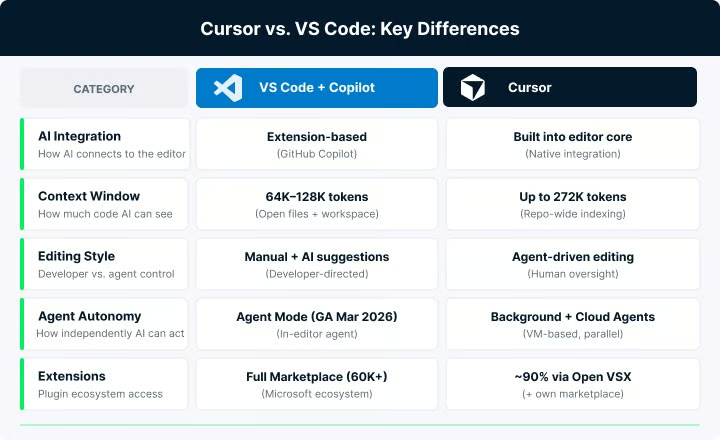
Cinco diferencias clave entre ambos editores. Imagen del autor.
Integración de IA: nativa vs. basada en extensiones
VS Code ofrece su IA a través de GitHub Copilot, que técnicamente es una extensión. Se comunica con el editor mediante APIs de extensiones y, aunque las últimas versiones han profundizado mucho esa integración, la IA y el editor siguen siendo capas distintas. Puedes desactivar, cambiar o sustituir la IA sin tocar la experiencia base de edición.
Cursor adopta el enfoque opuesto. La IA está integrada en el núcleo: el buffer de texto, el terminal, el explorador de archivos. No espera a una llamada de API para entender qué estás haciendo. Las sugerencias con Tab se sienten visiblemente más rápidas; profundizo en esto en la sección de capacidades de IA.
Conciencia de contexto del código
Esta es una de las diferencias prácticas más grandes. VS Code con Copilot ofrece una ventana de contexto entre 64.000 y 128.000 tokens y se basa principalmente en archivos abiertos y la búsqueda del workspace para decidir qué contexto enviar al modelo.
Cursor, por defecto, indexa todo el repositorio. Crea una huella basada en embeddings de tu proyecto usando árboles de Merkle, almacena esos embeddings en el servidor y soporta ventanas de contexto de hasta 272.000 tokens. Cuando pides al agente de Cursor que refactorice algo, ya dispone de un mapa semántico de relaciones entre archivos, cadenas de imports y patrones de arquitectura. Aquí es donde la diferencia entre ambos enfoques se hace más tangible.
Estilo de edición: manual vs. dirigido por agentes
VS Code está pensado para desarrolladores que quieren mantener el control. Copilot potencia tu escritura con Next Edit Suggestions y autocompletados inline. Agent Mode, disponible de forma general desde el 11 de marzo de 2026, añade edición autónoma multiarchivo, pero el flujo sigue siendo interactivo y dirigido por el desarrollador.
Cursor va un paso más allá. Su Agent Mode crea y actualiza archivos, ejecuta comandos en el terminal, lanza un navegador integrado para pruebas e incluso abre pull requests. La función Automations (marzo de 2026) permite configurar agentes siempre activos que se disparan con eventos externos como un webhook de GitHub o un mensaje de Slack.
Personalización y flexibilidad
VS Code ofrece un alto grado de configurabilidad mediante ajustes, extensiones, temas y ahora Agent Plugins y Agent-Scoped Hooks para definir con detalle el comportamiento de los agentes.
Cursor hereda gran parte de la personalización de VS Code por ser un fork y añade capas específicas de IA encima. Puedes definir reglas del proyecto en .cursor/rules/ mediante archivos Markdown, excluir archivos sensibles con .cursorignore y configurar instrucciones de IA por proyecto. Además tiene su propio marketplace de plugins, que veremos en la sección de extensiones.
Código abierto y gobernanza
El código fuente de VS Code tiene licencia MIT y cuenta con el respaldo de Microsoft. Cursor es propietario y lo respalda Anysphere, una startup independiente financiada por Accel, a16z, Thrive Capital, Nvidia y Google.
Comparativa de capacidades de IA: Cursor vs. VS Code
Ambos van mucho más allá del autocompletado simple. Gestionan ediciones multiarchivo, ejecutan agentes y cubren tu flujo con git. Las diferencias se notan sobre todo en lo profunda que es la integración de la IA en la experiencia de edición.
Sugerencias de código inline
El autocompletado con Tab de Cursor usa modelos impulsados por Supermaven y, en la práctica, suele sentirse más rápido. Predice no solo la siguiente línea, sino también el próximo punto de edición, para que puedas avanzar con Tab por una serie de cambios relacionados sin navegar manualmente.
Las sugerencias inline de Copilot en VS Code pueden variar más según el modelo y el tipo de petición. También introdujo Next Edit Suggestions a inicios de 2025, que predicen tanto la ubicación como el contenido del siguiente cambio. El plan gratuito, como comentamos, incluye 2.000 completados al mes; los planes de pago no tienen límite.
Edición multiarchivo
Composer de Cursor genera diffs coordinados en todo tu repositorio a partir de un prompt en lenguaje natural. Puede actualizar rutas, controladores, tests y documentación en una sola edición coordinada. Revisas los cambios como un diff unificado. Para trabajo multiarchivo complejo, Cursor recomienda Composer 1.5, su modelo propio para razonamiento.
Copilot Edits en VS Code adopta un enfoque más secuencial. Seleccionas explícitamente los archivos a editar y la herramienta los procesa uno a uno. Agent Mode amplía esto a ediciones autónomas en varios pasos, pero la coordinación entre archivos no está tan integrada como en Composer.
Agentes autónomos
Aquí es donde la brecha se nota más. Según las notas de versión de Cursor, los agentes en segundo plano se ejecutan en VMs dedicadas, pueden operar en paralelo, crear ramas y abrir pull requests al terminar. Los Cloud Agents clonan tu repo y generan PRs listos para mezclar, con vídeo y capturas documentando lo que hicieron. Los subagentes, introducidos en la versión 2.4, permiten que el agente principal delegue partes de una tarea en subprocesos que corren en paralelo, y cada subagente puede crear sus propios subagentes para trabajo en árbol. Las automatizaciones lanzan agentes automáticamente ante disparadores externos.
Un detalle de seguridad para equipos: Cloud Agents firman cada commit que crean, de modo que aparecen como Verified en GitHub y GitLab por defecto. Los repos que exigen commits firmados pueden aceptar ramas de Cloud Agent sin volver a firmar manualmente.
El equivalente en VS Code es el agente de codificación de GitHub Copilot, que trabaja dentro de entornos de GitHub Actions para crear PRs y ejecutar builds. El propio Agent Mode de VS Code gestiona tareas autónomas dentro del editor. Ambos son potentes, pero la infraestructura de agentes de Cursor está más madura a marzo de 2026.
MCP e integración de herramientas
Ambos editores soportan ya el Model Context Protocol (MCP), que permite conectar agentes a herramientas y fuentes de datos externas. Cursor lo admite desde mediados de 2025 y añadió MCP Apps en la versión 2.6, que renderizan UIs interactivas como gráficos y diagramas directamente en el chat. VS Code incorporó MCP y Agent Plugins en sus versiones 1.109 y 1.110. A estas alturas, MCP es estándar en ambos.
Cursor vs. VS Code en flujos de trabajo reales
Cómo rinde una herramienta en escenarios concretos importa más que la lista de funciones. Estos son los casos que más me ayudan a decidir.
Prototipado rápido y startups
Aquí Cursor tiene ventaja. Agent Mode puede generar el esqueleto de funcionalidades a partir de una descripción en lenguaje natural, y la velocidad del autocompletado con Tab ayuda a mantener la concentración en iteraciones rápidas. En proyectos greenfield con poco legado, usar agentes reduce el código que debes escribir a mano.
VS Code con Copilot también va sobrado para prototipos, sobre todo con el plan gratuito que elimina la barrera de coste. Pero el flujo es más manual: la IA asiste, no toma el mando.
Proyectos grandes y monorepos
VS Code es la opción más segura para bases de código masivas. Microsoft ha optimizado arranque y memoria durante una década, y el editor maneja millones de líneas sin necesitar indexado en segundo plano. El indexado a nivel de repositorio de Cursor puede convertirse en cuello de botella en monorepos muy grandes, consumiendo CPU y RAM en el indexado inicial. Si usas Cursor en un proyecto grande, ayuda usar .cursorignore para excluir artefactos de build, dependencias y ficheros de datos pesados.
Equipos enterprise
Cursor indica que cerca del 60% de sus ingresos ya provienen de clientes corporativos, y su plan Teams incluye chats compartidos, SSO SAML/OIDC y analítica de uso. VS Code con Copilot Business ofrece indemnización de PI, registros de auditoría e integración profunda con el ecosistema Microsoft/Azure. Para precios exactos, consulta la sección de precios más abajo. Si tu organización ya usa GitHub Enterprise, Copilot suele encajar más fácil con compliance.
Privacidad y trabajo offline
VS Code funciona completamente sin conexión. No sale ningún dato de tu máquina salvo que actives funciones en la nube. Las funciones de IA de Cursor requieren conexión a internet. Incluso con Privacy Mode activado, tu código se envía a servidores de inferencia para su procesamiento, aunque existen acuerdos de no retención para evitar su almacenamiento o entrenamiento. Para sectores regulados o entornos aislados, VS Code suele ser la única opción viable.
Rendimiento y uso de recursos: Cursor vs. VS Code
Las diferencias de rendimiento entre ambos editores existen, pero son más estrechas de lo que cabría esperar.
VS Code suele arrancar un poco más rápido y consumir menos memoria en reposo, especialmente en workspaces grandes. Cursor añade algo de sobrecarga por el indexado en segundo plano y el contexto de IA, por lo que puede sentirse más pesado en equipos con poca RAM. En proyectos pequeños y medianos, la diferencia suele ser menor. En monorepos muy grandes o sesiones largas, VS Code tiende a mantenerse más estable.
En el foro de Cursor hay informes de pérdidas de memoria en sesiones prolongadas, especialmente al apilar extensiones de IA de terceros sobre la IA integrada de Cursor. Desactivar extensiones de IA que no estés usando suele devolver el consumo a la normalidad. VS Code, en comparación, introdujo rutinas de compactación de contexto y un comando /compact para gestionar sesiones largas de agentes sin crecimiento descontrolado de memoria.
Extensiones de VS Code vs. funciones integradas de Cursor
En extensiones es donde más se nota la década de ventaja de VS Code.
La situación del marketplace
VS Code usa el marketplace propietario de Microsoft, con decenas de miles de extensiones. Cursor no puede acceder legalmente a ese marketplace por los términos de servicio de Microsoft. En su lugar, Cursor usa el registro Open VSX (mantenido por la Eclipse Foundation) y su propio marketplace en crecimiento. En la práctica, alrededor del 90% de las extensiones populares de VS Code funcionan en Cursor porque la mayoría son de código abierto y se publican también en Open VSX.
Las que no funcionan suelen ser las propietarias de Microsoft. Pylance (el servidor de lenguaje de Python de Microsoft), C# Dev Kit, Remote SSH y Live Share no están disponibles en Cursor. Si dependes de alguna a diario, es un factor a considerar. Para Pylance, la alternativa es BasedPyright o Pyright, proyectos open source con algo menos de funciones.
Funciones integradas que sustituyen extensiones
La integración de IA de Cursor cubre categorías que, de otro modo, requerirían extensiones. Su autocompletado nativo con Tab, Agent Mode y Composer reducen la necesidad de GitHub Copilot. Bugbot cubre parte de lo que hacen herramientas de revisión de PR de terceros. La capacidad del agente para leer errores del terminal y proponer soluciones reduce la necesidad de extensiones como Error Lens. Que lo veas como ventaja o limitación depende de si prefieres sistemas integrados o módulos intercambiables.
El ecosistema propio de plugins de Cursor
En marzo de 2026, Cursor lanzó su propio marketplace de plugins con integraciones de Atlassian, Datadog, GitLab, Hugging Face y otros. El ecosistema aún es pequeño comparado con el de VS Code, pero crece a buen ritmo.
Comparativa de precios: Cursor vs. VS Code
El precio es uno de los diferenciadores más claros.
La capa de IA vía GitHub Copilot sigue un modelo por niveles. El plan gratuito te da 2.000 autocompletados y 50 peticiones premium al mes. Si eres estudiante verificado, GitHub Copilot también es gratis bajo el plan Copilot Student, aunque limita qué modelos premium puedes elegir manualmente. Copilot Pro cuesta 10 $ al mes con autocompletados ilimitados y 300 peticiones premium. Copilot Business sale por 19 $/usuario/mes con indemnización de PI y gestión centralizada. Copilot Enterprise cuesta 39 $/usuario/mes con modelos y bases de conocimiento personalizados.
Cursor empieza con un plan gratuito Hobby que incluye una prueba de Pro de dos semanas, peticiones limitadas y acceso solo a modelos del nivel gratuito. Cursor Pro cuesta 20 $ al mes con autocompletado con Tab ilimitado, Auto mode ilimitado y un crédito mensual de 20 $. Pro+ cuesta 60 $/mes con 3× uso en todos los modelos. Ultra cuesta 200 $/mes con 20× uso. El plan Teams cuesta 40 $/usuario/mes con chats compartidos y SSO.
Cursor pasó de facturación por petición a facturación por créditos en junio de 2025. Cada plan de pago incluye un pool de créditos igual al precio del plan en dólares. Auto mode, que permite a Cursor elegir el modelo más rentable, es ilimitado. Pero si seleccionas manualmente un modelo premium como Claude Opus para una gran refactorización, los créditos se consumen más rápido. El cambio fue accidentado; el CEO reconoció una mala gestión de la transición y ofreció reembolsos. Te recomiendo leer la documentación de créditos de Cursor antes de suscribirte, porque el consumo puede subir más de lo esperado con modelos premium.
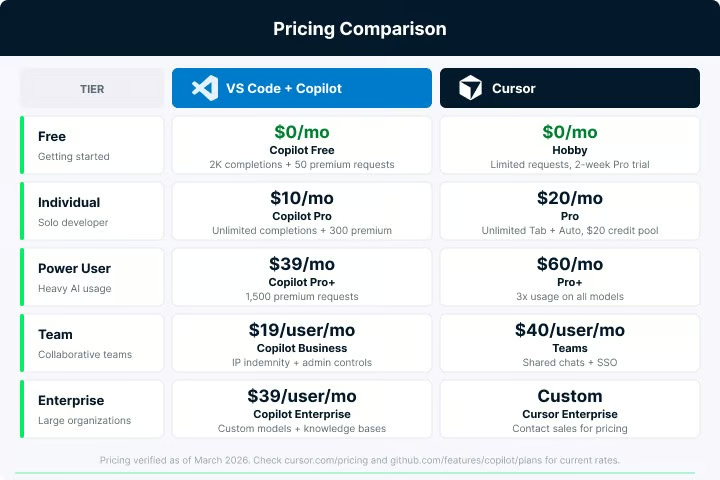
Comparativa de precios a marzo de 2026. Imagen del autor.
En todos los niveles, VS Code con Copilot es más barato. Un desarrollador individual paga 0–10 $ al mes con VS Code frente a 20 $/mes con Cursor. Un equipo paga 19 $/usuario frente a 40 $/usuario. Si compensa la diferencia depende de cuánto uses las funciones de IA.
¿Es Cursor mejor que VS Code?
No hay una única respuesta. La elección correcta depende de cómo trabajes, en qué trabajes y qué concesiones estés dispuesto a asumir.
Elige Cursor si pasas la mayor parte del tiempo con flujos basados en agentes, necesitas a menudo refactorizaciones multiarchivo y agentes automatizados, las carencias en extensiones (Pylance, Remote SSH, Live Share) no afectan a tu stack y estás dispuesto a pagar por una integración de IA más profunda.
Elige VS Code con Copilot si te importa el presupuesto (especialmente el plan gratuito para aprendizaje y proyectos personales), dependes de extensiones de Microsoft, necesitas modo offline completo, prefieres la estabilidad del producto principal de VS Code frente a un fork que va a remolque, o tu organización requiere indemnización de PI.
| Factor | Ganador |
|---|---|
| Profundidad de IA y potencia de agentes | Cursor |
| Precio | VS Code |
| Ecosistema de extensiones | VS Code |
| Tamaño de la ventana de contexto | Cursor (hasta 272K tokens) |
| Soporte offline | VS Code |
| Monorepos grandes | VS Code |
También conviene recordar que el panorama va más allá de estos dos. Claude Code se ha vuelto una alternativa popular para razonamiento profundo y tareas de codificación autónoma, y funciona junto a cualquier editor. Windsurf, que Cognition AI adquirió en julio de 2025, ofrece un enfoque similar al de Cursor a un precio más bajo. La comparación entre Cursor y VS Code es útil, pero no es la única que merece la pena hacer.
Conclusión
Cursor y VS Code están convergiendo. Cursor sigue añadiendo funciones propias de IDE tradicional y VS Code sigue ampliando su IA. La brecha se estrecha, especialmente desde que Agent Mode llegó a disponibilidad general en marzo de 2026. Pero siguen existiendo diferencias reales en la profundidad de la IA, cuánto puedes delegar y cuánto pagas por la experiencia.
Si trabajas principalmente con agentes y quieres la IA más integrada en la edición, Cursor encaja mejor. Si necesitas el ecosistema de extensiones más amplio, soporte offline total o un despliegue rentable para equipos, VS Code con Copilot cubre bien ese terreno.
La mejor forma de decidir es probar ambos en algo real. VS Code es gratis y Cursor ofrece un plan gratuito con prueba de Pro de dos semanas. Verás la diferencia más clara tras unos días en un proyecto de verdad que leyendo comparativas.
Si quieres profundizar en herramientas de codificación con IA, te recomiendo estos recursos:
- Nuestro artículo Cursor vs. GitHub Copilot compara Cursor específicamente con el conjunto de funciones de GitHub Copilot, útil como complemento a esta comparativa.
- La guía Cómo usar GitHub Copilot: casos de uso y buenas prácticas muestra patrones concretos de Copilot en VS Code para que puedas evaluarlo en igualdad de condiciones frente a Cursor.
- Nuestro artículo Top 15 Vibe Coding Tools para construir más rápido en 2026 ofrece una visión más amplia de editores y agentes con IA más allá de Cursor y VS Code.