
Leerpad
Containerisatie en virtualisatie met Docker en Kubernetes
13 uur
Oefen en volg je voortgang.
Ga Verder Met GoogleToen ik begon met containerized applicaties, was een handjevol containers handmatig beheren nog te doen, maar opschalen vroeg om een andere aanpak. Dáár komen containerorchestratieplatforms om de hoek kijken, en twee namen voeren steevast de boventoon: Docker Swarm en Kubernetes.
Containerorchestratie automatiseert de uitrol, het beheer, het schalen en de netwerkconfiguratie van containers over clusters van machines. De juiste keuze kan enorme impact hebben op de productiviteit van je team, de operationele kosten en de schaalmogelijkheden.
In deze gids vergelijk ik Docker Swarm en Kubernetes uitgebreid, zodat je het beste platform voor jouw behoeften kunt kiezen, of je nu een kleine startup runt of een enterprise-infrastructuur beheert.
Als je nieuw bent met Docker, raad ik aan te beginnen met onze cursus Introduction to Docker. Lees ook zeker onze tutorial over het draaien van Claude Code in Docker.
Laten we beginnen met Docker Swarm, de eenvoudigere van de twee platforms.
Docker Swarm is Docker’s eigen oplossing voor containerorchestratie die meerdere Docker-hosts transformeert tot één virtuele host. Ik vind het bijzonder aantrekkelijk vanwege de naadloze integratie met het Docker-ecosysteem dat veel teams al gebruiken.
Docker Swarm-logo
Swarm is direct ingebouwd in Docker Engine en breidt de mogelijkheden van Docker uit om gedistribueerde containers over meerdere machines te beheren. Door Swarm-modus in te schakelen, creëer je een cluster dat workloads slim verdeelt, hoge beschikbaarheid behoudt en services opschaalt zonder de complexiteit die je vaak bij orchestratieplatforms ziet.
Als Docker en zijn features je nog niet helemaal duidelijk zijn, en hoe die zich verhouden tot Kubernetes, raad ik onze andere vergelijkende stukken aan: Kubernetes vs Docker en Docker Compose vs Kubernetes.
Let op: hoewel Swarm Mode blijft werken en beveiligingsupdates ontvangt, is de actieve featureontwikkeling aanzienlijk vertraagd ten gunste van Kubernetes-gebaseerde oplossingen.
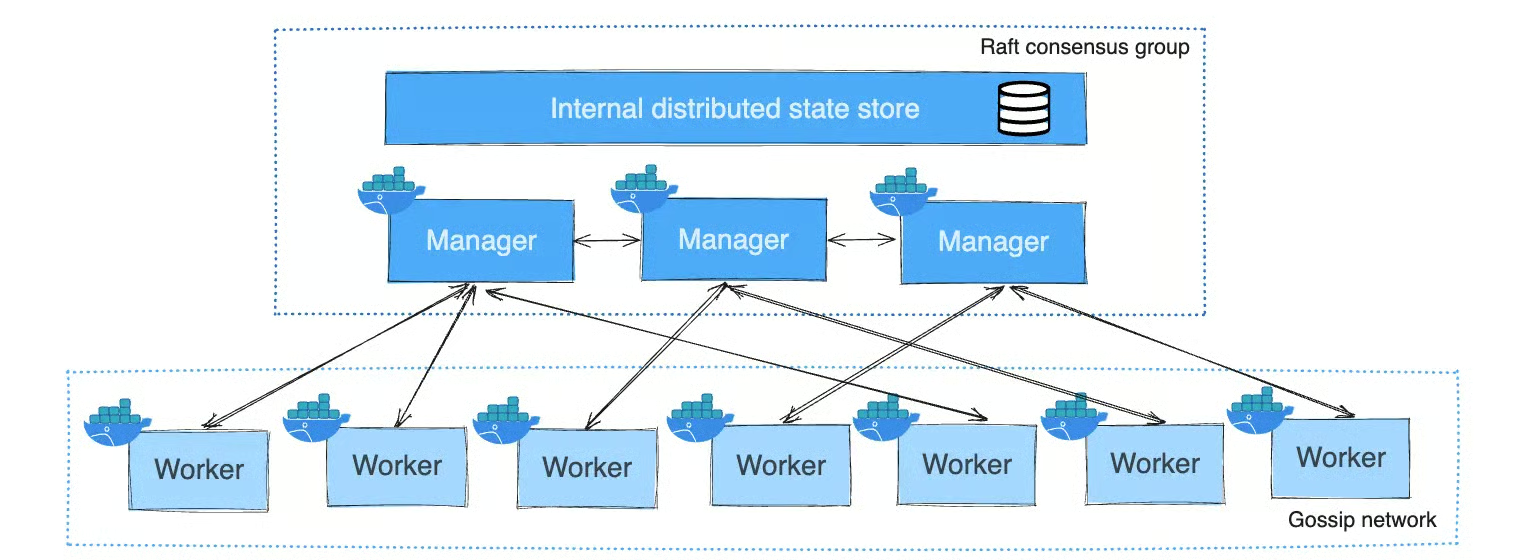
Docker Swarm volgt een manager-worker-model. Managernodes orkestreren en onderhouden de clusterstatus, terwijl workernodes taken uitvoeren. Managers kunnen ook workloads draaien of exclusief voor orkestratie worden gebruikt.
Het gebruikt het Raft-consensusalgoritme, dat één leider aanwijst onder de managernodes die alle clustermanagementbeslissingen afhandelt. Beslissingen vereisen overeenstemming van een meerderheid van de managernodes. Zo zorgt Docker Swarm ervoor dat de clusterstatus consistent blijft over managers, waardoor het kan blijven functioneren ondanks uitval van individuele managernodes.
Services worden gedefinieerd in YAML-bestanden, vergelijkbaar met Docker Compose, waarin je de applicatiestatus specificeert, inclusief replica’s, netwerken en resources
Nu we de architectuur begrijpen, kijken we wat Docker Swarm voor je kan betekenen.
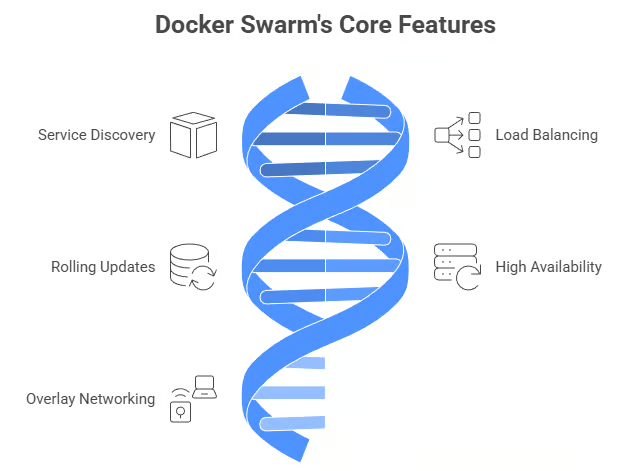
Docker Swarm bevat meerdere ingebouwde features voor toegankelijke containerorchestratie:
Kernfuncties van Docker Swarm
Deze functies werken samen voor productieklare orchestratie zonder uitgebreide configuratie. De eenvoud van deze ingebouwde features maakt Docker Swarm zo aantrekkelijk voor teams die snel willen starten.
Met de features besproken, hier is waar Docker Swarm echt in uitblinkt. Het biedt meerdere sterke voordelen:
Deze voordelen maken Docker Swarm bijzonder aantrekkelijk voor startups, kleine developmentteams en organisaties die snelheid van implementatie belangrijker vinden dan een uitgebreide feature-set. Door de lage instapdrempel kun je binnen uren, in plaats van dagen of weken, containers in productie orkestreren.
Geen enkel platform is perfect. Dit zijn de belangrijkste beperkingen om te overwegen:
Hoewel deze beperkingen reëel zijn, vormen ze alleen een probleem als jouw use case deze geavanceerde mogelijkheden daadwerkelijk vereist. Voor veel projecten is de feature-set van Docker Swarm ruimschoots voldoende, en is de eenvoud een waardevolle ruil.
De vraag is niet of Swarm beperkingen heeft; het is of die beperkingen relevant zijn voor jouw specifieke behoeften. Wil je alternatieve tools verkennen, lees dan ons stuk over de Top Docker-alternatieven in 2026.
Nu we Docker Swarm hebben behandeld, richten we ons op Kubernetes, het krachtigere maar complexere alternatief.
Kubernetes (K8s) is de industriestandaard voor containerorchestratie. Oorspronkelijk ontwikkeld door Google en nu beheerd door de Cloud Native Computing Foundation, is het gebouwd om containerized applicaties op enorme schaal te beheren. Voor een meer gedetailleerde introductie, lees onze gids What is Kubernetes?.
Kubernetes-logo
Kubernetes biedt een platform dat is ontworpen voor vrijwel elke productiegerelateerde containeruitdaging. Naast basisorchestratie levert het oplossingen voor persistente opslag, configuratiebeheer, omgang met secrets en jobverwerking.
De brede adoptie heeft een enorm ecosysteem van tools en services gecreëerd.
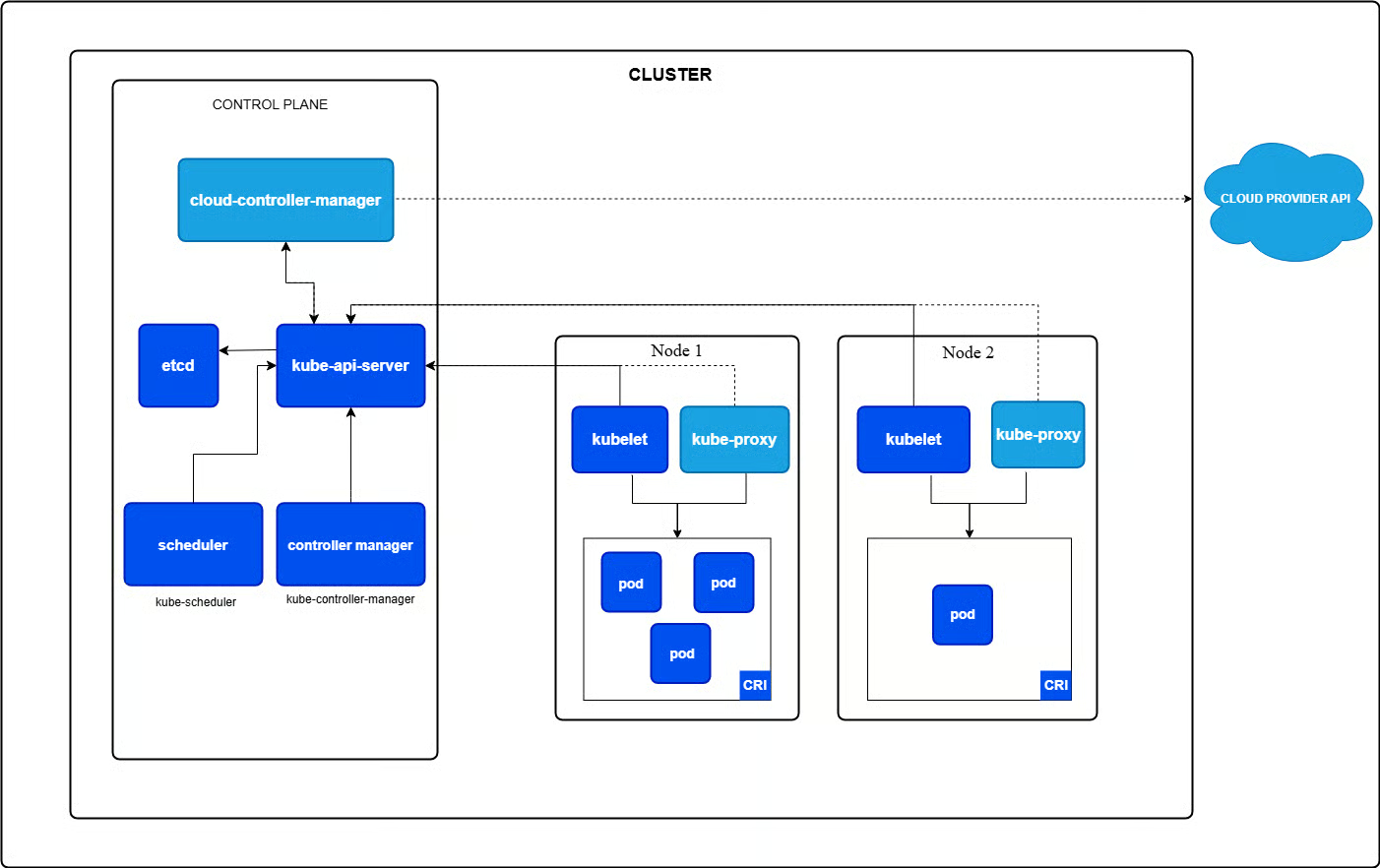
Kubernetes gebruikt een master-worker-topologie, met de master als de control plane. Belangrijke control-planecomponenten zijn onder meer:
Workernodes draaien kubelet (communiceert met de control plane), kube-proxy (regelt networking) en bevatten Pods, de kleinste deploybare eenheden met één of meer containers die resources delen.
Deze gedistribueerde architectuur is complexer dan die van Docker Swarm, maar maakt wel de indrukwekkende schaalbaarheid en veerkracht van Kubernetes mogelijk. Elke component heeft een specifieke, goed gedefinieerde rol en samen vormen ze een zeer robuust orchestratiesysteem.
Voor meer diepgang raad ik onze gids Kubernetes Architecture aan.
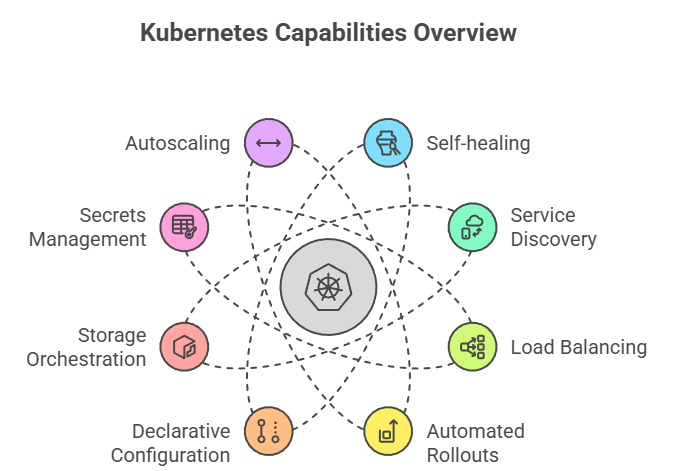
Met deze architectuur levert Kubernetes een rijk palet aan mogelijkheden. Kubernetes biedt uitgebreide features voor productieworkloads met containers:
Overzicht van Kubernetes-mogelijkheden
Deze uitgebreide feature-set maakt Kubernetes de eerste keuze voor complexe productieomgevingen. Waar Docker Swarm de basis levert, biedt Kubernetes geavanceerde mogelijkheden die essentieel worden naarmate je infrastructuur groeit.
Hier blijkt waarom Kubernetes de industriestandaard is geworden. Kubernetes blinkt uit bij complexe, grootschalige deployments:
Deze voordelen verklaren waarom Kubernetes synoniem is geworden met containerorchestratie in enterprise-omgevingen. Als je productieklare features, uitgebreide tooling en een platform nodig hebt dat met je organisatie meegroeit, levert Kubernetes.
Wil je de sterke punten in actie zien, bekijk dan deze Kubernetes-tutorial.
Al die kracht heeft echter een prijs:
Deze afwegingen begrijpen is cruciaal bij het kiezen tussen platforms. De nadelen van Kubernetes zijn geen gebreken, maar inherente consequenties van het krachtige, flexibele ontwerp. De vraag is of jouw use case deze complexiteit rechtvaardigt.
Nu we beide platforms afzonderlijk hebben bekeken, is het tijd om ze te vergelijken op kritieke punten.
|
Feature |
Docker Swarm |
Kubernetes |
|
Setup |
Eenvoudig (één commando) |
Complex |
|
Leercurve |
Licht |
Steil |
|
Schaalbaarheid |
~50-100 nodes |
Tot 5.000 nodes |
|
Ecosysteem |
Kleiner |
Enorm |
|
Autoscaling |
Niet ingebouwd (vereist externe tooling) |
Automatisch (HPA); VPA beschikbaar als add-on |
|
Beste keuze voor |
Kleine-middelgrote projecten |
Enterprise-schaal |
Laten we nu dieper ingaan op elk vergelijkingsgebied. Ik begin met wat vaak de eerste interactie met elk orchestratieplatform is: het aan de praat krijgen.
Docker Swarm installeren is eenvoudig: met Docker Engine geïnstalleerd, maakt één docker swarm init-commando een cluster aan. Nodes toevoegen vereist alleen de join-token. De meeste teams hebben binnen een uur een cluster draaiend.
Daarentegen verschilt Kubernetes-installatie per aanpak. Managed services (AWS EKS, GKE, AKS) nemen de meeste complexiteit uit handen. Zelfbeheer vraagt om kubectl, netwerkconfiguratie, certificaten en etcd-configuratie. Tools als kubeadm of k3s maken het eenvoudiger, maar Kubernetes vergt meer setup dan Swarm.
De leercurve volgt een vergelijkbaar patroon. Als je Docker-commando’s en Compose-bestanden al kent, voelt Swarm natuurlijk aan. Het is in wezen Docker op schaal. Kubernetes introduceert echter geheel nieuwe concepten (Pods, ReplicaSets, Services, Ingress) en vraagt om een steilere mentale omslag.
Als je cluster draait, zo verschillen de deploymentaanpakken tussen de twee platforms.
Docker Swarm houdt het simpel: applicaties worden als services gedeployed met YAML-bestanden die compatibel zijn met Docker Compose. Als je Compose hebt gebruikt voor lokale ontwikkeling, herken je het formaat direct. Stack-deployments behandelen meerdere services samen, en rolling updates werken door nieuwe versies te specificeren met instelbare updateparameters.
Kubernetes pakt het geavanceerder aan. In plaats van één deploymentconcept krijg je meerdere gespecialiseerde resourcetypen:
Deze variëteit biedt kracht en flexibiliteit, maar vereist wel dat je weet welk resourcetype bij jouw use case past. Geavanceerde strategieën zoals canary- en blue-green-deployments worden goed ondersteund via diverse technieken en tools van derden.
Hier beginnen de platforms echt uiteen te lopen in mogelijkheden.
Docker Swarm gaat goed om met schaalbaarheid voor kleine tot middelgrote clusters (meestal onder 50-100 nodes). Schalen is declaratief: je geeft het gewenste aantal replica’s op en Swarm past dit automatisch aan. De performance is goed met lage overhead, wat het efficiënt maakt voor kleinere workloads.
De keerzijde? Je bent beperkt tot handmatige schaalbeslissingen; Swarm voegt niet automatisch replica’s toe of verwijdert ze op basis van CPU- of geheugengebruik.
Kubernetes blinkt daarentegen uit op meerdere schaalniveaus. Het kan duizenden nodes en tienduizenden Pods beheren zonder problemen. En nog indrukwekkender: het schaalt intelligent.
De Horizontal Pod Autoscaler past replica’s automatisch aan op basis van metrics, de Vertical Pod Autoscaler wijzigt resourceallocaties en de Cluster Autoscaler beheert zelfs het aantal nodes in cloudomgevingen. Deze automatische scaling maakt Kubernetes opvallend kosteneffectief voor variabele workloads.
Networking is cruciaal en elk platform pakt dezelfde fundamentele problemen anders aan.
Docker Swarm bevat geïntegreerde load balancing via de routing mesh, die verkeer automatisch verdeelt over service-endpoints. Overlay-netwerken maken versleutelde communicatie tussen containers mogelijk, terwijl service discovery werkt via ingebedde DNS. Het is een "batterijen-inbegrepen" aanpak. Alles wat je nodig hebt zit erin en is standaard geconfigureerd.
Kubernetes biedt meer flexibiliteit, tegen de prijs van meer configuratie. Networking is gebaseerd op de Container Network Interface (CNI), die meerdere oplossingen ondersteunt zoals Calico, Cilium en Flannel. Jij kiest welke je gebruikt.
Ingress-controllers bieden geavanceerde HTTP/HTTPS-routing met SSL-terminatie. Netwerkpolicies maken fijnmazige verkeerscontrole tussen Pods mogelijk. Voor geavanceerde use cases kunnen servicemeshes zoals Istio naadloos integreren voor traffic management, beveiliging en observability. Deze modulariteit is krachtig, maar vraagt vooraf om meer keuzes.
Beveiliging is essentieel, en hier komt de enterprise-oorsprong van Kubernetes echt naar voren.
Docker Swarm levert de basis: TLS-encryptie met automatische certificaatbeheer beveiligt communicatie tussen nodes, terwijl Swarm Secrets veilige opslag biedt voor gevoelige data zoals wachtwoorden en API-sleutels. Toegangsbeheer leunt op de authenticatiemechanismen van Docker. Het is eenvoudig en voor veel use cases voldoende, maar mist fijnmazige controle.
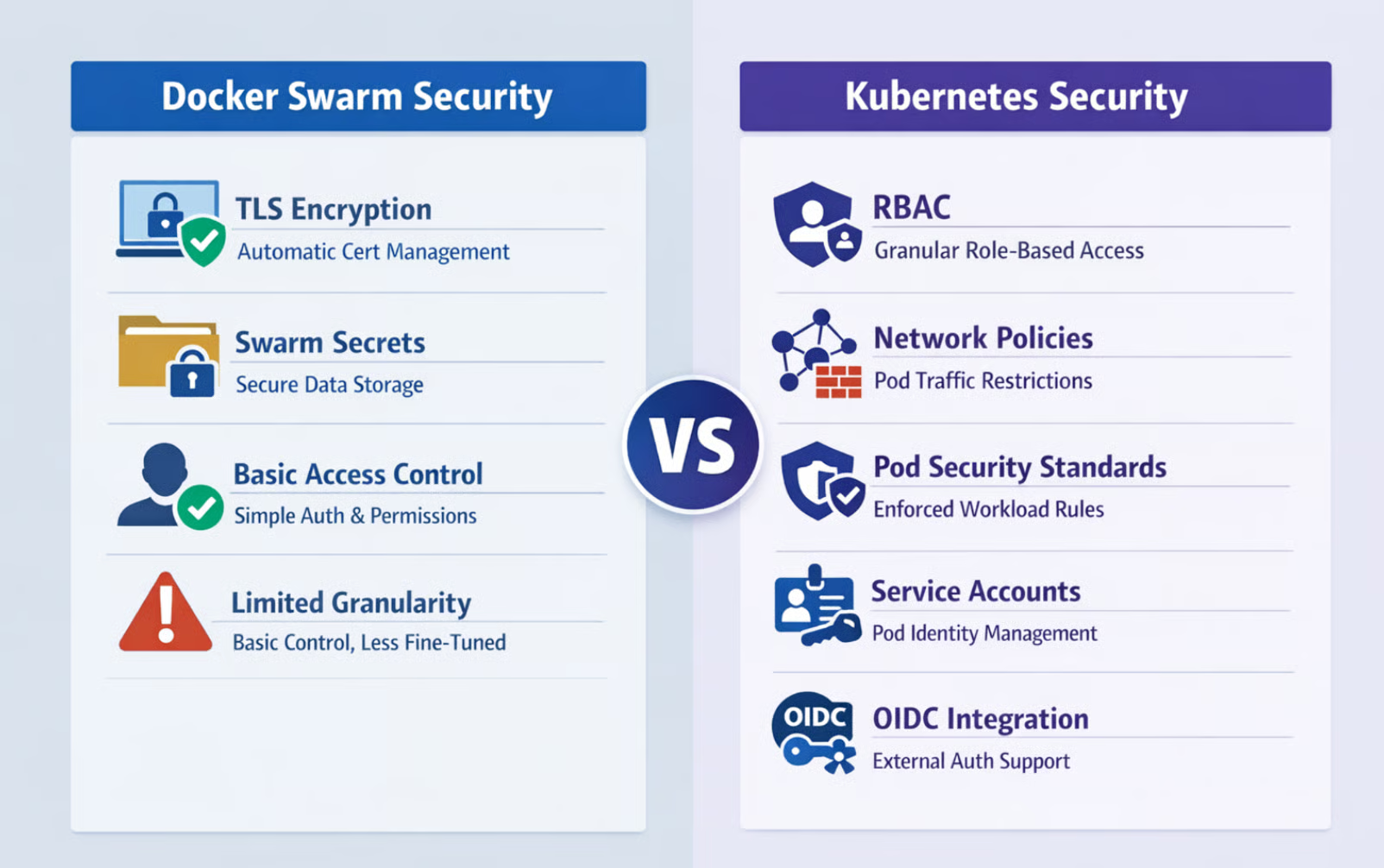
Docker Swarm vs. Kubernetes-beveiliging
Kubernetes biedt uitgebreide beveiliging, ontworpen voor multi-tenantomgevingen. Een van de grootste pluspunten voor veilige deployments in teams is Role-Based Access Control (RBAC), dat granulaire rechten biedt op zowel namespace- als clusterniveau. Je kunt exact specificeren wie wat mag doen met welke resources.
Netwerkpolicies beperken verkeer tussen Pods op basis van labels en regels. Pod Security Standards dwingen beveiligingsrestricties af op workload-specificaties. Serviceaccounts voorzien Pods van identiteit, met ondersteuning voor externe authenticatie-integratie via OIDC en andere protocollen.
Dit uitgebreide beveiligingsmodel maakt Kubernetes geschikt voor gereguleerde sectoren en complexe organisatorische eisen.
Als het om persistente data gaat, worden de ontwerpinzichten van beide platforms heel duidelijk.
Docker Swarm ondersteunt lokale en benoemde volumes, die prima werken voor simpele gevallen. Maar storagebeheer blijft basaal, dynamische provisioning is beperkt en storage coördineren over replica’s voor complexe stateful applicaties wordt uitdagend. Voor alles voorbij rechttoe-rechtaan volumemounts heb je vaak externe tools of handmatige configuratie nodig.
Kubernetes is vanaf het begin gebouwd met stateful workloads in gedachten. Het biedt PersistentVolumes (PV’s) als clusterbrede storageresources en PersistentVolumeClaims (PVC’s) waarmee applicaties storage kunnen aanvragen zonder de onderliggende details te kennen.
StorageClasses maken dynamische provisioning mogelijk, waarbij storage automatisch wordt aangemaakt wanneer nodig. De Container Storage Interface ondersteunt tal van providers met geavanceerde features zoals snapshots, klonen en uitbreiding. StatefulSets coördineren storage met Pod-identiteiten, waardoor je complexe gedistribueerde databases betrouwbaar kunt draaien.
Deze verfijning maakt Kubernetes de duidelijke keuze voor stateful workloads.
Observability helpt je te begrijpen wat er in je cluster gebeurt, maar de volwassenheid van het ecosysteem verschilt sterk.
Docker Swarm biedt basale metrics via de Docker-API, die je inzicht geeft in de gezondheid van containers en nodes. Voor allesomvattende observability heb je doorgaans externe tools zoals Prometheus nodig. Het observability-ecosysteem rondom Swarm is kleiner, met minder specifiek gerichte integraties en minder community-investeringen in monitoringsoplossingen.
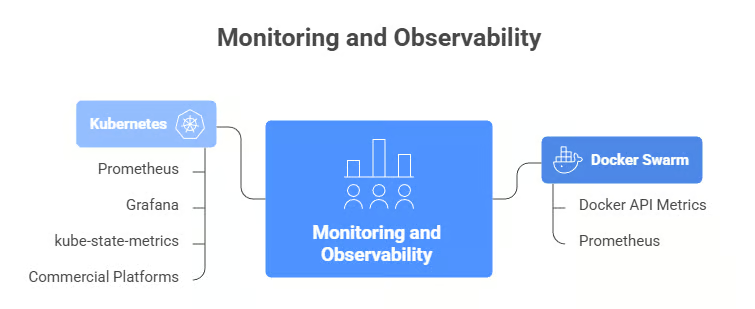
Monitoring en observability: Docker Swarm vs. Kubernetes
Het Kubernetes-monitoringecosysteem is, eerlijk gezegd, gigantisch. Prometheus is de facto standaard voor Kubernetes-metrics, meestal gekoppeld aan Grafana voor visualisatie. De component kube-state-metrics stelt clusterlevel-metrics beschikbaar over de status van objecten. Tools voor gedistribueerde tracing zoals Jaeger integreren naadloos.
Tal van commerciële platforms (Datadog, New Relic, Dynatrace) bieden geavanceerde Kubernetes-specifieke integraties met ingebouwde dashboards en alerts. De breedte aan tooling betekent dat je observability op enterprise-niveau kunt bereiken, maar ook dat je moet kiezen en configureren.
Naast kernfeatures kan het omliggende ecosysteem je ervaring maken of breken, en hier is het verschil tussen platforms het duidelijkst.
Kubernetes heeft een enorm ecosysteem. Elke grote monitoringtool, beveiligingsplatform, CI/CD-systeem en cloudprovider biedt eersteklas ondersteuning voor Kubernetes. Moet je Kubernetes uitbreiden met eigen functionaliteit? Met Custom Resource Definitions (CRD’s) voeg je je eigen resourcetypen toe, terwijl Operators complex applicatiebeheer automatiseren met Kubernetes-native patronen.
De community is groot en actief, met uitgebreide documentatie, regelmatige conferenties, talloze tutorials en makkelijk te vinden expertise.
Het ecosysteem van Docker Swarm is aanzienlijk kleiner. De kerncommunity van Docker blijft ondersteunend, maar er zijn minder tools van derden die zich specifiek op Swarm richten. Maatwerkmogelijkheden zijn beperkt door de constraints van de Docker-API. Je werkt binnen de grenzen die Swarm biedt. Dit kleinere ecosysteem betekent minder kant-en-klare oplossingen voor randgevallen en minder communitymomentum voor innovatie.
Cloudintegratie is belangrijk als je in AWS, Azure of GCP draait, en de platforms pakken dit heel verschillend aan. Voor een vergelijking tussen de 3 populairste cloudproviders, bekijk deze gids over AWS vs. Azure vs. GCP.
Alle grote cloudproviders bieden managed Kubernetes-services (AWS EKS, Google GKE, Azure AKS), waarbij zij het beheer van de control plane, upgrades en nauwe integratie met hun eigen services verzorgen.
Kubernetes-abstracties werken consistent over verschillende cloudomgevingen en ondersteunen echte multi-cloud- en hybride-architecturen. Toepassingen beheren over meerdere regio’s of zelfs meerdere clouds? Karmada, de opvolger van Kubernetes Federation (KubeFed), maakt het mogelijk om meerdere clusters als één logische eenheid te beheren—essentieel voor wereldwijde deployments.
Docker Swarm werkt prima in cloudomgevingen, maar mist deze diepe integraties. Je kunt zeker Swarm-clusters op AWS, Azure of GCP draaien, maar je zult meer infrastructuur zelf moeten beheren. Multiclusterbeheer is beperkt omdat elke Swarm-cluster onafhankelijk opereert.
Deployments coördineren over regio’s of cloudproviders vereist custom tooling en extra orchestratielagen.
Kosten zijn altijd een factor, en de platforms gaan er verschillend mee om, in lijn met hun ontwerpprioriteiten.
Kubernetes biedt geavanceerde kostenoptimalisatie in het ontwerp. Resourcequota en -limieten voorkomen dat één team of applicatie clusterresources monopoliseert. De Horizontal Pod Autoscaler en Cluster Autoscaler stemmen samen resourceallocatie af op de echte vraag, en schalen terug tijdens rustige periodes om kosten te besparen.
Integratie met spotinstances van cloudproviders kan compute-kosten aanzienlijk verlagen. Tools zoals Kubecost bieden gedetailleerd inzicht in uitgavenpatronen en optimalisatie-adviezen. Het nadeel? Deze verfijning vereist monitoring, tuning en expertise om effectief te benutten.
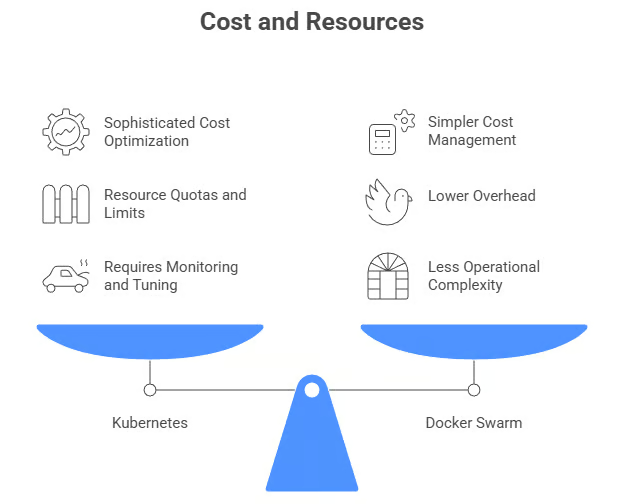
Kosten en resources: Docker Swarm vs. Kubernetes
Docker Swarm kiest een eenvoudigere aanpak. Het resourcemodel is rechttoe-rechtaan, met minder ingebouwde optimalisatiefuncties. Maar door de lagere overhead gaat meer van je infrastructuurresources naar het draaien van daadwerkelijke applicaties in plaats van naar de orchestratie.
Kostenbeheer leunt doorgaans op externe monitoringtools en handmatige aanpassingen. Voor kleinere deployments kan deze eenvoud juist kosteneffectiever zijn. Je besteedt minder aan operationele complexiteit, ook al mist het platform geavanceerde optimalisatiefuncties.
Nu we de platforms op al deze technische dimensies hebben vergeleken, van installatiecomplexiteit tot kostenoptimalisatie, vraag je je misschien af: "Welke moet ik nu eigenlijk gebruiken?" Het antwoord hangt volledig af van jouw situatie. Laten we kijken naar de praktijkscenario’s waarin elk platform echt uitblinkt.
De technische verschillen begrijpen is één ding, maar weten wanneer je elk platform gebruikt is wat echt telt. Ik neem je mee door de ideale scenario’s voor elk.
Docker Swarm blinkt uit in deze scenario’s:
Als je project aan deze kenmerken voldoet, laat Docker Swarm je containerorchestratie bereiken zonder de overhead van het leren en beheren van een complexer systeem. Je bent snel productief en kunt altijd later migreren naar Kubernetes als je behoeften die van Swarm overstijgen.
Aan de andere kant is Kubernetes de juiste keuze wanneer je het volgende nodig hebt:
Deze use cases rechtvaardigen de investering in het leren en opereren van Kubernetes. De complexiteit wordt een pluspunt in plaats van een last wanneer je complexe orchestratie-uitdagingen op schaal oplost. Als je jouw organisatie in deze scenario’s herkent, betaalt de overstap naar Kubernetes zich terug in operationele capaciteiten en toekomstige flexibiliteit.
Met de use cases in gedachten, hoe maak je de keuze? Hier is een framework:
|
Kies Swarm als... |
Kies Kubernetes als... |
|
< 50 nodes |
> 100 nodes |
|
Team kent Docker |
Team heeft K8s-skills |
|
Snel starten is cruciaal |
Enterprise-features nodig |
|
Budget is krap |
Managed services mogelijk |
Laten we elk beslissingspunt bekijken.
Kijk naar je huidige schaal en groeiverwachtingen. Voor enkele tientallen services met eenvoudige eisen volstaat Swarm. Voor snelle groei, complexe microservices of enterprisedeployments biedt Kubernetes de benodigde basis.
Naast projectvereisten zijn de capaciteiten van je team enorm belangrijk.
Beoordeel de skills en leertijd van je team. Teams met Docker-ervaring maar nieuw in orchestratie zijn productiever en sneller met Swarm. Teams met Kubernetes-expertise of trainingsmogelijkheden kunnen de geavanceerde capaciteiten van Kubernetes benutten.
Je infrastructuurvereisten sturen je keuze ook.
Evalueer beschikbaarheidseisen, schaalpatronen en infrastructuurverdeling. Eenvoudig schalen binnen één datacenter past bij Swarm. Complexe autoscaling, multiregiodeployments en dynamisch resourcemanagement spreken in het voordeel van Kubernetes.
Kijk tot slot naar zowel initiële als doorlopende kosten.
De lagere overhead van Swarm kan de kosten drukken voor kleinere deployments. Kubernetes’ autoscaling kan op schaal efficiënter zijn, ondanks hogere initiële vereisten.
Docker Swarm en Kubernetes zijn niet je enige opties. Er bestaan verschillende alternatieven voor specifieke use cases.
K3s, een lichtgewicht Kubernetes-distributie, biedt volledige Kubernetes-functionaliteit in één binaire van minder dan 100 MB. Ideaal voor edge computing, IoT en resourcebeperkte omgevingen, met behoud van compatibiliteit.
MicroK8s van Canonical en k0s van Mirantis bieden vergelijkbare lichtgewicht ervaringen.
Naast lichtgewicht Kubernetes-distributies verdienen enkele totaal andere platforms aandacht:
Deze alternatieven kunnen beter aansluiten op jouw specifieke vereisten en bestaande infrastructuur dan Docker Swarm of Kubernetes.
Docker Swarm en Kubernetes bedienen verschillende behoeften. Swarm blinkt uit in eenvoud en snelle deployment, ideaal voor kleinere projecten en beperkte DevOps-resources. Kubernetes schittert in complexe deployments die geavanceerde features vereisen. De steile leercurve wordt gecompenseerd door ongeëvenaarde mogelijkheden op schaal.
Kies op basis van je behoeften, teamexpertise en vereisten. Veel teams gebruiken beide platforms: Swarm voor simpelere services en Kubernetes voor complexe applicaties.
Je keuze is niet definitief. Veel teams beginnen met Swarm en migreren later naar Kubernetes naarmate de behoeften groeien. Kies wat past bij je huidige situatie, met oog voor toekomstige eisen.
Wil je dieper duiken in beide tools, schrijf je dan zeker in voor onze skill track Containerization and Virtualization with Docker and Kubernetes.
Cursussen over containerorchestratie
Leerpad
Cursus
Oefen en volg je voortgang.
Ga Verder Met Googleblog
Adel Nehme
15 min