
Our biggest-ever sale. 60% off AI & data skills
Buy Now
So, how do you use ChatGPT Apps? In this section, I’ll walk you through the steps to get started, as well as some examples workflows I used.
So the first natural question is, how can I check what apps are available?
Before connecting any app with your ChatGPT account, you won’t see them easily in the interface, and of course, you won’t know what name to call. If you go to your account settings and then to Apps & Connectors, you will see all available integrations.
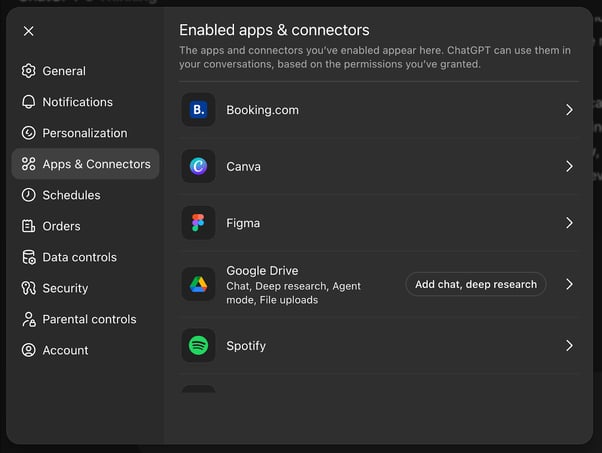
Screenshot of ChatGPT Apps & Connections section. Screenshot by Author.
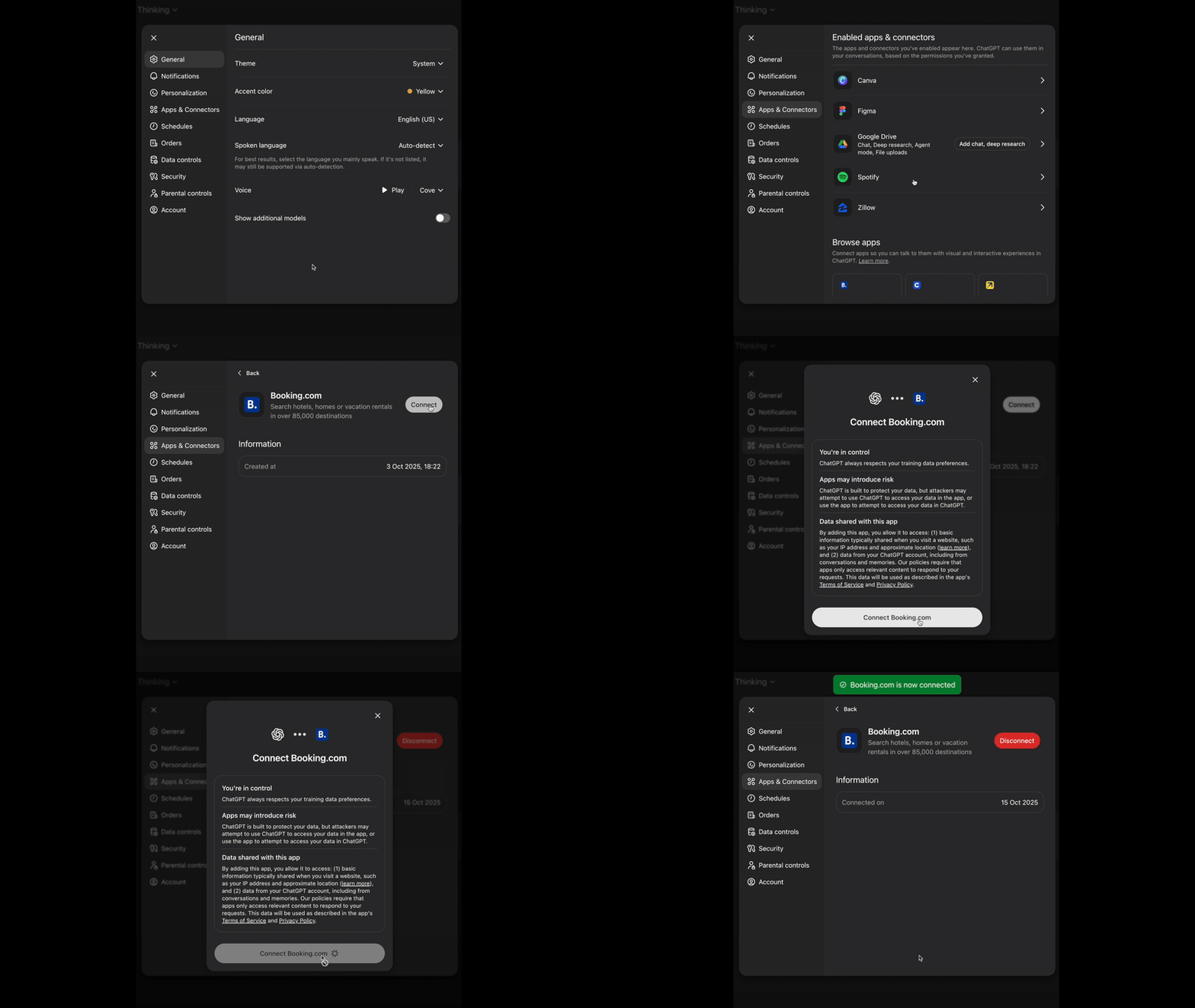
If you haven’t used any of them yet, you won’t have any apps connected. A second way to connect the integrations to our ChatGPT account is just selecting the desired app in this section and performing the connection manually.
Once connected, apps appear behind the plus (“+”) button under the chatting box, within the More menu in the composer.
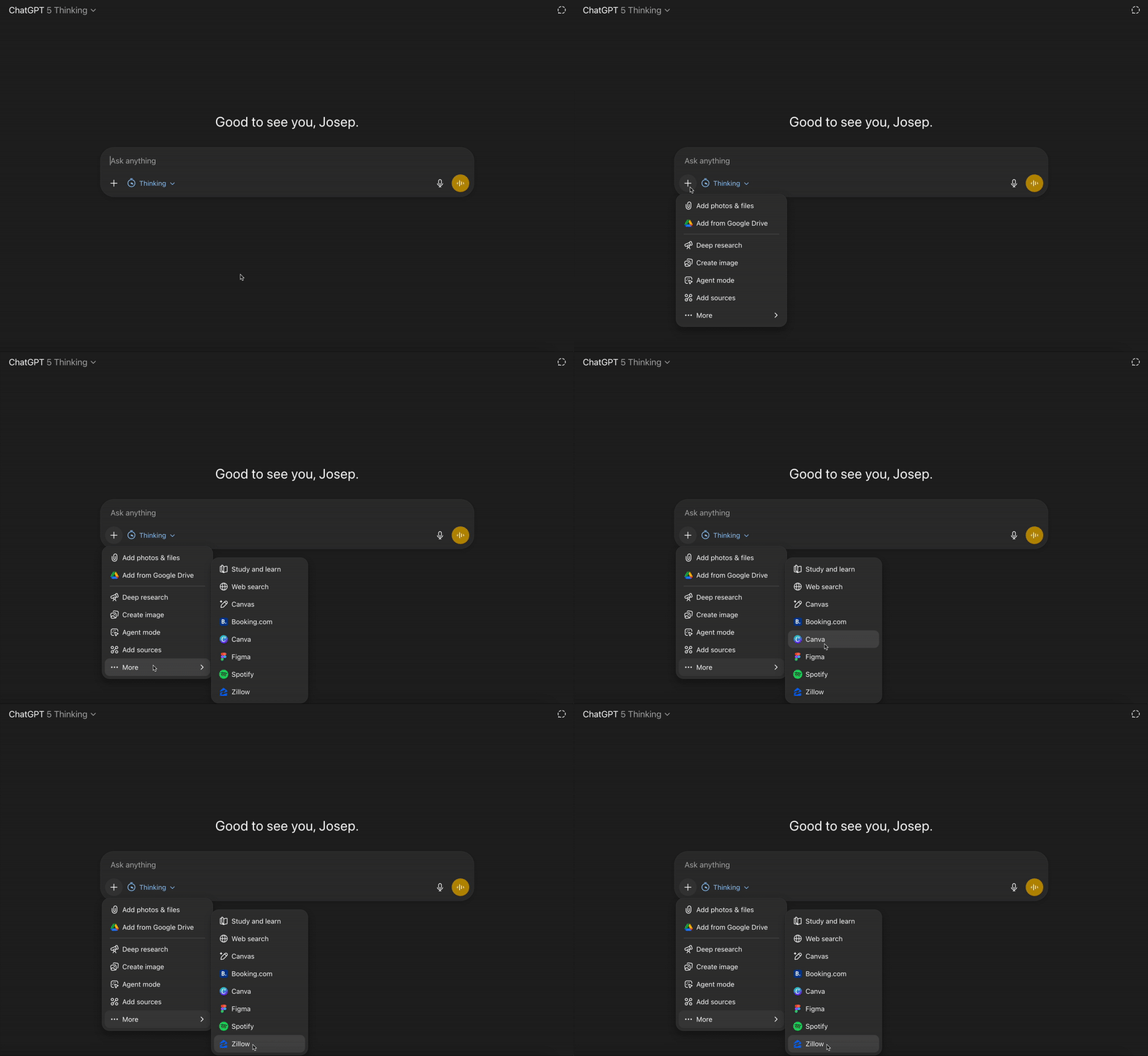
To use these apps in our conversations with ChatGPT, you can easily:
Below are a few concrete flows you can reproduce.
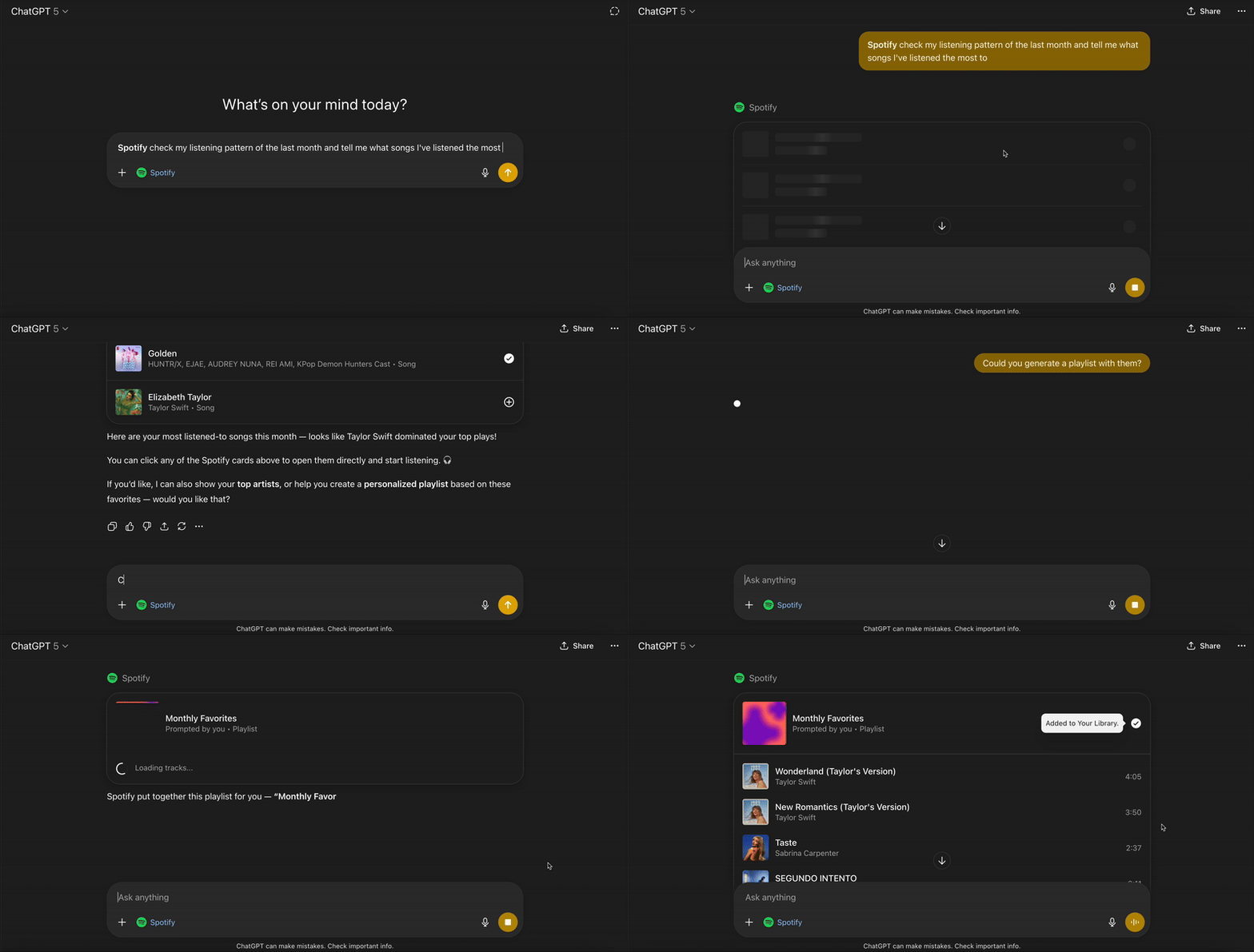
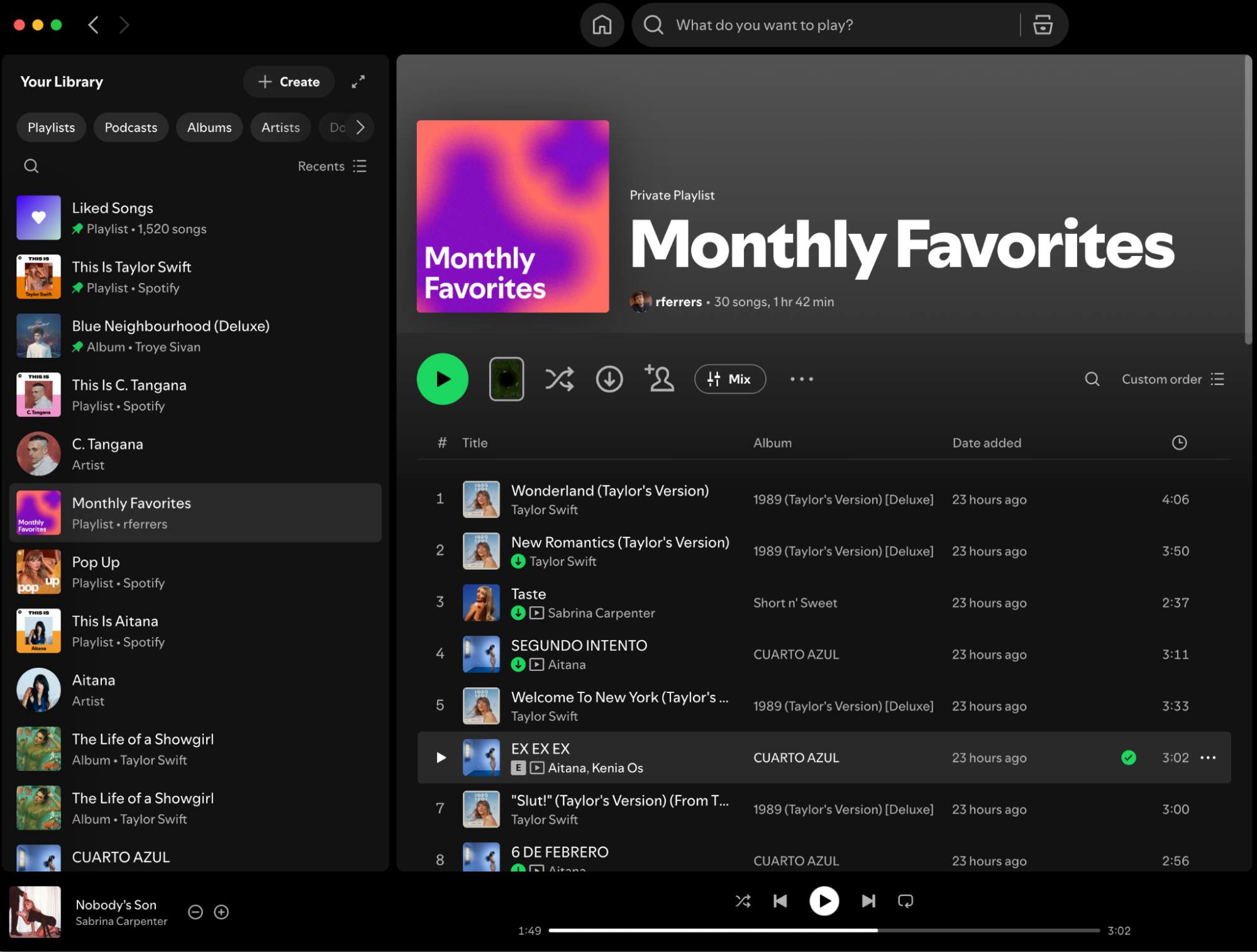
Screenshot of the Spotify interface. Now I have the “Monthly Favorite” playlist generated by ChatGPT. As you can observe, it says it has been generated by me.
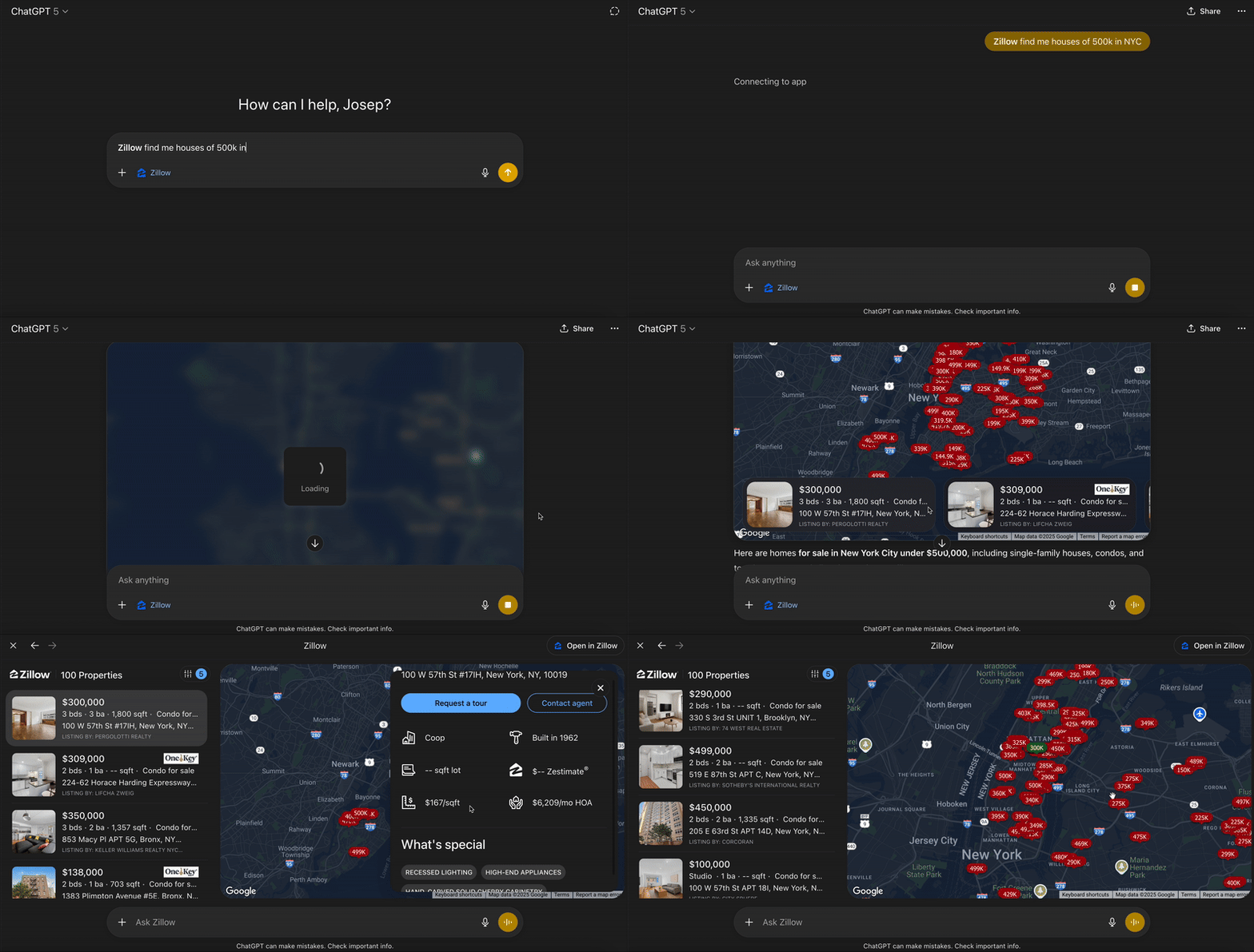
You can click a listing to view details and photos without leaving the chat.
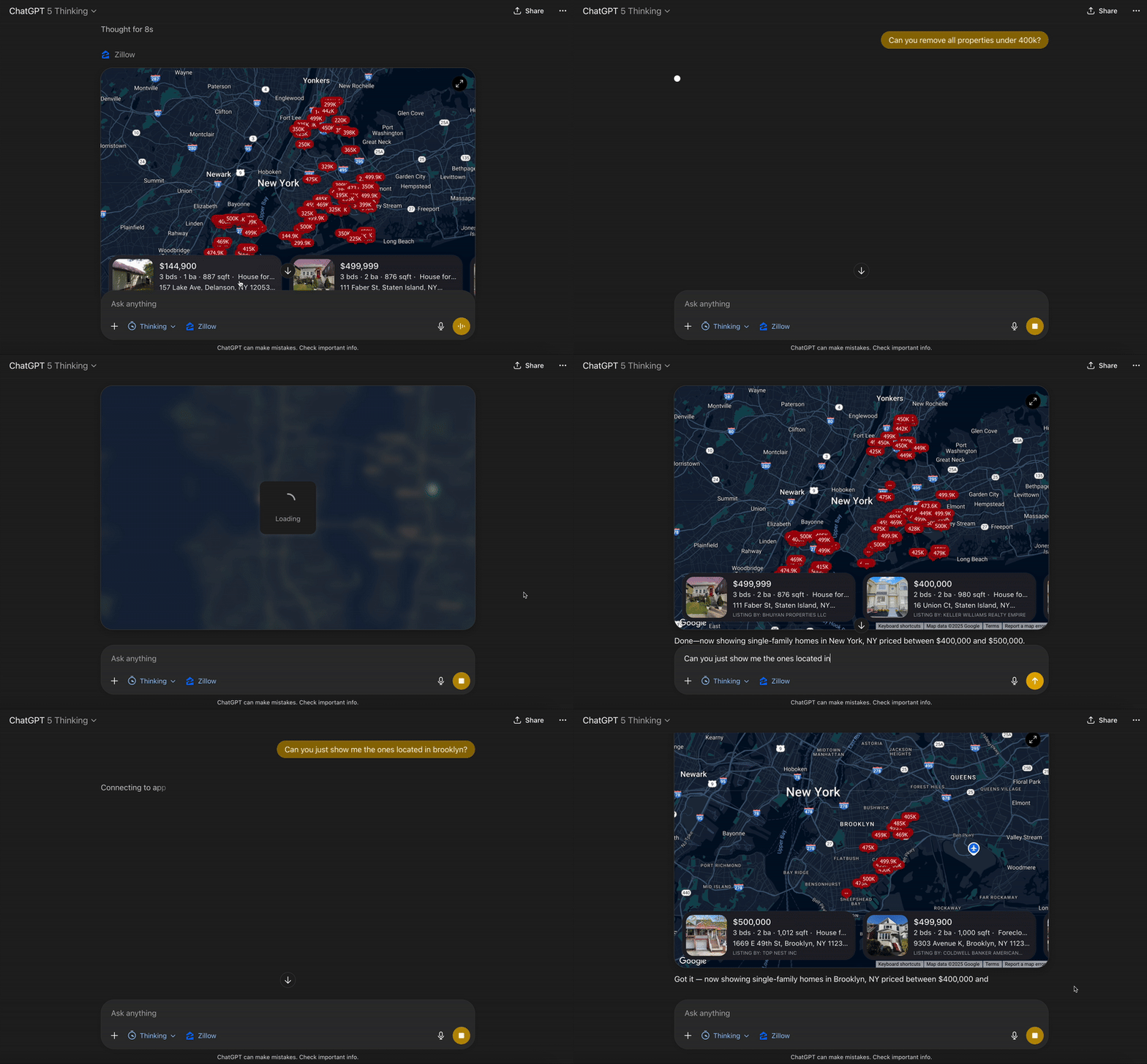
Open in Zillow when you need deeper filters or contact info.
booking.com I'm planning a trip with three more friends to Madrid in December, could you please check some cheap options in the center of the city? 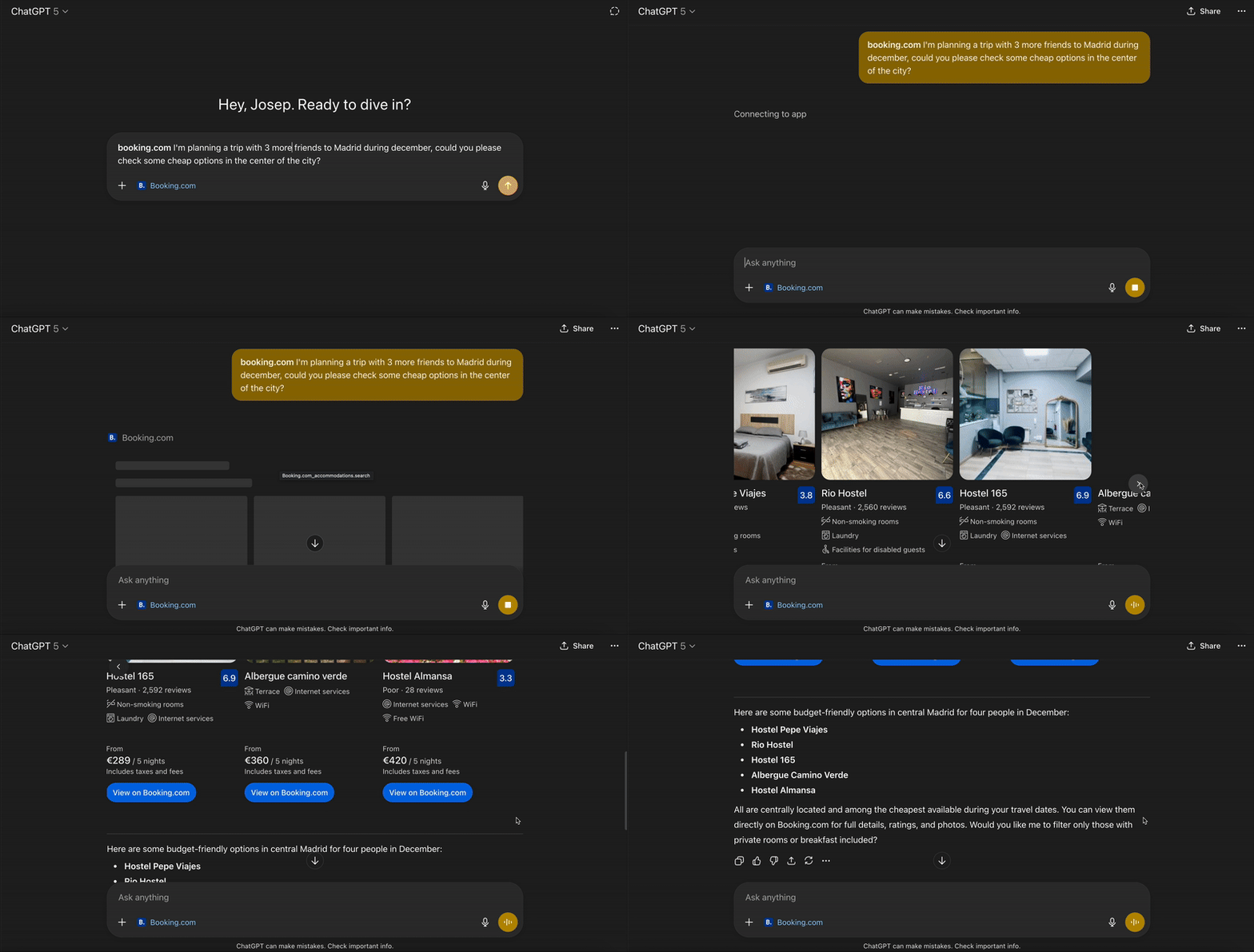
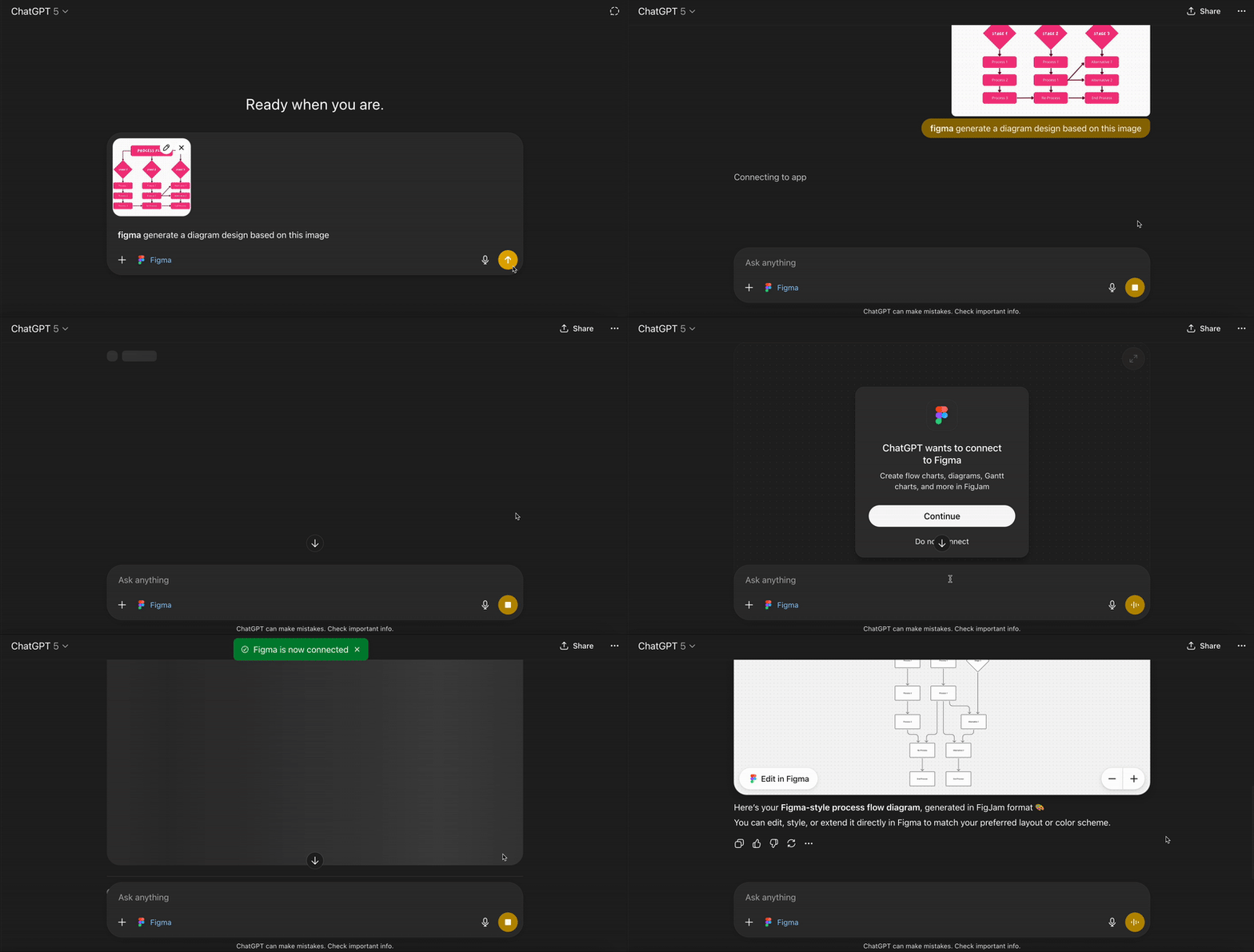
So by now there are these apps available, but in the coming months, the planning of OpenAI is to allow developers to develop their own apps and integrations with ChatGPT. So, the following question tries to assess go to do so with ChatGPT Apps SDK.
To improve your usage of ChatGPT, I recommend that you get started with some ChatGPT practical examples, and in case you need it for analytics, go check our ChatGPT cheatsheet for Data Science.
The ChatGPT Apps SDK is OpenAI’s framework for building apps that run inside ChatGPT. It’s in preview today so developers can start building and testing, with app submissions opening later this year.
Apps are powered by the Model Context Protocol (MCP), which connects ChatGPT to your tools and data and lets you return structured results and UI that render in the chat.
You ship an MCP server that exposes your actions and returns results (plus optional UI metadata), and a small UI bundle that the chat can render. ChatGPT invokes your actions in context, shows the results inline, and lets the user refine in natural language.
Remember, these integrations are to be interacted with Natural Language, so it means we need to keep that in mind when developing them.
We’ll publish a separate, more detailed tutorial on the Apps SDK, but for now, treat the tool as a way to put your service where users already are, in the conversation, while preserving your app’s logic and brand UI.
Remember that when working with LLMs, prompt engineering is one of the basic concepts to understand. In case you are new to it, as a good practice, I encourage you to deepen your knowledge of it by following the Prompt Engineering course for Developers.
Two clear threads are emerging:
OpenAI and partners have said additional apps are on the way, think ride-hailing, food delivery, reservations, shopping, and outdoor services. Reported “coming soon” examples include Uber, DoorDash, Instacart, OpenTable, Target, Tripadvisor, Peloton, and AllTrails. As these land, the real win will be chaining tasks in a single thread (hotel → dinner → ride) without bouncing across tabs.
The Apps SDK is in preview now; OpenAI says app submissions (and paid experiences) will open later this year. In parallel, OpenAI is piloting Instant Checkout and an Agentic Commerce Protocol, enabling purchases directly in ChatGPT (already live for some sellers and expanding via partnerships like Walmart). That combo points to real transactions, not just lookups—once broader availability reaches Business/Enterprise plans.
Apps get most useful when they work alongside agent capabilities (web browsing, computer use). If an app can pass context like book dinner near my hotel at 7:30 you avoid dead ends and cut copy-paste. There’ll be early friction (permissions, defaults, missing context), but the trajectory is fewer steps and tighter loops.
So if you want to get started building tools, treat this as a distribution shift. Instead of teaching users a new UI, let them call your service in plain language and finish the flow inside the chat, your logic and brand intact via the Apps SDK.
Even though there aren’t loads of apps available yet, ChatGPT apps promise us a future of integration that can make routine work feel lighter: create a playlist, check transportation, filter listings, plan a trip, sketch a diagram, without leaving the conversation.
The experience is simple: call the app by name, describe the outcome, iterate in natural language, and jump to the native app only when you need full control.
If you try just one, pick an app you already use weekly. Run it end-to-end in a single thread. You’ll know quickly if it deserves a spot in your daily toolkit.
To keep learning how to use ChatGPT and take even more advantage of it, I encourage you to follow:
They’re available to Free, Plus, and Pro users in the US and Canada. They’re not yet on Business/Education/Enterprise plans. Rollout is country-by-country, and the EU is currently excluded.
Call it by name in your message. On first use you’ll see a one-time connect prompt.
Creation and filtering (lists, cards, maps, edits) happen inside ChatGPT. Playback or deep editing (e.g., playing a playlist, full design work) opens in the native app via “Open in …”.
Today, there are just a few apps available that include Spotify, Canvas, and Booking.com, among others.
The Apps SDK (preview) lets developers build in-chat apps using MCP: define actions over your APIs, return inline UI, and keep light session state. Submissions and paid flows are slated to open later; Instant checkout/agentic commerce is being piloted. Expect more integrations and stronger agent hand-offs.
Josep is a freelance Data Scientist specializing in European projects, with expertise in data storage, processing, advanced analytics, and impactful data storytelling.
As an educator, he teaches Big Data in the Master’s program at the University of Navarra and shares insights through articles on platforms like Medium, KDNuggets, and DataCamp. Josep also writes about Data and Tech in his newsletter Databites (databites.tech).
He holds a BS in Engineering Physics from the Polytechnic University of Catalonia and an MS in Intelligent Interactive Systems from Pompeu Fabra University.

blog
 Dr Ana Rojo-Echeburúa• 8 min

blog
 François Aubry• 6 min

blog
 Aashi Dutt• 7 min
Top DataCamp Courses
Ścieżka
Poznaj podstawy ChatGPT i inżynierii promptów. Opanuj tworzenie promptów, aby maksymalnie wykorzystać możliwości ChatGPT.
Kurs
Poznaj architekturę modeli GPT i opanuj zaawansowane tworzenie promptów, by odblokować pełny potencjał ChatGPT.
Kurs
Zbuduj krok po kroku asystenta obsługi klienta z Google’s Agent Development Kit (ADK).






ChatGPT now has apps you can use directly inside a conversation. This shift doesn’t just bring new built-ins; it means third-party developers can bring their own apps into ChatGPT, much like the App Store unlocked more than Apple’s defaults on the early iPhone.
Apps are now live for ChatGPT Free, Plus, and Pro users in the US and Canada. They aren’t available yet on Business, Education, or Enterprise plans. Availability is rolling out by country, so at the time of writing, the EU isn’t included.
But what are ChatGPT apps?
In this tutorial, I will help you understand how they work and how to start using them today.
Image by OpenAI.
What are ChatGPT Apps?
Think of ChatGPT apps as mini-integrations you can call by name inside a conversation. Instead of switching tabs to do a task (make a playlist, draft slides, find a hotel), you invoke the app in plain language and continue the work right where you are.
You can call services like Spotify, Canva, Zillow, or Booking.com, among others, by name in your prompt and keep the entire workflow in one thread. You can see how, just writing the app name, for instance, Spotify, the ChatGPT interface automatically detects it and activates the integration to use during our interaction.
Recording of the ChatGPT interface. Recording by Author.
The first time you use an app, you’ll connect your account (one-time auth). There’s a way to connect them directly in your account settings, but to make sure the flow of the conversation is not interrupted, they’ve developed a second, more organic way to connect new apps during our chat flow, as you can observe in the following interaction with Zillow.
After that, it feels like chatting with a tool that already knows what you’re trying to do, and that has extended capabilities to interact with our most-used services.
If you haven’t yet worked with ChatGPT much, you can find out how to start optimizing your daily workflow in our ChatGPT fundamentals skill track.
What ChatGPT Apps Are Available?
There are a few new apps you can start using today inside ChatGPT, including:
Each app maintains the back-and-forth within ChatGPT, featuring an “open in …” button when you prefer the full interface, buhasng a full integration of the app inside the ChatGPT interface.