Have you ever wondered if you could run a 125-billion-parameter Mixture-of-Experts (MoE) model locally on a gaming PC or workstation with a decent GPU and plenty of RAM?
And what if I told you that instead of struggling with 1–5 tokens per second, you could get over 100 tokens per second? No expensive GPU servers, no cloud subscriptions, and no API costs.
How did we get here? How is this even possible?
The answer lies in a combination of efficient MoE architectures, aggressive model quantization, and smarter inference engines that make better use of your available hardware.
One such engine is Strata, which makes running massive language models on consumer hardware more practical than ever.
In this guide, I'll install Strata on Linux, run a 125B-parameter quantized Qwen MoE model locally, test its inference speed, and expose it through an OpenAI-compatible API. Finally, I'll connect it to the Pi coding agent and see whether we can build a fast, fully local AI coding assistant without relying on paid APIs.
What Is Strata?
Strata is an open-source inference engine designed to run massive Mixture-of-Experts (MoE) language models on consumer hardware. Instead of requiring expensive servers with hundreds of gigabytes of GPU memory, Strata makes it possible to run models like Qwen3.8-Flash-Next (125B parameters) on a regular gaming PC or workstation with a capable GPU and sufficient system RAM.
It also includes a built-in web interface and OpenAI-compatible API, making it easy to connect local models to applications and coding agents.
What makes Strata interesting is how efficiently it uses your hardware. Rather than loading the entire model into GPU memory, it distributes the workload across VRAM, system RAM, and SSD storage.
It keeps frequently used experts on the GPU while the CPU processes others in parallel. Combined with quantization, intelligent caching, and speculative decoding, this approach enables surprisingly fast inference on consumer GPUs.
1. Prepare Your Linux System
For this tutorial, we're using Ubuntu 24.04 with an NVIDIA RTX 3090 (24 GB VRAM) and 96 GB of system RAM to run the quantized Qwen3.8-Flash-Next IQ2_XS model.
However, you don't necessarily need this much hardware. You can also run the model with 64 GB RAM and a 16 GB GPU, provided you reduce the context window and optimize memory usage.
Performance will depend on your hardware, model configuration, and how much of the model can fit into GPU memory.
Make sure you have at least 120 GB of free SSD storage for the model files and setup.
First, update Ubuntu and install the required dependencies:
sudo apt update && sudo apt upgrade -y
sudo apt install -y curl git wget python3 python3-venv
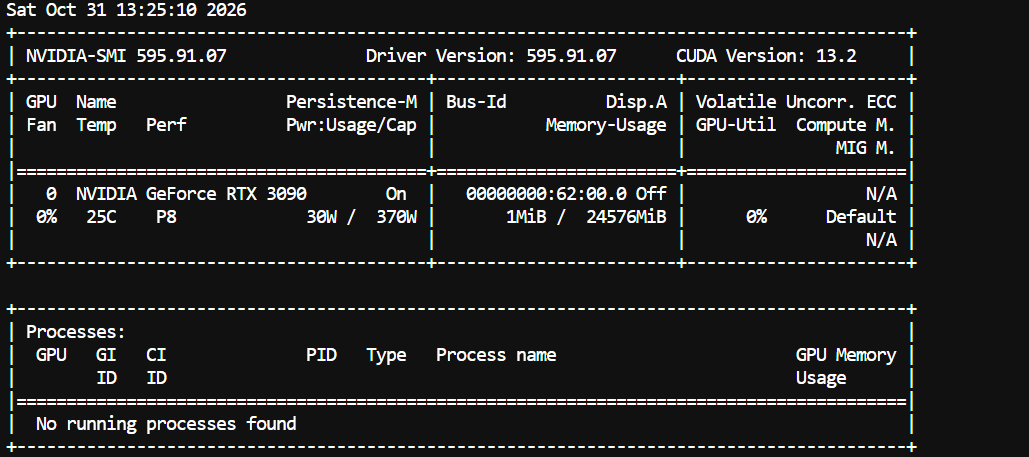
Next, verify that your NVIDIA GPU is detected correctly:
This should display your GPU model, driver version, and available VRAM. If your GPU appears in the output, you're ready to proceed with installing Strata.
2. Install Strata
Next, we'll install Strata so we can run large language models locally without relying on cloud services or paid APIs.
First, download the latest installation script from the official GitHub repository:
curl -fsSL \
  https://github.com/Niko1221/Strata/releases/latest/download/install.sh \
  -o install.sh
Run the installer:
Once the installation is complete, add Strata to your system's PATH so you can access it from any directory:
echo 'export PATH="$HOME/.local/bin:$PATH"' >> ~/.bashrc
source ~/.bashrc
Finally, verify that Strata is installed correctly:
If everything is working, you should see the available launch options, including settings for model loading, context length, GPU usage, and server configuration.

3. Download Qwen3.8-Flash-Next
Now that Strata is installed, let's download Qwen3.8-Flash-Next, a large MoE model that we'll run locally.
A quick note on size: Qwen3.8-Flash-Next is advertised as a 125B-parameter model with 6B parameters active per token. That figure covers the main model only. The full release also includes a 51B-parameter n-gram embedding table and a 4B multi-token prediction layer, for roughly 180B parameters in total (the GGUF files are listed as 177B). The n-gram table is why the download includes a second 28.8 GB shard.
We're using the IQ2_XS quantization from ISTA-DASLab, which significantly reduces the model's memory requirements while preserving much of its original quality.
Why IQ2_XS? Our RTX 3090 has 24 GB of VRAM, so running the full-precision model isn't practical. With IQ2_XS, the model's transformer weights are compressed to approximately 39.2 GB, making it possible to split the workload between GPU and system RAM. The complete download is approximately 68 GB across two GGUF shards.
If you have more RAM or GPU memory available, you can also experiment with higher-quality quantizations such as IQ3_XXS (75.8 GB) or IQ3_S (83.6 GB).
You can explore all available versions on Hugging Face.
First, install uv, which we'll use to manage our Python tools:
curl -LsSf https://astral.sh/uv/install.sh | sh
Restart your terminal after installation so the uv command becomes available.
Next, install the Hugging Face CLI:
uv tool install huggingface_hub
Create a directory to store the model:
mkdir -p /workspace/models/qwen3.8-flash-next
Now, download the IQ2_XS quantized model:
hf download \
  ISTA-DASLab/Qwen3.8-Flash-Next-GSQ-RCO-GGUF \
  --include "IQ2_XS/*.gguf" \
  --local-dir /workspace/models/qwen3.8-flash-next
This downloads approximately 68 GB of model files, split into two GGUF shards. The first contains the quantized transformer weights, while the second contains the n-gram lookup data.

4. Start the Strata Server
Now that our model is downloaded, let's launch Strata and run our 125B-parameter MoE model locally.
We'll use a 64K context window, limit inference to one concurrent request to manage memory usage, and enable LAN access so other applications can connect to our model.
strata launch \
  --family qwen \
  --model-path /workspace/models/qwen3.8-flash-next/IQ2_XS \
  --context 64k \
  --parallel 1 \
  --vision off \
  --access lan \
  --port 18765 \
  --yes \
  --no-tui
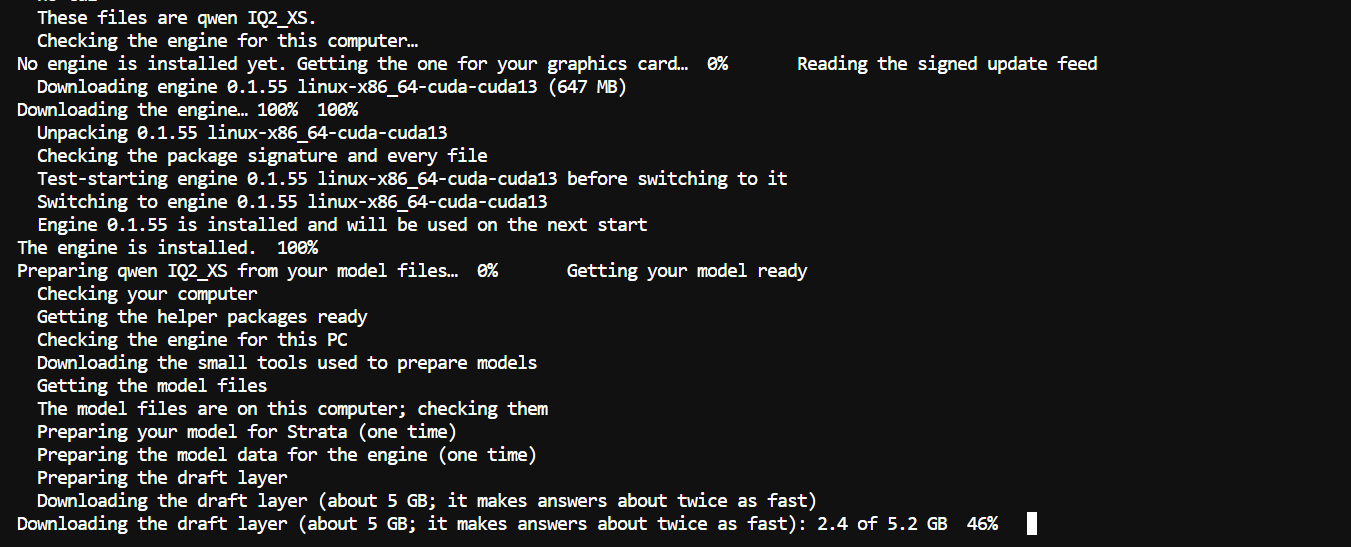
During the first launch, Strata will automatically download and install the required CUDA inference engine, prepare the runtime for our model's quantization, and configure GPU and system memory usage. This initial setup may take a little longer, but subsequent launches should be faster.
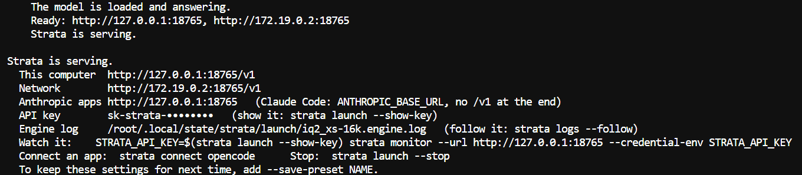
Once everything is ready, Strata starts an OpenAI-compatible API server at:
http://127.0.0.1:18765/v1
Since we've enabled LAN access, other devices on the same network can also connect using the machine's IP address. Strata generates an API key to secure these connections, which you can retrieve using:
You can also check the server status:
If you're running on a 16 GB GPU with 64 GB RAM, try reducing --context 64k to --context 16k or --context 32k to lower memory requirements.
Our local model server is now ready. Next, we'll test the API and measure how quickly it generates tokens.
5. Test the Model Using curl
Now that our Strata server is running, let's send our first request and see how quickly the model responds.
Open another terminal and run the following command:
curl -sS http://127.0.0.1:18765/v1/chat/completions \
  -H "Content-Type: application/json" \
  -H "Authorization: Bearer $(strata launch --show-key)" \
  -d '{
    "model": "strata",
    "messages": [
      {
        "role": "user",
        "content": "Explain how mixture-of-experts AI models work in simple terms."
      }
    ],
    "max_tokens": 300
  }'
This sends a request to Strata's OpenAI-compatible API, authenticates using our local API key, and asks the model to explain the Mixture-of-Experts architecture.
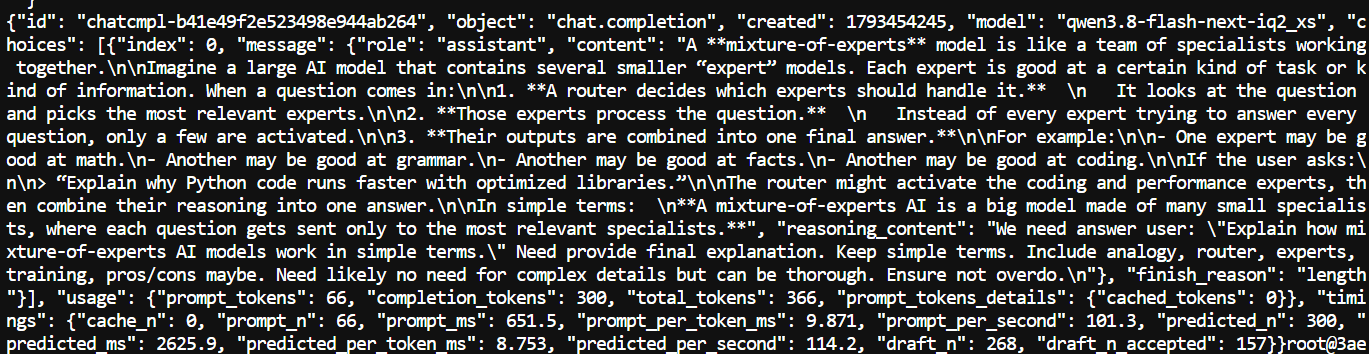
The results were impressive! We achieved 101.3 tokens per second, generating 300 tokens in approximately 3 seconds.
6. Open Strata's Built-in Web UI
Strata comes with its own web interface, so we don't need to install Gradio or any additional application to interact with our model.
Before opening the dashboard, retrieve your API key:
Copy the generated key and open the following address in your browser:
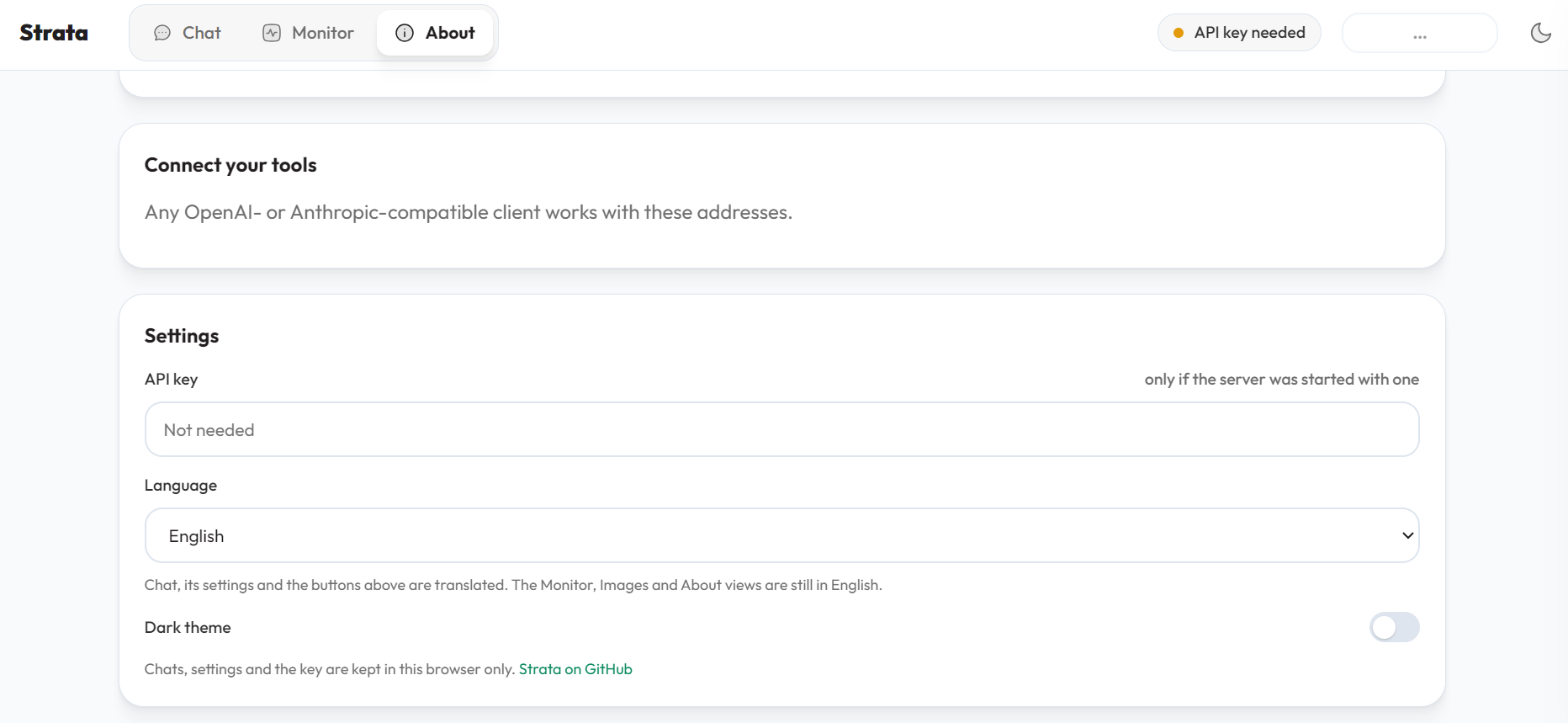
In the top-left navigation, click About, open Settings, and paste your API key into the API Key field.
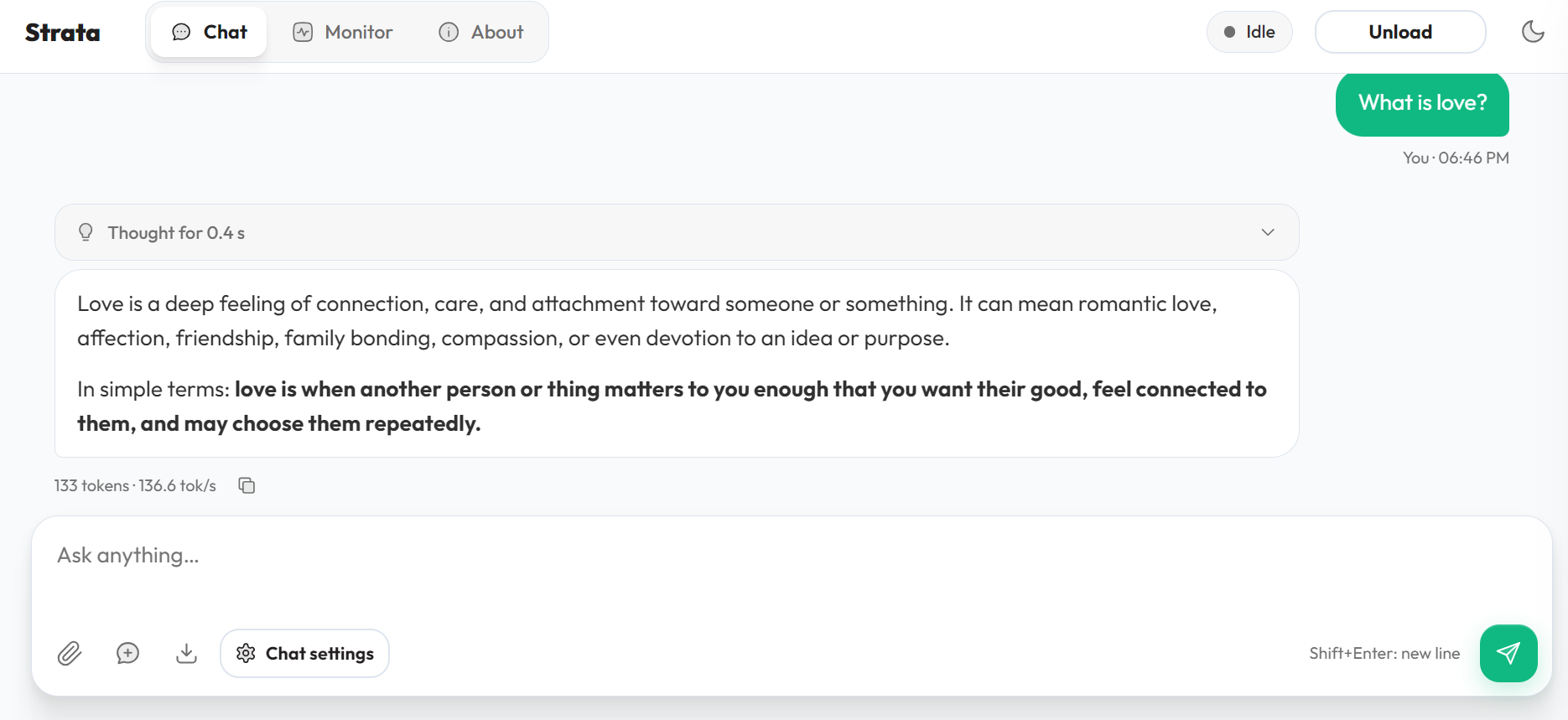
Now, let's test our model directly from the browser by clicking the Chat tab. Start with a simple prompt and observe the generation speed. In our testing, we achieved over 135 tokens per second.
Next, let's give it a coding task:
Create a simple REST API server using Python.
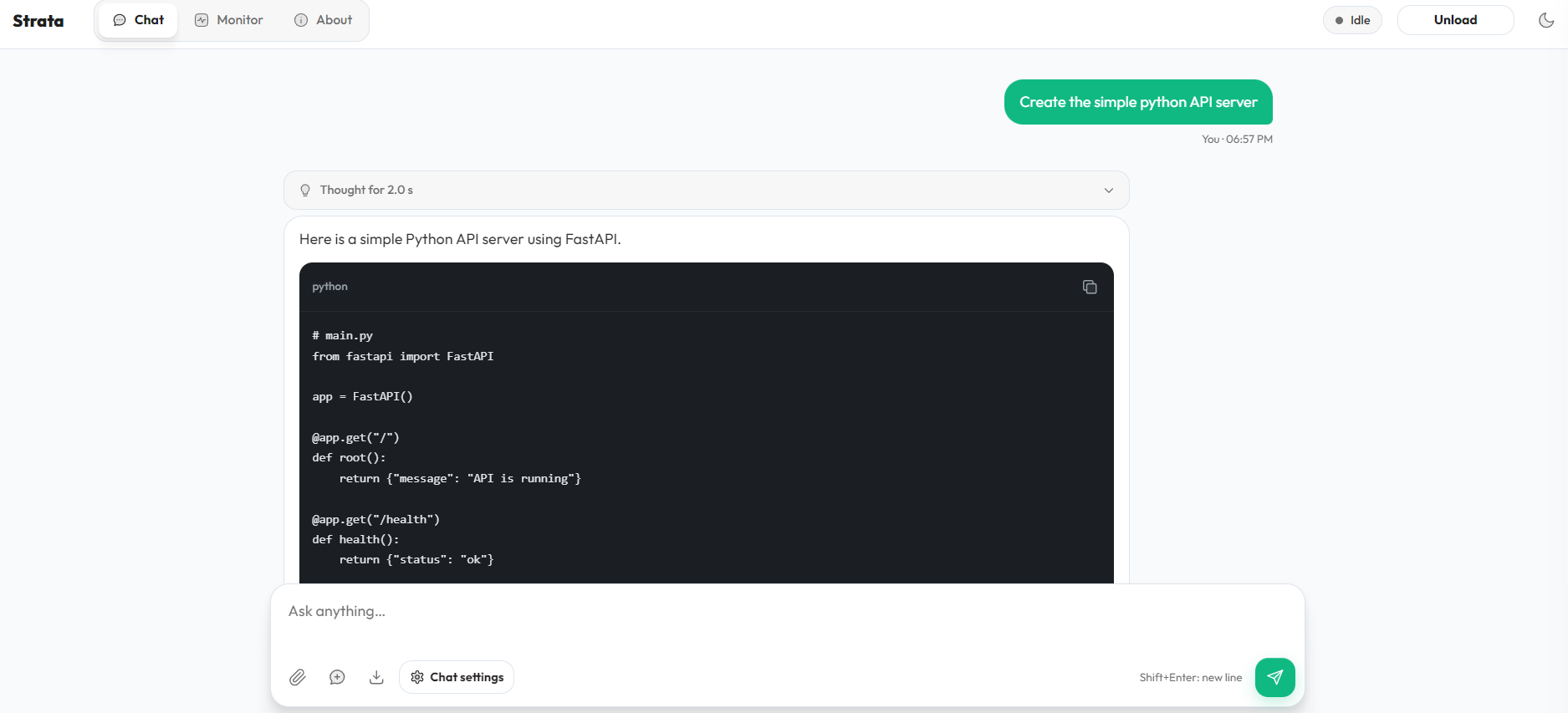
The model generated the Python server code quickly and produced a useful implementation.
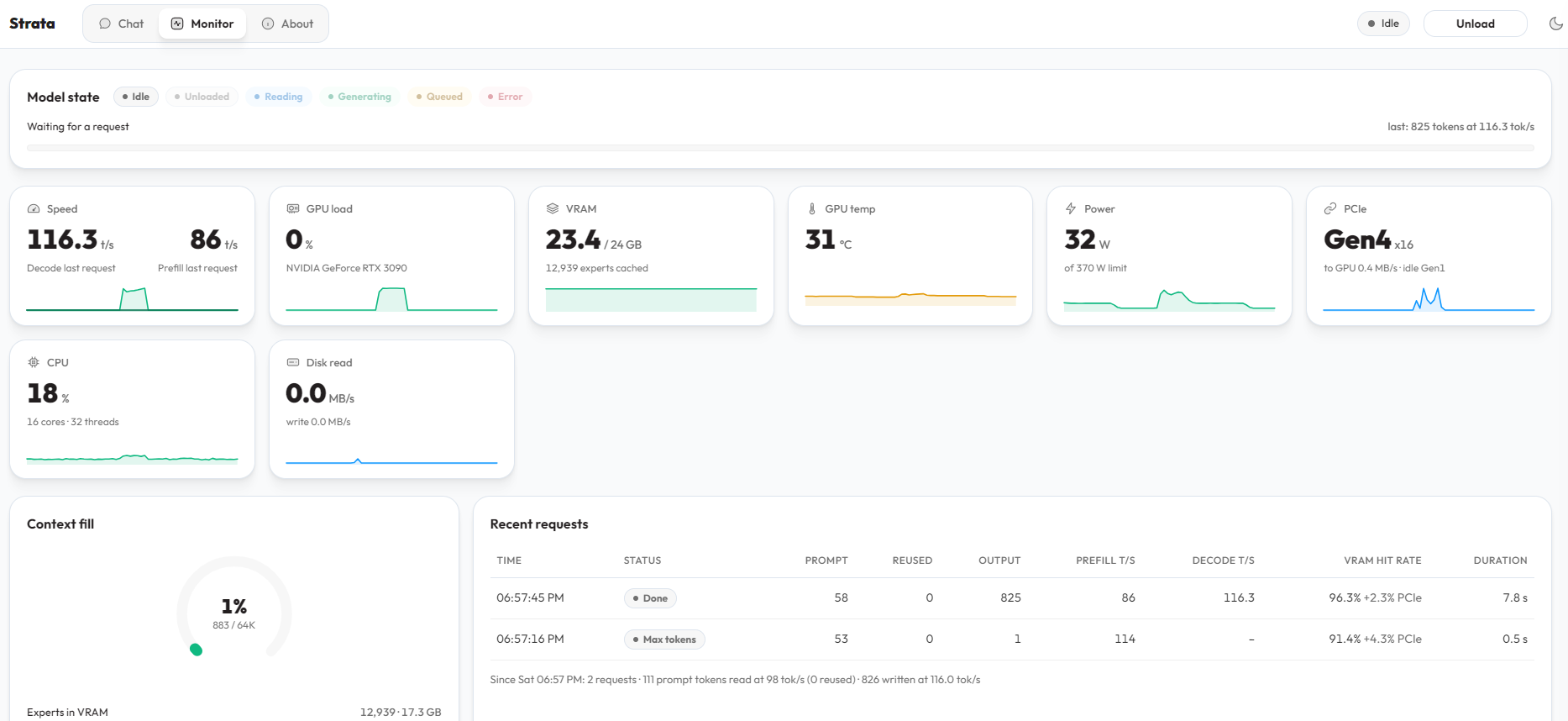
We also explored the Monitor tab, which displays real-time inference statistics, token generation speed, GPU memory consumption, and other performance metrics.
Across our tests, we typically achieved 110–120 tokens per second, with occasional speeds exceeding 135 tokens per second. We noticed that generation speed varied depending on the task, slowing during some reasoning-heavy responses and increasing during code generation.
What's even better is that we can monitor everything directly from the browser, including our VRAM usage and inference performance, while running the entire model locally without paying for API calls.
7. Integrate Strata with the Pi Coding Agent
Now that we've tested our model through the API and web interface, let's take things further by connecting it to the Pi coding agent, a lightweight terminal-based AI coding assistant.
First, install Pi on Linux:
curl -fsSL https://pi.dev/install.sh | sh
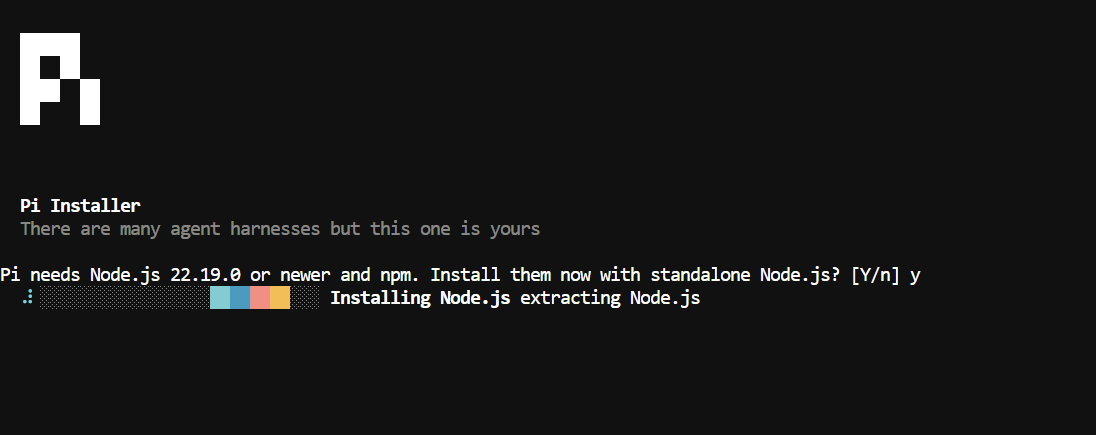
Once installed, Pi may launch its terminal interface. If it does, press Ctrl+C to exit because we first need to configure our local model.
Pi supports custom OpenAI-compatible providers through a models.json configuration file.
Create the configuration directory and export your Strata API key. Pi reads the key from this environment variable, so launch Pi from the same terminal (or add the export to your shell profile):
mkdir -p ~/.pi/agent
export STRATA_API_KEY=$(strata launch --show-key)
Now, configure Pi to connect to our local Strata server:
cat > ~/.pi/agent/models.json <<'EOF'
{
  "providers": {
    "strata": {
      "baseUrl": "http://127.0.0.1:18765/v1",
      "api": "openai-completions",
      "apiKey": "$STRATA_API_KEY",
      "models": [
        {
          "id": "strata",
          "name": "Qwen3.8-Flash-Next",
          "contextWindow": 65536,
          "maxTokens": 8192
        }
      ]
    }
  }
}
EOF
We're using a 64K context window to match our Strata server configuration, with up to 8,192 output tokens per response. This gives the coding agent more room to work on longer tasks.
Next, create a project directory and launch Pi using our local model:
mkdir -p ~/coding-demo
cd ~/coding-demo
pi --model strata/strata
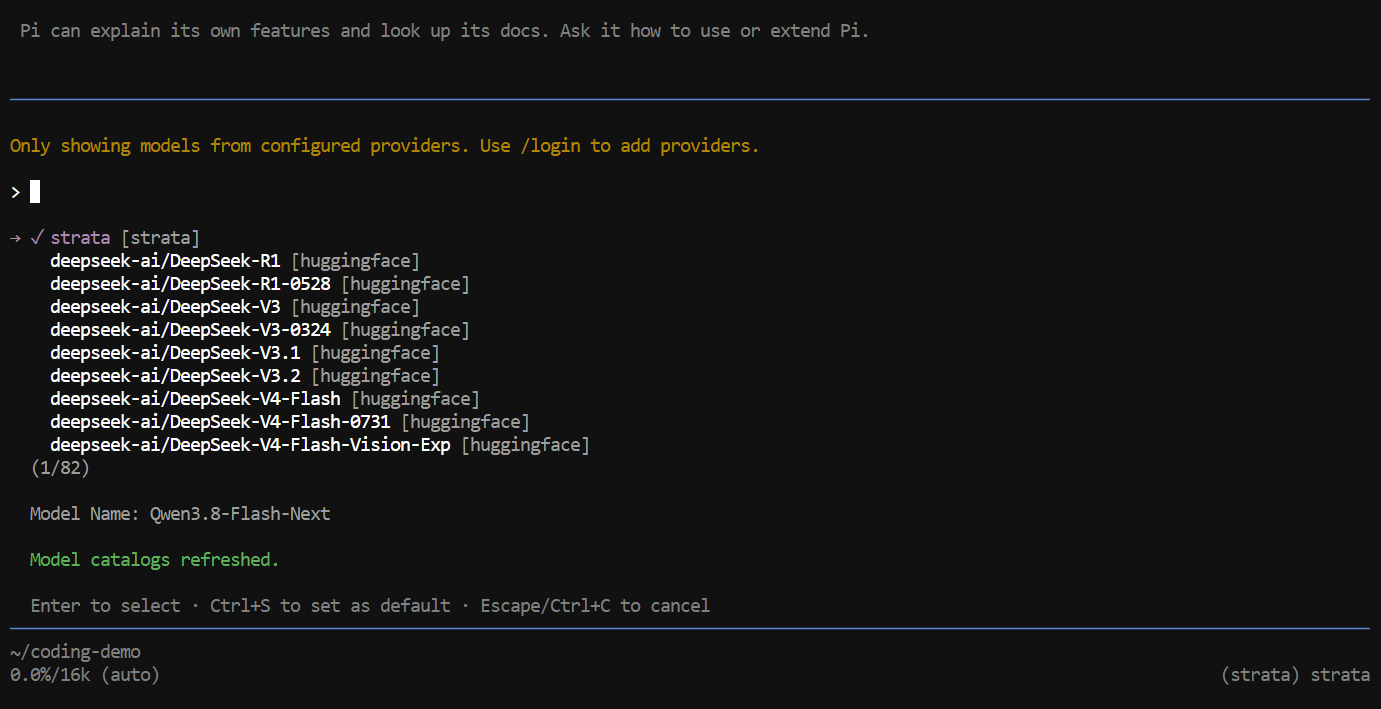
Pi will now launch with our locally running Qwen model. You can switch between configured models, but for this experiment, we'll use Strata.
Let's give our coding agent a small but complete development task:
Create a Python calculator application with unit tests using pytest. Implement the basic arithmetic operations, handle errors, run the tests, and fix any failures.
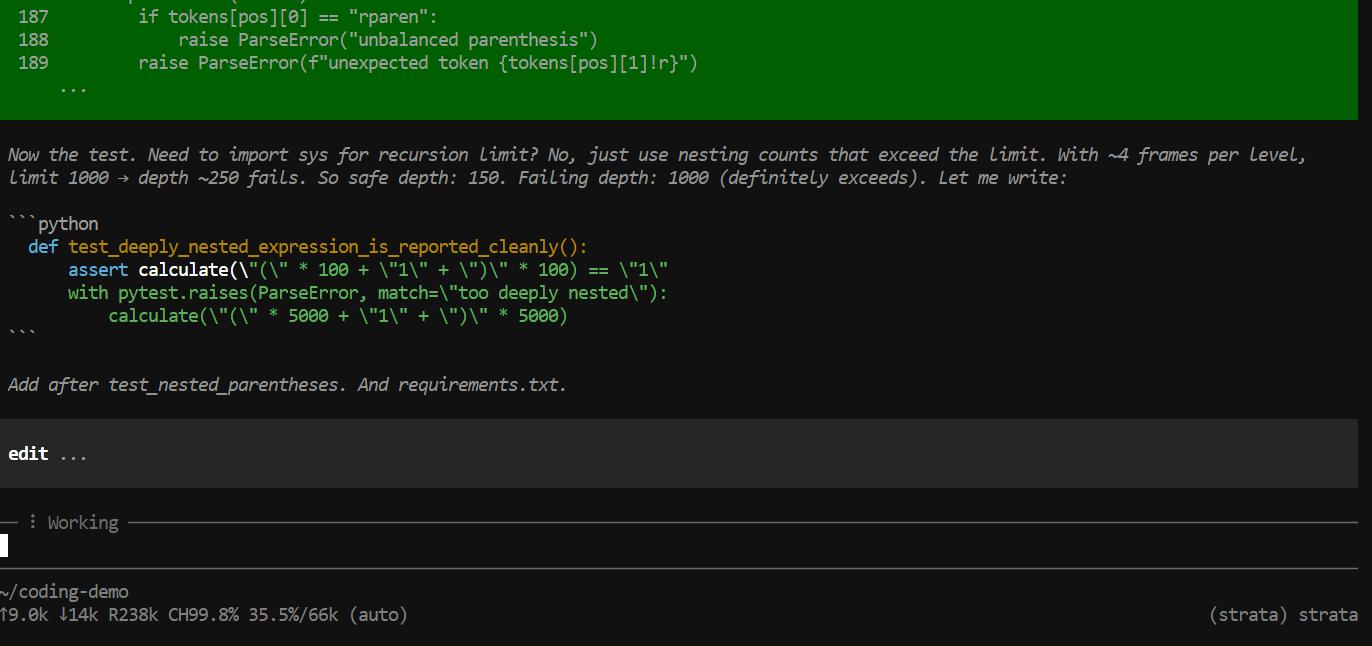
This is a simple project, but it allows us to test whether the agent can create files, write code, execute tests, and review its own work.
Although the agent took some time to complete the entire workflow, we consistently observed around 147 tokens per second during generation, with fast cached prompt processing.
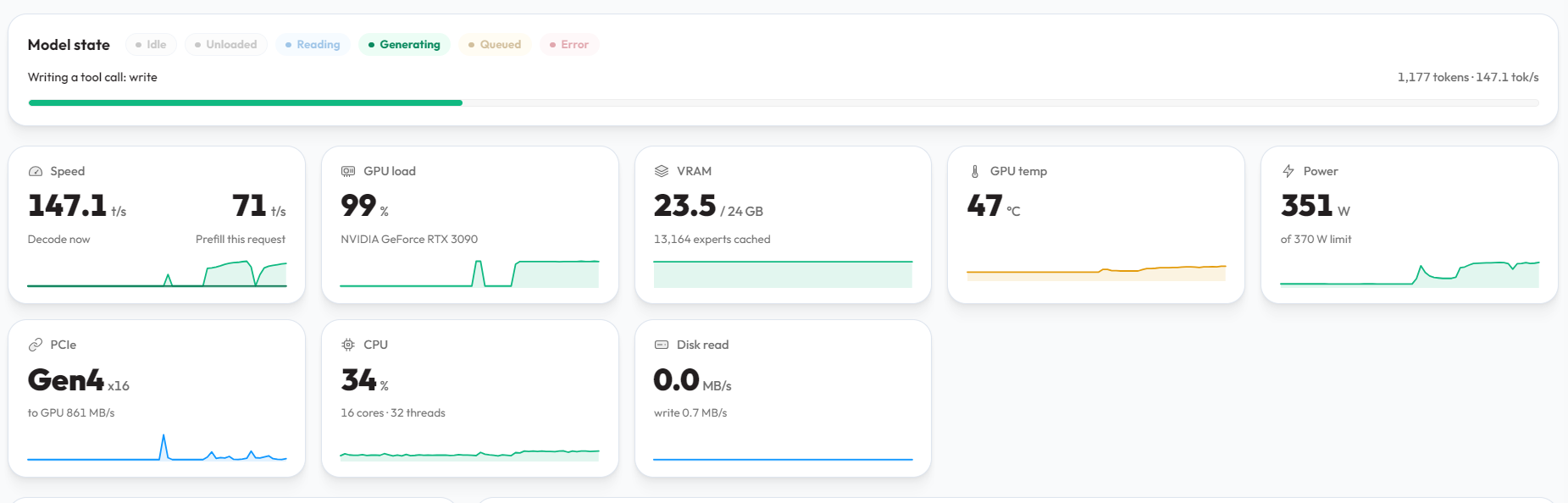
During the coding session, our system used approximately 23 GB of GPU VRAM and 71 GB of RAM, leaving us with some available system memory.
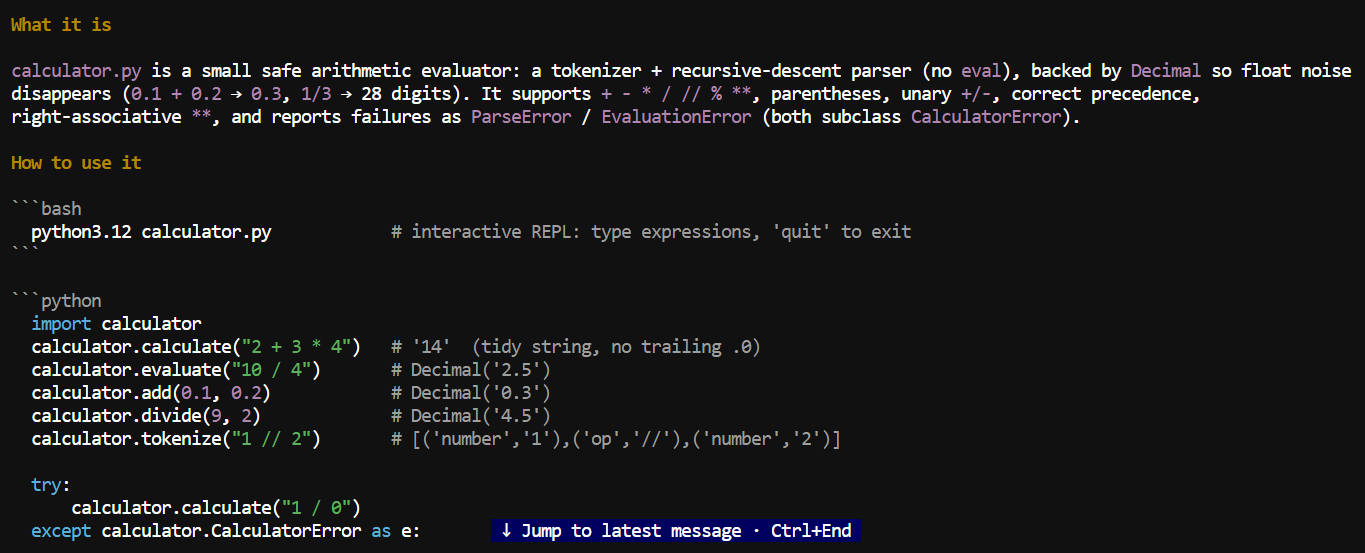
The agent generated the project, provided instructions for running it, and executed the tests. We could also continue the conversation and ask it to summarize the implementation and testing results.
What impressed us most was that we had a fully functional AI coding agent running a massive MoE model locally, with fast inference. It wasn't just generating text anymore; it was working on an actual software project.
Final Thoughts
Running a 125B-parameter MoE model locally on an RTX 3090 and achieving almost 150 tokens per second is something we genuinely didn't expect. We're seeing generation speeds that can rival or even exceed those offered by some commercial API providers, all without paying for inference or relying on cloud GPUs.
However, fast token generation doesn't necessarily mean faster task completion. This became obvious when we connected the model to the Pi coding agent. Despite generating nearly 150 tokens per second, it took surprisingly long to complete a relatively simple Python calculator project.
The biggest issue wasn't inference speed but how many steps and how much reasoning the model needed to reach a solution. It repeatedly worked through decisions and took longer paths to accomplish tasks that newer proprietary models can often understand, plan, and complete in far fewer steps. Those models may generate tokens more slowly, but their more efficient reasoning and tool usage can make them significantly faster at completing the actual task.
This was the major drawback of our experiment. The model is incredibly fast at generating tokens, but it still has room to improve when it comes to efficient planning, reasoning, and autonomous coding.
On the positive side, Strata handled this massive model remarkably well. During our coding tests, we used approximately 23 GB of VRAM and 71 GB of system RAM, and the entire setup worked without relying on paid APIs.
You no longer need an expensive multi-GPU server to run massive MoE models at impressive speeds. However, tokens per second shouldn't be the only benchmark that matters. We also need to measure how quickly and accurately models complete real tasks, how many tool calls they make, and how efficiently they reach the final result.
Our biggest takeaway: local inference speed is becoming competitive with cloud services, but agentic efficiency still has some catching up to do.
If you want to get more out of coding agents like Pi, even with a slower or less capable model, the AI-Assisted Coding for Developers course shows how to guide an assistant to write, test, and document code in fewer steps.


Have you ever wondered if you could run a 125-billion-parameter Mixture-of-Experts (MoE) model locally on a gaming PC or workstation with a decent GPU and plenty of RAM?
And what if I told you that instead of struggling with 1–5 tokens per second, you could get over 100 tokens per second? No expensive GPU servers, no cloud subscriptions, and no API costs.
How did we get here? How is this even possible?
The answer lies in a combination of efficient MoE architectures, aggressive model quantization, and smarter inference engines that make better use of your available hardware.
One such engine is Strata, which makes running massive language models on consumer hardware more practical than ever.
In this guide, I'll install Strata on Linux, run a 125B-parameter quantized Qwen MoE model locally, test its inference speed, and expose it through an OpenAI-compatible API. Finally, I'll connect it to the Pi coding agent and see whether we can build a fast, fully local AI coding assistant without relying on paid APIs.
What Is Strata?
Strata is an open-source inference engine designed to run massive Mixture-of-Experts (MoE) language models on consumer hardware. Instead of requiring expensive servers with hundreds of gigabytes of GPU memory, Strata makes it possible to run models like Qwen3.8-Flash-Next (125B parameters) on a regular gaming PC or workstation with a capable GPU and sufficient system RAM.
It also includes a built-in web interface and OpenAI-compatible API, making it easy to connect local models to applications and coding agents.
What makes Strata interesting is how efficiently it uses your hardware. Rather than loading the entire model into GPU memory, it distributes the workload across VRAM, system RAM, and SSD storage.
It keeps frequently used experts on the GPU while the CPU processes others in parallel. Combined with quantization, intelligent caching, and speculative decoding, this approach enables surprisingly fast inference on consumer GPUs.
1. Prepare Your Linux System
For this tutorial, we're using Ubuntu 24.04 with an NVIDIA RTX 3090 (24 GB VRAM) and 96 GB of system RAM to run the quantized Qwen3.8-Flash-Next IQ2_XS model.
However, you don't necessarily need this much hardware. You can also run the model with 64 GB RAM and a 16 GB GPU, provided you reduce the context window and optimize memory usage.
Performance will depend on your hardware, model configuration, and how much of the model can fit into GPU memory.
Make sure you have at least 120 GB of free SSD storage for the model files and setup.
First, update Ubuntu and install the required dependencies:
Next, verify that your NVIDIA GPU is detected correctly:
This should display your GPU model, driver version, and available VRAM. If your GPU appears in the output, you're ready to proceed with installing Strata.
2. Install Strata
Next, we'll install Strata so we can run large language models locally without relying on cloud services or paid APIs.
First, download the latest installation script from the official GitHub repository:
Run the installer:
Once the installation is complete, add Strata to your system's
PATHso you can access it from any directory:Finally, verify that Strata is installed correctly:
If everything is working, you should see the available launch options, including settings for model loading, context length, GPU usage, and server configuration.
3. Download Qwen3.8-Flash-Next
Now that Strata is installed, let's download Qwen3.8-Flash-Next, a large MoE model that we'll run locally.
A quick note on size: Qwen3.8-Flash-Next is advertised as a 125B-parameter model with 6B parameters active per token. That figure covers the main model only. The full release also includes a 51B-parameter n-gram embedding table and a 4B multi-token prediction layer, for roughly 180B parameters in total (the GGUF files are listed as 177B). The n-gram table is why the download includes a second 28.8 GB shard.
We're using the IQ2_XS quantization from ISTA-DASLab, which significantly reduces the model's memory requirements while preserving much of its original quality.
Why IQ2_XS? Our RTX 3090 has 24 GB of VRAM, so running the full-precision model isn't practical. With IQ2_XS, the model's transformer weights are compressed to approximately 39.2 GB, making it possible to split the workload between GPU and system RAM. The complete download is approximately 68 GB across two GGUF shards.
If you have more RAM or GPU memory available, you can also experiment with higher-quality quantizations such as IQ3_XXS (75.8 GB) or IQ3_S (83.6 GB).
You can explore all available versions on Hugging Face.
First, install
uv, which we'll use to manage our Python tools:Restart your terminal after installation so the
uvcommand becomes available.Next, install the Hugging Face CLI:
Create a directory to store the model:
Now, download the IQ2_XS quantized model:
This downloads approximately 68 GB of model files, split into two GGUF shards. The first contains the quantized transformer weights, while the second contains the n-gram lookup data.
4. Start the Strata Server
Now that our model is downloaded, let's launch Strata and run our 125B-parameter MoE model locally.
We'll use a 64K context window, limit inference to one concurrent request to manage memory usage, and enable LAN access so other applications can connect to our model.
During the first launch, Strata will automatically download and install the required CUDA inference engine, prepare the runtime for our model's quantization, and configure GPU and system memory usage. This initial setup may take a little longer, but subsequent launches should be faster.
Once everything is ready, Strata starts an OpenAI-compatible API server at:
Since we've enabled LAN access, other devices on the same network can also connect using the machine's IP address. Strata generates an API key to secure these connections, which you can retrieve using:
You can also check the server status:
If you're running on a 16 GB GPU with 64 GB RAM, try reducing
--context 64kto--context 16kor--context 32kto lower memory requirements.Our local model server is now ready. Next, we'll test the API and measure how quickly it generates tokens.
5. Test the Model Using curl
Now that our Strata server is running, let's send our first request and see how quickly the model responds.
Open another terminal and run the following command:
This sends a request to Strata's OpenAI-compatible API, authenticates using our local API key, and asks the model to explain the Mixture-of-Experts architecture.
The results were impressive! We achieved 101.3 tokens per second, generating 300 tokens in approximately 3 seconds.
6. Open Strata's Built-in Web UI
Strata comes with its own web interface, so we don't need to install Gradio or any additional application to interact with our model.
Before opening the dashboard, retrieve your API key:
Copy the generated key and open the following address in your browser:
In the top-left navigation, click About, open Settings, and paste your API key into the API Key field.
Now, let's test our model directly from the browser by clicking the Chat tab. Start with a simple prompt and observe the generation speed. In our testing, we achieved over 135 tokens per second.
Next, let's give it a coding task:
The model generated the Python server code quickly and produced a useful implementation.
We also explored the Monitor tab, which displays real-time inference statistics, token generation speed, GPU memory consumption, and other performance metrics.
Across our tests, we typically achieved 110–120 tokens per second, with occasional speeds exceeding 135 tokens per second. We noticed that generation speed varied depending on the task, slowing during some reasoning-heavy responses and increasing during code generation.
What's even better is that we can monitor everything directly from the browser, including our VRAM usage and inference performance, while running the entire model locally without paying for API calls.
7. Integrate Strata with the Pi Coding Agent
Now that we've tested our model through the API and web interface, let's take things further by connecting it to the Pi coding agent, a lightweight terminal-based AI coding assistant.
First, install Pi on Linux:
Once installed, Pi may launch its terminal interface. If it does, press
Ctrl+Cto exit because we first need to configure our local model.Pi supports custom OpenAI-compatible providers through a
models.jsonconfiguration file.Create the configuration directory and export your Strata API key. Pi reads the key from this environment variable, so launch Pi from the same terminal (or add the export to your shell profile):
Now, configure Pi to connect to our local Strata server:
We're using a 64K context window to match our Strata server configuration, with up to 8,192 output tokens per response. This gives the coding agent more room to work on longer tasks.
Next, create a project directory and launch Pi using our local model:
Pi will now launch with our locally running Qwen model. You can switch between configured models, but for this experiment, we'll use Strata.
Let's give our coding agent a small but complete development task:
This is a simple project, but it allows us to test whether the agent can create files, write code, execute tests, and review its own work.
Although the agent took some time to complete the entire workflow, we consistently observed around 147 tokens per second during generation, with fast cached prompt processing.
During the coding session, our system used approximately 23 GB of GPU VRAM and 71 GB of RAM, leaving us with some available system memory.
The agent generated the project, provided instructions for running it, and executed the tests. We could also continue the conversation and ask it to summarize the implementation and testing results.
What impressed us most was that we had a fully functional AI coding agent running a massive MoE model locally, with fast inference. It wasn't just generating text anymore; it was working on an actual software project.
Final Thoughts
Running a 125B-parameter MoE model locally on an RTX 3090 and achieving almost 150 tokens per second is something we genuinely didn't expect. We're seeing generation speeds that can rival or even exceed those offered by some commercial API providers, all without paying for inference or relying on cloud GPUs.
However, fast token generation doesn't necessarily mean faster task completion. This became obvious when we connected the model to the Pi coding agent. Despite generating nearly 150 tokens per second, it took surprisingly long to complete a relatively simple Python calculator project.
The biggest issue wasn't inference speed but how many steps and how much reasoning the model needed to reach a solution. It repeatedly worked through decisions and took longer paths to accomplish tasks that newer proprietary models can often understand, plan, and complete in far fewer steps. Those models may generate tokens more slowly, but their more efficient reasoning and tool usage can make them significantly faster at completing the actual task.
This was the major drawback of our experiment. The model is incredibly fast at generating tokens, but it still has room to improve when it comes to efficient planning, reasoning, and autonomous coding.
On the positive side, Strata handled this massive model remarkably well. During our coding tests, we used approximately 23 GB of VRAM and 71 GB of system RAM, and the entire setup worked without relying on paid APIs.
You no longer need an expensive multi-GPU server to run massive MoE models at impressive speeds. However, tokens per second shouldn't be the only benchmark that matters. We also need to measure how quickly and accurately models complete real tasks, how many tool calls they make, and how efficiently they reach the final result.
Our biggest takeaway: local inference speed is becoming competitive with cloud services, but agentic efficiency still has some catching up to do.
If you want to get more out of coding agents like Pi, even with a slower or less capable model, the AI-Assisted Coding for Developers course shows how to guide an assistant to write, test, and document code in fewer steps.