Track
Associate AI Engineer for Developers
29 hr
GGUF, short for GGML Unified Format, is a binary file format that packages model weights, tokenizer data, architecture metadata, and quantization information into a single, portable file for inference with GGML-based runtimes, especially llama.cpp.
GGUF solves an LLM deployment problem. Many model formats require users to keep several files together, including model weights, tokenizer files, configuration files, and architecture-specific loading code. GGUF simplifies this by making the model file largely self-describing.
A GGUF file typically contains:
The key idea is that the file describes itself. The runtime can inspect the metadata, understand the architecture, load the tokenizer, and map the tensors without relying on a separate config.json or tokenizer folder.
This does not mean every GGUF file is universally compatible with every runtime forever. The runtime still needs to support the model architecture and tensor types used in the file. However, GGUF makes that compatibility far easier than older formats because the file carries much more structured information.
Four defining characteristics of GGUF are:
GGUF was introduced as part of the llama.cpp and GGML ecosystem in 2023. It is now the dominant format for distributing quantized local LLMs on Hugging Face.
The GGML (Georgi Gerganov Machine Learning) format was the predecessor to GGUF. It was important because it helped make early local inference possible. However, it had practical limitations as the ecosystem expanded beyond the original LLaMA models.
Common GGML pain points included:
GGUF addressed those limitations with a more structured format. It introduced typed metadata, better tokenizer embedding, and a clearer file layout. This made it easier for llama.cpp and related tools to support more architectures without constantly redesigning the loading pipeline.
For users, the important difference is simple: GGUF is the modern format. If you are downloading models today, you should almost always choose GGUF rather than older GGML files.
In your research of the file formats, you must have come across GGUF, GPTQ (Generative Post-Training Quantization), and AWQ (Activation-Aware Weight Quantization). I find them often discussed together because all three are used to make LLM inference more efficient. However, they are not identical categories.
GGUF is primarily a file format and deployment container. It supports many quantization types and is closely associated with llama.cpp-style local inference.
GPTQ and AWQ are quantization methods and ecosystems commonly used for GPU-optimized inference, especially on NVIDIA hardware through frameworks such as Transformers, ExLlama, AutoGPTQ, and vLLM-compatible workflows.
|
Feature |
GGUF |
GPTQ |
AWQ |
|
Primary target |
Portable local inference |
GPU inference |
GPU inference |
|
Common hardware |
CPU, Apple Silicon, NVIDIA, AMD, Vulkan, mobile |
NVIDIA GPUs |
NVIDIA GPUs |
|
CPU support |
Strong |
Limited |
Limited |
|
Portability |
Very high |
Moderate |
Moderate |
|
Typical ecosystem |
llama.cpp, Ollama, LM Studio, GPT4All |
Transformers, ExLlama, AutoGPTQ |
Transformers, TensorRT-LLM-style workflows |
|
GPU throughput |
Good, especially with offload |
Often very strong |
Often very strong |
|
Best use case |
Local and mixed-hardware inference |
High-throughput GPU serving |
High-throughput GPU serving |
If your goal is maximum compatibility across laptops, desktops, Apple Silicon, and mixed hardware, GGUF is usually the safer choice.
If your goal is maximum throughput on dedicated NVIDIA inference servers, GPTQ, AWQ, FP8, or other GPU-optimized serving formats may be more appropriate.
GGUF became popular because it solves practical deployment problems. I’ve also come to find them so convenient when deploying locally without all the setup mess.
Running local LLMs used to involve fragmented tooling, large uncompressed weights, incompatible model formats, and complicated setup steps. GGUF can now help you standardize a large part of that workflow.
Instead of thinking about many separate files and loading scripts, users can focus on selecting the right model, choosing a quantization level, and running inference.
GGUF allows you to run LLMs on your own machine. This means:
This is especially useful for privacy-sensitive workflows. Developers may not want to send proprietary code, internal documents, customer records, or confidential prompts to an external API.
Local inference is not automatically secure by itself. You still need to manage your machine, logs, applications, and access control properly. But GGUF makes private local deployment much more accessible.
For hands-on practice running models locally, see our tutorials on serving Mistral Medium 3.5 with SGLang, running DeepSeek V4 Flash locally, running the efficient Bonsai 1-bit model on an old laptop, and running MiniMax M2 locally as a coding assistant.
GGUF is useful because it works across many hardware configurations.
Depending on the runtime and backend, GGUF models can run on:
This flexibility is a major reason llama.cpp became influential. It was not designed only for high-end server GPUs. It was designed to make local inference possible on a broad range of hardware.
For example, a Mac user may rely on Metal acceleration, while a Linux desktop user may use CUDA or Vulkan. A CPU-only user may still run smaller quantized models, although generation speed will be slower.
GGUF is supported by many local inference tools. Examples include:
This matters because users are not locked into one interface. The same general model format can be used across different workflows.
A developer might benchmark a model with llama.cpp, chat with it in LM Studio, serve it through Ollama, and connect it to a browser UI through Open WebUI.
Hugging Face has become a major distribution hub for GGUF models.

Source: Hugging Face
Many popular open-weight models receive community-uploaded GGUF variants shortly after release. These repositories often include several quantization options so users can pick a model that fits their hardware.
Common upload variants include:
This means manual conversion is often unnecessary. For the most popular models, someone in the community has already created GGUF files for common quantization levels.
GGUF gives users fine-grained control over the size-quality tradeoff. You can choose:
This flexibility is one of the format's biggest advantages. Instead of one fixed deployment target, GGUF lets users adapt the same model family to many hardware tiers.
A GGUF file is organized into three major parts:
The exact structure is defined by the GGUF specification. The important idea is that metadata and tensor information appear before the raw tensor data, allowing a runtime to understand what it is about to load.
The header identifies the file as GGUF and tells the runtime how to parse the rest of the file. It includes:
Modern GGUF files commonly use GGUF version 3.
Inference engines check the magic number first. If the file does not begin with the expected GGUF identifier, the runtime can reject it before trying to parse tensors or allocate memory.
This is a simple but important safety and reliability step. It prevents a runtime from accidentally treating an unrelated binary file as a model.
GGUF metadata is a typed key-value store. This metadata can describe:
Keys are usually namespaced. Examples include:
general.architecturegeneral.alignmentllama.context_lengthtokenizer.ggml.tokensNamespacing is important because it allows GGUF to support many architectures without changing the entire file format. A LLaMA-family model can use llama.* keys, while other model families can use their own architecture-specific metadata.
This is one reason GGUF adapted well to models beyond the original LLaMA family, including architectures such as Qwen, Mistral, Gemma, DeepSeek, Phi, and others.
After the metadata, the file stores tensor information and tensor data.
Tensor information describes:
The tensor data section contains the actual model weights. These weights may be stored in full precision or in one of GGUF's supported quantized tensor types.
GGUF uses an alignment value defined in metadata, commonly general.alignment. Many GGUF files use 32-byte alignment, but the correct way to describe this is that alignment is metadata-controlled rather than permanently hardcoded.
Alignment matters because it allows runtimes to access tensor blocks efficiently.
One of GGUF's practical advantages is memory mapping, often called mmap.
With memory mapping, the operating system can map the model file into virtual memory instead of forcing the runtime to copy the entire file into RAM upfront.
This can make model startup feel much faster, especially on SSDs. It also allows the operating system to page model data in and out as needed.
However, memory mapping is not magic. The model still needs enough practical memory bandwidth and available RAM or VRAM to run well. If your system is constantly paging from disk, inference may become slow.
A better way to think about mmap is this:
Quantization compresses model weights into lower-precision representations.
Instead of storing every weight as a 16-bit floating point value, a quantized model stores approximate values using fewer bits. This reduces disk size, RAM and VRAM usage, and memory bandwidth pressure.
The key insight is that many neural network weights do not need full floating-point precision during inference. A carefully quantized model can preserve much of the original model's behavior while becoming dramatically smaller.
GGUF quantization names usually follow this pattern:
Examples include:
The name is a useful guide, but it is not always an exact statement of total file size. Real file size depends on tensor mix, architecture, metadata, tokenizer size, and whether some tensors remain at higher precision.
|
Quantization |
Approximate behavior |
Approximate 7B file size |
Quality note |
|
Q2_K |
Very low-bit quantization |
Around 2.5–3 GB |
Small, but quality loss is often obvious |
|
Q3_K_M |
Low-bit balanced quantization |
Around 3.5–4 GB |
Usable for lightweight chat, but not ideal for reasoning |
|
Q4_K_M |
Balanced 4-bit quantization |
Around 4–5 GB |
Strong default for most local users |
|
Q5_K_M |
Higher-quality 5-bit quantization |
Around 5.5–6.5 GB |
Better for coding, reasoning, and structured tasks |
|
Q6_K |
High-quality quantization |
Around 7–8 GB |
Often close to higher-precision behavior |
|
Q8_0 |
8-bit quantization |
Around 8–9 GB |
High quality, but much larger than Q4/Q5 |
These numbers are approximations for 7B-class dense models. Newer architectures, mixture-of-experts models, larger tokenizers, and different tensor layouts can change the actual file size.
In practice, Q4_K_M became a popular default because it provides a strong balance between size and quality. Many users find it good enough for general chat, summarization, rewriting, and exploratory local AI work.
Q5_K_M and Q6_K are often better choices for more demanding workloads, such as coding or multi-step instruction following
The reason is simple: these tasks are more sensitive to small quality degradation.
K-quants are the widely used quantization family behind formats such as Q4_K_M, Q5_K_M, and Q6_K.
They use grouped quantization schemes with scaling information that helps preserve model behavior while reducing memory requirements. They are popular because they are reliable, broadly supported, and easy to find in community GGUF releases.
I-quants, often written as IQ formats, are newer quantization types such as:
I-quants are designed to achieve better quality at very small sizes. They can use techniques such as importance-aware quantization and non-linear quantization codebooks. Some workflows use an importance matrix, often called an imatrix, to help preserve more important weights during quantization.
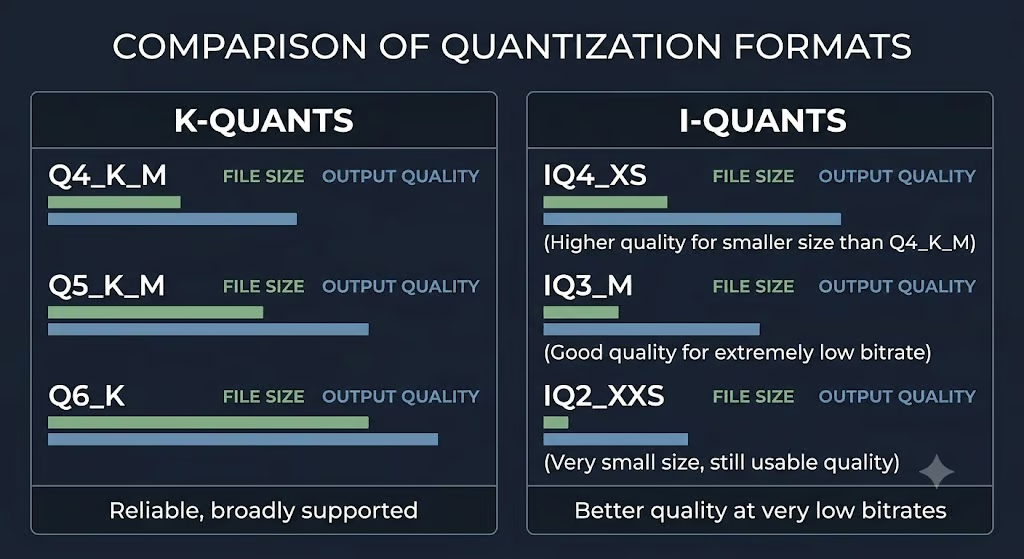
The tradeoff is complexity. I-quants can produce excellent size-quality results, especially at very low bitrates, but they may require more careful quantization workflows and runtime support.
For most beginners, K-quants remain the easiest starting point.
The following table gives practical starting points. Treat these as rules of thumb, not strict guarantees. Context length, operating system overhead, GPU offloading, KV cache size, and the specific model architecture can all change memory requirements.
|
Hardware tier |
7B/8B models |
13B/14B models |
30B/34B models |
70B-class models |
|
8 GB RAM/VRAM |
Q4_K_M or smaller |
Q2_K/Q3_K may run slowly |
Not practical |
Not practical |
|
16 GB RAM/VRAM |
Q5_K_M or Q6_K |
Q4_K_M |
Not practical or very constrained |
Not practical |
|
24 GB RAM/VRAM |
Q8_0 or Q6_K |
Q5_K_M/Q6_K |
Q3_K/Q4_K with constraints |
Not practical for most users |
|
32 GB RAM/VRAM |
Q8_0 |
Q6_K/Q8_0 |
Q4_K_M/Q5_K_M |
Q2_K/Q3_K only for experiments |
|
48 GB+ RAM/VRAM |
Q8_0 or FP16/BF16 where supported |
Q8_0 |
Q5_K_M/Q6_K |
Q4_K_M possible with constraints |
|
64 GB+ RAM/VRAM |
High precision |
High precision |
Q6_K/Q8_0 |
Q4_K_M/Q5_K_M more practical |
General rules of thumb:
The KV cache is easy to overlook. A model may fit into RAM at a short context length but fail or slow down at a much longer context length because the cache grows with sequence length.
Blackwell GPUs add another option beyond the K-quants: NVFP4, a 4-bit format with hardware tensor-core support, which we put to work in this RTX 5090 Qwen3.8 walkthrough.
GGUF's adoption is driven as much by tooling as by the format itself.
A format only becomes useful when users can easily download, run, inspect, convert, and serve models. GGUF benefits from a strong ecosystem across command-line tools, desktop apps, APIs, and hosted model repositories.
llama.cpp is the original and most important GGUF runtime. It is a lightweight C/C++ inference engine created by Georgi Gerganov and maintained by the GGML community. Its main goal is to enable efficient LLM inference with minimal setup across many hardware platforms.
Modern llama.cpp supports many backends, including:
It also includes tools for conversion, quantization, serving, benchmarking, and command-line inference. Common tools include:
convert_hf_to_gguf.pyllama-quantizellama-clillama-serverllama-benchThe commands to create a basic CPU CMake build are:
cmake -B build
cmake --build build --config Release
For some configurations, certain flags need to be added to the first of those two commands:
-DGGML_METAL=OFF-DGGML_VULKAN=1-DGGML_CUDA=ONDo take note that the current builds use GGML_* CMake options such as GGML_CUDA, GGML_VULKAN, and GGML_HIP.
Ollama is one of the easiest ways to run local models. It provides:
Ollama stores and manages models for you, so the user usually does not interact with .gguf files directly. However, Ollama is built around llama.cpp-compatible local inference and can also import GGUF files through a Modelfile workflow.
Ollama exposes a local API at:
http://localhost:11434/apiTwo commonly used endpoints are:
/api/generate for prompt completion/api/chat for chat-style messagesFor beginners, Ollama is often the fastest path from zero to local inference.
Source: LM Studio
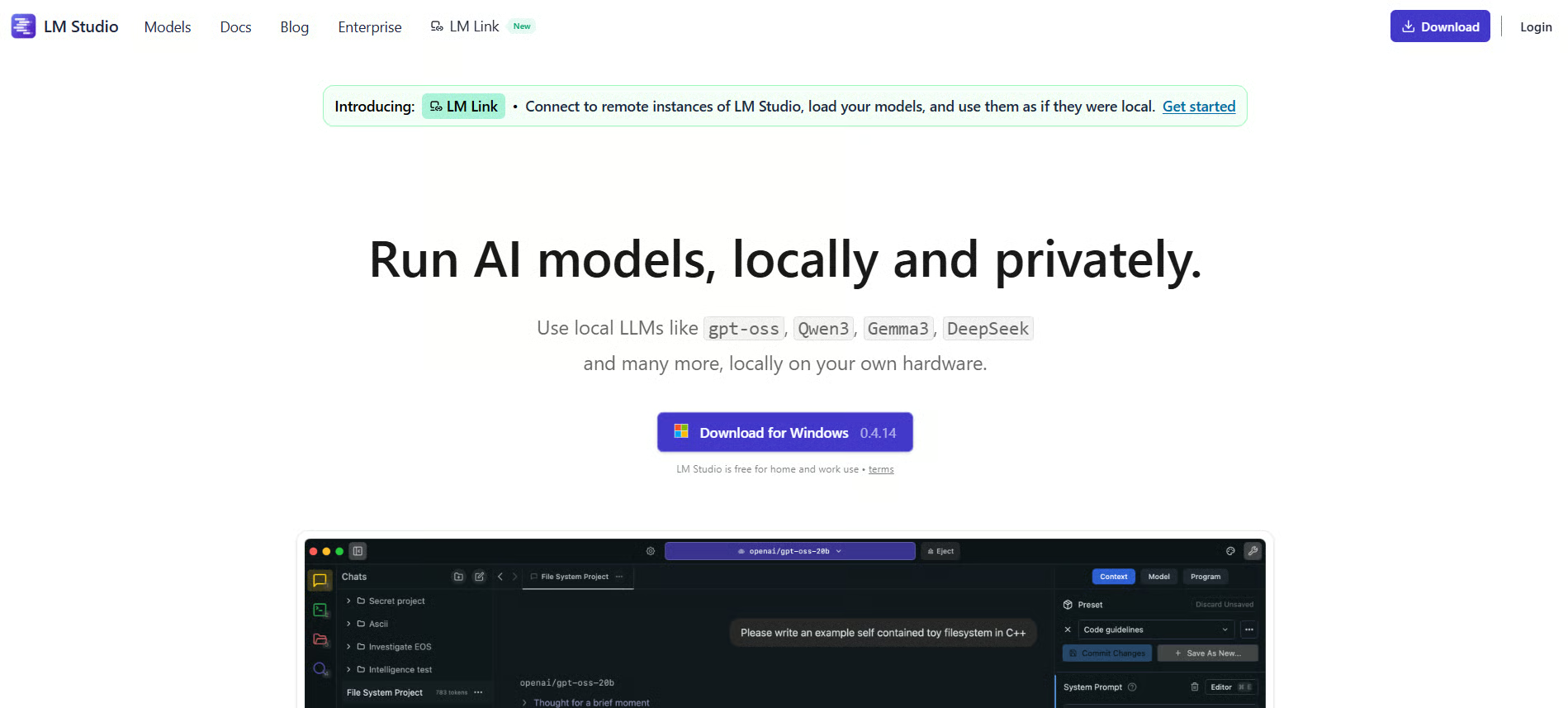
LM Studio is a desktop application for discovering, downloading, and chatting with local models. It is useful for users who prefer a graphical interface instead of command-line tools.

Source: GPT4All
GPT4All is another cross-platform local AI application focused on private, local chatbot workflows. It supports GGUF models and provides a beginner-friendly environment for local inference.
These tools make GGUF accessible to non-specialists. Users do not need to understand CMake, tensor layouts, or quantization internals just to try a local model.
There are two practical ways to get started:
The simplest workflow is to download the model and start an interactive chat session:
ollama pull llama3.3
ollama run llama3.3
To call the model from Python using the REST API:
import requests

payload = {
    "model": "llama3.3",
    "prompt": "Give me three practical use cases for GGUF.",
    "stream": False
}

response = requests.post(
    "http://localhost:11434/api/generate",
    json=payload
)

print(response.json()["response"])
For chat-style applications, use /api/chat:
import requests

payload = {
    "model": "llama3.3",
    "messages": [
        {"role": "user", "content": "What is GGUF used for?"}
    ],
    "stream": False
}

response = requests.post(
    "http://localhost:11434/api/chat",
    json=payload
)

print(response.json()["message"]["content"])
The stream: false field is important for simple scripts. Without it, Ollama returns a stream of JSON objects rather than one final JSON response.
You can also use Ollama's official Python library:
from ollama import chat

response = chat(
    model="llama3.3",
    messages=[
        {"role": "user", "content": "Explain GGUF quantization simply."}
    ]
)

print(response.message.content)If you already have a .gguf file, you can run it directly with llama.cpp after building the project.
Example:
./build/bin/llama-cli \
  -m models/model.Q4_K_M.gguf \
  -p "Explain the difference between GGUF and GPTQ." \
  -n 256
If you have GPU support enabled, you can offload layers to the GPU:
./build/bin/llama-cli \
  -m models/model.Q4_K_M.gguf \
  -p "Summarize GGUF in five bullet points." \
  -n 256 \
  -ngl 99
The -ngl flag controls the number of layers offloaded to the GPU. A high value such as 99 is commonly used to offload as much as possible, assuming the model fits in VRAM.
For API serving, use llama-server:
./build/bin/llama-server \
  -m models/model.Q4_K_M.gguf \
  -ngl 99 \
  --host 127.0.0.1 \
  --port 8080
This gives you a local server interface for integrating llama.cpp into applications.
Most users do not need to convert models manually because community GGUF releases are widely available.
However, manual conversion is useful when:
A typical workflow is:
Example:
huggingface-cli download mistralai/Mistral-7B-Instruct-v0.3 \
  --local-dir mistral-7b
Then convert to GGUF:
python convert_hf_to_gguf.py mistral-7b \
  --outfile mistral-f16.gguf \
  --outtype f16
Then quantize:
./build/bin/llama-quantize \
  mistral-f16.gguf \
  mistral-q4_k_m.gguf \
  Q4_K_M
In current llama.cpp workflows, convert_hf_to_gguf.py and llama-quantize are the relevant tools. Older tutorials may refer to deprecated conversion scripts or older binary names.
GGUF is optimized for practical local inference. It is not a universal replacement for every model format or serving stack.
|
Advantages |
Limitations |
|
Single-file model deployment |
Not designed for training from scratch |
|
Strong local inference ecosystem |
Very low-bit quantization can hurt quality |
|
Works across many hardware backends |
Large models still need significant memory |
|
Supports memory mapping |
GPU throughput may be lower than specialized GPU serving stacks |
|
Many quantization choices |
Runtime must still support the model architecture and tensor types |
|
Easy distribution on Hugging Face |
Context length can increase memory use through the KV cache |
For CPU-first, Apple Silicon, mixed-hardware, and privacy-focused inference, GGUF is often an excellent choice.
For high-throughput NVIDIA server deployment, other formats and engines may be faster depending on the model, batch size, quantization method, and serving framework.
GGUF makes local LLM inference practical by packaging everything a runtime needs (weights, tokenizer, metadata, quantization info) into one portable file. Its real strength is the ecosystem around it: llama.cpp, Ollama, LM Studio, and Hugging Face have all made it the default format for local AI deployment.
For most users, the path is simple: install Ollama, pull a model, and run it. Q4_K_M is a solid default; step up to Q5_K_M or Q6_K when you need better reasoning or coding output and have the memory to spare.
If you want to go deeper into LLM deployment, model optimization, and local inference workflows, you should explore the Associate AI Engineer for Data Scientists or the Associate AI Engineer for Developers career track.
Top AI Courses
Track
Track
Course
Tutorial
Abid Ali Awan
9 min
Tutorial
Abid Ali Awan
8 min
Tutorial
Abid Ali Awan
14 min
Tutorial
Abid Ali Awan
8 min
Tutorial
Abid Ali Awan
12 min
Tutorial
Andrea Valenzuela
12 min