
Курс
Claude Code 101
3 ч
28.3K
Using Anthropic’s Claude API allows you to go beyond simply chatting with a chatbot. It gives you the power to integrate all of the capabilities of Claude AI into your applications.
Anthropic shocked the AI world with the release of Fable 5, a model so capable that it prompted the US government to temporarily restrict access to it shortly after launch. While the model has since been restored for users worldwide, the way we access it has changed.
Anthropic is now restricting Fable 5 exclusively to API-based access via metered usage credits (with the cutoff taking effect following a brief five-day extension).
This means we have to rethink how we interact with AI. High-powered models and automated coding tools require significantly more computing resources than flat-rate consumer plans can provide.
In this tutorial, I will prepare you for this new reality by looking at how to use the Claude API.
I will teach you exactly how to set up Claude Code with the Anthropic Developer API. By making the switch to the pay-as-you-go model today, you will secure uninterrupted access to cutting-edge models like Fable 5, eliminate invisible rate limits, and learn how to run complex coding sessions directly from your terminal.
If you're looking for a quick reference, I recommend checking out the Claude API in Python cheat sheet.
For many, the $20 monthly Claude Pro plan was the ideal way to access top-tier AI. It offered a set price and steady access.
However, the rise of automated coding tools has completely changed the math. Agentic workflows require far more resources than a standard subscription can provide, making the Claude API the only viable option for serious developers.
Below are three main reasons for ditching the subscription and using Claude Code directly through the API.
Standard plans struggle with tools like Claude Code because of how these tools operate.
Unlike a simple web chat, an automated developer tool must constantly scan our entire project to understand what it is working on.
Every time we give it a task, it goes through several steps: reading files, checking structures, and running tests. This requires sending a massive amount of data back and forth to keep the AI updated on the current state of our code.
This process uses up tokens very quickly. On a Pro subscription, these complex workflows can exhaust our multi-hour usage limit in just a few minutes, bringing our work to a sudden halt.
Claude Pro accounts use one shared pool of resources. If we use our main account for terminal-based coding, those heavy automated tasks will take away from the capacity we have for our browser or mobile app.
We wouldn't want to be locked out of a simple conversation because a background coding task hit our cap. Routing your development tools through the Claude API keeps your professional coding work completely separate from your everyday AI usage.
As Anthropic releases models built specifically for heavy-duty engineering and autonomous work, like Claude Fable 5, they are moving away from flat-rate plans.
Because Fable 5 requires immense computing power, Anthropic has confirmed that this specific model will eventually require pay-per-use billing to manage the high operational costs.
This restriction is a preview of the future. Sticking to a consumer subscription means you will eventually lose access to Anthropic's most powerful reasoning engines, making a Claude API account a strict requirement for staying on the cutting edge.
The difference between a consumer subscription and the developer API comes down to a trade-off between predictable costs and uninterrupted access.
A Claude subscription gives us a flat monthly rate.
We can use it intensely for a while, and eventually, we will hit a dynamic usage cap based on server load. When Claude Code hits this invisible wall mid-project, it stops working entirely.
We are forced to wait several hours for our limit to reset before the agent can finish writing our code.
The Claude API removes these training wheels. There are no hourly message caps, no shared bandwidth limits, and no waiting periods. If we want Fable 5 to refactor a massive codebase for eight hours straight, the API will happily execute every single command without interruption.
However, this freedom introduces a significant danger: budget blowouts. Using a subscription might be frustrating when hitting the limit, but at least we know exactly how much our bill will be at the end of the month.
This is especially dangerous with expensive models like Fable 5.
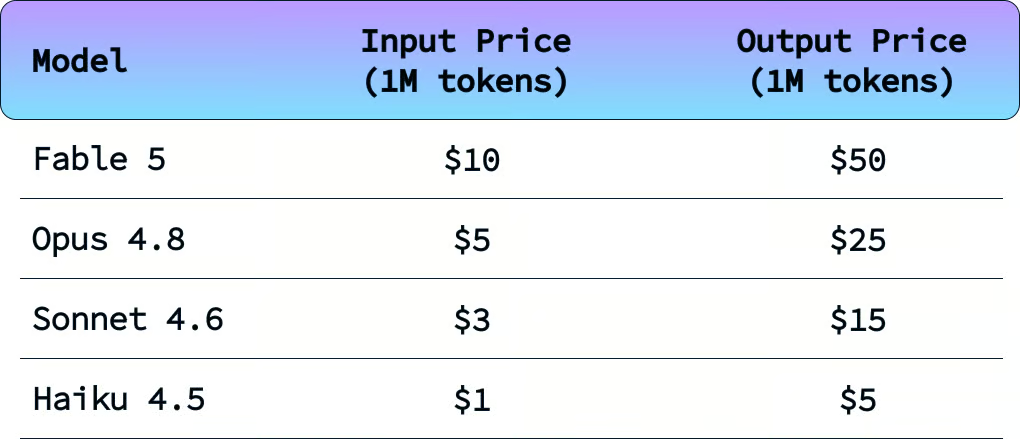
There are two ways in which we can control our budget when using the API.
The first is to make sure that auto-reload is off. Auto-reload will allow Claude to automatically buy credits when it runs out.
Because the token usage when using Claude Code is highly unpredictable, I strongly recommend not enabling this.
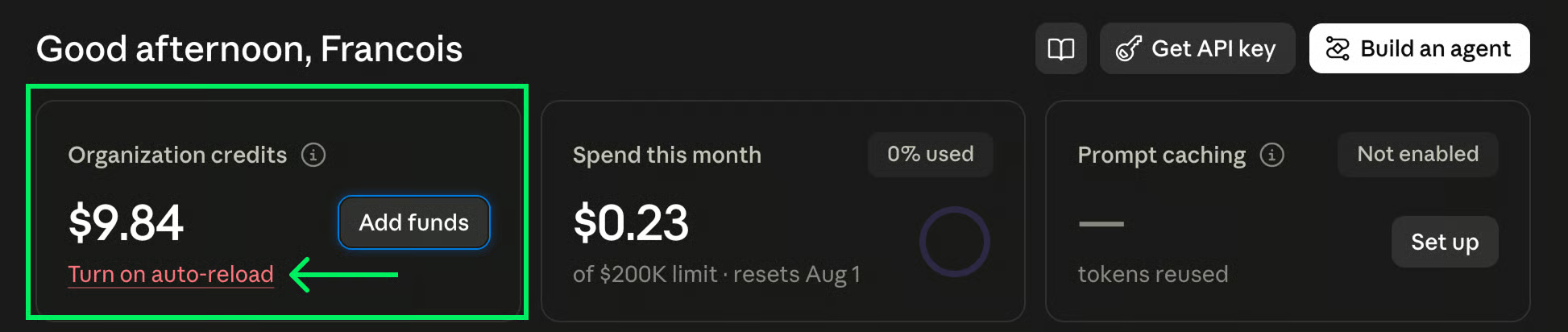
The second is to carefully select which model is being used.
Fable 5 is highly capable of solving complex tasks and implementing complex applications. However, it is often overkill for simpler tasks.
I personally like to use the cheaper models and only switch to more expensive models when the cheaper models fail to solve a task after multiple attempts. The model I use the most is actually Haiku 4.5.
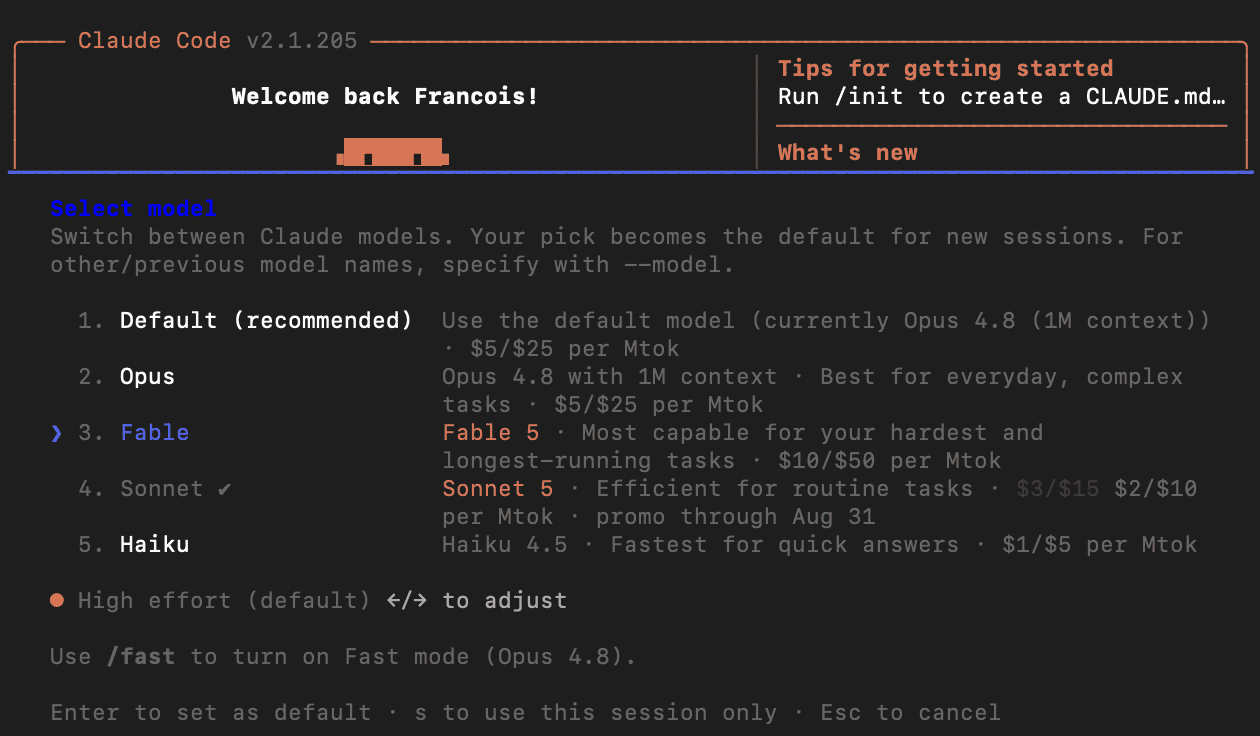
To select the model, use the /model command.
If you’re looking for a dedicated Claude Fable 5 API tutorial, I recommend checking out our separate guide.
To get started, log in to the Claude web platform and set up billing. Next, open a terminal and install Claude Code using the command:
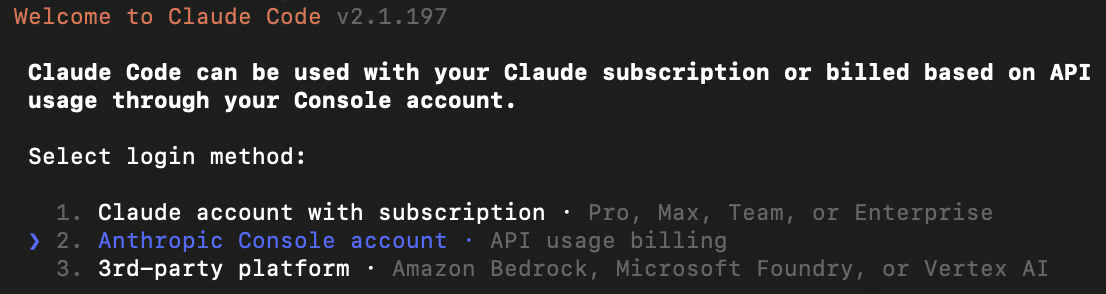
npm install -g @anthropic-ai/claude-codeOnce installed, we can run it by typing claude in the terminal. The first time it runs, it will ask us to configure it. Make sure to select “API usage billing” during the setup:
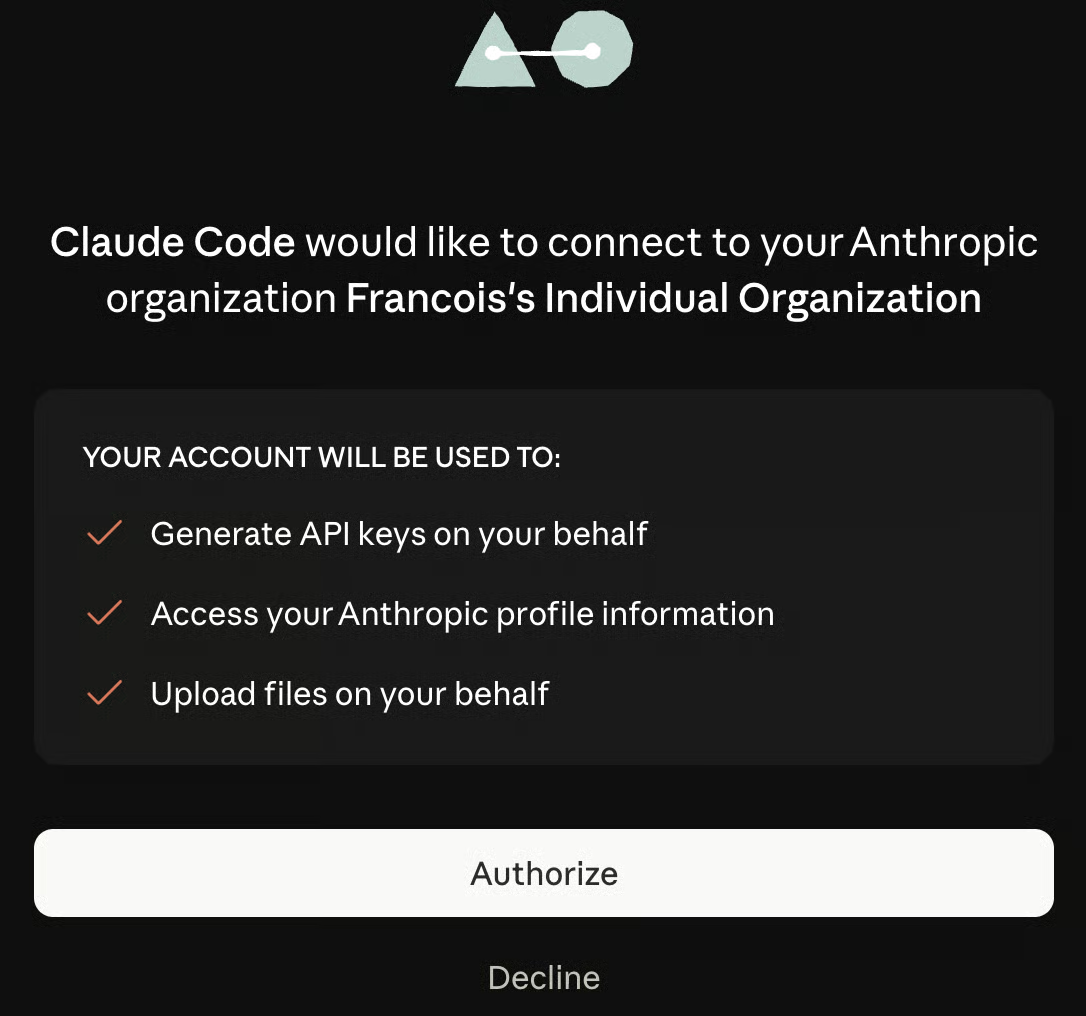
Eventually, Claude will open the browser and ask permission to link our account and create an API key for us. Click “Authorize,” and the account will be automatically linked.
Once the setup is completed, we’re ready to start building with Claude Code:
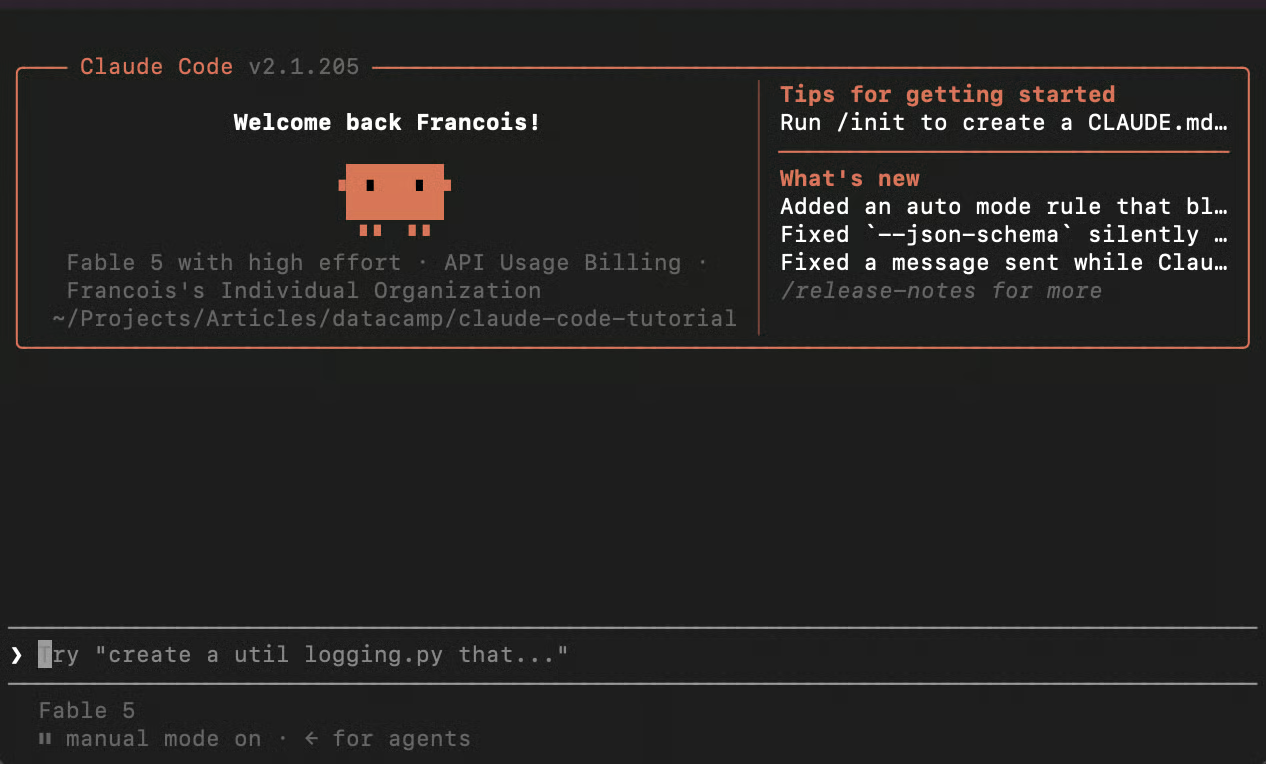
In my case, Claude Code is already running with Fable 5. If that’s not the case, we can select the model by using the /model command and select Fable 5 from the menu.
For those who have already been using Claude Code with a subscription and want to change to API usage billing, the process is straightforward.
/logout command.claude command and select the “Anthropic Console account · API usage billing” login method.If we ever run out of credits while Claude Code is in the middle of implementing a feature, it will stop and let you know we should add credits.
After adding credits, if Claude is still on, just ask it to keep going with a prompt, and it will pick up where it left off. If it’s not running, use the command claude --continue.
The focus of this tutorial is to learn how to set up Claude Code with the API rather than providing a detailed tutorial on how to use Claude Code.
If you want to learn more about it, I recommend enrolling in our Claude Code 101 Course.
The goal of this project is to build a Python app that allows users to easily locate photos on their computer.
Nowadays, people take lots of photos, and they often end up disorganized and spread across multiple locations. For me personally, as a photographer, it’s often a headache to locate a photo months after I took it.
The idea behind the app is to allow users to find their photos by either describing what’s in the photo or providing a screenshot or image reference.
This second mode is particularly useful for me as I often post my work on social media, so it would allow me to just take a screenshot of the post and locate the original high-quality file.
We could let Claude Code figure out the project architecture and do all of the implementation. It would probably work just fine.
But for educational purposes, I wanted to define the project architecture myself and let Claude Code focus on the implementation.
To create this app, I created a CLAUDE.md file describing the architecture of the project.
A CLAUDE.md file is a project-specific Markdown configuration file that Claude Code reads at the start of every session to establish persistent memory of your architecture, coding standards, and workflow preferences.
The app has two main components:
To encode images into vectors, we use the CLIP model. For the database, we use ChromaDB, which runs locally for free.
The intuition behind how it works is that the CLIP model is trained to convert text and images into vectors (a numerical representation of the data) such that images that look similar or contain similar concepts are plotted close together on this map, while unrelated images are pushed further apart.
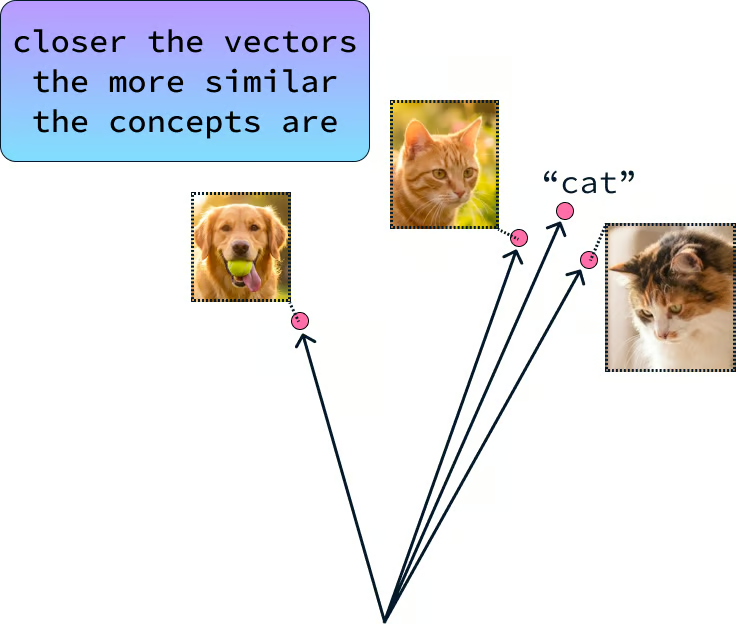
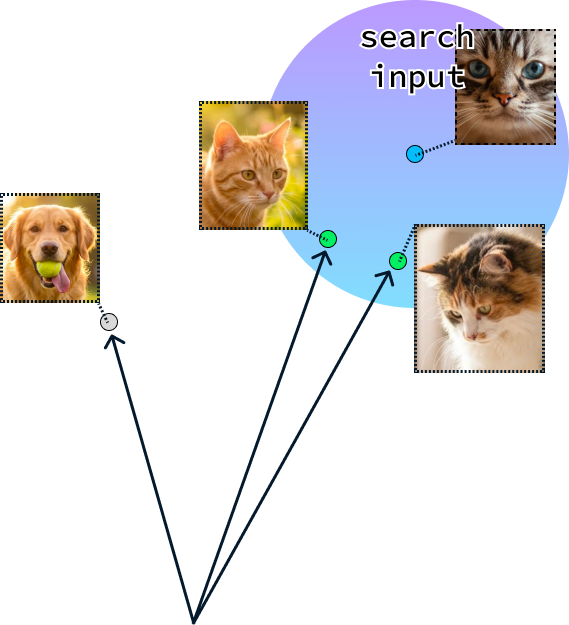
When we want to locate an image, we also convert the query into a query vector and use ChromaDB to find the vectors that are the closest to the query vector.
If you want to learn more about vector databases, check out this ChromaDB Tutorial: A Step-By-Step Guide.
With the project architecture specified in the CLAUDE.md file, I started a terminal in that folder and gave Claude Code running the Fable 5 model the following prompt:
Build a desktop graphical app for my photography search engine with Python.
First, plan the application architecture exactly as outlined in the CLAUDE.md file, ensuring the GUI can handle both folder ingestion and searching.
Create a virtual environment, install the necessary dependencies (including customtkinter and raw image processing libraries), and save them to requirements.txt.
Write the application logic, paying special attention to background threading for the ingestion process. I submitted the prompt and let Claude Code do its magic. After about seven minutes, it was done.
I executed the app, and this is what it looked like:

I uploaded some images I took this year and then went to Instagram and took a screenshot of a post I made to use as a reference image.
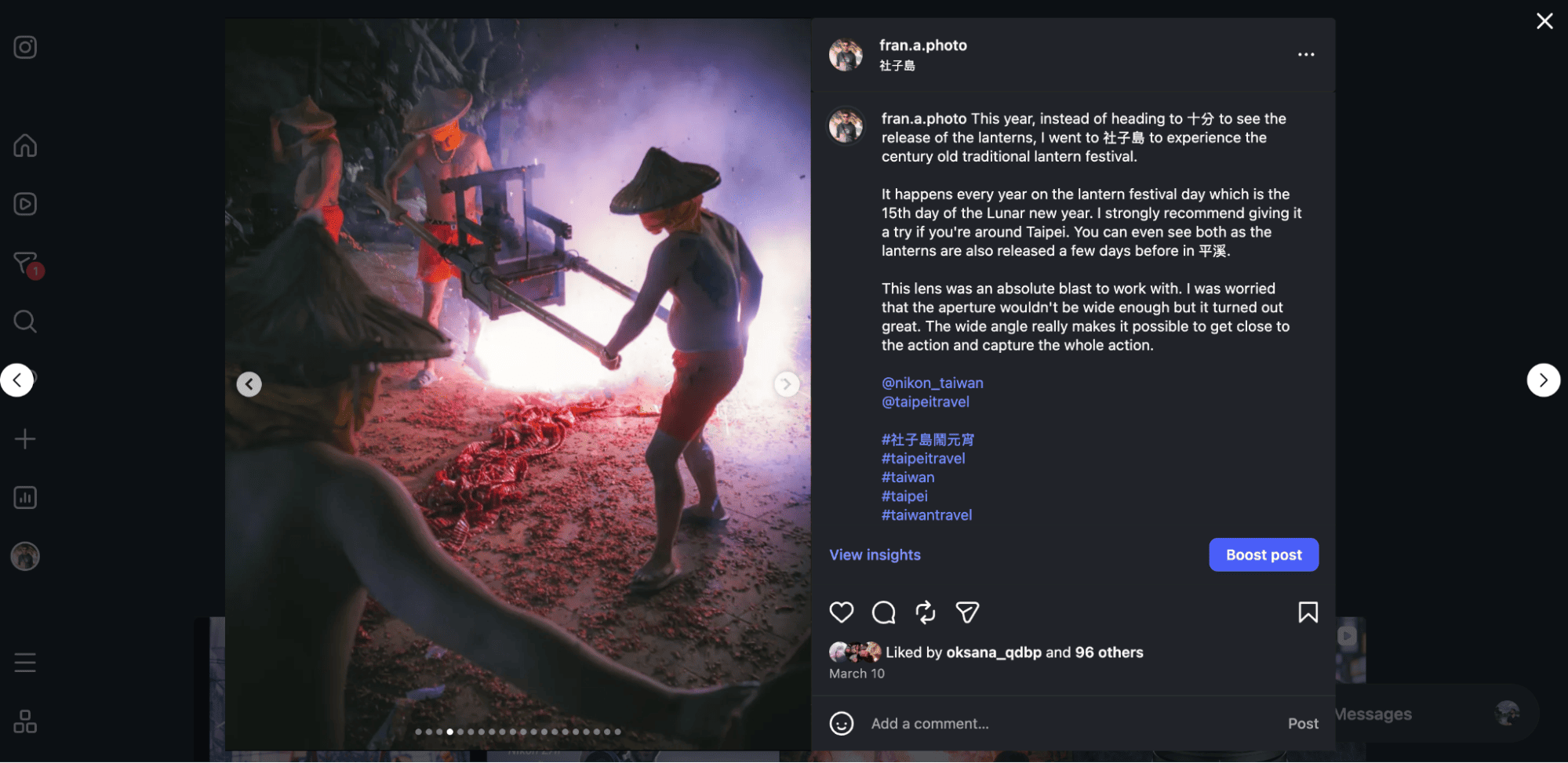
I purposefully included the whole UI to make it harder for the app to find the source image. Here’s what I got:
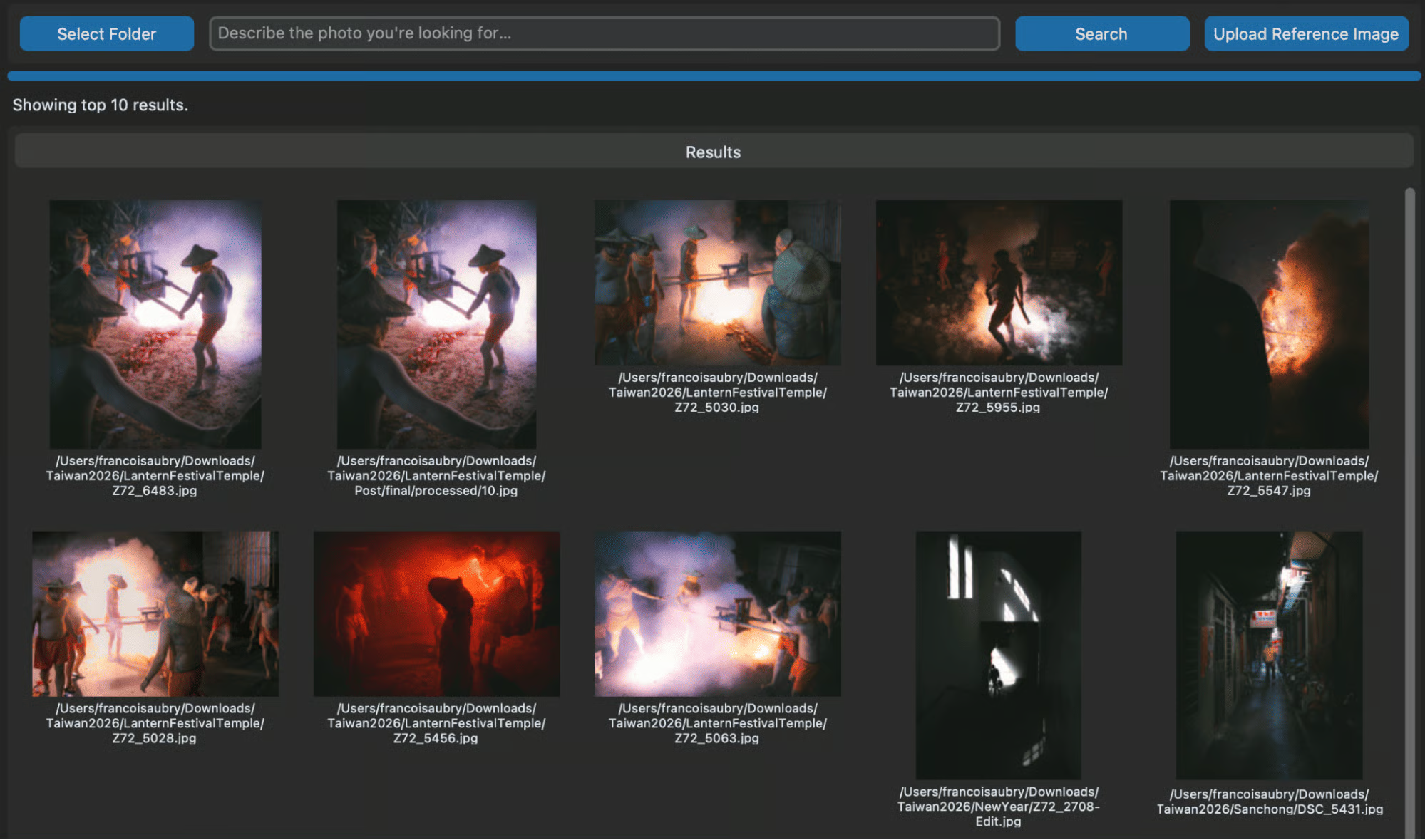
I have to say, it works quite well, and the interface is exactly what I had envisioned. I also tested it with text search by trying to find photos of Taipei 101, the tallest building in Taiwan.
Here are the results:

In total, creating this project cost $3.65 of API tokens. We can get a detailed breakdown of the cost of a session using the /cost command:
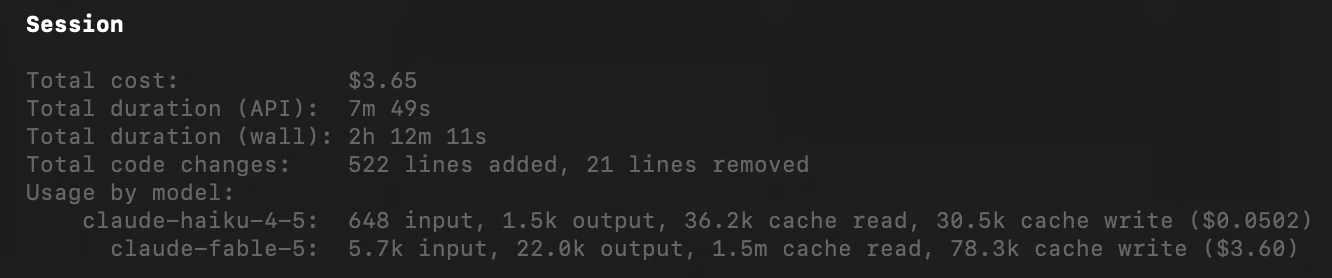
Interestingly, we see that it also used claude-haiku-4.5 for some of the work.
This shows that Fable 5 is quite expensive.
A seven-minute session on a blank project already cost us $3.65.
So I can only imagine how much using Fable 5 on an existing project with hundreds of code files would cost.
Of course, in the real world, when building a real application that also generates revenue, these costs need to be evaluated differently as they become an investment.
Moving to the API exposes tooling that Claude.ai doesn't offer: prompt caching, batch processing, and tool integration.
If you're using Claude Code, routing high API call volumes, or building agentic systems that interact with external services, these are the features that most directly affect your cost and latency.
Prompt caching stores static portions of your context window server-side between API calls, so you stop paying to reprocess the same content on every request.
If you're working with Claude Code, you're likely sending the same large context with every call (a CLAUDE.md file, a codebase summary, or a long system prompt). According to Anthropic's caching documentation, cached prefixes reduce input costs by up to 90% and cut time-to-first-token since the prefix skips re-ingestion.
The first request pays the full input price. Every subsequent call that hits the same cache prefix is billed at the reduced rate.
The Batch API handles workloads that don't need real-time responses.
Processing 10,000 customer support tickets, generating documentation for an entire codebase, or running evals on a large test set: all batch-appropriate. Anthropic prices batch requests at 50% of standard input and output token costs, and the full job submits in a single API call rather than requiring you to manage a queue.
The constraint is that batch jobs take up to 24 hours to complete, and results arrive together, not streamed. This is fine for offline pipelines, but wrong for anything user-facing.
Tool use (sometimes called function calling) lets Claude invoke external functions during generation and fold the results into its response.
You define available tools in JSON schema format; Claude decides when to call them, which arguments to pass, and what to do with the output. Claude can therefore query a database, call a REST API, or run a Python script without you specifying the exact invocation point in your prompt.
The Model Context Protocol (MCP) extends this with a standardized server interface: rather than defining tools per project, Claude connects to a local MCP server that exposes file access, code execution, or database reads.
The Computer Use API works differently. Claude interprets a screenshot and issues keyboard and mouse events, navigating interfaces without programmatic API access to the underlying application.
Switching to the Claude API is a necessary step for running automated development tools, but it requires a change in how we manage our projects.
Fable 5 is undeniably an outstanding coding model, capable of generating fully working, complex applications from a single prompt.
Its reasoning power can turn an architectural vision into a functional reality in minutes, which is nothing short of impressive.
However, using the Claude API for this level of power comes at a price. Because models like Fable 5 are so expensive to operate, it is crucial to be strategic about your model selection.
I recommend relying on cheaper, efficient models for routine tasks and reserving Fable 5 for when you encounter genuine roadblocks or complex architectural challenges that require deeper reasoning.
As we saw with our project, even for a relatively simple single-file application, API token costs can add up quickly. Protect your wallet by keeping a close eye on your usage and, most importantly, disabling auto-recharge to ensure an automated coding session doesn't run loose with your budget.
If you want to learn more about the Claude ecosystem, I recommend checking out our Claude 101 course.
Top DataCamp Courses
Курс
Курс
Курс
блог
Matt Crabtree
15 мин
Учебное руководство
Abid Ali Awan
8 мин
Учебное руководство
Josep Ferrer
15 мин
Учебное руководство
Bexruz (Bex) Tuychiev
9 мин
Учебное руководство
Aashi Dutt
10 мин
Учебное руководство
Abid Ali Awan
11 мин