Many people reach for .apply() to “avoid loops” and expect it to be fast and straightforward. In practice, row-wise .apply(axis=1) is still a Python-level loop. It can be slow on large data, and it sometimes returns shapes you didn’t expect. The fix is simple: use vectorized pandas/NumPy operations for common tasks, and reserve .apply() for logic that truly needs multiple columns.
This guide shows how .apply() works today, highlights common pitfalls, and provides drop-in patterns that are faster and clearer.
What Is DataFrame.apply() and Series.apply()?
DataFrame.apply(func, axis=0) calls func on each column by default. With axis=1, it calls func on each row. Series.apply(func) calls func on each element (or the whole Series, depending on signatures in recent versions).
Row-wise vs. column-wise:axis=1 means “per row.” axis=0 (the default) means “per column.”
Return shape rules (pandas ≥0.23): If your function returns a scalar per row/column, you get a Series. If it returns a Series or dict, pandas expands those keys into a DataFrame. If it returns a list/array, you’ll get a Series of lists unless you set result_type='expand'.
Stricter errors (pandas ≥2.0): Mismatched list-like lengths now raise errors instead of silently producing inconsistent results.
Recommended First Choice: Vectorized Operations
Most tasks that involve combining or transforming columns are faster and clearer with vectorized expressions or built-in methods. The following example computes a baseball team’s run differential without .apply().
import pandas as pd
team_stats = pd.DataFrame({"Team":["ARI","ATL","BAL"],"League":["NL","NL","AL"],"Year":[2012,2012,2012],"RunsScored":[734,700,712],"RunsAllowed":[688,600,705],"Wins":[81,94,93],"Games":[162,162,162],"Playoffs":[0,1,1],})# Vectorized: fast and idiomatic
team_stats["RunDiff"]= team_stats["RunsScored"]- team_stats["RunsAllowed"]print(team_stats[["Team","RunsScored","RunsAllowed","RunDiff"]])Работает на
Row-Wise .apply() When You Actually Need It
Use .apply(axis=1) when your logic truly spans multiple columns and isn’t easily vectorized (for example, conditional rules that depend on several fields).
compute a derived value from multiple columns
This pattern calculates a value per row using multiple inputs. The vectorized approach above is still preferred, but this shows the correct row-wise usage and options that affect speed and output.
defcompute_run_diff(row):# Treat the row as read-only; return a scalarreturn row["RunsScored"]- row["RunsAllowed"]# Row-wise apply (Python-level loop; can be slow on large data)
team_stats["RunDiff_apply"]= team_stats.apply(compute_run_diff, axis=1)Работает на
When the function is numeric and only needs raw arrays, passing raw=True skips some pandas overhead by providing a NumPy array to your function.
import numpy as np
defcompute_run_diff_raw(values):# values is a NumPy array when raw=True# Order matches the column order we select
rs, ra = values
return rs - ra
team_stats["RunDiff_raw"]= team_stats[["RunsScored","RunsAllowed"]].apply(
compute_run_diff_raw, axis=1, raw=True)Работает на
verify the function input once
When I wire up a new row function, I print one row once to confirm what’s being passed.
defdebug_row(row):# Print the first row onlyif row.name == team_stats.index[0]:print("Example row:", row.to_dict())return0
_ = team_stats.apply(debug_row, axis=1)Работает на
Case Study: Sums, Season Totals, and Text Flags
Given Rays-by-year stats, prefer built-in methods and elementwise tools over .apply() where possible.
rays_by_year = pd.DataFrame({"Year":[2012,2011,2010,2009,2008],"RunsScored":[697,707,802,803,774],"RunsAllowed":[577,614,649,754,671],"Wins":[90,91,96,84,97],"Playoffs":[0,1,1,0,1],}).set_index("Year")Работает на
get column sums efficiently
Use DataFrame.sum() instead of .apply(sum). It’s faster and clearer.
# Preferred
totals = rays_by_year.sum(axis=0)print(totals)# If you must use apply (not recommended here)
totals_apply = rays_by_year.apply(sum, axis=0)Работает на
compute total runs scored in a season
Use vectorized arithmetic across columns; no .apply() needed.
rays_by_year["TotalRuns"]= rays_by_year["RunsScored"]+ rays_by_year["RunsAllowed"]print(rays_by_year[["RunsScored","RunsAllowed","TotalRuns"]].head())Работает на
convert a 0/1 flag to text
Prefer Series.map() or replace() for elementwise transforms on one column.
# Using map with a dict
rays_by_year["PlayoffsText"]= rays_by_year["Playoffs"].map({0:"No",1:"Yes"})# Equivalent with replace
rays_by_year["PlayoffsText2"]= rays_by_year["Playoffs"].replace({0:"No",1:"Yes"})Работает на
Control the Output Shape From .apply()
When your function returns more than one value per row, make the shape explicit. This avoids surprises and future version breakage.
return a list and expand to columns
Use result_type='expand' to split a list/array into multiple columns.
defwins_losses(row):# Derive wins and losses as two outputs
wins = row["Wins"]
losses = row["Games"]- row["Wins"]if"Games"in row else np.nan
return[wins, losses]# Example using team_stats, which has "Wins" and "Games"
expanded = team_stats.apply(wins_losses, axis=1, result_type="expand")
expanded.columns =["WinsOut","LossesOut"]
team_stats = pd.concat([team_stats, expanded], axis=1)Работает на
return a series or dict to name columns automatically
Returning a Series or dict from each row produces a DataFrame with matching column labels.
Row-wise .apply(axis=1) is convenient but slow on large frames because it calls your Python function once per row. These patterns avoid that bottleneck.
Prefer vectorized pandas/NumPy operations and built-in methods like sum, mean, clip, where, astype, and string/accessor methods.
For numeric row/column operations that accept arrays, pass raw=True to get a NumPy array and reduce pandas overhead.
For elementwise work on a single column, use Series.map() or vectorized methods instead of DataFrame.apply(axis=1).
Avoid mutating the provided row/column inside your function; return a new value instead.
Version Notes You Should Know (pandas 2.x)
Recent pandas releases tightened behavior around .apply() so results are more predictable.
List-like returns: In 2.0+, mismatched list lengths raise an error. Use consistent lengths and set result_type='expand' when you want multiple columns.
Output expansion: Returning a Series or dict expands into a DataFrame with those keys as columns (stable since 0.23).
Series.apply() changes: The convert_dtype argument is deprecated. If you need mixed types, cast to object first (for example, s.astype("object").apply(fn)). Newer signatures allow controlling whether fn receives scalars or a Series in more contexts (for example,by_row).
.apply() vs. .map() vs. .applymap() vs. .agg()
Choose the API that matches the shape of your transformation.
Series.map(func_or_dict): Elementwise transform on one column. Best for lookups or simple functions.
DataFrame.apply(func, axis=1): Row-wise logic that needs multiple columns.
DataFrame.apply(func, axis=0): Column-wise logic (each input is a Series representing a column).
DataFrame.applymap(func): Elementwise over every cell. Use sparingly; vectorized methods are faster.
.agg()/.transform(): Aggregations and group-wise transforms; prefer these in groupby pipelines.
Common Mistakes and Quick Fixes
These are the issues that most often cause incorrect results or slowdowns, with ways to correct them.
Forgetting axis=1 for per-row logic: If your function suddenly receives columns instead of rows, add axis=1.
Unexpected Series of lists: When returning a list/array from each row, set result_type='expand' to split into columns.
Slow row-wise code: Replace with vectorized expressions or built-ins; if not possible, consider raw=True to reduce overhead.
Mutating the input row: Treat inputs as read-only, and return new values.
Dtype drift: If your function sometimes returns non-integers, integer columns can upcast to float or object. Cast afterward with astype if needed.
Conclusion
.apply() is a flexible tool, but it’s not a performance shortcut. Use vectorized operations for arithmetic, aggregation, and elementwise transforms on a single column. Reach for DataFrame.apply(axis=1) only when your logic really needs multiple columns per row. When you do use it, control output shape with result_type, consider raw=True for numeric functions, and keep an eye on dtypes. These patterns produce predictable results on modern pandas and scale better as your data grows.
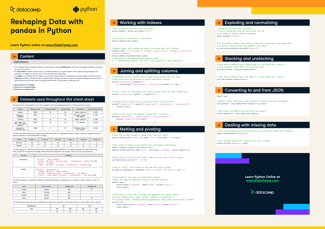
Pandas DataFrames are commonly used in Python for data analysis, with observations containing values or variables related to a single object and variables representing attributes across all observations.
Explore data analysis with Python. Pandas DataFrames make manipulating your data easy, from selecting or replacing columns and indices to reshaping your data.


 Richie Cotton

 Karlijn Willems · 15 min

 Adejumo Ridwan Suleiman · 13 min


Many people reach for
.apply()to “avoid loops” and expect it to be fast and straightforward. In practice, row-wise.apply(axis=1)is still a Python-level loop. It can be slow on large data, and it sometimes returns shapes you didn’t expect. The fix is simple: use vectorized pandas/NumPy operations for common tasks, and reserve.apply()for logic that truly needs multiple columns.This guide shows how
.apply()works today, highlights common pitfalls, and provides drop-in patterns that are faster and clearer.What Is DataFrame.apply() and Series.apply()?
DataFrame.apply(func, axis=0)callsfuncon each column by default. Withaxis=1, it callsfuncon each row.Series.apply(func)callsfuncon each element (or the wholeSeries, depending on signatures in recent versions).axis=1means “per row.”axis=0(the default) means “per column.”Series. If it returns aSeriesordict, pandas expands those keys into aDataFrame. If it returns a list/array, you’ll get a Series of lists unless you setresult_type='expand'.Recommended First Choice: Vectorized Operations
Most tasks that involve combining or transforming columns are faster and clearer with vectorized expressions or built-in methods. The following example computes a baseball team’s run differential without
.apply().Row-Wise .apply() When You Actually Need It
Use
.apply(axis=1)when your logic truly spans multiple columns and isn’t easily vectorized (for example, conditional rules that depend on several fields).compute a derived value from multiple columns
This pattern calculates a value per row using multiple inputs. The vectorized approach above is still preferred, but this shows the correct row-wise usage and options that affect speed and output.
When the function is numeric and only needs raw arrays, passing
raw=Trueskips some pandas overhead by providing a NumPy array to your function.verify the function input once
When I wire up a new row function, I print one row once to confirm what’s being passed.
Case Study: Sums, Season Totals, and Text Flags
Given Rays-by-year stats, prefer built-in methods and elementwise tools over
.apply()where possible.get column sums efficiently
Use
DataFrame.sum()instead of.apply(sum). It’s faster and clearer.compute total runs scored in a season
Use vectorized arithmetic across columns; no
.apply()needed.convert a 0/1 flag to text
Prefer
Series.map()orreplace()for elementwise transforms on one column.Control the Output Shape From .apply()
When your function returns more than one value per row, make the shape explicit. This avoids surprises and future version breakage.
return a list and expand to columns
Use
result_type='expand'to split a list/array into multiple columns.return a series or dict to name columns automatically
Returning a
Seriesordictfrom each row produces a DataFrame with matching column labels.Performance Tips That Matter
Row-wise
.apply(axis=1)is convenient but slow on large frames because it calls your Python function once per row. These patterns avoid that bottleneck.sum,mean,clip,where,astype, and string/accessor methods.raw=Trueto get a NumPy array and reduce pandas overhead.Series.map()or vectorized methods instead ofDataFrame.apply(axis=1).Version Notes You Should Know (pandas 2.x)
Recent pandas releases tightened behavior around
.apply() so results are more predictable.result_type='expand'when you want multiple columns.Seriesordictexpands into a DataFrame with those keys as columns (stable since 0.23).Series.apply()changes: Theconvert_dtypeargument is deprecated. If you need mixed types, cast toobjectfirst (for example,s.astype("object").apply(fn)). Newer signatures allow controlling whetherfnreceives scalars or a Series in more contexts (for example,by_row)..apply() vs. .map() vs. .applymap() vs. .agg()
Choose the API that matches the shape of your transformation.
Series.map(func_or_dict): Elementwise transform on one column. Best for lookups or simple functions.DataFrame.apply(func, axis=1): Row-wise logic that needs multiple columns.DataFrame.apply(func, axis=0): Column-wise logic (each input is a Series representing a column).DataFrame.applymap(func): Elementwise over every cell. Use sparingly; vectorized methods are faster..agg()/.transform(): Aggregations and group-wise transforms; prefer these in groupby pipelines.Common Mistakes and Quick Fixes
These are the issues that most often cause incorrect results or slowdowns, with ways to correct them.
axis=1.result_type='expand'to split into columns.raw=Trueto reduce overhead.astypeif needed.Conclusion
.apply()is a flexible tool, but it’s not a performance shortcut. Use vectorized operations for arithmetic, aggregation, and elementwise transforms on a single column. Reach forDataFrame.apply(axis=1)only when your logic really needs multiple columns per row. When you do use it, control output shape withresult_type, considerraw=Truefor numeric functions, and keep an eye ondtypes. These patterns produce predictable results on modern pandas and scale better as your data grows.