
Our biggest-ever sale. 60% off AI & data skills
Buy Now
Securing your Azure Database for PostgreSQL instance is crucial to protect sensitive data, ensure business continuity, and maintain regulatory compliance.
Azure provides robust, built-in capabilities that help enforce identity management, secure network access, and align with industry standards.
Authentication is the first line of defence in securing access to your PostgreSQL database.
Azure AD allows you to centrally manage users and their access to Azure resources, including PostgreSQL.
This is more secure than managing local server users and enables multi-factor authentication, conditional access, and user lifecycle management.
We can look at an example architecture:
You can integrate your on-premises Active Directory domain with Azure AD to extend your existing identity infrastructure to the cloud.
The image below illustrates a typical hybrid identity architecture:
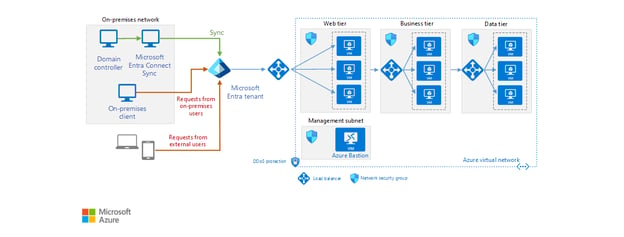 Image illustrating a hybrid identity architecture integrating on-premises Active Directory with Azure Active Directory (Azure AD). Source: Microsoft Azure Architecture
To enable AAD authentication:
01: Register the PostgreSQL server with AAD:
02: Set up AAD admin using Azure CLI (optional):
az postgres flexible-server ad-admin create \
  --resource-group <your-resource-group> \
  --server-name <your-server-name> \
  --display-name <aad-user-name> \
--object-id <aad-user-object-id>03: Connect using psql:
psql "host=<your-postgres-host> dbname=<your-db> user=<aad-user>@<tenant>.onmicrosoft.com sslmode=require"Azure PostgreSQL supports SCRAM-SHA-256, a modern and secure password-based authentication mechanism that surpasses the outdated MD5.
Enable it in PostgreSQL server parameters:
password_encryption and set it to scram-sha-256.Use RLS to define fine-grained access control policies, which allow only specific rows of a table to be visible or modifiable to certain users.
How to enable RLS:
01: Connect to your database and run:
02: Create a policy:
Protecting your Azure Database for PostgreSQL at the network level is essential to prevent unauthorized access and reduce the attack surface.
Azure provides several built-in networking features to isolate traffic and enforce access control.
Private endpoints allow your PostgreSQL server to be accessible only within your Azure Virtual Network, eliminating public exposure.
To configure a private endpoint:
01: Go to the Azure portal and select your PostgreSQL flexible server
02: Under ‘Settings’, click ‘Networking’.
03: Select ‘Private access (VNet integration)’.
04: Click ‘Add Private Endpoint’.
05: Provide a name and select your resource group and VNet/subnet.
06: Choose Private DNS Integration (recommended).
07: Review and create the private endpoint.
The images below show some of the main steps in the Azure portal for setting up a private endpoint.
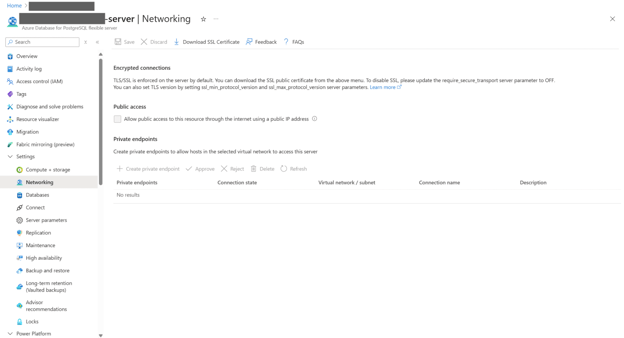 Image showing a screenshot of the Azure portal steps for configuring a private endpoint (01).
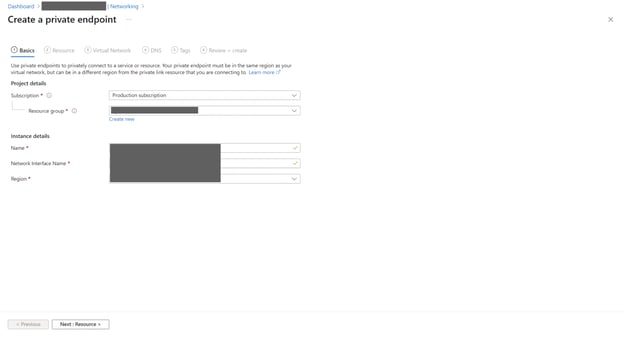 Image showing a screenshot of the Azure portal steps for configuring a private endpoint (02).
NSGs control inbound and outbound traffic to network interfaces and subnets. Use them to allow only trusted IPs to connect.
To configure NSGs for your private endpoint:
01: Navigate to the subnet where your private endpoint resides.
02: Attach an NSG and define rules such as:
For global applications, use VNet Peering between Azure regions to securely route traffic between virtual networks.
To set up cross-region peering in the Azure portal:
01: In the Azure portal, go to ‘Virtual networks’ and select ‘Peerings’.
02: Click ‘Add’ and select the remote virtual network (VNet).
03: Enable ‘Use remote gateways for cross-region connectivity’.
Azure Database for PostgreSQL complies with a broad range of industry and government standards, which ensures data protection and legal alignment:
Some of the certifications include:
You can view the compliance status on the Microsoft Trust Center and download compliance reports relevant to your region or industry.
Maximizing performance and reliability is critical for production workloads.
Azure provides tools for intelligent tuning, real-time monitoring, and alerting to ensure your PostgreSQL server runs optimally.
Azure enables proactive performance improvement through built-in analytics and optimization tools.
Use cases include automatic scaling, workload distribution, and storage performance enhancement.
Azure Advisor analyzes telemetry data and recommends best practices.
To apply performance recommendations:
01: Go to Azure Portal and select ‘Azure Advisor’.
02: Click on ‘Recommendations’, then ‘Performance’.
03: Look for your PostgreSQL flexible server.
04: Apply suggestions such as:
Offload read-heavy workloads by creating replicas. To do this:
01: In the Azure portal, select your PostgreSQL server.
02: Under ‘Settings’, choose ‘Replicas’.
03: Click ‘Add Replica’, select the region, and create it.
04: Use the read-only endpoints in your application.
Azure Monitor provides deep visibility into the health and usage of your PostgreSQL resources.
To view metrics:
Step 01: Go to the Azure portal and open Monitor.
Step 02: Click ‘Metrics’ and select your PostgreSQL flexible server.
Step 03: Choose a metric (e.g., CPU %).
Step 04: Apply filters and set aggregation (e.g., average, max).
Step 05: Create visual charts or pin them to dashboards.
Alerts help you act on performance anomalies before they impact users.
To create an alert:
Step 01: In the Azure portal, go to Monitor and select ‘Alerts’.
Step 02: Click ‘New Alert Rule’.
Step 03: Select your PostgreSQL resource.
Step 04: Choose a condition, e.g., CPU usage > 80%.
Step 05: Set the evaluation period and frequency.
Step 06: Define an action group (email, webhook, Logic App).
Step 07: Name and create the alert.
Monitoring KPIs ensures your system is healthy and meets SLAs:
|
KPI |
Description |
|
CPU Utilization |
Should stay below 75% for optimal performance |
|
Memory usage |
High usage can lead to slow queries or OOM kills |
|
Query duration |
Track slow queries using query performance logs |
|
Active connections |
Indicates concurrent user load |
|
Storage utilization |
Helps predict when auto-scaling may trigger |
You can view and analyze these KPIs in Azure Monitor Metrics.
Migrating databases to Azure Database for PostgreSQL can be seamless with the right tools and strategy.
Azure supports both online and offline migration, multiple source systems, and integration with AI and development tools.
> If you want a hands-on tutorial on working with PostgreSQL in real-world development environments, read through Using PostgreSQL in Python.
Azure Database Migration Service (DMS) facilitates secure, guided migration from various database platforms (on-premises or cloud) to Azure PostgreSQL.
The image below illustrates supported migration scenarios and platforms:
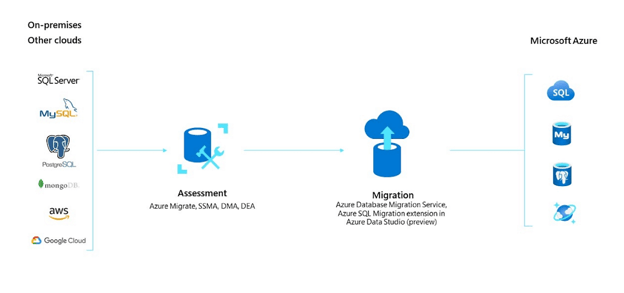 Diagram showing Azure Database Migration Service (DMS). Source: Microsoft Products
01: Create a DMS instance:
02: Create a migration project:
03: Define source and target servers:
04: Run and monitor migration:
For smaller or one-off migrations, you can use PostgreSQL native tools like pg_dump and pg_restore.
To perform an offline migration from an on-premises or other cloud PostgreSQL database to Azure, follow these steps:
01: Export the database from the source:
02: Import to Azure PostgreSQL:
A tip would be to use --jobs flag with pg_restore for faster performance on large databases.
To migrate from Oracle to PostgreSQL, you can use Ora2Pg to convert Oracle schemas into PostgreSQL-compatible syntax. Follow these steps:
01: Install Ora2Pg.
02: Configure the ora2pg.conf file with your Oracle credentials.
03: Run the following commands:
> To strengthen your ability to manage databases post-migration, have a look at Managing Databases in PostgreSQL.
Azure PostgreSQL enables AI workloads using the pgvector extension, and can integrate with Azure Cognitive Services.
To enable and use pgvector:
02: Create and use vector columns:
03: Insert and search vectors:
INSERT INTO embeddings (description, embedding)
VALUES ('example', '[0.1, 0.2, 0.3, 0.4]');

SELECT * FROM embeddings
ORDER BY embedding <-> '[0.1, 0.2, 0.3, 0.4]'
LIMIT 5;04: Integrate with AI services:
Azure offers multiple strategies to reduce PostgreSQL infrastructure and operational costs.
To optimize costs with flexible server pricing options, you should follow these guidelines:
01: Use Burstable SKUs (e.g., B1ms) for development or low-CPU workloads.
02: Reserved capacity:
Hyperscale uses horizontal sharding to improve throughput.
Benefits include:
Enable Hyperscale by going to the Azure portal, selecting ‘Create Resource’, and then choosing ‘Azure Database for PostgreSQL (Hyperscale, Citus)’.
To effectively manage storage and backup costs, you should consider the following steps:
Review snapshot retention:
Estimate costs using Azure Pricing Calculator:
Keep your environment secure and supported by regularly applying updates.
Understanding the supported PostgreSQL versions and their lifecycle policy is important for maintaining a secure and supported environment:
Upgrading and patching your PostgreSQL flexible server involves both automatic and manual processes, depending on the type of update:
Steps to upgrade:
01: Backup current database:
02: Create a new server with the desired PostgreSQL version from the Azure Portal.
03: Restore backup to the new server:
04: Update connection strings in your application or environment variables.
Azure PostgreSQL supports modern DevOps and geospatial workloads.
Use Terraform for repeatable, automated provisioning. Here’s a sample Terraform script to create an Azure PostgreSQL flexible server:
resource "azurerm_postgresql_flexible_server" "example" {
  name                   = "mypgflexserver"
  resource_group_name    = "myrg"
  location               = "East US"
  administrator_login    = "pgadmin"
  administrator_password = "password123!"
  sku_name               = "Standard_B1ms"
  version                = "14"
}To create the resource, run terraform init → terraform plan → terraform apply.
> To learn more, check out our comprehensive guide on using Terraform with Azure.
PostGIS extends PostgreSQL for spatial and geographic queries.
To enable PostGIS:
Use for location-based apps, mapping, route optimization, and geofencing.
Enable powerful PostgreSQL extensions to enhance observability and scheduling:
|
Extension |
Purpose |
|
pg_stat_statements |
Track and analyze query performance |
|
uuid-ossp |
Generate UUIDs |
|
postgis |
Geospatial queries |
|
pg_cron |
Schedule background jobs in SQL |
To enable the desired extensions, navigate to the Azure Portal and go to your PostgreSQL flexible server.
From there, access the Server Parameters section, locate the azure.extensions setting, add the required extensions as a comma-separated list, and save the changes.
Azure Database for PostgreSQL empowers you to deploy, scale, and manage PostgreSQL with enterprise-grade reliability, security, and performance in the cloud.
As cloud demands evolve, leveraging Azure’s robust ecosystem and PostgreSQL’s proven reliability will ensure your applications remain agile, compliant, and cost-efficient.
If you want to deepen your knowledge, I highly recommend checking out the Azure Fundamentals skill track. Happy learning!

blogg
 Laiba Siddiqui• 15 min

Handledning
 Anneleen Rummens• 12 min

Handledning
 Kofi Glover• 15 min
Learn more about Azure with these courses!
Kurs
Lär dig kraften i Microsoft Azure och molnbaserad programvara för att förbättra dina färdigheter inom data engineering.
Kurs
Bemästra Azure Management och Governance med vår omfattande kurs, perfekt för dataexperter som vill ha molnkompetens.
Kurs
Den här kursen går djupare in i Azures ryggrad med ämnen som containers, virtuella datorer och mycket mer.






As more workloads move to the cloud, I have found that managing PostgreSQL efficiently and securely has become a core skill for data professionals.
PostgreSQL has long been one of my go-to relational databases. It is reliable, extensible, and backed by an open-source community.
But running it in the cloud - especially at scale - comes with its own set of challenges, which include: high availability, performance tuning, cost optimization, and meeting strict security requirements.
Azure Database for PostgreSQL solves many of these issues by offering a fully managed, scalable, and secure platform. In my experience, it simplifies deployment and operations while giving you the flexibility you need to build fast and adapt to evolving demands. That’s why, in this tutorial, I’ll cover everything you need to know about deploying an Azure PostgreSQL database.
> To get familiar with PostgreSQL fundamentals and how it works, check out What Is PostgreSQL? How It Works, Use Cases, and Resources.
Overview of Azure Database for PostgreSQL
Azure Database for PostgreSQL is a cloud-native, fully managed PostgreSQL service provided by Microsoft.
Designed for both small-scale and enterprise-grade workloads, it eliminates the need for manual provisioning, configuration, patching, and maintenance of database infrastructure.
Built on the trusted Azure platform, it supports three distinct deployment models, single server, flexible server, and Hyperscale (Citus), to accommodate different workloads and application architectures.
Some of the key benefits of Azure PostgreSQL include:
Image showing the key benefits of Azure PostgreSQL. Created using Napkin AI.
Deployment Models and Architectural Frameworks
Azure Database for PostgreSQL supports multiple deployment models, which enables you to select the architecture that best fits your application's scalability, availability, and performance needs.
Flexible server deployment
The flexible server deployment model is the most versatile option, which offers granular control over resource configuration, availability, and performance tuning.
It is well-suited for mission-critical applications requiring high uptime and predictable performance.
High Availability (HA)
To ensure service continuity and minimize downtime, you should consider the following high availability configurations:
Scaling and optimization
To ensure performance and cost-efficiency, implement the following strategies for dynamic resource management and workload tuning:
How to deploy a flexible server with HA enabled
To deploy a ‘flexible server’ with High Availability (HA) enabled, follow these steps:
01: Go to Azure Portal, then Azure Database for PostgreSQL flexible servers, and hit ‘create’.
The images below illustrate this step.
02: Under ‘High availability’, choose either ‘Same zone’ or ‘Zone redundant’.
The image below illustrates this step.
03: Configure vCores, storage size, and IOPS settings.
04: Complete network configuration (e.g., VNet or public access) and deploy.
Single server deployment
The single server model is designed for simplicity and quick setup.
It provides automatic backups, basic performance tuning, and minimal configuration overhead.
It is ideal for development, testing, or smaller production workloads.
Tiers available
Some of the tiers available include:
How to create a single server
01: In the Azure Portal, navigate to Azure Database for PostgreSQL servers, and hit ‘create’.
02: Select a pricing tier based on workload requirements.
Refer to the Azure pricing page for the most up-to-date information on available tiers and pricing.
03: Set admin credentials, configure firewall rules, and deploy.
> If you are new to PostgreSQL, the Beginner's Guide to PostgreSQL is a great place to start working with databases before deploying them in the cloud.
Hyperscale (Citus) extension
The Hyperscale (Citus) deployment model is designed for distributed PostgreSQL use cases.
It transforms a single-node database into a horizontally scalable cluster by sharding data across worker nodes and coordinating queries efficiently.
Some of the key use cases include:
How to create and distribute a table
01: Create a Hyperscale (Citus) server group in the Azure Portal. This sets up a distributed PostgreSQL cluster using the Citus extension.
02: Connect to the coordinator node using a tool like psql or Azure Data Studio.
Make sure you are connecting to the coordinator node (not a worker), since distributed table commands must be run from the coordinator.
03: Create the table in SQL (if it does not already exist):
04: Distribute the table using:
Replace 'your_table_name' with your actual table name, and 'distribution_column' with a column that has good cardinality and is often used in queries.
Choosing the right deployment model
The table below outlines recommended deployment models based on common use cases.
Choosing the right deployment model depends on your application’s workload characteristics, high availability needs, and performance expectations.
> If you are not sure if PostgreSQL is the right choice for your project, check out PostgreSQL vs. MySQL: Choosing the Right Database for Your Project and SQLite vs PostgreSQL: A Detailed Comparison.