%22%3E%3Cpath%20d%3D%22m-369%200h408v79h-408z%22%20fill%3D%22%237933ff%22%2F%3E%3Cpath%20d%3D%22m-148%200h306v45h-306z%22%20fill%3D%22%23974dff%22%2F%3E%3C%2Fg%3E%3C%2Fsvg%3E)
%22%2F%3E%3C%2FclipPath%3E%3Cg%20clip-path%3D%22url(%23a)%22%3E%3Cpath%20d%3D%22m76%200h484v36h-484z%22%20fill%3D%22%23974dff%22%2F%3E%3Cpath%20d%3D%22m0%200h384v24h-384z%22%20fill%3D%22%2306bdfc%22%20transform%3D%22matrix(1%200%200%20-1%200%2060)%22%2F%3E%3C%2Fg%3E%3C%2Fsvg%3E)
什么是 PageIndex?
PageIndex 是一种检索框架,它通过推理s 文档结构来定位答案,而不是去搜索与查询文本相似的内容。该项目由 VectifyAI 于 2025 年 9 月发布,由 Mingtian Zhang 和 Yu Tang 构建。它以 MIT 许可开源,截至 2026 年 7 月,GitHub 仓库已累积超过 34,000 颗星标。
PageIndex vs 标准 RAG
解释 PageIndex 如何工作,最好的方式就是与标准 RAG 做对比。如果您不熟悉 RAG,基本思路是:在查询时检索出与问题相关的文档片段,将其作为上下文提供给 LLM。
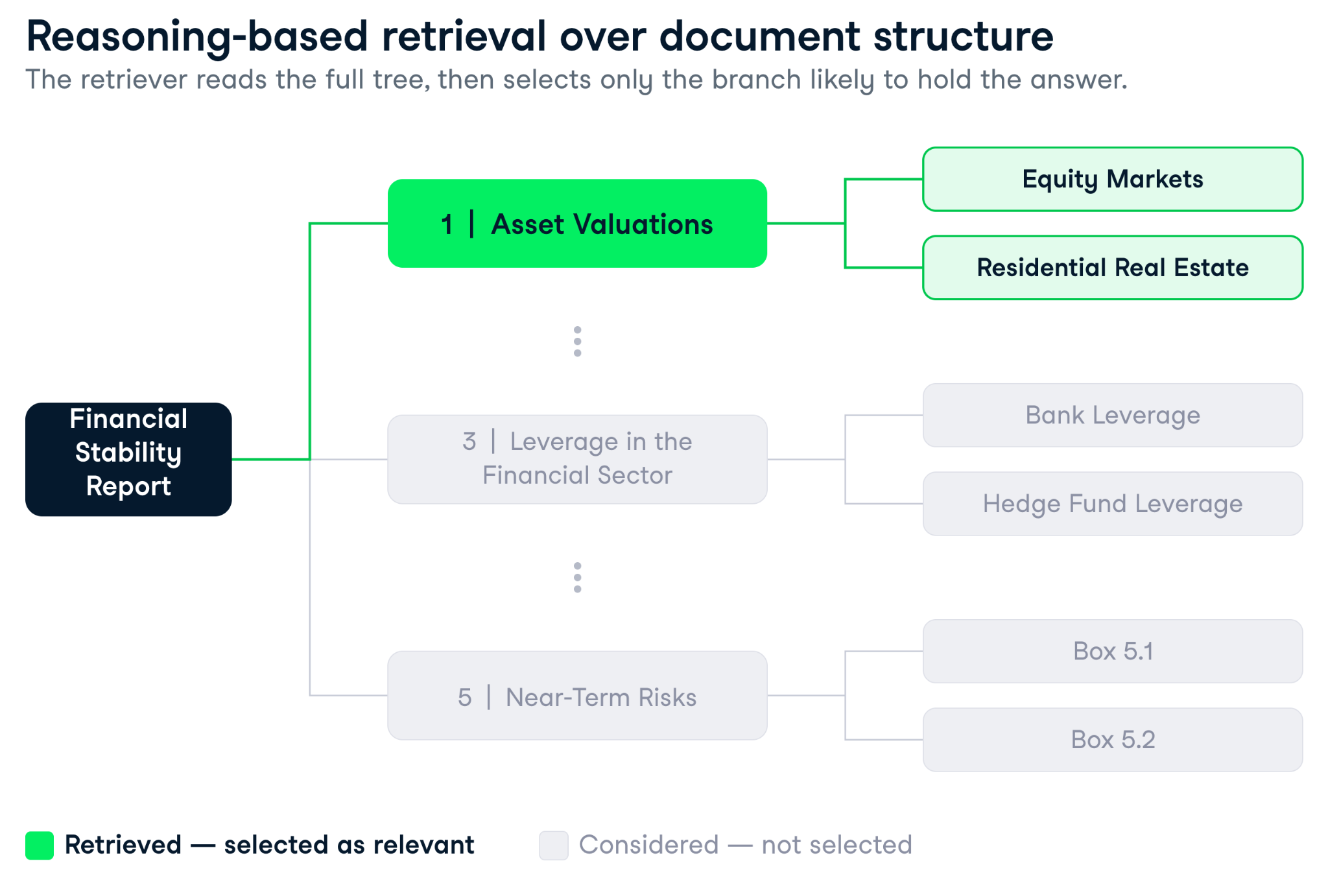
PageIndex 重新设计的正是“检索”这一步。它不是把查询与文档中的每个分块对比,而是先根据文档结构构建一个分层树形索引。这会带来不同的结果:
- 向量搜索会找到与查询表面相似的文本。
- 树搜索会找到最可能包含答案的章节。
换言之,标准 RAG 与 PageIndex 的区别,就好比在一本书里逐页扫描关键词,和先看目录再定位到正确章节之间的差异。
对于简短文档上的简单事实查询,两者的目标可能一致;但当文档变得冗长、结构化且充满内部交叉引用时,差异就会显著拉大。
|
维度 |
PageIndex |
向量 RAG |
|
检索机制 |
LLM 基于树索引进行推理 |
基于嵌入的余弦相似度 |
|
搭建成本 |
文档处理(一次性) |
分块 + 嵌入(一次性) |
|
单次查询延迟 |
3–8 秒(多次 LLM 调用) |
< 1 秒(索引查找) |
|
单次查询成本 |
较高(2 次以上 LLM 调用) |
较低(嵌入查找 + 1 次 LLM 调用) |
|
长结构化文档的准确率 |
FinanceBench 上为 98.7%(Mafin 2.5) |
FinanceBench 上为 30–50% |
|
处理交叉引用 |
支持 |
不支持 |
|
处理被拆分表格 |
支持 |
不支持 |
|
可溯源性 |
完整推理轨迹 + 页码引用 |
Top-k 分块得分 |
|
最适用场景 |
财务申报、合同、手册 |
常见问答、产品文档、支持工单 |
树索引的工作方式
流程分两步展开。
- 您导入一份文档,PageIndex 生成一棵树。每个节点包含标题、摘要和页码索引。该树反映文档的自然层级(章节、节、小节、附录,或文档实际包含的任何结构)。
- 当有查询到来时,LLM 会接收这棵树的结构(不包含全文,以免溢出上下文窗口)并推理哪些节点最可能包含答案。它返回一组节点 ID 及其选择原因的推理轨迹,然后从这些节点抽取文本,传递给生成步骤。
为何这对结构化文档尤为重要
我搭建过足够多的 RAG 流水线,深知 分块是多数生产系统悄然失效的地方。策略在纸面上很干净,但一旦文档出现跨页的表格,或者脚注定义了三节前使用的术语,问题就会暴露。
向量 RAG 在财务与法律文档上,一贯会暴露三类结构性弱点。
- 内容被拆分: 一张资产负债表被分到两个块中,会丢失各行项目之间的关联,两半由于各自孤立而被判定为低相关。(后分块在此有帮助,但无法解决交叉引用。)
- 术语重复: 年度报告会多次提到“营收”,因此关于某一部门营收增长的查询,会把所有提到“营收”的块都拉进来、排名相近,却无从分辨真正相关的那段。
- 交叉引用: 当第 4.3 节写着“完整对账见附录 G”时,相似度搜索并没有跟随指针的机制。答案在附录 G,而检索器无从得知。
PageIndex 能处理这三类问题,因为它基于结构检索而非碎片。树保持了文档的整体性,推理步骤可以跟随交叉引用或跨章节比较,而且由于每个节点都带着页码索引和摘要,检索器是在“文档地理位置”上导航,而非停留在表层文本相似度。
老实说,当我第一次看到 Mafin 2.5 的 98.7% 准确率(VectifyAI 基于 PageIndex 的系统)在 FinanceBench 上的表现时,我本能是持怀疑态度的:比标准 RAG 高出近 50 个百分点,像是选了“讨巧”的基准。但 FinanceBench 正是测试这些失效模式:在 SEC 申报文件上做多步推理并给出精准数值答案。
PageIndex 入门
本教程需要几个包和两个 API 密钥。动手写代码前,您需要准备好这些。
您可以在我配套的 GitHub 仓库中查看教程所用的全部代码。
要跟随本教程,您需要:
- 已安装 Python 3.10+
- 对 RAG 概念有基本了解。如果您刚接触检索增强生成,请先阅读 什么是检索增强生成(RAG)?,再继续
- 一个 OpenAI API 密钥,来自 platform.openai.com/api-keys
- 一个 PageIndex API 密钥,来自 dash.pageindex.ai/api-keys(免费层就足以完成本教程)
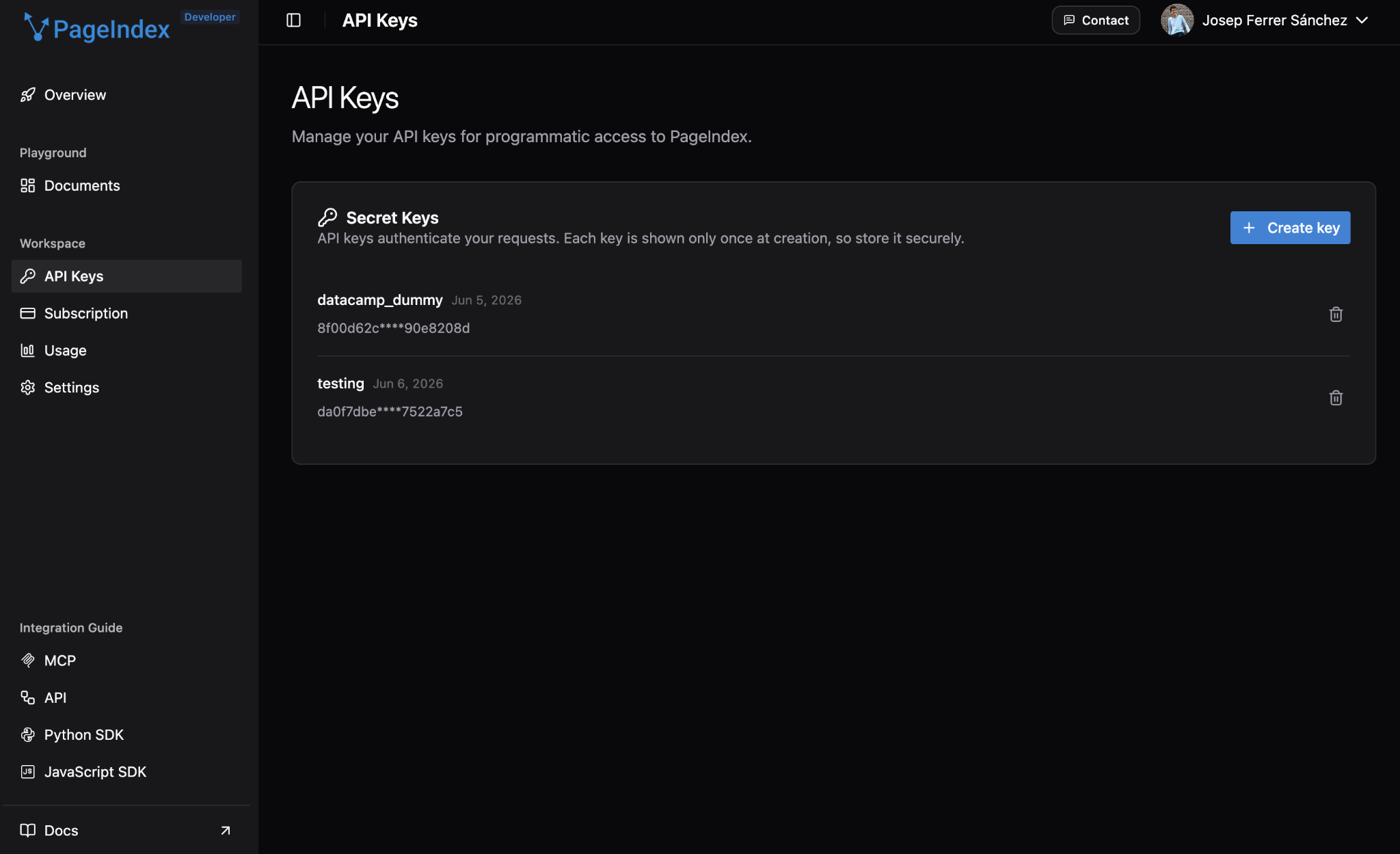
安装所需包:
pip install pageindex openai requests faiss-cpu pymupdf将 API 密钥设置为环境变量,而不是硬编码在代码里:
export PAGEINDEX_API_KEY="your_pageindex_key_here"
export OPENAI_API_KEY="your_openai_key_here"两把密钥都设置好后,初始化客户端:
import os
import copy
import time
import json
import asyncio
import requests
from pageindex import PageIndexClient
import pageindex.utils as utils
import openai
PAGEINDEX_API_KEY = os.environ["PAGEINDEX_API_KEY"]
OPENAI_API_KEY = os.environ["OPENAI_API_KEY"]
pi_client = PageIndexClient(api_key=PAGEINDEX_API_KEY)
openai_client = openai.AsyncOpenAI(api_key=OPENAI_API_KEY)这就是全部环境搭建:9 个导入,2 个环境变量,2 个客户端。
导入文档并构建 PageIndex 树
本教程将使用这份 美联储 2023 年 10 月的《金融稳定报告》。它是一份公开的 PDF,具有真实生产文档的结构:正式分节、编号章节、附录以及内部交叉引用。
下载文档
美联储以可访问的 PDF 形式在稳定 URL 发布报告。if not os.path.exists() 的检查确保只下载一次,这在迭代后续代码时很重要,避免每次运行都重新下载一份 60 页的 PDF。
DOWNLOAD_DIR = "./data"
os.makedirs(DOWNLOAD_DIR, exist_ok=True)
PDF_URL = "https://www.federalreserve.gov/publications/files/financial-stability-report-20231020.pdf"
PDF_PATH = os.path.join(DOWNLOAD_DIR, "fed_financial_stability_report_2023.pdf")
if not os.path.exists(PDF_PATH):
print("Downloading Federal Reserve Financial Stability Report (Oct 2023)...")
response = requests.get(PDF_URL, timeout=60)
response.raise_for_status()
with open(PDF_PATH, "wb") as f:
f.write(response.content)
print(f"Saved to {PDF_PATH}")
else:
print(f"Already present: {PDF_PATH}")提交文档
提交是一次 API 调用。submit_document() 上传文件并返回一个 doc_id,您将用它来执行该文档上的所有后续操作。请妥善保存它,因为如果您重启会话,就可以跳过提交步骤,直接使用相同 ID 调用 get_tree()。
print("Submitting document to PageIndex...")
submit_result = pi_client.submit_document(PDF_PATH)
doc_id = submit_result["doc_id"]
print(f"Document ID: {doc_id}")PageIndex 以异步方式处理文档,因此需要轮询直至树构建完成:
print("Waiting for tree generation...")
while True:
status_result = pi_client.get_document(doc_id)
status = status_result.get("status")
print(f" Status: {status}")
if status == "completed":
break
elif status == "failed":
raise RuntimeError(f"Processing failed: {status_result}")
time.sleep(10)
print("Done.")处理一份 60 页的 PDF 通常需要两到四分钟,而且这是每份文档只需一次的成本。您会看到状态依次为 queued → processing → completed。
Submitting document to PageIndex...
Document ID: pi-cmq2bp4ok00rx01qxmym7tnd1
Waiting for tree generation...
Status: queued
Status: processing
Status: completed
Processing done.查看树结构
处理完成后,get_tree() 会以嵌套节点列表的形式返回完整的分层结构。utils.create_node_mapping() 助手会将其拍平成以节点 ID 为键的普通字典,比起每次查询都递归遍历树,后续抽取文本会快得多。
tree_result = pi_client.get_tree(doc_id, node_summary=True)
tree = tree_result["result"]
# Build a flat node map for easy access later
node_map = utils.create_node_mapping(tree)
# Print the top-level nodes
print(f"\nTop-level nodes ({len(tree)} sections):\n")
for node in tree:
print(f" [{node['node_id']}] {node['title']}")
print(f" Page {node['page_index']}")
print(f" {node['summary'][:120]}...")
print()在《金融稳定报告》上运行,将一眼看到文档骨架:
Top-level nodes (9 sections):
[0000] Financial Stability Report
Page 1
This document is the October 2023 Financial Stability Report from the Federal Reserve...
[0001] Purpose and Framework
Page 5
This report outlines the Federal Reserve's framework for assessing U.S. financial stability...
[0002] Overview
Page 9
This report evaluates the stability of the U.S. financial system by analyzing four key vulnerability areas...
[0003] 1 | Asset Valuations
Page 13
...
[0012] 2 | Borrowing by Businesses and Households
Page 23
...
[0019] 3 | Leverage in the Financial Sector
Page 33
...
[0029] 4 | Funding Risks
Page 45
...
[0036] 5 | Near-Term Risks to the Financial System
Page 53
...
[0041] Appendix | Figure Notes
Page 59
…该树是纯 JSON,每个节点都带有 node_id、title、summary、page_index 以及包含子节的 nodes 列表。与向量索引不同,没有不透明的嵌入空间或需要特殊读取器的二进制索引文件。它就是一个您可以打印、检查并直接进行推理的嵌套列表。
这种透明性在实践中很有用:如果检索器返回了错误章节,您可以查看树并理解原因;而这对一个 768 维的嵌入向量来说几乎不可能。
使用 LLM 树搜索查询 PageIndex
检索步骤会将树结构(不包含全文,以免溢出上下文窗口)发送给 LLM,并让其识别与查询最相关的节点。
树搜索函数
该提示会把精简后的树(仅标题与摘要,去除了正文)传给 LLM,并要求其返回一个包含推理轨迹与节点 ID 列表的 JSON 对象。这里有两个值得注意的设计选择。
首先,utils.remove_fields() 会在序列化前移除每个节点的实际内容,这样即使文档很长,提示也能稳稳落在上下文限制内。由于 remove_fields 是原地修改,因此需要 copy.deepcopy() 来保护原始树,便于后续抽取文本。
其次,response_format={"type": "json_object"} 强制结构化输出,使解析稳健而非脆弱。温度设为 0,因为这是推理任务。
TREE_SEARCH_PROMPT = """You are a document retrieval assistant.
Given a document's tree structure and a user query, identify which nodes (sections)
are most likely to contain the answer.
Document tree:
{tree_json}
User query: {query}
Return a JSON object with the following format:
{{
"reasoning": "Your step-by-step reasoning about which sections to retrieve",
"node_ids": ["id1", "id2", ...]
}}
Return ONLY the JSON object, no other text."""
async def tree_search(tree, query: str, model: str = "gpt-4o") -> dict:
"""Use an LLM to reason over the tree and return relevant node IDs."""
# remove_fields mutates in place; deepcopy protects the original tree
slim_tree = utils.remove_fields(copy.deepcopy(tree), fields=["text"])
tree_json = json.dumps(slim_tree, indent=2)
prompt = TREE_SEARCH_PROMPT.format(tree_json=tree_json, query=query)
response = await openai_client.chat.completions.create(
model=model,
messages=[{"role": "user", "content": prompt}],
temperature=0,
response_format={"type": "json_object"}
)
result = json.loads(response.choices[0].message.content)
return result注意:下面的 await 调用假定处于 Jupyter 或 iPython 环境,支持顶层 await。如果作为普通 .py 脚本运行,请将 async 调用包在 async def main() 中,并使用 asyncio.run(main()) 调用。
运行一次查询
先从一个需要跨多处导航的问题开始。关于资产估值脆弱性的查询,需要概览、资产估值章节及其覆盖特定市场的小节中的材料。
这些是向量 RAG 也许会分别检索到的部分,但很难连同正确的层级一起返回。这正是树搜索大显身手的查询类型。
query_1 = "What are the main vulnerabilities the Fed identified in asset valuations as of October 2023, and which markets were flagged as stretched?"
result = await tree_search(tree, query_1)
print("LLM Reasoning:")
print(result["reasoning"])
print("\nSelected node IDs:", result["node_ids"])推理轨迹是最值得关注的部分。下面是一个典型输出:
LLM Reasoning:
To identify the main vulnerabilities in asset valuations as of October 2023,
we should focus on sections that specifically discuss asset valuations and
related market conditions. The '1 | Asset Valuations' section and its
subsections are directly relevant as they provide detailed insights into
asset valuation pressures, equity market conditions, and specific market
sectors flagged as stretched.
Selected node IDs: ['0003', '0004', '0006', '0009', '0010', '0011']您可以清楚地看到选择每个章节的原因——这种可溯源性,余弦相似度排名无法提供。
从检索到的上下文生成答案
拿到相关节点 ID 后,下一步是抽取对应文本并交给生成模型。
抽取上下文并生成答案
有两个函数处理生成步骤。
-
generate_answer()会在node_map中逐个查找所选节点,给每段上下文加上包含章节标题与页码的抬头(这将为最终答案提供可审计的引文),并将汇总的上下文传递给生成模型。 -
pageindex_pipeline()将树搜索与生成封装为一次调用,避免每次手动串联。
ANSWER_PROMPT = """You are a financial document analyst. Answer the user's question
using ONLY the provided context. Cite the specific section(s) you are drawing from.
If the context does not contain enough information to answer, say so clearly.
Context:
{context}
Question: {question}
Provide a precise, well-cited answer."""
async def generate_answer(node_ids: list, query: str, node_map: dict,
model: str = "gpt-4o") -> str:
"""Extract text from the selected nodes and generate an answer."""
# Gather the text from each selected node
context_parts = []
for node_id in node_ids:
node = node_map.get(node_id)
if node:
section_header = f"[{node['title']} | Page {node['page_index']}]"
context_parts.append(f"{section_header}\n{node.get('text', '')}")
context = "\n\n---\n\n".join(context_parts)
prompt = ANSWER_PROMPT.format(context=context, question=query)
response = await openai_client.chat.completions.create(
model=model,
messages=[{"role": "user", "content": prompt}],
temperature=0
)
return response.choices[0].message.content
async def pageindex_pipeline(tree, query: str, node_map: dict) -> dict:
"""Full PageIndex pipeline: tree search + answer generation."""
search_result = await tree_search(tree, query)
node_ids = search_result["node_ids"]
reasoning = search_result["reasoning"]
answer = await generate_answer(node_ids, query, node_map)
return {
"query": query,
"reasoning": reasoning,
"retrieved_sections": node_ids,
"answer": answer
}运行完整流水线:
result = await pageindex_pipeline(tree, query_1, node_map)
print(f"Query: {result['query']}\n")
print(f"Retrieved sections: {result['retrieved_sections']}\n")
print(f"Answer:\n{result['answer']}")答案会带有章节级别的引文和页码。这就是 PageIndex 默认提供的可溯源性。
Query: What are the main vulnerabilities the Fed identified in asset valuations
as of October 2023, and which markets were flagged as stretched?
Retrieved sections: ['0003', '0004', '0006', '0009', '0010', '0011']
Answer:
The main vulnerabilities identified by the Fed in asset valuations as of
October 2023 include:
1. Equity Markets: Valuations increased modestly from an already high level,
with the forward price-to-earnings ratio rising further above its historical
median (Page 13, "Equity market valuation pressures remained notable").
2. Residential Real Estate: House prices started increasing again, and the
price-to-rent ratio was close to its previous peak from the mid-2000s
(Page 20, "House prices started increasing again in recent months").
3. Commercial Real Estate: Despite recent price declines, valuations remained
elevated relative to rental income (Page 19, "Commercial real estate
valuations remained elevated").
4. Farmland: Prices near the peak of their historical distribution, driven
by strong agricultural commodity prices (Page 21, "Farmland valuations
remained elevated").将 PageIndex 与向量 RAG 对比
这部分才是真正有用的信息。我们在同一文档上构建一个向量 RAG 基线,并在相同查询上跑两个流水线。
构建向量 RAG 基线
基线遵循标准流程:用 PyMuPDF 从 PDF 抽取原始文本,按重叠 500 词分块,用 text-embedding-3-small 为每个块做嵌入,再将全部载入内存中的 FAISS 索引,进行余弦相似度查找。
如果您想了解分块大小与重叠对检索质量的影响,我们的 分块策略 文章值得配合阅读,若对索引构建步骤不熟悉,什么是 FAISS? 的讲解也很有帮助。
from openai import OpenAI
import numpy as np
import faiss
sync_openai = OpenAI(api_key=OPENAI_API_KEY)
def extract_text_from_pdf(pdf_path: str) -> str:
"""Extract raw text from a PDF using PyMuPDF."""
import fitz # pip install pymupdf
doc = fitz.open(pdf_path)
pages = []
for page_num, page in enumerate(doc):
text = page.get_text()
if text.strip():
pages.append(f"[Page {page_num + 1}]\n{text}")
return "\n\n".join(pages)
def chunk_text(text: str, chunk_size: int = 500, overlap: int = 50) -> list[str]:
"""Split text into overlapping chunks by word count."""
words = text.split()
chunks = []
start = 0
while start < len(words):
end = min(start + chunk_size, len(words))
chunks.append(" ".join(words[start:end]))
start += chunk_size - overlap
return chunks
def embed_chunks(chunks: list[str], model: str = "text-embedding-3-small") -> np.ndarray:
"""Embed a list of text chunks with the OpenAI embeddings API."""
all_embeddings = []
batch_size = 100
for i in range(0, len(chunks), batch_size):
batch = chunks[i : i + batch_size]
response = sync_openai.embeddings.create(input=batch, model=model)
batch_embeddings = [item.embedding for item in response.data]
all_embeddings.extend(batch_embeddings)
return np.array(all_embeddings, dtype="float32")
def build_faiss_index(embeddings: np.ndarray) -> faiss.IndexFlatIP:
"""Build an in-memory FAISS index for inner-product (cosine) search."""
dim = embeddings.shape[1]
faiss.normalize_L2(embeddings)
index = faiss.IndexFlatIP(dim)
index.add(embeddings)
return index
def vector_rag_pipeline(query: str, chunks: list[str], index: faiss.IndexFlatIP,
k: int = 5, model: str = "gpt-4o") -> str:
"""Full vector RAG pipeline: embed query, retrieve top-k, generate answer."""
# Embed the query
query_embedding = sync_openai.embeddings.create(
input=[query], model="text-embedding-3-small"
).data[0].embedding
query_vec = np.array([query_embedding], dtype="float32")
faiss.normalize_L2(query_vec)
# Retrieve top-k chunks
_, indices = index.search(query_vec, k)
retrieved_chunks = [chunks[i] for i in indices[0] if i < len(chunks)]
context = "\n\n---\n\n".join(retrieved_chunks)
# Generate answer
response = sync_openai.chat.completions.create(
model=model,
messages=[
{"role": "system", "content": "Answer the question using only the provided context. Be precise."},
{"role": "user", "content": f"Context:\n{context}\n\nQuestion: {query}"}
],
temperature=0
)
return response.choices[0].message.content定义好辅助函数后,开始构建索引。对于 60 页的文档,嵌入步骤最慢:预计一两分钟,取决于您的网络与 OpenAI 的吞吐。
print("Extracting text from PDF...")
raw_text = extract_text_from_pdf(PDF_PATH)
print("Chunking text...")
chunks = chunk_text(raw_text, chunk_size=500, overlap=50)
print(f" {len(chunks)} chunks created")
print("Embedding chunks...")
embeddings = embed_chunks(chunks)
print(f" Embeddings shape: {embeddings.shape}")
print("Building FAISS index...")
faiss_index = build_faiss_index(embeddings)
print("Done.\n")运行对比
一份 60 页的报告,按 500 词、50 词重叠分块,大约会产生 47 个块。
Extracting text from PDF...
Chunking text...
47 chunks created
Embedding chunks (takes 1-2 min)...
Embeddings shape: (47, 1536)
Building FAISS index...
Done.三类查询,分别暴露不同的检索难点:
queries = [
# Direct factual lookup
"What does the Fed consider the most significant near-term risk to financial stability as of October 2023?",
# Cross-reference question (Box 5.2 is referenced from Section 5, requires following an internal pointer)
"What methodology does the Fed use to assess climate-related financial risks, and where in the report is it described?",
# Multi-section reasoning (requires connecting Section 1 and Section 3)
"How do elevated asset valuations interact with leverage in the financial sector to amplify systemic risk, according to the report?"
]两个流水线都准备好后,下面的循环会将每个查询送入两个系统并收集结果。对每个答案做 [:500] 截断只是为了让控制台可读;完整答案会存入 results 以便事后查看。
results = []
for query in queries:
print(f"\nQuery: {query}\n")
# PageIndex
pi_result = await pageindex_pipeline(tree, query, node_map)
pi_answer = pi_result["answer"]
# Vector RAG
vec_answer = vector_rag_pipeline(query, chunks, faiss_index)
results.append({
"query": query,
"pageindex_answer": pi_answer,
"vector_rag_answer": vec_answer
})
print("PageIndex answer:")
print(pi_answer[:500])
print("\nVector RAG answer:")
print(vec_answer[:500])
print("\n" + "="*60)结果对比
下面是三类查询中,您大致会看到的结果:
|
查询 |
PageIndex |
向量 RAG |
正确答案 |
胜者 |
|
最重大的近期风险 |
覆盖多项风险并附章节引文的概括性答案 |
找到了具体的 72% 调查数字(在此更精确) |
持续通胀与更紧的货币政策,72% 受访者提及(表 5.1) |
平手,向量 RAG 在具体数字上略占优 |
|
气候风险方法论(交叉引用) |
检索到正确章节,但选了父节点而非表 5.2,方法论正文未进入生成 |
直接跨过表 5.2 的分块,返回了具体方法步骤 |
表 5.2 通过情景分析将物理与转型风险转化为金融暴露 |
向量 RAG |
|
资产估值与杠杆的相互作用 |
跨第 1 与第 3 节检索了 18 个节点并解释放大机制 |
连接两节并解释了放大机制 |
高估值提高剧烈回撤风险;当回撤冲击加杠杆机构时,杠杆放大损失(第 1 与第 3 节) |
平手 |
结果解读
结果比单边碾压更微妙,这也更有参考价值。
PageIndex 在三种场景下都导航到了正确章节。在直接事实查询上,两者都答对了,不过向量 RAG 因为平铺分块“刚好”完整覆盖了表 5.1,所以更容易检索出 72% 这个数字——这更像“分块幸运”而非结构优势。对于多章节查询,PageIndex 跨第 1 与第 3 节检索了 18 个节点并解释了相互作用,整体与向量 RAG 相当。唯一的明显失利是交叉引用查询,值得细看原因。
在气候方法论查询中,PageIndex 推理到了第 5 节与概览,但方法论正文在表 5.2(第 5 节下的一个子节点)。树搜索选择了父节而非该表;而父节的正文只是引用该表,并未复现其内容,因此生成步骤看不到方法论。向量 RAG 则因直接跨越表 5.2 的分块而获胜。
这属于检索粒度问题,而非推理失败:选择父节点并不会自动包含其子节点的文本,除非您在生成前展开选择。可以通过提示树搜索返回相关章节的子节点,或在生成前将所选节点扩展至其后代,来弥补这一差距。
PageIndex 的优势在教程前面的独立流水线演示(资产估值查询)中更加明显:它能正确基于文档结构推理,并给出带有清晰章节引文的答案。上面的对比查询特意选择了更具挑战性的检索场景,因此在 60 页文档上会偏向向量 RAG。
坦率的结论:文档越长、内部交叉引用越密集,PageIndex 相对向量 RAG 的优势越大。对一份 60 页的报告,差距中等;对一份 200 页、脚注密集互引的 10-K,差距会更明显。
如果您想在放弃向量 RAG 之前再做优化, 如何提升 RAG 性能 覆盖了五种最具杠杆的技巧。
何时使用 PageIndex
上述对比针对特定文档类型与长度。PageIndex 是否合适,取决于三件事:文档结构、查询类型与量级。
PageIndex 的胜场
PageIndex 的额外开销值得用于 冗长、结构化的专业文档,且给错答案代价高的场景:
- 10-K 及其他财务申报
- 带定义术语与交叉引用的法律合同
- 监管指南
- 具有编号章节的技术手册
这些场景中,推理轨迹也更便于审计。甜蜜点是 低量高价值:每天几十份文档、每次查询必须靠谱,延迟与成本溢价物有所值。
向量 RAG 的适用场景
对于 高吞吐、低延迟 的工作负载,向量 RAG 更适合作为默认方案;PageIndex 每次查询需要多次 LLM 调用会成为瓶颈,而缓存嵌入能以更低成本承载负载。
它也适合 扁平文档、层级不多可供推理的场景,例如:
- 新闻文章
- 产品描述
- 支持工单
对于“差不多就行”的场景,它同样合适。一款支持聊天机器人能在十次里有九次找到正确 FAQ,往往已达标。
真实的权衡
代价是速度与金钱。每次 PageIndex 查询至少需要两次 LLM 调用(树搜索与答案生成)加上前期处理,因此在 60 页文档上预计 3–8 秒;而带缓存 FAISS 索引的向量 RAG 则低于 1 秒,单次查询费用也以同样方式分化。
《金融稳定报告》是 PageIndex 的一个公平测试样本:结构化、层级化、交叉引用密集。而成千上万条短支持工单就不是,向量 RAG 会以更低成本胜出。
总结
向量 RAG 有个隐含前提:与查询最相似的段落就是包含答案的段落。对简短、松散结构的文档,这个前提大体成立;但在冗长、结构化的专业文档上,它会以可预期的方式失效:表格被拆分、词频误导、交叉引用“隐形”。
PageIndex 通过把检索当作“基于文档结构的推理问题”,而非“基于文本碎片的相似度搜索”,来同时解决这三点。
实用法则很直接:如果您的文档有层级、查询需要跟随内部引用、且“答对”比“答得快”更重要,那么 PageIndex 值得那点额外延迟与成本;如果您在短小或扁平文档上做海量检索,向量 RAG 仍是正确默认。
想更深入了解生产级 RAG 与智能体系统s?我们的 LangChain AI 工程学习路径将带您从应用基础出发,覆盖检索、评估与工具型智能体。
PageIndex 常见问答
什么是 PageIndex?
PageIndex 是 VectifyAI 于 2025 年 9 月开源的 RAG 框架,用 LLM 基于层级树索引进行推理来取代向量相似度搜索:无需嵌入、无需向量数据库、无需分块。
PageIndex 与标准 RAG 有何不同?
标准 RAG 将文档切成碎片、做嵌入,并检索与查询最相似的分块。PageIndex 则根据文档的自然结构构建一棵树,并让 LLM 推理哪些章节最可能包含答案。检索步骤是推理问题,而非相似度搜索。
PageIndex 是否要求使用 OpenAI API 密钥?
不一定。自托管的开源仓库可搭配任一 LiteLLM 支持的提供商。本教程在检索推理和答案生成上使用 OpenAI,因此若按文中步骤操作,您需要一个 OpenAI 密钥以及来自 dash.pageindex.ai/api-keys 的 PageIndex 密钥。
PageIndex 适用于所有文档吗?
不是。PageIndex 擅长处理带层级与交叉引用的长结构化文档。对于由大量短小、松散结构文本组成的语料(如支持工单或 FAQ 页面),向量 RAG 会更快、更省钱。
PageIndex 在 FinanceBench 上的准确率是多少?
Mafin 2.5(VectifyAI 基于 PageIndex 的系统)达到了 98.7%,而传统向量 RAG 大致为 30–50%。FinanceBench 聚焦 SEC 申报文件上的财务问答,需要多步推理与精确数值检索。PageIndex 正是为弥合这道差距而打造。

Josep 是一名专注于欧洲项目的自由职业数据科学家,擅长数据存储、处理、高级分析,以及具有影响力的数据叙事。
作为一名教育者,他在纳瓦拉大学硕士项目教授大数据课程,并在 Medium、KDNuggets 和 DataCamp 等平台发表文章分享见解。Josep 还在其通讯 Databites(databites.tech)撰写有关数据与技术的内容。
他拥有加泰罗尼亚理工大学工程物理学学士学位,以及庞培法布拉大学智能交互系统硕士学位。
想象您正翻阅美联储的《金融稳定报告》。有人问:多少受访者将持续通胀列为近期最主要的风险?您翻到第5节,找到表5.1,两秒钟就看到了数字:72%。
把这个问题交给标准的 RAG 流水线,能否找到答案取决于分块器如何恰好切分该页。如果表5.1被拆散到不同块中,相似度搜索会返回某些提到“通胀”的段落,但错过具体数字。这正是相似度搜索的核心局限:与查询“看起来相似”的文本,并不等同于真正“回答问题”的那一节。
对于冗长且结构化的文档,这点影响很大,而 PageIndex 正是为解决此问题而生。在本教程中,我将用 PageIndex 构建一个文档问答系统,并在同一份美联储报告上与向量 RAG 基线进行对比测试,帮助您明确何时各自物有所值。
要点速览