%22%3E%3Cpath%20d%3D%22m-369%200h408v79h-408z%22%20fill%3D%22%237933ff%22%2F%3E%3Cpath%20d%3D%22m-148%200h306v45h-306z%22%20fill%3D%22%23974dff%22%2F%3E%3C%2Fg%3E%3C%2Fsvg%3E)
%22%2F%3E%3C%2FclipPath%3E%3Cg%20clip-path%3D%22url(%23a)%22%3E%3Cpath%20d%3D%22m76%200h484v36h-484z%22%20fill%3D%22%23974dff%22%2F%3E%3Cpath%20d%3D%22m0%200h384v24h-384z%22%20fill%3D%22%2306bdfc%22%20transform%3D%22matrix(1%200%200%20-1%200%2060)%22%2F%3E%3C%2Fg%3E%3C%2Fsvg%3E)
What Is PageIndex?
PageIndex is a retrieval framework that reasons over a document's structure instead of searching for text that looks similar to your query. It was released by VectifyAI in September 2025, built by Mingtian Zhang and Yu Tang. It is open source under the MIT license, and as of July 2026, the GitHub repository has accumulated over 34,000 stars.
PageIndex vs standard RAG
The best way to explain how PageIndex works is by contrasting it with standard RAG. If you are new to RAG, the basic idea is that you give an LLM access to a document by retrieving the relevant parts at query time and passing them as context.
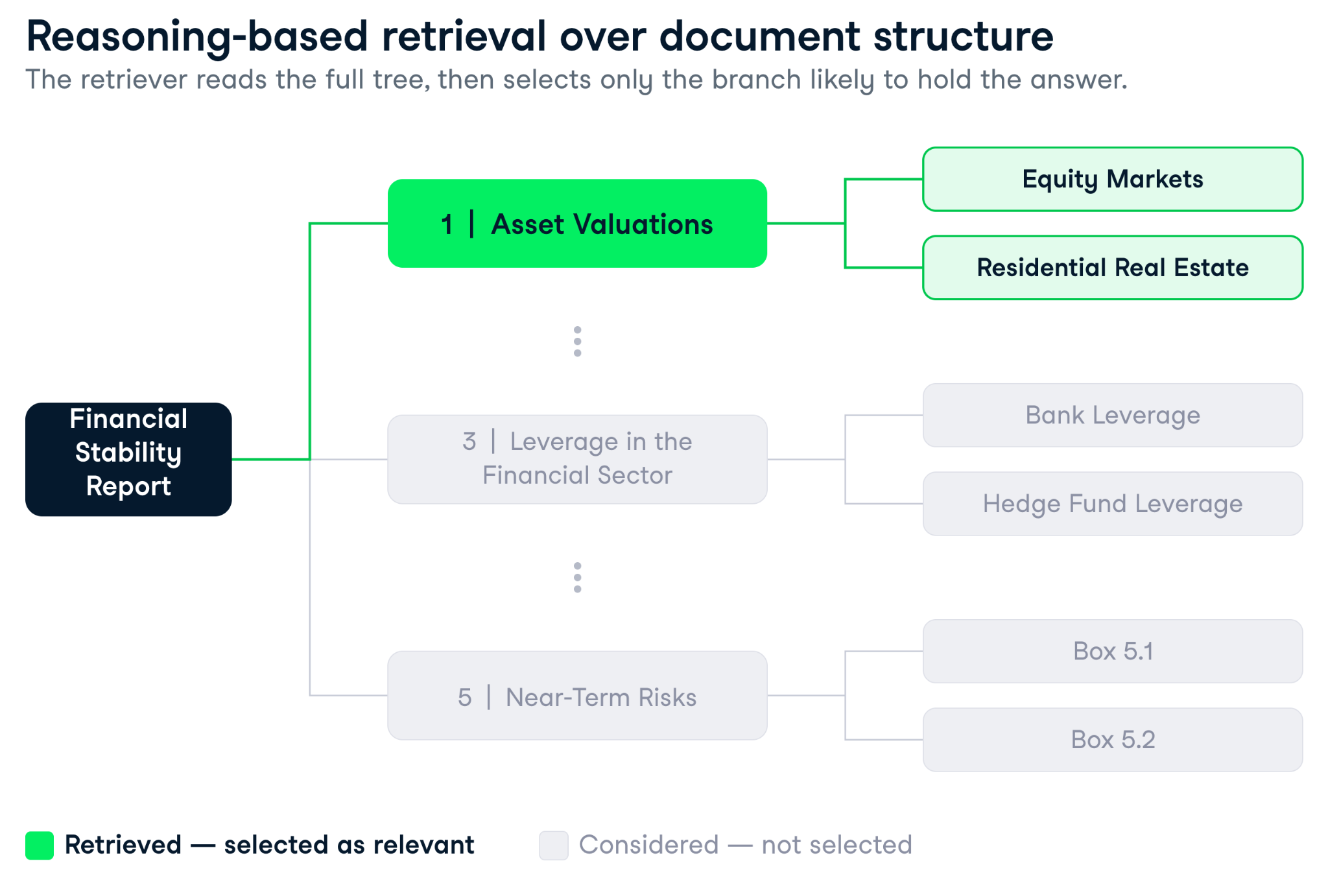
The retrieval step is precisely what PageIndex reimagines. Rather than comparing your query against every chunk in the document, PageIndex first builds a hierarchical tree index from the document's structure. This leads to different results:
- Vector search finds text that looks similar to your query.
- Tree search finds sections that are likely to contain the answer.
In other words, the difference between standard RAG and PageIndex is that between scanning every page in a book for relevant keywords and reading the table of contents to find the right chapter first.
Those two goals converge for simple factual queries on short documents, but they diverge sharply once documents get long, structured, and full of internal cross-references.
|
Dimension |
PageIndex |
Vector RAG |
|
Retrieval mechanism |
LLM reasoning over tree index |
Cosine similarity over embeddings |
|
Setup cost |
Document processing (one-time) |
Chunking + embedding (one-time) |
|
Latency per query |
3–8 seconds (multiple LLM calls) |
< 1 second (index lookup) |
|
Cost per query |
Higher (2+ LLM calls) |
Lower (embedding lookup + one LLM call) |
|
Accuracy on long structured docs |
98.7% on FinanceBench (Mafin 2.5) |
30-50% on FinanceBench |
|
Handles cross-references |
Yes |
No |
|
Handles split tables |
Yes |
No |
|
Traceability |
Full reasoning trace + page citations |
Top-k chunk scores |
|
Best for |
Financial filings, contracts, manuals |
FAQs, product docs, support tickets |
How the tree index works
The process unfolds in two steps.
- You ingest a document, and PageIndex generates a tree. Every node carries a title, a summary, and a page index. The tree reflects the document's natural hierarchy (chapters, sections, subsections, appendices, whatever the document actually contains).
- When a query arrives, the LLM receives the tree structure (without the full text, which would overflow the context window) and reasons about which nodes are likely to hold the answer. It returns a set of node IDs along with a reasoning trace explaining why each was selected, after which the text from those nodes is extracted and passed to a generation step.
Why it matters for structured documents
I have built enough RAG pipelines to know that chunking is where most production systems quietly fail. The strategy looks clean on paper, but the moment your document has a table that spans page boundaries, or a footnote that defines a term used three sections earlier, the cracks appear.
Vector RAG has three structural weaknesses that show up consistently on financial and legal documents.
- Split content: A balance sheet broken across two chunks loses the relationship between its line items, and both halves score as low-relevance because neither makes sense on its own. (Late chunking helps here, but it does not solve cross-references.)
- Repeated terms: An annual report mentions "revenue" dozens of times, so a query about one division's revenue growth pulls chunks from every mention, ranked roughly equally, with no way to tell the relevant one apart.
- Cross-references: When Section 4.3 says "see Appendix G for the full reconciliation," a similarity search has no mechanism to follow that pointer. The answer sits in Appendix G, and the retriever has no way of knowing.
PageIndex handles all three because it retrieves over structure rather than fragments. The tree keeps the document whole, the reasoning step can follow a cross-reference or compare across sections, and because every node carries a page index and summary, the retriever navigates document geography instead of surface-level text similarity.
I will be honest: when I first saw the 98.7% accuracy claim for Mafin 2.5 (VectifyAI's PageIndex-based system) on FinanceBench, my instinct was skepticism, since a near-50-point gap over standard RAG looks like a benchmark chosen to flatter. But FinanceBench tests exactly these failure modes: multi-step reasoning over SEC filings with precise numerical answers.
Getting Started with PageIndex
This tutorial requires a few packages and two API keys. Here is everything you need before writing a line of code.
You can check all the code used throughout the tutorial in my accompanying GitHub repo.
To follow along with this tutorial, you will need:
- Python 3.10+ installed
- Basic familiarity with RAG concepts. If you are new to retrieval-augmented generation, read What is Retrieval Augmented Generation (RAG)? before continuing
- An OpenAI API key from platform.openai.com/api-keys
- A PageIndex API key from dash.pageindex.ai/api-keys (free tier is sufficient for this tutorial)
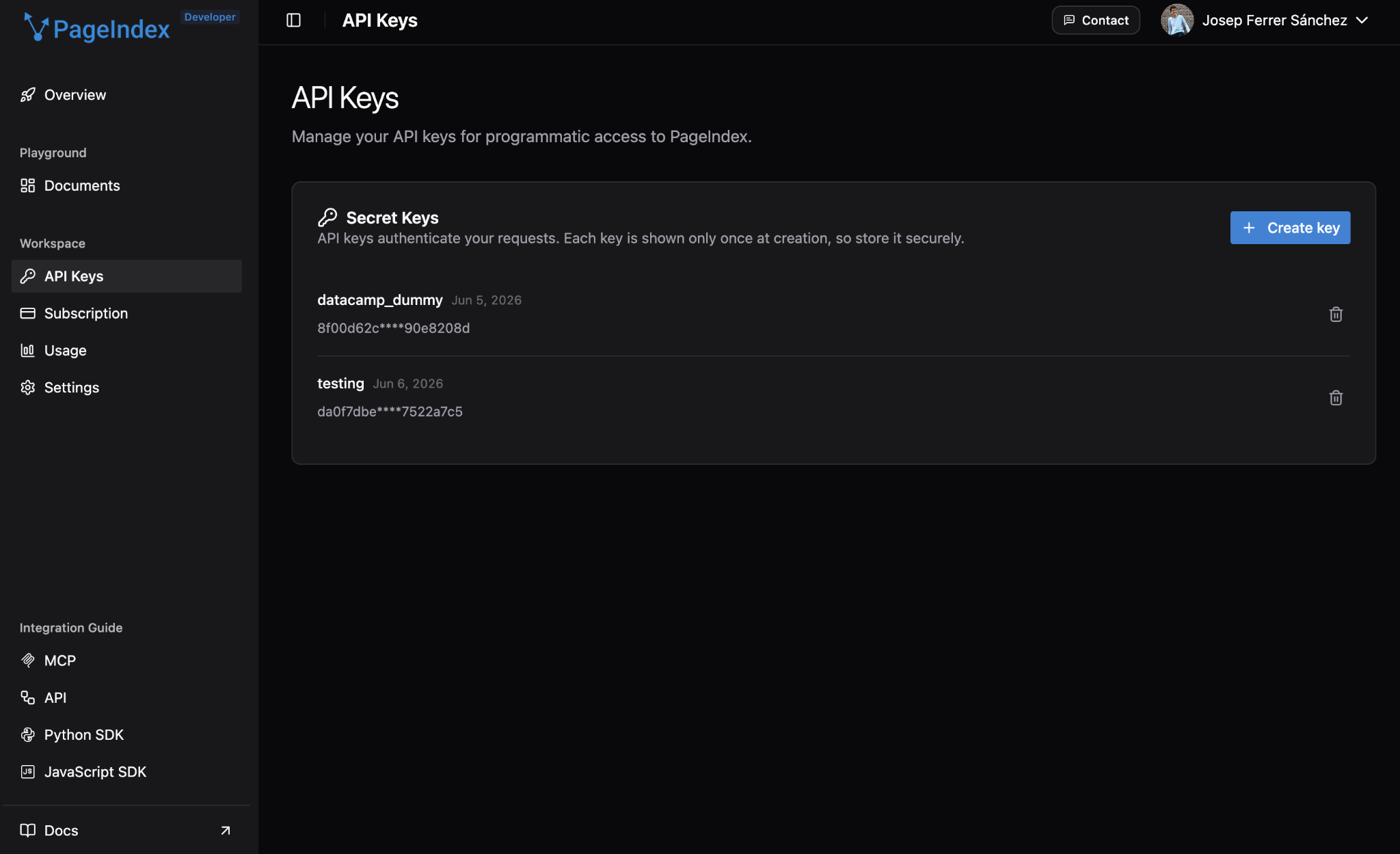
Install the required packages:
Set the API keys as environment variables rather than hardcoding them:
With both keys set, initialize your clients:
import os
import copy
import time
import json
import asyncio
import requests
from pageindex import PageIndexClient
import pageindex.utils as utils
import openai

PAGEINDEX_API_KEY = os.environ["PAGEINDEX_API_KEY"]
OPENAI_API_KEY = os.environ["OPENAI_API_KEY"]

pi_client = PageIndexClient(api_key=PAGEINDEX_API_KEY)
openai_client = openai.AsyncOpenAI(api_key=OPENAI_API_KEY)That is the entire setup: nine imports, two environment variables, two clients.
Ingesting a Document and Building the PageIndex Tree
For this tutorial, we'll use the Federal Reserve's October 2023 Financial Stability Report. It is a publicly available PDF structured like a real production document: formal sections, numbered chapters, appendices, and internal cross-references.
Downloading the document
The Fed publishes its reports as accessible PDFs at a stable URL. The if not os.path.exists() check means you only fetch it once, which matters when you are iterating on the rest of the code and do not want to re-download a 60-page PDF on every run.
DOWNLOAD_DIR = "./data"
os.makedirs(DOWNLOAD_DIR, exist_ok=True)

PDF_URL = "https://www.federalreserve.gov/publications/files/financial-stability-report-20231020.pdf"
PDF_PATH = os.path.join(DOWNLOAD_DIR, "fed_financial_stability_report_2023.pdf")

if not os.path.exists(PDF_PATH):
    print("Downloading Federal Reserve Financial Stability Report (Oct 2023)...")
    response = requests.get(PDF_URL, timeout=60)
    response.raise_for_status()
    with open(PDF_PATH, "wb") as f:
        f.write(response.content)
    print(f"Saved to {PDF_PATH}")
else:
print(f"Already present: {PDF_PATH}")Submitting the document
Submission is a single API call. submit_document() uploads the file and returns a doc_id you will use for every subsequent operation on this document. Save it somewhere, because if you restart the session, you can skip the submission step and jump straight to get_tree() using the same ID.
print("Submitting document to PageIndex...")
submit_result = pi_client.submit_document(PDF_PATH)
doc_id = submit_result["doc_id"]
print(f"Document ID: {doc_id}")PageIndex processes the document asynchronously, so you need to poll until the tree is ready:
print("Waiting for tree generation...")
while True:
    status_result = pi_client.get_document(doc_id)
    status = status_result.get("status")
    print(f"  Status: {status}")
    if status == "completed":
        break
    elif status == "failed":
        raise RuntimeError(f"Processing failed: {status_result}")
    time.sleep(10)

print("Done.")Processing a 60-page PDF typically takes two to four minutes, and this cost is paid only once per document. You will see the status cycle through queued → processing → completed.
Submitting document to PageIndex...
Document ID: pi-cmq2bp4ok00rx01qxmym7tnd1

Waiting for tree generation...
  Status: queued
  Status: processing
  Status: completed
Processing done.Inspecting the tree
Once processing completes, get_tree() returns the full hierarchical structure as a nested list of nodes. The utils.create_node_mapping() helper then flattens it into a plain dictionary keyed by node ID, making later text extraction much faster than traversing the tree recursively for every query.
tree_result = pi_client.get_tree(doc_id, node_summary=True)
tree = tree_result["result"]

# Build a flat node map for easy access later
node_map = utils.create_node_mapping(tree)

# Print the top-level nodes
print(f"\nTop-level nodes ({len(tree)} sections):\n")
for node in tree:
    print(f"  [{node['node_id']}] {node['title']}")
    print(f"       Page {node['page_index']}")
    print(f"       {node['summary'][:120]}...")
print()Running this on the Financial Stability Report gives you the document's skeleton at a glance:
Top-level nodes (9 sections):
[0000] Financial Stability Report
Page 1
This document is the October 2023 Financial Stability Report from the Federal Reserve...
[0001] Purpose and Framework
Page 5
This report outlines the Federal Reserve's framework for assessing U.S. financial stability...
[0002] Overview
Page 9
This report evaluates the stability of the U.S. financial system by analyzing four key vulnerability areas...
[0003] 1 | Asset Valuations
Page 13
...
[0012] 2 | Borrowing by Businesses and Households
Page 23
...
[0019] 3 | Leverage in the Financial Sector
Page 33
...
[0029] 4 | Funding Risks
Page 45
...
[0036] 5 | Near-Term Risks to the Financial System
Page 53
...
[0041] Appendix | Figure Notes
Page 59
…The tree is plain JSON, with every node carrying a node_id, a title, a summary, a page_index, and a nodes list for any subsections it contains. Unlike vector indexes, there is no opaque embedding space or binary index file requiring a special reader. It is just a nested list you can print, inspect, and reason about directly.
That transparency is very useful in practice: if the retriever returns the wrong section, you can look at the tree and understand why, which is something you simply cannot do with a 768-dimensional embedding.
Querying PageIndex with LLM Tree Search
The retrieval step sends the tree structure (without the full text, which would overflow the context window) to an LLM and asks it to identify which nodes are relevant to the query.
The tree search function
The prompt passes the slim tree (titles and summaries only, stripped of full section text) to the LLM and asks it to return a JSON object containing a reasoning trace and a list of node IDs. Two design choices are worth noting here.
First, utils.remove_fields() removes the actual content from each node before serializing it, which keeps the prompt well within context limits even on a long document. The copy.deepcopy() call is necessary because remove_fields mutates in place, and you need the original tree intact for the text extraction step that follows.
Second, response_format={"type": "json_object"} forces structured output, so parsing is reliable rather than fragile. The temperature stays at 0 because this is a reasoning task.
TREE_SEARCH_PROMPT = """You are a document retrieval assistant.
Given a document's tree structure and a user query, identify which nodes (sections)
are most likely to contain the answer.

Document tree:
{tree_json}

User query: {query}

Return a JSON object with the following format:
{{
  "reasoning": "Your step-by-step reasoning about which sections to retrieve",
  "node_ids": ["id1", "id2", ...]
}}

Return ONLY the JSON object, no other text."""

async def tree_search(tree, query: str, model: str = "gpt-4o") -> dict:
    """Use an LLM to reason over the tree and return relevant node IDs."""

    # remove_fields mutates in place; deepcopy protects the original tree
    slim_tree = utils.remove_fields(copy.deepcopy(tree), fields=["text"])
    tree_json = json.dumps(slim_tree, indent=2)

    prompt = TREE_SEARCH_PROMPT.format(tree_json=tree_json, query=query)

    response = await openai_client.chat.completions.create(
        model=model,
        messages=[{"role": "user", "content": prompt}],
        temperature=0,
        response_format={"type": "json_object"}
    )

    result = json.loads(response.choices[0].message.content)
return resultNote: the await calls below assume a Jupyter or iPython environment where top-level await is supported. If you run this as a plain .py script, wrap the async calls inside an async def main() function and call it with asyncio.run(main()).
Running a query
Start with a question that requires navigating across multiple sections. A query about asset valuation vulnerabilities needs material from the overview, the asset valuations chapter, and its subsections covering specific markets.
Those are sections that vector RAG may surface independently, but rarely together with the right hierarchy intact. This is exactly the kind of query where tree search earns its keep.
query_1 = "What are the main vulnerabilities the Fed identified in asset valuations as of October 2023, and which markets were flagged as stretched?"

result = await tree_search(tree, query_1)

print("LLM Reasoning:")
print(result["reasoning"])
print("\nSelected node IDs:", result["node_ids"])The reasoning trace is the part worth paying closest attention to. Here is what a typical output looks like:
LLM Reasoning:
To identify the main vulnerabilities in asset valuations as of October 2023,
we should focus on sections that specifically discuss asset valuations and
related market conditions. The '1 | Asset Valuations' section and its
subsections are directly relevant as they provide detailed insights into
asset valuation pressures, equity market conditions, and specific market
sectors flagged as stretched.

Selected node IDs: ['0003', '0004', '0006', '0009', '0010', '0011']You can see exactly why each section was selected, a level of traceability you simply do not get from a cosine similarity ranking.
Generating Answers from Retrieved Context
Once you have the relevant node IDs, the next step is to extract the corresponding text and pass it to a generation model.
Extracting context and generating answers
Two functions handle the generation step.
-
generate_answer()looks up each selected node in thenode_map, prepends a header with the section title and page index (this is what gives you auditable citations in the final answer), and passes the assembled context to a generation model. -
pageindex_pipeline()wraps tree search and generation into a single call, so you are not chaining them manually every time.
ANSWER_PROMPT = """You are a financial document analyst. Answer the user's question
using ONLY the provided context. Cite the specific section(s) you are drawing from.
If the context does not contain enough information to answer, say so clearly.

Context:
{context}

Question: {question}

Provide a precise, well-cited answer."""

async def generate_answer(node_ids: list, query: str, node_map: dict,
                          model: str = "gpt-4o") -> str:
    """Extract text from the selected nodes and generate an answer."""

    # Gather the text from each selected node
    context_parts = []
    for node_id in node_ids:
        node = node_map.get(node_id)
        if node:
            section_header = f"[{node['title']} | Page {node['page_index']}]"
            context_parts.append(f"{section_header}\n{node.get('text', '')}")

    context = "\n\n---\n\n".join(context_parts)
    prompt = ANSWER_PROMPT.format(context=context, question=query)

    response = await openai_client.chat.completions.create(
        model=model,
        messages=[{"role": "user", "content": prompt}],
        temperature=0
    )

    return response.choices[0].message.content

async def pageindex_pipeline(tree, query: str, node_map: dict) -> dict:
    """Full PageIndex pipeline: tree search + answer generation."""
    search_result = await tree_search(tree, query)
    node_ids = search_result["node_ids"]
    reasoning = search_result["reasoning"]
    answer = await generate_answer(node_ids, query, node_map)
    return {
        "query": query,
        "reasoning": reasoning,
        "retrieved_sections": node_ids,
        "answer": answer
}Run the full pipeline:
result = await pageindex_pipeline(tree, query_1, node_map)

print(f"Query: {result['query']}\n")
print(f"Retrieved sections: {result['retrieved_sections']}\n")
print(f"Answer:\n{result['answer']}")The answer comes back with section-level citations and page numbers. That's the traceability PageIndex gives you by default.
Query: What are the main vulnerabilities the Fed identified in asset valuations
as of October 2023, and which markets were flagged as stretched?

Retrieved sections: ['0003', '0004', '0006', '0009', '0010', '0011']

Answer:
The main vulnerabilities identified by the Fed in asset valuations as of
October 2023 include:

1. Equity Markets: Valuations increased modestly from an already high level,
with the forward price-to-earnings ratio rising further above its historical
median (Page 13, "Equity market valuation pressures remained notable").

2. Residential Real Estate: House prices started increasing again, and the
price-to-rent ratio was close to its previous peak from the mid-2000s
(Page 20, "House prices started increasing again in recent months").

3. Commercial Real Estate: Despite recent price declines, valuations remained
elevated relative to rental income (Page 19, "Commercial real estate
valuations remained elevated").

4. Farmland: Prices near the peak of their historical distribution, driven
by strong agricultural commodity prices (Page 21, "Farmland valuations
remained elevated").Comparing PageIndex Against Vector RAG
This is the section that actually tells you something useful. Let's build a vector RAG baseline on the same document and run both pipelines on the same queries.
Building the vector RAG baseline
The baseline follows the standard pattern: extract raw text from the PDF with PyMuPDF, split it into overlapping 500-word chunks, embed each chunk with text-embedding-3-small, and load everything into an in-memory FAISS index for cosine similarity lookup.
If you want more background on why chunk size and overlap choices affect retrieval quality, our Chunking Strategies article is worth reading alongside this, and the What Is FAISS? explainer is also useful if the index-building steps look unfamiliar.
from openai import OpenAI
import numpy as np
import faiss
sync_openai = OpenAI(api_key=OPENAI_API_KEY)
def extract_text_from_pdf(pdf_path: str) -> str:
"""Extract raw text from a PDF using PyMuPDF."""
import fitz # pip install pymupdf
doc = fitz.open(pdf_path)
pages = []
for page_num, page in enumerate(doc):
text = page.get_text()
if text.strip():
pages.append(f"[Page {page_num + 1}]\n{text}")
return "\n\n".join(pages)
def chunk_text(text: str, chunk_size: int = 500, overlap: int = 50) -> list[str]:
"""Split text into overlapping chunks by word count."""
words = text.split()
chunks = []
start = 0
while start < len(words):
end = min(start + chunk_size, len(words))
chunks.append(" ".join(words[start:end]))
start += chunk_size - overlap
return chunks
def embed_chunks(chunks: list[str], model: str = "text-embedding-3-small") -> np.ndarray:
"""Embed a list of text chunks with the OpenAI embeddings API."""
all_embeddings = []
batch_size = 100
for i in range(0, len(chunks), batch_size):
batch = chunks[i : i + batch_size]
response = sync_openai.embeddings.create(input=batch, model=model)
batch_embeddings = [item.embedding for item in response.data]
all_embeddings.extend(batch_embeddings)
return np.array(all_embeddings, dtype="float32")
def build_faiss_index(embeddings: np.ndarray) -> faiss.IndexFlatIP:
"""Build an in-memory FAISS index for inner-product (cosine) search."""
dim = embeddings.shape[1]
faiss.normalize_L2(embeddings)
index = faiss.IndexFlatIP(dim)
index.add(embeddings)
return index
def vector_rag_pipeline(query: str, chunks: list[str], index: faiss.IndexFlatIP,
k: int = 5, model: str = "gpt-4o") -> str:
"""Full vector RAG pipeline: embed query, retrieve top-k, generate answer."""
# Embed the query
query_embedding = sync_openai.embeddings.create(
input=[query], model="text-embedding-3-small"
).data[0].embedding
query_vec = np.array([query_embedding], dtype="float32")
faiss.normalize_L2(query_vec)
# Retrieve top-k chunks
_, indices = index.search(query_vec, k)
retrieved_chunks = [chunks[i] for i in indices[0] if i < len(chunks)]
context = "\n\n---\n\n".join(retrieved_chunks)
# Generate answer
response = sync_openai.chat.completions.create(
model=model,
messages=[
{"role": "system", "content": "Answer the question using only the provided context. Be precise."},
{"role": "user", "content": f"Context:\n{context}\n\nQuestion: {query}"}
],
temperature=0
)
return response.choices[0].message.contentWith the helper functions defined, build the index. On a 60-page document, the embedding step is the slow part: expect a minute or two, depending on your connection and OpenAI's throughput.
print("Extracting text from PDF...")
raw_text = extract_text_from_pdf(PDF_PATH)
print("Chunking text...")
chunks = chunk_text(raw_text, chunk_size=500, overlap=50)
print(f" {len(chunks)} chunks created")
print("Embedding chunks...")
embeddings = embed_chunks(chunks)
print(f" Embeddings shape: {embeddings.shape}")
print("Building FAISS index...")
faiss_index = build_faiss_index(embeddings)
print("Done.\n")Running the comparison
A 60-page report produces around 47 chunks at 500 words with 50-word overlap.
Extracting text from PDF...
Chunking text...
47 chunks created
Embedding chunks (takes 1-2 min)...
Embeddings shape: (47, 1536)
Building FAISS index...
Done.Three queries, each designed to expose a different retrieval challenge:
queries = [
# Direct factual lookup
"What does the Fed consider the most significant near-term risk to financial stability as of October 2023?",
# Cross-reference question (Box 5.2 is referenced from Section 5, requires following an internal pointer)
"What methodology does the Fed use to assess climate-related financial risks, and where in the report is it described?",
# Multi-section reasoning (requires connecting Section 1 and Section 3)
"How do elevated asset valuations interact with leverage in the financial sector to amplify systemic risk, according to the report?"
]With both pipelines ready, the loop below sends each query through both systems and collects the results. The [:500] slice on each answer just keeps the console output readable; the full answers are stored in results for inspection afterward.
results = []
for query in queries:
print(f"\nQuery: {query}\n")
# PageIndex
pi_result = await pageindex_pipeline(tree, query, node_map)
pi_answer = pi_result["answer"]
# Vector RAG
vec_answer = vector_rag_pipeline(query, chunks, faiss_index)
results.append({
"query": query,
"pageindex_answer": pi_answer,
"vector_rag_answer": vec_answer
})
print("PageIndex answer:")
print(pi_answer[:500])
print("\nVector RAG answer:")
print(vec_answer[:500])
print("\n" + "="*60)Results comparison
Here is the kind of result you'll see across the three query types:
|
Query |
PageIndex |
Vector RAG |
Correct Answer |
Winner |
|
Most significant near-term risk |
Broad answer covering multiple risks with section citations |
Surfaced the specific 72% survey figure (more precise on this one) |
Persistent inflation and tighter monetary policy, cited by 72% of survey respondents (Box 5.1) |
Draw, slight edge to Vector RAG on the specific stat |
|
Climate risk methodology (cross-reference) |
Retrieved Section, but selected the parent node rather than Box 5.2, so the methodology text never reached generation |
Chunked right through Box 5.2 and returned the actual methodology steps |
Box 5.2 describes translating physical and transition risks into financial exposures via scenario analysis |
Vector RAG |
|
Asset valuations + leverage interaction |
Retrieved 18 nodes across Sections 1 and 3 and explained the amplification mechanism |
Connected the two sections and explained the amplification mechanism |
Elevated valuations raise the risk of sharp price corrections; leverage amplifies losses when corrections hit leveraged institutions (Sections 1 and 3) |
Draw |
Interpreting the results
The results are more subtle than a clean sweep for either system, which makes them more useful.
PageIndex navigated to the right sections in all three cases. On the direct factual query, both answered correctly, though vector RAG surfaced the specific 72% figure because its flat chunking happened to capture Box 5.1 intact, more chunking luck than a structural edge. On the multi-section query, PageIndex retrieved 18 nodes spanning Sections 1 and 3 and explained the interaction, roughly matching vector RAG. The one clear loss was the cross-reference query, and it is worth understanding why.
On the climate-methodology query, PageIndex reasoned its way to Section 5 and the Overview, but the methodology lives in Box 5.2, a distinct child node under Section 5. Tree search selected the parent section, not the box, and the parent's own text references the box without reproducing it, so the generation step never saw the methodology. Vector RAG won by chunking straight through Box 5.2.
This is a retrieval-granularity issue, not a reasoning failure: selecting a parent node does not pull in its children's text unless you expand the selection to include them. You can close the gap by prompting tree search to return the child nodes of any relevant section, or by expanding each selected node to include its descendants before generation.
PageIndex's advantage showed most clearly in the standalone pipeline run earlier in the tutorial (the asset valuations query), where it correctly reasoned about document structure and returned well-cited, section-attributed answers. The comparison queries above were specifically chosen to stress-test more challenging retrieval scenarios, which is why they favor vector RAG for a 60-page document.
The honest takeaway: PageIndex's edge over vector RAG sharpens with document length and the density of internal cross-references. On a 60-page report, the gap is moderate. On a 200-page 10-K with dozens of footnotes referencing each other, expect it to be larger.
If you want to push the vector RAG baseline further before writing it off, How to Improve RAG Performance covers the five highest-leverage techniques.
When to Use PageIndex
The comparison above is specific to one document type and length. Whether PageIndex is the right choice comes down to three factors: document structure, query type, and volume.
When PageIndex wins
PageIndex earns its overhead on long, structured professional documents where a wrong answer is expensive:
- 10-Ks and other financial filings
- Legal contracts with defined terms and cross-references
- Regulatory guidance
- Technical manuals with numbered sections
These are also the cases where the reasoning traces give you something concrete to audit. The sweet spot is low-volume, high-stakes work: a few dozen documents a day where each query needs to be right, and the latency and cost premium is worth it.
When vector RAG is the better choice
Vector RAG is the better default for high-throughput, low-latency workloads, where PageIndex's multiple LLM calls per query become a bottleneck and cached embeddings handle the load for a fraction of the cost.
It also fits flat documents with little hierarchy to reason over, like:
- News articles
- Product descriptions
- Support tickets
It is also the right choice for cases where approximate answers are good enough. A support chatbot that finds the right FAQ nine times out of ten is probably meeting its bar.
The honest tradeoffs
The cost is speed and money. Each PageIndex query runs at least two LLM calls (tree search and answer generation) plus the upfront processing, so expect three to eight seconds per query on a 60-page document against under one second for vector RAG with a cached FAISS index, and the per-query bill scales the same way.
The Financial Stability Report is a fair test case for PageIndex: structured, hierarchical, cross-referenced. A corpus of thousands of short support tickets is not, and vector RAG will beat it there at a fraction of the cost.
Final Thoughts
Vector RAG has a hidden assumption baked into it: that the passage most similar to your query is also the passage that contains the answer. For short, loosely structured documents, that assumption holds well enough. For long, structured professional documents, it breaks down in predictable ways: split tables, misleading term frequency, and invisible cross-references.
PageIndex addresses all three by treating retrieval as a reasoning problem over document structure rather than a similarity search over text fragments.
The practical rule is straightforward: if your documents have hierarchy, your queries require following internal references, and getting the answer right matters more than getting it fast, PageIndex is worth the extra latency and cost. If you are running high-volume searches on short or flat documents, vector RAG remains the right default.
Want to go deeper on production RAG and agentic systems? Our AI Engineering with LangChain track takes you from application fundamentals through retrieval, evaluation, and tool-using agents.
PageIndex FAQs
What is PageIndex?
PageIndex is an open-source RAG framework from VectifyAI (September 2025) that replaces vector similarity search with LLM reasoning over a hierarchical tree index: no embeddings, no vector database, no chunking.
How does PageIndex differ from standard RAG?
Standard RAG chunks a document into fragments, embeds them, and retrieves the most similar chunks to a query. PageIndex builds a tree from the document's natural structure and asks an LLM to reason about which sections are likely to contain the answer. The retrieval step is a reasoning problem, not a similarity search.
Does PageIndex require an OpenAI API key?
Not necessarily. The self-hosted open-source repo works with any LiteLLM-supported provider. This tutorial uses OpenAI for the retrieval reasoning and answer generation, so if you follow it as written, you'll need an OpenAI key plus a PageIndex key from dash.pageindex.ai/api-keys.
Is PageIndex good for all documents?
No. PageIndex shines on long, structured documents with hierarchy and cross-references. For large corpora of short, loosely structured text, like support tickets or FAQ pages, vector RAG will be faster and cheaper.
What accuracy did PageIndex achieve on FinanceBench?
Mafin 2.5, VectifyAI's PageIndex-based system, achieved 98.7%, compared to roughly 30–50% for traditional vector-based RAG. FinanceBench covers financial question-answering on SEC filings, which requires multi-step reasoning and exact numerical retrieval. That's the gap PageIndex was built to close.

Josep is a freelance Data Scientist specializing in European projects, with expertise in data storage, processing, advanced analytics, and impactful data storytelling.
As an educator, he teaches Big Data in the Master’s program at the University of Navarra and shares insights through articles on platforms like Medium, KDNuggets, and DataCamp. Josep also writes about Data and Tech in his newsletter Databites (databites.tech).
He holds a BS in Engineering Physics from the Polytechnic University of Catalonia and an MS in Intelligent Interactive Systems from Pompeu Fabra University.
%22%3E%0A%20%20%20%20%20%20%20%20%3Crect%20fill%3D%22%23EFEBE4%22%20height%3D%22180%22%20width%3D%22336%22%20%2F%3E%0A%20%20%20%20%20%20%20%20%3Crect%0A%20%20%20%20%20%20%20%20%20%20fill%3D%22%23DD3400%22%0A%20%20%20%20%20%20%20%20%20%20height%3D%22106.6%22%0A%20%20%20%20%20%20%20%20%20%20transform%3D%22rotate(-30%20-208.588%20220.18)%22%0A%20%20%20%20%20%20%20%20%20%20width%3D%22456.125%22%0A%20%20%20%20%20%20%20%20%20%20x%3D%22-208.588%22%0A%20%20%20%20%20%20%20%20%20%20y%3D%22220.18%22%0A%20%20%20%20%20%20%20%20%2F%3E%0A%20%20%20%20%20%20%20%20%3Crect%0A%20%20%20%20%20%20%20%20%20%20fill%3D%22%23FFEC3C%22%0A%20%20%20%20%20%20%20%20%20%20height%3D%2235.875%22%0A%20%20%20%20%20%20%20%20%20%20transform%3D%22rotate(-30%20-208.588%20220.18)%22%0A%20%20%20%20%20%20%20%20%20%20width%3D%22347.576%22%0A%20%20%20%20%20%20%20%20%20%20x%3D%22-208.588%22%0A%20%20%20%20%20%20%20%20%20%20y%3D%22220.18%22%0A%20%20%20%20%20%20%20%20%2F%3E%0A%20%20%20%20%20%20%20%20%3Crect%0A%20%20%20%20%20%20%20%20%20%20fill%3D%22%23FF931E%22%0A%20%20%20%20%20%20%20%20%20%20height%3D%2235.875%22%0A%20%20%20%20%20%20%20%20%20%20transform%3D%22rotate(-30%20-226.525%20189.111)%22%0A%20%20%20%20%20%20%20%20%20%20width%3D%22347.576%22%0A%20%20%20%20%20%20%20%20%20%20x%3D%22-226.525%22%0A%20%20%20%20%20%20%20%20%20%20y%3D%22189.111%22%0A%20%20%20%20%20%20%20%20%2F%3E%0A%20%20%20%20%20%20%20%20%3Crect%0A%20%20%20%20%20%20%20%20%20%20fill%3D%22%23DD3400%22%0A%20%20%20%20%20%20%20%20%20%20height%3D%22106.6%22%0A%20%20%20%20%20%20%20%20%20%20transform%3D%22rotate(-30%2085.5879%20256.055)%22%0A%20%20%20%20%20%20%20%20%20%20width%3D%22456.125%22%0A%20%20%20%20%20%20%20%20%20%20x%3D%2285.5879%22%0A%20%20%20%20%20%20%20%20%20%20y%3D%22256.055%22%0A%20%20%20%20%20%20%20%20%2F%3E%0A%20%20%20%20%20%20%20%20%3Crect%0A%20%20%20%20%20%20%20%20%20%20fill%3D%22%23FFEC3C%22%0A%20%20%20%20%20%20%20%20%20%20height%3D%2235.875%22%0A%20%20%20%20%20%20%20%20%20%20transform%3D%22rotate(-30%2085.5879%20256.055)%22%0A%20%20%20%20%20%20%20%20%20%20width%3D%22184.5%22%0A%20%20%20%20%20%20%20%20%20%20x%3D%2285.5879%22%0A%20%20%20%20%20%20%20%20%20%20y%3D%22256.055%22%0A%20%20%20%20%20%20%20%20%2F%3E%0A%20%20%20%20%20%20%20%20%3Crect%0A%20%20%20%20%20%20%20%20%20%20fill%3D%22%23FF931E%22%0A%20%20%20%20%20%20%20%20%20%20height%3D%2235.875%22%0A%20%20%20%20%20%20%20%20%20%20transform%3D%22rotate(-30%20227.432%20132.736)%22%0A%20%20%20%20%20%20%20%20%20%20width%3D%22271.625%22%0A%20%20%20%20%20%20%20%20%20%20x%3D%22227.432%22%0A%20%20%20%20%20%20%20%20%20%20y%3D%22132.736%22%0A%20%20%20%20%20%20%20%20%2F%3E%0A%20%20%20%20%20%20%3C%2Fg%3E%0A%20%20%20%20%20%20%3Cdefs%3E%0A%20%20%20%20%20%20%20%20%3CclipPath%20id%3D%22clip%22%3E%0A%20%20%20%20%20%20%20%20%20%20%3Crect%20fill%3D%22white%22%20height%3D%22180%22%20width%3D%22336%22%20%2F%3E%0A%20%20%20%20%20%20%20%20%3C%2FclipPath%3E%0A%20%20%20%20%20%20%3C%2Fdefs%3E%0A%20%20%20%20%3C%2Fsvg%3E)

%22%3E%0A%20%20%20%20%20%20%20%20%3Crect%20fill%3D%22%23EFEBE4%22%20height%3D%22180%22%20width%3D%22336%22%20%2F%3E%0A%20%20%20%20%20%20%20%20%3Crect%0A%20%20%20%20%20%20%20%20%20%20fill%3D%22%23FF931E%22%0A%20%20%20%20%20%20%20%20%20%20height%3D%22106.6%22%0A%20%20%20%20%20%20%20%20%20%20transform%3D%22rotate(-30%20-208.588%20220.18)%22%0A%20%20%20%20%20%20%20%20%20%20width%3D%22456.125%22%0A%20%20%20%20%20%20%20%20%20%20x%3D%22-208.588%22%0A%20%20%20%20%20%20%20%20%20%20y%3D%22220.18%22%0A%20%20%20%20%20%20%20%20%2F%3E%0A%20%20%20%20%20%20%20%20%3Crect%0A%20%20%20%20%20%20%20%20%20%20fill%3D%22%23F7F3EB%22%0A%20%20%20%20%20%20%20%20%20%20height%3D%2235.875%22%0A%20%20%20%20%20%20%20%20%20%20transform%3D%22rotate(-30%20-208.588%20220.18)%22%0A%20%20%20%20%20%20%20%20%20%20width%3D%22347.576%22%0A%20%20%20%20%20%20%20%20%20%20x%3D%22-208.588%22%0A%20%20%20%20%20%20%20%20%20%20y%3D%22220.18%22%0A%20%20%20%20%20%20%20%20%2F%3E%0A%20%20%20%20%20%20%20%20%3Crect%0A%20%20%20%20%20%20%20%20%20%20fill%3D%22%23000820%22%0A%20%20%20%20%20%20%20%20%20%20height%3D%2235.875%22%0A%20%20%20%20%20%20%20%20%20%20transform%3D%22rotate(-30%20-226.525%20189.111)%22%0A%20%20%20%20%20%20%20%20%20%20width%3D%22347.576%22%0A%20%20%20%20%20%20%20%20%20%20x%3D%22-226.525%22%0A%20%20%20%20%20%20%20%20%20%20y%3D%22189.111%22%0A%20%20%20%20%20%20%20%20%2F%3E%0A%20%20%20%20%20%20%20%20%3Crect%0A%20%20%20%20%20%20%20%20%20%20fill%3D%22%23000820%22%0A%20%20%20%20%20%20%20%20%20%20height%3D%22106.6%22%0A%20%20%20%20%20%20%20%20%20%20transform%3D%22rotate(-30%2085.5879%20256.055)%22%0A%20%20%20%20%20%20%20%20%20%20width%3D%22456.125%22%0A%20%20%20%20%20%20%20%20%20%20x%3D%2285.5879%22%0A%20%20%20%20%20%20%20%20%20%20y%3D%22256.055%22%0A%20%20%20%20%20%20%20%20%2F%3E%0A%20%20%20%20%20%20%20%20%3Crect%0A%20%20%20%20%20%20%20%20%20%20fill%3D%22%23D87300%22%0A%20%20%20%20%20%20%20%20%20%20height%3D%2235.875%22%0A%20%20%20%20%20%20%20%20%20%20transform%3D%22rotate(-30%2085.5879%20256.055)%22%0A%20%20%20%20%20%20%20%20%20%20width%3D%22184.5%22%0A%20%20%20%20%20%20%20%20%20%20x%3D%2285.5879%22%0A%20%20%20%20%20%20%20%20%20%20y%3D%22256.055%22%0A%20%20%20%20%20%20%20%20%2F%3E%0A%20%20%20%20%20%20%20%20%3Crect%0A%20%20%20%20%20%20%20%20%20%20fill%3D%22%23FF931E%22%0A%20%20%20%20%20%20%20%20%20%20height%3D%2235.875%22%0A%20%20%20%20%20%20%20%20%20%20transform%3D%22rotate(-30%20227.432%20132.736)%22%0A%20%20%20%20%20%20%20%20%20%20width%3D%22271.625%22%0A%20%20%20%20%20%20%20%20%20%20x%3D%22227.432%22%0A%20%20%20%20%20%20%20%20%20%20y%3D%22132.736%22%0A%20%20%20%20%20%20%20%20%2F%3E%0A%20%20%20%20%20%20%3C%2Fg%3E%0A%20%20%20%20%20%20%3Cdefs%3E%0A%20%20%20%20%20%20%20%20%3CclipPath%20id%3D%22clip%22%3E%0A%20%20%20%20%20%20%20%20%20%20%3Crect%20fill%3D%22white%22%20height%3D%22180%22%20width%3D%22336%22%20%2F%3E%0A%20%20%20%20%20%20%20%20%3C%2FclipPath%3E%0A%20%20%20%20%20%20%3C%2Fdefs%3E%0A%20%20%20%20%3C%2Fsvg%3E)



%22%3E%0A%20%20%20%20%20%20%20%20%3Crect%20fill%3D%22%23F7F3EB%22%20height%3D%22180%22%20width%3D%22336%22%20%2F%3E%0A%20%20%20%20%20%20%20%20%3Crect%0A%20%20%20%20%20%20%20%20%20%20fill%3D%22%23000820%22%0A%20%20%20%20%20%20%20%20%20%20height%3D%22106.6%22%0A%20%20%20%20%20%20%20%20%20%20transform%3D%22rotate(-30%20-208.588%20220.18)%22%0A%20%20%20%20%20%20%20%20%20%20width%3D%22456.125%22%0A%20%20%20%20%20%20%20%20%20%20x%3D%22-208.588%22%0A%20%20%20%20%20%20%20%20%20%20y%3D%22220.18%22%0A%20%20%20%20%20%20%20%20%2F%3E%0A%20%20%20%20%20%20%20%20%3Crect%0A%20%20%20%20%20%20%20%20%20%20fill%3D%22%2300C74E%22%0A%20%20%20%20%20%20%20%20%20%20height%3D%2235.875%22%0A%20%20%20%20%20%20%20%20%20%20transform%3D%22rotate(-30%20-208.588%20220.18)%22%0A%20%20%20%20%20%20%20%20%20%20width%3D%22347.576%22%0A%20%20%20%20%20%20%20%20%20%20x%3D%22-208.588%22%0A%20%20%20%20%20%20%20%20%20%20y%3D%22220.18%22%0A%20%20%20%20%20%20%20%20%2F%3E%0A%20%20%20%20%20%20%20%20%3Crect%0A%20%20%20%20%20%20%20%20%20%20fill%3D%22%23FF931E%22%0A%20%20%20%20%20%20%20%20%20%20height%3D%2235.875%22%0A%20%20%20%20%20%20%20%20%20%20transform%3D%22rotate(-30%20-226.525%20189.111)%22%0A%20%20%20%20%20%20%20%20%20%20width%3D%22347.576%22%0A%20%20%20%20%20%20%20%20%20%20x%3D%22-226.525%22%0A%20%20%20%20%20%20%20%20%20%20y%3D%22189.111%22%0A%20%20%20%20%20%20%20%20%2F%3E%0A%20%20%20%20%20%20%20%20%3Crect%0A%20%20%20%20%20%20%20%20%20%20fill%3D%22%23D87300%22%0A%20%20%20%20%20%20%20%20%20%20height%3D%22106.6%22%0A%20%20%20%20%20%20%20%20%20%20transform%3D%22rotate(-30%2085.5879%20256.055)%22%0A%20%20%20%20%20%20%20%20%20%20width%3D%22456.125%22%0A%20%20%20%20%20%20%20%20%20%20x%3D%2285.5879%22%0A%20%20%20%20%20%20%20%20%20%20y%3D%22256.055%22%0A%20%20%20%20%20%20%20%20%2F%3E%0A%20%20%20%20%20%20%20%20%3Crect%0A%20%20%20%20%20%20%20%20%20%20fill%3D%22%23000820%22%0A%20%20%20%20%20%20%20%20%20%20height%3D%2235.875%22%0A%20%20%20%20%20%20%20%20%20%20transform%3D%22rotate(-30%2085.5879%20256.055)%22%0A%20%20%20%20%20%20%20%20%20%20width%3D%22184.5%22%0A%20%20%20%20%20%20%20%20%20%20x%3D%2285.5879%22%0A%20%20%20%20%20%20%20%20%20%20y%3D%22256.055%22%0A%20%20%20%20%20%20%20%20%2F%3E%0A%20%20%20%20%20%20%20%20%3Crect%0A%20%20%20%20%20%20%20%20%20%20fill%3D%22%2300C74E%22%0A%20%20%20%20%20%20%20%20%20%20height%3D%2235.875%22%0A%20%20%20%20%20%20%20%20%20%20transform%3D%22rotate(-30%20227.432%20132.736)%22%0A%20%20%20%20%20%20%20%20%20%20width%3D%22271.625%22%0A%20%20%20%20%20%20%20%20%20%20x%3D%22227.432%22%0A%20%20%20%20%20%20%20%20%20%20y%3D%22132.736%22%0A%20%20%20%20%20%20%20%20%2F%3E%0A%20%20%20%20%20%20%3C%2Fg%3E%0A%20%20%20%20%20%20%3Cdefs%3E%0A%20%20%20%20%20%20%20%20%3CclipPath%20id%3D%22clip%22%3E%0A%20%20%20%20%20%20%20%20%20%20%3Crect%20fill%3D%22white%22%20height%3D%22180%22%20width%3D%22336%22%20%2F%3E%0A%20%20%20%20%20%20%20%20%3C%2FclipPath%3E%0A%20%20%20%20%20%20%3C%2Fdefs%3E%0A%20%20%20%20%3C%2Fsvg%3E)
%22%3E%0A%20%20%20%20%20%20%20%20%3Crect%20fill%3D%22%2372E5FE%22%20height%3D%22180%22%20width%3D%22336%22%20%2F%3E%0A%20%20%20%20%20%20%20%20%3Crect%0A%20%20%20%20%20%20%20%20%20%20fill%3D%22%237933FF%22%0A%20%20%20%20%20%20%20%20%20%20height%3D%22106.6%22%0A%20%20%20%20%20%20%20%20%20%20transform%3D%22rotate(-30%20-208.588%20220.18)%22%0A%20%20%20%20%20%20%20%20%20%20width%3D%22456.125%22%0A%20%20%20%20%20%20%20%20%20%20x%3D%22-208.588%22%0A%20%20%20%20%20%20%20%20%20%20y%3D%22220.18%22%0A%20%20%20%20%20%20%20%20%2F%3E%0A%20%20%20%20%20%20%20%20%3Crect%0A%20%20%20%20%20%20%20%20%20%20fill%3D%22%235EB1FF%22%0A%20%20%20%20%20%20%20%20%20%20height%3D%2235.875%22%0A%20%20%20%20%20%20%20%20%20%20transform%3D%22rotate(-30%20-208.588%20220.18)%22%0A%20%20%20%20%20%20%20%20%20%20width%3D%22347.576%22%0A%20%20%20%20%20%20%20%20%20%20x%3D%22-208.588%22%0A%20%20%20%20%20%20%20%20%20%20y%3D%22220.18%22%0A%20%20%20%20%20%20%20%20%2F%3E%0A%20%20%20%20%20%20%20%20%3Crect%0A%20%20%20%20%20%20%20%20%20%20fill%3D%22%23000820%22%0A%20%20%20%20%20%20%20%20%20%20height%3D%2235.875%22%0A%20%20%20%20%20%20%20%20%20%20transform%3D%22rotate(-30%20-226.525%20189.111)%22%0A%20%20%20%20%20%20%20%20%20%20width%3D%22347.576%22%0A%20%20%20%20%20%20%20%20%20%20x%3D%22-226.525%22%0A%20%20%20%20%20%20%20%20%20%20y%3D%22189.111%22%0A%20%20%20%20%20%20%20%20%2F%3E%0A%20%20%20%20%20%20%20%20%3Crect%0A%20%20%20%20%20%20%20%20%20%20fill%3D%22%237933FF%22%0A%20%20%20%20%20%20%20%20%20%20height%3D%22106.6%22%0A%20%20%20%20%20%20%20%20%20%20transform%3D%22rotate(-30%2085.5879%20256.055)%22%0A%20%20%20%20%20%20%20%20%20%20width%3D%22456.125%22%0A%20%20%20%20%20%20%20%20%20%20x%3D%2285.5879%22%0A%20%20%20%20%20%20%20%20%20%20y%3D%22256.055%22%0A%20%20%20%20%20%20%20%20%2F%3E%0A%20%20%20%20%20%20%20%20%3Crect%0A%20%20%20%20%20%20%20%20%20%20fill%3D%22%235EB1FF%22%0A%20%20%20%20%20%20%20%20%20%20height%3D%2235.875%22%0A%20%20%20%20%20%20%20%20%20%20transform%3D%22rotate(-30%2085.5879%20256.055)%22%0A%20%20%20%20%20%20%20%20%20%20width%3D%22184.5%22%0A%20%20%20%20%20%20%20%20%20%20x%3D%2285.5879%22%0A%20%20%20%20%20%20%20%20%20%20y%3D%22256.055%22%0A%20%20%20%20%20%20%20%20%2F%3E%0A%20%20%20%20%20%20%20%20%3Crect%0A%20%20%20%20%20%20%20%20%20%20fill%3D%22%23000820%22%0A%20%20%20%20%20%20%20%20%20%20height%3D%2235.875%22%0A%20%20%20%20%20%20%20%20%20%20transform%3D%22rotate(-30%20227.432%20132.736)%22%0A%20%20%20%20%20%20%20%20%20%20width%3D%22271.625%22%0A%20%20%20%20%20%20%20%20%20%20x%3D%22227.432%22%0A%20%20%20%20%20%20%20%20%20%20y%3D%22132.736%22%0A%20%20%20%20%20%20%20%20%2F%3E%0A%20%20%20%20%20%20%3C%2Fg%3E%0A%20%20%20%20%20%20%3Cdefs%3E%0A%20%20%20%20%20%20%20%20%3CclipPath%20id%3D%22clip%22%3E%0A%20%20%20%20%20%20%20%20%20%20%3Crect%20fill%3D%22white%22%20height%3D%22180%22%20width%3D%22336%22%20%2F%3E%0A%20%20%20%20%20%20%20%20%3C%2FclipPath%3E%0A%20%20%20%20%20%20%3C%2Fdefs%3E%0A%20%20%20%20%3C%2Fsvg%3E)

%22%3E%0A%20%20%20%20%20%20%20%20%3Crect%20fill%3D%22%23EFEBE4%22%20height%3D%22180%22%20width%3D%22336%22%20%2F%3E%0A%20%20%20%20%20%20%20%20%3Crect%0A%20%20%20%20%20%20%20%20%20%20fill%3D%22%2372E5FE%22%0A%20%20%20%20%20%20%20%20%20%20height%3D%22106.6%22%0A%20%20%20%20%20%20%20%20%20%20transform%3D%22rotate(-30%20-208.588%20220.18)%22%0A%20%20%20%20%20%20%20%20%20%20width%3D%22456.125%22%0A%20%20%20%20%20%20%20%20%20%20x%3D%22-208.588%22%0A%20%20%20%20%20%20%20%20%20%20y%3D%22220.18%22%0A%20%20%20%20%20%20%20%20%2F%3E%0A%20%20%20%20%20%20%20%20%3Crect%0A%20%20%20%20%20%20%20%20%20%20fill%3D%22%23000820%22%0A%20%20%20%20%20%20%20%20%20%20height%3D%2235.875%22%0A%20%20%20%20%20%20%20%20%20%20transform%3D%22rotate(-30%20-208.588%20220.18)%22%0A%20%20%20%20%20%20%20%20%20%20width%3D%22347.576%22%0A%20%20%20%20%20%20%20%20%20%20x%3D%22-208.588%22%0A%20%20%20%20%20%20%20%20%20%20y%3D%22220.18%22%0A%20%20%20%20%20%20%20%20%2F%3E%0A%20%20%20%20%20%20%20%20%3Crect%0A%20%20%20%20%20%20%20%20%20%20fill%3D%22%235EB1FF%22%0A%20%20%20%20%20%20%20%20%20%20height%3D%2235.875%22%0A%20%20%20%20%20%20%20%20%20%20transform%3D%22rotate(-30%20-226.525%20189.111)%22%0A%20%20%20%20%20%20%20%20%20%20width%3D%22347.576%22%0A%20%20%20%20%20%20%20%20%20%20x%3D%22-226.525%22%0A%20%20%20%20%20%20%20%20%20%20y%3D%22189.111%22%0A%20%20%20%20%20%20%20%20%2F%3E%0A%20%20%20%20%20%20%20%20%3Crect%0A%20%20%20%20%20%20%20%20%20%20fill%3D%22%23000820%22%0A%20%20%20%20%20%20%20%20%20%20height%3D%22106.6%22%0A%20%20%20%20%20%20%20%20%20%20transform%3D%22rotate(-30%2085.5879%20256.055)%22%0A%20%20%20%20%20%20%20%20%20%20width%3D%22456.125%22%0A%20%20%20%20%20%20%20%20%20%20x%3D%2285.5879%22%0A%20%20%20%20%20%20%20%20%20%20y%3D%22256.055%22%0A%20%20%20%20%20%20%20%20%2F%3E%0A%20%20%20%20%20%20%20%20%3Crect%0A%20%20%20%20%20%20%20%20%20%20fill%3D%22%23D87300%22%0A%20%20%20%20%20%20%20%20%20%20height%3D%2235.875%22%0A%20%20%20%20%20%20%20%20%20%20transform%3D%22rotate(-30%2085.5879%20256.055)%22%0A%20%20%20%20%20%20%20%20%20%20width%3D%22184.5%22%0A%20%20%20%20%20%20%20%20%20%20x%3D%2285.5879%22%0A%20%20%20%20%20%20%20%20%20%20y%3D%22256.055%22%0A%20%20%20%20%20%20%20%20%2F%3E%0A%20%20%20%20%20%20%20%20%3Crect%0A%20%20%20%20%20%20%20%20%20%20fill%3D%22%235646A5%22%0A%20%20%20%20%20%20%20%20%20%20height%3D%2235.875%22%0A%20%20%20%20%20%20%20%20%20%20transform%3D%22rotate(-30%20227.432%20132.736)%22%0A%20%20%20%20%20%20%20%20%20%20width%3D%22271.625%22%0A%20%20%20%20%20%20%20%20%20%20x%3D%22227.432%22%0A%20%20%20%20%20%20%20%20%20%20y%3D%22132.736%22%0A%20%20%20%20%20%20%20%20%2F%3E%0A%20%20%20%20%20%20%3C%2Fg%3E%0A%20%20%20%20%20%20%3Cdefs%3E%0A%20%20%20%20%20%20%20%20%3CclipPath%20id%3D%22clip%22%3E%0A%20%20%20%20%20%20%20%20%20%20%3Crect%20fill%3D%22white%22%20height%3D%22180%22%20width%3D%22336%22%20%2F%3E%0A%20%20%20%20%20%20%20%20%3C%2FclipPath%3E%0A%20%20%20%20%20%20%3C%2Fdefs%3E%0A%20%20%20%20%3C%2Fsvg%3E)

Imagine you have the Federal Reserve's Financial Stability Report open in front of you. Someone asks: What percentage of respondents cited persistent inflation as the top near-term risk? You flip to Section 5, find Box 5.1, and see the number in two seconds. It is 72%.
Hand that question to a standard RAG pipeline, and whether it finds the answer depends on how the chunker happened to split the page. If Box 5.1 gets fragmented across chunks, similarity search returns passages that mention inflation somewhere but miss the figure. That is the core limitation of similarity search: text that looks like your query is not the same as the section that answers it.
For long, structured documents, it matters a lot, and it is what PageIndex was built to fix. In this tutorial, I will build a document QA system with PageIndex and test it against a vector RAG baseline on that same Fed report, so you leave knowing when each approach earns its cost.
TL;DR