

课程
Python 中级
4 小时
1.4M
实践并学习路径你的进步。
使用 Google 继续将 Redis 与 Python 结合使用,是数据工程师构建高性能、可扩展且易维护系统的强大方案。无论您是在优化缓存层、管理实时事件流,还是实现分布式锁,Redis 都能提供灵活高效的解决方案。
在本指南中,我们将介绍在 Python 中使用 Redis 的基础知识,帮助您将其无缝集成到数据工程工作流中。
Redis 是一个开源的内存数据结构存储,可用作数据库、缓存和消息代理。其名称源于 Remote Dictionary Server,最初被设计为具有快速访问时间的键值存储系统。
它支持多种数据结构,如字符串、哈希、列表、集合和可按范围查询的有序集合。Redis 还提供事务、发布/订阅消息、Lua 脚本,以及内置的复制与集群能力,以提升可用性与可扩展性等高级功能。
Redis 的潜在用例广泛多样。
在数据工程中的常见用例如下:
Redis 也常与其他技术结合使用,例如 Web 服务器(如 NGINX)、数据库(如 MySQL)以及消息系统(如 Kafka),以优化性能和可扩展性。
由于其灵活性、庞大的生态系统以及与大数据技术的易集成性,Python 在数据工程领域占据主导地位。
将其与 Redis 结合,可为您的应用带来诸多好处:
Redis-py 是官方的 Python 版 Redis 客户端库。它为您在 Python 代码中与 Redis 通信提供了易用接口。
其主要特性包括:
下面来看如何使用 Python 为自己搭建 Redis。


运行 Redis 的三种主要方式:
首先,若使用 Docker,您需要在机器上安装 Docker Desktop。可从DockerHub 网站下载。
安装完成后,打开命令提示符并输入以下命令。
docker pull redis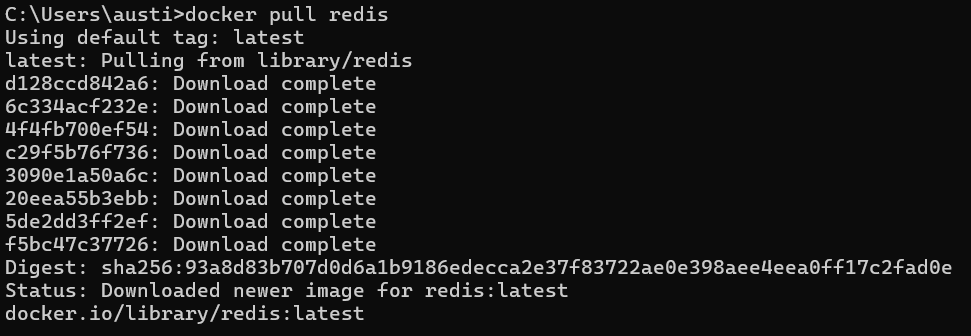
接下来启动一个新容器。
docker run --name my-redis -p 6379:6379 -d redisdocker pull redis 会下载最新的官方 Redis 镜像。docker run --name my-redis -p 6379:6379 -d redis 会启动一个名为 my-redis 的新容器。参数 -p 6379:6379 将本机的 6379 端口映射到容器的 6379 端口,因此您可以通过 localhost:6379 连接 Redis。-d 标志则以后台(分离)模式运行容器。
要验证,运行:
docker exec -it my-redis redis-cli ping
它应当返回 PONG。
对于 Windows 机器,另一种方式是使用 Windows 子系统进行安装。它将通过 Linux 进行安装。
wsl --install该命令会在 WSL 中安装并配置默认的 Ubuntu 发行版。如有需要,请重启。
随后,打开 Ubuntu 终端(从 Microsoft Store 或在 PowerShell 中输入 wsl)并运行:
sudo apt-get update
sudo apt-get install redis-server
接着,启动 Redis 服务器。
sudo service redis-server start让我们测试一下服务器是否已启动并运行。
redis-cli ping下面是上述命令的详细说明:
sudo apt-get update 获取最新的软件包定义。sudo apt-get install redis-server 在 Ubuntu 环境中安装 Redis。sudo service redis-server start 立即启动 Redis 服务。redis-cli ping 测试与本地 Redis 服务器的连通性,成功则返回 PONG。这些方案提供原生的 Windows 可执行文件。下载并安装或解压后,运行:
redis-server.exe启动后,redis-server.exe 应会打印日志,表明正在监听 127.0.0.1:6379。
您可以使用随附的 CLI(若提供)进行确认:
redis-cli.exe ping若成功,应能看到 PONG。
接着,您需要安装 redis-py 库,才能通过 Python 访问数据库。安装库之前,请确保已分别安装 Python 与 Redis。
pip install redis该命令会从 PyPI 下载并安装 Python 的 Redis 客户端库(redis-py)。如果您使用的是虚拟环境,请先激活后再运行此命令。
通过以下方式验证:
python -c "import redis; print(redis.__version__)"应当打印出版本号(例如,5.2.1)。
如果您按上述任一方法(Docker、WSL 或第三方构建)操作,现在应已有一个运行在 localhost:6379 的 Redis 服务器。这对于 Windows 上的本地开发已经足够。
下面的 Python 示例展示了如何连接并操作不同的 Redis 数据类型。每个代码块都包含解释性注释,说明方法或命令的工作机制。
import redis

# Instantiate a Redis client, connecting to localhost on port 6379
r = redis.Redis(
    host='localhost',
    port=6379,
    db=0  # The default Redis database index
)

# 1. SET command: store a string under 'mykey'
r.set("mykey", "hello from Windows")

# 2. GET command: retrieve the value stored at 'mykey'
value = r.get("mykey")
print(value)   # Output is b'hello from Windows', since redis-py returns bytes.

# 3. Convert bytes to string
print(value.decode())  # prints "hello from Windows"

# 4. DEL command: remove 'mykey' from Redis
r.delete("mykey")
我们创建了一个连接到本地 Redis 服务器的 Redis 对象。
r.set("mykey", "hello from Windows") 将字符串 "hello from Windows" 存储在键 "mykey" 下。r.get("mykey") 获取存储在 mykey 中的值。Redis 返回字节,因此我们进行解码以便人类可读输出。r.delete("mykey") 完全删除键 mykey。以下是一个用户会话管理的代码示例:
import uuid

def store_user_session(user_id):
    """
    Generates a unique session token (UUID) for a user and stores it in Redis.
    The session is stored under the key pattern: user:{user_id}:session
    """
    session_key = f"user:{user_id}:session"
    token = str(uuid.uuid4())   # Generate a random UUID as a session token
    r.set(session_key, token)   # Store token in Redis
    return token

def get_user_session(user_id):
    """
    Retrieves the stored session token for the given user_id.
    Returns None if the session does not exist or is expired.
    """
    session_key = f"user:{user_id}:session"
    token = r.get(session_key)
    return token.decode('utf-8') if token else None

def delete_user_session(user_id):
    """
    Deletes the session entry from Redis for the specified user_id.
    """
    session_key = f"user:{user_id}:session"
    r.delete(session_key)

# Usage demonstration
session_token = store_user_session(1001)
print(f"Stored session token: {session_token}")

retrieved_token = get_user_session(1001)
print(f"Retrieved session token: {retrieved_token}")

delete_user_session(1001)
print(f"Session after delete: {get_user_session(1001)}") # Should be None or emptystore_user_session(user_id):通过 uuid.uuid4() 创建全局唯一 ID,并将其存储在特定用户的键下。get_user_session(user_id):读回会话令牌。若为 None,则会话缺失或已过期。delete_user_session(user_id):从 Redis 中移除该会话键,相当于将用户登出。
Redis 列表是有序的字符串序列。它允许对两端进行操作,非常适合作为队列、栈或日志。
# LPUSH: Push an element to the head (left) of the list
r.lpush("task_queue", "task1")

# RPUSH: Push an element to the tail (right) of the list
r.rpush("task_queue", "task2")
r.rpush("task_queue", "task3")

# LPOP: Pop (remove and return) the element at the head
task = r.lpop("task_queue")
print(task)  # b'task1'

# Optional: RPOP removes and returns the element at the tail
task = r.rpop("task_queue")
print(task)  # b'task3'
lpush("task_queue", "task1") 将 "task1" 添加到名为 "task_queue" 的列表左侧。rpush("task_queue", "task2") 和 rpush("task_queue", "task3") 将任务添加到右侧。lpop("task_queue") and rpop("task_queue") 分别从列表两端移除并返回元素。
def enqueue_task(queue_name, task):
    """
    Appends a task to the end (right) of the Redis list named queue_name.
    """
    r.rpush(queue_name, task)

def dequeue_task(queue_name):
    """
    Removes a task from the front (left) of the Redis list named queue_name.
    Returns the task as a string, or None if the queue is empty.
    """
    task = r.lpop(queue_name)
    return task.decode('utf-8') if task else None

# Example usage:
enqueue_task("my_queue", "send_email")
enqueue_task("my_queue", "generate_report")

while True:
    task = dequeue_task("my_queue")
    if not task:
        print("No more tasks in queue.")
        break
    print(f"Processing task: {task}")
enqueue_task 始终将新任务添加到列表末尾,模拟传统的 FIFO 队列。dequeue_task 从队头移除任务。若列表为空,则返回 None。
该 while 循环会处理任务直至队列为空,然后停止。
哈希类似于 Python 的字典,但存储在 Redis 中。它最适合对相关字段进行分组(例如,用户详情)。
# HSET: Store 'name' and 'email' fields for a user hash key
r.hset("user:1001", "name", "Alice")
r.hset("user:1001", "email", "alice@example.com")

# HGET: Retrieve a single field from the hash
email = r.hget("user:1001", "email")
print(email.decode('utf-8'))  # alice@example.com

# HDEL: Remove a field from the hash
r.hdel("user:1001", "email")
hset("user:1001", "name", "Alice") 将哈希键 "user:1001" 中字段 "name" 的值设为 "Alice"。hget("user:1001", "email") 读取 "email" 字段。hdel("user:1001", "email") 从该哈希中删除 "email" 字段。
def create_user_profile(user_id, name, email):
    """
    Creates a user profile in Redis under the key 'user:{user_id}'.
    'name' and 'email' are stored as separate fields in the hash.
    """
    user_key = f"user:{user_id}"
    r.hset(user_key, mapping={"name": name, "email": email})

def get_user_profile(user_id):
    """
    Retrieves and returns all fields in the user profile hash
    as a Python dictionary. Keys and values are decoded from bytes.
    """
    user_key = f"user:{user_id}"
    profile_data = r.hgetall(user_key)
    return {k.decode('utf-8'): v.decode('utf-8') for k, v in profile_data.items()}

def delete_user_profile(user_id):
    """
    Deletes the entire user profile key from Redis.
    """
    user_key = f"user:{user_id}"
    r.delete(user_key)

# Usage demonstration
create_user_profile(1002, "Bob", "bob@example.com")
print(get_user_profile(1002))  # e.g. {'name': 'Bob', 'email': 'bob@example.com'}
delete_user_profile(1002)我们将用户的姓名与邮箱存入一个哈希中。mapping={"name": name, "email": email} 利用了 redis-py 一次设置多个字段的能力。r.hgetall(user_key) 会取回所有字段与值,返回为原始字节的字典,我们将其解码为字符串。delete_user_profile 则会移除整个哈希键。
在 Redis 中,可以使用集合或有序集合来管理数据。
集合是唯一值的集合,而有序集合是带有分数的键值对集合。这些数据结构提供了高效的数据存取方式,适用于需要快速查找的应用。
Redis 中的集合类似数学中的集合——包含一组唯一元素,不允许重复。集合可用于建模不同实体间的关系,例如点赞某条社交媒体帖子的用户。
以下是集合的演示:
# SADD: Add multiple members to a set
r.sadd("tags:python", "redis", "windows", "backend")

# SMEMBERS: Retrieve all unique members in the set
tags = r.smembers("tags:python")
print(tags)  # {b'redis', b'windows', b'backend'}
Redis 集合确保成员唯一。尝试添加重复成员将不会产生任何效果。
smembers 的结果是一个由字节组成的 Python 集合。
Redis 的有序集合与普通集合类似,但每个成员都带有一个对应的分数。这使得对集合进行高效排序和排名成为可能。
有序集合常用于排行榜,其中分数代表玩家的排名或积分。
以下是有序集合的演示:
# ZADD: Add members with scores
r.zadd("leaderboard", {"player1": 10, "player2": 20})

# ZRANGE: Retrieve members in ascending order of score
leaders = r.zrange("leaderboard", 0, -1, withscores=True)
print(leaders) # [(b'player1', 10.0), (b'player2', 20.0)]有序集合按照成员的数值分数维持特定顺序。zrange("leaderboard", 0, -1, withscores=True) 会返回从排名 0 到末尾的所有成员,并包含其分数。
有序集合对于管理标签或创建排行榜十分有用。
def add_tag(post_id, tag):
    """
    Adds a 'tag' to the set of tags belonging to a specific post.
    Each post has its own set under 'post:{post_id}:tags'.
    """
    r.sadd(f"post:{post_id}:tags", tag)

def get_tags(post_id):
    """
    Retrieves all tags for a specific post, decoding the bytes into strings.
    """
    raw_tags = r.smembers(f"post:{post_id}:tags")
    return {tag.decode('utf-8') for tag in raw_tags}

def update_leaderboard(player, score):
    """
    Updates or inserts a player's score in the 'game:leaderboard' sorted set.
    A higher score indicates a better position if sorting descending.
    """
    r.zadd("game:leaderboard", {player: score})

def get_leaderboard():
    """
    Returns an ascending list of (player, score) tuples from the leaderboard.
    To invert the sorting (highest first), you'd use ZREVRANGE.
    """
    entries = r.zrange("game:leaderboard", 0, -1, withscores=True)
    return [(player.decode('utf-8'), score) for player, score in entries]

# Usage demonstration
add_tag(123, "python")
add_tag(123, "redis")
print(get_tags(123))

update_leaderboard("Alice", 300)
update_leaderboard("Bob", 450)
print(get_leaderboard())
add_tag 与 get_tags 演示了一对多的标签系统,将标签存储在集合中。update_leaderboard 与 get_leaderboard 展示了如何实现游戏排行榜。
Redis 具备多项特性,使其成为 Python 应用中的热门数据存储选择:队列、加锁与缓存。
下面是它们在 Python 中的实现:
让我们使用 BLPOP 探索带阻塞的 Redis 队列。
BLPOP 是一个阻塞操作,会一直等待直到列表中有元素可用。
def blocking_consumer(queue_name):
    """
    Continuously listens to the specified queue (Redis list) using BLPOP,
    which blocks until new items are pushed. Once an item arrives,
    it is removed from the queue and processed.
    """
    print(f"Waiting on queue: {queue_name}")
    while True:
        result = r.blpop(queue_name)
        if result:
            list_name, task_bytes = result
            task = task_bytes.decode('utf-8')
            print(f"Received task: {task}")
        else:
            print("Queue is empty or an error occurred.")
            break

def enqueue_task(queue_name, task):
    """
    Pushes a task to the end of a Redis list (queue).
    """
    r.rpush(queue_name, task)

# Example usage:
enqueue_task("blocking_queue", "task_block_1")
enqueue_task("blocking_queue", "task_block_2")

# In a real application, the consumer might run in a separate thread or process
blocking_consumer("blocking_queue")
blocking_consumer 在循环中使用 blpop。若列表为空,blpop 会等待,直到有新元素被推入。
一旦收到元素,它会从列表中移除并打印。
此方法非常适合生产者-消费者模式,在任务出现时由工作线程消费。
分布式锁可防止多个客户端或进程同时修改同一资源。Redis 能帮助在分布式环境中避免竞争条件。
import time
from redis.exceptions import LockError

def process_critical_section():
    """
    Acquires a lock named 'resource_lock' with a timeout of 10 seconds.
    The lock automatically expires after 10 seconds to prevent deadlocks.
    """
    lock = r.lock("resource_lock", timeout=10)
    try:
        # Attempt to acquire the lock, wait for up to 5 seconds if another process holds it
        acquired = lock.acquire(blocking=True, blocking_timeout=5)
        if acquired:
            print("Lock acquired; performing critical operation...")
            time.sleep(3)  # Simulate some operation
        else:
            print("Failed to acquire lock within 5 seconds.")
    except LockError:
        print("A LockError occurred, possibly releasing already released lock.")
    finally:
        # Always release the lock in a finally block to ensure cleanup
        lock.release()
        print("Lock released.")

# Usage demonstration
process_critical_section()
我们创建了一个 timeout=10 的锁,这意味着如果未手动释放,Redis 将在 10 秒后自动移除该锁,以防止无限期阻塞(死锁)。lock.acquire(blocking=True, blocking_timeout=5) 会尝试在 5 秒内获取锁,超时则放弃。完成后,lock.release() 释放资源,供其他进程使用。
缓存是常见场景:将频繁访问的数据存入内存,减少对数据库或外部 API 的压力。
import requests
import json

def get_user_data(user_id):
    """
    Retrieves user data from a hypothetical API endpoint.
    If the data is found in Redis (cache), use that. Otherwise, call the API,
    store the response in Redis with a 60-second expiration, and return it.
    """
    cache_key = f"user_data:{user_id}"
    cached_data = r.get(cache_key)
    if cached_data:
        print("Cache hit!")
        return json.loads(cached_data)

    print("Cache miss. Fetching from API...")
    response = requests.get(f"https://api.example.com/users/{user_id}")
    user_info = response.json()

    # Store in Redis for 60 seconds
    r.setex(cache_key, 60, json.dumps(user_info))
    return user_info

# Usage
user = get_user_data(42)  # First call => cache miss
user_again = get_user_data(42)  # Subsequent call => cache hit
我们检查 user_data:{user_id} 是否存在于 Redis 中。若存在,则为缓存命中,跳过 API 调用;若不存在,则从远程 API 获取数据,然后使用 setex(设置 + 过期)将其缓存 60 秒。在此期间的后续调用将直接使用缓存数据,从而降低延迟。
觉得已经掌握 Redis 了?我们再来看看一些更进阶的话题。
发布/订阅是一种用于实时通信的常见消息模式。发布者向频道发送消息,所有订阅该频道的订阅者都会收到消息。
import threading

def subscriber(r, channel_name):
    """
    Subscribes to the given Redis channel and listens for messages.
    When a new message is published on that channel, it is printed.
    """
    pubsub = r.pubsub()
    pubsub.subscribe(channel_name)
    print(f"Subscribed to {channel_name}")

    # pubsub.listen() yields messages from the subscribed channel(s) in real time
    for message in pubsub.listen():
        if message['type'] == 'message':
            print(f"Received message: {message['data'].decode('utf-8')}")

def publisher(r, channel_name, message):
    """
    Publishes a message to the specified Redis channel.
    All subscribers to this channel immediately receive the message.
    """
    r.publish(channel_name, message)

# Example usage
channel = "updates"

# Start subscriber in a separate thread to avoid blocking the main thread
sub_thread = threading.Thread(target=subscriber, args=(r, channel))
sub_thread.start()

# Publish messages
publisher(r, channel, "Hello from Windows!")
publisher(r, channel, "Another update!")
pubsub = r.pubsub() 创建一个 PubSub 对象。pubsub.subscribe(channel_name) 指示 Redis 将该频道的消息发送至该对象。pubsub.listen() 是一个无限迭代器,会在消息到达时逐条返回。r.publish(channel_name, message) 会将消息发送给所有订阅了 channel_name 的订阅者。
Redis 支持生存时间(TTL)。这对会话或短期缓存等临时数据至关重要。
# EXPIRE: Set a 30-second expiration on a key
r.set("temp_key", "some value")
r.expire("temp_key", 30)

# SETEX: Combined set + expire in one command
r.setex("temp_key2", 60, "another value")
r.expire("temp_key", 30) 将 TTL 设为 30 秒。30 秒后,temp_key 会被自动删除。r.setex("temp_key2", 60, "another value") 则是一次性设置键与过期时间的快捷方式。
以下示例展示了如何使用带过期时间的键,让会话在指定时长后失效。
def store_session_with_expiry(user_id, token, ttl=3600):
    """
    Stores a session token for a specific user with a time-to-live (TTL).
    By default, the session expires after 1 hour (3600 seconds).
    """
    session_key = f"user:{user_id}:session"
    r.setex(session_key, ttl, token)

def get_session_with_expiry(user_id):
    """
    Retrieves the session token for the user. Returns None if the key doesn't exist
    or if it has expired.
    """
    session_key = f"user:{user_id}:session"
    token = r.get(session_key)
    return token.decode('utf-8') if token else None

# Usage
store_session_with_expiry(2001, "session_token_abc", 3600)
retrieved_token = get_session_with_expiry(2001)
print(f"Retrieved token: {retrieved_token}")
store_session_with_expiry 底层使用 setex 将 user:{user_id}:session 存储为带 TTL 的键。若不传 TTL,键可能会一直存在。
当 TTL 到期,Redis 会自动移除该键,届时将无法再检索会话。
使用 Redis 需要一些考量与最佳实践,以确保最佳性能并避免常见陷阱。
需要牢记的一些建议包括:
Redis 是用于管理 Python 应用中数据的强大而多功能的工具。将 Python 与 Redis 结合可带来诸多应用与用例,从数据缓存到队列管理等。
想进一步了解 Redis?我们的NoSQL 入门课程可帮助您学习如何处理键值数据。对 Python 更感兴趣?那么我们的Python 数据基础技能路径也许是最佳起点。
DataCamp 热门课程
课程
学习路径
实践并学习路径你的进步。
使用 Google 继续