

课程
理解 Prompt Engineering
1 小时
239.8K
实践并学习路径你的进步。
使用 Google 继续在本教程中,我将演示如何使用 BytePlus Ark API 通过 Python 与 Seedance 2 进行交互。
Seedance 2 是字节跳动推出的一款强大的生成式 AI 模型,充当“多模态导演”,可以同时处理文本、图像、视频和音频输入,生成带有同步音频的电影级视频序列。无论您是想让静态图像动起来,还是让复杂文本提示变为现实,本指南都会带您完成从搭建到实现的全过程。
首先,我们需要创建 BytePlus 账户并获取 API 密钥。步骤如下:
该密钥用于向 ModelArk(其官方 API)发起请求。
最佳实践是将密钥保存在与 Python 脚本同一文件夹中的 .env 文件里。请务必妥善保管该密钥,因为任何人只要获得它就可以使用您的账户访问 API。
将 API 密钥按以下格式粘贴到 .env 文件中:
ARK_API_KEY=<paste_api_key_here>要使用 Seedance 2,我们需要先激活该模型:
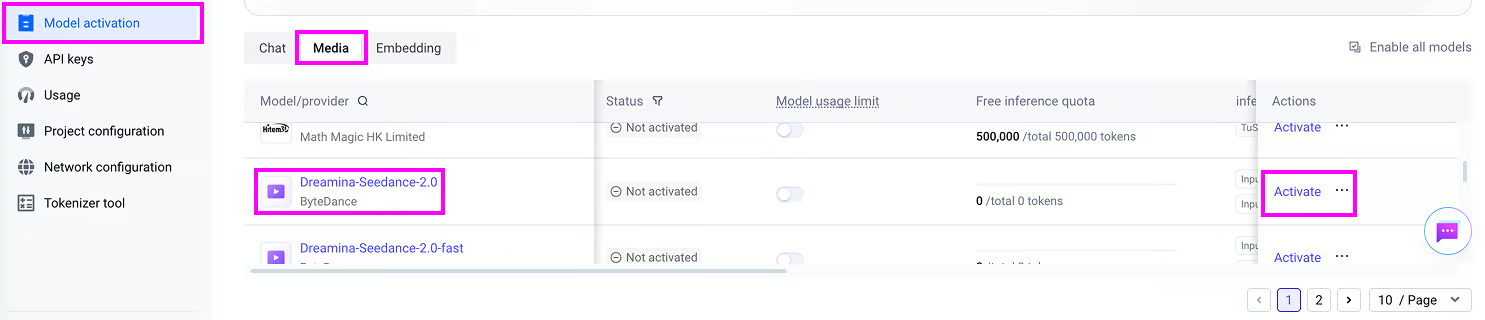
请注意,使用 API 并非免费,激活 Seedance 2 需要为该模型购买代币额度。本文中,我为 Seedance 2 购买了一个 700 万代币包,价格为 $30.10。
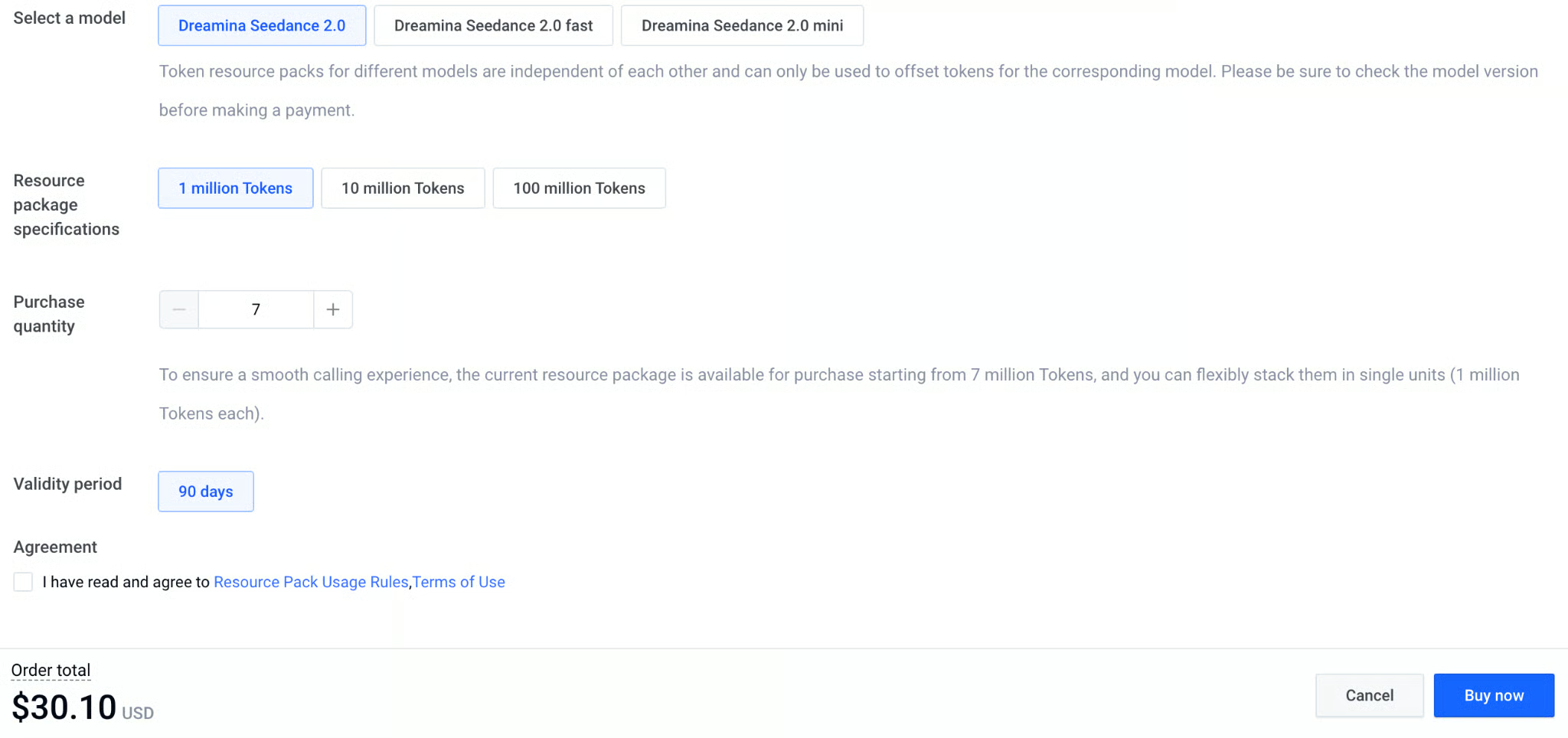
遗憾的是,代币与模型版本绑定。这意味着如果我们为 Seedance 2 的 fast 或 mini 版本购买了代币,将无法用于基础模型。
下面的表格展示了 API 的定价方案:

我已将本教程中涉及的完整脚本汇总在这个 GitHub 仓库中。
本节我们将学习如何发起一次文生视频请求来生成如下视频:
要通过 Python 连接 BytePlus Ark API,我们将使用官方的 byteplus-python-sdk-v2 包。
为本项目安装依赖的最简便方式是创建一个 Anaconda 环境并安装requirements.txt 文件,如下所示:
git clone git@github.com:fran-aubry/seedance2-tutorial.git
conda create --name seedance2 python=3.11
conda activate seedance2
pip install -r requirements.txt在我们之前创建 .env 的同一文件夹中新建一个名为 text_to_video.py 的脚本。
首先,导入必要的包:
import os
from byteplussdkarkruntime import Ark
from dotenv import load_dotenv
接下来,使用 load_dotenv() 函数从 .env 文件加载 API 密钥:
load_dotenv()
API_KEY = os.getenv("ARK_API_KEY")
现在初始化 Ark 客户端,以便我们向 BytePlus Ark API 发起请求。
我们使用 os 库从环境变量获取 API 密钥,并设置适用于国际 API 访问的 base URL:
client = Ark(
    api_key=os.getenv("ARK_API_KEY"),
    base_url="https://ark.ap-southeast.bytepluses.com/api/v3"
)
最后,我们设置提示词,并调用客户端的 content_generation.tasks.create() 函数生成视频:
prompt = """
A cinematic close-up of a weary but hopeful female astronaut inside a dimly lit, dusty spaceship cabin.
Soft blue light illuminates her face.
She takes a deep breath, showing subtle emotional relief, looks directly into the camera, and says:
'We finally made it. The atmosphere is stable.'
The ambient sound of a low, rhythmic spaceship engine hums in the background.
"""
response = client.content_generation.tasks.create(
    model="dreamina-seedance-2-0-260128",
    content=[
        {
            "type": "text",
            "text": prompt,
        }
    ],
    generate_audio=True,
    ratio="16:9",
    duration=8,
    watermark=True,
    resolution="480p",
)
task_id = response.id
print(f"Task successfully submitted! Task ID: {task_id}")
提交生成视频的请求后,我们不会立刻拿到视频,因为生成需要一定时间。
这意味着 response 变量并不是视频本身。
相反,它是一个对象,包含有关视频生成任务的信息。
其中包含任务标识符,便于我们跟踪视频生成进度,并在模型完成后下载视频。
我们可以将任务标识符提供给 content_generation.tasks.get() 函数来获取任务状态,如下所示:
task = client.content_generation.tasks.get(task_id=task_id)
status = task.status
print(f"Status: {status}")
为便于跟踪视频进度,我们在同一文件夹中新建脚本 utils.py,添加如下函数,给定客户端实例和任务标识符即可跟踪视频进度:
import time
import requests

def poll_task(client, task_id, poll_interval=5):
    while True:
        try:
            task_status = client.content_generation.tasks.get(task_id=task_id)
            status = getattr(task_status, "status", None) or (task_status.get("status") if isinstance(task_status, dict) else None)

            if status == "succeeded":
                print("\nTask completed successfully.")
                return task_status.content.video_url

            elif status == "failed":
                error_details = getattr(task_status, "error", "Unknown error occurred during processing.")
                raise RuntimeError(f"Task failed: {error_details}")

            print(".", end="", flush=True)
            time.sleep(poll_interval)
        except Exception as e:
            if isinstance(e, RuntimeError):
                raise
            print(f"\nWarning: Error polling task (will retry): {e}")
time.sleep(poll_interval)poll_task() 函数会返回视频
既然我们已经能跟踪视频生成过程,接下来只需在生成完成后将其下载即可。
由于 BytePlus Ark API 会在任务响应中返回生成视频文件的直链 URL,我们可以使用 requests 库进行下载。
下面是一个实现该功能的函数:
def download_video(url, output_path = "video.mp4"):
    try:
        print(f"Downloading video from {url} to {output_path}...")
        response = requests.get(url, stream=True)
        response.raise_for_status()

        with open(output_path, 'wb') as f:
            for chunk in response.iter_content(chunk_size=8192):
                f.write(chunk)
        print(f"Video successfully downloaded to '{output_path}'")
        return True
    except Exception as e:
        print(f"Error downloading video: {e}")
return False将上述内容整合在一起,下面给出使用 Seedance 2 根据文本提示生成视频的完整脚本:
import os
from byteplussdkarkruntime import Ark
from dotenv import load_dotenv
import utils

load_dotenv()
API_KEY = os.getenv("ARK_API_KEY")

client = Ark(
    api_key=os.getenv("ARK_API_KEY"),
    base_url="https://ark.ap-southeast.bytepluses.com/api/v3"
)

prompt = """
A cinematic close-up of a weary but hopeful female astronaut inside a dimly lit, dusty spaceship cabin.
Soft blue light illuminates her face.
She takes a deep breath, showing subtle emotional relief, looks directly into the camera, and says:
'We finally made it. The atmosphere is stable.'
The ambient sound of a low, rhythmic spaceship engine hums in the background.
"""

response = client.content_generation.tasks.create(
    model="dreamina-seedance-2-0-260128",
    content=[
        {
            "type": "text",
            "text": prompt,
        }
    ],
    generate_audio=True,
    ratio="16:9",
    duration=8,
    watermark=True,
    resolution="480p",
)

task_id = response.id
print(f"Task successfully submitted! Task ID: {task_id}")

# Wait for the video to finish generating
video_url = utils.poll_task(client, task_id)

utils.download_video(video_url, "./videos/space.mp4")下面列出了视频生成请求的核心参数及可选值:
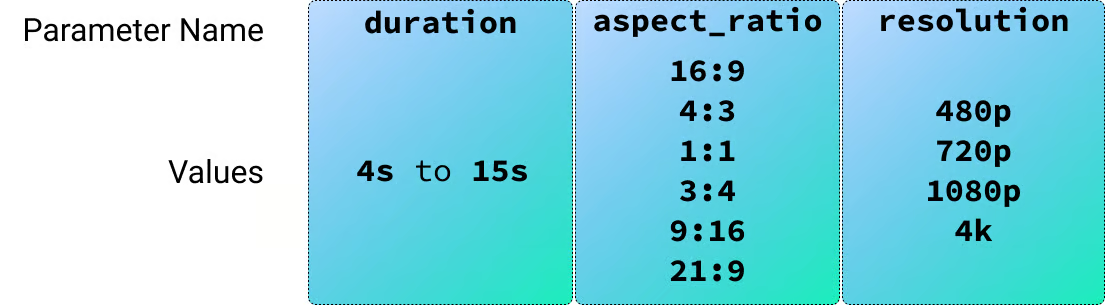
上一节我们学习了如何使用文本提示生成视频。Seedance 2 还支持图像、视频和音频输入,我们先从图像开始。
为了测试图像输入,我用 AI 生成了两个角色,准备用于一段情景喜剧式的场景。

我们可以在请求的 content 字段中添加图像引用,方法如下:
response = client.content_generation.tasks.create(
    model="dreamina-seedance-2-0-260128",
    content=[
        {
            "type": "text",
            "text": prompt,
        },
        {
            "type": "image_url",
            "image_url": {
                "url": utils.load_image("./images/male-character.png")
            },
            "role": "reference_image"
        },
        {
            "type": "image_url",
            "image_url": {
                "url": utils.load_image("./images/female-character.png")
            },
            "role": "reference_image"
        }
    ],
    generate_audio=True,
    ratio="16:9",
    duration=15,
    watermark=True,
    resolution="480p",
)
对于该视频,我使用了如下提示词:
Context: A cozy, warmly lit independent coffee shop counter with wooden accents.
Reference:
- The male barista's face and clothing follow @Image1.
- The female customer's face and styling follow @Image2.

Action & Dialogue (10 Seconds Total):

0:00 - 0:04:
Medium close-up on the male barista (@Image1) standing behind the counter,
next to the coffee machine. He leans across the counter with a smooth,
flirtatious smirk, acting like he is making a highly exclusive offer:
"The WiFi password? It's actually my phone number: five-five-five, zero-one—"

0:04 - 0:07:
Camera cuts to the female customer (@Image2), instantly interrupting him.
She holds up her phone screen toward him, entirely unimpressed:
"Your network is called 'Free_Guest_WiFi' and there is literally no password."

0:07 - 0:08: Quick cut back to the two-shot.
Flustered, the barista becomes visibly embarrassed, his confident smirk
instantly vanishing as he nervously breaks eye contact.

0:08 - 0:10: Camera cuts back to a medium shot of the female customer (@Image2).
She lowers her phone, tapping her fingers lightly on the counter,
and delivers her order with perfect deadpan clarity:
"It will be an espresso please. No milk, no sugar, and no phone number."

Framing/Timing:
Clean cuts to perfectly pace the comedic timing over exactly 10 seconds.

Tone/Audio:
Lighthearted sitcom vibe. Synchronized voice generation for the dialogue, a subtle low cafe background hum, and the sound of the customer's fingers lightly tapping the wooden counter at the end.
请注意,提示词使用 @Image1 和 @Image2 按照列表中提供的顺序引用图像。
不过,当我尝试生成该视频时,遇到了如下错误:
The request failed because the input image may contain a real person.我发现,只要参考图像中包含真实感很强的人脸(即便是 AI 生成的),在使用 Seedance 2 时就会稳定地触发这个问题。
为了解决这个问题,我把角色转换为卡通形象后再次尝试。

这一次运转良好,效果也达到了我想要的呈现。
此示例的完整代码见image_to_video.py 文件。
上一个示例展示了如何通过在请求中设置 ”role”: “reference_image” 将图像作为参考使用。
Seedance 2 还支持另外两种图像角色:
”first_frame”:指示模型将提供的图像用作生成视频的精确起始帧。这是直接图生视频的常用设置。”last_frame”:指示模型以该图像作为视频的结束帧。注意:仅当同一请求中也提供了 first_frame 时才能使用此项,即让模型在两张图像之间进行插值。我通过生成一系列首帧进行测试,内容是一个机器人 AI 实验室在一个自然生命已消失的世界里尝试重现植物。
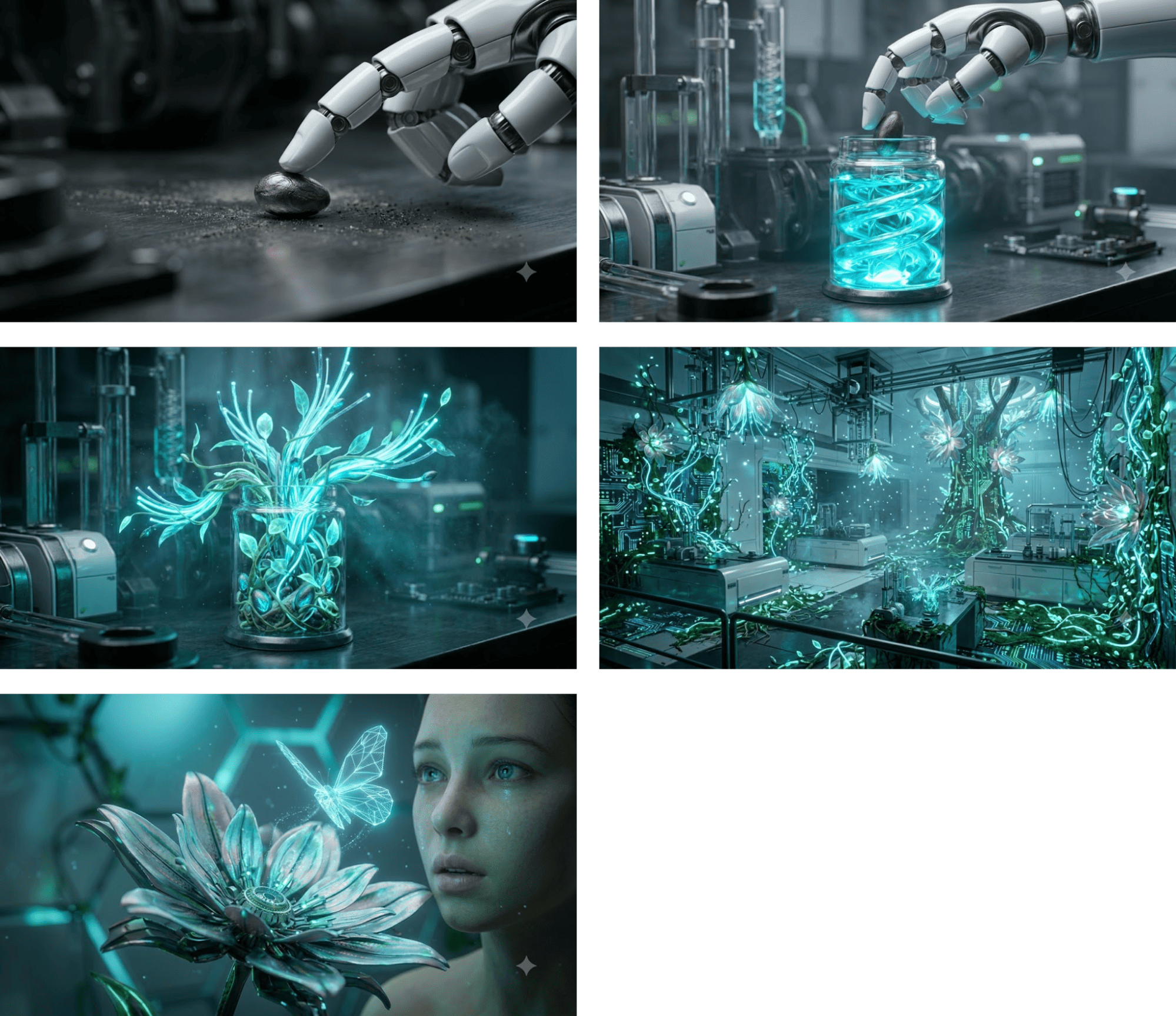
针对每一帧,我都以该帧为首帧生成一个视频。请求结构如下:
response = client.content_generation.tasks.create(
    model="dreamina-seedance-2-0-260128",
    content=[
        {
            "type": "text",
            "text": prompt,
        },
        {
            "type": "image_url",
            "image_url": {
                "url": utils.load_image("./images/robot-lab1.jpeg")
            },
            "role": "first_frame"
        }
    ],
    generate_audio=False,
    ratio="16:9",
    duration=4,
    watermark=True,
    resolution="480p",
)
我未生成音频,因为各段视频是分别生成的,音频无法保持一致。下面是将五段剪辑拼接后的效果:
用于基于首帧生成视频的完整脚本见此处。
last_frame 进行图像插值在这个例子中,我们同时提供 first_frame 和 last_frame,以在两者之间生成一段视频。
我生成了同一房间的两张图,一张是空房间(无家具),另一张是已完全布置好的房间。目标是生成一个展示房间逐步布置完成的动画视频。
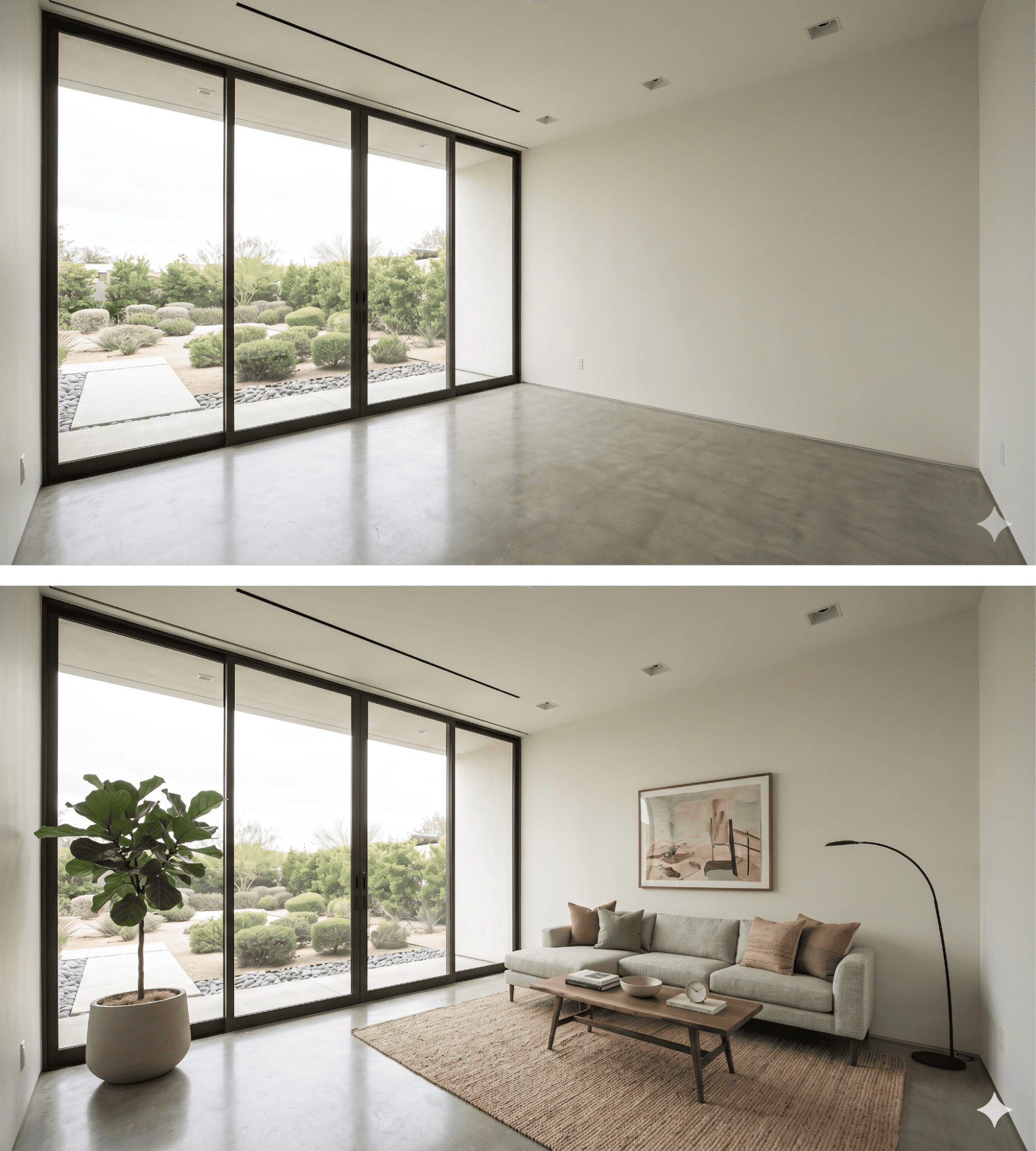
我使用的提示词描述了希望家具在视频中的出现方式:
A dynamic, fast-paced sequence where furniture pops into existence piece by piece. First, a rug rapidly unfolds itself, then the sofa drops from just above the floor with a heavy, realistic bounce. Lamps, artwork, and plants quickly spring into reality one after another. Vibrant lighting, photorealistic materials, lively and snappy energetic rhythm.请求如下:
response = client.content_generation.tasks.create(
    model="dreamina-seedance-2-0-260128",
    content=[
        {
            "type": "text",
            "text": prompt,
        },
        {
            "type": "image_url",
            "image_url": {
                "url": utils.load_image("./images/room-start.png")
            },
            "role": "first_frame"
        },
        {
            "type": "image_url",
            "image_url": {
                "url": utils.load_image("./images/room-end.png")
            },
            "role": "last_frame"
        }
    ],
    generate_audio=True,
    ratio="16:9",
    duration=8,
    watermark=True,
    resolution="480p",
)
效果如下:
为生成该效果,我使用了如下请求:
response = client.content_generation.tasks.create(
    model="dreamina-seedance-2-0-260128",
    content=[
        {
            "type": "text",
            "text": prompt,
        },
        {
            "type": "video_url",
            "video_url": {
                "url": "https://www.pexels.com/download/video/38213009/"
            },
            "role": "reference_video"
        }
    ],
    generate_audio=True,
    ratio="16:9",
    duration=6,
    watermark=True,
    resolution="480p",
)完整脚本见此处。我使用的提示词为:
The original skater, environment, and camera movement must remain
unchanged and untouched.

Only add gaming-style visual effects: intense glowing sparks and electric arcs
streaming from the skateboard-rail contact point during the grind, and a
brilliant energy shockwaves and dust burst at the jump/pop. 为测试音频输入,我为一个角色生成了一张图像,并使用Fish Audio 生成了带有不同情绪的音轨。

在音频上,我希望包含几种不同的情绪,以观察 Seedance 2 在生成视频时能否识别这些情绪。
Fish Audio AI 允许我们在提示词中用 [emotion] 指定情绪,非常契合本次需求。以下是我使用的音频提示词:
[sighing] Nothing much is happening today. [surprised] Wait a minute... what are those on my ears?[laughing] Oh my gosh, I can't believe I got piercings last night! [angry] But hold on, I specifically told you not to let me do it!为加载音频文件,我在 utils.py 中添加了如下函数:
def load_audio(file_path):
    if not os.path.exists(file_path):
        raise FileNotFoundError(f"Audio file not found at: {file_path}")

    # Guess the mime type (e.g., audio/mpeg for mp3, audio/wav for wav)
    mime_type, _ = mimetypes.guess_type(file_path)
    if mime_type is None:
        mime_type = "audio/mpeg" # Fallback to mp3 just in case

    with open(file_path, "rb") as audio_file:
        encoded_string = base64.b64encode(audio_file.read()).decode('utf-8')

    return f"data:{mime_type};base64,{encoded_string}"
向模型提供音频的方式与图像非常相似。
我们将音频加载为 base64 数据 URI,并在 contents 参数中提交给模型,如下所示:
response = client.content_generation.tasks.create(
    model="dreamina-seedance-2-0-260128",
    content=[
        {
            "type": "text",
            "text": prompt,
        },
        {
            "type": "image_url",
            "image_url": {
                "url": utils.load_image("./images/cat.png")
            },
            "role": "reference_image"
        },
        {
            "type": "audio_url",
            "audio_url": {
                "url": utils.load_audio("./audio/voice.mp3")
            },
            "role": "reference_audio"
        }
    ],
    ratio="16:9",
    duration=11,
    watermark=True,
    resolution="480p",
)
这是 Seedance 2 生成的视频:
Top DataCamp Courses
课程
课程
实践并学习路径你的进步。
使用 Google 继续