Cursus
Prompt Engineering begrijpen
1 uur
239.8K
Oefen en volg je voortgang.
Ga Verder Met GoogleIn deze tutorial laat ik zien hoe je met de BytePlus Ark API Seedance 2 aanstuurt met Python.
Seedance 2 is een krachtig generatief AI-model van ByteDance dat fungeert als een "multimodale regisseur". Het kan tekst-, beeld-, video- en audio-inputs tegelijk verwerken om filmische videosequenties met gesynchroniseerd geluid te maken. Of je nu statische afbeeldingen wilt animeren of complexe tekstprompts tot leven wilt brengen, deze gids loodst je door de setup en implementatie.
Om te beginnen maken we een BytePlus-account en een API-sleutel. Doe dit als volgt:
Deze sleutel wordt gebruikt om verzoeken te doen naar de ModelArk API, hun officiële API.
De beste praktijk is om de sleutel op te slaan in een bestand met de naam .env in dezelfde map als je Python-scripts. Houd de sleutel geheim, want iedereen kan ermee de API gebruiken via jouw account.
Plak de API-sleutel in het .env-bestand in het volgende formaat:
ARK_API_KEY=<paste_api_key_here>Om Seedance 2 te kunnen gebruiken, moeten we het model eerst activeren:
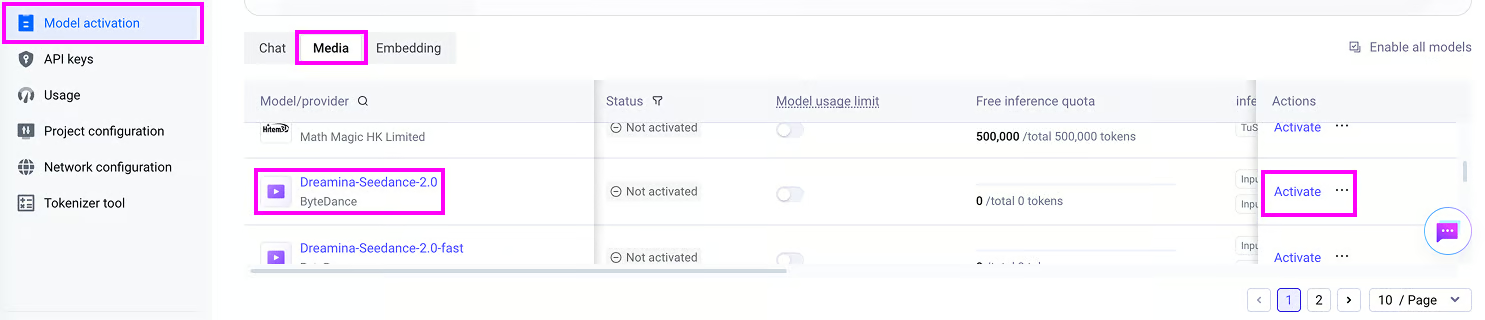
Let op: het gebruik van de API is niet gratis en het activeren van Seedance 2 vereist het kopen van tegoeden voor het model. Voor dit artikel kocht ik een pakket van 7 miljoen tokens voor Seedance 2 voor $30,10.
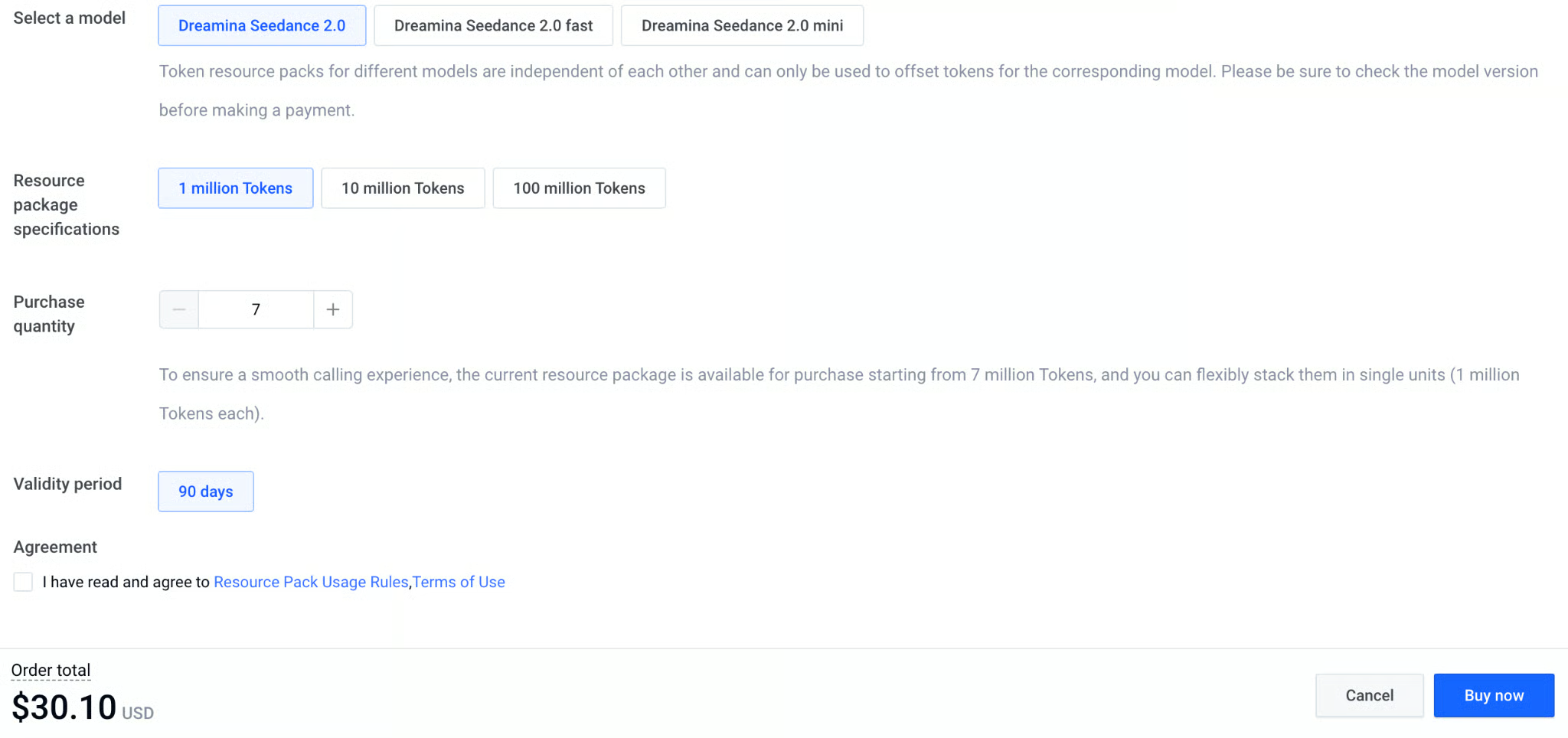
Helaas zijn de tokens modelspecifiek. Dat betekent dat als we tokens kopen voor de fast- of mini-versies van Seedance 2, we die niet met het basismodel kunnen gebruiken.
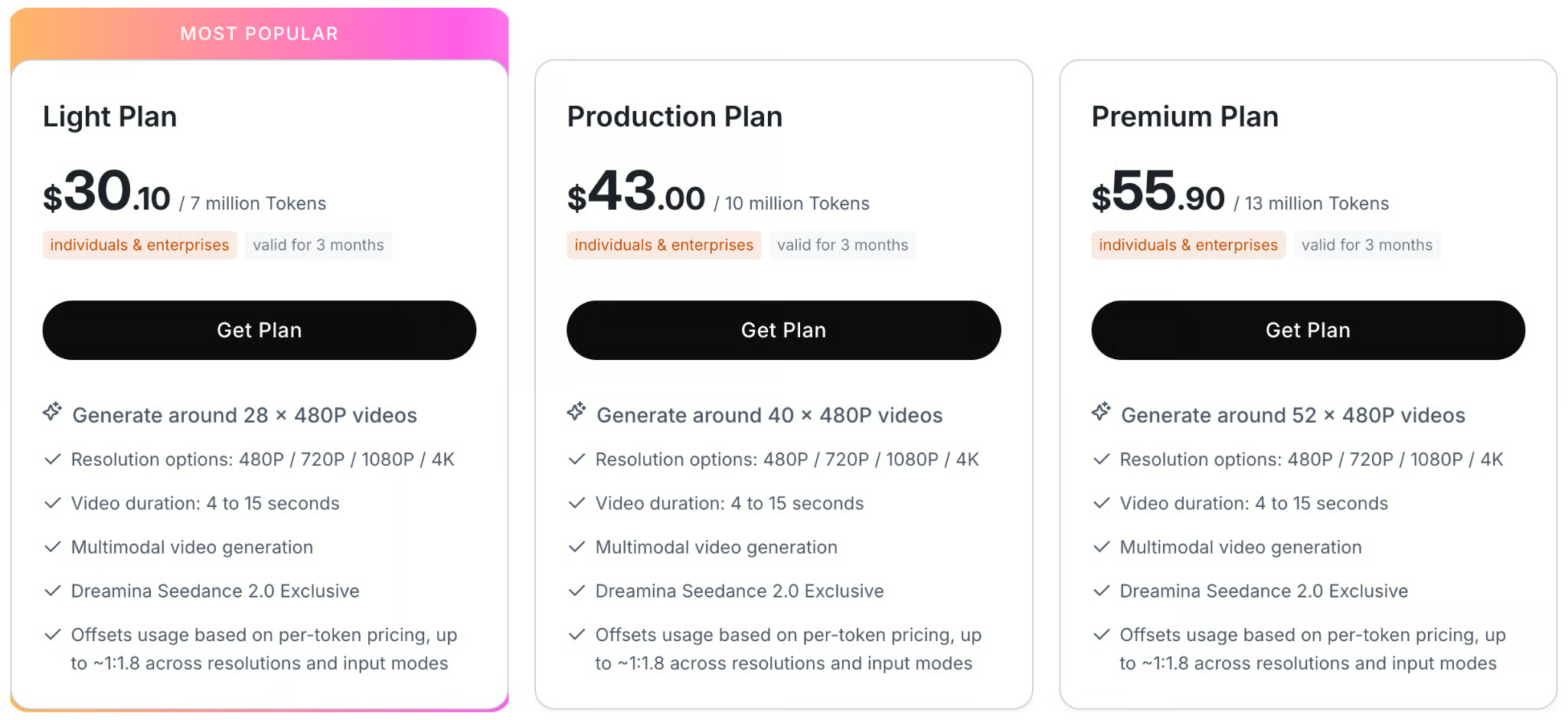
Hieronder staat een tabel met de prijsplannen voor de API:
Ik heb de volledige scripts die bij de code in deze tutorial horen toegevoegd in deze GitHub-repo.
In deze sectie leren we hoe je een text-to-video-verzoek doet om deze video te genereren:
Om met Python verbinding te maken met de BytePlus Ark API gebruiken we het officiële pakket byteplus-python-sdk-v2.
De makkelijkste manier om de afhankelijkheden voor dit project te installeren is een Anaconda-omgeving aan te maken en het bestand requirements.txt te installeren, als volgt:
git clone git@github.com:fran-aubry/seedance2-tutorial.git
conda create --name seedance2 python=3.11
conda activate seedance2
pip install -r requirements.txtMaak een nieuw script genaamd text_to_video.py in dezelfde map als het .env-bestand dat we eerder maakten.
Als eerste importeren we de benodigde packages:
import os
from byteplussdkarkruntime import Ark
from dotenv import load_dotenv
Vervolgens laden we de API-sleutel uit het .env-bestand met de functie load_dotenv():
load_dotenv()
API_KEY = os.getenv("ARK_API_KEY")
Nu initialiseren we de Ark-client, waarmee we verzoeken kunnen doen aan de BytePlus Ark API.
We gebruiken de os-bibliotheek om de API-sleutel uit de omgevingsvariabelen te halen en stellen de juiste basis-URL in voor internationale API-toegang:
client = Ark(
    api_key=os.getenv("ARK_API_KEY"),
    base_url="https://ark.ap-southeast.bytepluses.com/api/v3"
)
Tot slot stellen we een prompt in en gebruiken we de functie content_generation.tasks.create() van de client om de video te genereren:
prompt = """
A cinematic close-up of a weary but hopeful female astronaut inside a dimly lit, dusty spaceship cabin.
Soft blue light illuminates her face.
She takes a deep breath, showing subtle emotional relief, looks directly into the camera, and says:
'We finally made it. The atmosphere is stable.'
The ambient sound of a low, rhythmic spaceship engine hums in the background.
"""
response = client.content_generation.tasks.create(
    model="dreamina-seedance-2-0-260128",
    content=[
        {
            "type": "text",
            "text": prompt,
        }
    ],
    generate_audio=True,
    ratio="16:9",
    duration=8,
    watermark=True,
    resolution="480p",
)
task_id = response.id
print(f"Task successfully submitted! Task ID: {task_id}")
Na het verzoek om een video te genereren krijgen we niet meteen een video, omdat het genereren even duurt.
Dit betekent dat de variabele response niet de video zelf is.
In plaats daarvan is het een object dat informatie bevat over de videogeneratietaak.
In het bijzonder bevat het de taak-ID, waarmee we de voortgang van de videogeneratie kunnen volgen en de video kunnen downloaden zodra het model klaar is.
We kunnen de status van een taak opvragen door de taak-ID door te geven aan de functie content_generation.tasks.get(), zoals hieronder:
task = client.content_generation.tasks.get(task_id=task_id)
status = task.status
print(f"Status: {status}")
Om het volgen van de videovoortgang makkelijker te maken, maken we een nieuw script utils.py in dezelfde map en voegen we deze functie toe die de videovoortgang bijhoudt op basis van de clientinstantie en taak-ID:
import time
import requests

def poll_task(client, task_id, poll_interval=5):
    while True:
        try:
            task_status = client.content_generation.tasks.get(task_id=task_id)
            status = getattr(task_status, "status", None) or (task_status.get("status") if isinstance(task_status, dict) else None)

            if status == "succeeded":
                print("\nTask completed successfully.")
                return task_status.content.video_url

            elif status == "failed":
                error_details = getattr(task_status, "error", "Unknown error occurred during processing.")
                raise RuntimeError(f"Task failed: {error_details}")

            print(".", end="", flush=True)
            time.sleep(poll_interval)
        except Exception as e:
            if isinstance(e, RuntimeError):
                raise
            print(f"\nWarning: Error polling task (will retry): {e}")
time.sleep(poll_interval)De functie poll_task() die we hierboven implementeerden retourneert de video
Nu we de voortgang van het genereren kunnen volgen, hebben we alleen nog een manier nodig om de video te downloaden zodra deze klaar is.
Omdat de BytePlus Ark API in het taakresultaat een directe URL naar het videobestand teruggeeft, kunnen we deze downloaden met de requests-bibliotheek.
Hier is een functie die dat doet:
def download_video(url, output_path = "video.mp4"):
    try:
        print(f"Downloading video from {url} to {output_path}...")
        response = requests.get(url, stream=True)
        response.raise_for_status()

        with open(output_path, 'wb') as f:
            for chunk in response.iter_content(chunk_size=8192):
                f.write(chunk)
        print(f"Video successfully downloaded to '{output_path}'")
        return True
    except Exception as e:
        print(f"Error downloading video: {e}")
return FalseAlles samenvoegen levert het volgende volledige script op om een video te genereren uit een tekstprompt met Seedance 2:
import os
from byteplussdkarkruntime import Ark
from dotenv import load_dotenv
import utils

load_dotenv()
API_KEY = os.getenv("ARK_API_KEY")

client = Ark(
    api_key=os.getenv("ARK_API_KEY"),
    base_url="https://ark.ap-southeast.bytepluses.com/api/v3"
)

prompt = """
A cinematic close-up of a weary but hopeful female astronaut inside a dimly lit, dusty spaceship cabin.
Soft blue light illuminates her face.
She takes a deep breath, showing subtle emotional relief, looks directly into the camera, and says:
'We finally made it. The atmosphere is stable.'
The ambient sound of a low, rhythmic spaceship engine hums in the background.
"""

response = client.content_generation.tasks.create(
    model="dreamina-seedance-2-0-260128",
    content=[
        {
            "type": "text",
            "text": prompt,
        }
    ],
    generate_audio=True,
    ratio="16:9",
    duration=8,
    watermark=True,
    resolution="480p",
)

task_id = response.id
print(f"Task successfully submitted! Task ID: {task_id}")

# Wait for the video to finish generating
video_url = utils.poll_task(client, task_id)

utils.download_video(video_url, "./videos/space.mp4")Hieronder vind je een lijst met geaccepteerde waarden voor de kernparameters van een videogeneratieverzoek:
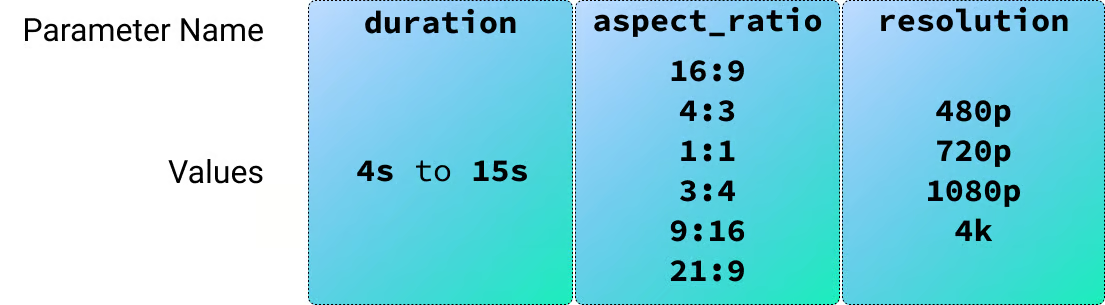
In de vorige sectie leerden we hoe je een video genereert met een tekstprompt. Seedance 2 ondersteunt ook beeld-, video- en audio-inputs, dus beginnen we met afbeeldingen.
Om beeldinputs te testen heb ik twee personages met AI gegenereerd om te gebruiken in een sitcom-achtige scène.

We kunnen referentieafbeeldingen aan het model doorgeven door ze toe te voegen aan het veld content van het verzoek, zoals hieronder:
response = client.content_generation.tasks.create(
    model="dreamina-seedance-2-0-260128",
    content=[
        {
            "type": "text",
            "text": prompt,
        },
        {
            "type": "image_url",
            "image_url": {
                "url": utils.load_image("./images/male-character.png")
            },
            "role": "reference_image"
        },
        {
            "type": "image_url",
            "image_url": {
                "url": utils.load_image("./images/female-character.png")
            },
            "role": "reference_image"
        }
    ],
    generate_audio=True,
    ratio="16:9",
    duration=15,
    watermark=True,
    resolution="480p",
)
Voor deze video gebruikte ik de volgende prompt:
Context: A cozy, warmly lit independent coffee shop counter with wooden accents.
Reference:
- The male barista's face and clothing follow @Image1.
- The female customer's face and styling follow @Image2.

Action & Dialogue (10 Seconds Total):

0:00 - 0:04:
Medium close-up on the male barista (@Image1) standing behind the counter,
next to the coffee machine. He leans across the counter with a smooth,
flirtatious smirk, acting like he is making a highly exclusive offer:
"The WiFi password? It's actually my phone number: five-five-five, zero-one—"

0:04 - 0:07:
Camera cuts to the female customer (@Image2), instantly interrupting him.
She holds up her phone screen toward him, entirely unimpressed:
"Your network is called 'Free_Guest_WiFi' and there is literally no password."

0:07 - 0:08: Quick cut back to the two-shot.
Flustered, the barista becomes visibly embarrassed, his confident smirk
instantly vanishing as he nervously breaks eye contact.

0:08 - 0:10: Camera cuts back to a medium shot of the female customer (@Image2).
She lowers her phone, tapping her fingers lightly on the counter,
and delivers her order with perfect deadpan clarity:
"It will be an espresso please. No milk, no sugar, and no phone number."

Framing/Timing:
Clean cuts to perfectly pace the comedic timing over exactly 10 seconds.

Tone/Audio:
Lighthearted sitcom vibe. Synchronized voice generation for the dialogue, a subtle low cafe background hum, and the sound of the customer's fingers lightly tapping the wooden counter at the end.
Let op dat de prompt @Image1 en @Image2 gebruikt om te verwijzen naar de afbeeldingen in de volgorde waarin ze in de lijst staan.
Helaas kreeg ik bij het genereren van deze video een foutmelding:
The request failed because the input image may contain a real person.Dit zag ik consequent wanneer ik Seedance 2 gebruikte met een referentieafbeelding met een realistisch mens, zelfs als deze AI-gegenereerd was.
Om dit te omzeilen heb ik de personages naar cartoons omgezet en het opnieuw geprobeerd.
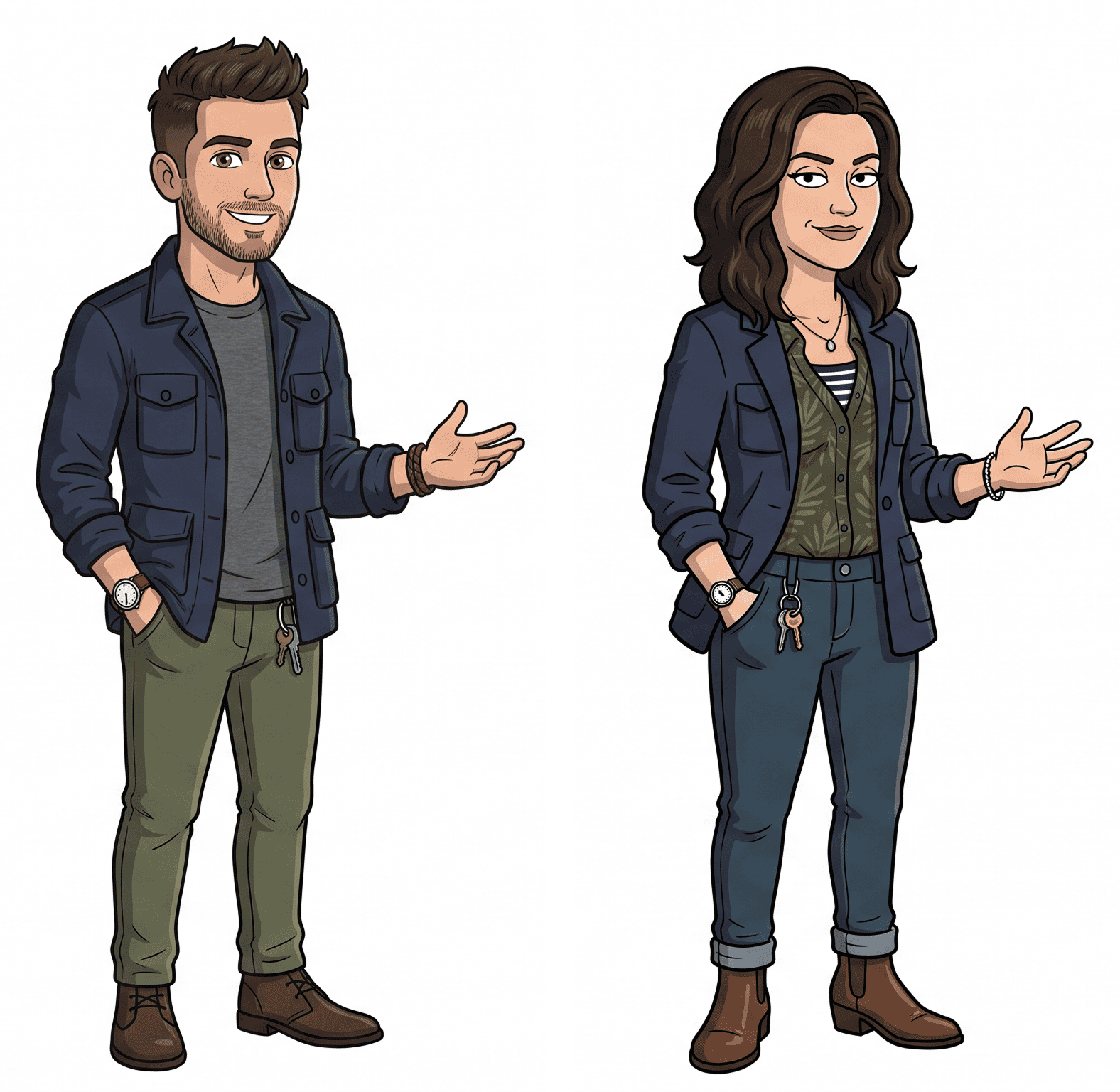
Dit keer werkte het perfect en ik vind dat het resultaat precies was wat ik wilde maken.
De volledige code voor dit voorbeeld vind je in het bestand image_to_video.py.
Het vorige voorbeeld liet zien hoe je afbeeldingen als referentie gebruikt door ”role”: “reference_image” in het verzoek te zetten.
Seedance 2 ondersteunt nog twee afbeeldingsrollen:
”first_frame”: Instrueert het model om de meegeleverde afbeelding te gebruiken als het exacte startframe van de gegenereerde video. Dit is de standaardinstelling voor directe Image-to-Video-generatie.”last_frame”: Instrueert het model om de gegenereerde video te laten eindigen met deze specifieke afbeelding. Let op: je kunt dit alleen gebruiken als je in hetzelfde verzoek ook een first_frame opgeeft; je vraagt het model dan om tussen beide afbeeldingen te interpoleren.Ik probeerde dit door een reeks beginframes te genereren van een robot-AI-lab dat probeert planten te recreëren in een wereld waar natuurlijk leven is verdwenen.
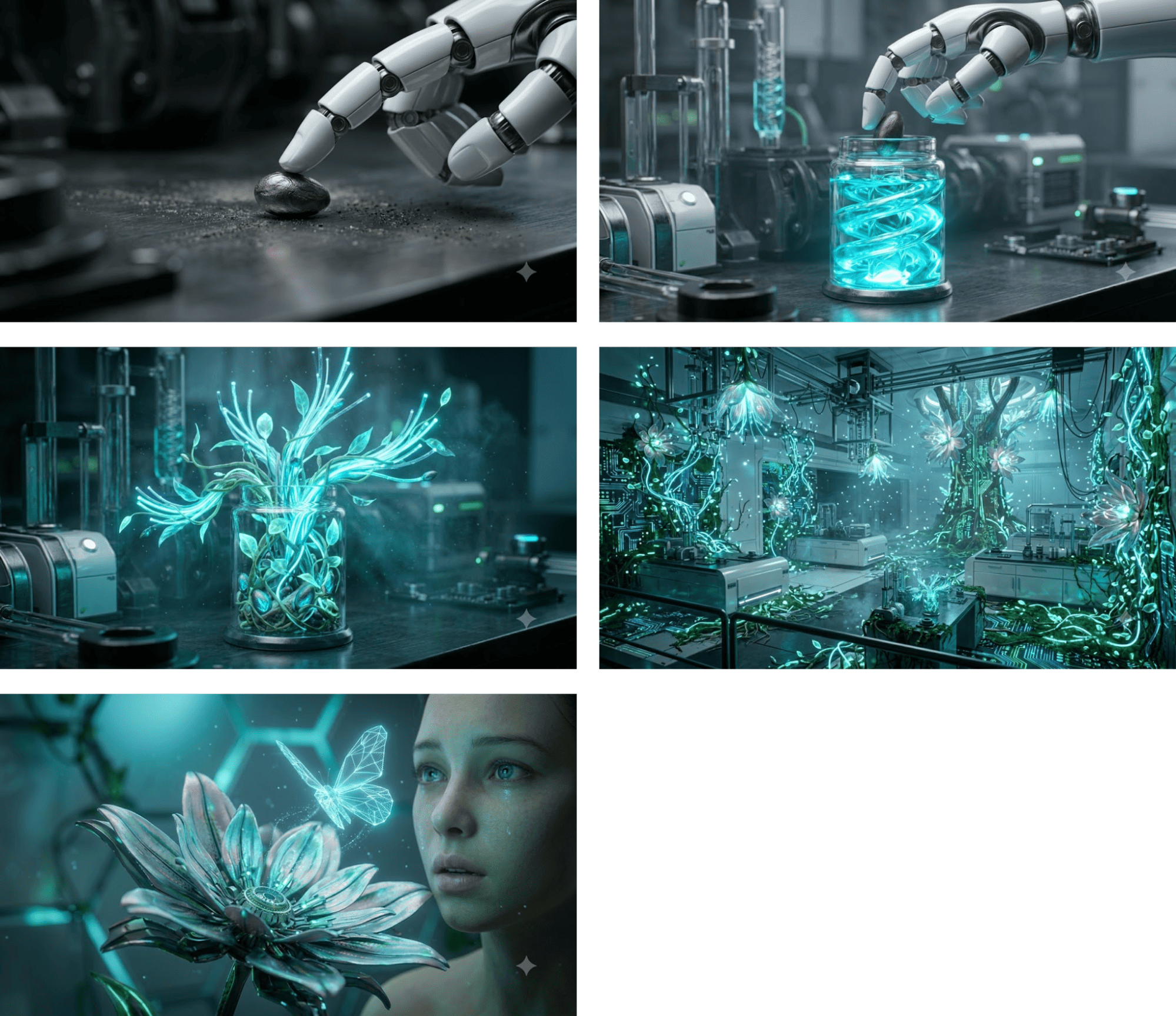
Voor elk frame genereerde ik een video met dat frame als eerste frame. Zo structureer je elk verzoek:
response = client.content_generation.tasks.create(
    model="dreamina-seedance-2-0-260128",
    content=[
        {
            "type": "text",
            "text": prompt,
        },
        {
            "type": "image_url",
            "image_url": {
                "url": utils.load_image("./images/robot-lab1.jpeg")
            },
            "role": "first_frame"
        }
    ],
    generate_audio=False,
    ratio="16:9",
    duration=4,
    watermark=True,
    resolution="480p",
)
Ik genereerde de video’s zonder audio, omdat het geluid niet consistent zou zijn aangezien elke video apart werd gemaakt. Dit is het resultaat van de vijf clips achter elkaar zetten:
Het volledige script om een video te genereren op basis van een startframe vind je hier.
last_frameIn dit voorbeeld geven we zowel een first_frame als last_frame op om een video ertussen te genereren.
Ik genereerde twee afbeeldingen van dezelfde kamer: één leeg zonder meubels en één volledig ingericht. Het doel is een video te genereren waarin de kamer wordt ingericht.
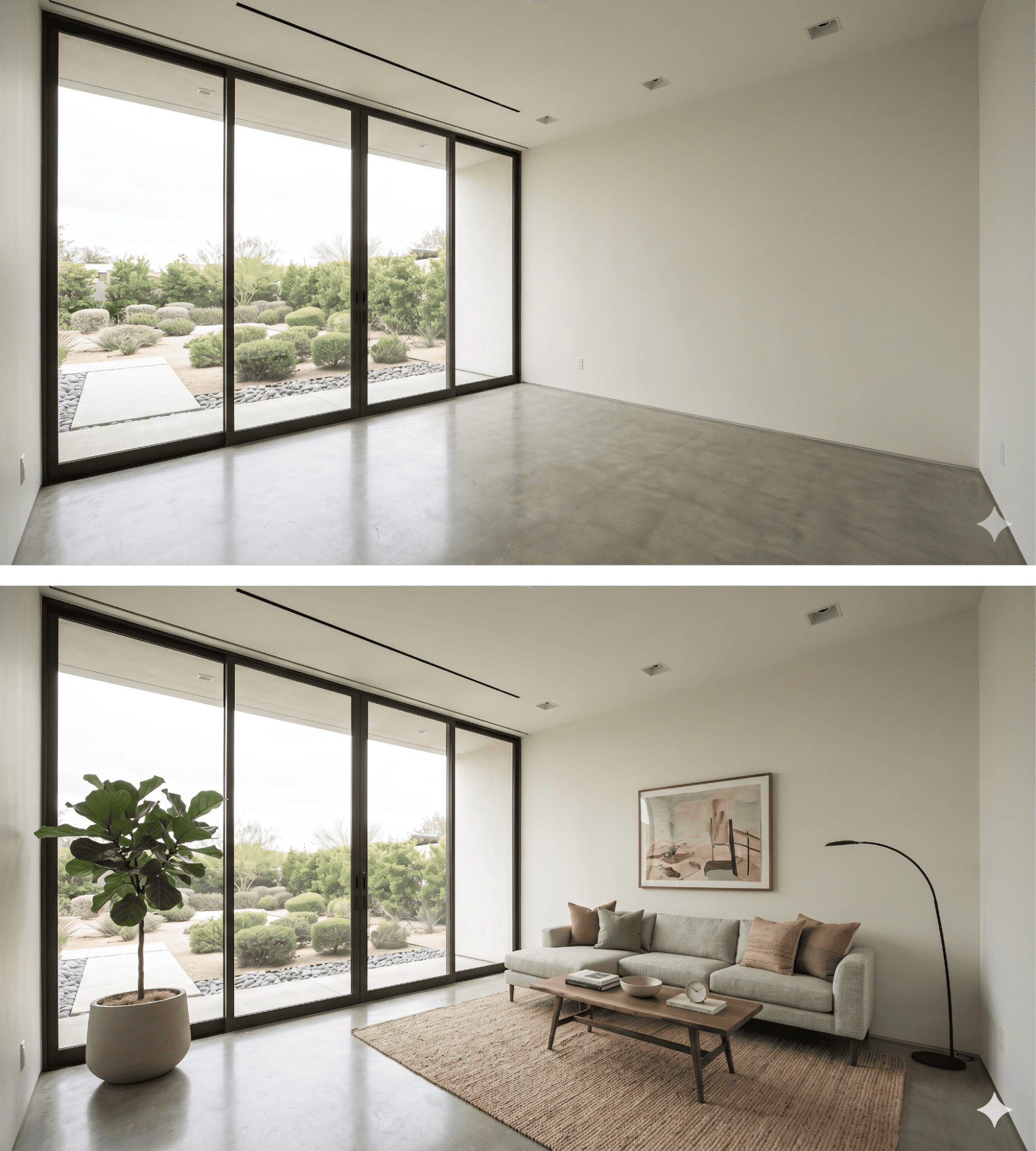
De prompt die ik gebruikte beschreef hoe ik wilde dat de meubels in beeld verschijnen:
A dynamic, fast-paced sequence where furniture pops into existence piece by piece. First, a rug rapidly unfolds itself, then the sofa drops from just above the floor with a heavy, realistic bounce. Lamps, artwork, and plants quickly spring into reality one after another. Vibrant lighting, photorealistic materials, lively and snappy energetic rhythm.Hier is het verzoek:
response = client.content_generation.tasks.create(
    model="dreamina-seedance-2-0-260128",
    content=[
        {
            "type": "text",
            "text": prompt,
        },
        {
            "type": "image_url",
            "image_url": {
                "url": utils.load_image("./images/room-start.png")
            },
            "role": "first_frame"
        },
        {
            "type": "image_url",
            "image_url": {
                "url": utils.load_image("./images/room-end.png")
            },
            "role": "last_frame"
        }
    ],
    generate_audio=True,
    ratio="16:9",
    duration=8,
    watermark=True,
    resolution="480p",
)
En dit is het resultaat:
Om dit te genereren gebruikte ik het volgende verzoek:
response = client.content_generation.tasks.create(
    model="dreamina-seedance-2-0-260128",
    content=[
        {
            "type": "text",
            "text": prompt,
        },
        {
            "type": "video_url",
            "video_url": {
                "url": "https://www.pexels.com/download/video/38213009/"
            },
            "role": "reference_video"
        }
    ],
    generate_audio=True,
    ratio="16:9",
    duration=6,
    watermark=True,
    resolution="480p",
)
Het volledige script vind je hier. De prompt die ik gebruikte was:
The original skater, environment, and camera movement must remain
unchanged and untouched.

Only add gaming-style visual effects: intense glowing sparks and electric arcs
streaming from the skateboard-rail contact point during the grind, and a
brilliant energy shockwaves and dust burst at the jump/pop. Om audio-inputs te testen heb ik een afbeelding voor een personage gegenereerd en Fish Audio gebruikt om een audiotrack met verschillende emoties te genereren.
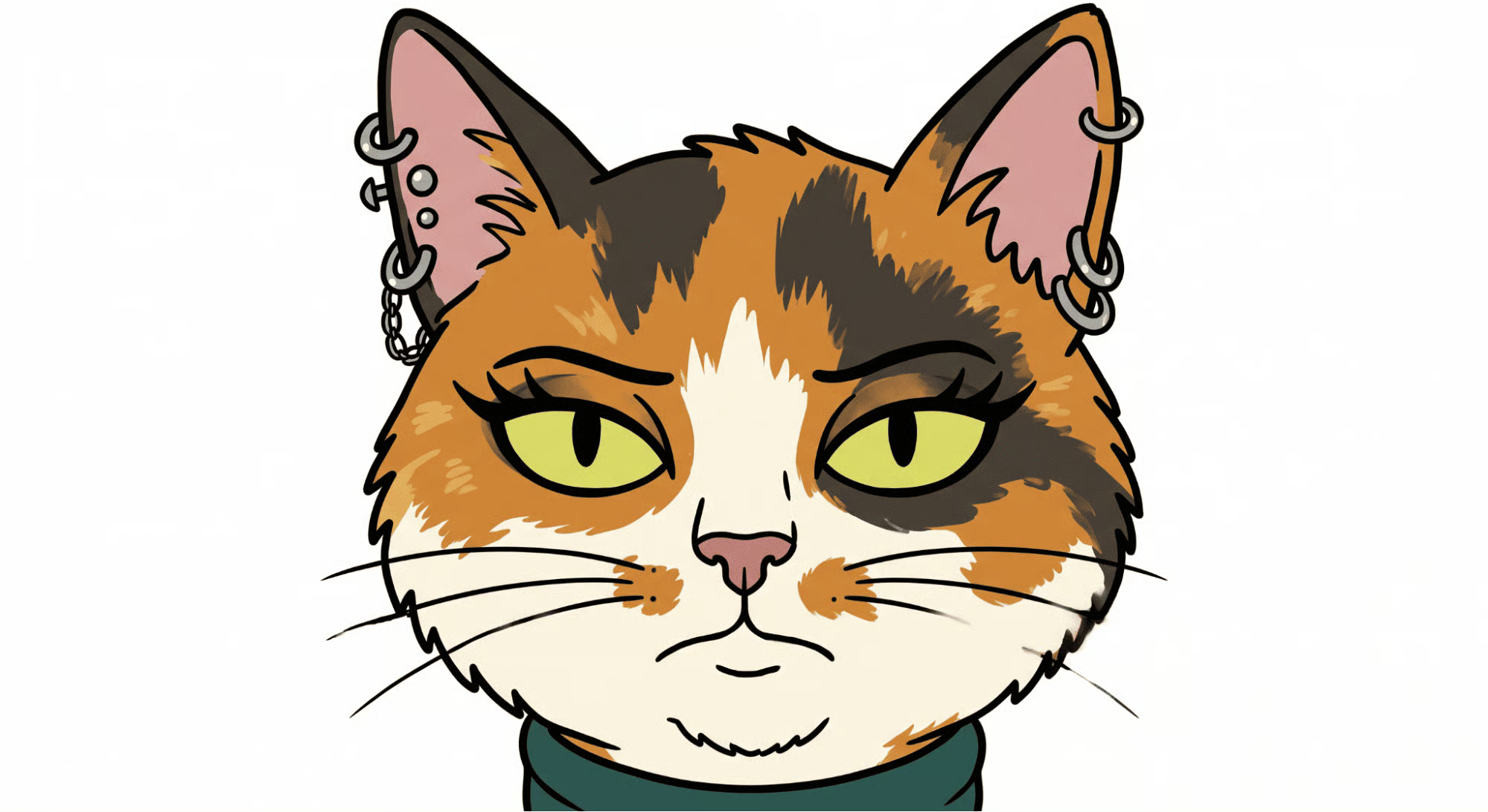
Voor de audio wilde ik een paar verschillende emoties om te zien of Seedance 2 die kon herkennen bij het genereren van de video.
Fish Audio AI laat ons emoties specificeren met [emotion] in de prompt, dus dat was perfect hiervoor. Dit was de audioprompt die ik gebruikte:
[sighing] Nothing much is happening today. [surprised] Wait a minute... what are those on my ears?[laughing] Oh my gosh, I can't believe I got piercings last night! [angry] But hold on, I specifically told you not to let me do it!Om het audiobestand te laden, schreef ik deze functie die ik toevoegde aan utils.py:
def load_audio(file_path):
    if not os.path.exists(file_path):
        raise FileNotFoundError(f"Audio file not found at: {file_path}")

    # Guess the mime type (e.g., audio/mpeg for mp3, audio/wav for wav)
    mime_type, _ = mimetypes.guess_type(file_path)
    if mime_type is None:
        mime_type = "audio/mpeg" # Fallback to mp3 just in case

    with open(file_path, "rb") as audio_file:
        encoded_string = base64.b64encode(audio_file.read()).decode('utf-8')

    return f"data:{mime_type};base64,{encoded_string}"
Audio aan het model doorgeven werkt vergelijkbaar met afbeeldingen.
We laden ze als een base64 data-URI en dienen ze in bij het model in de parameter contents, zoals hieronder:
response = client.content_generation.tasks.create(
    model="dreamina-seedance-2-0-260128",
    content=[
        {
            "type": "text",
            "text": prompt,
        },
        {
            "type": "image_url",
            "image_url": {
                "url": utils.load_image("./images/cat.png")
            },
            "role": "reference_image"
        },
        {
            "type": "audio_url",
            "audio_url": {
                "url": utils.load_audio("./audio/voice.mp3")
            },
            "role": "reference_audio"
        }
    ],
    ratio="16:9",
    duration=11,
    watermark=True,
    resolution="480p",
)
Dit is de video die Seedance 2 genereerde:
Topcursussen op DataCamp
Cursus
Cursus
Oefen en volg je voortgang.
Ga Verder Met Googleblog
Adel Nehme
15 min