Cours
Comprendre l'ingénierie des prompts
1 h
239.8K
S'entraîner et cursus vos progrès.
Continuer Avec GoogleDans ce tutoriel, je vous montre comment utiliser l’API BytePlus Ark pour interagir avec Seedance 2 en Python.
Seedance 2 est un puissant modèle d’IA générative de ByteDance qui agit comme un « réalisateur multimodal », capable de traiter simultanément du texte, des images, de la vidéo et de l’audio pour créer des séquences cinématiques avec un son synchronisé. Que vous souhaitiez animer des images statiques ou donner vie à des prompts textuels complexes, ce guide vous accompagne pas à pas dans la configuration et l’implémentation.
Pour commencer, il faut créer un compte BytePlus et une clé d’API. Pour ce faire :
Cette clé sert à effectuer des requêtes vers l’API ModelArk, leur API officielle.
La bonne pratique consiste à stocker la clé dans un fichier nommé .env dans le même dossier que vos scripts Python. Gardez cette clé secrète, car n’importe qui pourrait l’utiliser pour appeler l’API via votre compte.
Collez la clé d’API dans le fichier .env au format suivant :
ARK_API_KEY=<paste_api_key_here>Pour utiliser Seedance 2, il faut d’abord activer le modèle.
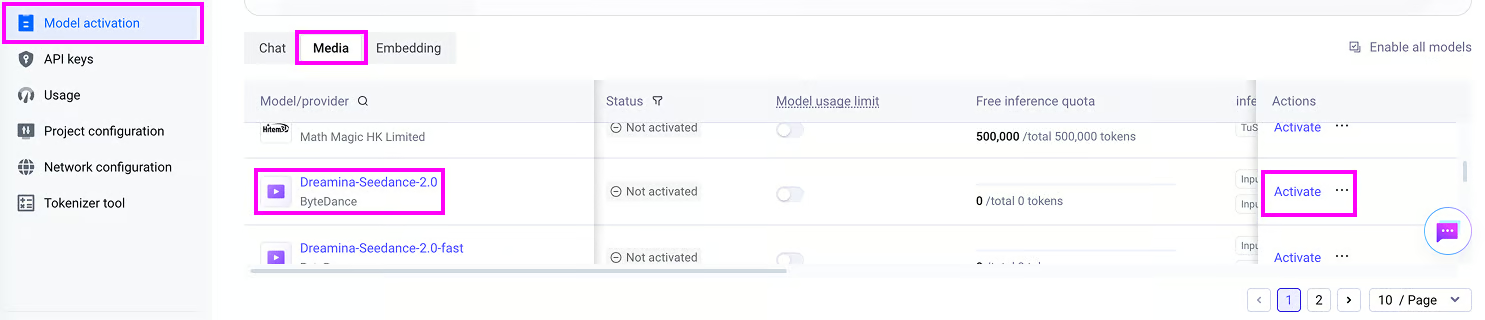
Notez que l’usage de l’API est payant et que l’activation de Seedance 2 nécessite l’achat de crédits spécifiques au modèle. Pour cet article, j’ai acheté un pack de 7 millions de tokens pour Seedance 2 à 30,10 $.
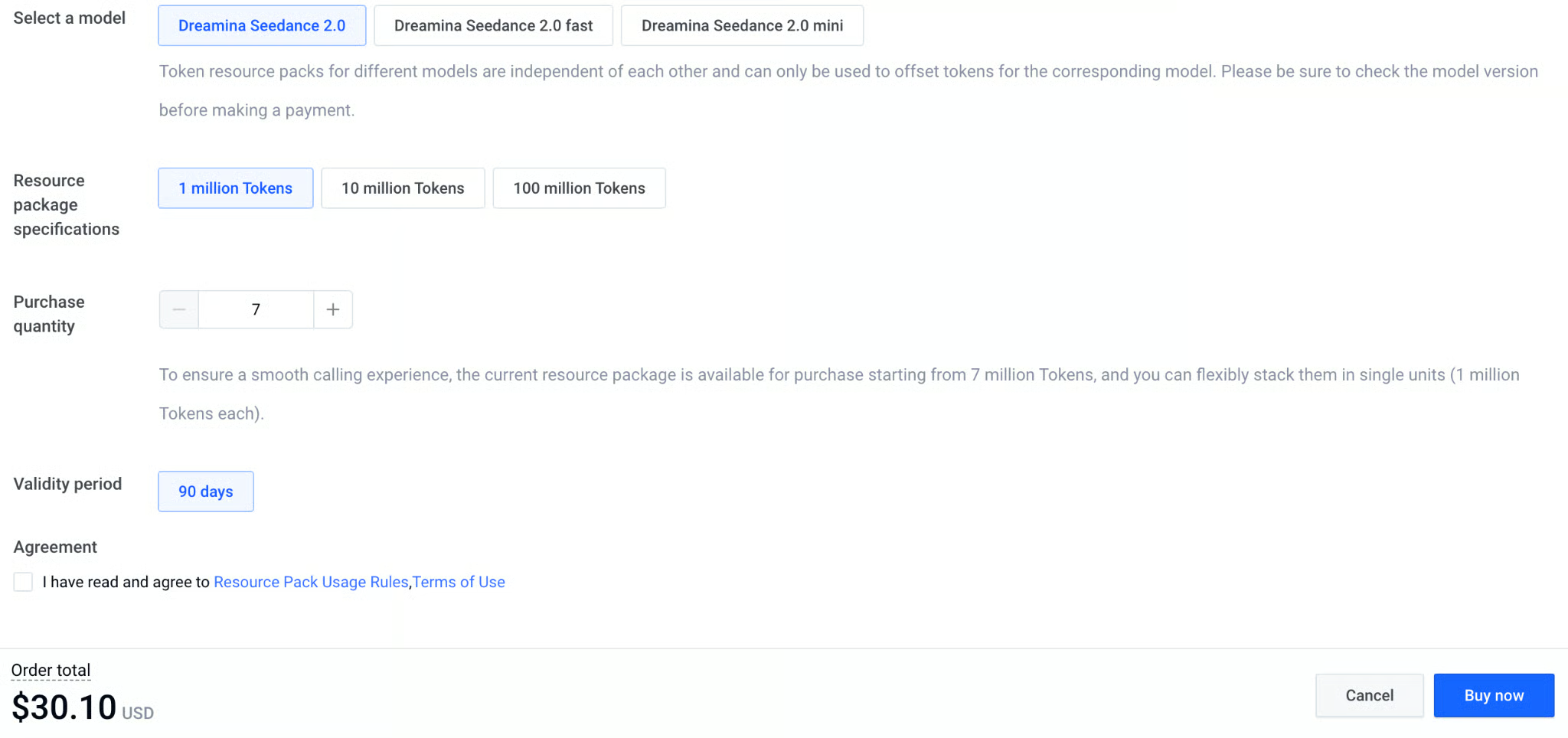
Malheureusement, les tokens sont spécifiques à chaque modèle. Autrement dit, si vous achetez des tokens pour les versions fast ou mini de Seedance 2, vous ne pourrez pas les utiliser avec le modèle de base.
Voici un tableau récapitulatif des tarifs de l’API :
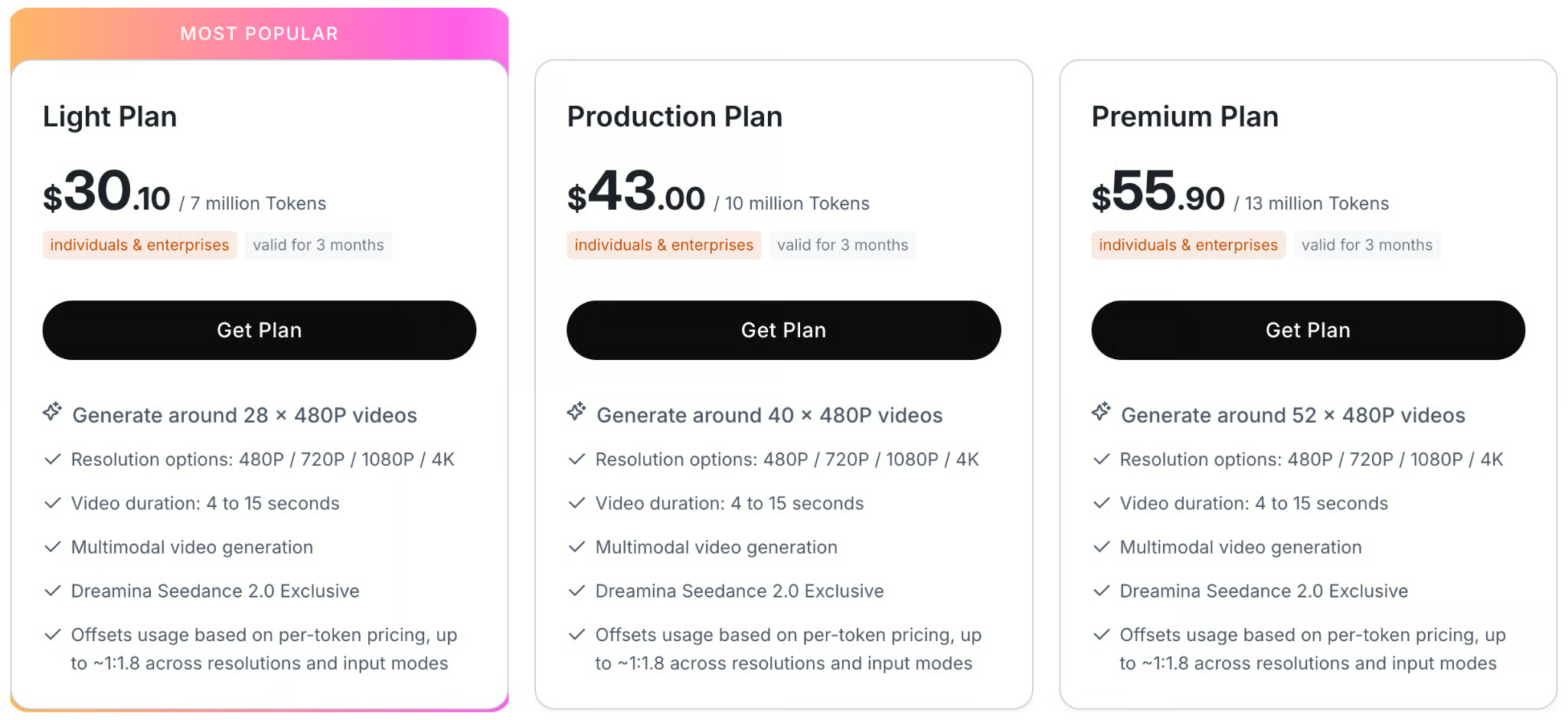
J’ai mis à disposition l’intégralité des scripts correspondant au code de ce tutoriel dans ce dépôt GitHub.
Dans cette section, nous allons envoyer une requête text-to-video pour générer cette vidéo :
Pour se connecter à l’API BytePlus Ark avec Python, nous utiliserons le package officiel byteplus-python-sdk-v2.
La façon la plus simple d’installer les dépendances du projet est de créer un environnement Anaconda et d’installer le fichier requirements.txt, comme suit :
git clone git@github.com:fran-aubry/seedance2-tutorial.git
conda create --name seedance2 python=3.11
conda activate seedance2
pip install -r requirements.txtCréez un nouveau script nommé text_to_video.py dans le même dossier que le fichier .env créé précédemment.
Commencez par importer les packages nécessaires :
import os
from byteplussdkarkruntime import Ark
from dotenv import load_dotenv
Ensuite, chargez la clé d’API depuis le fichier .env à l’aide de la fonction load_dotenv() :
load_dotenv()
API_KEY = os.getenv("ARK_API_KEY")
Initialisons maintenant le client Ark, qui nous permet d’envoyer des requêtes à l’API BytePlus Ark.
Nous utilisons la bibliothèque os pour récupérer la clé d’API via les variables d’environnement et définir l’URL de base adaptée à l’accès international de l’API :
client = Ark(
    api_key=os.getenv("ARK_API_KEY"),
    base_url="https://ark.ap-southeast.bytepluses.com/api/v3"
)
Enfin, définissons un prompt et utilisons la fonction content_generation.tasks.create() du client pour générer la vidéo :
prompt = """
A cinematic close-up of a weary but hopeful female astronaut inside a dimly lit, dusty spaceship cabin.
Soft blue light illuminates her face.
She takes a deep breath, showing subtle emotional relief, looks directly into the camera, and says:
'We finally made it. The atmosphere is stable.'
The ambient sound of a low, rhythmic spaceship engine hums in the background.
"""
response = client.content_generation.tasks.create(
    model="dreamina-seedance-2-0-260128",
    content=[
        {
            "type": "text",
            "text": prompt,
        }
    ],
    generate_audio=True,
    ratio="16:9",
    duration=8,
    watermark=True,
    resolution="480p",
)
task_id = response.id
print(f"Task successfully submitted! Task ID: {task_id}")
Après avoir demandé la génération d’une vidéo, vous ne l’obtenez pas immédiatement, car le rendu prend un certain temps.
Cela signifie que la variable response n’est pas la vidéo elle-même.
C’est plutôt un objet qui contient des informations sur la tâche de génération de vidéo.
En particulier, il contient l’identifiant de tâche, qui nous permet de suivre la progression et de télécharger la vidéo une fois la génération terminée.
Nous pouvons récupérer le statut d’une tâche en fournissant son identifiant à la fonction content_generation.tasks.get(), comme ceci :
task = client.content_generation.tasks.get(task_id=task_id)
status = task.status
print(f"Status: {status}")
Pour simplifier le suivi, créons un nouveau script utils.py dans le même dossier et ajoutons cette fonction qui suit la progression à partir de l’instance client et de l’identifiant de tâche :
import time
import requests

def poll_task(client, task_id, poll_interval=5):
    while True:
        try:
            task_status = client.content_generation.tasks.get(task_id=task_id)
            status = getattr(task_status, "status", None) or (task_status.get("status") if isinstance(task_status, dict) else None)

            if status == "succeeded":
                print("\nTask completed successfully.")
                return task_status.content.video_url

            elif status == "failed":
                error_details = getattr(task_status, "error", "Unknown error occurred during processing.")
                raise RuntimeError(f"Task failed: {error_details}")

            print(".", end="", flush=True)
            time.sleep(poll_interval)
        except Exception as e:
            if isinstance(e, RuntimeError):
                raise
            print(f"\nWarning: Error polling task (will retry): {e}")
time.sleep(poll_interval)La fonction poll_task() que nous venons d’implémenter renvoie l’URL de la vidéo
Maintenant que nous pouvons suivre la génération, il ne reste qu’à la télécharger une fois terminée.
Comme l’API BytePlus Ark renvoie une URL directe vers le fichier vidéo généré dans la réponse de tâche, nous pouvons la télécharger avec la bibliothèque requests.
Voici une fonction qui s’en charge :
def download_video(url, output_path = "video.mp4"):
    try:
        print(f"Downloading video from {url} to {output_path}...")
        response = requests.get(url, stream=True)
        response.raise_for_status()

        with open(output_path, 'wb') as f:
            for chunk in response.iter_content(chunk_size=8192):
                f.write(chunk)
        print(f"Video successfully downloaded to '{output_path}'")
        return True
    except Exception as e:
        print(f"Error downloading video: {e}")
return FalseEn combinant le tout, voici un script complet pour générer une vidéo à partir d’un prompt texte avec Seedance 2 :
import os
from byteplussdkarkruntime import Ark
from dotenv import load_dotenv
import utils

load_dotenv()
API_KEY = os.getenv("ARK_API_KEY")

client = Ark(
    api_key=os.getenv("ARK_API_KEY"),
    base_url="https://ark.ap-southeast.bytepluses.com/api/v3"
)

prompt = """
A cinematic close-up of a weary but hopeful female astronaut inside a dimly lit, dusty spaceship cabin.
Soft blue light illuminates her face.
She takes a deep breath, showing subtle emotional relief, looks directly into the camera, and says:
'We finally made it. The atmosphere is stable.'
The ambient sound of a low, rhythmic spaceship engine hums in the background.
"""

response = client.content_generation.tasks.create(
    model="dreamina-seedance-2-0-260128",
    content=[
        {
            "type": "text",
            "text": prompt,
        }
    ],
    generate_audio=True,
    ratio="16:9",
    duration=8,
    watermark=True,
    resolution="480p",
)

task_id = response.id
print(f"Task successfully submitted! Task ID: {task_id}")

# Wait for the video to finish generating
video_url = utils.poll_task(client, task_id)

utils.download_video(video_url, "./videos/space.mp4")Voici la liste des valeurs acceptées pour les principaux paramètres d’une requête de génération vidéo :
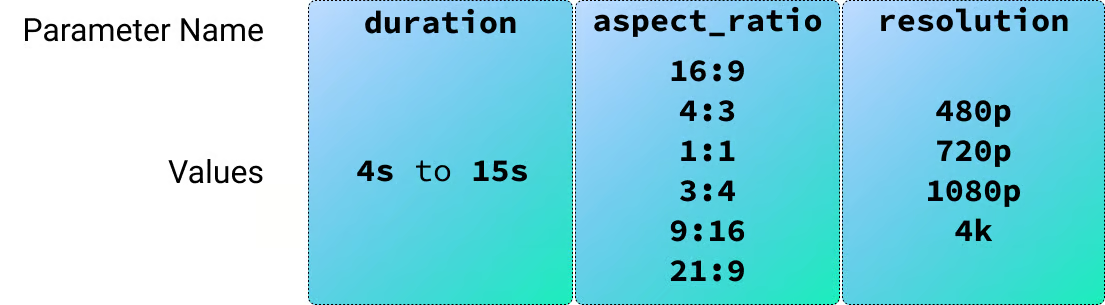
Dans la section précédente, nous avons généré une vidéo à partir d’un prompt texte. Seedance 2 gère aussi des entrées image, vidéo et audio : commençons par les images.
Pour tester les entrées image, j’ai généré deux personnages via l’IA pour une scène façon sitcom.

Nous pouvons fournir des images de référence au modèle en les ajoutant au champ content de la requête, comme suit :
response = client.content_generation.tasks.create(
    model="dreamina-seedance-2-0-260128",
    content=[
        {
            "type": "text",
            "text": prompt,
        },
        {
            "type": "image_url",
            "image_url": {
                "url": utils.load_image("./images/male-character.png")
            },
            "role": "reference_image"
        },
        {
            "type": "image_url",
            "image_url": {
                "url": utils.load_image("./images/female-character.png")
            },
            "role": "reference_image"
        }
    ],
    generate_audio=True,
    ratio="16:9",
    duration=15,
    watermark=True,
    resolution="480p",
)
Pour cette vidéo, j’ai utilisé le prompt suivant :
Context: A cozy, warmly lit independent coffee shop counter with wooden accents.
Reference:
- The male barista's face and clothing follow @Image1.
- The female customer's face and styling follow @Image2.

Action & Dialogue (10 Seconds Total):

0:00 - 0:04:
Medium close-up on the male barista (@Image1) standing behind the counter,
next to the coffee machine. He leans across the counter with a smooth,
flirtatious smirk, acting like he is making a highly exclusive offer:
"The WiFi password? It's actually my phone number: five-five-five, zero-one—"

0:04 - 0:07:
Camera cuts to the female customer (@Image2), instantly interrupting him.
She holds up her phone screen toward him, entirely unimpressed:
"Your network is called 'Free_Guest_WiFi' and there is literally no password."

0:07 - 0:08: Quick cut back to the two-shot.
Flustered, the barista becomes visibly embarrassed, his confident smirk
instantly vanishing as he nervously breaks eye contact.

0:08 - 0:10: Camera cuts back to a medium shot of the female customer (@Image2).
She lowers her phone, tapping her fingers lightly on the counter,
and delivers her order with perfect deadpan clarity:
"It will be an espresso please. No milk, no sugar, and no phone number."

Framing/Timing:
Clean cuts to perfectly pace the comedic timing over exactly 10 seconds.

Tone/Audio:
Lighthearted sitcom vibe. Synchronized voice generation for the dialogue, a subtle low cafe background hum, and the sound of the customer's fingers lightly tapping the wooden counter at the end.
Notez que le prompt utilise @Image1 et @Image2 pour référencer les images dans l’ordre de la liste.
Malheureusement, en tentant de générer cette vidéo, j’ai obtenu une erreur indiquant :
The request failed because the input image may contain a real person.J’ai observé ce comportement de manière systématique lorsque j’utilisais une image de référence avec un humain réaliste, même généré par IA.
Pour contourner le problème, j’ai converti les personnages en style cartoon et réessayé.
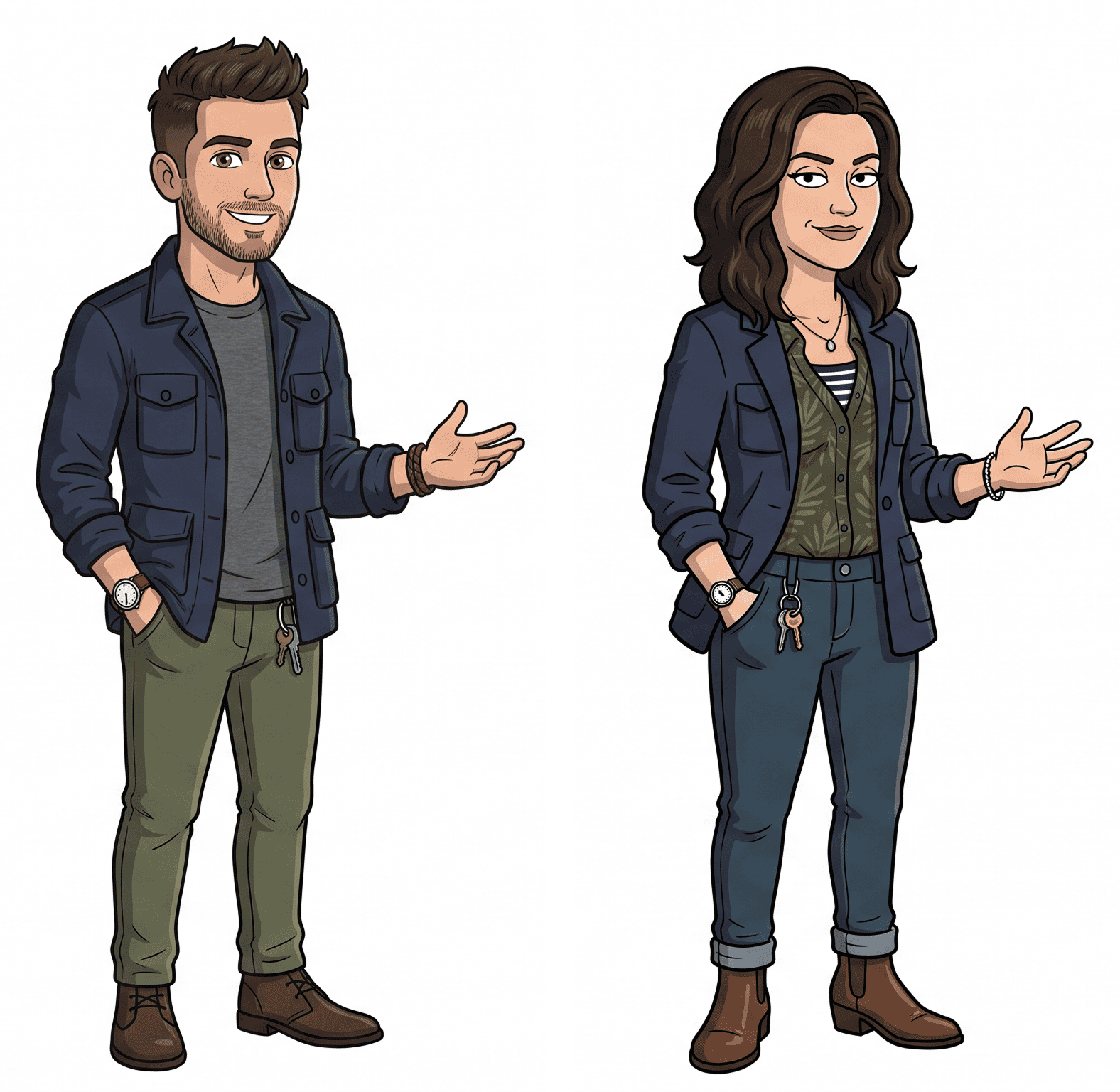
Cette fois, cela a parfaitement fonctionné et le résultat correspondait exactement à l’intention.
Le code complet de cet exemple est disponible dans le fichier image_to_video.py.
L’exemple précédent montrait comment utiliser des images comme références en définissant ”role”: “reference_image” dans la requête.
Seedance 2 prend en charge deux autres rôles d’image :
”first_frame” : indique au modèle d’utiliser l’image fournie comme image de départ exacte de la vidéo générée. C’est le réglage standard pour l’Image-to-Video direct.”last_frame” : indique au modèle de terminer la vidéo générée sur cette image précise. Remarque : vous ne pouvez l’utiliser que si vous fournissez également un first_frame dans la même requête, demandant au modèle d’interpoler la vidéo entre les deux images.J’ai testé cela en générant une succession d’images initiales montrant un laboratoire d’IA robotique essayant de recréer des plantes dans un monde où la vie naturelle a disparu.
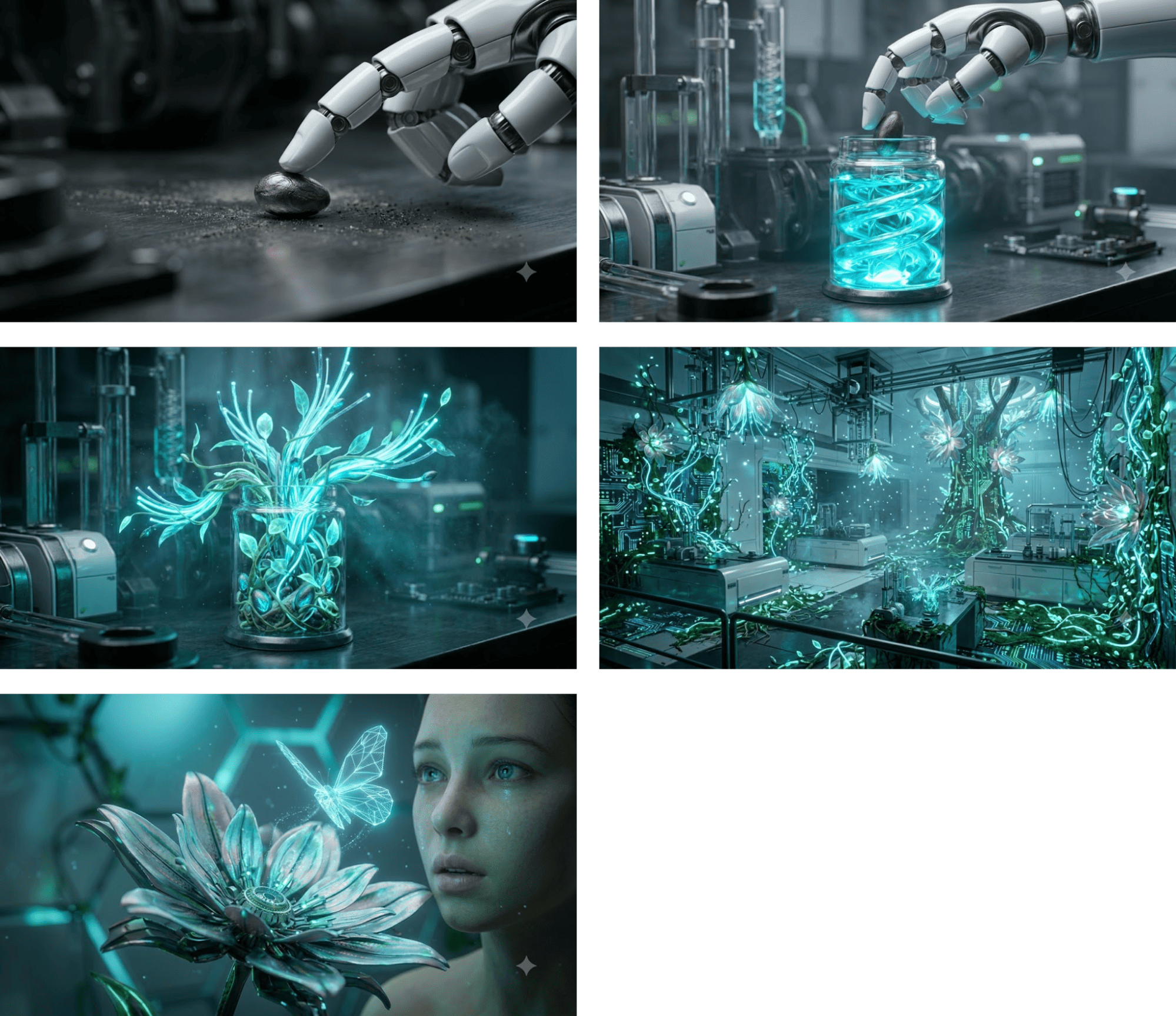
Pour chaque image, j’ai généré une vidéo en l’utilisant comme première image. Voici la structure de la requête :
response = client.content_generation.tasks.create(
    model="dreamina-seedance-2-0-260128",
    content=[
        {
            "type": "text",
            "text": prompt,
        },
        {
            "type": "image_url",
            "image_url": {
                "url": utils.load_image("./images/robot-lab1.jpeg")
            },
            "role": "first_frame"
        }
    ],
    generate_audio=False,
    ratio="16:9",
    duration=4,
    watermark=True,
    resolution="480p",
)
J’ai généré ces vidéos sans audio pour éviter les incohérences, chaque clip étant généré séparément. Voici le résultat après assemblage des cinq séquences :
Le script complet utilisé pour générer une vidéo à partir d’une image de départ est disponible ici.
last_frameDans cet exemple, nous fournissons à la fois un first_frame et un last_frame pour générer une vidéo entre les deux.
J’ai généré deux images de la même pièce, l’une vide sans mobilier et l’autre entièrement aménagée. L’objectif est de produire une vidéo où le mobilier apparaît progressivement.
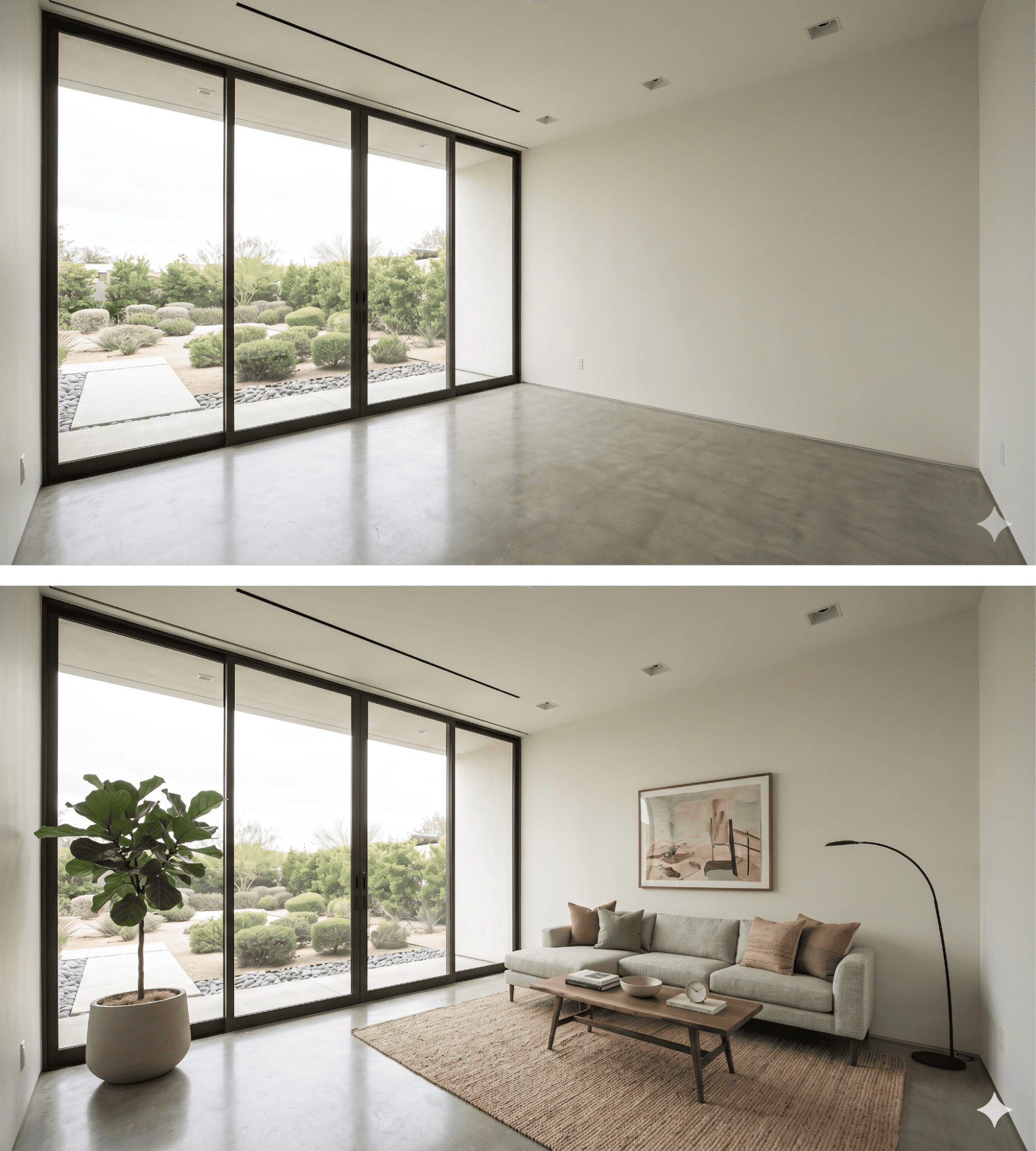
Voici le prompt décrivant la manière dont le mobilier doit apparaître dans la vidéo :
A dynamic, fast-paced sequence where furniture pops into existence piece by piece. First, a rug rapidly unfolds itself, then the sofa drops from just above the floor with a heavy, realistic bounce. Lamps, artwork, and plants quickly spring into reality one after another. Vibrant lighting, photorealistic materials, lively and snappy energetic rhythm.Voici la requête :
response = client.content_generation.tasks.create(
    model="dreamina-seedance-2-0-260128",
    content=[
        {
            "type": "text",
            "text": prompt,
        },
        {
            "type": "image_url",
            "image_url": {
                "url": utils.load_image("./images/room-start.png")
            },
            "role": "first_frame"
        },
        {
            "type": "image_url",
            "image_url": {
                "url": utils.load_image("./images/room-end.png")
            },
            "role": "last_frame"
        }
    ],
    generate_audio=True,
    ratio="16:9",
    duration=8,
    watermark=True,
    resolution="480p",
)
Et voici le résultat :
Pour générer ce résultat, j’ai utilisé la requête suivante :
response = client.content_generation.tasks.create(
    model="dreamina-seedance-2-0-260128",
    content=[
        {
            "type": "text",
            "text": prompt,
        },
        {
            "type": "video_url",
            "video_url": {
                "url": "https://www.pexels.com/download/video/38213009/"
            },
            "role": "reference_video"
        }
    ],
    generate_audio=True,
    ratio="16:9",
    duration=6,
    watermark=True,
    resolution="480p",
)
Le script complet est disponible ici. Le prompt utilisé :
The original skater, environment, and camera movement must remain
unchanged and untouched.

Only add gaming-style visual effects: intense glowing sparks and electric arcs
streaming from the skateboard-rail contact point during the grind, and a
brilliant energy shockwaves and dust burst at the jump/pop. Pour tester les entrées audio, j’ai généré l’image d’un personnage et utilisé Fish Audio pour générer une piste audio avec différentes émotions.
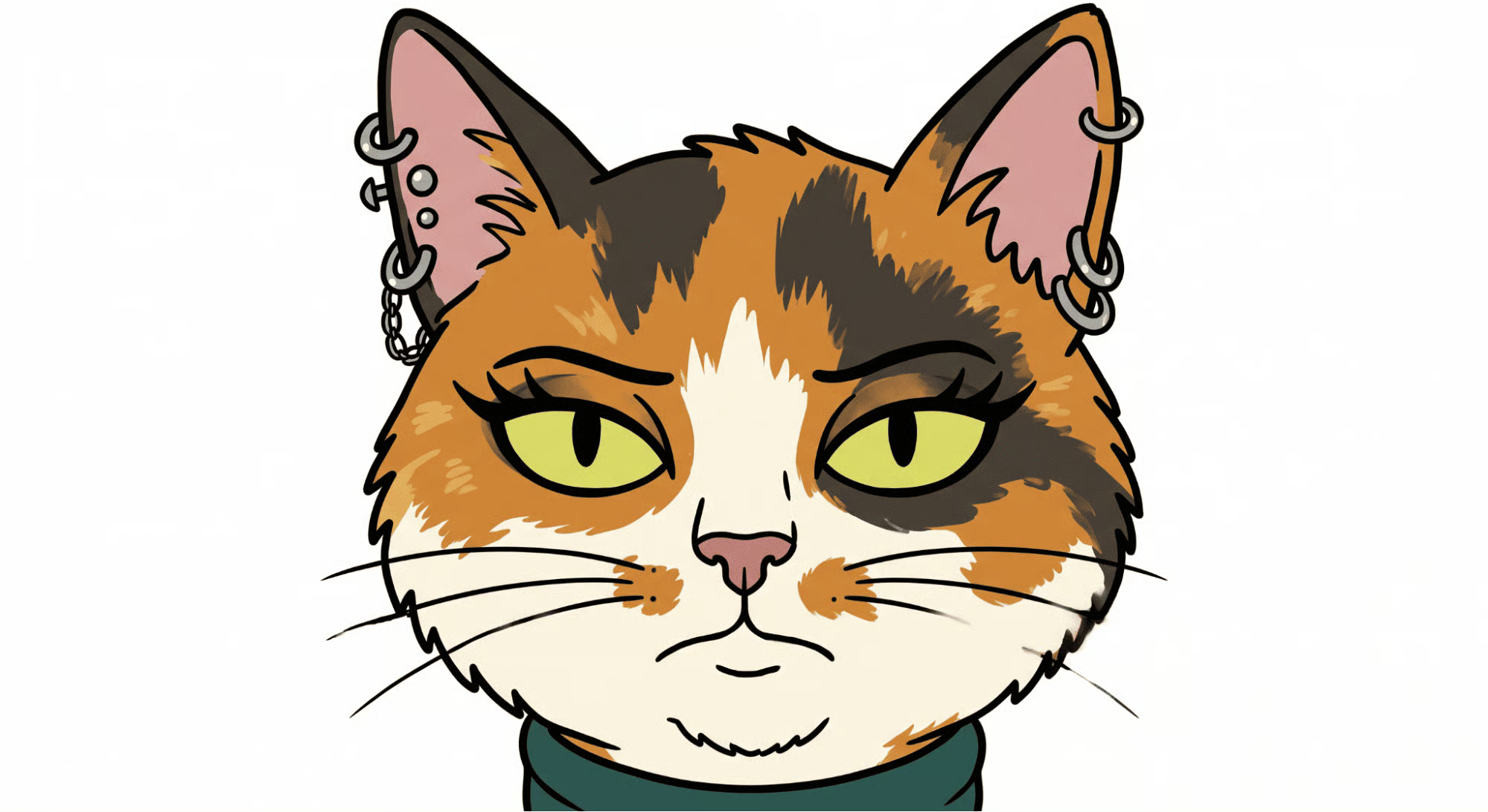
Pour l’audio, je voulais plusieurs émotions afin de voir si Seedance 2 pouvait les reconnaître lors de la génération de la vidéo.
Fish Audio AI permet de spécifier des émotions via [emotion] dans le prompt, ce qui était parfait. Voici le prompt audio que j’ai utilisé :
[sighing] Nothing much is happening today. [surprised] Wait a minute... what are those on my ears?[laughing] Oh my gosh, I can't believe I got piercings last night! [angry] But hold on, I specifically told you not to let me do it!Pour charger le fichier audio, j’ai écrit cette fonction ajoutée à utils.py :
def load_audio(file_path):
    if not os.path.exists(file_path):
        raise FileNotFoundError(f"Audio file not found at: {file_path}")

    # Guess the mime type (e.g., audio/mpeg for mp3, audio/wav for wav)
    mime_type, _ = mimetypes.guess_type(file_path)
    if mime_type is None:
        mime_type = "audio/mpeg" # Fallback to mp3 just in case

    with open(file_path, "rb") as audio_file:
        encoded_string = base64.b64encode(audio_file.read()).decode('utf-8')

    return f"data:{mime_type};base64,{encoded_string}"
La fourniture de l’audio au modèle fonctionne de façon très similaire aux images.
Nous les chargeons en data URI base 64 et les transmettons au modèle via le paramètre contents, comme suit :
response = client.content_generation.tasks.create(
    model="dreamina-seedance-2-0-260128",
    content=[
        {
            "type": "text",
            "text": prompt,
        },
        {
            "type": "image_url",
            "image_url": {
                "url": utils.load_image("./images/cat.png")
            },
            "role": "reference_image"
        },
        {
            "type": "audio_url",
            "audio_url": {
                "url": utils.load_audio("./audio/voice.mp3")
            },
            "role": "reference_audio"
        }
    ],
    ratio="16:9",
    duration=11,
    watermark=True,
    resolution="480p",
)
Voici la vidéo générée par Seedance 2 :
Les meilleurs cours DataCamp
Cours
Cours
S'entraîner et cursus vos progrès.
Continuer Avec GoogleTutoriel
Tutoriel
Sejal Jaiswal
9 min
Tutoriel
Laiba Siddiqui
6 min
Tutoriel
Aditya Sharma
5 min
Tutoriel
Satyabrata Pal
15 min
Tutoriel
Kurtis Pykes
15 min