
Our biggest-ever sale. 60% off AI & data skills
Buy Now
Before integrating AWS Lake Formation and AWS Glue, ensure you have the following:
Once you have the prerequisites, just follow these steps:
The first step is deploying the core AWS resources needed to build a secured data lake before starting the integration process. The AWS CloudFormation template helps organize and deploy all the required resources.
Use the provided CloudFormation template to create a stack in your AWS account. This stack provisions essential resources required for the use cases described in this tutorial.
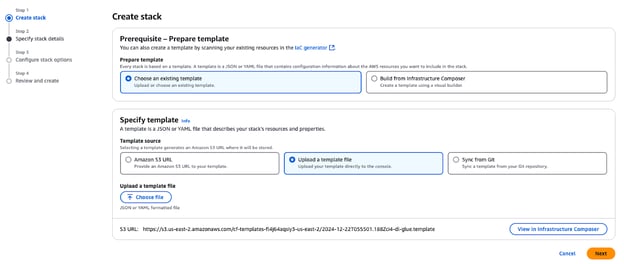
Creating a stack in AWS CloudFormation
Upon deploying the stack, the following key resources will be created in your AWS account:
GlueServiceRole: Grants AWS Glue access to S3 and Lake Formation services.DataEngineerGlueServiceRole: Provides engineers with permissions for data access and processing.DataAdminUser and DataEngineerUser: Pre-configured IAM users for exploring and managing Lake Formation security.EC2-DB-Loader) for pre-loading and transferring sample data into S3.lf-users-credentials) to securely store user credentials for the pre-created IAM users.After the stack is created, you will have the following:
In this section, the Data Lake Administrator will configure AWS Lake Formation to make it available for data consumer personas, including the data engineers. The administrator will:
These configurations provide secure, fine-grained access control and smooth coordination with other AWS services.
A Data Lake Administrator is an Identity and Access Management (IAM) user or role that can give any principle (including itself) permission on any Data Catalog entity. The Data Lake Administrator is usually the first user created to manage the Data Catalog and is commonly the user who is granted administrative privileges for the Data Catalog.
In the AWS Lake Formation service, you can open the prompt by clicking on the Administrative roles and tasks -> Add Administrators in the navigation panel button and then selecting the lf-data-admin IAM user from the dropdown list.
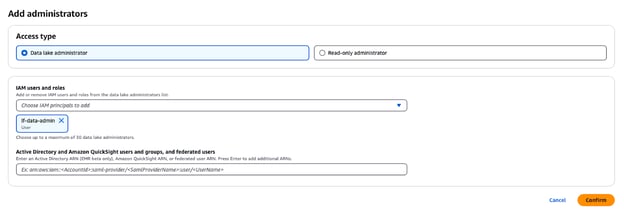
Adding a Data Lake Administrator in AWS Lake Formation
By default, Lake Formation has the option “Use only IAM access control,” which is selected to be compatible with the AWS Glue Data Catalog. To enable fine-grained access control with Lake Formation permissions, you need to adjust these settings:
IAMAllowedPrincipals group appears under Database creators, select the group and choose Revoke.These steps will disable default IAM access control and allow you to implement Lake Formation permissions for enhanced security.
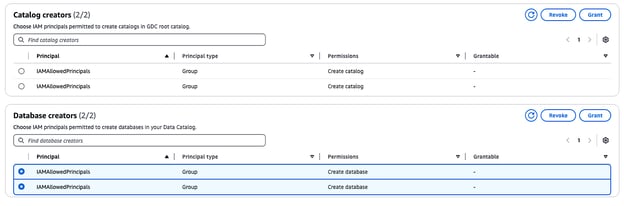
Managing catalog and database creators in AWS Lake Formation
Now, it is time to put the Glue Data Catalog to use.
To create a database for the TPC data, log out from your current AWS session and log back in as the lf-data-admin user. Use the sign-in link provided in the CloudFormation output and the password retrieved from AWS Secrets Manager.
lf-data-lake-account-ID, where account-ID is your 12-digit AWS account number.This database will be the foundation for storing and managing metadata for the TPC data in the Lake Formation setup.
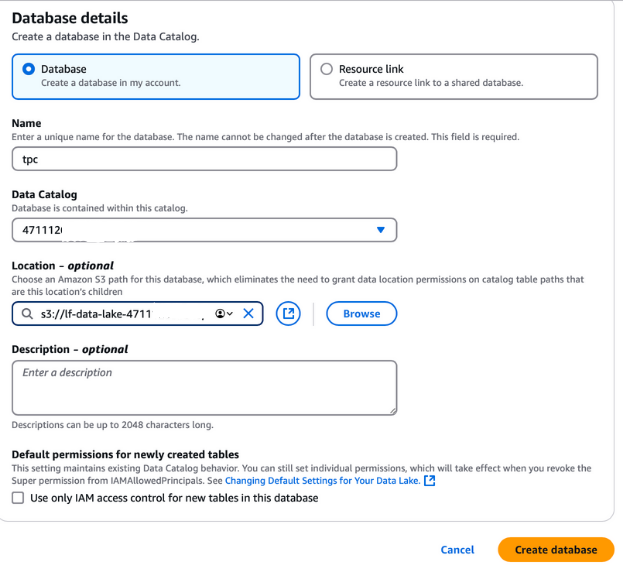
Creating a database in AWS Lake Formation
We use an AWS Glue Crawler to create tables in the AWS Glue Data Catalog. Crawlers are the most common way of creating tables in AWS Glue, as they can scan through multiple data stores at once and generate or update the details of the tables in the Data Catalog after the crawl is done.
Before running the AWS Glue Crawler, you need to grant the required permissions to its IAM role:
tpc database.LF-GlueServiceRole.tpc as the database.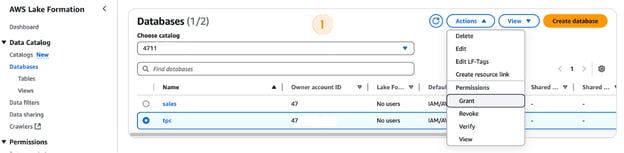
Granting permissions in AWS Lake Formation
With permissions granted, proceed to run the crawler:
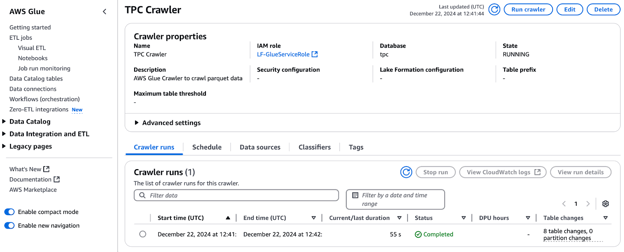
Running the TPC Crawler in AWS Glue
You can also verify these tables in the AWS Lake Formation console under Data catalog and Tables.
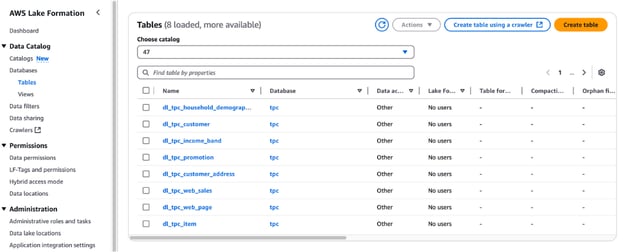
Viewing tables in AWS Lake Formation
You must register the S3 bucket in AWS Lake Formation for your data lake storage. This registration allows you to enforce fine-grained access control on AWS Glue Data Catalog objects and the underlying data stored in the bucket.
Steps to register a Data Lake location:
LF-GlueServiceRole created by the CloudFormation template.Once registered, verify your data lake location to ensure it is correctly configured. This step is essential for seamless data management and security in your Lake Formation setup.
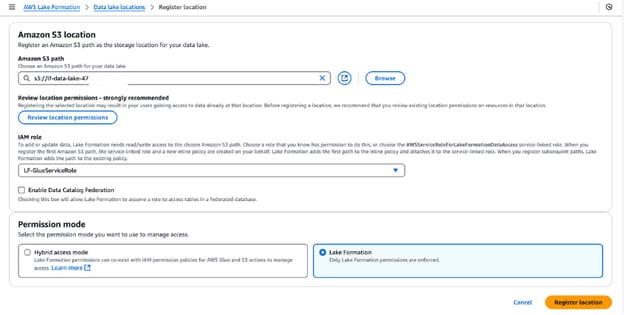
Registering an Amazon S3 location in AWS Lake Formation
LF-Tags can be used to organize resources and set permissions in many resources at once. It enables you to organize data using taxonomies and thus break down complex policies and manage permissions effectively. This is possible because with LF-Tags, you can separate policy from resource, and therefore, you can set up access policies even before resources are created.
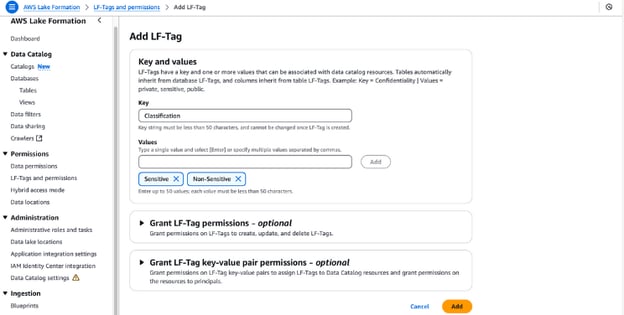
Creating LF-Tags in AWS Lake Formation
lf-data-admin user has LF-Tag permissions. Navigate to Tables in the Lake Formation console.dl_tpc_customer, click the actions menu, and choose Grant.lf-data-admin.tpc database and the table dl_tpc_customer, granting Alter table permissions. Click Grant.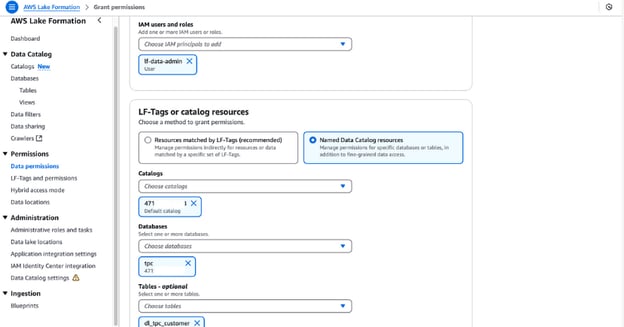
Granting permissions in AWS Lake Formation
dl_tpc_customer table. Open the table details and choose Edit LF-Tags from the actions menu.c_first_name, c_last_name, and c_email_address, and click Edit LF-Tags.Classification, change the value to “Sensitive” and click Save. Save this configuration as a new version.dl_tpc_household_demographics table, go to Actions and choose Edit LF-Tags.By following these steps, you can efficiently assign LF-Tags to your Data Catalog objects, ensuring secure, fine-grained access control across your data lake.
AWS Glue Studio is a drag-and-drop user interface that helps users develop, debug, and monitor ETL jobs for AWS Glue. Data engineers leverage Glue ETL, based on Apache Spark, to transform data sets stored in Amazon S3 and load data in data lakes and warehouses for analysis. To effectively administer access when several teams collaborate on the same data sets, it is important to provide access and restrict it according to roles.
Follow these steps to grant the required permissions to the lf-data-engineer user and the corresponding DE-GlueServiceRole role. This role is used by the data engineer to access Glue Data Catalog tables in Glue Studio jobs.
lf-data-admin user to log into the AWS Management Console. Retrieve the password from AWS Secrets Manager and the login URL from the CloudFormation output.lf-data-engineer and DE-GlueServiceRole.tpc.dl_tpc_household_demographics.DE-GlueServiceRole.tpc (leave tables unselected).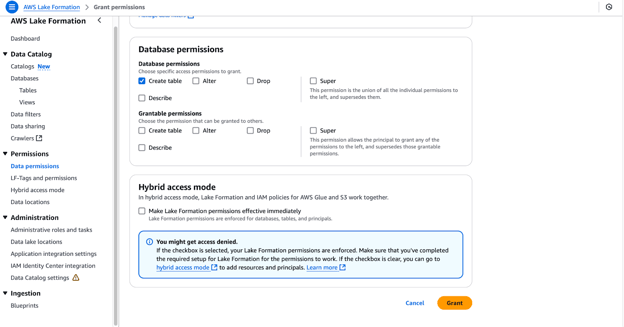
Configuring database permissions in AWS Lake Formation
Completing these steps will give the lf-data-engineer user and DE-GlueServiceRole role the necessary permissions to work with Glue Data Catalog tables and manage resources in Glue Studio jobs. This setup ensures secure, role-based access to your data lake.
In this section, we will create an ETL job in AWS Glue Studio using SQL Transform.
lf-data-engineer:
lf-data-engineer user to log into the AWS Management Console. Retrieve the password from AWS Secrets Manager and the login URL provided by the CloudFormation output.LF_GlueStudio so it can be identified easily.DE-GlueServiceRole.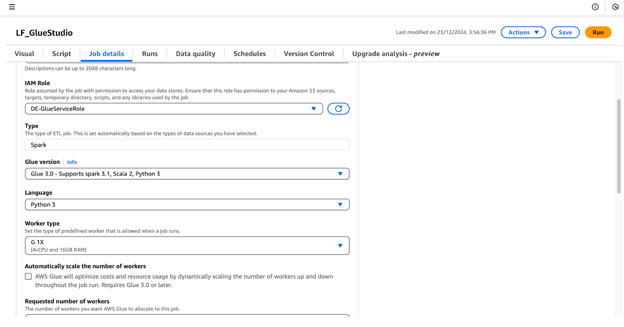
Configuring job details in AWS Glue Studio
tpc.dl_tpc_household_demographics. (Note: The lf-data-admin user has only granted lf-data-engineer Select permission on this table. Other tables will not appear in the dropdown.)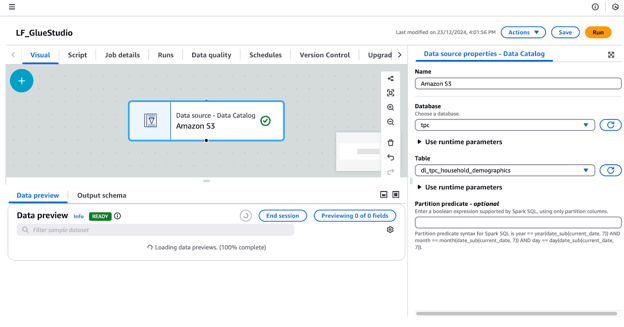
Configuring a data source in AWS Glue Studio
/* Select all records where buy potential is between 0 and 500 */
SELECT *
FROM myDataSource
WHERE hd_buy_potential = '0-500';hd_dep_count and hd_vehicle_count. Click Apply.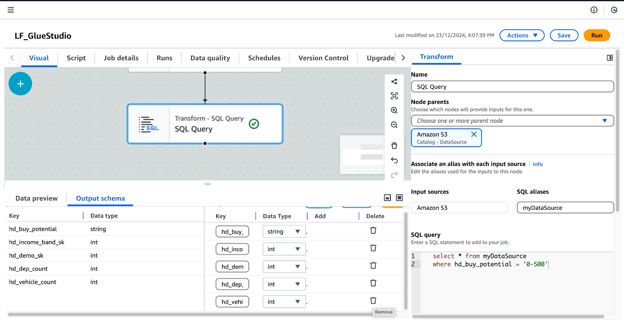
Configuring SQL Query Transform in AWS Glue Studio
s3://<your_LFDataLakeBucketName>/gluestudio/curated/. (Replace <your_LFDataLakeBucketName> with the actual bucket name from the CloudFormation Outputs tab.)tpc.dl_tpc_household_demographics_below500.By following these steps, you will create a fully functional Glue Studio ETL job that transforms data and writes the results to a curated S3 folder while updating the Glue Data Catalog.
To confirm the permissions granted in Lake Formation, follow these steps while logged in as the lf-data-engineer user (as detailed in the Create Glue Studio Jobs section):
LF_GlueStudio job: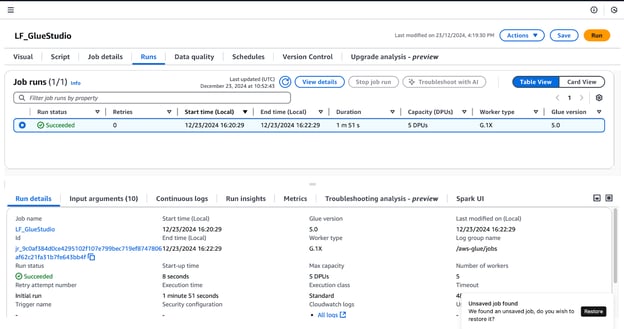
Monitoring job runs in AWS Glue Studio
curated folder in your S3 bucket to check for the output files. These files should be in Parquet format, as configured during the job creation.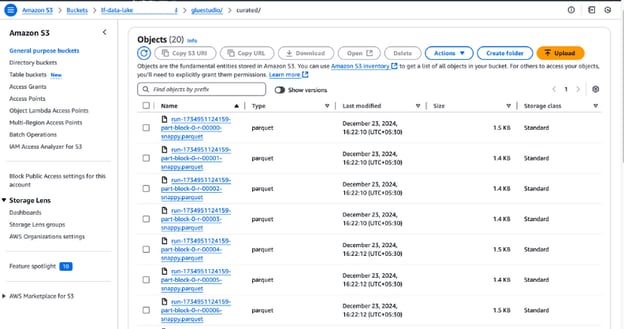
Viewing output files in Amazon S3
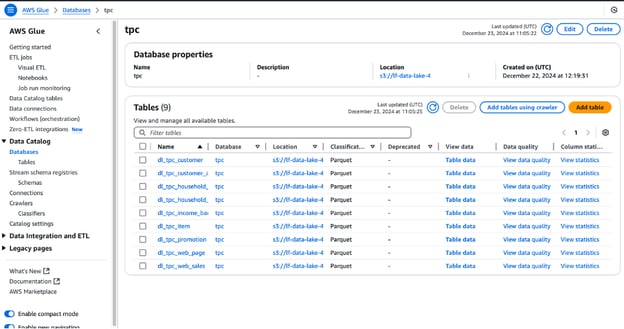
Viewing database tables in AWS Glue
When integrating AWS Lake Formation and AWS Glue, following best practices can enhance data security, streamline operations, and optimize performance. Here's how you can make the most of these services:

Log events for TPC Crawler in AWS CloudWatch

Monitoring AWS Glue Studio job metrics
Implementing AWS Lake Formation and AWS Glue helps the organization organize, safeguard, and process data. Using Lake Formation's extensive security measures and Glue's automation, you can optimize your ETL processes, meet all the policies regarding data governance, and provide easy access to data for users, including data engineers and data scientists.
Benefits include:
As you deepen your understanding of data integration, it’s essential to complement your learning with practical, hands-on knowledge. For example, mastering data pipelines with ETL and ELT in Python can elevate your ability to process and transform data efficiently. Similarly, a solid grasp of Data Management Concepts will enhance how you structure and handle datasets. And to ensure your results are reliable, understanding the principles taught in the Introduction to Data Quality course is a must.
By implementing AWS Lake Formation and AWS Glue, it is possible to develop secure, automated, and scalable data pipelines. This integration provides comprehensive access control, streamlined ETL processes, and a unified data management, analytics, and compliance platform.
LF-Tags allow for managing permissions at large since, through them, data is organized by certain taxonomies, for instance, “Sensitive” or “Non-Sensitive.” They help in reducing the complexity of access policies as you can set permissions based on tags, and before resources are actually created, you are able to do so; this provides a certain level of flexibility as well as security.
AWS Glue Studio is a data conversion tool with a drag-and-drop interface. Users can develop, monitor, and control ETL jobs through this interface. It makes data transformation processes more efficient and thus helps transform data for further analysis.
Yes, AWS Lake Formation does offer the capability for fine-grained access control where you can grant users access to specific roles or even LF-Tags. This way, every team will only be able to view the data that concerns them, and the data itself will be protected.
The TPC dataset is a synthetic dataset widely available for training, benchmarking, and educational purposes. It contains information on various products, customers, demographic data, web sales, and other transaction-related data, making it more realistic.
Rahul Sharma is an AWS Ambassador, DevOps Architect, and technical blogger specializing in cloud computing, DevOps practices, and open-source technologies. With expertise in AWS, Kubernetes, and Terraform, he simplifies complex concepts for learners and professionals through engaging articles and tutorials. Rahul is passionate about solving DevOps challenges and sharing insights to empower the tech community.

튜토리얼
 Zoumana Keita • 10분

튜토리얼
 Rahul Sharma• 15분

튜토리얼
 Don Kaluarachchi• 11분
Learn more about AWS with these courses!
트랙
핵심 AWS 컴퓨팅, 데이터베이스 및 스토리지 서비스를 사용하고 보호하는 방법을 학습하여 Amazon AWS Certified Cloud Practitioner(CLF-C02) 자격증 시험을 준비하세요.






Organizations struggle to secure, govern, and move big data sets in today's data environment. AWS Lake Formation and AWS Glue are two services that can help you overcome these challenges. AWS Glue performs data cleaning, restructuring, and data type conversion, while AWS Lake Formation builds data lakes and performs data security and management.
In this blog, we will demonstrate how to develop a secured, automated data pipeline using AWS Lake Formation and AWS Glue. We will develop an ETL job using AWS Glue to move and process sample data currently stored in an S3 bucket, and fine-grained access control will be made through AWS Lake Formation.
What is AWS Lake Formation?
AWS Lake Formation provides the necessary tools to create, manage, and secure data lakes on AWS. With Lake Formation, creating data lakes on Amazon S3 and managing security and permissions is easier.
Using AWS Lake Formation, you can:
What is AWS Glue?
AWS Glue is a serverless data integration service that provides Extract, Transform, and Load (ETL) functionality for data preparation. It is an automated data preparation service that makes managing data cataloging, transformation, and loading easier. This is useful in consolidating data from various sources, such as S3, into data warehouses or databases.
With AWS Glue, you get:
If you’re new to Glue, check out our Getting Started with AWS Glue tutorial.
Why Integrate AWS Lake Formation and AWS Glue?
Integrating AWS Lake Formation and AWS Glue brings the best of both worlds: secure data lakes and automated ETL pipelines. Some benefits of this integration include: