
Last chance! 50% off DataCamp Premium
Sale ends in
Buy Now

ฝึกฝนและตรวจสอบความก้าวหน้าของคุณ
ดำเนินการต่อด้วย Googleเมื่อดำเนินการต่อ ถือว่าคุณยอมรับ ข้อกำหนดการใช้งานและ นโยบายความเป็นส่วนตัว และยอมรับว่าข้อมูลของคุณจะถูกจัดเก็บในสหรัฐอเมริกาDocker is a container platform that developers use to package applications with all their dependencies so they can run smoothly across different environments.
Although containers share the same OS kernel, each one operates in its own isolated environment. This setup minimizes compatibility issues, reduces delays, and improves communication between development, testing, and operations teams.
Docker logo. Image source
In 2023, Docker led the containerization market with over 32% share. This highlights its importance in modern software development! That's why you can expect recruiters to test your Docker expertise in data-related job interviews.
First, familiarize yourself with some fundamental Docker concepts. These basic questions will help you build your understanding and prepare for the initial phase of the interview.
A Docker image is like a blueprint that creates containers. It has everything a developer needs to run an application, such as:
When you use a Docker image, Docker turns it into a container, which is a fully isolated environment. That's where the application runs independently.
A Docker host is the system where we install Docker. It acts as the primary environment that runs and manages Docker containers. We can set up a Docker host on a local device or in a virtual or cloud environment.
The Docker client and Docker daemon work side-by-side but have separate roles. The Docker client is the tool that sends commands and the Docker daemon is the engine that acts on those commands.
For example, if we type the docker run command to start a container, the client will take the request and send it to the Docker daemon. The Docker daemon will then handle the real work by starting the container.
Docker networking allows containers to connect and communicate with other containers and hosts. The docker network create command allows us to set up user-defined networks.
docker network create -d bridge my-bridge-networkmy-bridge-network for containers on the same host.docker network create --scope=swarm --attachable -d overlay my-multihost-networkmy-multihost-network for containers running on different hosts in a Docker Swarm.Bridge networking is the default setup Docker uses to connect containers. If we don't specify a network, Docker links it to the bridge network. This bridge connects all containers on the same Docker host. Each container has a unique IP address, which allows containers to communicate directly.
These questions are asked to test your knowledge of intermediate-level Docker concepts.
A Dockerfile is a script that defines instructions for building a Docker image. Each command in the Dockerfile sets up a specific part of the environment. When we run these commands, Docker builds an image layer-by-layer. Here's how we can write it:
COPY . . command to copy all project files into the container's working directory. RUN command to install dependencies. EXPOSE command to specify the port on which your app runs. Here’s a simple example of a Dockerfile for a Python web application:
# Step 1: Choose a base image
FROM python:3.9-slim
# Step 2: Specify the working directory
WORKDIR /app
# Step 3: Copy project files into the container
COPY . .
# Step 4: Install dependencies
RUN pip install -r requirements.txt
# Step 5: Expose the port the app runs on
EXPOSE 5000
# Step 6: Define the default command
CMD ["python", "app.py"]Using the Dockerfile above, you can build an image with docker build -t my-python-app . and run a container using docker run -p 5000:5000 my-python-app.
Docker Compose is a tool for defining and managing multi-container Docker applications using a YAML file (docker-compose.yml). It allows us to configure services, networks, and volumes in a single file, making it easier to manage complex applications.
Differences from Dockerfile:
For example, a docker-compose.yml file might look like this:
version: '3.9'
services:
web:
build: .
ports:
- "5000:5000"
depends_on:
- db
db:
image: postgres
volumes:
- db-data:/var/lib/postgresql/data
volumes:
db-data:This file defines two services, web and db, with networking and volume configurations.
We use Docker volumes to keep data safe outside of Docker containers. They provide a separate location on hosts where data lives even if the container gets removed. Also, it's easier to manage, back up, and share the volumes among containers.
With Docker bind mounts, we can share files between the host machine and a container. They connect a specific file on the host system to a location in the container. If we make any changes to files, it'll instantly show up inside the container.
Docker mounts are suitable for real-time file sharing — but they rely on the host OS, which raises security issues.
On the contrary, since Docker volumes work independently, they're more secure than mounts.
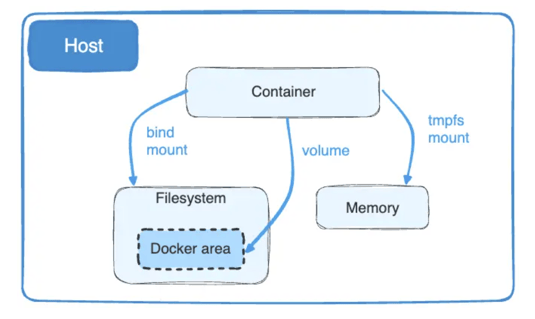
Diagram of docker bind mounts and volumes. Image source: Docker
Docker Swarm is a container orchestration tool that manages and deploys services across a cluster of Docker nodes. It enables high availability, scalability, and load balancing, allowing multiple hosts to act as a single virtual Docker engine.
No, Docker Swarm does not natively support automatic autoscaling. To achieve autoscaling, we need to integrate monitoring tools and use scripts to manually adjust the number of instances. Here's how:
docker service scale command to adjust the number of replicas. For example, to scale a service to 5 replicas: docker service scale <service_name>=5By combining monitoring tools, triggers, and scripts, you can implement a form of autoscaling in Docker Swarm, even though it’s not built-in.
To scale services using Docker Compose, we can use the --scale flag with the docker-compose up command. This is typically used for stateless services like web servers. For example, to scale a web service to 3 instances:
docker-compose up --scale web=3
It’s important to ensure the docker-compose.yml file has properly defined services and uses an external load balancer or supports scaled instances. Scaling stateful services (e.g., databases) requires additional configuration to ensure data consistency.
Yes, a container can restart by itself. However, we need to set a restart policy for that.
Docker has different restart policies that control when and how containers should restart. The default policy is no, which means a container won't restart if it stops. With the always policy, Docker will automatically restart the container whenever it stops.
We can use this command to apply always policy:
docker run --restart=always <container-name>
Now, let’s move on to advanced Docker interview questions!
A Docker container passes through a lifecycle that defines the states a container can be in and how it operates in those states. The stages in a Docker container lifecycle are:
docker create command. docker start command to run the container, which performs the tasks until we stop or pause it. docker pause command to stop the process. This state keeps the memory and disk intact. If you want to resume the container, use the docker unpause command. docker kill command stops the container without cleanup. docker rm command.A Docker image repository stores and shares multiple container images of the same name with the clients or the community. We can label them with tags to differentiate their different versions. For example, app/marketing_campaign:v1 will be the first version of a marketing app, and app/marketing_campaign:v2 will be the second version.
Docker Hub, the most popular Docker image repository, allows users to host, share, and pull container images publicly or privately. Other alternatives include Amazon ECR, Google Artifact Registry, and GitHub Container Registry.
To enhance container security and minimize common vulnerabilities, I follow these best practices:
Docker containers rely on health checks to ensure they run smoothly. Deploying a container that is running but doesn't process requests can create issues for deployment teams. Health checks monitor these issues in real-time and informs us instantly.
For example, a health check can be added in a Dockerfile like this:
HEALTHCHECK --interval=30s --timeout=10s --retries=3 CMD curl -f http://localhost:8080/health || exit 1
This health check pings the container’s health endpoint every 30 seconds and marks the container as unhealthy if it fails three consecutive attempts. This proactive monitoring helps identify and resolve issues promptly.
Dangling images in Docker are unused image layers that no longer have any tags associated with them. They often build up when you create new images with the same name and tag, leaving the old layers without references. These images can consume significant disk space, so it’s important to clean them up. Here's how:
docker images -f dangling=true command to find dangling images. docker image prune -f command to delete all images in one go. docker rmi -f $(docker images -f dangling=true -q) command. These steps help keep your system clean and free up storage efficiently.
Docker and Kubernetes are often used together, so finding some Kubernetes questions in a Docker interview wouldn't be unexpected, particularly if the role is oriented to DevOps. Here are some questions you may be asked:
Docker is a containerization platform that allows you to build, ship, and run containers. It focuses on creating and managing individual containers.Kubernetes, on the other hand, is an orchestration platform designed to manage multiple containers at scale. It handles deployment, scaling, load balancing, and self-healing across clusters of nodes.
Learn more about the differences in the Kubernetes vs Docker blog post.
Kubernetes and Docker Swarm manage containers, but they work differently:
While Docker is great for creating and running containers, managing a large number of them requires Kubernetes. Kubernetes orchestrates containers efficiently by:
By automating these processes, Kubernetes ensures smooth operation, even when managing thousands of containers. While occasional errors can occur, its self-healing capabilities, like restarting failed containers, minimize disruptions.
A Pod is the smallest deployable unit in Kubernetes and represents a group of one or more containers that share the same network namespace, storage, and configuration.Unlike individual containers, Pods allow multiple tightly coupled containers to work together as a single unit (e.g., a web server and a sidecar logging container).
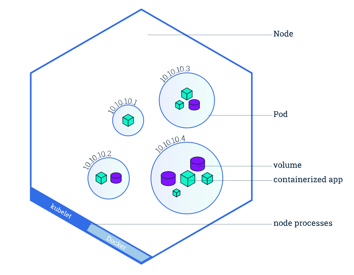
Overview of a Kubernetes node, highlighting pods and containers. Image source: Kubernetes.
Example in Kubernetes:
apiVersion: v1
kind: Secret
metadata:
name: my-secret
type: Opaque
data:
password: cGFzc3dvcmQ= # Base64-encoded "password"The interviewer asks scenario-based and problem-solving questions to test how you approach real-world problems. Let's take a look at some questions to give you an idea:
Example answer:
To reduce the size of a Docker image for a Maven-based API, I would follow these steps:
Create a .dockerignore file in the project directory to specify files and folders that should not be included in the Docker build context. This prevents unnecessary files from being added to the image, reducing its size. For example, I’d add the following to .dockerignore:
.git # Version control files
target # Compiled code and build artifacts
.idea # IDE configuration filesOptimize the Dockerfile using multi-stage builds. I’d build the Maven project in one stage and copy only the necessary artifacts (e.g., compiled JAR files) into the final stage to keep the image small. Example Dockerfile with multi-stage build:
# Stage 1: Build the application
FROM maven:3.8.5-openjdk-11 AS build
WORKDIR /app
COPY pom.xml .
COPY src ./src
RUN mvn clean package
# Stage 2: Create a lightweight runtime image
FROM openjdk:11-jre-slim
WORKDIR /app
COPY --from=build /app/target/my-api.jar .
CMD ["java", "-jar", "my-api.jar"]By ignoring unnecessary files and using multi-stage builds, one can significantly reduce the image size while maintaining efficiency.
Example answer:
Here's how I’d push a Docker container image to Docker Hub with Jenkins:
Jenkinsfile would include the following steps:Here’s how I’d migrate a WordPress Docker container:
docker cp or a volume backup tool to back up the necessary volumes, typically the html directory for WordPress files and the database volume.scp to securely copy the backup files to the new server.By backing up volumes and restoring them to a new server, one can migrate WordPress without losing data. This method avoids reliance on specific extensions and provides more control over the migration process.
If you’re reading this guide, you've already taken an important step to excel in your upcoming interview! But for complete beginners, preparing for an interview can be overwhelming. That's why I've put together some tips:
To excel in a Docker interview, start with a solid understanding of its core concepts.
FROM, RUN, and CMD. DataCamp offers plenty of other resources to guide you throughout your learning journey:
Once you’ve learned essential Docker topics, it's time to challenge yourself with some practical work. Here are 10 excellent Docker project ideas for beginners and more advanced learners. When working on these projects, use DataCamp's Docker cheat sheet to keep key commands at your fingertips.
Be ready to discuss your Docker experience in interviews. Prepare examples of:
Your real-world examples will demonstrate your practical knowledge and problem-solving skills!
As you prepare for your interview, remember these questions are a starting point. While memorizing answers can help, interviewers value candidates who can demonstrate practical experience and a deep understanding of containerization concepts. You should practice implementing these concepts in real-world scenarios and build your projects.
If you’re a beginner, start with our Introduction to Docker course. In the end, success in your interview will come from combining theoretical knowledge with hands-on experience and the ability to articulate your problem-solving approach!
No, you don't need to learn Kubernetes to use Docker. Docker does a completely different job than Kubernetes. It's used to build, run, and manage containers on a single machine.
No, you don't need programming skills to use Docker. Knowing how to work with command-line basics, YAML files, and Docker's documentation is enough to perform most tasks. But you must learn how Linux commands and networking work.
If you're fully dedicated, preparing for a Docker interview can take 3 to 4 weeks. Give at least one week to Docker basics. Then, move to Docker compose and multi-container setups. In the last 2 weeks, focus on multi-stage builds and container optimization. Also, build a portfolio with real-world examples.
I'm a content strategist who loves simplifying complex topics. I’ve helped companies like Splunk, Hackernoon, and Tiiny Host create engaging and informative content for their audiences.

บล็อก
 Patrick Brus• 15 นาที

บล็อก
 Kurtis Pykes • 15 นาที

บล็อก
Patrick Brus• 15 นาทีLearn more about Docker with these courses!
แทร็ก
เรียนรู้พลังของ Docker และ Kubernetes เส้นทางแบบอินเทอร์แอคทีฟนี้จะช่วยให้คุณสร้างและปรับใช้แอปพลิเคชันในสภาพแวดล้อมสมัยใหม่ได้
คอร์ส
รู้จัก Docker และค้นพบความสำคัญของมันในชุดเครื่องมือของผู้เชี่ยวชาญด้านข้อมูล เรียนรู้เกี่ยวกับคอนเทนเนอร์ Docker, อิมเมจ และอื่นๆ
ฝึกฝนและตรวจสอบความก้าวหน้าของคุณ
ดำเนินการต่อด้วย Googleเมื่อดำเนินการต่อ ถือว่าคุณยอมรับ ข้อกำหนดการใช้งานและ นโยบายความเป็นส่วนตัว และยอมรับว่าข้อมูลของคุณจะถูกจัดเก็บในสหรัฐอเมริกา


Docker has become the most popular containerization tool in modern software development, especially within DevOps and CI/CD workflows. It simplifies application deployment and management through containers, which enables delivering of software quickly and consistently.
Its scalability and flexibility features make Docker a requirement for data-related roles such as data engineering, MLOps, and even data science. That’s why I've compiled commonly asked Docker interview-related questions, covering core concepts and real-world scenarios.