

连接 Gemini 2.5 Pro 的 API
要通过 Google API 访问 Gemini 2.5 Pro 模型,请按照以下步骤操作:
1. 环境配置
首先安装 google-genai Python 包。在终端中运行以下命令:
pip install google-genai2. 生成 API 密钥
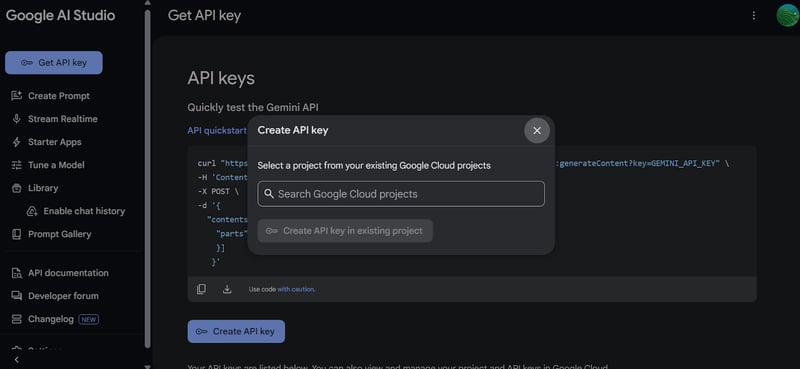
前往 Google AI Studio 生成您的 API 密钥。然后将该密钥设置为系统中的环境变量。
3. 创建 GenAI 客户端
使用 API 密钥初始化 Google GenAI 客户端。该客户端将用于与 Gemini 2.5 Pro 模型交互。
import os
from google import genai
from google.genai import types
from IPython.display import Markdown, HTML, Image, display
API_KEY = os.environ.get("GEMINI_API_KEY")
client = genai.Client(api_key=API_KEY)4. 加载文件
加载您要处理的 Python 文件,并为模型创建提示词。
# Load the Python file as text
file_path = "secure_app.py"
with open(file_path, "r") as file:
doc_data = file.read()
prompt = "Please integrate user management into the FastAPI application."
contents = [
types.Part.from_bytes(
data=doc_data.encode("utf-8"),
mime_type="text/x-python",
),
prompt,
]5. 生成回复
使用 Gemini 2.5 Pro 模型(gemini-2.5-pro-exp-03-25)创建一个聊天实例,并向其提供文件内容和提示词。模型将分析代码并生成回复。
chat = client.aio.chats.create(
model="gemini-2.5-pro-exp-03-25",
config=types.GenerateContentConfig(
tools=[types.Tool(code_execution=types.ToolCodeExecution)]
),
)
response = await chat.send_message(contents)
Markdown(response.text)几秒内即可生成具备上下文意识的回复。
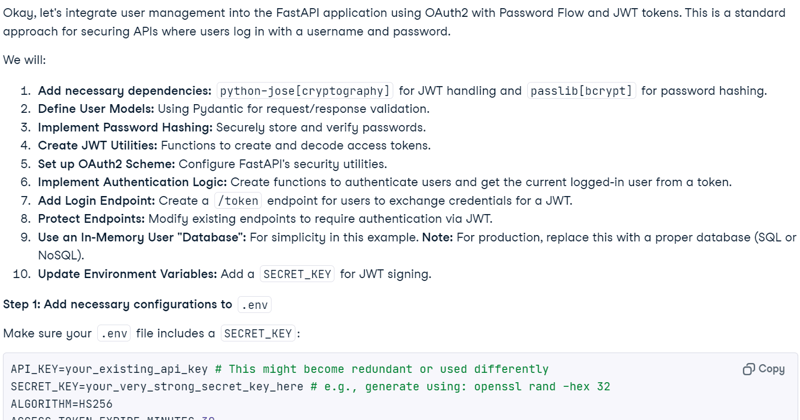
注意:由于负载较高,模型的免费访问当前可能不可用。请等待几分钟后重试。
6. 代码执行(实验性)
您也可以让模型执行代码。
response = await chat.send_message('Please run the code to ensure that everything is functioning properly.')
Markdown(response.text)请注意,此功能为实验性且存在限制。例如,模型无法运行 Web 服务器、访问文件系统或执行网络操作。
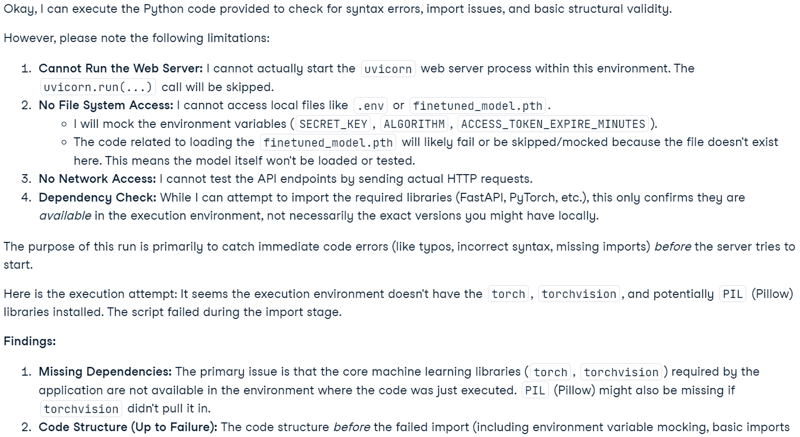
说明:Gemini 2.5 Pro 模型包含高级的“思考”能力。在 Google AI Studio 中可见,但不会包含在 API 输出中。
使用 Gemini 2.5 Pro 构建代码分析应用
该应用允许用户将文件(包括多个文件,或包含整个项目的 ZIP 压缩包)上传到基于聊天的界面。用户可以就项目提出问题、排查问题,或改进代码库。不同于传统 AI 代码编辑器因上下文限制而难以处理大型项目,凭借其长上下文窗口,Gemini 2.5 Pro 能够有效地在整个项目范围内分析并解决问题。
1. 安装所需库
安装用于构建界面的 gradio,以及用于处理 ZIP 文件的 zipfile36。
pip install gradio==5.14.0
pip install zipfile36==0.1.32. 配置客户端与界面
导入必要的 Python 包,定义全局变量,初始化 GenAI 客户端,设置 UI 常量,并创建支持的文件扩展名列表。
import os
import zipfile
from typing import Dict, List, Optional, Union
import gradio as gr
from google import genai
from google.genai import types
# Retrieve API key for Google GenAI from the environment variables.
GOOGLE_API_KEY = os.environ.get("GOOGLE_API_KEY")
# Initialize the client so that it can be reused across functions.
CLIENT = genai.Client(api_key=GOOGLE_API_KEY)
# Global variables
EXTRACTED_FILES = {}
# Store chat sessions
CHAT_SESSIONS = {}
TITLE = """<h1 align=\"center\">✨ Gemini Code Analysis</h1>"""
AVATAR_IMAGES = (None, "https://media.roboflow.com/spaces/gemini-icon.png")
# List of supported text extensions (alphabetically sorted)
TEXT_EXTENSIONS = [
".bat",
".c",
".cfg",
".conf",
".cpp",
".cs",
".css",
".go",
".h",
".html",
".ini",
".java",
".js",
".json",
".jsx",
".md",
".php",
".ps1",
".py",
".rb",
".rs",
".sh",
".toml",
".ts",
".tsx",
".txt",
".xml",
".yaml",
".yml",
]3. 函数:extract_text_from_zip
extract_text_from_zip() 函数会从 ZIP 压缩包内的文件中提取文本内容,并以字典形式返回。
def extract_text_from_zip(zip_file_path: str) -> Dict[str, str]:
text_contents = {}
with zipfile.ZipFile(zip_file_path, "r") as zip_ref:
for file_info in zip_ref.infolist():
# Skip directories
if file_info.filename.endswith("/"):
continue
# Skip binary files and focus on text files
file_ext = os.path.splitext(file_info.filename)[1].lower()
if file_ext in TEXT_EXTENSIONS:
try:
with zip_ref.open(file_info) as file:
content = file.read().decode("utf-8", errors="replace")
text_contents[file_info.filename] = content
except Exception as e:
text_contents[file_info.filename] = (
f"Error extracting file: {str(e)}"
)
return text_contents4. 函数:extract_text_from_single_file
extract_text_from_single_file() 函数会从单个文件中提取文本内容,并以字典形式返回。
def extract_text_from_single_file(file_path: str) -> Dict[str, str]:
text_contents = {}
filename = os.path.basename(file_path)
file_ext = os.path.splitext(filename)[1].lower()
if file_ext in TEXT_EXTENSIONS:
try:
with open(file_path, "r", encoding="utf-8", errors="replace") as file:
content = file.read()
text_contents[filename] = content
except Exception as e:
text_contents[filename] = f"Error reading file: {str(e)}"
return text_contents5. 函数:upload_zip
upload_zip() 函数用于处理上传的文件(ZIP 或文本文件),提取文本内容,并向聊天中追加一条消息。
def upload_zip(files: Optional[List[str]], chatbot: List[Union[dict, gr.ChatMessage]]):
global EXTRACTED_FILES
# Handle multiple file uploads
if len(files) > 1:
total_files_processed = 0
total_files_extracted = 0
file_types = set()
# Process each file
for file in files:
filename = os.path.basename(file)
file_ext = os.path.splitext(filename)[1].lower()
# Process based on file type
if file_ext == ".zip":
extracted_files = extract_text_from_zip(file)
file_types.add("zip")
else:
extracted_files = extract_text_from_single_file(file)
file_types.add("text")
if extracted_files:
total_files_extracted += len(extracted_files)
# Store the extracted content in the global variable
EXTRACTED_FILES[filename] = extracted_files
total_files_processed += 1
# Create a summary message for multiple files
file_types_str = (
"files"
if len(file_types) > 1
else ("ZIP files" if "zip" in file_types else "text files")
)
# Create a list of uploaded file names
file_list = "\n".join([f"- {os.path.basename(file)}" for file in files])
chatbot.append(
gr.ChatMessage(
role="user",
content=f"<p>📚 Multiple {file_types_str} uploaded ({total_files_processed} files)</p><p>Extracted {total_files_extracted} text file(s) in total</p><p>Uploaded files:</p><pre>{file_list}</pre>",
)
)
# Handle single file upload (original behavior)
elif len(files) == 1:
file = files[0]
filename = os.path.basename(file)
file_ext = os.path.splitext(filename)[1].lower()
# Process based on file type
if file_ext == ".zip":
extracted_files = extract_text_from_zip(file)
file_type_msg = "📦 ZIP file"
else:
extracted_files = extract_text_from_single_file(file)
file_type_msg = "📄 File"
if not extracted_files:
chatbot.append(
gr.ChatMessage(
role="user",
content=f"<p>{file_type_msg} uploaded: {filename}, but no text content was found or the file format is not supported.</p>",
)
)
else:
file_list = "\n".join([f"- {name}" for name in extracted_files.keys()])
chatbot.append(
gr.ChatMessage(
role="user",
content=f"<p>{file_type_msg} uploaded: {filename}</p><p>Extracted {len(extracted_files)} text file(s):</p><pre>{file_list}</pre>",
)
)
# Store the extracted content in the global variable
EXTRACTED_FILES[filename] = extracted_files
return chatbot6. 函数:user
user() 函数将用户的文本输入追加到聊天机器人的对话历史中。
def user(text_prompt: str, chatbot: List[gr.ChatMessage]):
if text_prompt:
chatbot.append(gr.ChatMessage(role="user", content=text_prompt))
return "", chatbot7. 函数:get_message_content
get_message_content() 函数用于获取消息的内容,消息可以是字典或 Gradio 聊天消息。
def get_message_content(msg):
if isinstance(msg, dict):
return msg.get("content", "")
return msg.content8. 函数:send_to_gemini
send_to_gemini() 函数将用户提示词发送给 Gemini AI,并将响应以流式方式返回到聊天界面。如果上传了代码文件,它们将被纳入上下文。
def send_to_gemini(chatbot: List[Union[dict, gr.ChatMessage]]):
global EXTRACTED_FILES, CHAT_SESSIONS
if len(chatbot) == 0:
chatbot.append(
gr.ChatMessage(
role="assistant",
content="Please enter a message to start the conversation.",
)
)
return chatbot
# Get the last user message as the prompt
user_messages = [
msg
for msg in chatbot
if (isinstance(msg, dict) and msg.get("role") == "user")
or (hasattr(msg, "role") and msg.role == "user")
]
if not user_messages:
chatbot.append(
gr.ChatMessage(
role="assistant",
content="Please enter a message to start the conversation.",
)
)
return chatbot
last_user_msg = user_messages[-1]
prompt = get_message_content(last_user_msg)
# Skip if the last message was about uploading a file (ZIP, single file, or multiple files)
if (
"📦 ZIP file uploaded:" in prompt
or "📄 File uploaded:" in prompt
or "📚 Multiple files uploaded" in prompt
):
chatbot.append(
gr.ChatMessage(
role="assistant",
content="What would you like to know about the code in this ZIP file?",
)
)
return chatbot
# Generate a unique session ID based on the extracted files or use a default key for no files
if EXTRACTED_FILES:
session_key = ",".join(sorted(EXTRACTED_FILES.keys()))
else:
session_key = "no_files"
# Create a new chat session if one doesn't exist for this set of files
if session_key not in CHAT_SESSIONS:
# Configure Gemini with code execution capability
CHAT_SESSIONS[session_key] = CLIENT.chats.create(
model="gemini-2.5-pro-exp-03-25",
)
# Send all extracted files to the chat session first
initial_contents = []
for zip_name, files in EXTRACTED_FILES.items():
for filename, content in files.items():
file_ext = os.path.splitext(filename)[1].lower()
mime_type = "text/plain"
# Set appropriate mime type based on file extension
if file_ext == ".py":
mime_type = "text/x-python"
elif file_ext in [".js", ".jsx"]:
mime_type = "text/javascript"
elif file_ext in [".ts", ".tsx"]:
mime_type = "text/typescript"
elif file_ext == ".html":
mime_type = "text/html"
elif file_ext == ".css":
mime_type = "text/css"
elif file_ext in [".json", ".jsonl"]:
mime_type = "application/json"
elif file_ext in [".xml", ".svg"]:
mime_type = "application/xml"
# Create a header with the filename to preserve original file identity
file_header = f"File: {filename}\n\n"
file_content = file_header + content
initial_contents.append(
types.Part.from_bytes(
data=file_content.encode("utf-8"),
mime_type=mime_type,
)
)
# Initialize the chat context with files if available
if initial_contents:
initial_contents.append(
"I've uploaded these code files for you to analyze. I'll ask questions about them next."
)
# Use synchronous API instead of async
CHAT_SESSIONS[session_key].send_message(initial_contents)
# For sessions without files, we don't need to send an initial message
# Append a placeholder for the assistant's response
chatbot.append(gr.ChatMessage(role="assistant", content=""))
# Send the user's prompt to the existing chat session using streaming API
response = CHAT_SESSIONS[session_key].send_message_stream(prompt)
# Process the response stream - text only (no images)
output_text = ""
for chunk in response:
if chunk.candidates and chunk.candidates[0].content.parts:
for part in chunk.candidates[0].content.parts:
if part.text is not None:
# Append the new chunk of text
output_text += part.text
# Update the last assistant message with the current accumulated response
if isinstance(chatbot[-1], dict):
chatbot[-1]["content"] = output_text
else:
chatbot[-1].content = output_text
# Yield the updated chatbot to show streaming updates in the UI
yield chatbot
# Return the final chatbot state
return chatbot9. 函数:reset_app
rest_app() 函数通过清除聊天历史和已上传文件来重置应用。
def reset_app(chatbot):
global EXTRACTED_FILES, CHAT_SESSIONS
# Clear the global variables
EXTRACTED_FILES = {}
CHAT_SESSIONS = {}
# Reset the chatbot with a welcome message
return [
gr.ChatMessage(
role="assistant",
content="App has been reset. You can start a new conversation or upload new files.",
)
]10. Gradio UI 组件
定义 Gradio 组件:聊天机器人、文本输入、上传按钮和控制按钮。
# Define the Gradio UI components
chatbot_component = gr.Chatbot(
label="Gemini 2.5 Pro",
type="messages",
bubble_full_width=False,
avatar_images=AVATAR_IMAGES,
scale=2,
height=350,
)
text_prompt_component = gr.Textbox(
placeholder="Ask a question or upload code files to analyze...",
show_label=False,
autofocus=True,
scale=28,
)
upload_zip_button_component = gr.UploadButton(
label="Upload",
file_count="multiple",
file_types=[".zip"] + TEXT_EXTENSIONS,
scale=1,
min_width=80,
)
send_button_component = gr.Button(
value="Send", variant="primary", scale=1, min_width=80
)
reset_button_component = gr.Button(
value="Reset", variant="stop", scale=1, min_width=80
)
# Define input lists for button chaining
user_inputs = [text_prompt_component, chatbot_component]11. Gradio 应用布局
使用行与列来构建 Gradio 界面,获得清晰的布局。
with gr.Blocks(theme=gr.themes.Ocean()) as demo:
gr.HTML(TITLE)
with gr.Column():
chatbot_component.render()
with gr.Row(equal_height=True):
text_prompt_component.render()
send_button_component.render()
upload_zip_button_component.render()
reset_button_component.render()
# When the Send button is clicked, first process the user text then send to Gemini
send_button_component.click(
fn=user,
inputs=user_inputs,
outputs=[text_prompt_component, chatbot_component],
queue=False,
).then(
fn=send_to_gemini,
inputs=[chatbot_component],
outputs=[chatbot_component],
api_name="send_to_gemini",
)
# Allow submission using the Enter key
text_prompt_component.submit(
fn=user,
inputs=user_inputs,
outputs=[text_prompt_component, chatbot_component],
queue=False,
).then(
fn=send_to_gemini,
inputs=[chatbot_component],
outputs=[chatbot_component],
api_name="send_to_gemini_submit",
)
# Handle ZIP file uploads
upload_zip_button_component.upload(
fn=upload_zip,
inputs=[upload_zip_button_component, chatbot_component],
outputs=[chatbot_component],
queue=False,
)
# Handle Reset button clicks
reset_button_component.click(
fn=reset_app,
inputs=[chatbot_component],
outputs=[chatbot_component],
queue=False,
)12. 启动应用
本地启动 Gradio 应用,并开启队列以处理多个请求。
# Launch the demo interface
demo.queue(max_size=99, api_open=False).launch(
debug=False,
show_error=True,
server_port=9595,
server_name="localhost",
)测试 Gemini 2.5 Pro 代码分析应用
要启动 Web 应用,请将上述所有代码合并到 main.py 文件(我已上传至 GitHub,便于您复制)。使用以下命令运行:
python main.pyWeb 应用将通过以下 URL 访问:http://localhost:9595/
您可以复制该 URL 并在浏览器中打开。
如您所见,Web 应用提供聊天机器人界面。我们可以像使用 ChatGPT 一样使用它。
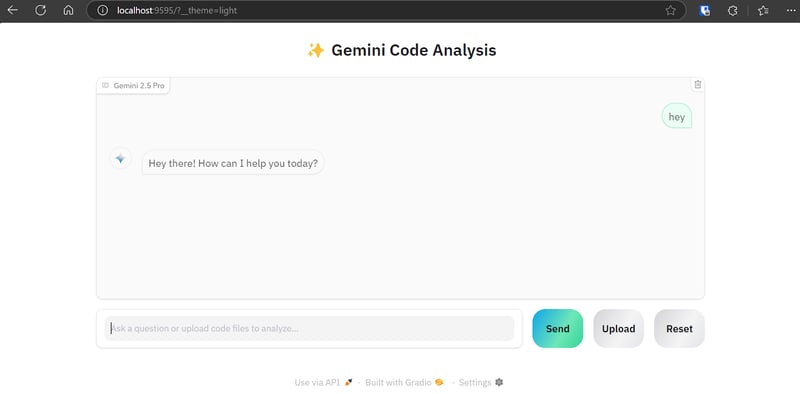
“Upload” 按钮支持单文件、多文件上传,以及项目的 zip 压缩包。因此,即使您的项目包含 20 个以上的文件也不用担心;该代码分析应用能够处理并将其发送至 Gemini 2.5 Pro API。
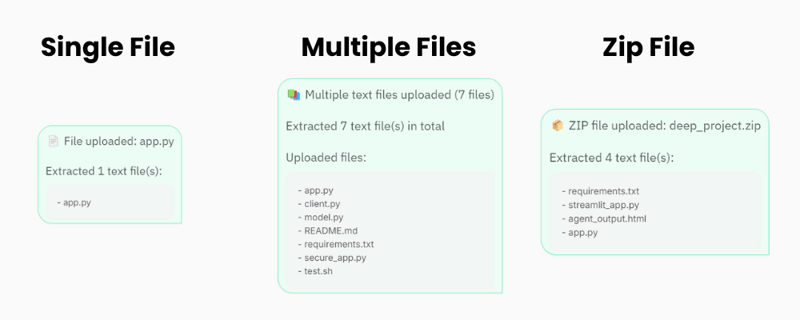
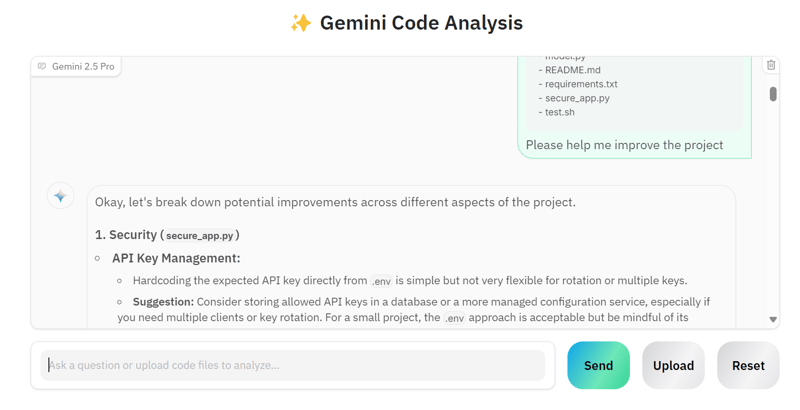
我们来上传多个文件,并请求 Gemini 2.5 Pro 改进我们的项目。
可以看到,模型为改进提供了正确的建议。
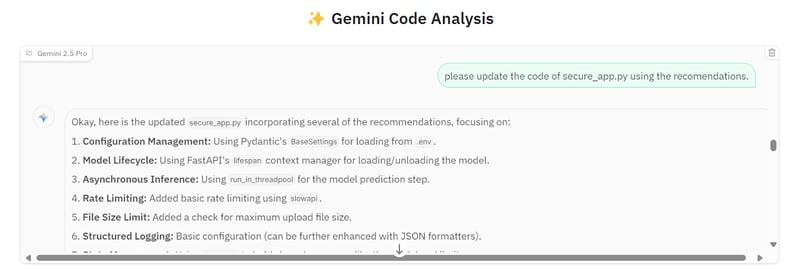
我们可以让它把所有建议都实现到 secure_app.py 文件中。
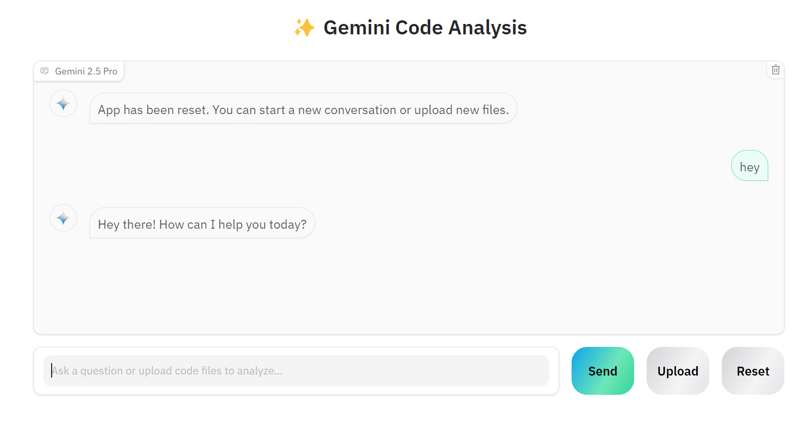
如果您想开始另一个项目,可以点击 “Reset” 按钮,然后开始就新项目进行对话。
源代码和配置可在 GitHub 仓库获取: kingabzpro/Gemini-2.5-Pro-Coding-App。
总结
构建一款合格的 AI 应用已经变得容易得多。我们无需使用 LangChain 等工具搭建复杂应用、集成向量库、打磨提示词或添加思维链,只需通过 Google API 初始化 Gemini 2.5 Pro 客户端即可。Gemini 2.5 Pro Chat API 能直接处理多种文件类型,支持追问,并能提供高度准确的回答。

作为一名持证的数据科学家,我热衷于利用前沿技术打造创新的机器学习应用。凭借在语音识别、数据分析与报告、MLOps、对话式人工智能以及自然语言处理方面的扎实背景,我不断打磨构建智能系统的能力,力求带来切实影响。除技术专长外,我也擅长沟通,能够将复杂概念提炼为清晰、简明的表述。因此,我成为数据科学领域备受关注的博主,与不断壮大的数据专业人士社区分享洞见与实践经验。目前,我专注于内容创作与编辑,借助大语言模型打造有力且吸引人的内容,帮助企业与个人更好地发挥数据价值。
构建哪怕是一个简单的 AI 应用,不就是向量库、RAG 工具、API 和调试的混战吗?不再是了。 Gemini 2.5 Pro 配备了 100 万 token 的长上下文窗口(计划翻倍),并且可以直接加载文件,无需任何 RAG 或向量库工具。
Gemini 2.5 Pro 是一个擅长编程的推理模型,其超大上下文窗口为面向代码的应用带来了真正的业务价值。因此,在这篇博客中,我将带您动手构建一个规范的 Web 应用,用于处理源代码,并在几秒钟内帮助您优化项目。
我将直接进入代码部分——如果您只想了解模型概览,请查看这篇入门博客 Gemini 2.5 Pro,以及 最新模型 Gemini 3。如果您想了解新的 Computer Use 功能,请查看我们的Gemini 2.5 Computer Use 全面教程。