%22%3E%3Cpath%20d%3D%22m-369%200h408v79h-408z%22%20fill%3D%22%237933ff%22%2F%3E%3Cpath%20d%3D%22m-148%200h306v45h-306z%22%20fill%3D%22%23974dff%22%2F%3E%3C%2Fg%3E%3C%2Fsvg%3E)
%22%2F%3E%3C%2FclipPath%3E%3Cg%20clip-path%3D%22url(%23a)%22%3E%3Cpath%20d%3D%22m76%200h484v36h-484z%22%20fill%3D%22%23974dff%22%2F%3E%3Cpath%20d%3D%22m0%200h384v24h-384z%22%20fill%3D%22%2306bdfc%22%20transform%3D%22matrix(1%200%200%20-1%200%2060)%22%2F%3E%3C%2Fg%3E%3C%2Fsvg%3E)
1. 推理力度(Reasoning Effort)
GPT-5 引入了全新的推理力度参数,允许您控制模型在回答前思考的深度。您可以根据需要在 minimal、low、medium、high 四个级别中进行选择。
Minimal 非常适合对速度敏感的任务,如快速写代码或简单指令执行;而 medium 和 high 则支持更全面、逐步推理。通过这种灵活性,您可以在延迟、成本和准确性之间取得平衡。
首先,安装 OpenAI Python SDK,并将您的 API Key 设置为环境变量:
pip install openai设置您的 API Key(请替换为实际密钥):
- Linux/macOS:
export OPENAI_API_KEY="your_api_key_here" - Windows(PowerShell):
setx OPENAI_API_KEY "your_api_key_here"
让我们使用Response API 以“minimal”推理力度生成文本。这意味着模型会直接作答,不会为内部推理分配令牌。
import os
from openai import OpenAI
client = OpenAI(api_key=os.getenv("OPENAI_API_KEY"))
resp = client.responses.create(
model="gpt-5",
input="Who is the father of Python?",
reasoning={"effort": "minimal"},
)
print(resp.output_text)输出:
Guido van Rossum is known as the father (creator) of Python. He first released Python in 1991.您还可以查看令牌用量摘要,以了解模型如何处理您的请求:
print(f"Input tokens: {resp.usage.input_tokens}")
print(f" - Cached tokens: {resp.usage.input_tokens_details.cached_tokens}")
print(f"Output tokens: {resp.usage.output_tokens}")
print(f" - Reasoning tokens: {resp.usage.output_tokens_details.reasoning_tokens}")
print(f"Total tokens: {resp.usage.total_tokens}")如所示,当力度设为 minimal 时,用于推理的令牌为 0。
Input tokens: 13
- Cached tokens: 0
Output tokens: 31
- Reasoning tokens: 0
Total tokens: 44现在,将推理力度提升到 "high",看看模型的内部推理有何变化:
resp = client.responses.create(
model="gpt-5",
input="Who is the father of Python?",
reasoning={"effort": "high"},
)
print(resp.output_text)输出:
Guido van Rossum. He created Python and first released it in 1991.再次查看令牌用量:
print(f"Input tokens: {resp.usage.input_tokens}")
print(f" - Cached tokens: {resp.usage.input_tokens_details.cached_tokens}")
print(f"Output tokens: {resp.usage.output_tokens}")
print(f" - Reasoning tokens: {resp.usage.output_tokens_details.reasoning_tokens}")
print(f"Total tokens: {resp.usage.total_tokens}")即便是一个简单问题,在 high 力度下模型也使用了 192 个推理令牌。这说明您现在可以按需控制推理深度,以优化成本、速度或准确性。
Input tokens: 13
- Cached tokens: 0
Output tokens: 216
- Reasoning tokens: 192
Total tokens: 2292. 冗长度(Verbosity)
在 GPT-5 中,您可以通过冗长度参数直接控制模型输出的详略。将其设为 low 可获得简洁回答,medium 提供适中细节,high 则给出深入解释。这对代码生成尤为有用——低冗长度产出简短、干净的代码;高冗长度会包含行内注释和详细推理。
您可以将冗长度参数与推理控制结合使用,从而精确贴合您的需求。无论您想要一句话、较长回答,还是一份完整报告,都可以灵活掌控。
“low” 冗长度会生成简短直白的答案。
from openai import OpenAI
client = OpenAI(api_key=os.getenv("OPENAI_API_KEY"))
resp = client.responses.create(
model="gpt-5",
input="Who is the father of Python?",
reasoning={"effort": "minimal"},
text={"verbosity": "low"},
)
print(resp.output_text)输出:
Guido van Rossum.“high” 冗长度则会生成更详细、解释性更强的回答。
resp = client.responses.create(
model="gpt-5",
input="Who is the father of Python?",
reasoning={"effort": "minimal"},
text={"verbosity": "high"},
)
print(resp.output_text)输出:
Guido van Rossum is known as the "father of Python." He created Python in the late 1980s and released the first version (Python 0.9.0) in 1991. He also served for many years as Python's "Benevolent Dictator For Life" (BDFL), guiding the language's development.3. 多轮对话与链式思维交接
GPT-5 的一大升级是其能够在 Responses API 中在回合之间传递链式思维(CoT)推理。这意味着模型会记住前一步的内部推理,避免重复思考,从而提升速度和准确性。
在多轮对话中,尤其是使用工具时,只需传递previous_response_id 即可保持推理上下文。
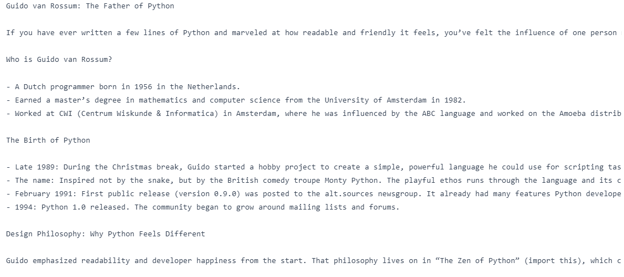
第一次请求问“Who is the father of Python?”,第二次请求通过previous_response_id 关联到第一次,请模型在不重申主题的情况下“Write a blog on it”。通过传递上一个响应的 ID,模型会保留推理上下文。
from openai import OpenAI
client = OpenAI(api_key=os.getenv("OPENAI_API_KEY"))
first = client.responses.create(
model="gpt-5",
input="Who is the father of Python?",
reasoning={"effort": "minimal"},
text={"verbosity": "low"},
)
followup = client.responses.create(
model="gpt-5",
previous_response_id=first.id,
input="Write a blog on it.",
reasoning={"effort": "medium"},
text={"verbosity": "high"},
)
print(followup.output_text)结果,我们得到了关于 Python 之父的博文。
4. 自由格式输入(Freeform Input)
GPT-5 的自定义工具现已支持自由格式输入,允许模型将原始文本(如代码、SQL 查询或 shell 命令)直接发送给您的工具。这是对以往仅限结构化 JSON 的重大升级,使模型与您的系统交互更灵活。无论您在构建代码执行器、查询引擎还是 DSL 解释器,自由格式输入都让 GPT-5 更能适配真实世界的非结构化任务。
在下面的代码中,我们定义了一个模拟的 SQL 运行器,将其注册为自定义工具,并发起初始请求,模型以自由格式 SQL 查询进行响应。该查询被提取后在本地执行,并使用相同的call_id 返还结果以维持工具调用上下文。最后,GPT‑5 将原始工具输出转化为自然语言答案。
from openai import OpenAI
import random
client = OpenAI()
def run_sql_query(sql: str) -> str:
print("\n[FAKE DB] Executing SQL:\n", sql)
categories = ["Electronics", "Clothing", "Furniture", "Toys", "Books"]
result = "category | total_sales\n" + "-" * 28 + "\n"
for cat in categories:
result += f"{cat:<11} | {random.randint(5000, 200000)}\n"
return result
tools = [
{
"type": "custom",
"name": "sql_query_runner",
"description": "Runs raw SQL queries on the company sales database.",
}
]
messages = [
{
"role": "user",
"content": "Show me the total sales for each product category last month.",
}
]
# 1) First call - model emits a freeform tool call
resp = client.responses.create(model="gpt-5", tools=tools, input=messages)
# IMPORTANT: carry the tool call into the next turn
messages += resp.output # <-- this preserves the tool_call with its call_id
# Find the tool call from the response output
tool_call = next(
(
x
for x in resp.output
if getattr(x, "type", "") in ("custom_tool_call", "function_call", "tool_call")
),
None,
)
assert tool_call is not None, "No tool call found."
# Freeform text is in input (fallback to arguments for safety) raw_text = getattr(tool_call, "input", None) or getattr(tool_call, "arguments", "") sql_text = raw_text.strip() # 2) Execute the tool locally fake_result = run_sql_query(sql_text) # 3) Send tool result back, referencing the SAME call_id messages.append( { "type": "function_call_output", "call_id": tool_call.call_id, "output": fake_result, } ) # 4) Final call - model turns tool output into a natural answer final = client.responses.create(model="gpt-5", tools=tools, input=messages) print("\nFinal output text:\n", final.output_text)输出:
[FAKE DB] Executing SQL:
SELECT table_schema, table_name
FROM information_schema.tables
WHERE table_schema NOT IN ('information_schema','pg_catalog')
ORDER BY 1,2;
Final output text:
Here are the total sales by category for last month (July 2025):
- Electronics: 31,766
- Clothing: 90,266
- Furniture: 55,471
- Toys: 124,625
- Books: 74,263
Want this as a CSV or chart?5. 约束输出
在精确性至关重要的场景中,GPT-5 支持使用上下文无关文法(CFG)来严格控制输出格式。通过附加类似 SQL 语法或领域专用语言的文法,您可以确保模型的响应始终符合所需结构。这对于高风险或自动化流程尤为有价值,因为即使格式有细微偏差也可能导致错误。
在示例代码中,我们构建了一个sql_query_runner 工具,并使用 Lark 文法定义其 SQL 语法,确保模型生成的任何 SQL 始终有效且严格遵循我们设定的结构。
在第一次模型调用中,GPT‑5 使用该工具生成一条符合文法的 SQL 查询,用于获取上月按品类统计的销售额。随后我们在本地执行该查询,使用相同的call_id 将结果发回,并在第二次调用中由 GPT‑5 将原始数据转化为清晰的自然语言答案。
from openai import OpenAI
import random
client = OpenAI()
def run_sql_query(sql: str) -> str:
cats = ["Electronics", "Clothing", "Furniture", "Toys", "Books"]
rows = [f"{c:<11} | {random.randint(5_000, 200_000)}" for c in cats]
return "category | total_sales\n" + "-" * 28 + "\n" + "\n".join(rows)
tools = [
{
"type": "custom",
"name": "sql_query_runner",
"description": "Runs raw SQL on the sales DB.",
"format": {
"type": "grammar",
"syntax": "lark",
"definition": r"""
start: SELECT CATEGORY COMMA SUM LPAREN SALES RPAREN AS TOTAL_SALES FROM ORDERS WHERE ORDER_MONTH EQ ESCAPED_STRING GROUP BY CATEGORY ORDER BY TOTAL_SALES (DESC|ASC)?
SELECT: "SELECT"
CATEGORY: "category"
COMMA: ","
SUM: "SUM"
LPAREN: "("
SALES: "sales"
RPAREN: ")"
AS: "AS"
TOTAL_SALES: "total_sales"
FROM: "FROM"
ORDERS: "orders"
WHERE: "WHERE"
ORDER_MONTH: "order_month"
EQ: "="
GROUP: "GROUP"
BY: "BY"
ORDER: "ORDER"
DESC: "DESC"
ASC: "ASC"
%import common.ESCAPED_STRING
%ignore /[ \t\r\n]+/
""",
},
}
]
msgs = [
{
"role": "user",
"content": "Show me the total sales for each product category last month.",
}
]
print("\n=== 1) First Model Call ===")
resp = client.responses.create(
model="gpt-5", input=msgs, tools=tools, text={"format": {"type": "text"}}
)
print("Raw model output objects:\n", resp.output)
msgs += resp.output
tool_call = next(
x
for x in resp.output
if getattr(x, "type", "") in ("custom_tool_call", "function_call", "tool_call")
)
sql = (getattr(tool_call, "input", None) or getattr(tool_call, "arguments", "")).strip()
print("\nExtracted SQL from tool call:\n", sql)
print("\n=== 2) Local Tool Execution ===")
tool_result = run_sql_query(sql)
print(tool_result)
msgs.append(
{
"type": "function_call_output",
"call_id": getattr(tool_call, "call_id", None) or tool_call["call_id"],
"output": tool_result,
}
)
print("\n=== 3) Second Model Call ===")
final = client.responses.create(
model="gpt-5", input=msgs, tools=tools, text={"format": {"type": "text"}}
)
print("\nFinal natural-language answer:\n", final.output_text)可以看到,模型首先生成了符合文法的 SQL 查询,然后执行函数以获取销售数据。最后,GPT-5 将这些数据转化为关于上月按品类销售额的清晰、排序的自然语言总结。
=== 1) First Model Call ===
Raw model output objects:
[ResponseReasoningItem(id='rs_6897acee8afc819f9e7ae0f675bfa4ee0d5175a46255063b', summary=[], type='reasoning', content=None, encrypted_content=None, status=None), ResponseCustomToolCall(call_id='call_vzcHPT7EGvb7QbhF2djVIJZA', input='SELECT category, SUM(sales) AS total_sales FROM orders WHERE order_month = "2025-07" GROUP BY category ORDER BY total_sales DESC', name='sql_query_runner', type='custom_tool_call', id='ctc_6897acf67a34819f84a085191e4ca1fb0d5175a46255063b', status='completed')]
Extracted SQL from tool call:
SELECT category, SUM(sales) AS total_sales FROM orders WHERE order_month = "2025-07" GROUP BY category ORDER BY total_sales DESC
=== 2) Local Tool Execution ===
category | total_sales
----------------------------
Electronics | 52423
Clothing | 59976
Furniture | 172713
Toys | 69667
Books | 14633
=== 3) Second Model Call ===
Final natural-language answer:
Here are the total sales by category for last month (2025-07):
- Furniture: 172,713
- Toys: 69,667
- Clothing: 59,976
- Electronics: 52,423
- Books: 14,633
Want this as a chart or need a different month?6. 允许的工具(Allowed Tools)
全新的allowed_tools 参数让您可以定义模型在完整工具集中的工具子集可用。您可以将模式设为 auto(模型可选择)或 required(模型必须使用其中之一)。这通过阻止模型调用非预期工具,同时允许其在允许集合中择优选择,从而提升安全性、可预测性和提示缓存效果。
完整工具集包含get_weather 和 send_email,但我们仅允许 get_weather,并将模式设为“required”,强制模型使用它。
当被问到 “What’s the weather in Oslo?” 时,GPT‑5 以对 get_weather 的函数调用及正确参数 {"city": "Oslo"} 进行响应。
from openai import OpenAI
client = OpenAI()
# Full toolset (N)
tools = [
{
"type": "function",
"name": "get_weather",
"parameters": {
"type": "object",
"properties": {"city": {"type": "string"}},
"required": ["city"],
},
},
{
"type": "function",
"name": "send_email",
"parameters": {
"type": "object",
"properties": {"to": {"type": "string"}, "body": {"type": "string"}},
"required": ["to", "body"],
},
},
]
# Allowed subset (M < N), mode=required → must call get_weather
resp = client.responses.create(
model="gpt-5",
input="What's the weather in Oslo?",
tools=tools,
tool_choice={
"type": "allowed_tools",
"mode": "required", # use "auto" to let it decide
"tools": [{"type": "function", "name": "get_weather"}],
},
)
for item in resp.output:
if getattr(item, "type", None) in ("function_call", "tool_call", "custom_tool_call"):
print("Tool name:", getattr(item, "name", None))
print("Arguments:", getattr(item, "arguments", None))输出:
Tool name: get_weather
Arguments: {"city":"Oslo"}7. 前言说明(Preambles)
Preambles 是 GPT-5 在调用工具之前可生成的简短、用户可见的说明,用于解释其原因。这能增强透明度、用户信任和调试便利性,尤其适用于复杂流程。只需指示模型“在调用工具前先解释”,即可在不显著增加延迟的情况下,让交互更具人性化与目的性。
在下面的代码中,我们定义了一个 get_weather 函数工具,并在系统指令中要求模型在调用工具前输出一条以“Preamble:”为前缀的简短、用户可见的句子。
当被问到 “What’s the weather in Oslo?” 时,GPT‑5 会先给出一段前言说明其正在查询实时天气服务,然后以正确参数 {"city": "Oslo"} 调用 get_weather 工具。在本地执行工具并返回结果后,模型会给出最终的自然语言答案。
from openai import OpenAI
client = OpenAI()
def get_weather(city: str):
return {"city": city, "temperature_c": 12}
# Tool
tools = [{
"type": "function",
"name": "get_weather",
"description": "Get current temperature for a city.",
"parameters": {
"type": "object",
"properties": {"city": {"type": "string"}},
"required": ["city"],
"additionalProperties": False
},
"strict": True,
}]
# Messages (enable preamble via system instruction)
msgs = [
{"role": "system", "content": "Before you call a tool, explain why you are calling it in ONE short sentence prefixed with 'Preamble:'."},
{"role": "user", "content": "What's the weather in Oslo?"}
]
# 1) Model call → expect a visible preamble + a tool call
resp = client.responses.create(model="gpt-5", input=msgs, tools=tools)
print("=== First response objects ===")
for item in resp.output:
t = getattr(item, "type", None)
if t == "message": # preamble is a normal assistant message
print("PREAMBLE:", getattr(item, "content", None))
if t in ("function_call","tool_call","custom_tool_call"):
print("TOOL:", getattr(item, "name", None))
print("ARGS:", getattr(item, "arguments", None))
tool_call = next(x for x in resp.output if getattr(x, "type", None) in ("function_call","tool_call","custom_tool_call"))
msgs += resp.output # keep context
# 2) Execute tool locally (fake)
import json
args = json.loads(getattr(tool_call, "arguments", "{}"))
city = args.get("city", "Unknown")
tool_result = get_weather(city)
# 3) Return tool result
msgs.append({"type": "function_call_output", "call_id": tool_call.call_id, "output": json.dumps(tool_result)})
# 4) Final model call → natural answer
final = client.responses.create(model="gpt-5", input=msgs, tools=tools)
print("\n=== Final answer ===")
print(final.output_text)可以看到,模型首先给出简短前言说明其意图,然后以 {"city": "Oslo"} 正确调用 get_weather 工具,最后以自然语言返回温度。
=== First response objects ===
PREAMBLE: [ResponseOutputText(annotations=[], text='Preamble: I'm checking a live weather service to get the current conditions for Oslo.', type='output_text', logprobs=[])]
TOOL: get_weather
ARGS: {"city":"Oslo"}
=== Final answer ===
It's currently about 12°C in Oslo.8. 提示词优化(Prompt Optimization)
GPT-5 在精心设计的提示词下表现尤为出色,OpenAI 提供了Prompt Optimizer 来帮助您微调提示词。该工具会根据 GPT-5 的推理风格自动调整提示,从而提升准确性与效率。
前往 Edit prompt - OpenAI API,输入一个简单提示词,如“Create a Netflix clone web application.”。它会将您的提示拆解为适配 GPT-5 的详细结构。
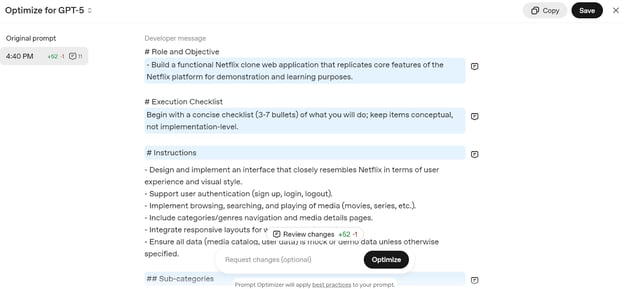
复制该提示词,将其粘贴到 ChatGPT 聊天中,开始构建您自己的 Netflix Web 服务。
9. 迁移到 GPT-5 模型
OpenAI 强烈建议开发者从旧模型迁移到全新的 GPT‑5 系列,以降低成本、提升准确性并改进响应质量。
迁移过程很简单;只需参考下表,为您的用例选择合适的 GPT‑5 模型与推理级别。
|
当前模型 |
推荐的 GPT-5 模型 |
起始推理级别 |
迁移说明 |
|
o3 |
GPT-5 |
Medium |
从 medium 推理 + 提示调优开始;必要时提升到 high。 |
|
gpt-4.1 |
GPT-5 |
Minimal |
从 minimal 推理 + 提示调优开始;为更好表现可提升到 low。 |
|
o4-mini |
GPT-5-mini |
Medium |
使用 GPT-5-mini 并进行提示调优。 |
|
gpt-4.1-mini |
GPT-5-mini |
Minimal |
使用 GPT-5-mini 并进行提示调优。 |
|
gpt-4.1-nano |
GPT-5-nano |
Minimal |
使用 GPT-5-nano 并进行提示调优。 |
结语
GPT-5 不仅仅是一个更聪明的模型,它更是一个用于构建智能、可靠且高效 AI 系统的开发者工具箱。凭借对推理、冗长度、工具使用与输出格式的精细控制,它既能胜任快速编码任务,也能处理复杂的多步骤工作流。
通过运用其新功能与最佳实践,您可以以极小成本,借助 OpenAI SDK 构建可用于生产的 AI 应用。
如果您刚开始接触 OpenAI,务必查看以下资源:
- Working with the OpenAI API:学习与 OpenAI 模型交互的基础知识。
- OpenAI Fundamentals Track:一条面向 OpenAI 技术的系统化学习路径。

作为一名持证的数据科学家,我热衷于利用前沿技术打造创新的机器学习应用。凭借在语音识别、数据分析与报告、MLOps、对话式人工智能以及自然语言处理方面的扎实背景,我不断打磨构建智能系统的能力,力求带来切实影响。除技术专长外,我也擅长沟通,能够将复杂概念提炼为清晰、简明的表述。因此,我成为数据科学领域备受关注的博主,与不断壮大的数据专业人士社区分享洞见与实践经验。目前,我专注于内容创作与编辑,借助大语言模型打造有力且吸引人的内容,帮助企业与个人更好地发挥数据价值。
GPT‑5 已经发布,正在重塑我们使用 AI 工具的方式。它在编程、工具调用、指令遵循和自动化方面表现出色。事实上,它的能力之强让一些人敲响了警钟:GPT‑5 很容易取代初级和中级开发者。
如果您想更深入了解 GPT‑5 的能力,请查看GPT-5: New Features, Tests, Benchmarks, and More | DataCamp。您也可以查看7 个可在聊天中尝试的 GPT-5 示例。
在本教程中,我们不会关注模型的一般能力。相反,我们将探索并测试随新模型一同引入的全新 GPT-5 API 功能。我们将逐一讲解每个功能并运行示例代码,帮助您直观看到其效果。
这里有一些目前其他 API 提供商尚不具备的特色功能。借助 OpenAI SDK,您现在可以无需集成任何外部框架就构建一个完整可用的基于 Agent 的应用。开箱即用。您可以观看下方视频中的实操教程: