Curso
Claude Code 101
3 h
28.3K
Meta Superintelligence Labs ha lanzado su primer modelo de generación de imágenes, Muse Image, ya disponible dentro de la app de Meta AI. Llega tras Muse Spark, el primer modelo de texto del laboratorio, y se suma a la creciente familia Muse con la que Meta está sustituyendo su línea Llama.
Alexandr Wang, responsable de Meta Superintelligence Labs, describe Muse Image como "agéntico": se empareja con el modelo de lenguaje Muse Spark para razonar sobre el prompt, buscar en la web y planificar un diseño antes de renderizar.
Los propios benchmarks internos de Meta sitúan a Muse Image por detrás de GPT Image 2 de OpenAI en calidad general, pero por delante de Nano Banana 2 de Google en tareas de edición de una o varias imágenes.
En este artículo cubro todas las novedades de Muse Image: sus funciones, el enfoque de razonamiento primero, la situación de precios y acceso, y la preocupación de privacidad por usar fotos públicas de Instagram en imágenes de IA (y cómo desactivar esa opción). También indico cómo encaja Muse Video en la hoja de ruta de Meta. Además, te recomiendo nuestra guía sobre el nuevo Muse Glimmer.
Muse Image es el primer modelo de generación de imágenes creado por Meta Superintelligence Labs, con el nombre en clave interno "Mango", según publicó CNBC. Impulsa la creación de imágenes en la app de Meta AI, en meta.ai en la web, en Instagram y en WhatsApp, y pronto llegará a Facebook y Messenger.
La decisión de diseño clave es que Muse Image no convierte un prompt directamente en píxeles. Utiliza una capa intermedia de razonamiento, trabajando con Muse Spark para planificar la composición, incorporar contexto web en tiempo real y combinar varias fotos de referencia antes de generar nada.
Un análisis técnico independiente en YouTube afirma que el modelo, de forma efectiva, escribe primero su propio plan interno para la imagen, lo que mejora la precisión compositiva en escenas complejas con múltiples objetos.
En las comparativas internas de Meta, Muse Image queda por detrás de GPT Image 2 en calidad general, pero supera a Nano Banana 2 tanto en edición de una sola imagen como en edición multiimagen.
Esa posición deja claro el objetivo: resultados realistas y seguros para marcas, orientados a creadores y anunciantes, no una personalidad artística marcada como la de otros modelos.
Muse Image gira en torno a varias funciones pensadas para quienes quieren pasar de una idea a una imagen lista para compartir sin aprender ingeniería de prompts. Estas son las más destacadas.
Puedes describir lo que quieres en un lenguaje conversacional y dejar que Meta AI resuelva la composición.
Como Muse Image razona primero sobre el prompt, se mantiene mejor en peticiones con relaciones espaciales —por ejemplo, colocar varios objetos en una disposición concreta— que un modelo de difusión que trabaja directamente desde el texto.
El modelo también renderiza texto dentro de las imágenes de forma legible, así que puedes pedir una infografía o un gráfico paso a paso y obtener etiquetas estilizadas y claras.
Meta incluso lo promociona como capaz de generar un código QR funcional a partir de un prompt.
Advertencia de probadores independientes: la tipografía fina sigue siendo inconsistente. El texto pequeño en carteles, maquetas de UI y etiquetas de producto puede salir distorsionado, así que toma las promesas de texto legible como "en general" más que "siempre".
Muse Image incluye un panel de presets con prompts sugeridos para que no empieces desde una caja en blanco.
Con un toque puedes restaurar una foto antigua de familia, probarte un peinado en tendencia o convertirte en un personaje de claymation o en un héroe de videojuego retro de 16 bits.
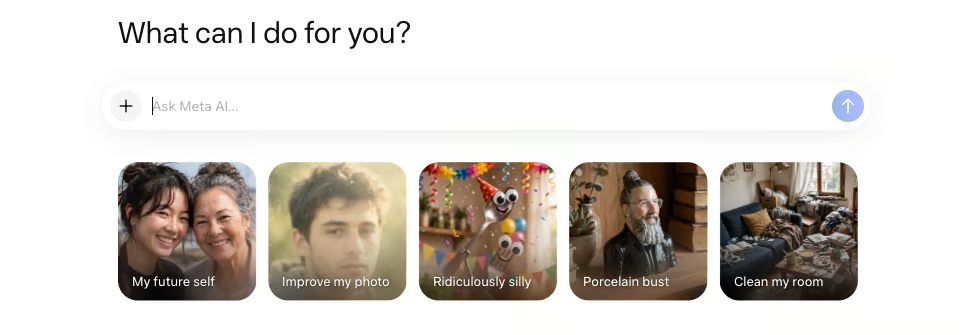
Lo que crees puedes compartirlo como preset con tus amigos para que lo apliquen a sus propias fotos.
Es la mecánica por la que Meta apuesta para la viralidad en sus apps, y es la misma detrás de los más de 30 nuevos efectos de IA que llegan a Instagram Stories, primero en EE. UU. y luego de forma más amplia.
Puedes fotografiar una estancia y pedir a Meta AI que la rediseñe usando productos reales extraídos de la web o de Facebook Marketplace.
Sugiere un estilo o pide al modelo que tire de lo que está en tendencia, y renderizará tu espacio con un cambio de imagen completo usando artículos que puedes comprar de verdad.
Es el gancho comercial más claro de este lanzamiento.
Vincular la generación de imágenes directamente con anuncios de Marketplace convierte una maqueta divertida en un embudo de compra, que es exactamente por lo que los anunciantes tendrán acceso a través de Meta Advantage+ creative en las próximas semanas.
Puedes @mencionar una cuenta de Instagram dentro de un prompt de Meta AI, y el modelo usará las fotos públicas de esa cuenta para crear una imagen en la que aparezca su parecido.
Meta lo presenta para cosas como invitaciones personalizadas a eventos o conceptos creativos colaborativos.
Es la función que más escrutinio está recibiendo, y con razón.
Permitir que cualquiera incorpore las fotos públicas de Instagram de otra persona en imágenes generadas por IA plantea preguntas evidentes sobre consentimiento y uso indebido, incluso con los filtros de seguridad de Meta activos.
Explico cómo desactivarlo en su propia sección más abajo, porque importa más que cualquier preset, pero aquí puedes ver cómo funciona.
Para cambiar una imagen generada, toca el icono de marcado y rodea, dibuja o anota la edición directamente encima de la foto.
Como Meta AI recuerda todo el contexto de la conversación, puedes seguir refinando, cambiando estilos o añadiendo elementos sin empezar de cero.
Una limitación honesta de los primeros probadores: el modelo aún no mantiene de forma fiable todo el "estado de la escena" a lo largo de muchas ediciones secuenciales, y no hay control por capas como en una herramienta de diseño dedicada.
Es bueno para retoques iterativos, menos para composiciones precisas de múltiples pasadas.
La función de @mención permite a Meta AI crear una imagen a partir de las fotos públicas de Instagram de una persona cuando etiquetas su nombre de usuario, y esa es la parte del lanzamiento que merece una pausa.
Significa que tus fotos públicas de perfil pueden convertirse en material de origen para imágenes que generen otras personas, lo que supone un cambio importante respecto a que simplemente sean visibles.
Meta afirma que tienes control sobre si tu contenido puede reutilizarse de esta forma, con un ajuste para desactivar la función en cualquier momento.
Si prefieres que tus fotos públicas de Instagram no se utilicen en creaciones de IA de otras personas, ajusta el ajuste de etiquetado para creación con IA en tus controles de Instagram.
Abre la app de Instagram y toca tu icono de perfil.
Toca el menú hamburguesa (las tres líneas horizontales) en la esquina superior derecha y selecciona Configuración y actividad.
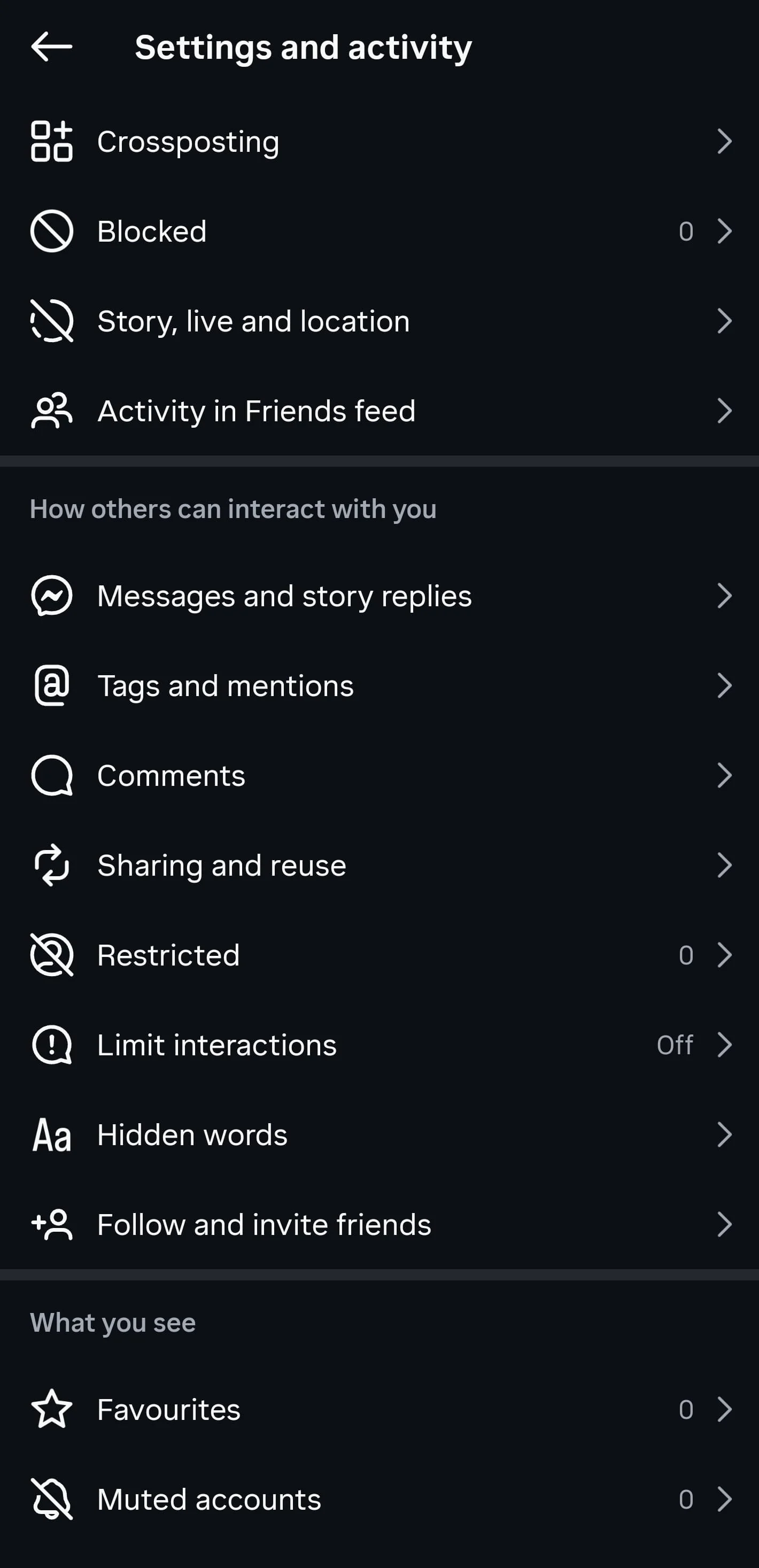
Desplázate y toca Uso compartido y reutilización.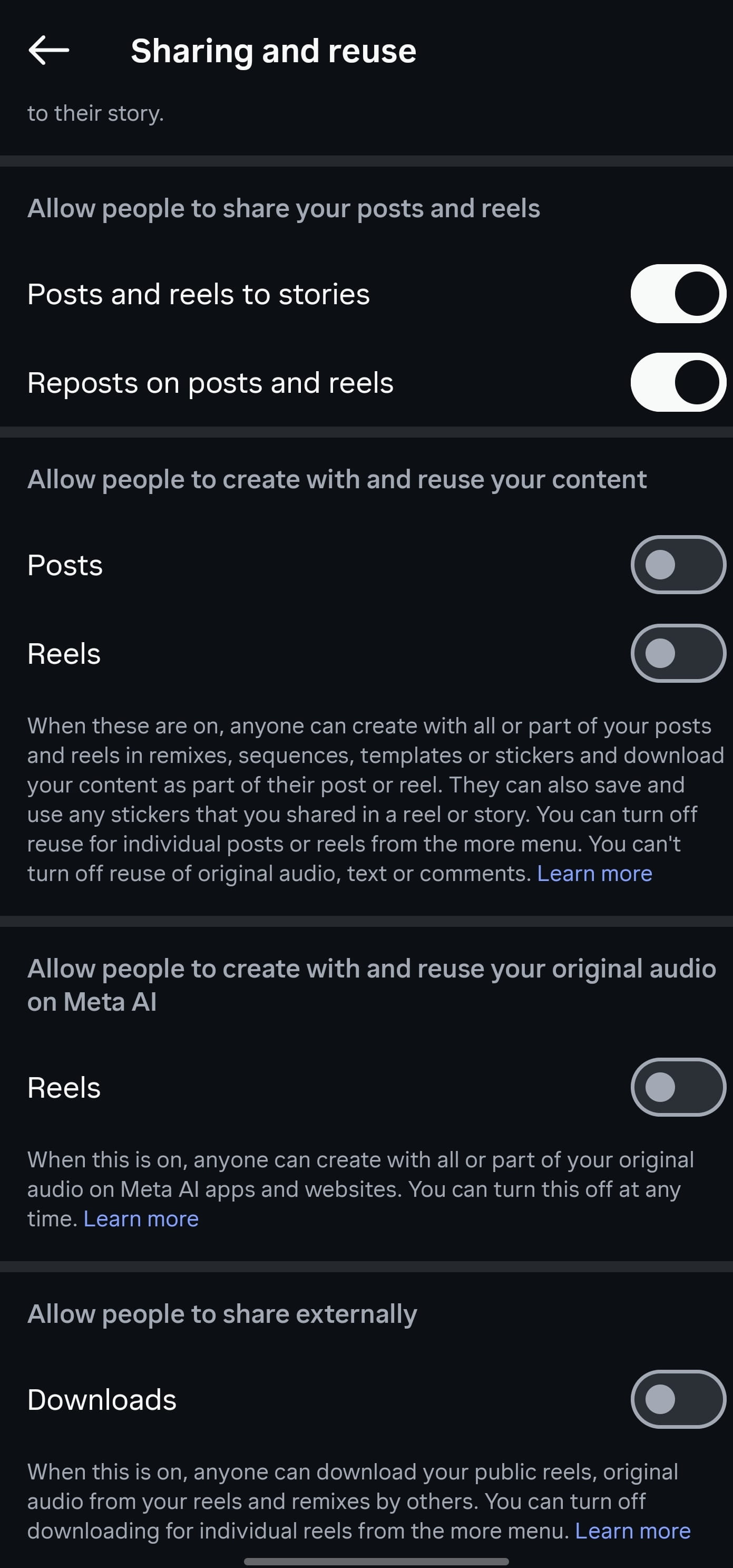
Desactiva los interruptores individuales. Según tu versión de la app, podrías ver conmutadores separados para publicaciones, Reels y audio original.
Mi opinión: un sistema de exclusión voluntaria pone la carga en los usuarios, y la mayoría nunca encontrará el ajuste. Si tienes una cuenta pública de Instagram y esto te preocupa, cambia el ajuste ahora en lugar de esperar a ver cómo se usa la función.
Las promesas principales de Muse Image merecen ponerse a prueba directamente: composición guiada por razonamiento, texto legible dentro de la imagen, mezcla multiimagen y ediciones iterativas a mano alzada. A continuación tienes prompts que un editor puede ejecutar en la app de Meta AI para comprobar cada afirmación. Yo no los he ejecutado; las secciones de resultados son marcadores de posición para que el editor las complete.
Esto apunta a la afirmación de razonamiento primero: que Muse Image gestiona mejor las relaciones entre objetos que un modelo de difusión directo.
Create a photorealistic image of a green bicycle leaning against a brick wall,
with a small orange cat sitting on the seat and a red umbrella open on the ground
to the left of the front wheel.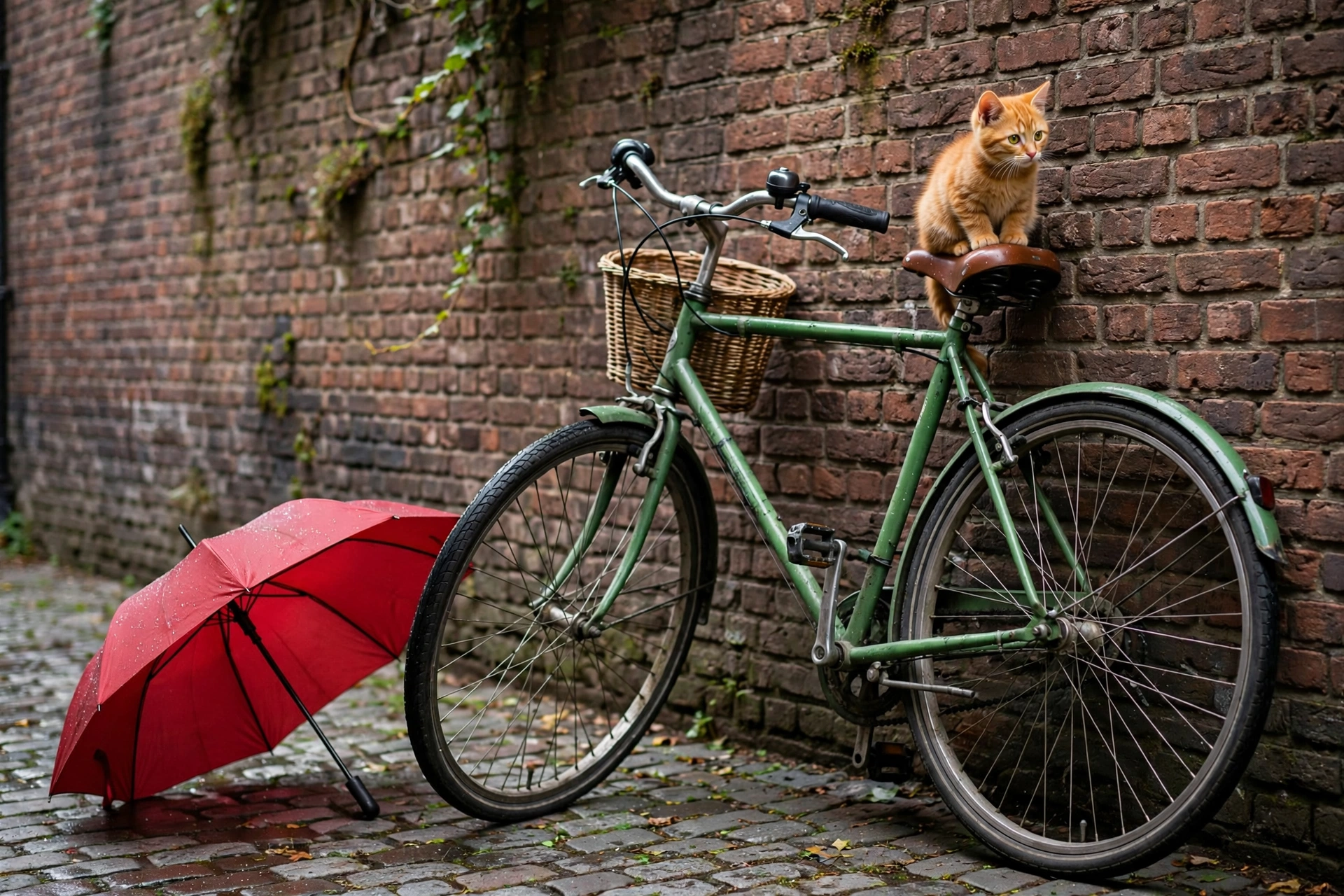
Como ves, ha hecho un trabajo bastante decente, colocando los distintos objetos como se pidió. Hay algunos detalles que fallan: la cesta está en una posición poco natural y parece haber tres pedales en lugar de dos. Además, el gato "destaca" más que el resto de la imagen. Aun así, es un resultado sólido.
Meta afirma que Muse Image renderiza texto estilizado y legible dentro de las imágenes. El texto pequeño es el punto débil conocido, así que esta prueba lo presiona directamente.
Make a clean infographic titled "Morning Routine" with four numbered steps:
1. Drink water, 2. Stretch for five minutes, 3. Eat breakfast,
4. Review your to-do list. Use a minimal flat design with legible sans-serif
labels.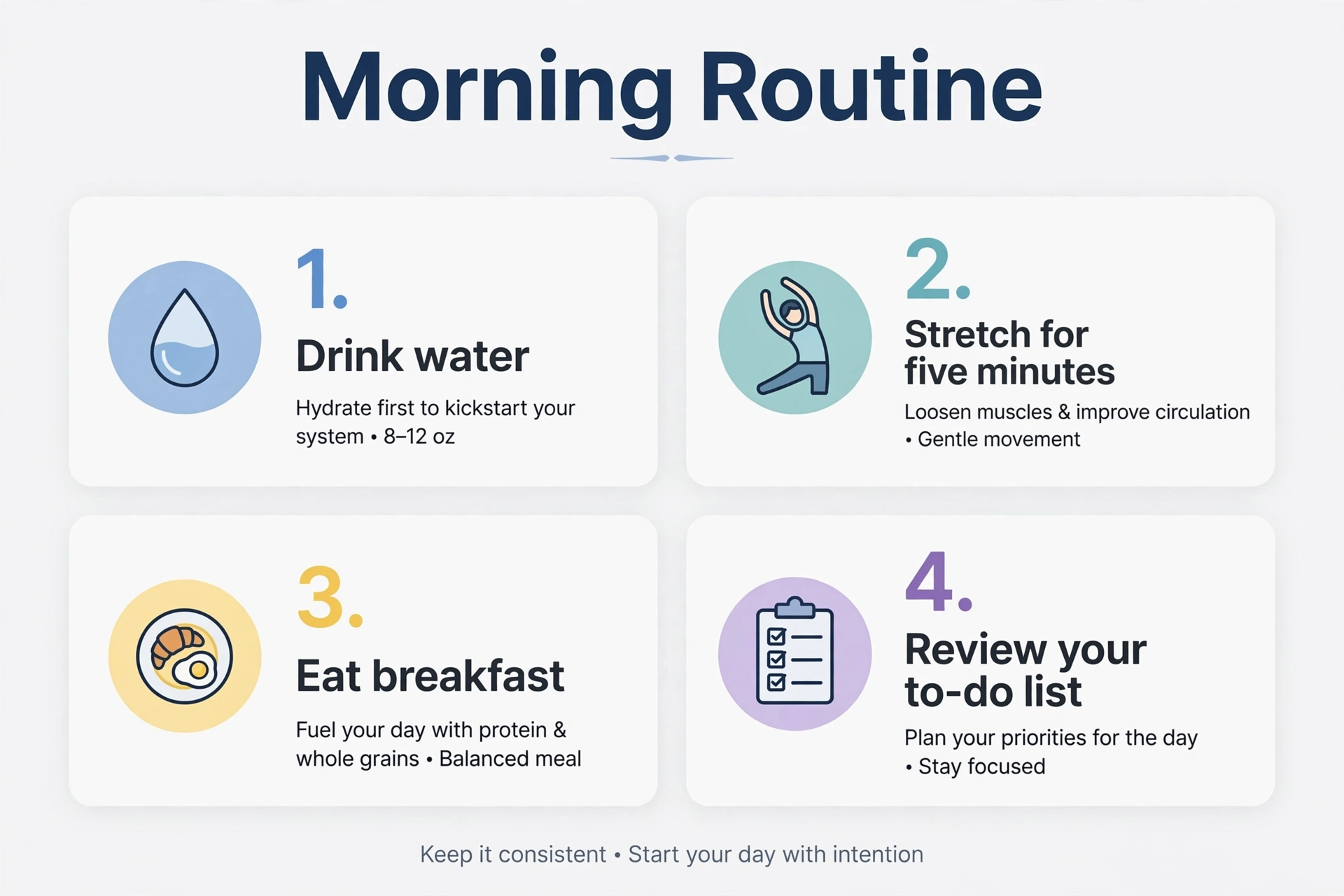
De nuevo, el resultado es correcto. Las etiquetas están bien escritas y la tipografía funciona, aunque no está especialmente bien escalada entre los cuatro paneles. Ha añadido contexto extra que no pedí, pero puede resultar útil.
Esto pone a prueba el flujo de marcado y refinado y si el modelo mantiene el resto de la imagen consistente entre ediciones.
Generate a photo of a wooden kitchen table with a single white coffee mug on it. T
hen, in a follow-up, add a plate of croissants next to the mug without
changing the table, lighting, or mug.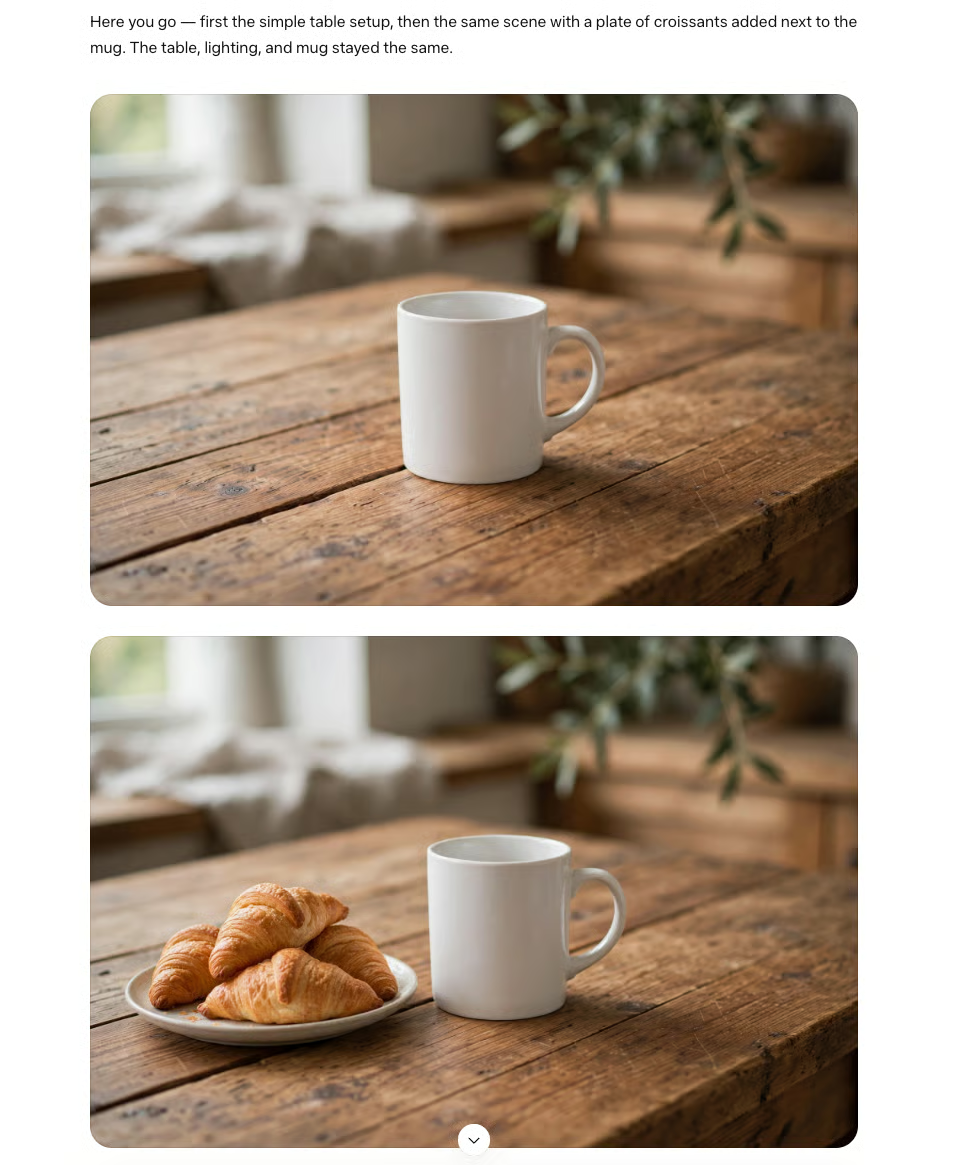
Aquí el modelo se comporta bastante bien. La escena original resulta verosímil y la iluminación está bien. La segunda imagen mantiene la consistencia, pero los cruasanes parecen poco reales: fallan el tamaño y la textura.
Meta no ha publicado una tabla de benchmarks estandarizada de terceros para Muse Image como suelen hacer los laboratorios con los modelos de texto. Las cifras disponibles proceden de comparativas internas de Meta, así que léelas con la cautela habitual ante resultados auto-reportados.
En los benchmarks internos de edición de Meta, Muse Image queda por detrás de GPT Image 2 de OpenAI en calidad general, pero supera a Nano Banana 2 de Google tanto en edición de una sola imagen como en edición multiimagen. En términos sencillos, los benchmarks de edición miden lo bien que un modelo modifica una imagen existente (cambiar estilos, añadir o quitar objetos) manteniendo intacto el resto.
| Modelo (Laboratorio) | Text-to-Image Arena | Single-Image Edit Arena | Multi-Image Edit Arena |
|---|---|---|---|
| GPT Image 2 (OpenAI) | Líder (puntuación: 1385) | Líder (puntuación: 1466) | Líder (puntuación: 1454) |
| Muse Image (Meta) | Segundo (puntuación: 1280) | Segundo (puntuación: 1405) | Segundo (puntuación: 1399) |
| Nano Banana 2 (Google) | Cuarto (puntuación: 1270) | Séptimo (puntuación: 1387) | Tercero (puntuación: 1376) |
Para quienes lo usen en producción, ese ranking sugiere que Muse Image es un editor competente de segunda línea, no el referente. Si tu flujo depende de la máxima fidelidad de edición disponible, GPT Image 2 sigue en cabeza según los propios números de Meta.
Conviene recordar que el modelo de texto relacionado, Muse Spark, tiene un historial documentado de afirmaciones internas infladas.
Artificial Analysis encontró que la cifra interna de Meta para Humanity's Last Exam del 50,2% caía al 39,9% en pruebas independientes de un solo agente. Aplica el mismo escepticismo a las victorias internas de edición de Muse Image hasta que lleguen evaluaciones de terceros.
Probadores independientes e hilos de la comunidad han señalado limitaciones consistentes que ningún gráfico de benchmarks captura. Importan más para el día a día que una única puntuación de calidad.
Muse Image ya está disponible en la app de Meta AI, en meta.ai, en chats directos de WhatsApp (países limitados en el lanzamiento) y como motor de los más de 30 nuevos efectos de IA en Instagram Stories, empezando por EE. UU.
Facebook y Messenger llegarán pronto, y los anunciantes tendrán acceso a través de Meta Advantage+ creative en las próximas semanas.
Para uso cotidiano, Muse Image es gratis, con un límite diario o mensual de generaciones para el que Meta no ha publicado cifras exactas.
El uso intensivo y los controles avanzados quedan detrás de los planes de suscripción de pago de Meta.
Muse Image es el primer modelo de imágenes serio de Meta para flujos sociales y publicitarios, y la estrategia es clara: poner una herramienta creativa gratuita y guiada por razonamiento frente a miles de millones de usuarios de Meta AI, Instagram y WhatsApp, y canalizar el dinero de compras y creatividades publicitarias por Marketplace y Advantage+.
La rápida secuencia tras Muse Spark apunta a una hoja de ruta multimodal agresiva, con Muse Video ya en desarrollo y con guiños de ser competitivo en adherencia al prompt, fidelidad visual y consistencia temporal.
¿Merece la pena usarlo? Para creación casual y contenido social, sí, especialmente siendo gratis.
Pero en los propios benchmarks internos de Meta, queda por detrás de GPT Image 2, y probadores independientes describen su estilo por defecto como limpio pero genérico frente a la personalidad de Midjourney. Si necesitas la máxima fidelidad de edición o un estilo artístico distintivo, todavía no es el modelo al que acudir.
Lo más urgente hoy es la función de @mención en Instagram. Permitir que otros generen imágenes de IA a partir de tus fotos públicas de perfil es un cambio real; la opción para desactivarlo está algo escondida y, por defecto, favorece la participación. Si gestionas una cuenta pública, cambia el ajuste ya.
Si quieres entender cómo modelos como este razonan sobre los prompts y generan imágenes, nuestro itinerario de aprendizaje AI Fundamentals es un buen punto de partida.
Los mejores cursos de DataCamp
Curso
Curso
Curso
blog
Abid Ali Awan
10 min
blog
Dr Ana Rojo-Echeburúa
9 min
blog
blog
Abid Ali Awan
8 min
blog
Bhavishya Pandit
8 min
Tutorial
Zoumana Keita
12 min