
Our biggest-ever sale. 60% off AI & data skills
Buy Now

실습 문제하고 트랙하세요.
Google로 계속하기계속 진행하시면 다음 사항에 동의하는 것으로 간주됩니다: 이용약관 및 개인정보 처리방침 그리고 귀하의 데이터가 미국에 저장된다는 점에 동의하는 것으로 간주됩니다.To showcase your expertise in Azure data engineering, you should have a solid grasp of core Azure services and data pipeline concepts. Questions like the following will assess your ability to design, optimize, and manage a basic cloud-based data workflow.
Azure provides core data services for managing, processing, and analyzing data, including:
There are many others, but the above are the most important ones for data engineers.
Azure Data Factory (ADF) creates pipelines to move and transform data. A basic pipeline includes:
For a step-by-step walkthrough, check out our Azure Data Factory tutorial.
ETL (Extract, Transform, Load) is a data integration process that gathers, processes, and stores data for analysis. Its three stages are:
ETL (Extract, Transform, Load) and ELT (Extract, Load, Transform) are data-processing approaches, but they differ when and where the transformation occurs.
With ETL, Data is transformed before loading; however, with ELT, Data is transformed after loading.
ETL is better when you have structured data that needs to be pre-processed and high-quality for business intelligence (BI) dashboards.
You can learn more about the practical trade-offs in our ETL vs ELT guide.
Azure provides these different options to meet various data storage and processing needs. Here’s a comparison of the most popular options:
|
Feature |
Azure Blob Storage |
Azure Data Lake Storage (ADLS) |
Azure SQL Database |
|
Purpose |
General-purpose object storage for unstructured data |
Optimized for big data analytics on top of Blob storage |
Fully managed relational database service |
|
Data type |
Unstructured (e.g., text, images, video, logs) |
Structured, semi-structured, and unstructured |
Structured (tables, rows, columns) |
|
Use cases |
Backup files, media content, logs, raw data storage |
Big data processing, analytics, data lake architecture |
OLTP (transactional systems), reporting, business apps |
|
Integration |
Integrates with most Azure services and SDKs |
Integrates with big data tools like Azure Synapse, HDInsight |
Integrates with Power BI, Azure Data Factory, Logic Apps |
|
Performance tiers |
Hot, Cool, Archive tiers for cost optimization |
Optimized for throughput and parallel processing |
Built-in performance tiers (General Purpose, Business Critical) |
|
Security |
Role-based access control (RBAC), encryption at rest |
RBAC, POSIX-style ACLs for granular permissions |
Advanced threat protection, encryption, auditing |
|
Query support |
Limited (via Azure Data Lake or custom logic) |
Supports hierarchical namespace and analytics with U-SQL/Parquet |
Full SQL query support |
|
Cost model |
Pay-as-you-go based on storage and access tier |
Similar to Blob, but may incur higher processing costs |
Pay per DTU/vCore and storage tier |
As we have seen in the previous comparison, Azure Blob Storage and Azure Data Lake Storage (ADLS) store data, but ADLS is optimized for big data analytics and it’s built on top of .
Choose ADLS when:
In Azure, SQL is widely used for querying data from services like Azure SQL Database, Azure Synapse Analytics, and Azure Data Explorer.
Understanding core SQL commands is essential for tasks like data exploration, transformation, and reporting. Key SQL commands:
SELECT – Retrieves data from tables.WHERE – Filters records by condition.ORDER BY – Sorts results.GROUP BY – Groups rows with the same values.HAVING – Filters grouped records.JOIN – Combines data from multiple tables.Example: Extracting Insights with SQL in Azure Synapse:
SELECT d.name AS department, AVG(e.salary) AS avg_salary
FROM employees e
JOIN departments d ON e.dept_id = d.id
WHERE e.status = 'active'
GROUP BY d.name
HAVING AVG(e.salary) > 80000
ORDER BY avg_salary DESC;This query might be used in Azure Synapse Analytics to analyze average salaries by department, filtering for only active employees and high-paying departments.
If you’re new to Synapse, start with this Azure Synapse beginner’s guide to build confidence.
In Azure, data transformation using SQL is commonly performed in services like Azure SQL Database, Azure Synapse Analytics (Dedicated or Serverless SQL pools), or via mapping data flows in Azure Data Factory.
These transformations help shape raw data into clean, structured, and insightful formats for reporting and analytics.
Here are some widely used SQL operations for data transformation:
SUM, AVG, COUNT) – Summarizes data.CASE statements – Applies conditional logic.UPPER, LOWER, CONCAT) – Modifies text.YEAR, MONTH, DATEDIFF) – Extracts date details.RANK, ROW_NUMBER, LEAD, LAG) – Enables analytics.Example: Transformation Query in Azure Synapse SQL
SELECT
customer_id,
UPPER(TRIM(customer_name)) AS cleaned_name,
SUM(order_amount) AS total_spent,
RANK() OVER (ORDER BY SUM(order_amount) DESC) AS spending_rank,
CASE
WHEN SUM(order_amount) > 5000 THEN 'High Value'
WHEN SUM(order_amount) > 1000 THEN 'Medium Value'
ELSE 'Low Value'
END AS customer_segment
FROM sales_data
GROUP BY customer_id, customer_name;The above kind of SQL transformation could be part of a Synapse pipeline used to power dashboards or feed into machine learning models.
Data ingestion moves data from sources to storage or processing systems in Azure. It generally falls into two types, depending on the timeliness and frequency of data processing:
To understand when to use each ingestion method, see our Batch vs Stream Processing breakdown.
Azure Data Factory is an ETL (Extract, Transform, Load) service that helps move and transform large volumes of data. How it works:
Having covered the basics, let's move on to some intermediate-level Azure data engineer interview questions that explore your technical proficiency in implementing and using these fundamental concepts.
Azure Databricks is a cloud-based analytics platform optimized for Apache Spark. It enables efficient large-scale data processing through distributed computing. It uses Spark’s model for large data transformations, partitioning data and processing it in parallel across cluster nodes. Features for large-scale transformation:
map, filter, groupBy) are not executed immediately. Instead, Spark builds a logical execution plan and waits until an action (e.g., count, collect, save) is called.You can explore how Delta Lake enables ACID transactions in our Delta Lake tutorial.
In Azure Databricks, Spark operations are classified into Transformations and Actions. Here are their differences:
|
Aspect |
Transformations |
Actions |
|
Definition |
Operations that define a new dataset from an existing one |
Operations that trigger the execution of transformations |
|
Execution |
Lazy – they build a logical plan but don't run immediately |
Eager – they force Spark to execute the DAG and compute results |
|
Result |
Returns a new RDD or DataFrame (transformed dataset) |
Returns a value to the driver or writes data to storage |
|
Purpose |
Used to define what should be done |
Used to specify when to execute and retrieve data |
|
Examples |
map(), filter(), select(), groupBy(), withColumn() |
count(), collect(), show(), save(), write() |
|
Optimization |
Enables Spark to optimize the execution plan before running |
Executes the optimized plan |
Azure Data Factory (ADF) is a cloud-based data integration service for orchestrating and automating workflows across various sources and destinations. Key ADF components for orchestration:
Triggers in Azure Data Factory automate pipeline runs based on schedules or events. The three main types are:
While both Azure Synapse Analytics and Azure Databricks are designed for large-scale data processing, they serve different purposes, follow different architectural models, and cater to distinct user personas.
Here are their main differences:
|
Category |
Azure Synapse Analytics |
Azure Databricks |
|
Architecture |
Tightly integrated SQL engines (dedicated + serverless) |
Apache Spark-based distributed clusters |
|
Primary interface |
Synapse Studio (SQL Editor, Data Explorer, Pipelines) |
Collaborative notebooks (Python, Scala, SQL, R) |
|
Best for |
Data warehousing, BI, reporting, and batch analytics |
Big data processing, data science, ML, streaming workloads |
|
Language support |
Primarily T-SQL, with limited support for Spark |
Python, Scala, SQL, R, and full Spark support |
|
Data formats |
Structured and semi-structured (Parquet, CSV, JSON) |
Structured, semi-structured, and unstructured (text, images, video) |
|
Integration |
Native Power BI, Data Factory, and SQL tooling |
MLflow, Delta Lake, AutoML, advanced ML frameworks (TensorFlow, etc.) |
|
Processing type |
Optimized for batch and interactive SQL queries |
Optimized for distributed, in-memory, real-time & iterative workloads |
|
User personas |
Data analysts, BI developers, SQL developers |
Data engineers, data scientists, ML engineers |
For a deeper breakdown, read our Azure Synapse vs. Databricks comparison.
Azure Synapse and Databricks both support real-time processing but differ in approach.
Use Azure Synapse for real-time BI and event ingestion when:
Use Azure Databricks for low-latency streaming and ML pipelines when:
Role-Based Access Control (RBAC) is an Azure security model that limits resource access based on user roles. Instead of full access, RBAC grants only the permissions needed for each role.
RBAC assigns roles to users, groups, or apps at various scopes—like subscriptions, resource groups, or specific resources. Common roles include:
Key benefits:
Azure secures data through encryption at rest and in transit:
Azure Purview is a unified solution that helps:
Data partitioning divides large datasets into smaller, manageable chunks (partitions) based on criteria like time, region, or ID.
Example: Partitioning in Azure Data Lake Storage.
A retail company storing sales data in Azure Data Lake Storage (ADLS) can organize it by year, month, and day instead of using one large file:
/sales_data/year=2023/month=12/day=01/
/sales_data/year=2023/month=12/day=02/
/sales_data/year=2023/month=12/day=03/This structure lets queries target only relevant partitions, greatly improving performance.
In Azure Synapse Analytics, large-scale queries can be optimized with indexing and caching to improve speed and efficiency.
CustomerID enables faster lookups, avoiding full table scans.SalesData table enables instant retrieval of precomputed aggregations.Let's explore some advanced interview questions for those seeking more senior roles or aiming to demonstrate a deep knowledge of specialized or complex Azure data engineering.
Azure Stream Analytics (ASA) is a real-time processing engine that ingests, analyzes, and transforms data from sources like Azure Event Hubs, IoT Hub, and Blob Storage. It lets users filter, aggregate, and route data to destinations such as Azure SQL, Power BI, or Data Lake Storage.
How ASA works with Event Hubs:
Performance optimizations:
Event-driven architecture enables systems to respond instantly to events, ideal for real-time analytics, monitoring, and automation. Azure Event Hubs, a scalable event ingestion service, works seamlessly with Azure Functions for processing.
Workflow with Event Hubs and Azure Functions:
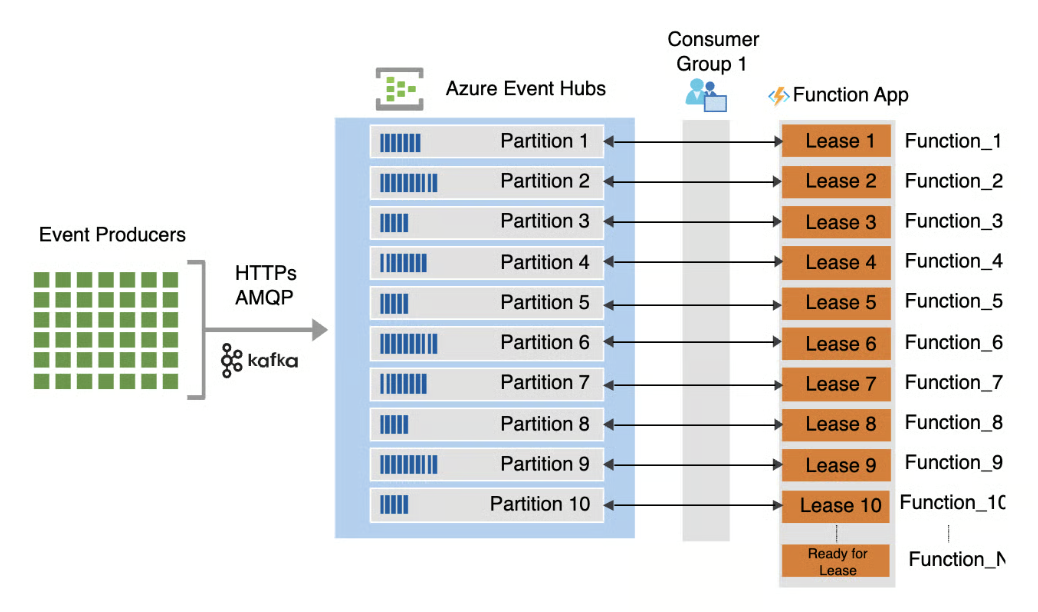
Example architecture using Azure Event Hubs and Azure Funtions to process large volumes of data in near real time. Source: Microsoft Learn.
Azure Synapse Analytics natively supports Apache Spark pools, allowing you to run Spark-based big data and machine learning workloads directly within the Synapse environment—without deploying external infrastructure.
This tight integration bridges the gap between big data engineering, machine learning, and enterprise analytics, making it easy to work with both structured and unstructured data at scale.
How the integration works:
Cost optimization in Azure means selecting the right services, minimizing resource use, and using automation—all while preserving performance and scalability. Key strategies:
Performance tuning involves optimizing data processing, query execution, and scaling to ensure efficient resource use. Here are some best practices:
date) to reduce scan time.SELECT *—only retrieve needed columns.shuffle.partitions) based on workload.Integrating Azure ML with Azure Data Factory (ADF) enables automated model training, deployment, and inference within a data pipeline. Integration steps:
Azure Databricks and Azure Machine Learning (Azure ML) can be integrated for scalable data processing, model training, and deployment in the cloud. Integration steps:
CI/CD (Continuous Integration/Deployment) for Azure Data Factory (ADF) automates pipeline deployment, minimizing manual effort and ensuring consistency across environments.
Steps to implement CI/CD with Azure DevOps:
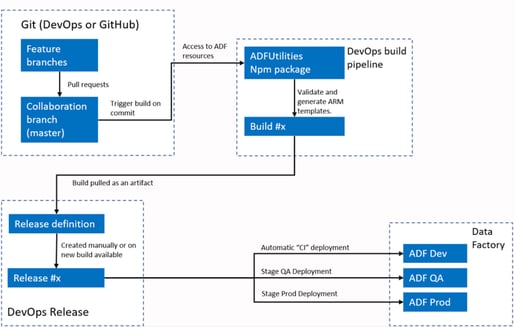
Example architecture of automated publishing for CI/CD in Azure with ADF. Source: Microsoft Learn.
To go further, explore how CI/CD principles apply to ML pipelines in our CI/CD for Machine Learning course.
Terraform is an Infrastructure-as-Code (IaC) tool that automates and standardizes the provisioning of Azure resources like Data Factory, Data Lake, Synapse, and Databricks—ensuring consistency, scalability, and repeatability.
Steps to use Terraform for Azure Data engineering pipelines:
terraform plan and apply to provision infrastructure automatically.Get up and running quickly with our Terraform getting started guide.
Demonstrating your Azure data engineering knowledge is essential, but showcasing that you know when to use it properly will make you stand out in your interview. This section will review applying your Azure data engineer knowledge to practical situations.
To process large daily volumes of transactional data, design an Azure-based batch pipeline as follows:
Design a low-latency, event-driven streaming pipeline as follows:
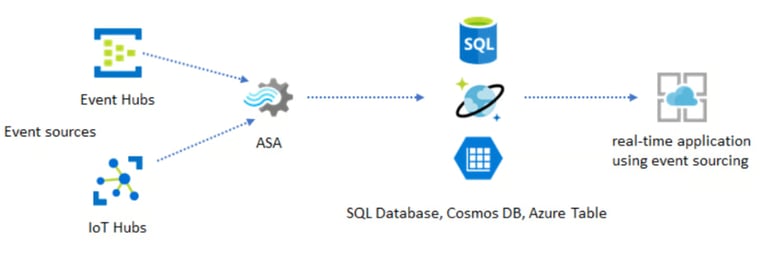
Example architecture for real-time insights through data stores in Azure. Source: Microsoft Learn.
Use a hybrid pipeline combining real-time and batch processing:
Use a Lambda architecture combining real-time and batch processing:
Slow queries often stem from poor data organization, oversized files, or missing indexes. Optimize with these strategies:
Learn why Parquet is ideal for big data pipelines in our Apache Parquet tutorial.
To reduce costs while maintaining performance, apply a layered strategy:
VACUUM.Tiny files create metadata overhead and slow down queries. To optimize:
Your organization is experiencing slow performance when joining multiple large datasets. How can you improve join performance on large datasets in Azure Data Lake?
Slow joins often result from data shuffling, poor formats, or inefficient execution. To optimize:
HASH DISTRIBUTION on large fact tables for faster joins.Protect data through encryption at rest and in transit:
These steps ensure end-to-end data protection across the pipeline.
To protect sensitive customer data, combine RBAC and Managed Identities:
This approach ensures secure, role-based access across the pipeline.
Preparing for an Azure data engineering interview can be daunting, but a structured approach helps. Here’s my recommendation:
Azure Data Engineers don't just move data—they design systems that power analytics, machine learning, and real-time decision-making. Be ready to explain how your work supports data analysts, scientists, and business goals. Demonstrating this context-awareness sets you apart.
Example: "How would you design a pipeline to support both real-time fraud detection and daily reporting?"
You don’t need to be an expert in every Azure service—but you do need to show how you break down problems and reason through solutions. Focus on:
Practice talking through open-ended architecture questions aloud.
Pay attention to the specific technologies and responsibilities mentioned in the posting. Are they using Synapse? Emphasizing streaming? Mentioning DevOps or CI/CD?
Align your preparation accordingly and have relevant project examples ready.
Prepare 2–3 stories using the STAR format (Situation, Task, Action, Result) to show:
Interviewers love when candidates talk about observability and performance. Make sure you’re comfortable discussing:
The best way to build confidence is through practice. Use:
For quick reference during your hands-on prep, the Azure CLI Cheat Sheet is a handy resource.
You don’t need to know everything—but show that you're eager to learn. If asked about something unfamiliar, describe how you'd go about investigating or testing it.
Example response: "I haven’t worked with Azure Stream Analytics directly, but I’d start by reviewing the official docs, checking integration options with Event Hub, and testing a simple pipeline in a dev workspace."
Wrap up interviews with thoughtful questions that show engagement, such as:
|
Category |
What to focus on |
|
Core concepts |
Understand ETL vs ELT, batch vs streaming, data pipelines, schema design. |
|
Azure services |
Know how to use Azure Data Factory, Synapse, Databricks, and Data Lake. |
|
Data ingestion and movement |
Learn how to connect to multiple data sources, move and transform data efficiently. |
|
Data storage |
Choose between Blob Storage, ADLS, and Azure SQL based on use case. |
|
Data transformation |
Practice using Mapping Data Flows, Spark, and SQL for transformation. |
|
Performance and monitoring |
Know how to tune pipelines and monitor performance using Azure Monitor and Log Analytics. |
|
ML and analytics integration |
Be ready to integrate with Power BI, ML models, and real-time dashboards. |
|
Security and governance |
Brush up on RBAC, managed identities, data encryption, and data lineage. |
|
Scenario design |
Practice designing end-to-end solutions for real business cases. |
Preparing for an Azure Data Engineering interview means more than just knowing the tools—it’s about understanding how to design reliable, scalable, and efficient data solutions using the Azure ecosystem. In this guide, we covered essential topics from core services like Azure Data Factory, Synapse Analytics, and Databricks, to advanced concepts like real-time processing, performance tuning, and end-to-end pipeline design.
To deepen your knowledge and gain hands-on practice, check out DataCamp Azure courses and tutorials . With the right preparation, you'll be ready to tackle both technical and scenario-based interview questions with confidence!
If you're preparing for entry-level certifications, the Microsoft Azure Fundamentals (AZ-900) track is a great place to start.

Author
Dhiraj Kumar
I am a data scientist with strong expertise in Python, Machine Learning, and AWS, complemented by a master's degree focused on Machine Learning using Python. My interests span artificial intelligence, data science, machine learning, and Python programming. I am passionate about exploring the mathematical foundations of machine learning algorithms. I regularly write blogs on Python and machine learning topics, sharing insights and knowledge to help others in the field.

블로그
 Kurtis Pykes • 15분

블로그
 Josep Ferrer• 15분

블로그
 Abid Ali Awan• 15분
Learn more about Azure with these courses!
실습 문제하고 트랙하세요.
Google로 계속하기계속 진행하시면 다음 사항에 동의하는 것으로 간주됩니다: 이용약관 및 개인정보 처리방침 그리고 귀하의 데이터가 미국에 저장된다는 점에 동의하는 것으로 간주됩니다.




Whether you're just starting out or looking to level up your cloud data engineering career, understanding how to answer technical questions with confidence is key.
In this guide, you’ll find a curated list of common Azure data engineer interview questions—covering everything from data ingestion and transformation to storage, security, and real-time analytics.
Use this as a go-to resource to review core concepts, brush up on Azure best practices, and get comfortable with real-world scenarios you’ll likely face during technical interviews.
What Is Azure Data Engineering, and Why Is It Important?
Azure data engineering focuses on designing, building, and managing data pipelines using Microsoft Azure. It ensures efficient data ingestion, processing, storage, and analysis for business intelligence, machine learning, and analytics.
Mastering data engineering in Azure not only strengthens your technical foundation but also opens the door to in-demand roles like Data Engineer, Cloud Architect, or AI/ML Engineer—especially as more organizations move their data infrastructure to the cloud.
To build a strong foundation before diving into interviews, consider exploring the fundamentals in Understanding Microsoft Azure Architecture and Services. With that, let’s get started with the questions you may encounter in your interview!