
tracks
대형 언어 모델 개발
16
Many AI applications use large language models for tasks that do not actually require text generation.
An agent may simply need to decide which tool to call, whether a document is relevant, how urgent a request is, or whether an action should be escalated.
TypeSafe AI’s Jev approaches these tasks differently. Instead of generating an answer token by token, it takes application state and structured questions and returns typed decisions such as choices, scores, yes/no judgments, and probabilities. See it in action in our Jev API tutorial
TypeSafe AI describes this as a System One Model approach: using AI as a fast decision layer rather than as a general-purpose text generator.
The challenge is that we still know relatively little about how Jev works internally.
TypeSafe AI has shared some details about its parallel decision-making approach and training method, but the full architecture, model weights, training data, and complete training recipe are not public.
This makes it difficult to inspect, reproduce, or adapt Jev itself.
Open-source projects are exploring the same idea using architectures we can actually examine and run locally.
Some use small bidirectional models, others adapt Qwen with specialized decision heads, while others extract probabilities directly from existing language models.
Because you control the full stack, you can also optimize model size, quantization, batching, caching, hardware, and serving to build a faster and cheaper decision layer for your own workload.
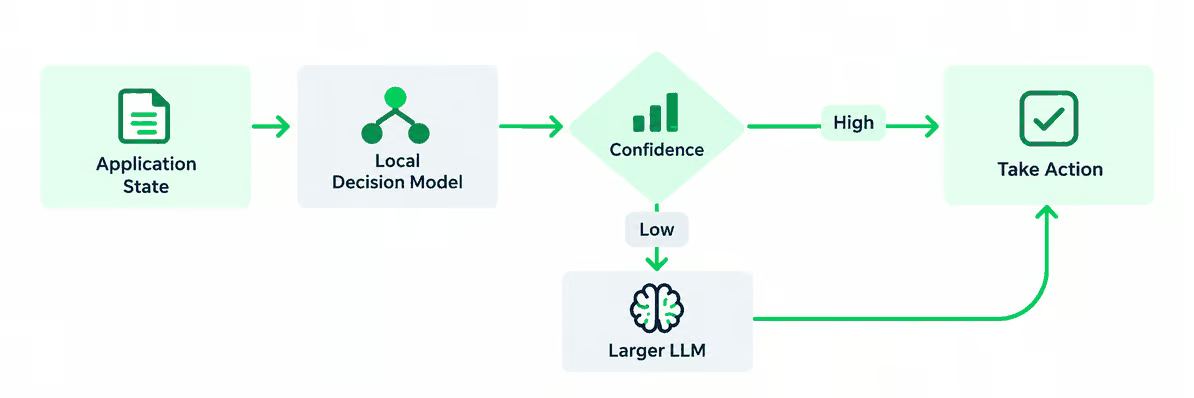
In this blog, I will compare seven open-source alternatives to Jev, including Laya, Nimble, Kev, SemIf, Rizzo Flow, Von, and NanoJev, looking at how each works, how closely it follows the Jev approach, where it stands out, and how to run it locally.
Disclaimer: The projects covered in this guide are very new and evolving rapidly. The code examples are based on their official documentation and repositories, but not all examples have been independently tested end-to-end.
Laya is a purpose-built, non-autoregressive decision model based on ModernBERT-large, with a separate mmBERT checkpoint for multilingual workloads.
Instead of generating text, it processes the state, question, and available options together and directly scores the possible answers in a single forward pass. It supports Jev-style choice, score, and noul decisions, with dedicated checkpoints for English, multilingual, and typed-decision workloads.
This makes Laya one of the closest architectural alternatives to Jev because both are designed specifically for probabilistic decisions rather than text generation.
Laya stands out for its relatively small 322M–421M models, multilingual support across 100+ languages, and the ability to evaluate multiple questions efficiently without running a multi-billion-parameter generative model.
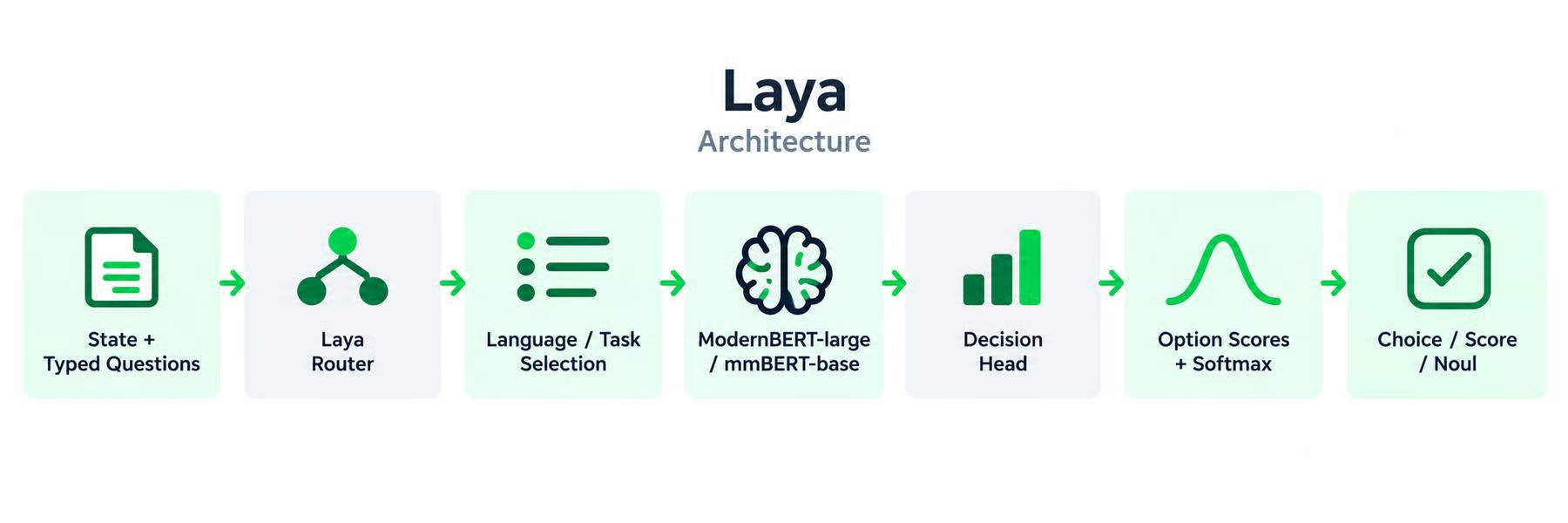
Laya takes a state such as an email, support ticket, document, or JSON object, together with typed questions like choice, score, or noul.
Its router selects the most suitable checkpoint for the request, such as ModernBERT-large for English or mmBERT-base for multilingual input.
The selected model processes the state and questions in a single forward pass, then a decision head scores the available options and converts them into probabilities.
This creates a direct flow from the input, through routing and encoding, to the final typed decision.
 Getting started with Laya
Laya is available as a Python package:
pip install layaThis command installs the Laya library and its dependencies, but it does not bundle the model weights inside the package.
The models are hosted on Hugging Face.
When you create the router with preload=True, Laya downloads and loads its available checkpoints immediately so they are ready before the first request.
The downloaded weights are cached locally, so they do not need to be downloaded again every time you run your application.
from laya import Router

router = Router(preload=True)

state = {
    "subject": "Duplicate charge",
    "body": "I was charged twice. Please refund this today."
}

questions = {
    "department": {
        "type": "choice",
        "instructions": "Which department should handle this?",
        "criteria": {
            "billing": "Payments and refunds",
            "technical": "Errors and outages",
            "sales": "Pricing and purchases"
        }
    }
}

result = router.predict(state, questions)

print(result["answers"]["department"]["choice"])
Here, Router(preload=True) is the important part.
On the first run, Laya fetches the required model files from its Hugging Face repository and loads them into memory. Future runs can reuse the locally cached copies.
If you instead use:
router = Router()Laya uses lazy loading. It waits until a particular checkpoint is required and downloads/builds it on first use.
Bespoke Nimble uses Qwen3.5-9B as its backbone and fine-tunes it with a rank-16 LoRA specifically for typed decision making.
You provide some text together with a flat schema containing boolean or enum questions, and Nimble returns the selected answer plus probabilities for every allowed option.
Rather than decoding an answer token by token, training and inference operate directly over the candidate logits.
Like Jev, Nimble is built around the idea of state in, typed probabilistic decisions out, but its implementation shows how that behavior can be added to an existing open LLM rather than requiring a proprietary decision architecture.
Its main strength is openness around the entire process: Bespoke Labs released the model, training recipe, evaluation setup, and data-curation pipeline, making Nimble particularly useful for developers who want to train or study their own Jev-style models.
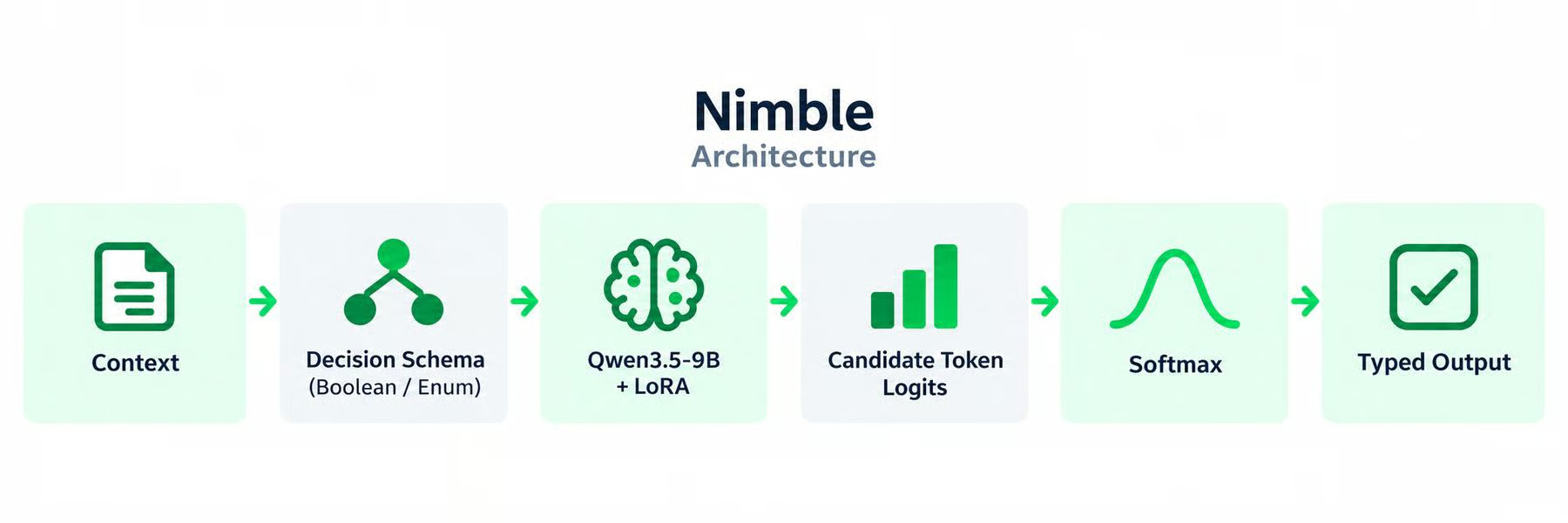
Nimble starts with a context and a decision schema that defines the allowed outputs, such as a boolean or one value from an enum.
It uses Qwen3.5-9B with LoRA to process the context and schema, then reads the logits for the permitted candidate tokens rather than generating a full response.
Those logits are passed through softmax to produce probabilities, which are returned as structured typed output.
 Getting started with Nimble
Nimble requires Python 3.12 and uses the Bespoke-Nimble-9B checkpoint. Start by cloning the repository and installing the dependencies:
git clone https://github.com/bespokelabsai/nimble.git nimble
cd nimble

python3.12 -m venv .cache/venvs/nimble
source .cache/venvs/nimble/bin/activate

python -m pip install torch==2.8.0 -r requirements/training.txt
Next, download and prepare the model. The official preparation step downloads bespokelabs/Bespoke-Nimble-9B from Hugging Face and, when necessary, merges its LoRA adapter with the pinned Qwen3.5 base model. It then creates .cache/nimble-model.json.
import json
from pathlib import Path
from huggingface_hub import snapshot_download

repo = "bespokelabs/Bespoke-Nimble-9B"

snapshot = Path(
    snapshot_download(
        repo,
        cache_dir=".cache/huggingface/hub"
    )
)

config = {
    "model_path": str(snapshot.resolve()),
    "model_id": repo,
    "revision": snapshot.name,
    "max_input_tokens": 2048,
}

Path(".cache/nimble-model.json").write_text(
    json.dumps(config, indent=2)
)
If the downloaded release is a LoRA adapter, use Nimble's full preparation block from the official quickstart so it can merge the adapter with its pinned base model before inference.
On an NVIDIA GPU, load the prepared model:
import json
from pathlib import Path
from nimble.scoring.cuda_scorer import CudaCandidateScorer

config = json.loads(
    Path(".cache/nimble-model.json").read_text()
)

scorer = CudaCandidateScorer(**config)
Then make a typed decision:
schema = {
    "priority": {
        "type": "enum",
        "choices": ["HIGH", "LOW"],
        "description": "Urgency based on current business impact."
    },
    "requires_review": {
        "type": "boolean",
        "description": "Whether a human should review this incident."
    }
}

result = scorer.score(
    "The payment service is down for all customers.",
    schema
)

print(result["output"])
print(result["fields"]["priority"]["scores"])
Nimble returns the selected values together with the probability assigned to each candidate rather than generating a text response.
Kev is a family of Jev-inspired decision models built on Qwen3.5, with 0.8B, 4B, and 9B variants.
It adds a rank-16 LoRA adapter and a small pointer head that compares each option representation with the question's decision representation.
Multiple questions can share the same state, while Kev keeps the questions isolated and returns their probability distributions without generating text.
Kev is particularly close to Jev because its architecture was explicitly based on a public reconstruction of Jev, and its server implements TypeSafe's /v1/systemone API contract.
It supports the same noul, choice, and score question styles, so existing TypeSafe SDK code can be redirected to a local Kev server.
Its main advantage is this combination of Jev-like behavior, open weights, multiple model sizes, and an open training pipeline.
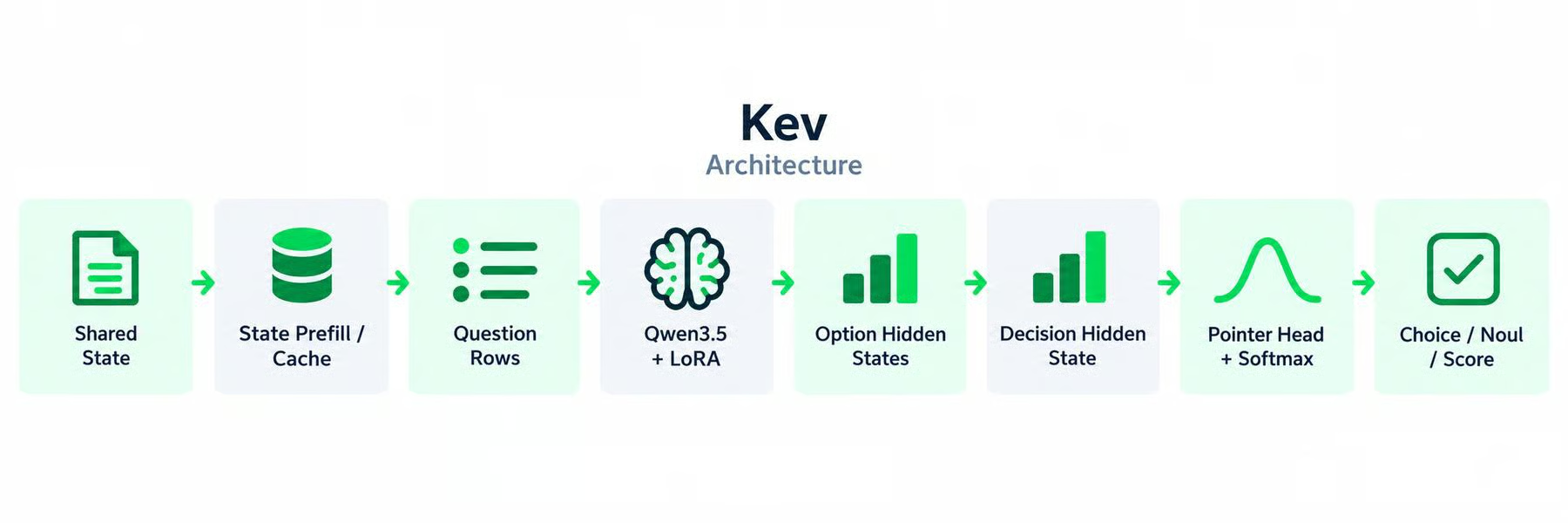
Kev uses a Qwen base model with a LoRA adapter and a small pointer head.
The shared state is processed once and reused across multiple questions, so the model does not need to repeatedly process the same context.
For each question, Kev creates hidden representations for the options and the decision token, then the pointer head compares them and produces option scores.
Softmax converts those scores into probabilities for the final choice, noul, or score.
 Getting started with Kev
Kev runs as a local System One server.
Start by cloning the project and installing its serving dependencies:
git clone https://github.com/jaredpalmer/kev.git
cd kev

uv sync --extra serve
This installs Kev itself, but not necessarily all of the model weights.
Start Kev-4B with:
KEV_DTYPE=bf16 \
uv run --extra serve python -m kev.serve \
    --run jaredpalmer/kev-4b \
    --port 8009
On the first run, Kev automatically downloads both the Kev adapter/checkpoint and its Qwen base model from Hugging Face.
Later starts reuse the cached model files rather than downloading them again.
Once the server is running, you can use the TypeSafe SDK against it:
from typesafe_sdk import Choice, TypeSafeClient

client = TypeSafeClient(
    api_key="local",
    base_url="http://127.0.0.1:8009",
    model="kev-latest",
)

response = client.system_one(
    state="I was charged twice.",
    questions={
        "team": Choice(
            instructions="Which team owns this?",
            criteria={
                "billing": None,
                "technical": None,
            },
        )
    },
)

print(response.choices["team"].choice)
So with Kev, the server command doubles as the model-loading step: the first launch downloads the required weights automatically.
SemIf takes a simpler approach: it does not train a new decision model at all.
Instead, it uses existing open models such as Qwen3.5-4B and directly reads the logits assigned to the permitted answers.
The state, criteria, and typed options are passed to the model, and SemIf converts the native option logits into probabilities without sampling or generating an answer.
This reproduces one of Jev's most important practical properties, making decisions without autoregressive output, while avoiding the need for a specialized checkpoint.
SemIf stands out for its flexibility: you can use different open models underneath it, reuse a long state across many questions, and experiment with direct scoring on CUDA, Apple Silicon, or quantized browser models.
It is especially useful when you want to test the System One idea without training a dedicated model first.
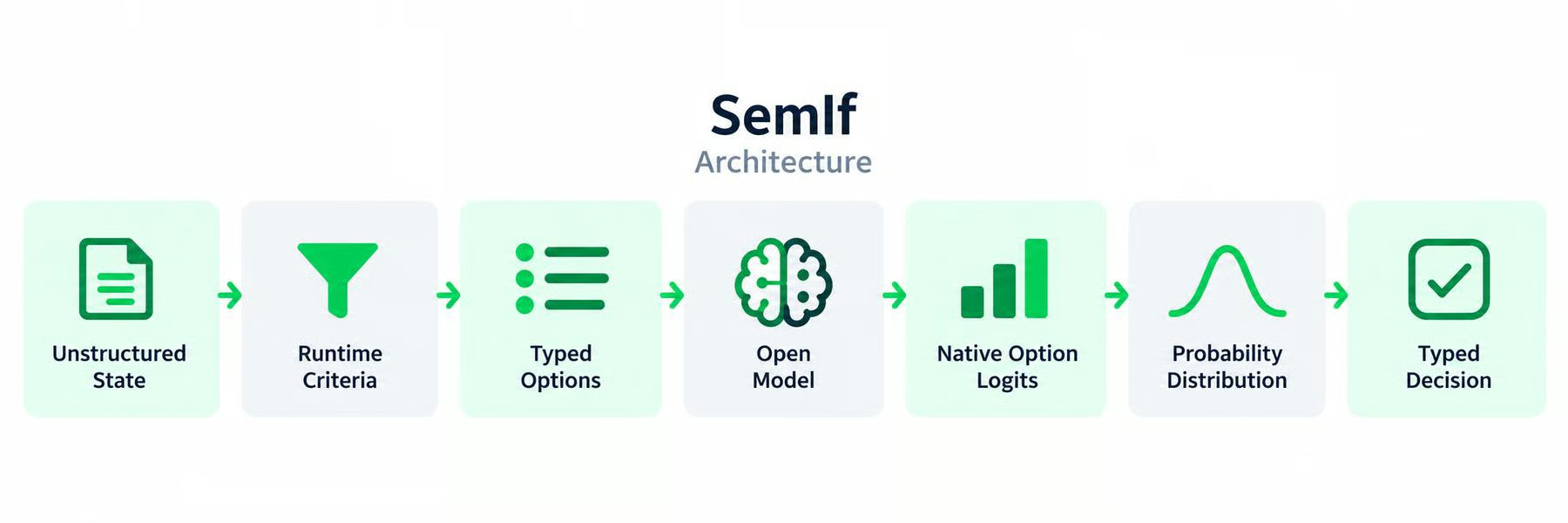
SemIf takes an unstructured state, runtime criteria, and a set of allowed options and passes them through an existing open model.
Instead of asking the model to generate an answer, it directly reads the logits assigned to those predefined options.
These logits are converted into a probability distribution, allowing the application to make a typed decision without generating text or parsing a response afterward.
 Getting started with SemIf
SemIf does not have its own dedicated foundation-model checkpoint. Instead, it runs decision scoring on an existing open model.
Clone and install it:
git clone https://github.com/TheoLeeCJ/SemIf.git
cd SemIf

python -m venv .venv
source .venv/bin/activate

pip install -e '.[test]'
This installs SemIf, but it does not download Qwen yet.
Run the scorer:
CUDA_VISIBLE_DEVICES=0 semif-score \
    --mode direct \
    --model Qwen/Qwen3.5-4B \
    --revision 851bf6e806efd8d0a36b00ddf55e13ccb7b8cd0a \
    --input examples/decisions.jsonl \
    --output results.jsonl
On the first run, the selected Qwen model is downloaded from Hugging Face and stored in the Hugging Face cache. SemIf's documentation even recommends setting HF_HOME to a large drive because the model files can take significant space.
For example:
export HF_HOME=/path/to/large-drive/huggingfaceAfter the model has been cached, subsequent runs can reuse the local copy.
So SemIf itself is relatively small. Most of the download size comes from whichever open model you choose to run underneath it.
Rizzo Flow is a local-first Jev-style inference system built around open Spark-X2.5 models and llama.cpp-based serving.
Instead of generating a JSON answer, it converts each decision into a constrained set of possible answer tokens, reads the logits assigned to those tokens, and turns them into probabilities.
The state can be processed once and reused across multiple questions, reducing repeated computation.
Like Jev, Rizzo Flow accepts unstructured state and returns typed decisions such as yes/no judgments, choices, scores, and numeric outputs.
It also mirrors TypeSafe's HTTP interface, making it relatively easy to replace a hosted call with a local endpoint.
Rizzo Flow particularly stands out for local deployment and hardware flexibility, combining open models, quantization, and a familiar API rather than trying to reproduce Jev's proprietary training architecture.
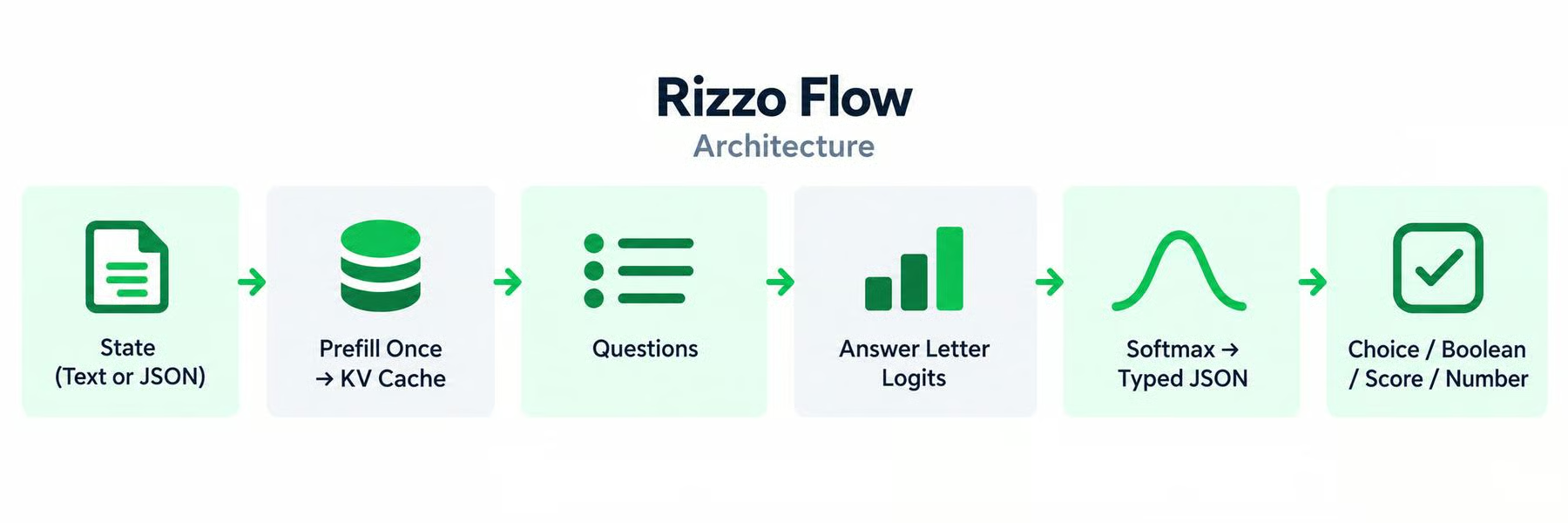
Rizzo Flow processes the state once and stores the result in the model's KV cache.
Multiple questions can then reuse that cached state instead of processing the full context again. Each question is converted into a multiple-choice problem, with candidate answers represented by letters such as A, B, or C.
Rizzo Flow reads only the logits for those answer letters, applies softmax, and converts the resulting probabilities into typed outputs such as a boolean, choice, score, or number.
Rizzo Flow requires Python 3.11+, Git, and uv.
When installing it, select the compute backend for your machine. For example, on Linux with an NVIDIA GPU:
git clone https://github.com/Rizzo-AI-Academy/rizzo-flow
cd rizzo-flow

uv sync --locked --extra cuda
source .venv/bin/activate
For Apple Silicon, use --extra mlx; CPU-only systems can use --extra cpu.
Next, download the default Spark-X2.5 model and its local runtime:
rizzo downloadThen start the server:
rizzo serveThe model now runs locally at http://127.0.0.1:8017.
You can test the Jev-compatible endpoint with a real decision:
curl http://127.0.0.1:8017/v1/systemone \
  -H 'Content-Type: application/json' \
  -d '{
    "state": "My payouts have been failing for three days.",
    "model": "rizzo-latest",
    "questions": {
      "is_urgent": {
        "type": "noul",
        "instructions": "Does this convey urgency?"
      },
      "department": {
        "type": "choice",
        "instructions": "Which team should handle this?",
        "criteria": {
          "billing": "Payments and refunds",
          "technical": "Bugs and outages",
          "sales": null
        }
      }
    }
  }'
Rizzo Flow returns the answer and probability distribution directly, without generating an output response token by token.
Von is a purpose-built System One model based on a 395M-parameter bidirectional ModernBERT architecture.
Instead of decoding text, it evaluates the state and candidate criteria together using OptionMarker representations, then directly produces logits for Choice, Noul, and Score decisions.
It also applies post-training calibration so the resulting probability distributions can be used directly by application logic.
Von is very similar to Jev at the interface level: it is non-autoregressive, supports the same three core decision primitives, evaluates multiple questions in a forward pass, and implements the /v1/systemone protocol.
Its main strength is its small footprint and local inference design: the model has hundreds of millions rather than billions of parameters and supports CUDA, ROCm, Apple Silicon, and CPU execution.
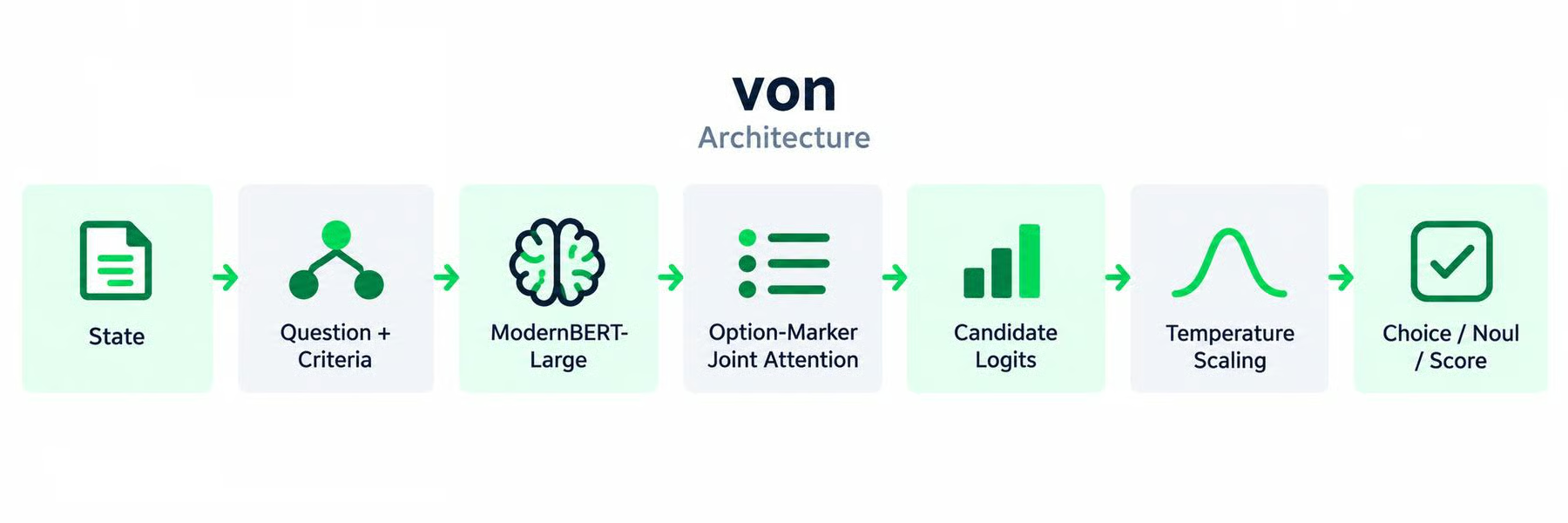
von uses a compact bidirectional ModernBERT-based model to process the state, question, and candidate criteria together.
Its Option-Marker mechanism creates representations for the possible answers, which are converted into candidate logits.
Temperature scaling is then applied to improve the probability distribution before von returns the final choice, noul, or score.
The same architecture can also evaluate multiple questions within a single forward pass.
Von has one of the simplest interfaces.
Install the Python SDK:
pip install von-sdkThis installs the Von software. The actual model is published separately as wfzyx/von-1.0 on Hugging Face.
When the model is loaded for the first time, its ModernBERT checkpoint is downloaded and cached locally through the Hugging Face/Transformers model-loading system.
Once cached, later inference can use the local copy rather than downloading the weights again.
You can then make a decision with:
import von

result = von.decide(
    state="Database replication lag exceeded 45 seconds.",
    choices={
        "infrastructure": "Database or network failures",
        "billing": "Payments and invoices",
        "feature": "Requests for new functionality",
    },
    instructions="Classify the root cause.",
)

print(result.choice)
print(result.confidence)
For a binary decision:
p_blocking = von.judge(
    state="Requests are timing out.",
    instructions="Is this actively blocking customers?"
)

print(p_blocking)
So the first call can take longer because the model needs to be downloaded and initialized. After that, the actual inference happens locally.
NanoJev is a 0.6B Jev replica built on Qwen3-0.6B with dedicated decision heads for structured outputs.
Each request contains a state, question, and candidate set, which are passed through the backbone before shared heads produce complete probability distributions.
Choice uses set attention and a scalar head, Boolean decisions use a sigmoid, and Score evaluates ordered levels and produces both a distribution and expected score.
NanoJev follows Jev's design particularly closely: it supports parallel decisions, dynamic candidate sets, full probability distributions, and zero output decoding.
Where it stands out is its very small backbone and explicit end-to-end training pipeline.
It can batch multiple states, questions, and candidate paths into one backbone forward pass, making it an interesting option for developers who want to experiment with a compact, trainable Jev-style architecture rather than adapting a larger general-purpose LLM.
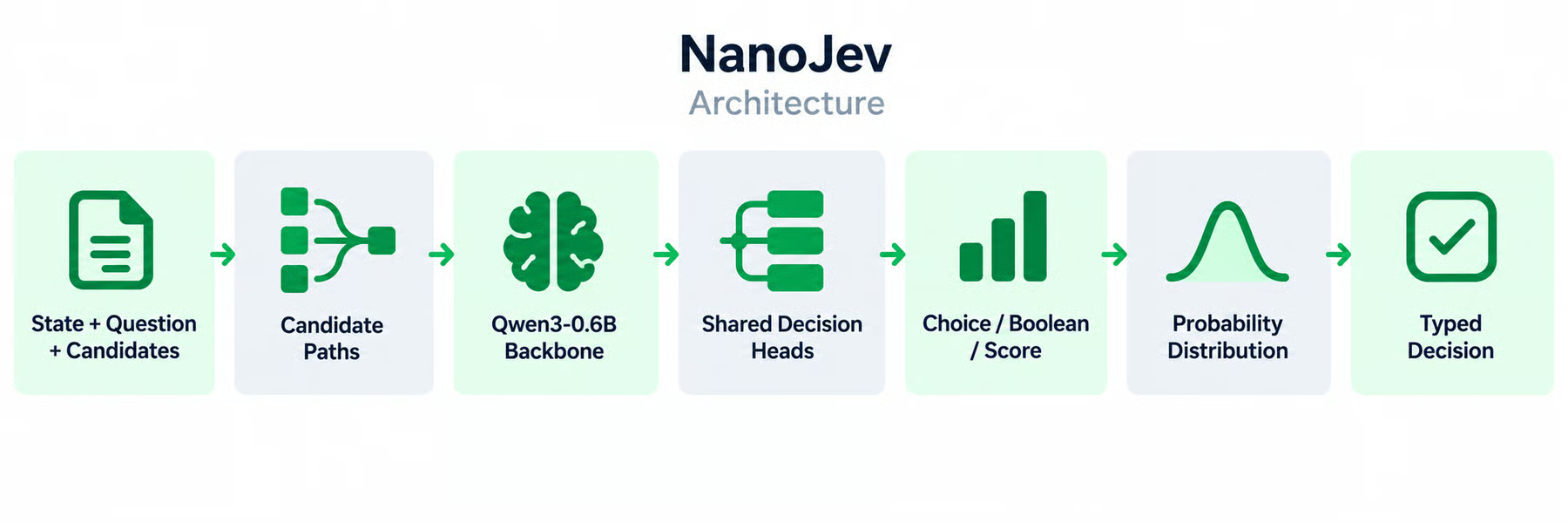
NanoJev takes a state, a question, and the candidate answers that the model is allowed to choose from.
Each candidate is combined with the relevant input and passed through a shared Qwen3-0.6B backbone.
NanoJev then uses dedicated decision heads to score the candidates directly: Choice uses set attention and softmax, Boolean uses a sigmoid, and Score produces a probability distribution over ordered levels.
Because it reads these probabilities directly from the forward pass, it can return complete typed distributions without generating output tokens.
NanoJev keeps the model download separate from the repository installation.
Start by installing the project:
git clone https://github.com/TianyuCodings/NanoJev.git
cd NanoJev

python -m pip install \
    -r requirements-toy.txt \
    huggingface_hub
Then download the pinned public checkpoint:
from huggingface_hub import snapshot_download

snapshot_download(
    repo_id="C-Tianyu/NanoJev",
    revision="unified-games-v1",
    local_dir="checkpoints/NanoJev-unified",
    allow_patterns=[
        "best.safetensors",
        "config.json",
        "tokenizer/*",
        "backbone_config/*",
    ],
)
Start the local inference server:
CUDA_VISIBLE_DEVICES=0 python scripts/serve_decisions.py \
    --checkpoint-dir checkpoints/NanoJev-unified \
    --web-root web \
    --host 127.0.0.1 \
    --port 8765 \
    --precision bf16
Create a request:
cat > data/request.json <<'JSON'
{
  "states": [{
    "id": "living_room",
    "state": "The living room is 29 degrees. The target is 24 degrees. The window is closed and someone is home.",
    "questions": {
      "action": {
        "type": "choice",
        "instructions": "Choose the action that most directly lowers the room temperature.",
        "criteria": {
          "cool": "Turn on air conditioning",
          "light": "Turn on the lights",
          "wait": "Keep the current settings"
        }
      },
      "occupied": {
        "type": "boolean",
        "instructions": "Someone is home."
      }
    }
  }]
}
JSON
Then send it to NanoJev:
curl http://127.0.0.1:8765/api/evaluate \
  -H 'Content-Type: application/json' \
  --data-binary @data/request.json
The server keeps the checkpoint loaded and returns the probability distribution for each question. NanoJev can also batch multiple states and questions in the same request.
The main difference is how each project produces the decision.
Laya and Von use small bidirectional encoders built specifically for option scoring.
Kev, Nimble, and NanoJev adapt Qwen models with specialized training or decision heads.
SemIf and Rizzo Flow take a lighter approach by extracting probabilities directly from existing generative models.
|
Project |
Architecture |
Size |
Jev-style decisions |
Best suited for |
|
Laya |
ModernBERT/mmBERT + decision head |
322M–421M |
Yes |
Small multilingual decisions |
|
Nimble |
Qwen3.5 + LoRA candidate scoring |
9B |
Similar |
Training and research |
|
Kev |
Qwen + LoRA + pointer head |
0.8B–9B |
Yes |
Jev-like local deployment |
|
SemIf |
Direct logits from open LLMs |
Model-dependent |
Similar |
Direct-logit experiments |
|
Rizzo Flow |
Spark + direct option scoring |
1.7B–4B |
Yes |
Easy local serving |
|
Von |
ModernBERT + OptionMarker |
~395M |
Yes |
Compact decision inference |
|
NanoJev |
Qwen3 + shared decision heads |
0.6B |
Yes |
Small trainable Jev replica |
In practice, dedicated encoders prioritize speed and efficiency, adapted Qwen models retain more general language capability, and direct-logit methods are easier to experiment with because they require less specialized training.
For small, specialized decision models, Laya, Von, and NanoJev are among the most interesting options, ranging from roughly 322M to 600M parameters.
If you need multilingual decision-making, Laya stands out with a dedicated mmBERT-based checkpoint covering 100+ languages.
For applications built around the TypeSafe System One API, Kev and Von provide particularly close integration paths, while Rizzo Flow mirrors the same HTTP interface for local serving.
For training and experimentation, Nimble publishes its data-curation and LoRA fine-tuning recipe, while NanoJev provides a full pipeline covering data generation, training, evaluation, and serving.
If you want to experiment without training a specialized decision model, SemIf is a useful baseline: it reads option probabilities directly from existing open models such as Qwen instead of generating an answer.
Jev's exact architecture may be new, but the underlying idea is not.
Zero-shot NLI classifiers have been scoring arbitrary candidate labels from model logits for years, long before Jev.
What TypeSafe AI adds is a purpose-built architecture, parallel outputs, calibrated probabilities, and a clean API for turning that idea into a programmable decision layer.
The open-source ecosystem shows that you do not need a closed service to build something similar.
Projects such as Kev, Von, and Rizzo Flow can run locally and expose Jev-style interfaces, while others let you download the weights, quantize them, or use runtimes such as llama.cpp.
The real takeaway is not that Jev invented AI decision-making, but that it has brought attention back to an important idea: if your application only needs a decision, you may not need text generation at all.
Top DataCamp Courses
tracks
courses
courses
blogs
Matt Crabtree
10분
blogs
Abid Ali Awan
9분
blogs
Tom Farnschläder
12분
blogs
Tom Farnschläder
15분
blogs
Austin Chia
11분
tutorials
Tom Farnschläder
15분