Track
Associate AI Engineer for Developers
29 hr
I mentioned already that the expectations have to match the model. This is true especially in Jev’s case, and it mostly has to do with its model class, referred to as System One models.
A System One model returns typed decisions instead of text. You send a block of state plus a set of questions, each with an answer space you define, and the model returns one answer per question with probabilities attached. Nothing is produced token by token, so there is no string to parse and no malformed JSON to repair. TypeSafe coined this term to refer to Daniel Kahneman's famous split:
Because the answer space is a schema your code declares, System One models by design can never return a category you never defined. This means it can never be off-schema. That said, it still can be wrong, and we’ll get into a few tricky cases later on.
TypeSafe came out of stealth on September 15, 2026, with Jev in early access, reporting 70 to 500 ms responses and $0.042 per million input tokens with output free. On its own four-workflow benchmark, Jev lands near 68% accuracy, roughly mid-tier LLM territory at a fraction of the cost.
For more information on features and benchmark performance, I recommend reading our Jev guide.
Write down the valid answers before you make the call. If you can enumerate them, you have a Jev-shaped problem:
Reach for an LLM when the output is prose or code, when the answer space is open, or when the task needs several hops of reasoning chained together. Jev is also the wrong tool for anything numeric, and I'll come back to why later.
Before writing any code, create a TypeSafe account and open the Playground. Here, you can paste text as the state, add questions, and see the full answer objects without installing anything. It's the fastest way to understand what each question type hands back (and to find out if your question is worded badly).
I'll use one support ticket as the state for all three examples:
Export to CSV has been broken since Friday.
It works in Chrome, but half our team is on Safari and they can't pull reports at all.
We have a board meeting Thursday.
Every question type takes instructions, the plain-language question you want answered. What changes between them is criteria, and what comes back.
A Choice picks one option from a set you define.
You pass criteria as a dictionary object mapping each option to a description, anywhere from 1 to 255 of them, and the answer comes back with:
{
  "department": {
    "type": "choice",
    "instructions": "Which queue should own this ticket?",
    "criteria": {
      "bug_triage": "A defect in a specific feature, reproducible, goes into the backlog",
      "incident_response": "A live breakage affecting multiple users right now, needs a responder today",
      "customer_success": "The account needs managing, not the code"
    }
  }
}
To see the code output you’d also receive via API, click on the </> button in the upper right corner, and click Run to let Jev answer the question.
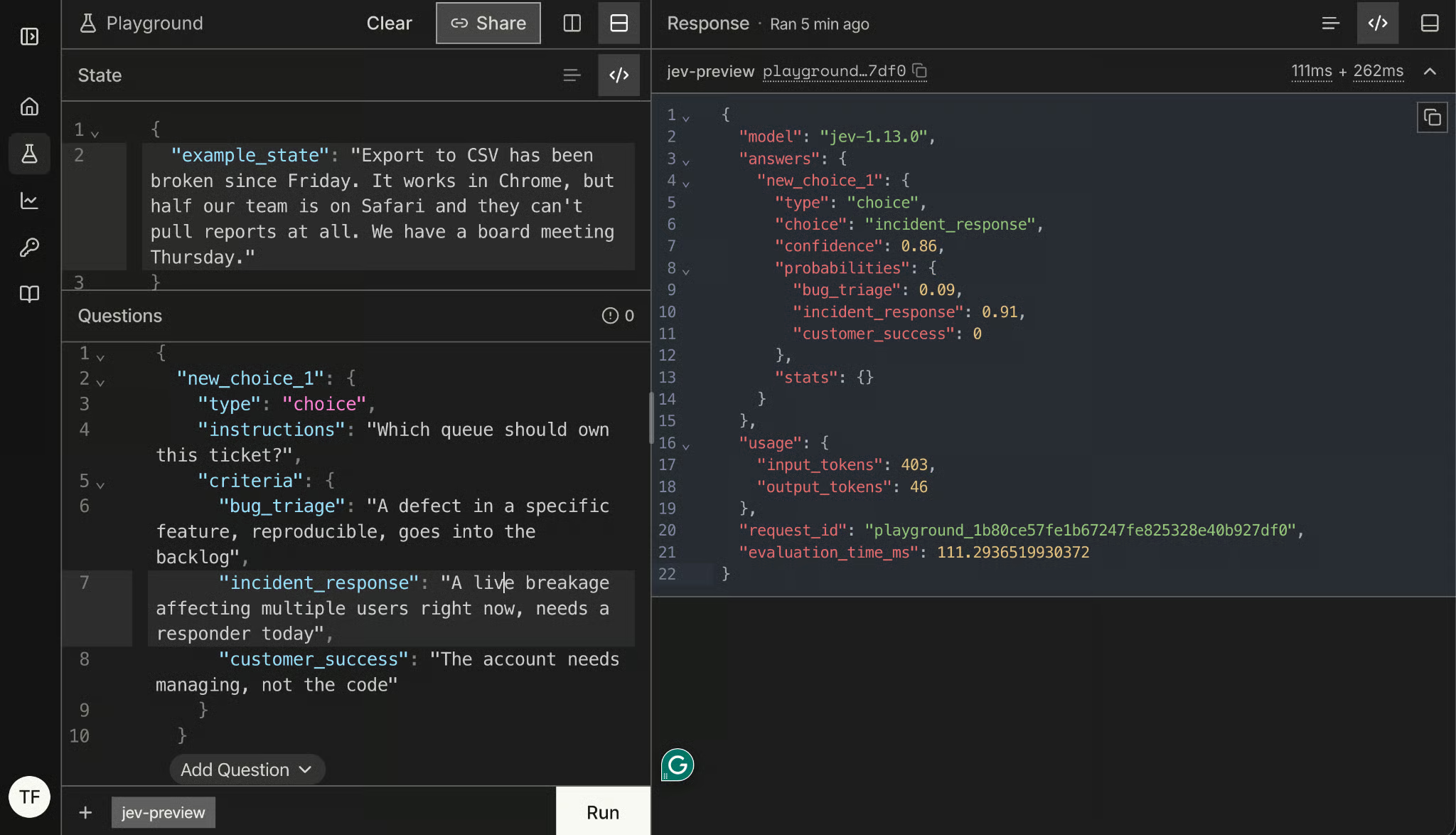
In this case, incident_response is the choice with a 91% probability. Jev’s confidence for the pick is 86%.
The full distribution is the part worth your attention.
choice only tells you which option won.
probabilities tells you by how much.
Those are different pieces of information when you're about to route a ticket automatically. A 0.41/0.38/0.21 split and the 0.91/0.09/0 split we received might both return the same choice.
A Score rates the state against ordered levels. You pass criteria as an array of 2 to 10 level descriptions, lowest first, and the answer includes a score, a legend mapping each position to your description, a probability per level, and confidence.
{
  "goodwill_risk": {
    "type": "score",
    "instructions": "How much patience does this customer have left?",
    "criteria": [
      "Reporting a problem, no sign of frustration",
      "Mildly annoyed, still collaborative",
      "Visibly out of patience, mentions the cost to their work",
      "At the point of escalating over our heads or leaving"
    ]
  }
}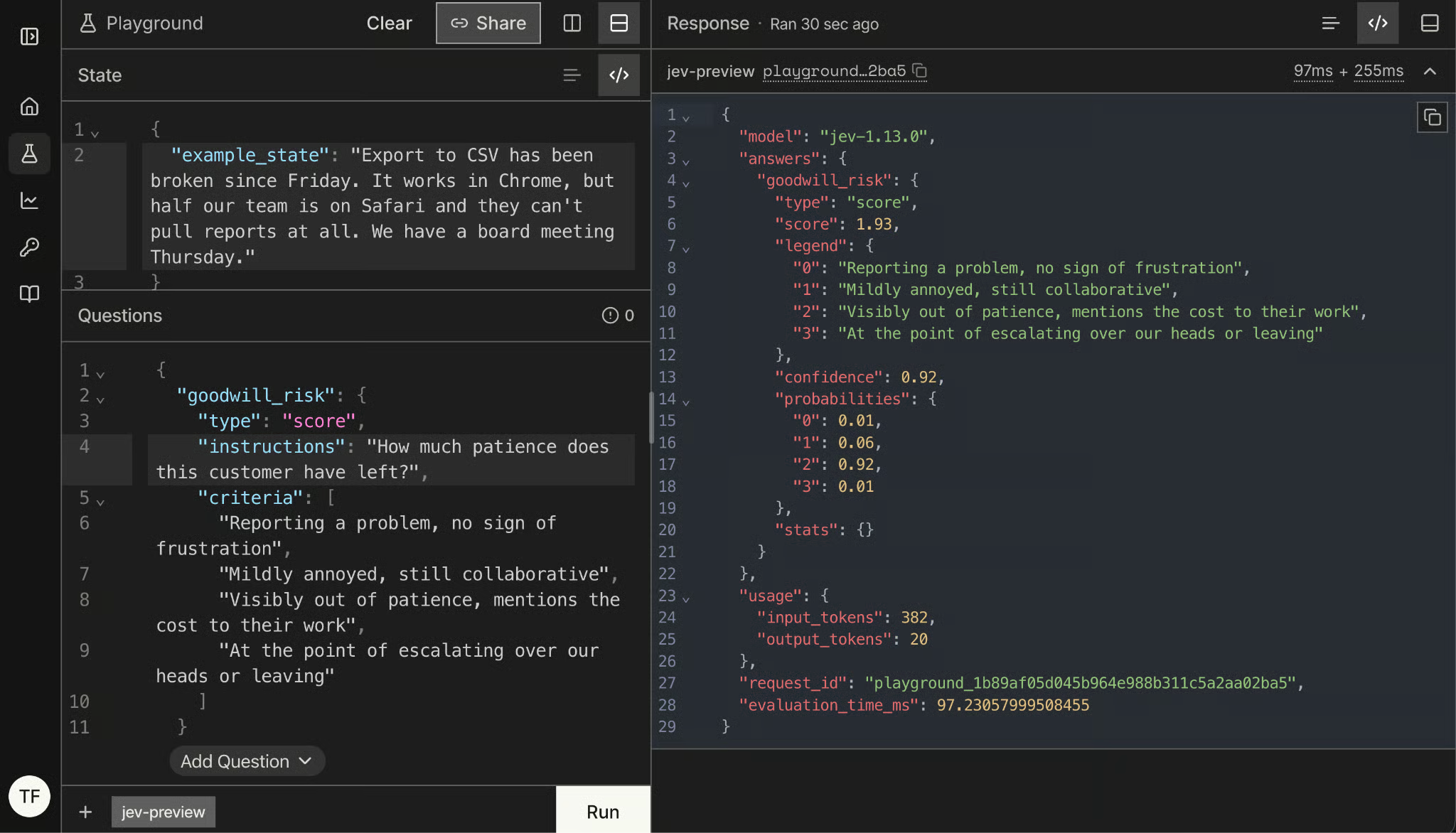
The score can land between your levels, and that's the whole point of the legend. A score of 1.93 here means the model is split between "mildly annoyed" and "visibly out of patience", strongly leaning toward the latter, which is a fair reading of a ticket that stays polite while naming a deadline it's going to miss.
Again, read the probabilities spread rather than the number alone: probability concentrated on one level means a decisive answer, probability smeared across three means you got an average instead of a judgment.
A Noul is the type for binary questions, and its name was coined by TypeSafe. criteria is optional here, though you can describe what true and false mean, which is worth doing whenever "yes" could be read two ways.
Phrase the question so that a high value means yes. TypeSafe's docs are explicit about this, and a Noul whose true maps to "no" performs measurably worse.
{
  "is_time_sensitive": {
    "type": "noul",
    "instructions": "The customer names a specific deadline",
    "criteria": {
      "true": "A date, day, or event the work must be done before",
      "false": "Urgency is implied but no deadline is given"
    }
  }
}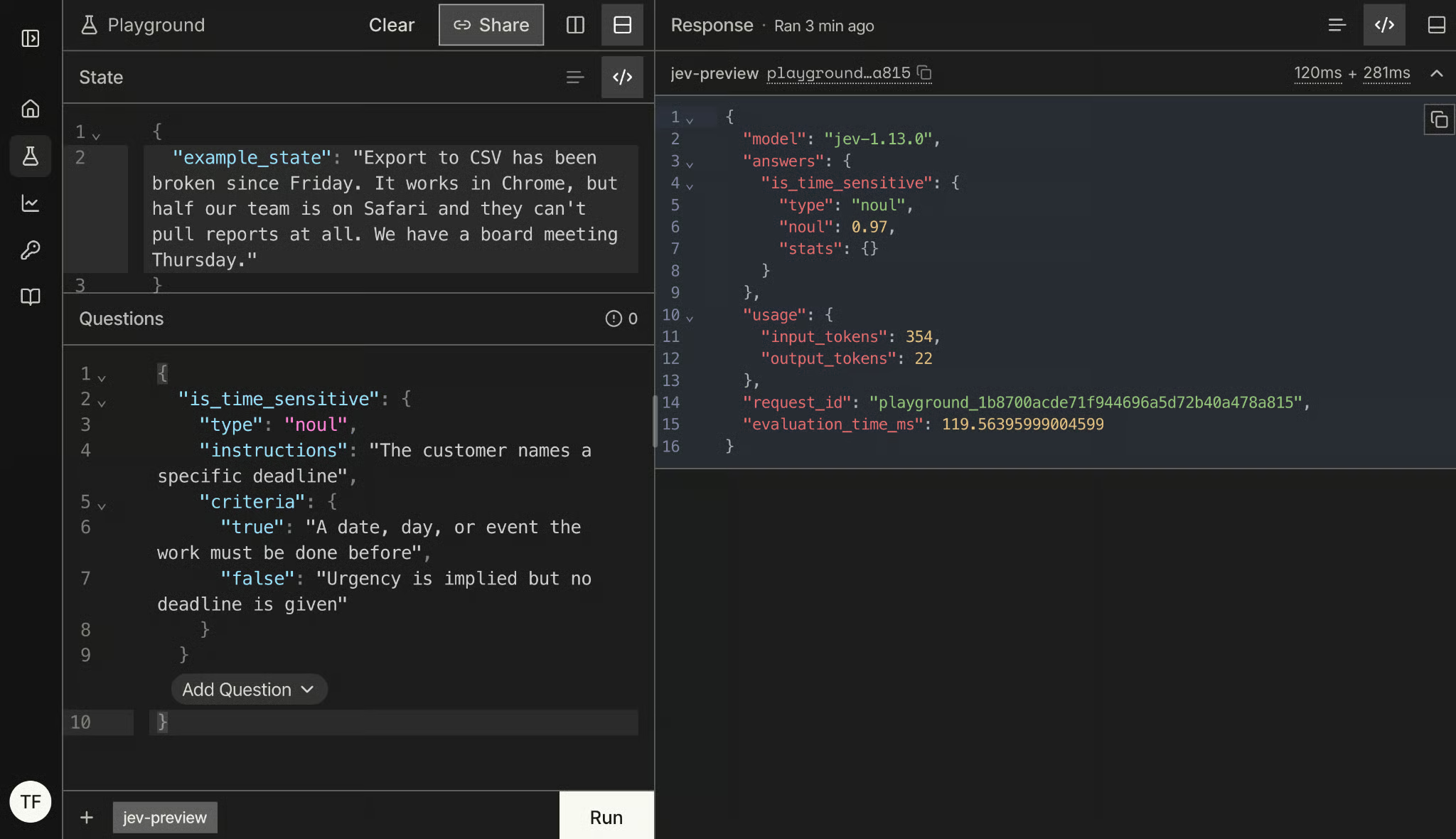
Since a board meeting on Thursday is mentioned in the state, the high noul value of 0.97 was expected.
Choice and Score return confidence alongside their probabilities. A Noul doesn't, and that trips people up, so it's worth being precise about why.
Confidence and probability are separate axes. For a Choice, probabilities says how the model distributes belief across your options, and confidence says how firmly it holds that answer, which is why a Choice can return a 0.85 top option with confidence of 0.78. A Noul has only two outcomes, so the single probability already carries both: 0.97 is a firm yes, 0.03 is a firm no, and 0.52 is the model telling you it has no idea.
That means the distance from 0.5 is your decisiveness signal, not a separate field to read. It also means you can't port a threshold from a Noul to a Choice, and I'll come back to that in the jaggedness section, because it bites harder than it sounds.
To follow along, you’ll only need Python 3.10+ and a TypeSafe early-access key.
Install the SDK:
pip install typesafe-sdkOr with uv:
uv add typesafe-sdkThen create a key in the TypeSafe console and export it. The client reads TYPESAFE_API_KEY from the environment, so you never pass it in code:
export TYPESAFE_API_KEY="your-key"The following imports give you everything from the playground:
from typesafe_sdk import Choice, Noul, Score, TypeSafeClient

client = TypeSafeClient()Choice, Noul, and Score are the same question types you just clicked through, as Python objects.
TypeSafeClient is the synchronous client, and there's an AsyncTypeSafeClient with the same interface if you're calling Jev from an async service. Both work as context managers, which is what I'd use in anything longer than a script:
with TypeSafeClient() as client:
...Left alone, the client calls jev-latest, which moves whenever TypeSafe ships a new version, which is what we will use throughout the tutorial. For anything where you've already tuned a threshold, pin the version instead:
client = TypeSafeClient(model="jev-1.13.0")The response tells you which model actually answered either way, and there's a section near the end on why you should be logging that.
To make an API call to Jev, you need to define a response item using TypeSafeClient and the system_one() function, which takes your question context as state parameter, and the questions themselves in the same format like in the playground.
We can create one call that answers all our 3 playground questions, since they share the same state:
from typesafe_sdk import Choice, Noul, Score, TypeSafeClient

ticket = (
    "Export to CSV has been broken since Friday. It works in Chrome, "
    "but half our team is on Safari and they can't pull reports at all. "
    "We have a board meeting Thursday."
)

with TypeSafeClient() as client:
    response = client.system_one(
        state=ticket,
        questions={
            "queue": Choice(
                instructions="Which queue should own this ticket",
                criteria={
                    "bug_triage": "A defect in a specific feature, reproducible, goes into the backlog",
                    "incident_response": "A live breakage affecting multiple users right now, needs a responder today",
                    "customer_success": "The account needs managing, not the code",
                },
            ),
            "goodwill_risk": Score(
                instructions="How much patience does this customer have left",
                criteria=[
                    "Reporting a problem, no sign of frustration",
                    "Mildly annoyed, still collaborative",
                    "Visibly out of patience, mentions the cost to their work",
                    "At the point of escalating over our heads or leaving",
                ],
            ),
            "is_time_sensitive": Noul(
                instructions="The customer names a specific deadline",
                criteria={
                    "true": "A date, day, or event the work must be done before",
                    "false": "Urgency is implied but no deadline is given",
                },
            ),
        },
    )
Answers come back under those same names you chose for each question, which is the detail that makes the whole thing pleasant to work with:
print(response.model)
print(response.answers["queue"].choice, response.answers["queue"].confidence)
print(response.answers["goodwill_risk"].score)
print(response.answers["is_time_sensitive"].noul)
jev-1.13.0
Incidence_response 0.95
1.95
0.97If your first call fails with a TypeError about output_buffer_limit: that's a version mismatch in the SDK's compression backend, not your code. The SDK ships its own HTTP client, httpx2, which decompresses responses through zstandard and brotli, and an older copy of either one is missing the argument it gets called with. pip install -U typesafe-sdk httpx2 zstandard brotli cleared it for me.
Two things in that output are worth pausing on.
First, response.model returned jev-1.13.0, not jev-latest. You asked for the moving alias and Jev told you which version actually answered, which is the only reason logging that field is cheap enough to be worth doing.
Second, the answer objects are typed per question type, so .choice, .score, and .noul are real attributes and your editor knows about them. There is no JSON string anywhere in this code, nothing to parse, and no branch for the call that came back malformed. If you prefer grouping, the SDK also exposes response.choices, response.scores, and response.nouls, keyed the same way.
Check response.usage, too:
print(response.usage.input_tokens, response.usage.output_tokens)524
78Output tokens are single digits and free. You pay for the state and the questions, so you can completely control the cost lever by deciding how much context you send. That matters more than it looks, and it comes up again in the jaggedness section: a bloated state costs you money and accuracy at the same time.
This is one of the use cases Jev is built for. A support ticket arrives, and something has to decide which queue it goes to, whether a human should look at it first, and how fast. Every one of those is a judgment with an answer space you can write down before the ticket arrives.
The design rule worth stating up front: Jev decides what is, your code decides what happens. Jev never routes anything. It returns numbers, and the routing lives in an ordinary function you can read, test, and change without touching the model.
Questions in a single request are evaluated in parallel, so a sixth question costs you the tokens it's written in and almost no extra latency. That changes how you ask. With an LLM, you'd batch carefully to save round-trip time, but here you ask everything you might want about a certain context, including questions you'll probably ignore.
Let’s expand our previous questions with three more Nouls that give us important information on how to handle the ticket:
QUESTIONS = {
    "queue": Choice(
        instructions="Which queue should own this ticket",
        criteria={
            "bug_triage": "A defect in a specific feature, reproducible, goes into the backlog",
            "incident_response": "A live breakage affecting multiple users right now, needs a responder today",
            "customer_success": "The account needs managing, not the code",
        },
    ),
    "goodwill_risk": Score(
        instructions="How much patience does this customer have left",
        criteria=[
            "Reporting a problem, no sign of frustration",
            "Mildly annoyed, still collaborative",
            "Visibly out of patience, mentions the cost to their work",
            "At the point of escalating over our heads or leaving",
        ],
    ),
    "is_time_sensitive": Noul(
        instructions="The customer names a specific deadline",
        criteria={
            "true": "A date, day, or event the work must be done before",
            "false": "Urgency is implied but no deadline is given",
        },
    ),
    "has_reproduction": Noul(
        instructions="The ticket contains enough detail to reproduce the problem",
    ),
    "mentions_money": Noul(
        instructions="The customer mentions lost revenue, refunds, or cancelling",
    ),
    "is_automated": Noul(
        instructions="This ticket is a machine-generated notification, not a person writing in",
    ),
}

with TypeSafeClient() as client:
    response = client.system_one(state=ticket, questions=QUESTIONS)
Six questions, all answered in one call and one bill. is_automated is the speculative one: it's false on almost every real ticket, and it's worth asking anyway because the one time it's true, it saves a person from opening a mailer daemon bounce.
Two habits I'd pick up here.
Keep the question set as a module-level constant rather than building it inline, because it's the thing you'll version alongside your thresholds.
And name questions after what they measure, not what you'll do with the answer, since is_time_sensitive survives a policy change and route_to_incident doesn't.
Framed questions positively: We could have also called is_automated something like needs_no_reply, but according to TypeSafe, performance for positively formulated questions is better.
Now the part Jev doesn't do. Every answer arrives with either a confidence value or a probability, and that second number is what lets you build three paths instead of two:
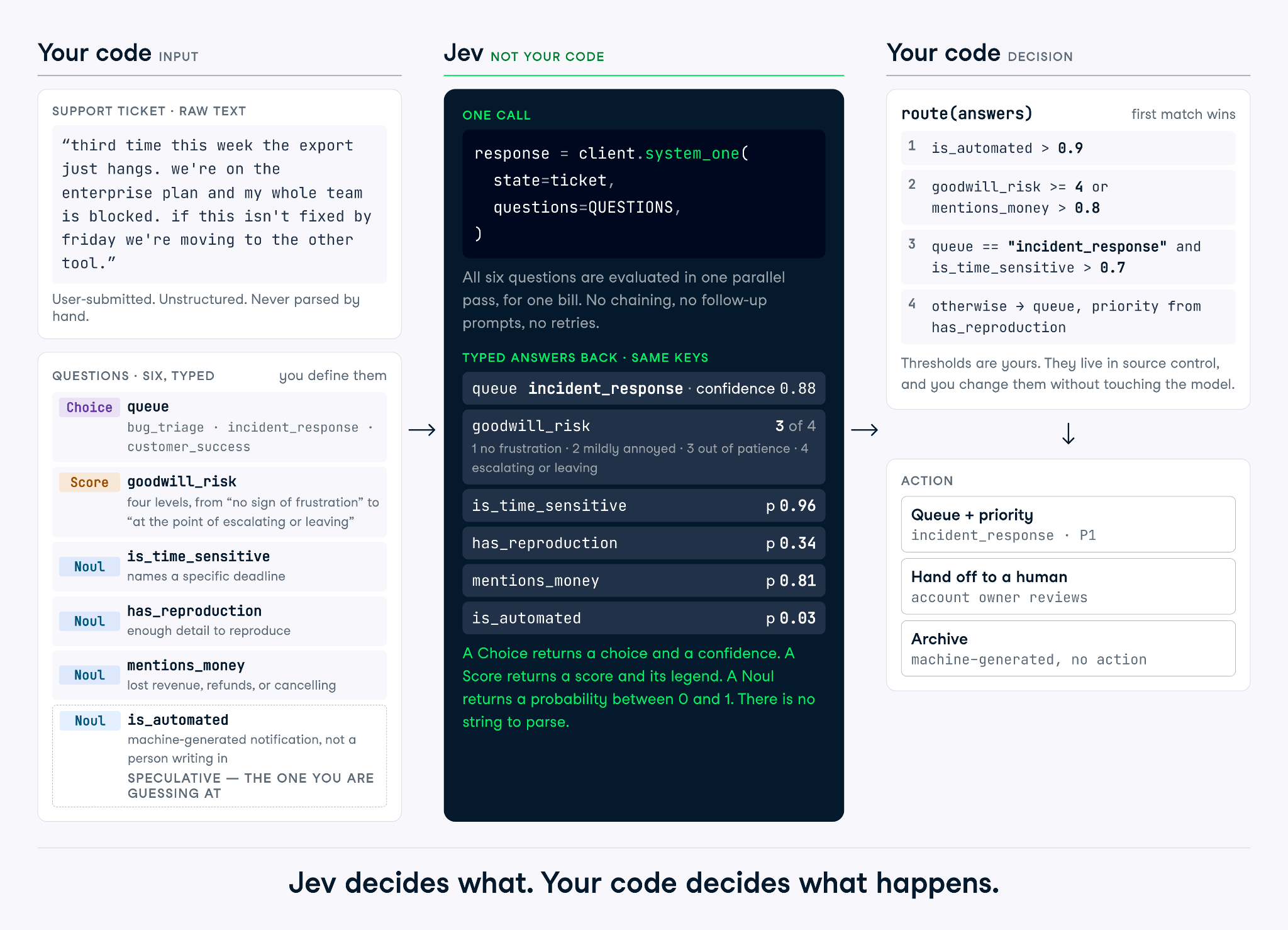
Let’s turn that into a couple of rules for routing tickets:
AUTO_ROUTE_CONFIDENCE = 0.75
YES = 0.8
FRUSTRATED = 2.0

def route(answers):
    if answers["is_automated"].noul > YES:
        return "archive", "auto"

    queue = answers["queue"]
    urgent = answers["is_time_sensitive"].noul > YES
    unhappy = answers["goodwill_risk"].score >= FRUSTRATED

    if unhappy and answers["mentions_money"].noul > YES:
        return "customer_success", "human_first"

    if queue.confidence < AUTO_ROUTE_CONFIDENCE:
        return queue.choice, "human_first"

    priority = "today" if urgent else "normal"
    return queue.choice, priority
Read what that function is doing. The model supplied six judgments, and the policy decided that one of them, mentions_money crossed with a frustrated customer, outranks the queue Jev picked. That override is a business decision, it belongs in code, and you can change it on a Friday afternoon without re-testing a model.
has_reproduction never gets used. I left it in deliberately, because that's what the fan-out pattern looks like in practice: you ask for more than the current policy consumes, log all of it, and when someone asks whether bug_triage tickets without repro steps take longer to close, you already have six weeks of the answer.
The thresholds above are just examples. Figuring the right ones out is a matter of calibration, and there's a section at the end on how to set them with data instead of vibes.
You can access the full script from this accompanying GitHub repo. When I ran the Python script with our scenario, the judgement was to route the ticket to the incident response team today.
python routing.py('incident_response', 'today')TypeSafe publishes a jaggedness page per model version, listing the failure modes it knows about. I wish more labs did this. Read it before you build anything, and read it again when you upgrade, because the list is versioned and the edges move.
Here are the five that would have cost me the most time.
You can't port a threshold across question types. TypeSafe's own example asks "Is the customer asking for a refund?" both ways on the same ticket: the Noul returns 0.22, the yes/no Choice returns 0.01 for yes, with 0.97 confidence. Same question, two numbers, two orders of magnitude apart.
Negations don't cooperate either. A Noul and its opposite came back at 0.72 and 0.47, which sums to 1.19.
The reason is that the two types ask different things. A Choice is relative and settles which option wins, while each Noul is absolute and can be low for all of them. Tune thresholds per question, in the form you'll ship, and never assume P(yes) and 1 - P(no) are the same number.
Score levels are ordered, not spaced. A 1.6 tells you the model sits between your second and third level, leaning to the third, and that's all it tells you.
What you can't do is interpolate a real quantity out of it. If your levels are "under an hour", "a few hours", and "a day", a 1.5 does not mean five hours. Use the score to test a threshold, then keep every actual number in code.
Jev treats the state as data, but it isn't hardened against state-written code to steer it. An injected instruction, a misleading framing, or text arguing for its own classification can move the answer, and TypeSafe says it expects to improve here. If the attack surface is new to you, we cover the general case in our prompt injection guide.
That matters most where the state is user-submitted, which for a ticket router is always. Write criteria precise enough that the ticket's own claims about itself don't decide the outcome, and test with hostile inputs before you route anything automatically.
Counting is unreliable and gets worse as the thing being counted grows, because the model recognizes the shape of an answer rather than tallying. Dates are read as text, so ordering, distance, and windows all fail. Numeric encodings underperform their semantic equivalents, so ask about "red" rather than #FF0000.
The fix is the same in all three cases: split the work.
If you need a count, iterate in code and ask one Noul per item:
count = sum(
    result.nouls[f"item_{i}"].noul > 0.5
    for i in range(len(items))
)Three smaller ones that share a cause. Jev answers the question you wrote, not the one you meant, so scoping words and negations are read at face value. Double negatives and questions about a property of a property cost accuracy. And a large state padded with irrelevant detail costs both accuracy and money, since unrelated material acts as a distractor.
The tell for the first one: when you look at a wrong answer and catch yourself explaining what you really meant, that explanation is the missing half of your instruction.
Based on what we’ve learned already, here are a few best practices to make the most out of Jev.
Write the condition instead of the intent. If you're explaining what you meant when reviewing a wrong answer, that explanation belongs in the instructions. What this means:
jev-latest moves. Pin the version once a threshold depends on model behavior:
client = TypeSafeClient(model="jev-1.13.0")Log response.model alongside the full answers on every call, not just the value you acted on. When a threshold starts misbehaving, that log is the only way to tell a model change from a drift in your tickets.
Finally, thresholds are not a given but the result of experimentation.
Jev is a narrow tool, and that's actually the point of it. It answers questions whose answers you can enumerate, cheap enough that you stop rationing them, and hands the decision back to your code.
What I'd push back on is the "cannot hallucinate" framing. It's true in a narrow sense that the model can't answer off-schema, but it says nothing about whether the answer is right. A Choice always returns a valid queue. It can still be the wrong queue at 0.9 confidence, and typed output makes that failure quieter.
To test it for your own work. I suggest finding one decision your code makes with a brittle rule or a slow LLM call, and try to write down the valid answers. If you can, it's Jev-shaped. If you can't, no amount of question engineering will change that.
If you want to get started with building systems that use AI, I highly recommend enrolling in our Associate AI Engineer for Developers career track. It teaches you how to work with the OpenAI API, MCP, LangChain, and much more.
Learn AI Engineering With DataCamp!
Track
Course
Course
blog
Matt Crabtree
10 min
blog
Abid Ali Awan
14 min
blog
Tom Farnschläder
12 min
Tutorial
Aashi Dutt
12 min
Tutorial
Bexruz (Bex) Tuychiev
12 min
Tutorial
François Aubry
15 min