Early September 2026 has been busy for frontier model launches, with GPT-6 Astra, Gemini 3.8 Flash, Claude Fable 5.1, and Muse Spark 1.3 all shipping in the first 10 days.
Away from the LLM race, OpenAI released ChatGPT Images 2.5 on September 8, 2026, its new state-of-the-art image model built for the way people actually create inside ChatGPT.
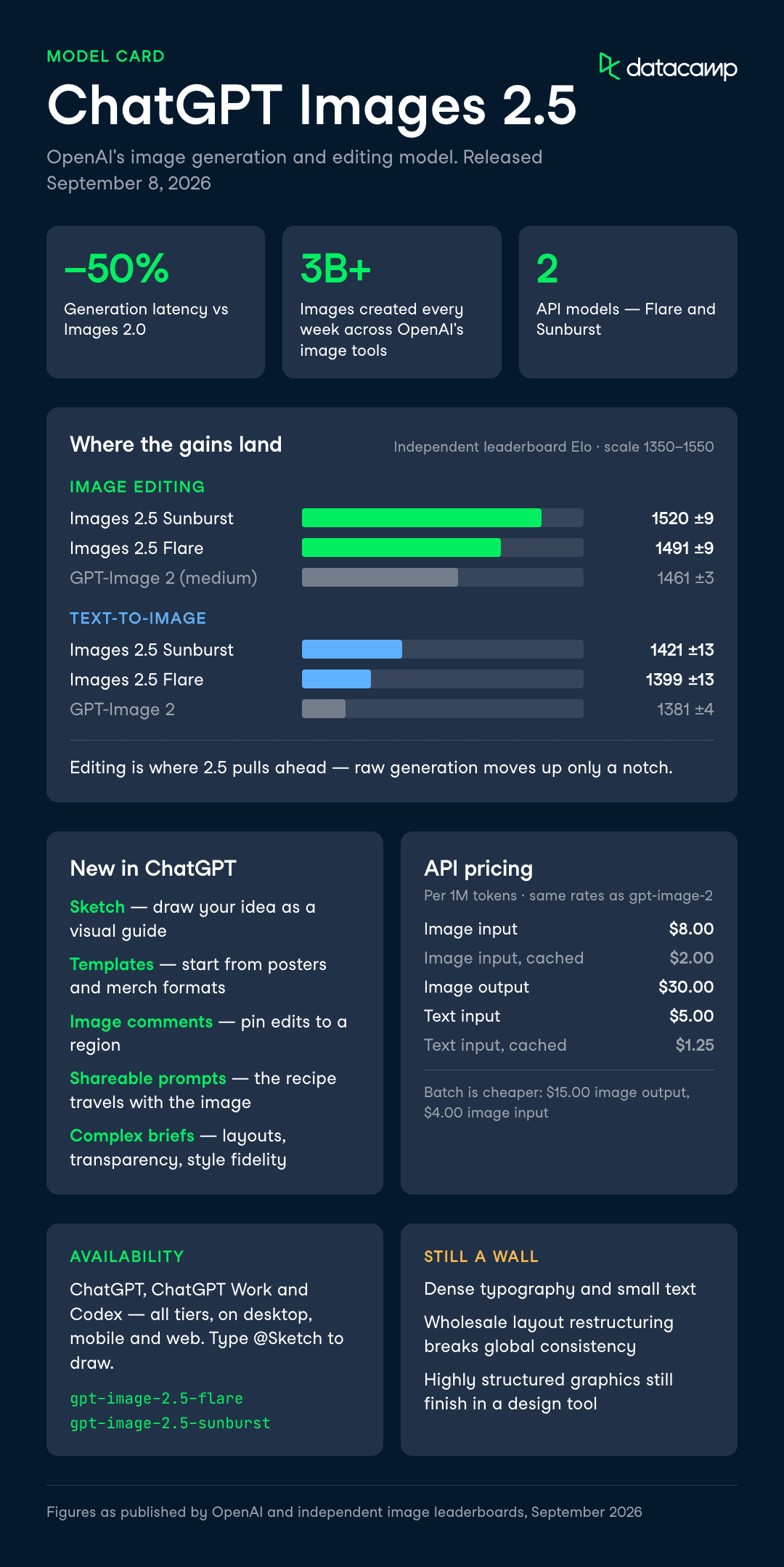
The headline claims are sharper details, more natural lighting, more reliable multi-turn editing, and up to 50% lower generation latency compared with Images 2.0.
OpenAI says people already create more than 3 billion images every week across ChatGPT Images and the GPT-Image models in the API, so this is one of the most-used products the company ships.
In this article, I'll cover everything new with ChatGPT Images 2.5, looking at the new features like Sketch and templates, the two new API models, pricing, and putting the image tools through a hands-on test.
TL;DR
- ChatGPT Images 2.5 is OpenAI's new image model, replacing Images 2.0 with sharper details and faster generation.
- The real gains are in editing: precise local edits and consistency across multiple turns, not raw text-to-image quality.
- Generation latency drops by up to 50% versus Images 2.0, which matters most in interactive, multi-turn sessions.
- New ChatGPT features include Sketch (draw your idea), templates for posters and merch, and shareable prompts.
- Developers get two API models: GPT-Image-2.5 Flare for speed and volume, GPT-Image-2.5 Sunburst for premium precision.
- It's a worthwhile upgrade if you edit iteratively; typography and dense small text still hit the usual walls.
What Is ChatGPT Images 2.5?
ChatGPT Images 2.5 is OpenAI's new image generation and editing model, positioned as an evolution over GPT-Image 2 rather than a new class of model.
It produces more natural lighting and richer textures, preserves subjects from reference photos more reliably, and follows editing instructions across multiple turns better than Images 2.0.
The clearest change is speed.
OpenAI reports up to 50% lower generation latency compared with Images 2.0, which shows up most in interactive sessions where you refine a concept over several edits.
Images 2.5 is tuned for ChatGPT-style workflows, meaning multi-turn conversations that mix text and images, rather than pure one-shot synthesis.
Independent leaderboard figures back up where the gains land.
On image-editing scores, Sunburst reaches 1520 (±9) and Flare 1491 (±9), against GPT-Image 2 (medium) at 1461 (±3). On text-to-image, the gap is smaller: Sunburst 1421 (±13) and Flare 1399 (±13), versus GPT-Image 2 at 1381 (±4). Editing is where 2.5 pulls ahead, not raw generation.
ChatGPT Images 2.5 Key Features
The model updates sit alongside a set of new ChatGPT tools aimed at giving you more control over the creative process. Here are the capabilities that matter most for day-to-day use.
Draw your idea with Sketch
Sketch lets you draw directly in ChatGPT and use that rough drawing as a visual guide for the final image.
You type "@Sketch" in ChatGPT, draw something like the seating layout for a cafe or the silhouette of a jacket you're designing, add a description of the style, and the model turns the doodle into a complete image.
This matters because a sketch resolves the ambiguity that plain text prompts often leave. Describing exactly where two characters should stand relative to each other is fiddly in words and trivial with a scribble. Thankfully for awful artists like me, you don't particularly need drawing skills for it to help.
Start from templates instead of a blank canvas
Templates give you a starting point for popular formats like posters and merch, so you fill in details rather than describe the whole composition from scratch.
You pick a template such as "Poster" or "Merch", then add the information to convey, design elements, and any style preferences.
For anyone producing repeatable formats, a birthday flyer or a product shot, templates cut down the prompt engineering needed to get a usable first draft.
The trade-off is less open-ended creativity, which is fine when you already know the format you want.
Comment directly on images for focused edits
You can now place comments directly on an image to steer more focused edits, rather than describing the region you mean in a follow-up prompt.
Combined with the model's improved local editing, this makes changing a single element, a background, a piece of copy, or one object, more reliable while keeping the rest of the image intact.
The caveat from early reviewers is that complex layout changes, like moving several objects or re-posing a person, can still break global consistency and introduce artifacts outside the edited region.
Point edits are the strong case; wholesale restructuring is not.
Share the prompt behind your image
When you share an image, you can choose to include the prompt that produced it, so someone else can run the same idea with their own photos and details.
OpenAI points to a viral prompt that reimagines your headshot as an '80s-style portrait as an example of how this spreads.
This turns a single good result into a template other people can remix. It's a small feature with an outsized effect on how ideas travel, since the recipe travels with the image.
Better handling of complex briefs and styles
Images 2.5 is better at parsing complex visual instructions and holding onto the requested direction as prompts get more specific, instead of drifting.
It handles more complex layouts, including transparent backgrounds, and reflects requested visual styles more closely.
For anyone generating a series of on-brand assets, UI mockups that preserve a hierarchy, or presentation visuals that fit a defined structure, this consistency is the difference between usable output and a redraw.
One review noted good handling of compositional prompts and multi-object scenes, with fewer obvious artifacts in faces and hands than older models.
Which API Model Should You Use?
For developers, ChatGPT Images 2.5 ships as two distinct API models that share the same token pricing but differ in their quality and speed profile. The choice comes down to whether your workflow needs raw throughput or tighter control across edits.
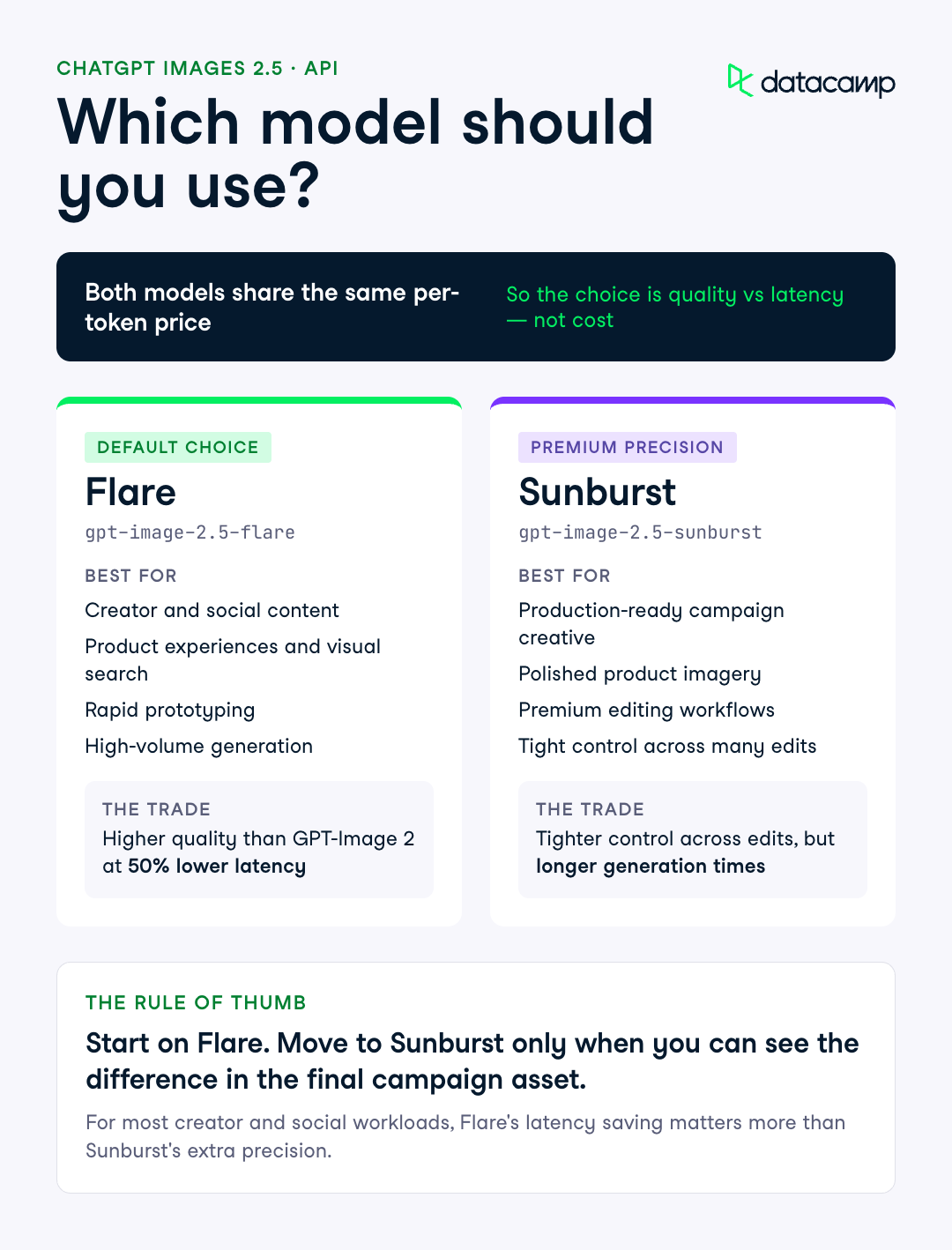 Flare is the default for most applications. Sunburst trades longer generation times for an extra level of precision on detailed creative work.
Here is how OpenAI positions the two models. Both carry the same per-token rates, so the decision is about quality and latency rather than cost.
| Model | Best for | Trade-off |
|---|---|---|
| GPT-Image-2.5 Flare | Creator and social content, product experiences, visual search, rapid prototyping, high-volume generation | Higher quality than GPT-Image 2 at 50% lower latency; the default choice |
| GPT-Image-2.5 Sunburst | Production-ready campaign creative, polished product imagery, premium editing workflows | Tighter control across edits, but longer generation times |
My read: start on Flare and only move to Sunburst when you can see the difference in final campaign assets. For most creator and social workloads, the latency saving on Flare will matter more than Sunburst's extra precision.
Testing ChatGPT Images 2.5: Hands-On Examples
These tests target the capabilities of ChatGPT Images 2.5, based on the features OpenAI leads with: reference-photo fidelity, precise local editing, and multi-turn consistency.
Test 1: Reference-photo fidelity in a new setting
This test probes how well Images 2.5 preserves a recognizable subject when placed into a new style and composition, the fidelity claim OpenAI makes about reference photos.
I've used a clear portrait of myself and asked for a stylistic transformation while keeping distinctive features intact.
Using the attached portrait photo as a reference,
create a 1920s Art Deco travel poster featuring this person as the central figure,
standing on the deck of an ocean liner at sunset.
Keep their facial features, hairstyle, and overall likeness clearly recognizable.
Add bold geometric borders and the text "ATLANTIC CROSSING" along the bottom.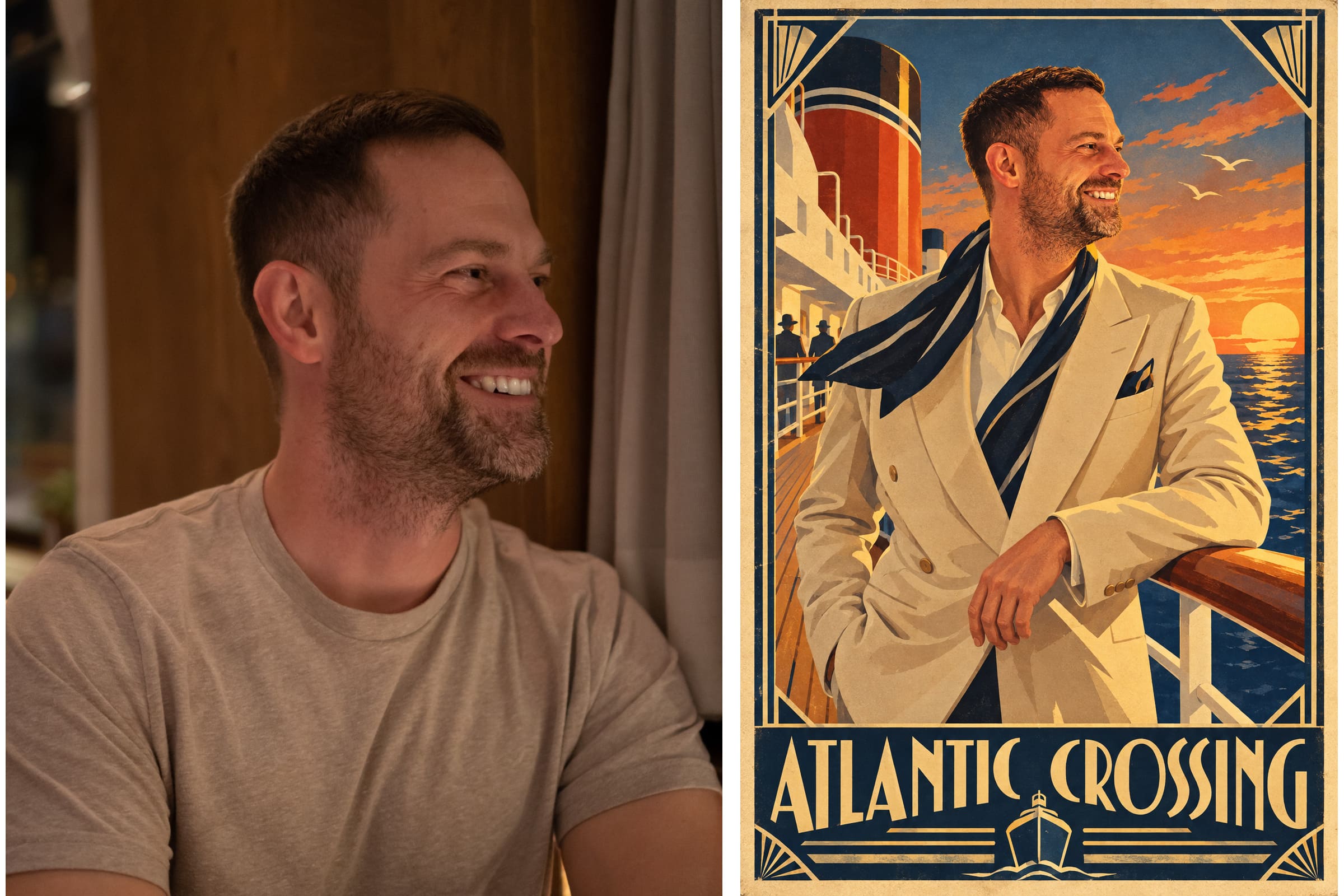
The results here are ok. The main theming and setting are pretty spot on, and it's certainly me as the reference image in it. But it looks a bit rough with the lighting around the hair, like a bad photoshop job.
Test 2: Template and sketch test
This test checks two of the new features - templates and the @sketch feature.
It also tests text rendering, which is a known weak spot, so this test deliberately includes copy.
I want a poster for CrabFest 2027, a summer craft beer and music festival
but on a small, family scale (about 100 people).
I want a TBC for the date and location.
I want to share it on whatsapp and socials.
The image should reflect the main themes, but it should look like a poster for a music/beer festival
I then asked it to make a change using the @sketch feature to include a beer barrel (using my very rough sketch).

The results are pretty strong, actually. It has the vibes right where I wanted them, even with minimal info, and the addition of the beer barrel worked well, even with my crude sketch of it. That being said, it clearly has that AI-generated vibe that seem to afflict many such examples.
I followed up with an edit asking to change the date to July 2027, and it completed that pretty swiftly and without issue.
Test 3: Multi-turn editing consistency
This test targets the model's headline editing claim, that earlier changes stay consistent as you build on them across turns.
I want to start from a single product photo and make three sequential edits, checking whether each edit preserves the previous ones without degrading quality.
Here is a photo of a ceramic coffee mug on a plain white table.
First, change the mug's color to matte forest green.
Then, in the next step, add a small potted succulent to the left of the mug.
Finally, change the background to a wooden kitchen counter.
Keep the mug's shape, size, and position identical across all three edits.
The results are all pretty decent here. It's carried them out with consistency, although it did initially create the succulent one, which changed positioning, though it corrected itself.
ChatGPT Images 2.5 Pricing and Availability
ChatGPT Images 2.5 rolled out on September 8, 2026 to all ChatGPT, ChatGPT Work, and Codex users across desktop, mobile, and web. It's available across all tiers, so there's no gating behind a premium plan for the consumer product.
In the API, GPT-Image-2.5 Flare and GPT-Image-2.5 Sunburst share the same token rates as the earlier gpt-image-2 model. Here are the published per-million-token prices:
- Image input tokens: $8.00 per 1M
- Cached image input tokens: $2.00 per 1M
- Image output tokens: $30.00 per 1M
- Text input tokens: $5.00 per 1M
- Cached text input tokens: $1.25 per 1M
Batch processing is cheaper, with image output tokens at $15.00 per 1M and image input at $4.00 per 1M for gpt-image-2 in the pricing tables. Per-image cost scales with resolution, since each of the 1024×1024, 1024×1536, and 1536×1024 tiers maps to a fixed number of output tokens.
The notable point is that both new models sit in the same pricing band as GPT-Image 2, so you get the capability uplift at the same token price. The differentiation between Flare and Sunburst is quality and speed, not cost.
How to Get Access to ChatGPT Images 2.5?
In ChatGPT, access is automatic: Images 2.5 is the model behind image generation for ChatGPT, ChatGPT Work, and Codex users on desktop, mobile, and web. To try the new Sketch feature, type @Sketch in ChatGPT.
For developers, the two API model IDs are gpt-image-2.5-flare and gpt-image-2.5-sunburst, both reachable through the OpenAI Images API. Here is a minimal request using the Python SDK:
from openai import OpenAI

client = OpenAI()
result = client.images.generate(
    model="gpt-image-2.5-flare",
    prompt="A retro travel poster of a coastal town at sunset",
)
print(result.data.url)
OpenAI continues to attach C2PA metadata and invisible watermarking to images made with these tools, and documents its safety evaluations in the model's system card. For deeper setup, see our guides to working with AI tools and our API tutorials.
Final Thoughts
ChatGPT Images 2.5 is an incremental but meaningful upgrade, and it plays to the way people actually use image models: iteratively, inside a chat, editing more than generating from scratch. The editing and latency gains are where reviewers see the clearest wins, while text-to-image quality moves up only a notch.
Strategically, OpenAI is defending its most-used surface, more than 3 billion images a week, with tools like Sketch and sharable prompts that make the product stickier rather than just the model stronger. If you edit images in multiple turns, it's worth switching to; if your bar is dense typography or highly structured graphics, you'll still finish the job in a design tool.
If you want to build stronger foundations in AI tooling, I recommend starting with our AI Fundamentals skill track.