
Courses
การพัฒนาซอฟต์แวร์ด้วย Cursor
1 30
4.2K
Cursor released Composer 2 on March 19, 2026, the third generation of its proprietary coding model. The release comes just six weeks after Composer 1.5, which scaled reinforcement learning 20x on the same base model without changing the underlying architecture. That RL scaling run actually exceeded the original pretraining compute budget, which tells you it was pushing the existing foundation about as far as it could go. Composer 2 takes a different approach: continued pretraining first to build a stronger base, then RL on top of that. That is why the benchmark jump is as large as it is despite the short gap.
It also ships with a 200,000-token context window and two pricing variants: Standard at $0.50 per million input tokens (roughly 86% cheaper than Composer 1.5) and Fast for real-time interactive sessions.
In this article, we'll break down what Composer 2 is, how it compares to Composer 1.5 on benchmarks and cost, and how it stacks up against Claude Opus 4.6 and GPT-5.4. We'll also walk through how to use it inside Cursor and what its known limitations are.
If you're interested in the frontier models that Composer 2 competes with, check out our guides to:
Composer is Cursor's family of proprietary AI coding models, designed for agentic coding inside the Cursor IDE. Unlike general-purpose models such as Claude Opus 4.6 or GPT-5.4, Composer models are built specifically for multi-file editing, terminal command execution, and codebase-wide refactoring. They are not meant for writing emails, answering trivia, or any non-code tasks.
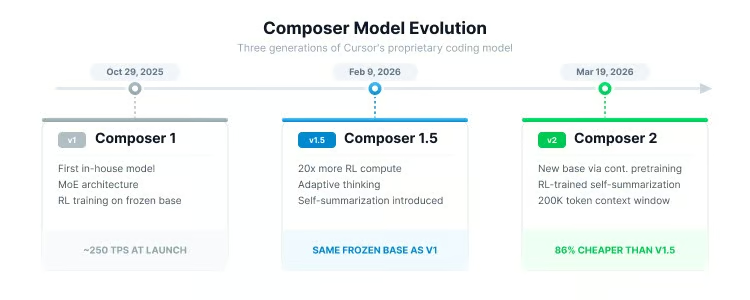
The lineage started with an internal prototype called Cheetah, then evolved through three public releases:
|
Model |
Release Date |
Key Innovation |
|
October 29, 2025 |
First in-house model; MoE architecture with RL training |
|
|
February 9, 2026 |
20x more RL compute on the same base; adaptive thinking; self-summarization introduced |
|
|
Composer 2 |
March 19, 2026 |
First continued pretraining run creating a new base; improved self-summarization; sharply lower cost |
Each generation built on top of the previous one, but Composer 2 marks the biggest architectural shift so far.
Visualizing the Composer model evolution timeline. Image by Author.
Composer 2 is Cursor's third-generation proprietary agentic coding model, and the first in the family to undergo continued pretraining.
Previous Composer models were built by layering reinforcement learning on top of a frozen base model. Think of it like teaching someone new skills without improving their fundamental understanding. Composer 2 changes this by first updating the base model's foundational weights with coding-specific data, then applying RL on top.
The model uses a Mixture-of-Experts (MoE) architecture, which means only a subset of the model's parameters activate for any given input. This keeps inference fast while maintaining a large total parameter count. Cursor has not published the exact parameter count.
The base model's identity was not disclosed at launch, but became public on March 20, 2026, after a user found it in API request headers. Lee Robinson, VP of Developer Education at Cursor, confirmed that Composer 2 is built on Kimi K2.5, an open-source model from Moonshot AI. He noted that roughly three-quarters of the total compute came from Cursor's own training (continued pretraining and RL), not the base model, which he said explains why the evals look different from a raw Kimi K2.5 run.
Moonshot AI later confirmed the arrangement as an authorized commercial partnership through Fireworks AI, which handled both the RL training infrastructure and inference. Co-founder Aman Sanger said the team evaluated multiple base models using perplexity-based benchmarks before selecting Kimi K2.5, and described the post-base training as continued pretraining followed by a 4x scale-up in RL compute.
The training infrastructure runs on PyTorch and Ray, using custom MXFP8 quantization kernels optimized for NVIDIA Blackwell GPUs.
Self-summarization, or what Cursor calls "compaction-in-the-loop RL," works like this: When the model's 200,000-token context window starts filling up, it pauses, compresses its own context down to roughly 1,000 tokens, and continues working. Because this compression behavior is part of the RL reward function, the model learns which variables, architectural decisions, and error logs to keep and which to discard.
Cursor's research blog reports that this approach reduces compaction errors by 50% compared to prompt-based summarization while using about one-fifth of the tokens. In a practical demonstration, Composer 2 solved the "make-doom-for-mips" problem from Terminal-Bench 2.0 in 170 turns, compressing over 100,000 tokens of context along the way.
During a session, Composer 2 has access to:
Together, these let the agent work across many files and steps in a single session.
Cursor ships Composer 2 in two variants, both sharing the same underlying intelligence.
The Fast variant is the default when you select Composer 2 in the model dropdown. It is built for low-latency interactive sessions where you are coding in real time and want near-instant responses.
The Standard variant runs at a lower speed but costs significantly less per token, making it better suited for background tasks, batch refactoring, or long-running agentic loops where you do not need immediate feedback.
Here is the pricing breakdown:
|
Variant |
Input (per 1M tokens) |
Cache Read (per 1M tokens) |
Output (per 1M tokens) |
|
Composer 2 Standard |
$0.50 |
$0.20 |
$2.50 |
|
Composer 2 Fast (default) |
$1.50 |
$0.35 |
$7.50 |
You can use the Fast variant when actively coding and switch to Standard for overnight or bulk operations to keep credit consumption down. We will go more into pricing differences later on.
Cursor evaluates Composer 2 across three benchmarks, each covering a different aspect of coding performance.
CursorBench is Cursor's proprietary internal benchmark, currently on version CursorBench-3. Tasks come from real Cursor sessions and are sourced using a tool called Cursor Blame, which traces committed code back to the agent request that produced it. The benchmark measures solution correctness, code quality, efficiency, and interaction behavior, and problem scope has roughly doubled from the initial version to CursorBench-3 in both lines of code and number of files. Cursor also supplements CursorBench with controlled live-traffic experiments to catch regressions that offline grading alone can miss. The obvious caveat: CursorBench is not publicly reproducible, so these scores cannot be independently verified.
Terminal-Bench 2.0 is maintained by the Laude Institute and tests an AI agent's ability to perform real-world tasks in a terminal environment. This includes navigating directories, running scripts, interpreting errors, and iterating toward solutions. Cursor used the official Harbor evaluation framework with default settings and ran five iterations per model, reporting the average.
SWE-bench Multilingual is a subset of SWE-bench featuring 300 tasks across 9 programming languages. It measures the ability to resolve real GitHub issues, making it a reasonable test of cross-language coding.
Scores have improved with each generation:
|
Benchmark |
Composer 1 |
Composer 1.5 |
Composer 2 |
|
CursorBench |
38.0 |
44.2 |
61.3 |
|
Terminal-Bench 2.0 |
40.0 |
47.9 |
61.7 |
|
SWE-bench Multilingual |
56.9 |
65.9 |
73.7 |
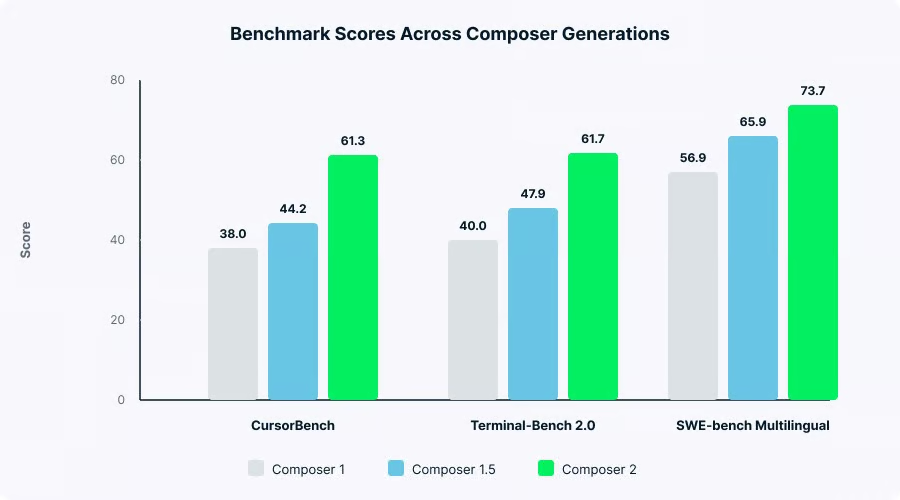
Benchmark scores across three Composer generations. Image by Author.
The improvement from Composer 1.5 to Composer 2 is bigger than any previous generation, covering both performance and cost.
As shown in the table above, Composer 2 scores 61.3 on CursorBench versus Composer 1.5's 44.2, a roughly 39% improvement. The Terminal-Bench 2.0 gap is about 29% (61.7 versus 47.9), and SWE-bench Multilingual improved about 12% (73.7 versus 65.9).
The cost drop is bigger than the benchmark gains. According to Cursor's launch blog, Composer 2 Standard is approximately 86% cheaper than Composer 1.5 on input tokens and roughly 57% cheaper even on the Fast variant. Cursor has not published a standalone pricing page for Composer 1.5, so these percentages come from Cursor's own comparison at launch.
The key technical differences are:
Community reception of Composer 1.5 was mixed. Some developers described it as useful only for small tasks like commits and simple edits. The benchmark numbers show improvement in the areas developers complained about most.
This is the comparison most people come looking for. Composer 2 beats Claude Opus 4.6 on some coding benchmarks, trails GPT-5.4 on most, and costs much less than both.
The numbers tell most of the story:
|
Benchmark |
Composer 2 |
Claude Opus 4.6 |
GPT-5.4 |
|
CursorBench |
61.3 |
~58.2 |
~63.9 |
|
Terminal-Bench 2.0 |
61.7 |
58.0 |
75.1 |
|
SWE-bench Verified |
Not reported |
~80.8% |
~80.0% |
Composer 2 vs. Claude Opus 4.6 vs. GPT-5.4
Composer 2 edges out Opus 4.6 on both CursorBench and Terminal-Bench 2.0, but GPT-5.4 leads on both by a clear margin. The Terminal-Bench 2.0 gap between Composer 2 (61.7) and GPT-5.4 (75.1) is 13 points.
One thing to note: the Terminal-Bench 2.0 scores measure agent-plus-model pairs, not raw models. Cursor used the Harbor evaluation framework for its score, while GPT-5.4's 75.1 corresponds to the Simple Codex harness entry on the official leaderboard. Different harnesses can produce different results for the same model.
Here is how the prices compare:
|
Model |
Input (per 1M tokens) |
Output (per 1M tokens) |
|
Composer 2 Standard |
$0.50 |
$2.50 |
|
Composer 2 Fast |
$1.50 |
$7.50 |
|
Claude Opus 4.6 |
$5.00 |
$25.00 |
|
GPT-5.4 |
$2.50 |
$15.00 |
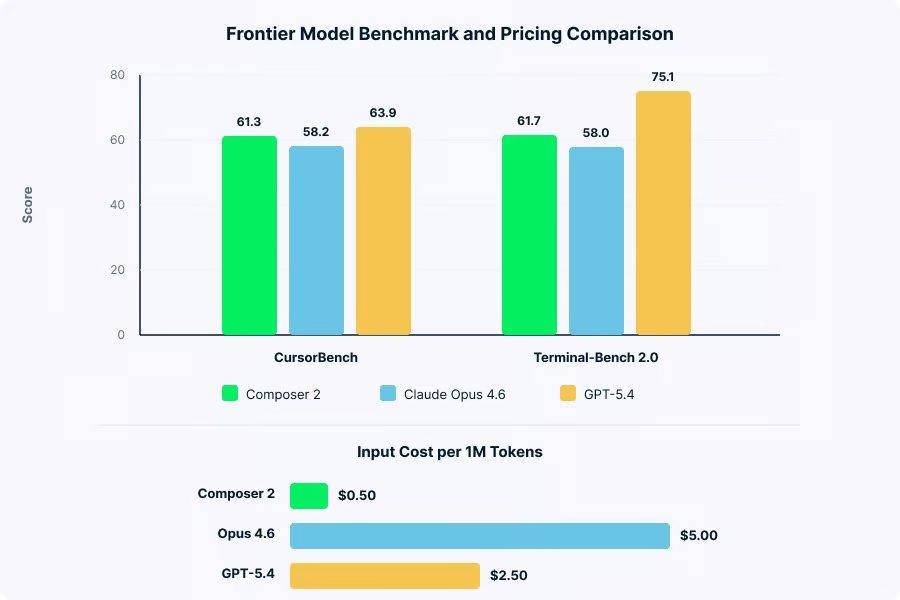
Comparing benchmark scores and token pricing. Image by Author.
Composer 2 Standard is roughly 90% cheaper than Opus 4.6 and about 80% cheaper than GPT-5.4 per token. For teams running thousands of agentic requests daily, that difference adds up fast.
Composer 2 is a code-only model locked to the Cursor IDE. It handles routine coding tasks quickly and at low cost, but cannot do anything outside of code.
Claude Opus 4.6 has a 200,000-token context window (with a 1M token beta at higher cost), excels at multi-file architectural planning, and supports multi-agent orchestration through Agent Teams. It is a general-purpose model that happens to be very good at code.
GPT-5.4 leads on the hardest coding benchmarks, has native computer use capability, and supports a 1.05-million token experimental context window. It is the most capable single model but also the most expensive to run at scale.
Cursor's pitch is value per task inside the IDE, not raw benchmark leadership.
The section above compares Composer 2 against raw models. Here is how it looks at the product level.
Claude Code is Anthropic's terminal-based coding agent. According to a 2026 developer survey, it now leads as the most-used AI coding tool among professionals, with 46% naming it the tool they love most compared to 19% for Cursor. Many developers use Cursor for everyday IDE editing and switch to Claude Code for complex autonomous tasks. The two tools complement each other more than they compete.
GitHub Copilot remains the widest-adopted tool with over 20 million all-time users and a lower entry price at $10/month. It recently added Agent mode for multi-step actions, but many developers report that Cursor's multi-file editing goes deeper.
Roughly 70% of developers now use two to four AI tools simultaneously. The question is less "which tool?" and more "which combination?"
Composer 2 lives entirely inside the Cursor IDE, so there is nothing to install separately.
To start using Composer 2, download or update Cursor from cursor.com. Composer 2 is available on all paid plans (Pro, Pro+, Ultra, Teams, Enterprise). Open the agent panel using Cmd+I on Mac or Ctrl+I on Windows and Linux, then select "Composer 2" or "Composer 2 Fast" from the model dropdown. The Fast variant is selected by default.
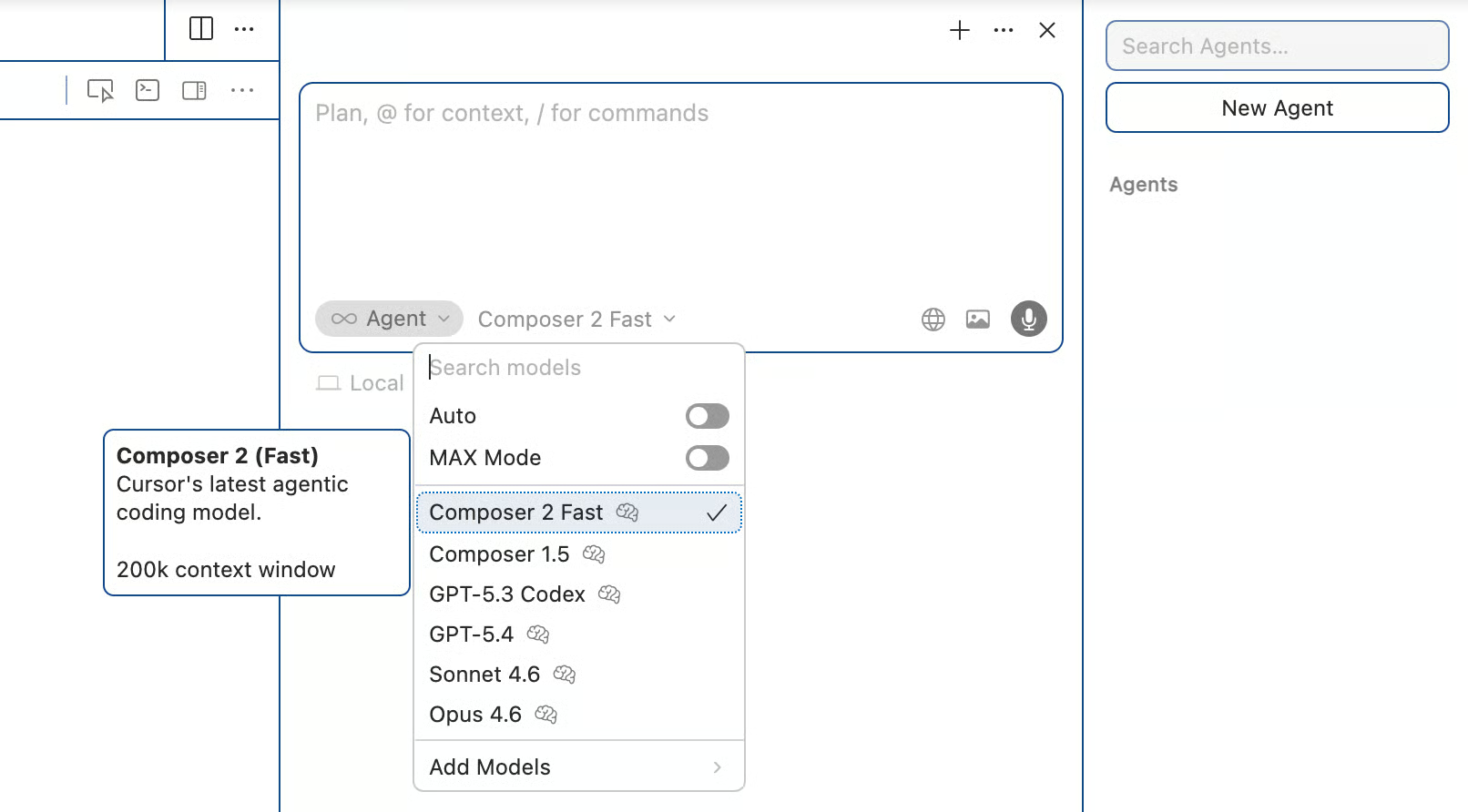
Locating the Cursor model selection dropdown. Image by Author.
From there, type a natural language description of the task you want done. Composer 2 operates in Agent mode by default, meaning it can autonomously explore your codebase, make changes, run terminal commands, and use all available tools. You review and accept or reject changes as the agent works.
Here are the shortcuts you will use most often when working with Composer 2:
|
Action |
Mac |
Windows/Linux |
|
Open Agent/Composer |
Cmd+I |
Ctrl+I |
|
New conversation |
Cmd+N |
Ctrl+N |
|
Switch modes (Agent/Ask/Edit) |
Cmd+. |
Ctrl+. |
|
Ask mode (read-only) |
Cmd+L |
Ctrl+L |
|
Inline edit |
Cmd+K |
Ctrl+K |
|
Open history |
Cmd+Opt+L |
Ctrl+Alt+L |
Composer 2 supports several ways to control what context it sees. Type @ followed by a filename, folder, or URL to inject specific context into the prompt. The # symbol focuses on a particular file. Context pills at the top of the chat show what the agent is currently referencing.
For larger projects, enabling Autocontext in Settings lets Cursor automatically pull relevant code through embeddings. You can also add custom documentation via Settings for framework-specific context.
For long-running tasks, self-summarization kicks in automatically when the context window fills up. You can also trigger compression manually with the /compress command. If the agent suggests starting a new conversation, that usually means the context is getting too large for effective summarization.
I covered per-token costs in the Variants section, so I will not repeat those numbers. Instead, here is how pricing works in practice.
Cursor uses a tiered subscription system with credits that determine how much you can use third-party models. Here is the current breakdown:
|
Plan |
Price |
Key Inclusions |
|
Hobby |
Free |
Limited agent requests and tab completions |
|
Pro |
$20/month ($16/month billed yearly) |
$20 credit pool, unlimited tab completions, cloud agents |
|
Pro+ |
$60/month ($48/month billed yearly) |
3x usage on all models |
|
Ultra |
$200/month |
20x usage on all models, priority access |
|
Teams |
$40/user/month ($32 billed yearly) |
Centralized billing, SAML/OIDC SSO, analytics |
|
Enterprise |
Custom |
SOC 2, legal review, advanced security controls |
This is the part that trips people up. Composer usage on individual plans draws from a standalone usage pool that is separate from the credit pool used for third-party models like Claude or GPT. Cursor describes this pool as having "generous usage included," though they have not published exact limits.
When you use "Auto" mode, which lets Cursor choose a model for each request, usage from Composer models is unlimited on paid plans with no credit deduction. Manually selecting premium third-party models draws from your monthly credit pool instead. Once that pool runs out, you can enable pay-as-you-go overages.
Cursor's pricing has gone through several changes over the past year. In June 2025, they replaced the flat "500 fast requests per month" system with credit-based billing, which effectively dropped requests from roughly 500 to about 225 per month on the Pro tier.
As of March 2026, frontier models like GPT-5.4 and Opus 4.6 are billed against your monthly credit pool with dynamic token-based pricing. Composer 2 usage remains in its separate pool. If you are budgeting for a team, default to Composer 2 for routine work and save third-party credits for tasks that need more.
As mentioned in the comparison section, Composer 2 is code-only. Co-founder Aman Sanger put it directly: "It won't help you do your taxes. It won't be able to write poems." For general-purpose tasks, you still need Claude or GPT inside Cursor.
Users have reported that in rigid, multi-step execution plans, Composer 2 sometimes skips intermediate verification steps and rushes toward implementation. This is likely a training artifact where the model pushes toward finishing rather than verifying.
Some users have reported that on macOS, Cursor's background file watcher ignores .gitignore directives in very large monorepos, causing the agent to index dependency folders like node_modules and exhaust token allowances unexpectedly.
CursorBench remains closed-source. For Terminal-Bench 2.0, Cursor took "the max score between the official leaderboard score and the score recorded running in our infrastructure" for non-Composer models, a methodology choice worth being aware of.
On transparency: Cursor did not disclose the Kimi K2.5 base model in its launch blog post. The omission surfaced on March 20, 2026, when a user found the model ID in API request headers, which briefly sparked public debate about license compliance. Lin Qiao, CEO of Fireworks AI, clarified that Cursor was in compliance from day one through Fireworks' platform. Moonshot AI confirmed the arrangement as an authorized commercial partnership. Both Lee Robinson and co-founder Aman Sanger acknowledged the non-disclosure was "a miss" and committed to being more transparent about base models going forward.
Cursor has said this directly: Composer 2 is not trying to be the most capable model overall. The focus is lower cost for everyday IDE work.
The benchmarks covered earlier back that up: Composer 2 outperforms Claude Opus 4.6 on Terminal-Bench 2.0 at roughly 90% lower cost per token, but still trails GPT-5.4 on harder benchmarks.
The market is moving toward multi-model workflows, and how Cursor prices Composer 2 suggests they are building around that assumption.
If you want to learn more about the AI tools shaping the software development landscape, check out our comparison of GPT-5.4 vs. Claude Opus 4.6.
Learn with DataCamp
Courses
Courses
Courses
blogs
Khalid Abdelaty
15 นาที
blogs
Tom Farnschläder
8 นาที
blogs
Derrick Mwiti
10 นาที
blogs
Alex Olteanu
8 นาที
blogs
Matt Crabtree
10 นาที
Tutorials
Bexruz (Bex) Tuychiev
12 นาที