
Course
Designing Agentic Systems with LangChain
3 hr
14.4K
Kimi K2.5 is an open-source, multimodal model from Moonshot AI built for agentic workflows, not just chat. Rather than responding to isolated prompts, it can break down complex tasks, coordinate tool use, and produce structured outputs like tables, reports, plans, and code, across multi-step workflows.
What makes Kimi K2.5 especially interesting is Agent Swarm. A self-directed mode where the model can dynamically spin up and orchestrate multiple sub-agents in parallel to speed up research, verification, and execution.
In this tutorial, I’ll cover what Kimi K2.5 is and where it performs well, then focus on four hands-on experiments that show how Agent Swarm behaves in practice, including what it does impressively, where it falls short, and when it actually beats a single-agent setup.
Kimi K2.5 is Moonshot AI’s open-source, natively multimodal model, which is built to handle text, images, video, and documents in one system. It extends Kimi K2 with continued pretraining on roughly 15T mixed text and visual tokens, and it’s designed to operate not just as a chatbot, but as an agentic system that can plan, use tools, and (in swarm mode) execute tasks in parallel.
In practice, Kimi K2.5 stands out for three things:
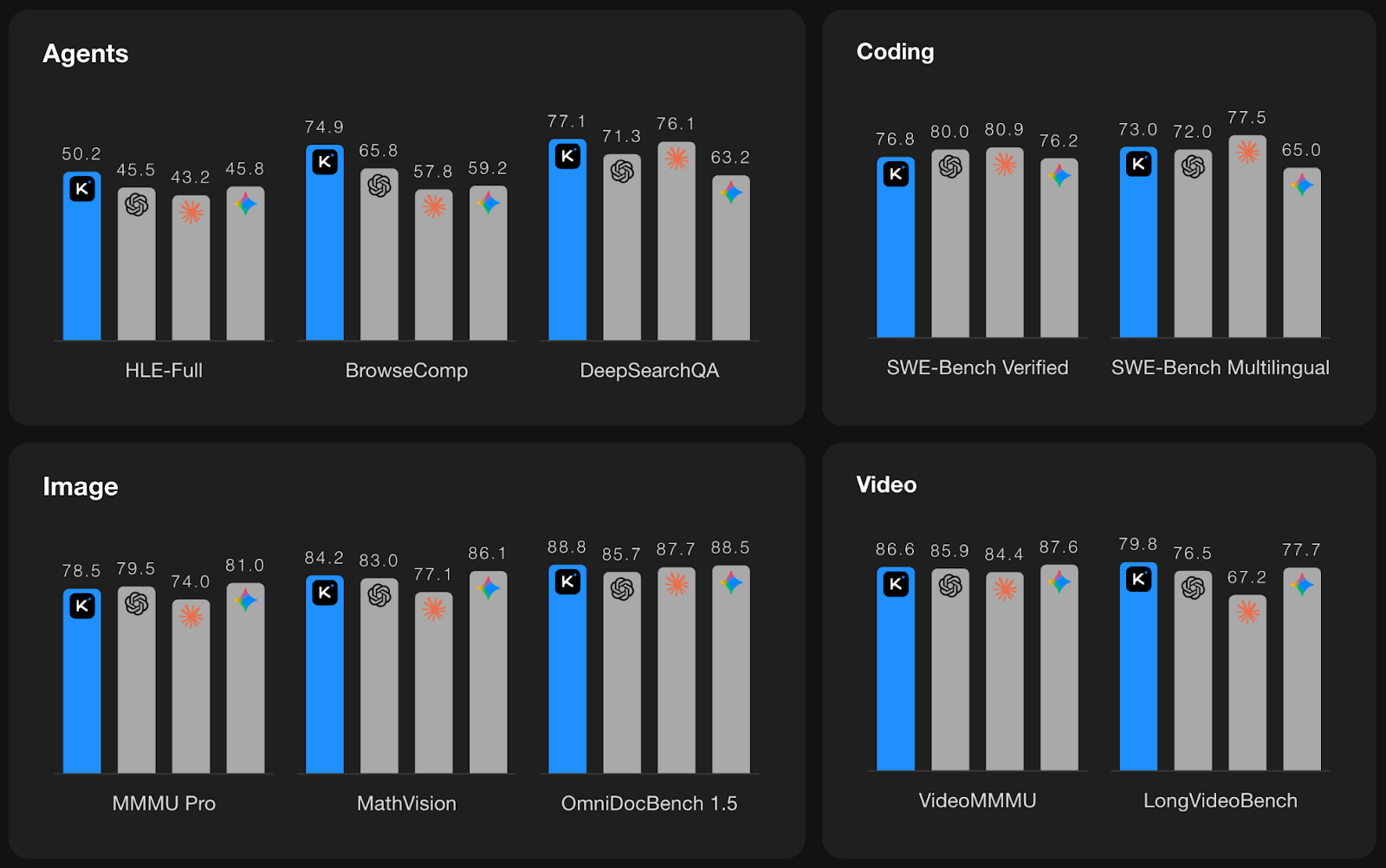
Source: Kimi K2.5
The above plots summarize Kimi K2.5’s performance across four categories: Agents, Coding, Image, and Video, with Kimi shown in blue and other leading frontier models shown as gray bars.
You can try Kimi K2.5 in multiple ways:
https://platform.moonshot.aiFor reproducible benchmarks, Moonshot recommends using the official API or verified providers via Kimi Vendor Verifier.
Most multi-agent setups today are still hand-built; you define roles, wire a workflow, and hope the orchestration holds up as tasks get bigger. Kimi K2.5 Agent Swarm flips that model.
Instead of predefining agents and pipelines, K2.5 can self-direct a swarm, deciding when to parallelize, how many agents to spawn, what tools to use, and how to merge results, based on the task itself.
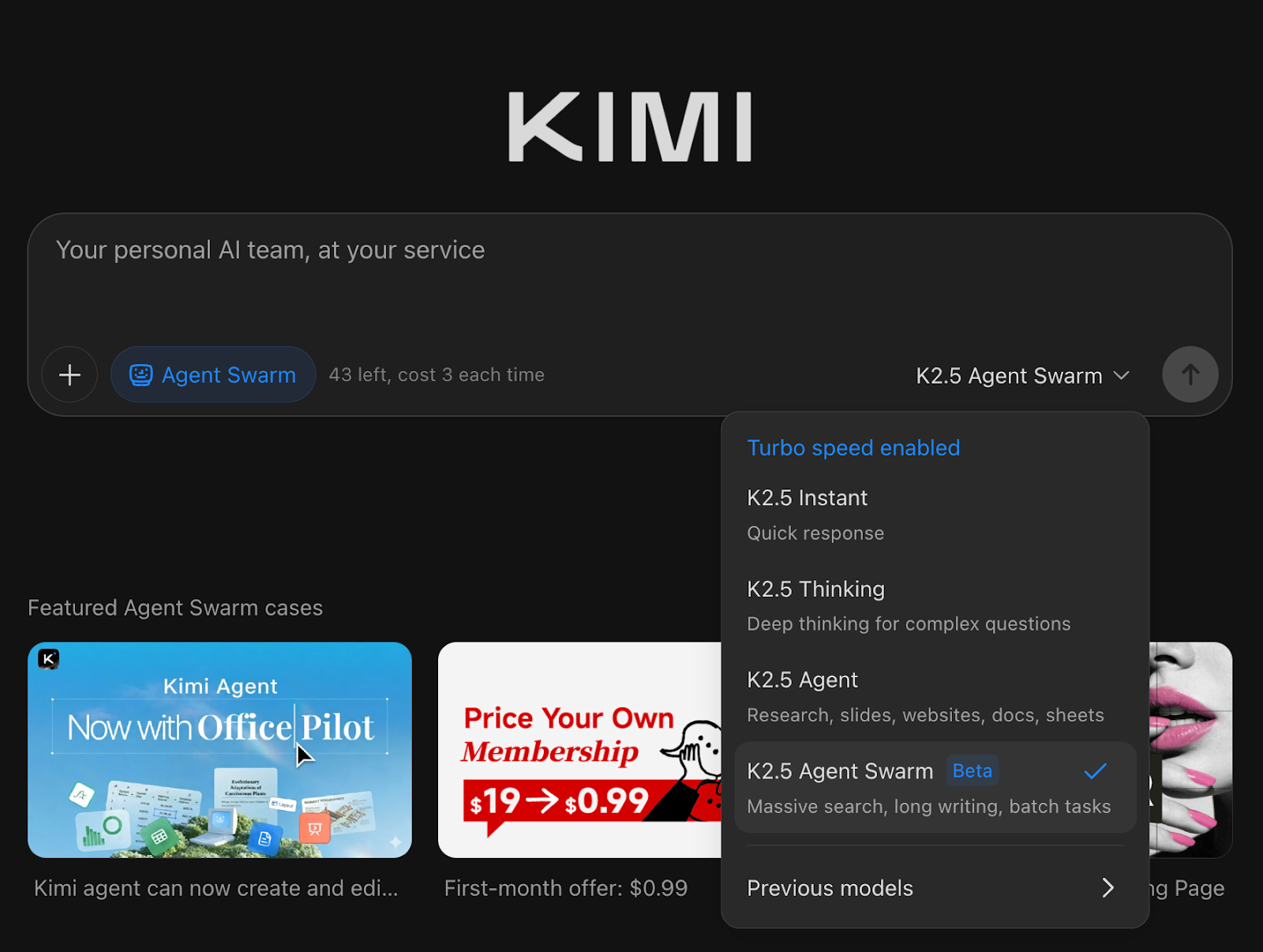
It can autonomously create and coordinate an agent swarm of up to 100 sub-agents, executing parallel workflows across up to 1,500 tool calls, with no predefined roles.
Under the hood, Agent Swarm introduces a trainable orchestrator that learns to decompose work into parallel subtasks and schedule them efficiently:
Kimi K2.5’s swarm behavior is trained using Parallel-Agent Reinforcement Learning (PARL), a training setup that makes parallelism itself a learnable skill. This matters because naive multi-agent systems often fail in two ways:
PARL addresses this by shaping rewards over training. It encourages parallelism early and gradually shifts optimization toward end-to-end task quality, preventing fake parallelism. To make the optimization latency-aware, K2.5 evaluates performance using Critical Steps because spawning more agents only helps if it actually shortens the slowest path of execution rather than inflating coordination overhead.
When the task is wide and tool-heavy, Agent Swarm can materially reduce time-to-output. Moonshot reports that, compared to a single-agent setup, K2.5 Swarm can cut execution time by ~3x to 4.5x, and internal evaluations show up to ~80% reduction in end-to-end runtime on complex workloads through true parallelization.
In this section, I’ll share my firsthand experience testing Kimi K2.5 Agent Swarm across diverse scenarios. Each example highlights how the swarm decomposes tasks, allocates agents, and where this approach genuinely helps or falls short in practice.
For my first experiment, I tested whether Kimi K2.5 Agent Swarm could tackle a high-stakes, real-world task like drafting a deployment plan for open-source LLMs.
Prompt:
I want you to research best practices for deploying open-source LLMs in production. Focus on real deployment patterns rather than theory. If possible, have different agents look into, Inference stacks like vLLM, TGI, llama.cpp, Quantization strategies and hardware trade-offs, and cost control techniques. I want a short, structured guide with common architectures, trade-offs, and concrete recommendations for small teams vs large-scale deployments.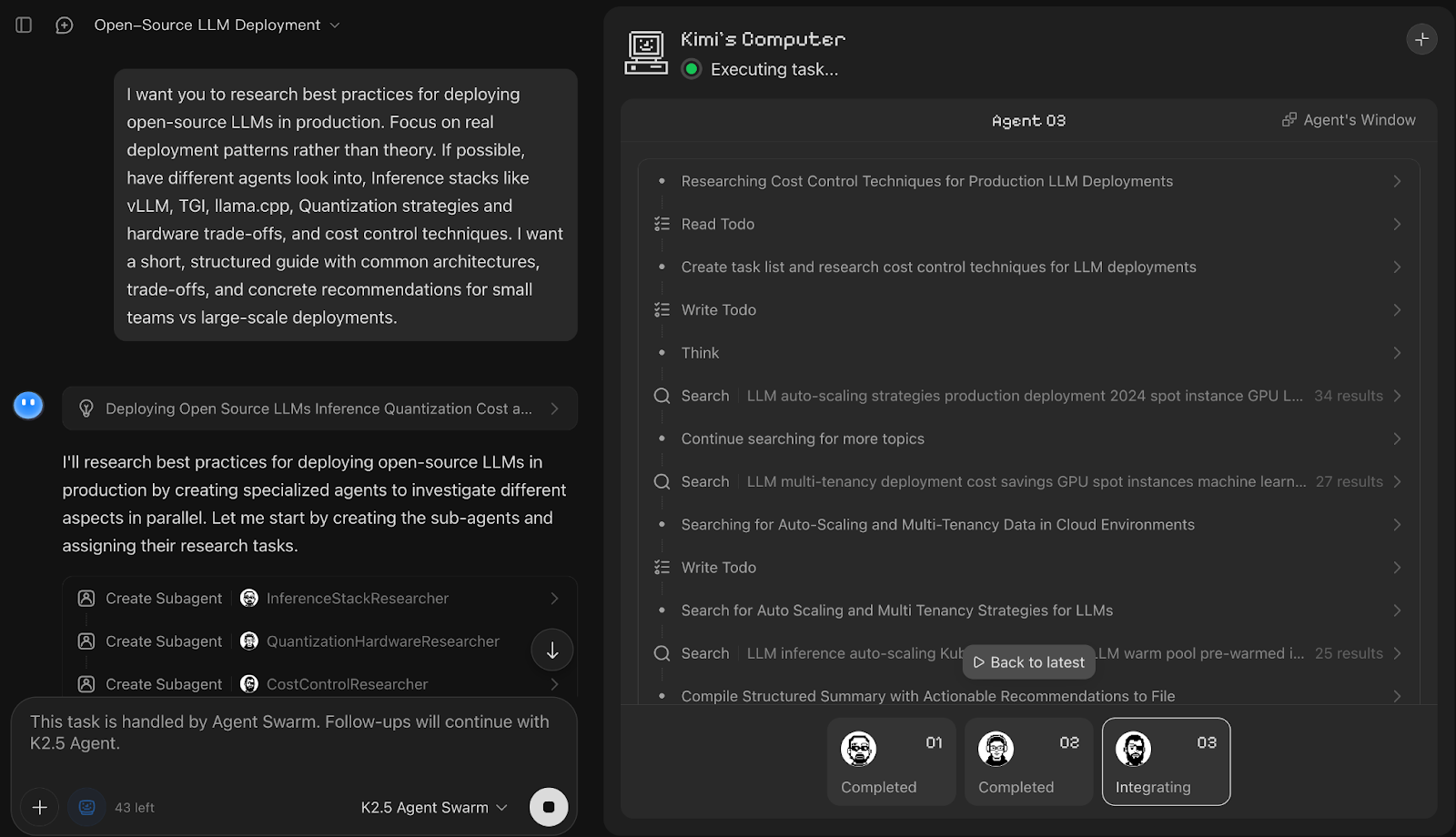
In this demo, Kimi K2.5 Agent Swarm immediately decomposed the prompt into parallel research tracks and spun up three dedicated sub-agents, namely InferenceStackResearcher, QuantizationHardwareResearcher, and CostControlResearcher. While each subagent name refers to the work they were allocated, it then fanned out work across multiple worker personas.
What I liked most was how the final output was a clean comparison table for inference stacks, along with concise recommendations and notes for quantization. You can also use the task progress bar to see how it decomposed the work upfront and tracked each subtask to completion.
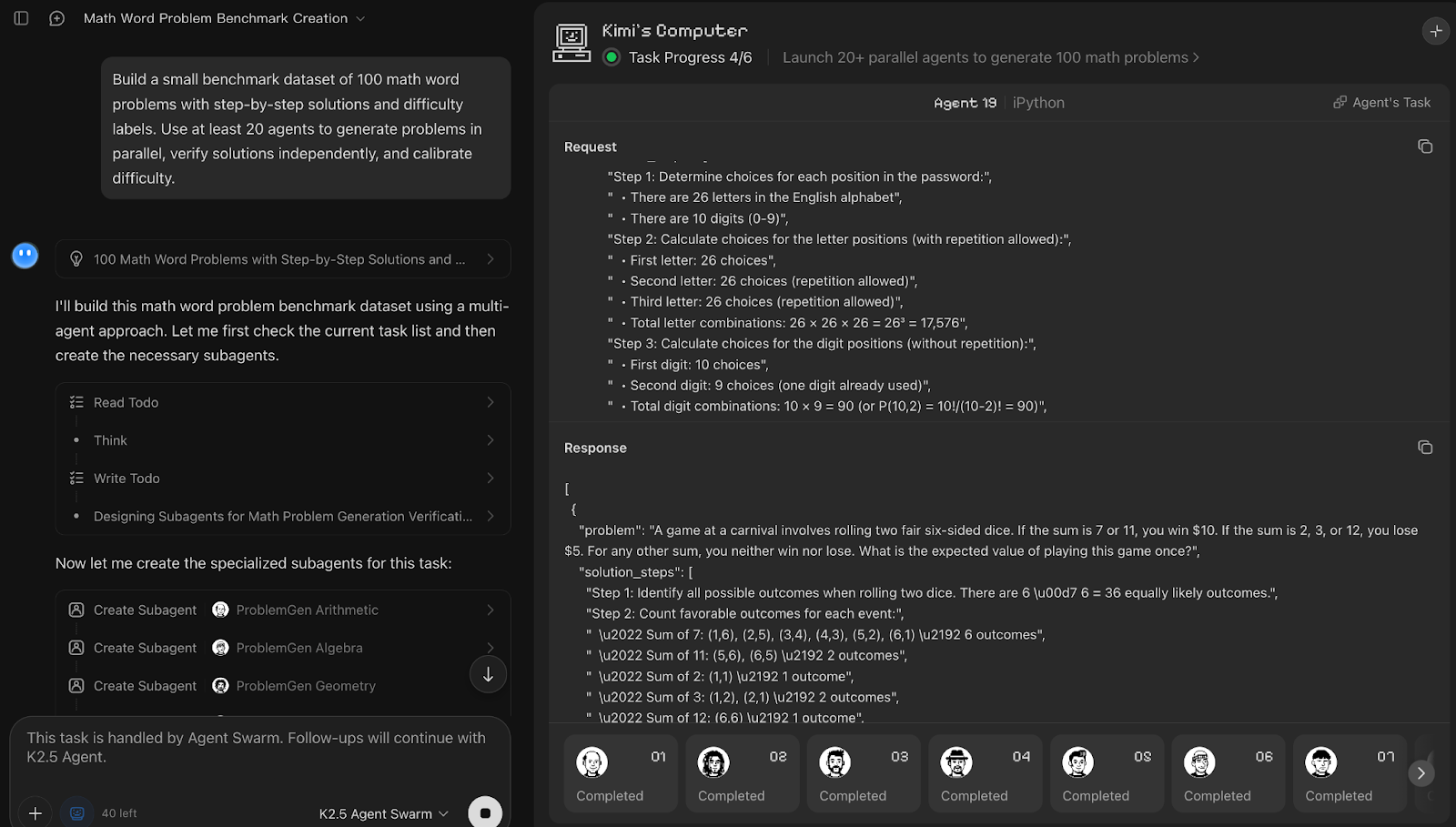
Next, I tested Agent Swarm on a dataset-building task by asking Kimi K2.5 to generate a 100-item math word-problem benchmark with solutions and difficulty labels. I also explicitly requested it use 20 agents to see how closely it follows the swarm-size constraint while maintaining quality.
Prompt:
Build a small benchmark dataset of 100 math word problems with step-by-step solutions and difficulty labels. Use at least 20 agents to generate problems in parallel, verify solutions independently, and calibrate difficulty.Kimi K2.5 Agent Swarm treated dataset creation as a three-phase pipeline, including generation, verification, and calibration. Although the prompt asked for at least 20 agents, the system autonomously spun up 25 sub-agents, prioritizing correctness over strict adherence to the requested count. It was interesting to observe that about five agents worked actively at a time while others queued and resumed as earlier subtasks completed, which suggests an internal scheduling mechanism.
Each generation agent handled a distinct math domain and produced five problems with step-by-step solutions, after which 10 agents were allocated to verification, and a smaller set of five agents focused on difficulty calibration.
Next, I pushed Kimi K2.5 into a multimodal workflow by providing multiple nutrition-label images and asking for a structured comparison. The goal was to see how well it can extract, normalize, and verify visual data.
Prompt:
I’m sharing images of nutrition labels from 7 packaged food items. Analyze them and produce a clear comparison specifically:
Extract fields like: calories, protein, total fat, sugar, sodium,  from each label.Normalize all values to a per-100g basis so items are comparableDouble-check numeric consistency (e.g. serving size vs totals)Rank the products from healthiest to least healthy, explaining the reasoningReturn a comparison table with normalized values for all items. Also include a summary highlighting, best high-protein option, the lowest sugar option, and items to avoid and why.
Assume the labels may vary in format and serving size. Resolve ambiguities where possible and note any missing or unclear values.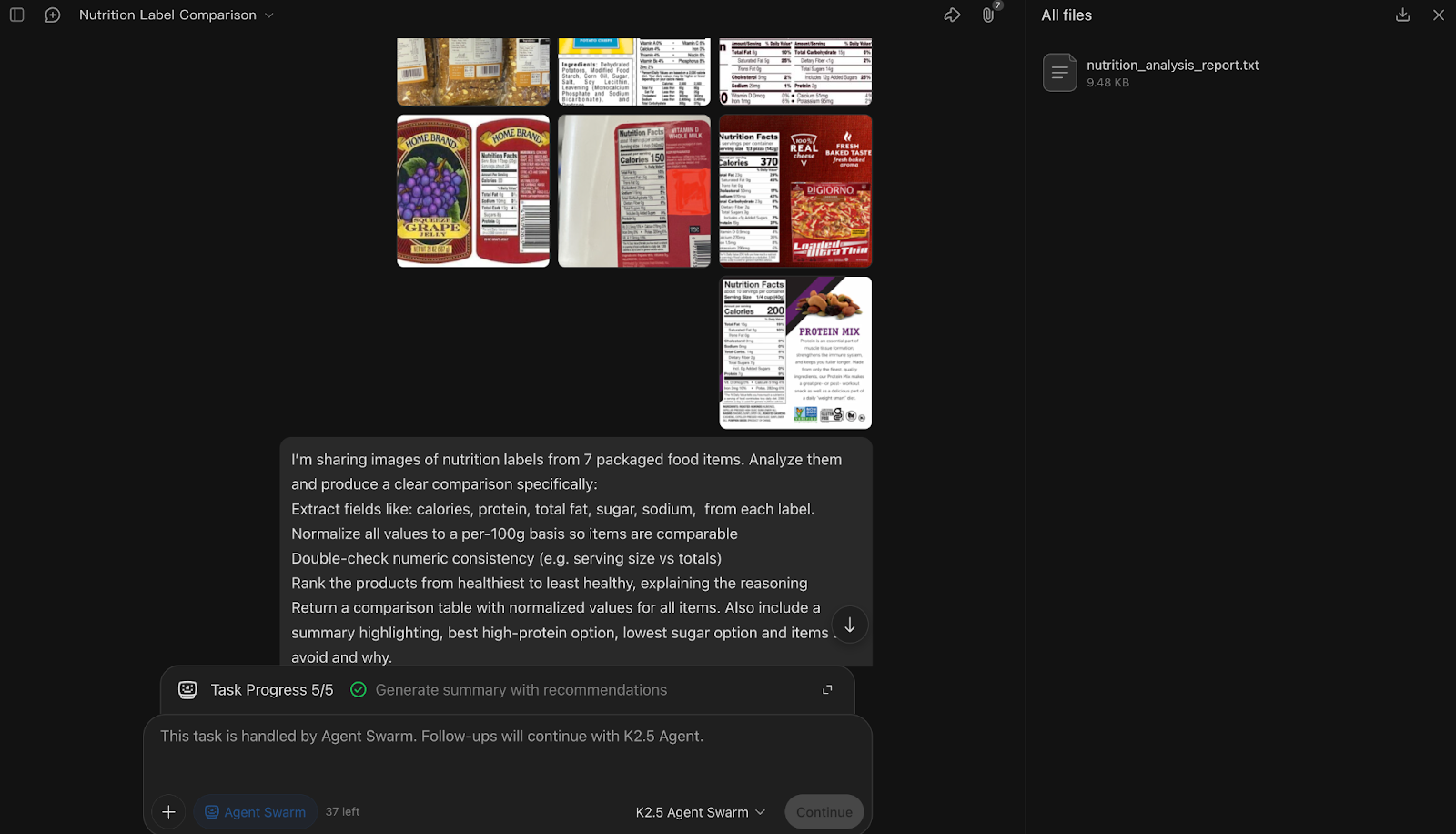
In this multimodal QA experiment, Kimi K2.5 Agent Swarm decomposed the task around one label per sub-agent, spinning up seven parallel sub-agents to extract nutritional fields from each image while a coordinating agent handled normalization, cross-checking, and ranking.
An interesting thing about Kimi is that the constraints you specify in the prompt (extraction, normalization, verification, ranking) effectively become the blueprint for how Kimi instantiates and assigns sub-agents.
What stood out for me is how the swarm treated verification as an important step, i.e, after extraction, the orchestrator explicitly reconciled serving sizes, normalized values, and flagged ambiguities instead of silently guessing. The final synthesis step, which ranked products and called out best high-protein and low-sugar options, demonstrated strong aggregation logic across visual inputs.
Finally, I tested Kimi K2.5’s coding capabilities by asking it to build a fully interactive Bubble Shooter game from scratch. This experiment highlights how the model handles end-to-end, stateful code generation where coherence matters more than parallelism.
Prompt:
```markdown
Build a fully playable Bubble Shooter game that runs locally in a web browser. The game should support mouse and touch aiming, show a live aim guideline, fire colored bubbles from the bottom center, bounce shots off side walls, and snap bubbles to a grid at the top on collision.
Implement core gameplay logic including popping groups of three or more connected bubbles of the same color, dropping any disconnected clusters, tracking and displaying score, showing a next-bubble preview, and ending the game when bubbles cross a danger line near the bottom.
Keep visuals simple but responsive, include a restart button, and finish with brief instructions on how to run and test the game locally.
```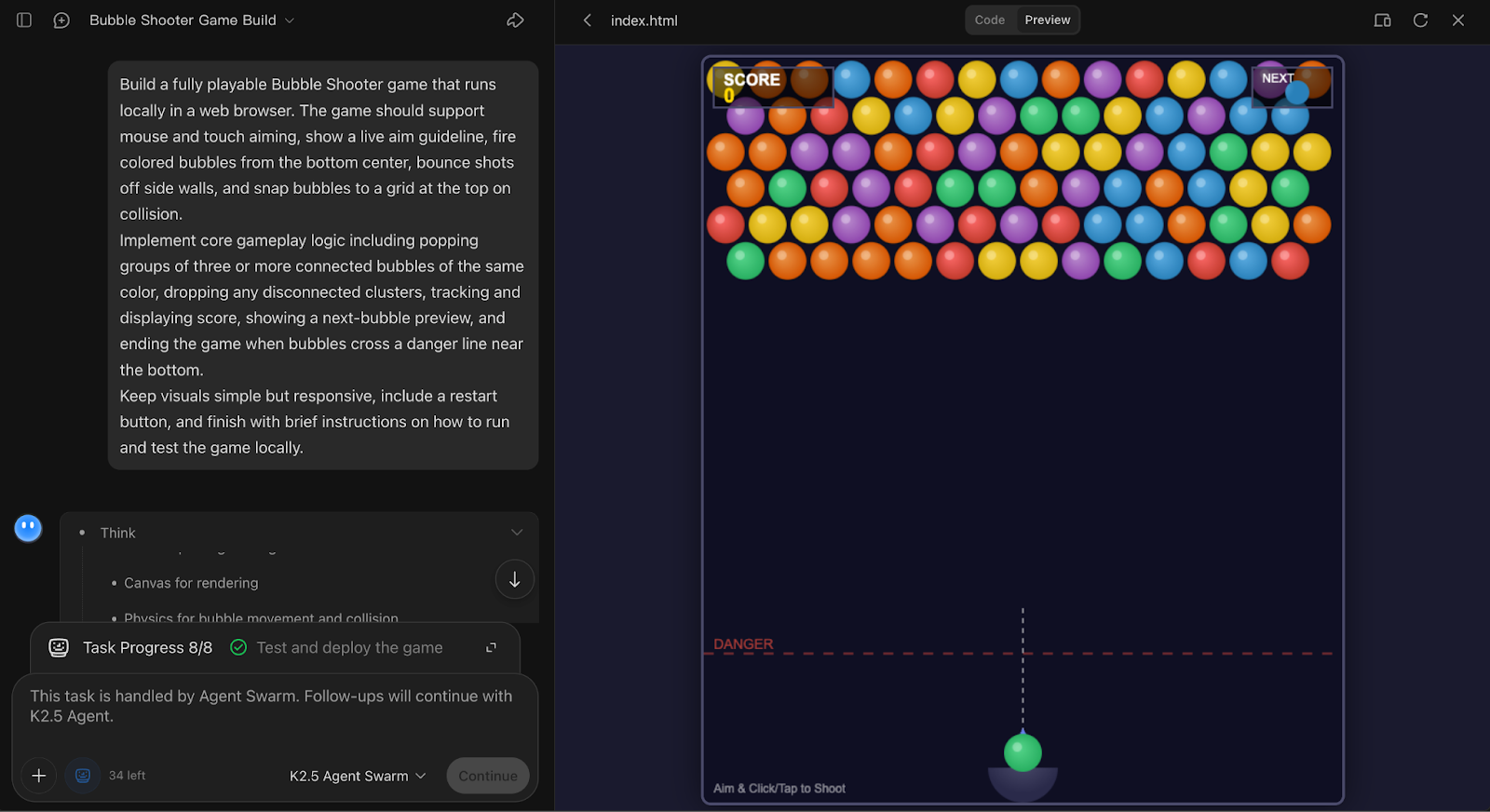
In this game-building experiment, Kimi K2.5 Agent Swarm made a notably conservative choice by allocating just a single sub-agent to handle the entire task.
That decision itself is an interesting observation because the system correctly recognized that this was a tightly coupled, stateful coding problem where heavy parallelism would add coordination overhead without any benefit.
The agent produced a complete, locally runnable Bubble Shooter implementation with aiming, wall bounces, grid snapping, match-three popping, score tracking, and restart logic, showing both gameplay mechanics and UI flow.
Top DataCamp Courses
Course
Course
Course
Tutorial
Aashi Dutt
8 min
Tutorial
Aashi Dutt
8 min
Tutorial
Abid Ali Awan
11 min
Tutorial
Bexruz (Bex) Tuychiev
15 min
Tutorial
Bexruz (Bex) Tuychiev
12 min
Tutorial
Abid Ali Awan
11 min