

课程
在 Python 中使用 DeepSeek
3 小时
1.4K
实践并学习路径你的进步。
使用 Google 继续Perplexity Labs 是 Perplexity 推出的一个以项目为导向的 AI 工具,可通过自然语言提示生成完整的报告、仪表盘和简单的网页应用。
用我自己的提示测试该平台后,我对其代码执行能力以及仅用 HTML、CSS 和 JavaScript 就能生成精致网页应用的能力都印象深刻。更吸引人的是,这些功能都包含在每月 20 美元的订阅中。
在这篇博客中,我将解释什么是 Perplexity Labs、如何使用它,并通过五个实用示例测试其能力。
我们通过每周五免费的 The Median 时讯为读者带来最新 AI 动态,快速拆解本周关键信息。订阅即可每周用几分钟保持敏锐:
Perplexity Labs 是一个由 AI 驱动的工具,旨在将用户提示转化为完整项目,例如报告、电子表格、仪表盘和简单网页应用。如果您用过Manus AI,体验会非常相似。
为帮助您理解 Perplexity Labs 的工作方式,我将带您浏览一个来自 Labs 作品库的示例:一个 投资组合表现仪表盘,用于比较传统与 AI 驱动的投资策略。
当您创建一个 Lab 时,您会注意到它看起来与标准的 Perplexity 对话不同。与传统对话线程不同,Lab 除了常规的Tasks 和 Sources 面板外,还有用于Apps、Assets 和 Images 的额外面板:
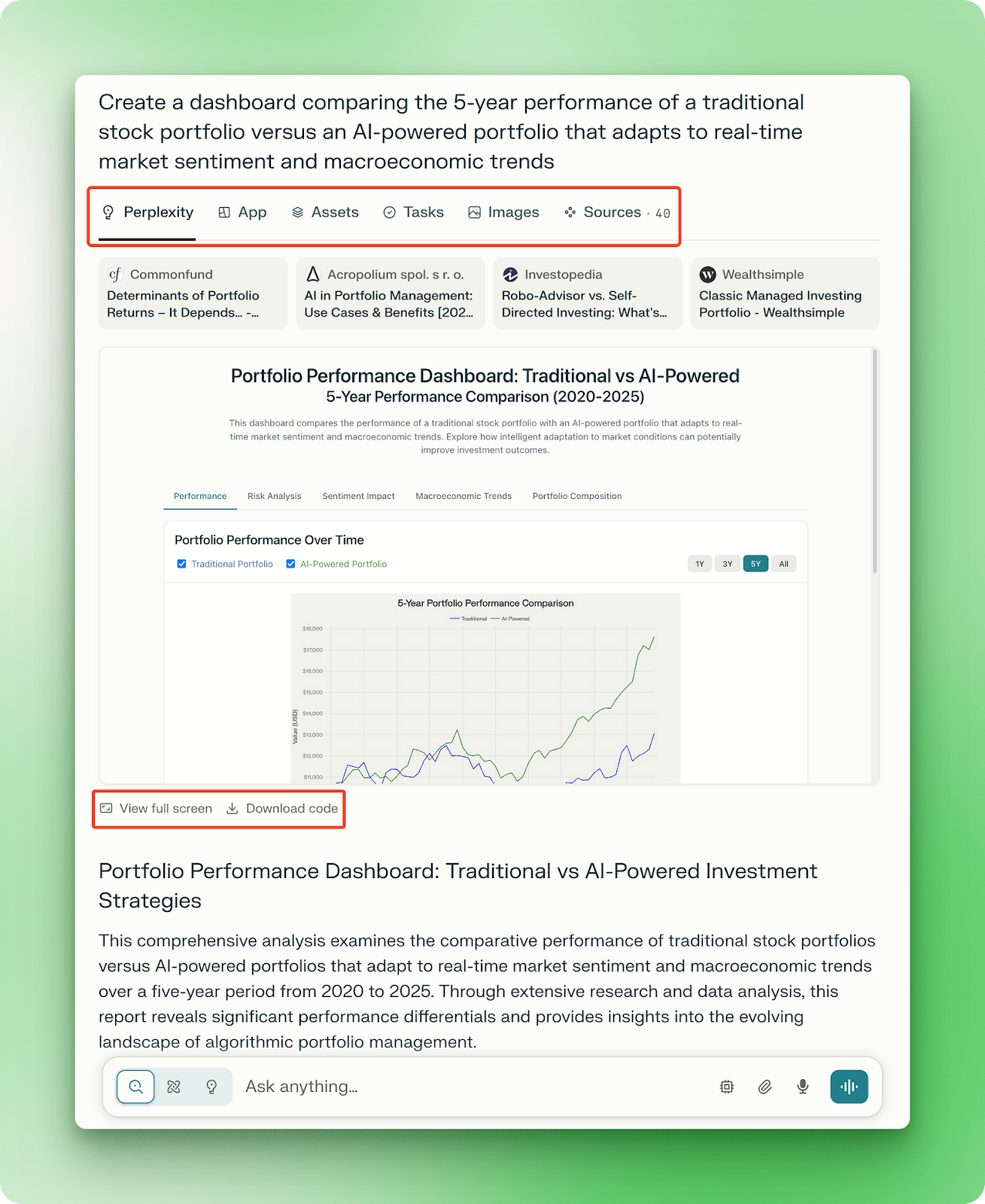
当您明确要求创建网页应用、仪表盘或演示文稿时,会出现Apps 面板,如下例所示:
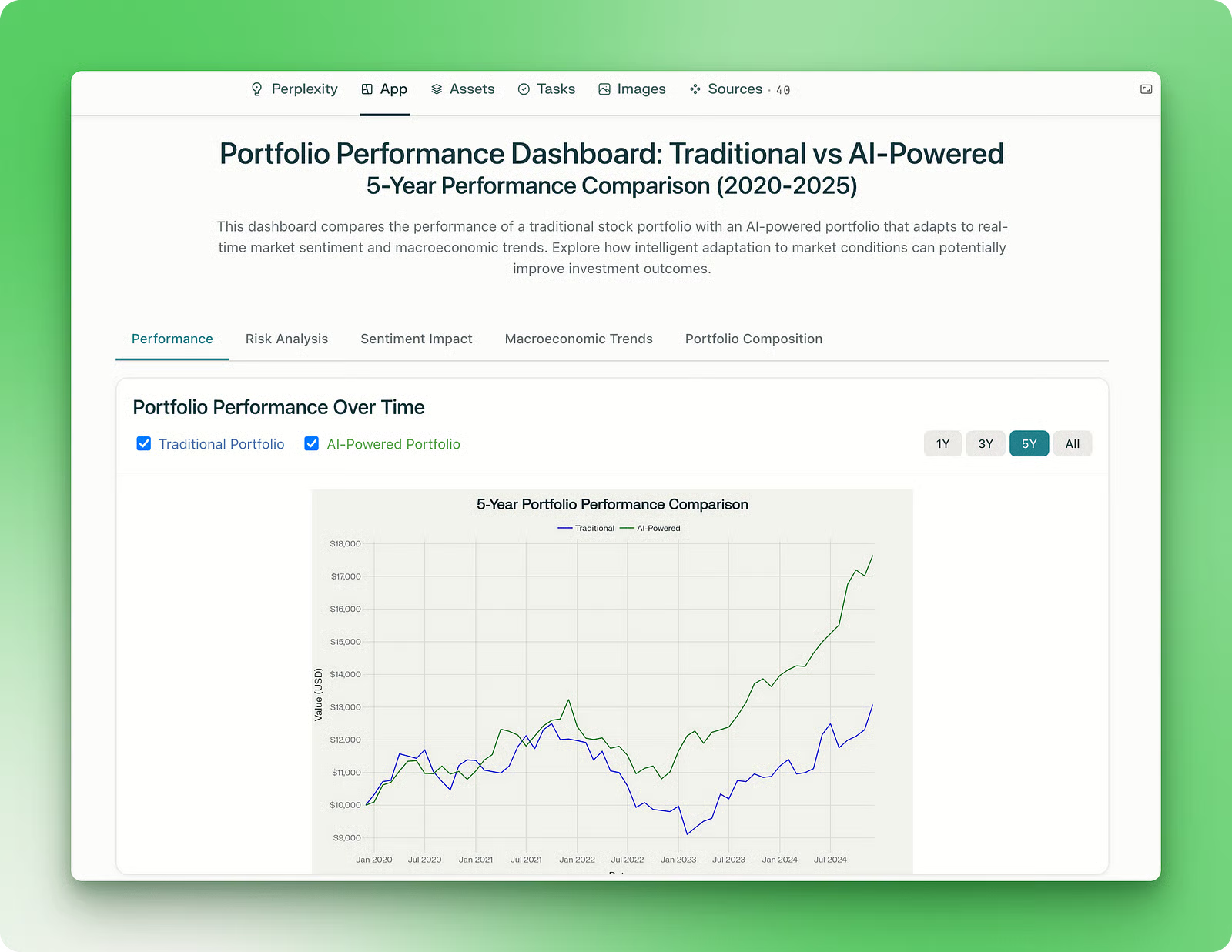
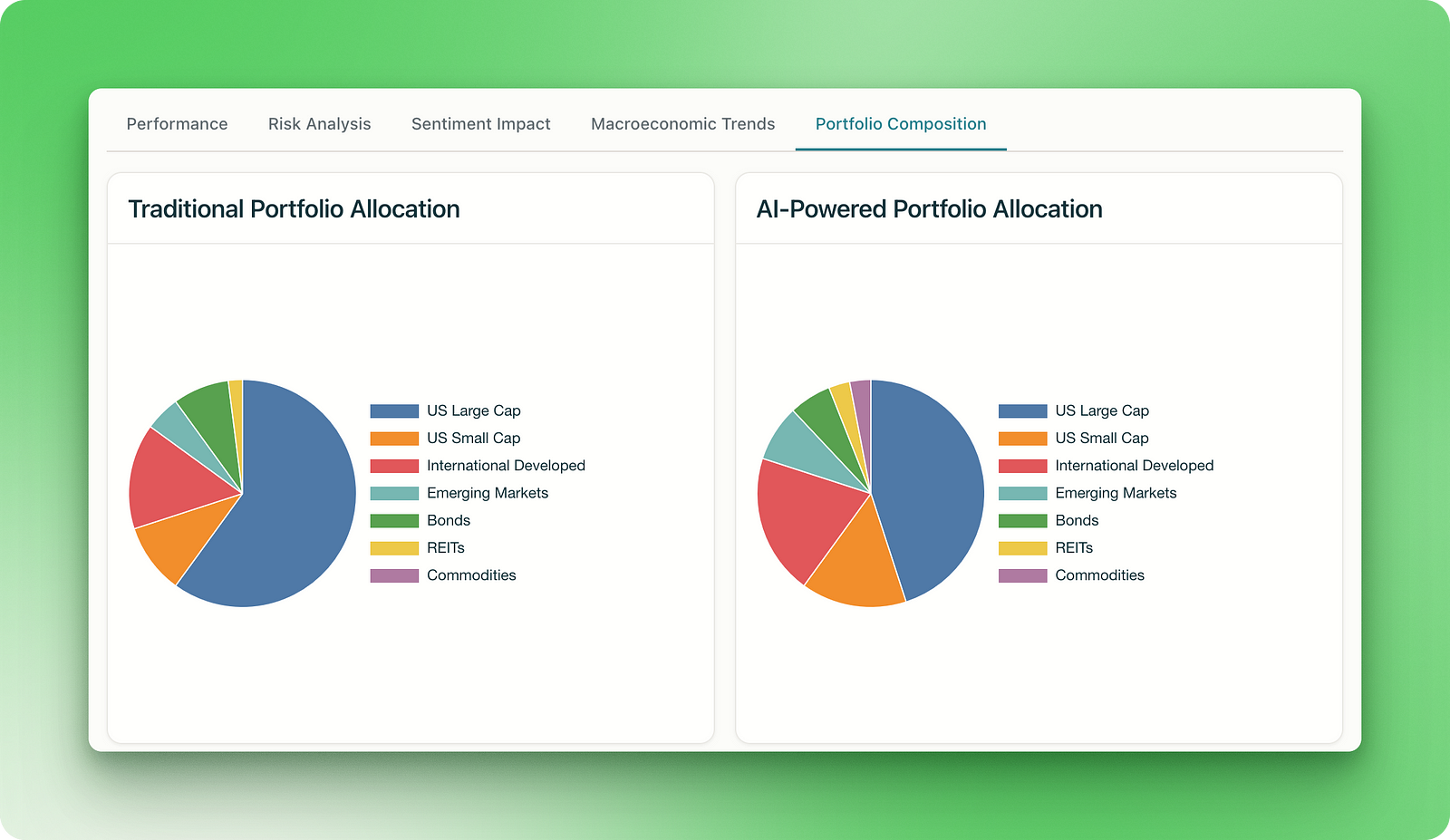
它展示了传统股票投资组合与 AI 驱动组合的总体表现对比,并包含情绪影响、宏观经济趋势和投资组合构成等部分:
更令人印象深刻的是,该应用会部署到 一个专属页面,您可以在 Perplexity 平台外访问。您可以将其加入书签、分享或稍后回访,而无需返回最初的 Lab。
Lab 还会在Assets 面板展示支撑应用的全部代码:
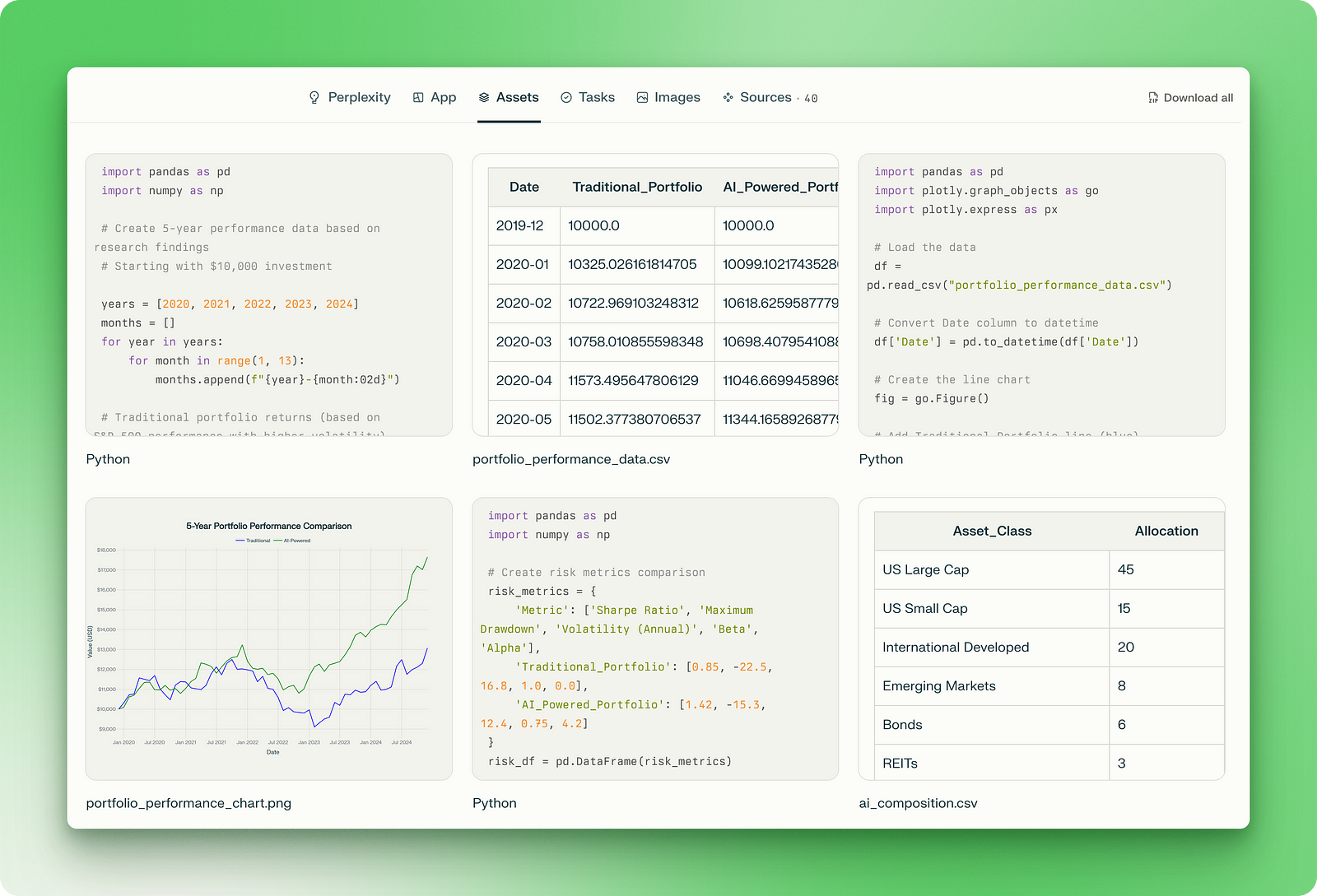
资源包含用于根据研究生成合成数据和绘图的 Python 脚本,以及可下载查看的 CSV 数据集和 PNG 图片。网页应用本身只依赖三个文件:用于结构的 HTML、用于样式的 CSS,以及用于交互功能的 JavaScript。
为便于整体把握,Tasks 面板展示了研究的具体执行顺序,以及整合信息如何流经各个 Python 脚本、数据文件,最终进入网页应用:
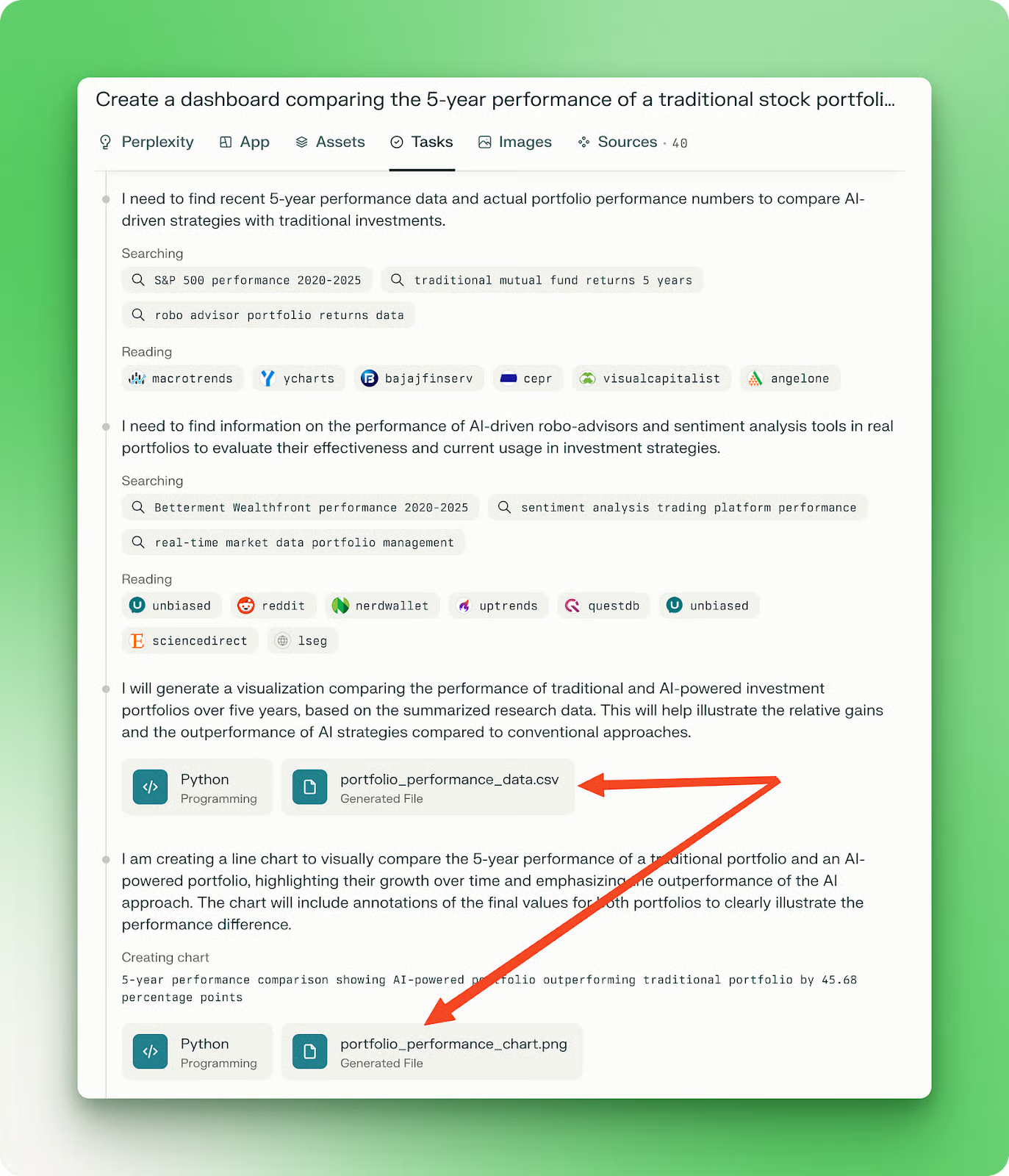
这种工作流可视性有助于您理解创建了什么、Labs 如何处理问题,从而更易于在未来项目中优化您的提示。
我特别欣赏的是促成此仪表盘的多项能力组合:
当然,这是一则由 Perplexity 团队精心挑选的作品库示例,因此我们还需通过创建自己的 Labs 来检验该功能。
在下一部分,我将带您浏览我用 Perplexity Labs 创建的示例项目。每个示例均在单独的 Lab 会话中完成,耗时 10 到 30 分钟不等。除一个外,其余均仅用一条提示就创建了完整应用。结果普遍呈现出干净的设计、悦目的配色,且更重要的是具备可接受的功能性。
我首先尝试了一个通用的气候数据可视化项目。提示如下:
Visualize global temperature trends over the past decade using interactive heat maps.
The application should display yearly and monthly temperature variations across different regions of the world, with the ability to zoom into continents, countries, or cities.
Include features such as a time slider, hover tooltips with exact temperature data, anomaly highlights (compared to historical averages), and filters for land vs. ocean temperatures.
The design should be responsive, data-rich, and intuitive, suitable for both researchers and general audiences. Use reliable open-source climate data sources (e.g., NASA, NOAA, Berkeley Earth).来看结果(您也可以在此处访问该 Lab):
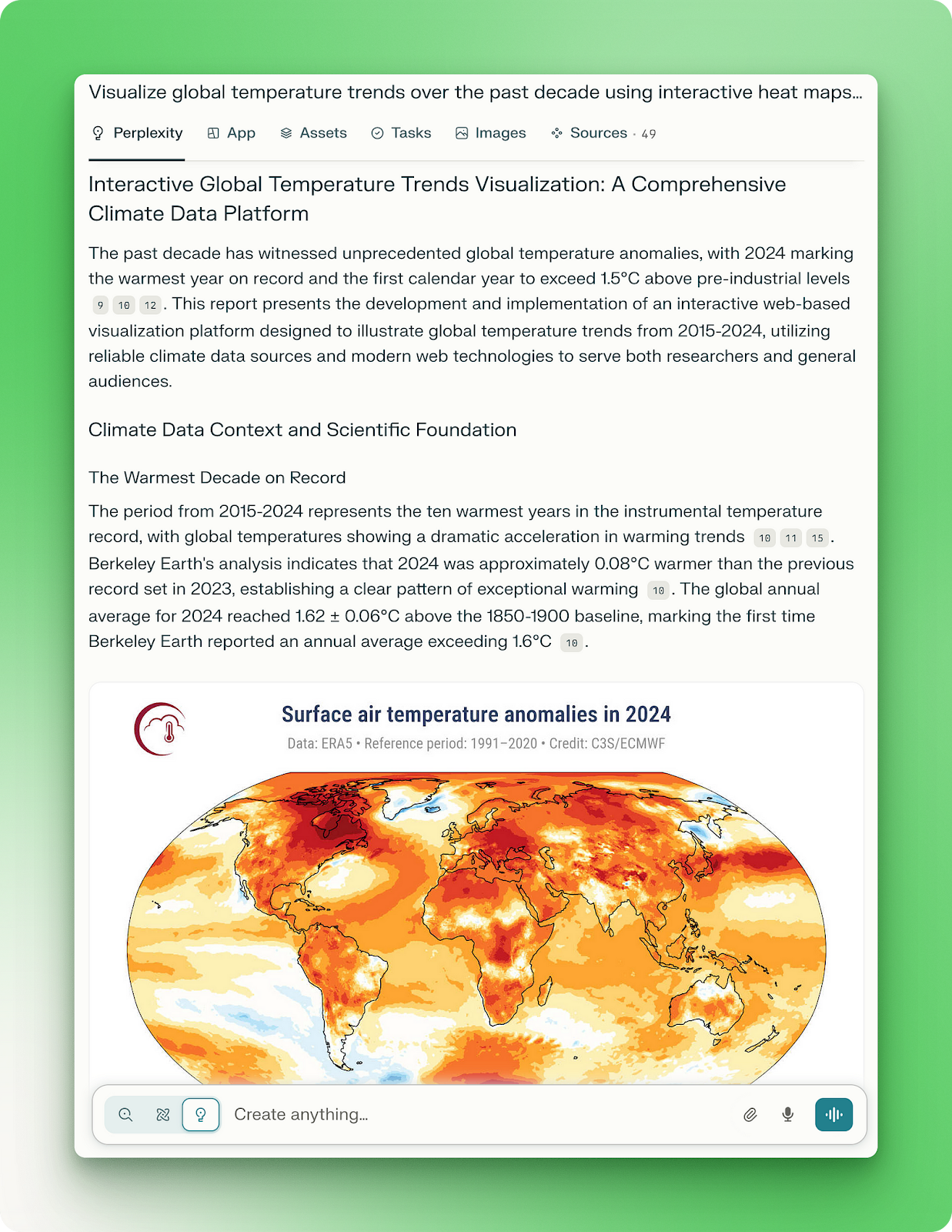
生成的项目报告详尽且到位。然而,网页应用并没有我期望的许多“酷炫”可视化:
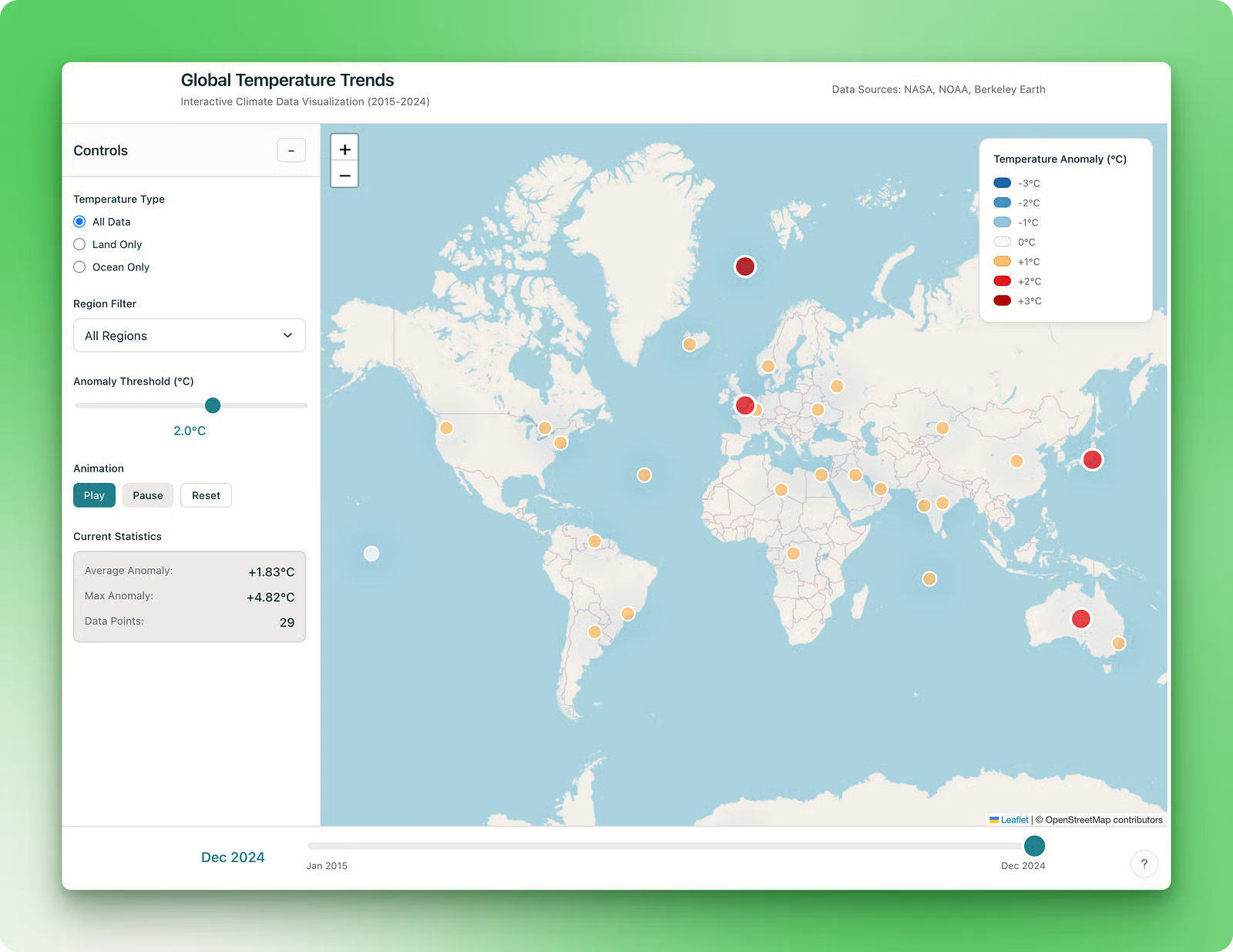
该应用配有一张基础地图,可放大缩小,并突出显示各区域的气候异常。用户可以通过简单控件调整异常阈值,并使用滑块浏览不同时段。
应用还支持动画功能,但并未提供您在气候可视化中可能期望的分析深度。尽管如此,页面上的所有组件都能按预期工作(可自行在此处查看 Lab)。
我猜测是我使用的提示缺少足够明确和详尽的指令,未能生成更复杂的应用。因此,后续项目我使用了更具描述性和结构化的提示。
在下一个项目中,我想要一个日历类仪表盘,收集即将到来的主要技术活动信息,如由知名机构组织的会议、聚会、开发者日和黑客松:
Design a visually appealing calendar web application that displays upcoming events in Python, AI, data science, and machine learning. The app should showcase high-quality conferences, meetups, developer days, and hackathons organized by official organizations and reputable companies only (e.g., PyCon, IEEE, NeurIPS, Google, OpenAI, Hugging Face, etc.).

Each event card should include:

1. Event Name
2. Date(s)
3. Location (city, country, or virtual)
4. Organizing Body or Host
5. Registration Fee or Ticket Cost
6. Event Type (conference, meetup, dev day, hackathon, etc.)
7. Website or registration link
8. Brief description (agenda, target audience, notable speakers, etc.)

Prioritize clean and minimalist design and filter options (by date, topic, event type, location). The UI should support calendar view (monthly) and list view, with intuitive navigation and bookmarking for favorite events.
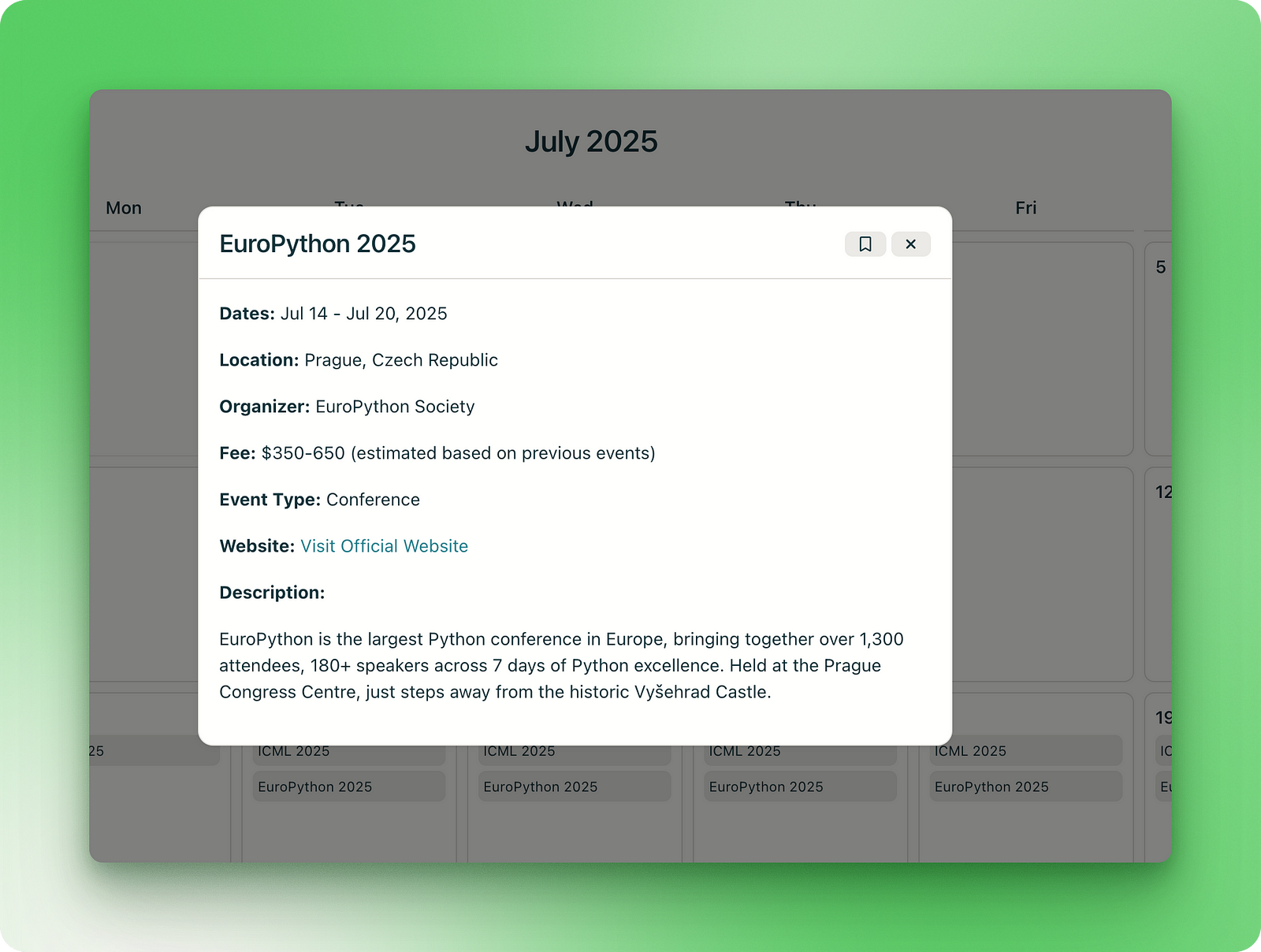
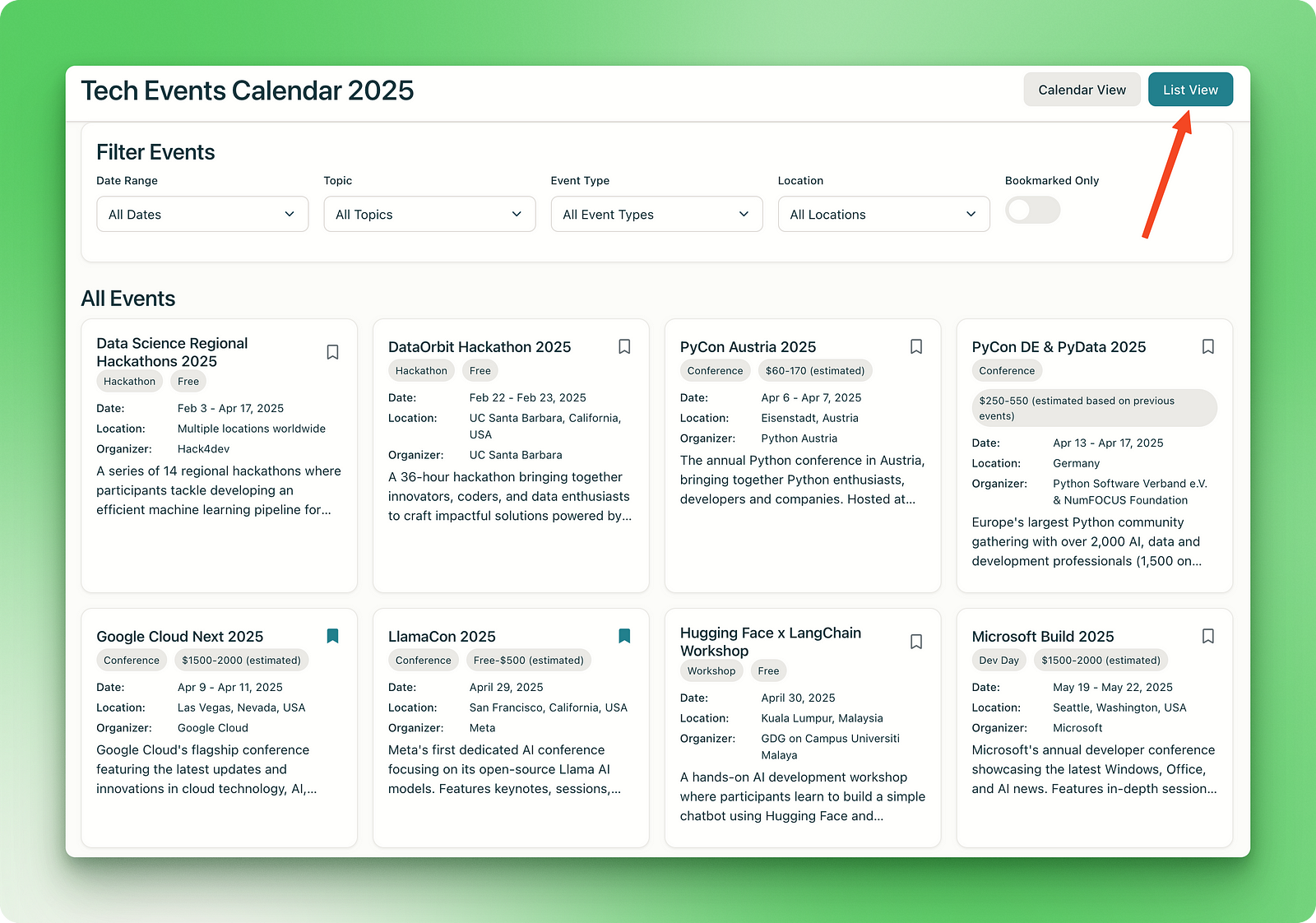
应用的初始版本在极简界面中具备了我想要的一切:
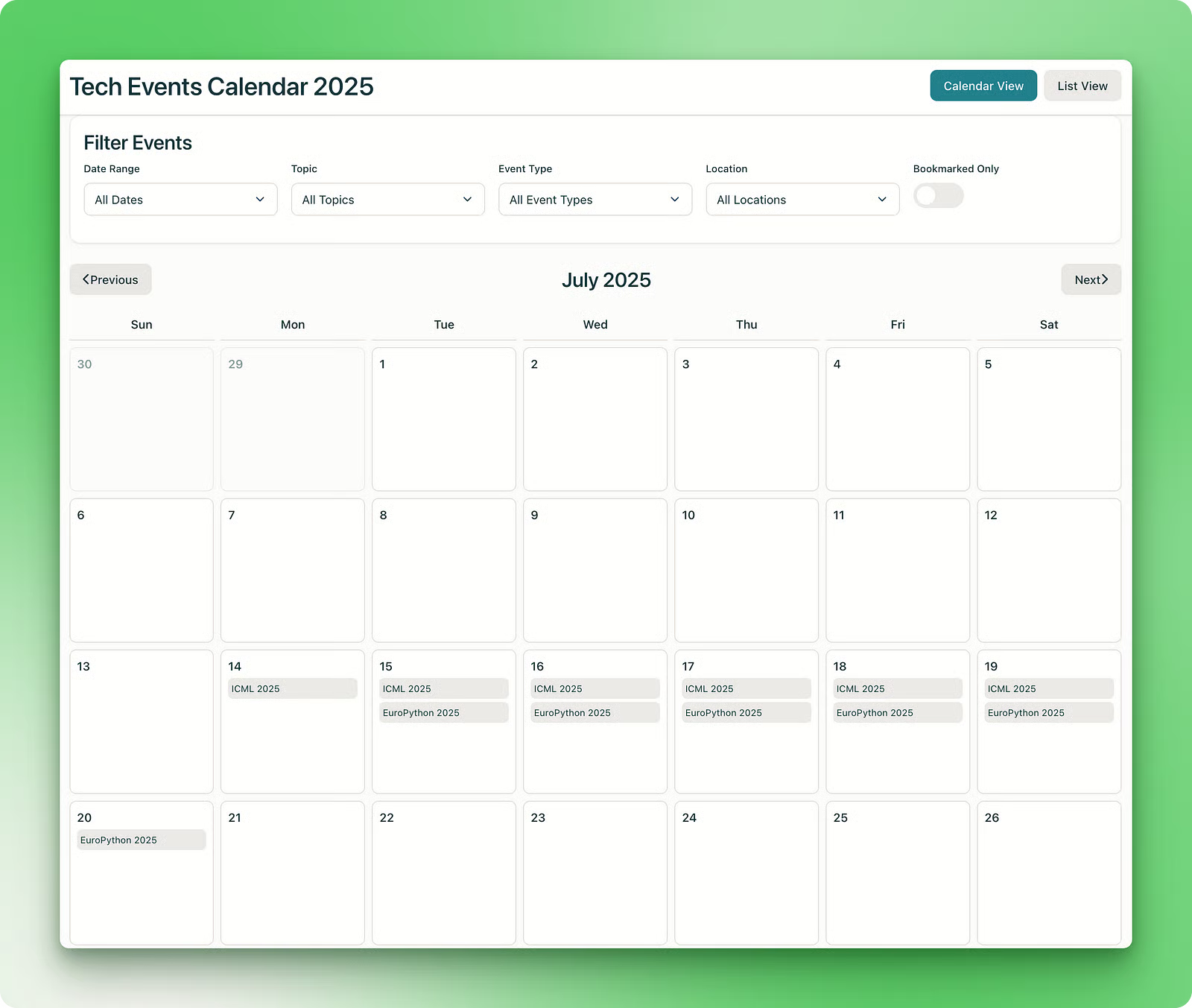
活动被正确检索并展示,多日活动会在对应日期占据日历中的多个位置。点击活动会弹出活动卡片,并带有书签按钮:
所有筛选和控件均可用,列表视图也同样如此:
在初版之后,我发现应用只列出到 2025 年底的活动。于是我在对话窗口中让 Perplexity 把 2026 年的活动也加上:
Can you update the app with events in 2026 as well?这时应用崩了。Perplexity Labs 似乎也容易受到大多数编程助手的同一问题困扰:过度工程化。
大约 15 分钟后,Perplexity 给了我一个更新版的应用,UI 更好,还新增了书签管理器:
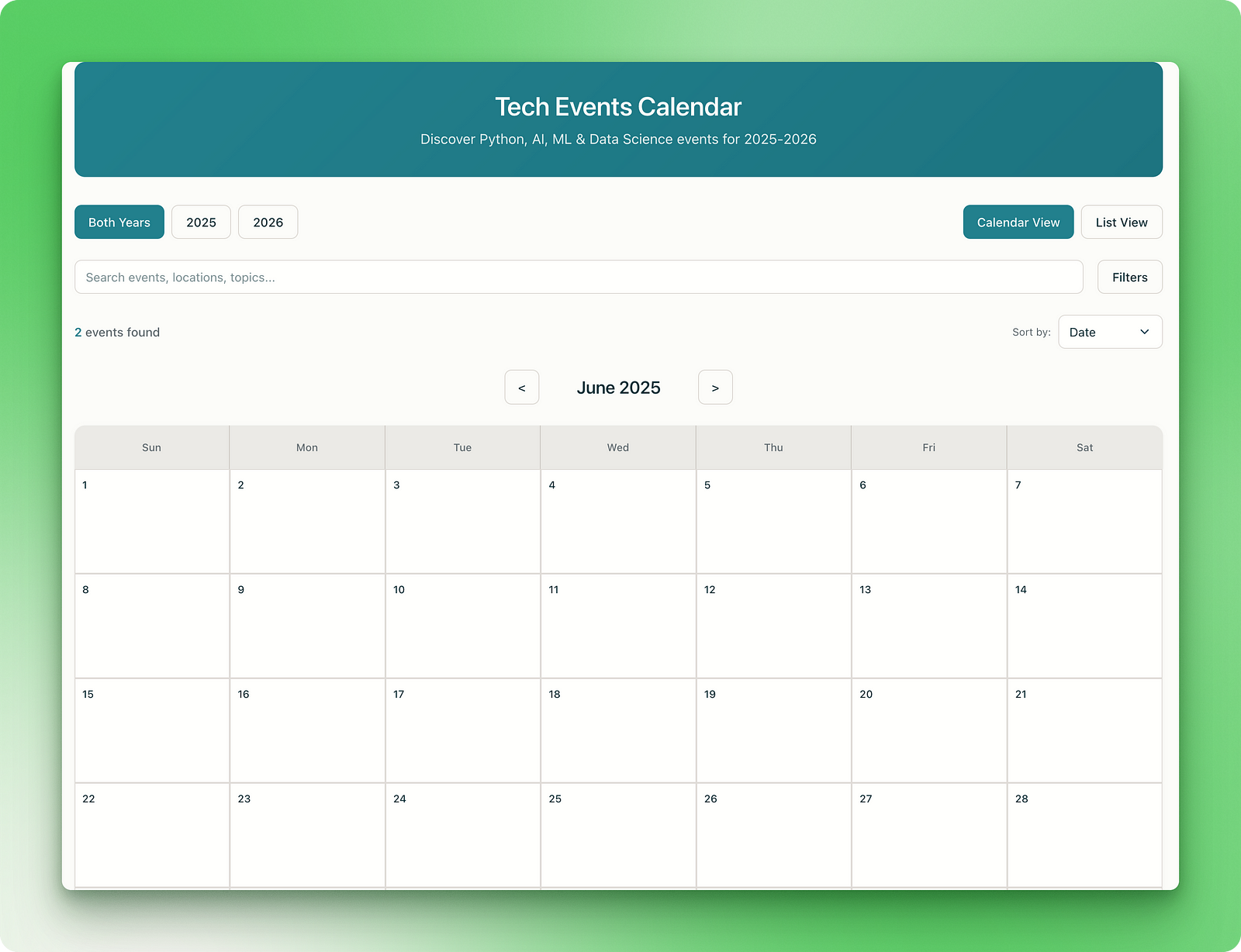
然而,新应用中两年的活动都只剩了两个,说明新 UI 破坏了现有数据管道。
因此,一个重要的注意点是:让编程助手修复问题时,务必要求尽量少改。这可以防止底层语言模型通过添加不必要的功能来增加 token 消耗。
我相信再用几条提示就能修好这个 bug,不如您也来试试 这里?
作为巴塞罗那俱乐部的球迷,我会密切关注球队赛果、留意赛程,并定期查看转会传闻。基于此,我尝试创建一个仪表盘来跟踪所有信息:
Create a comprehensive, real-time dashboard for FC Barcelona fans that displays the following:

1. **Last 5 Match Results** – Include opponent, date, scoreline, competition, and key stats (e.g., goalscorers, assists, possession).
2. **Upcoming 5 Fixtures** – Show date, opponent, competition, kickoff time, and venue.
3. **Full Squad Overview** – List players by position with photos, jersey numbers, current contract status, contract expiry date, and injury status indicators.
4. **Transfer & Rumor Hub** – A dedicated news section summarizing credible reports on potential signings, departures, renewals, and management changes.
5. **Additional Useful Features**:

  * **League Standing** with live table updates
  * **Injury List & Recovery Timelines**
  * **Top Scorers & Assist Leaders**
  * **Player Stats Summary** (minutes played, goals, assists, cards)
  * **Manager and Staff Info**
  * **Fan Polls or Reactions** for each match or transfer rumor
  * **Live Match Alerts** and countdowns to kickoff

The dashboard should be visually engaging, mobile-friendly, and update automatically via APIs from trusted football data providers (e.g., Football-Data.org, Transfermarkt, ESPN, or Opta).
Perplexity 没有让人失望:
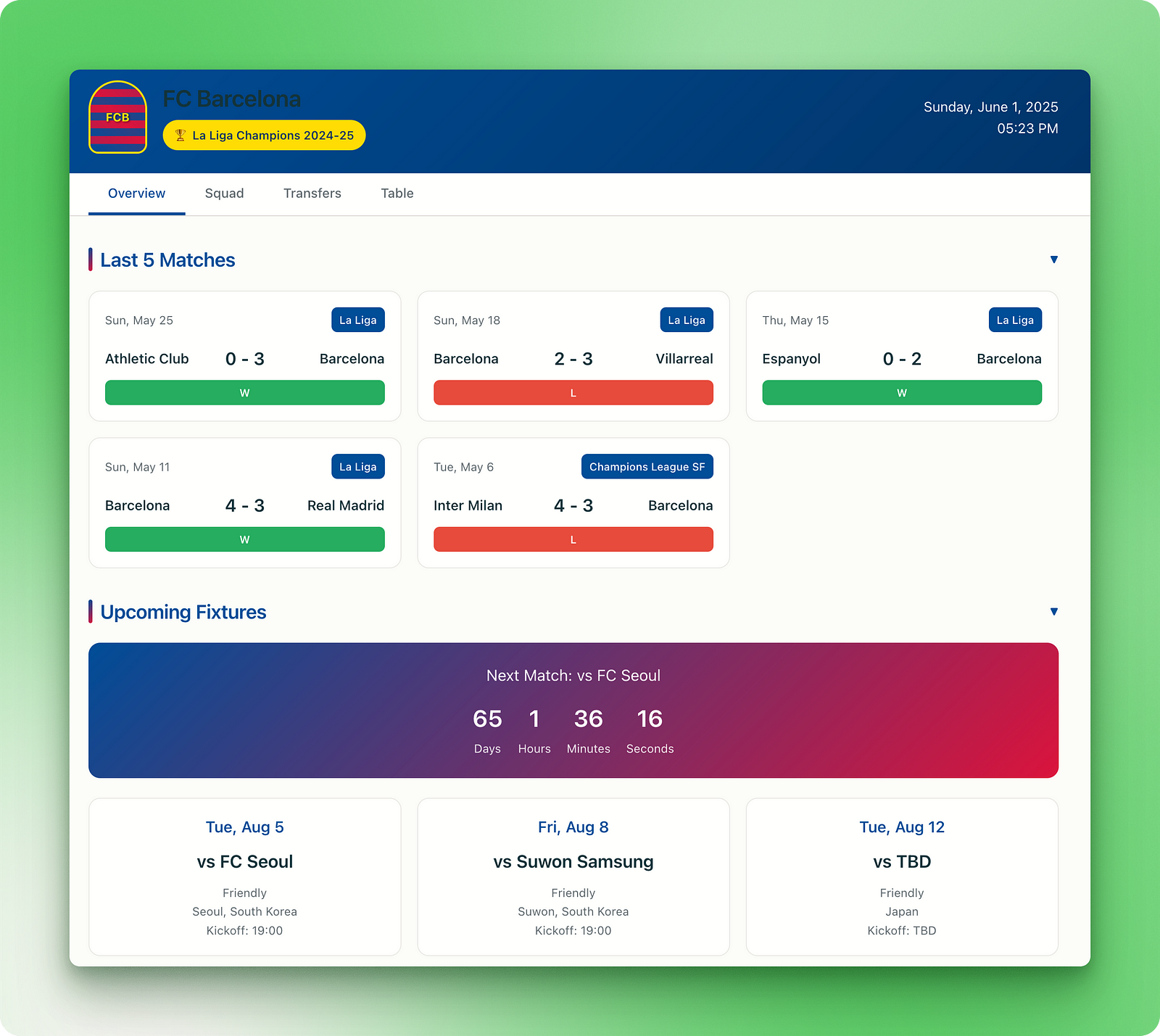
应用几乎满足提示中的所有要求,UI 使用了巴塞罗那的官方配色,并提供关于阵容的准确信息:
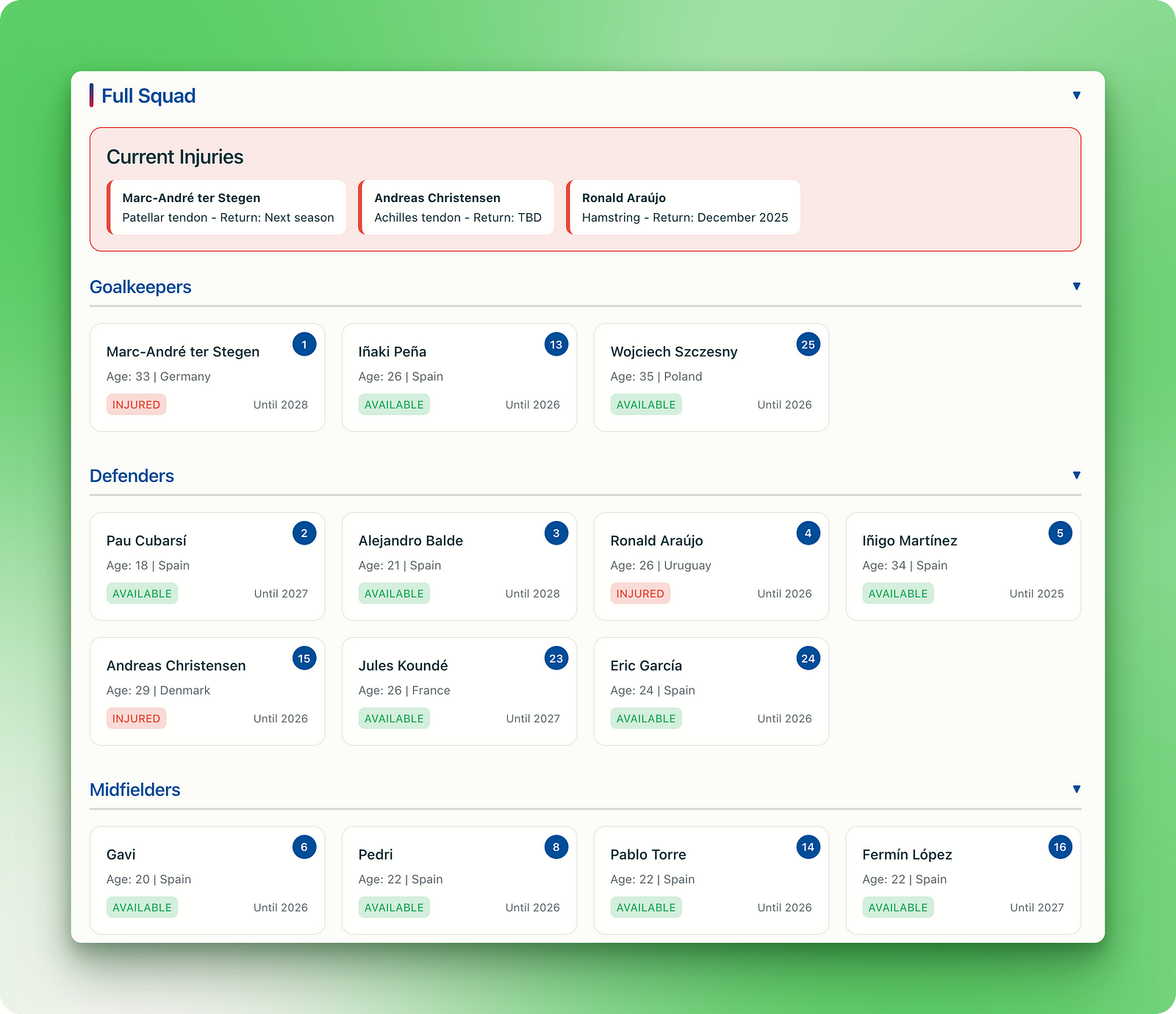
此外,还有一个专门的标签页展示传闻、潜在转会和续约动态:
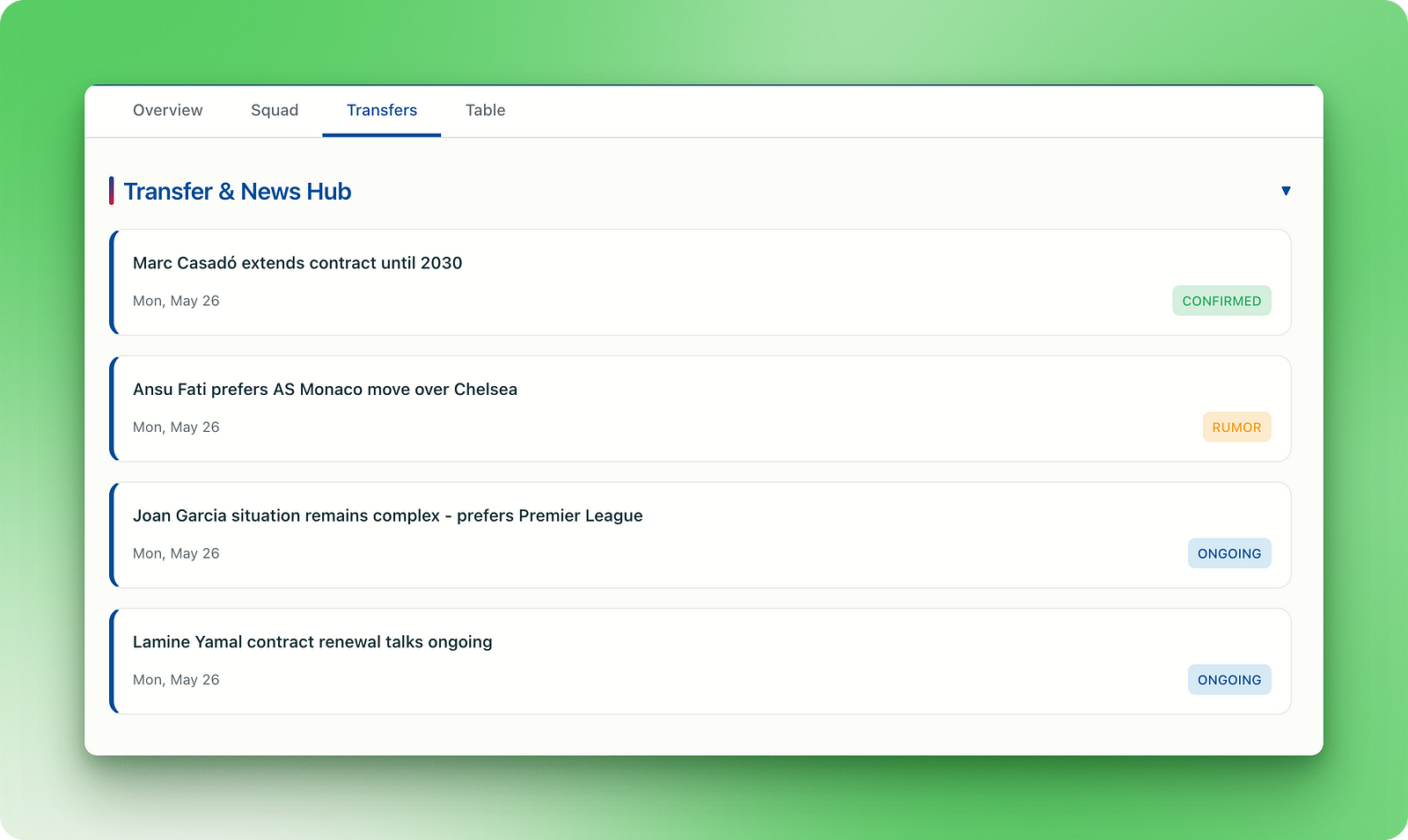
不过,在续约和伤病更新方面存在少数不准确之处,我们可将此归因于搜索过程中的缺陷。
作为球迷,我深知即便最强的语言模型在深入研究后,面对应对复杂的足球资讯也会出错。比如,ChatGPT 在处理一些时间线复杂的查询时也会犯类似错误。
您可以在 此处体验该应用。
接下来的项目关于 AI 创业公司,展示了在提示中明确说明的重要性:
Build a dynamic web application that tracks top-funded startups in AI, machine learning, and data science worldwide. The dashboard should pull from reliable funding databases (e.g., Crunchbase, PitchBook, CB Insights, or open-source alternatives) and display a curated list of startups with the following information:

1. Name, logo, and founding year
2. Headquarters location (city, country)
3. Founders (with brief bios if available)
4. Total funding raised, funding rounds, and latest round date
5. Top investors and VCs
6. Key products, APIs, or technologies offered
7. Primary market focus or industry vertical
8. Website, social links, and hiring page (if available)

Dashboard Features:

* Filter & Search: By funding amount, country, industry, founding year, or investor
* Charts & Trends:

 * Funding over time (line or bar chart)
 * Top countries and industries by startup count
 * Funding distribution by round type (Seed, Series A, etc.)
* Map View: Interactive global map showing startup HQs by funding volume
* Bookmark & Watchlist: Let users save startups they’re interested in tracking
* Automatic Updates: Sync regularly with open APIs or scrape if permitted

The UI should be clean, responsive, and professional—suitable for founders, investors, or researchers. Prioritize intuitive UX, minimal loading times, and visual clarity for data-heavy views. Add dark mode and export-to-CSV options
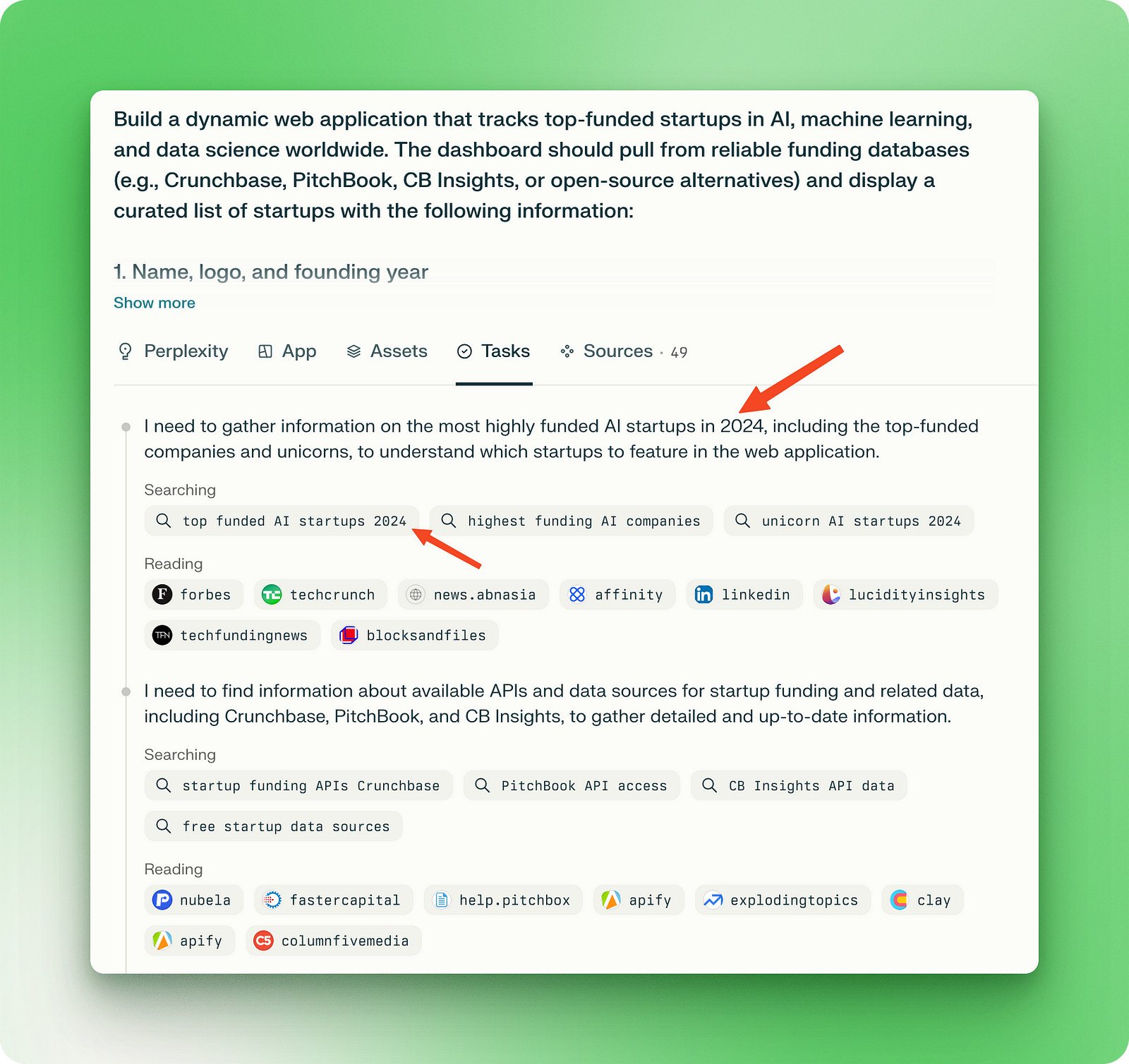
尽管提示结构清晰且详尽,但遗漏了一个关键信息——我们身处 2025 年。这也反映在 Perplexity 执行的所有任务中,它认为当前年份是 2024:
随后,应用 UI 也沿用了存在缺陷的研究结果:
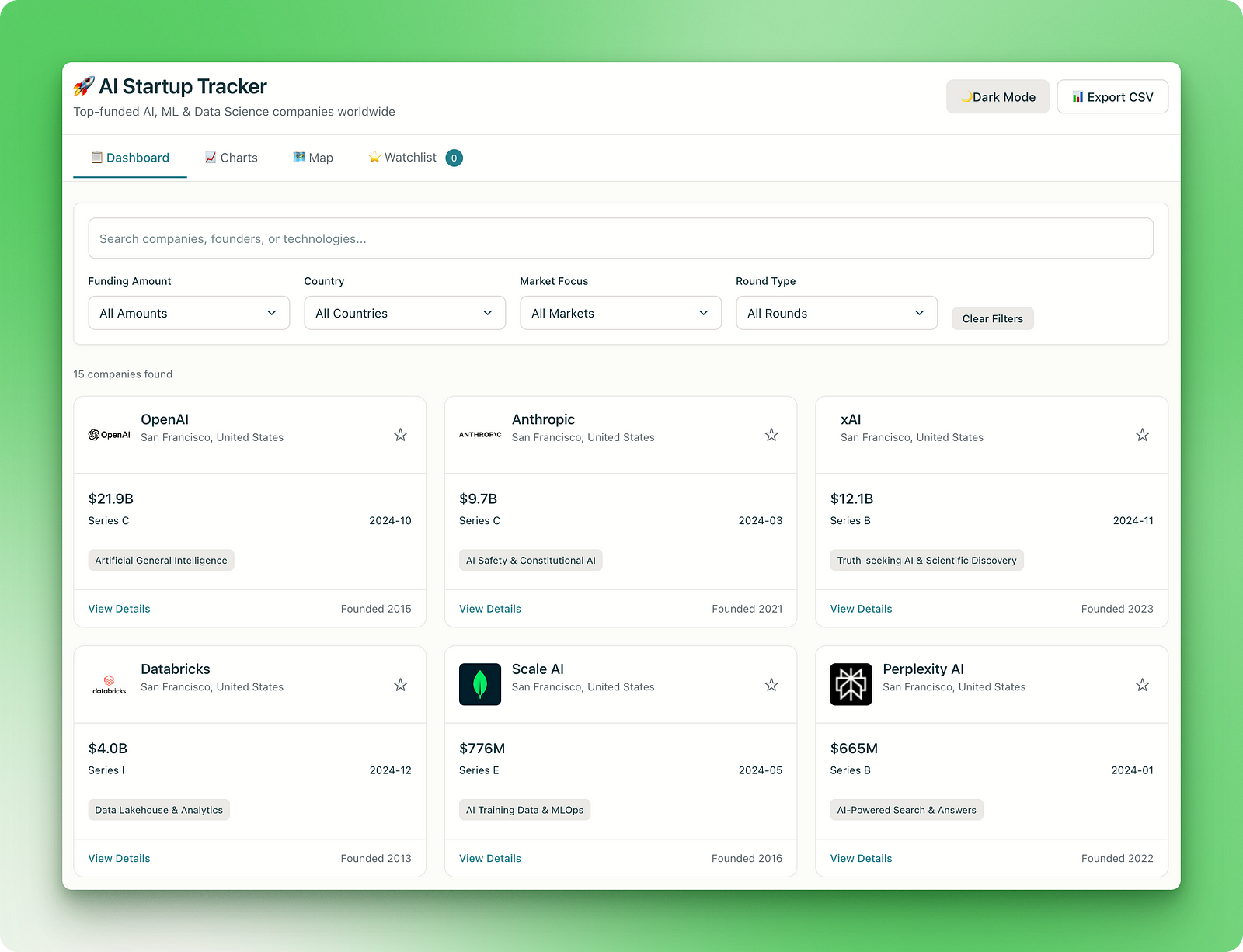
如您所见,最新一轮融资均停留在 2024 年。比如,OpenAI 在 2025 年 3 月以超 400 亿美元的单轮融资创下纪录。
除此之外,主仪表盘界面可用且夜间模式正常。但“Charts”和“Map”标签页的图表难以辨认,关注清单和“导出 CSV”功能则完全不可用。
在 这里探索该 Lab。
最后,我想构建一个展示全球冲突的仪表盘。由于该项目也需要实时信息,我在提示中特别注明了年份:
Create an interactive web dashboard that visualizes ongoing global conflicts, geopolitical tensions, and humanitarian crises in real time in 2025 June. The app should display a world map with clickable regions that surface detailed, verified information on each active conflict or crisis. Use reputable sources such as CrisisWatch, UN OCHA, ACLED, and major news outlets to provide live updates.

Each conflict entry should include:

1. Conflict name and affected regions
2. Key actors or parties involved (governments, rebel groups, coalitions, etc.)
3. Timeline of major events or escalations
4. Current status (active fighting, ceasefire, post-conflict recovery)
5. Human impact (displacement, casualties, humanitarian aid needs)
6. Links to news articles, UN reports, and crisis briefings
7. Tags (e.g., civil war, territorial dispute, ethnic violence)

Dashboard Features:

* Filter by region, conflict type, escalation level, or last update
* Time slider to visualize conflict evolution over weeks/months
* Toggle between map view and table/list view
* Live alerts for newly emerging conflicts or ceasefire violations
* Shareable conflict reports or exports (PDF/CSV)
* Optional integration with Twitter/X and RSS for news stream

Design the UI for clarity and urgency, with accessible visuals and support for mobile devices. Make it useful for analysts, journalists, NGOs, and concerned citizens
该应用的首个版本生成了一个不响应的页面。但当我把同一提示粘贴到一个新的 Lab 中时,Perplexity 产出了本篇最具视觉冲击力、也最令人满意的示例:
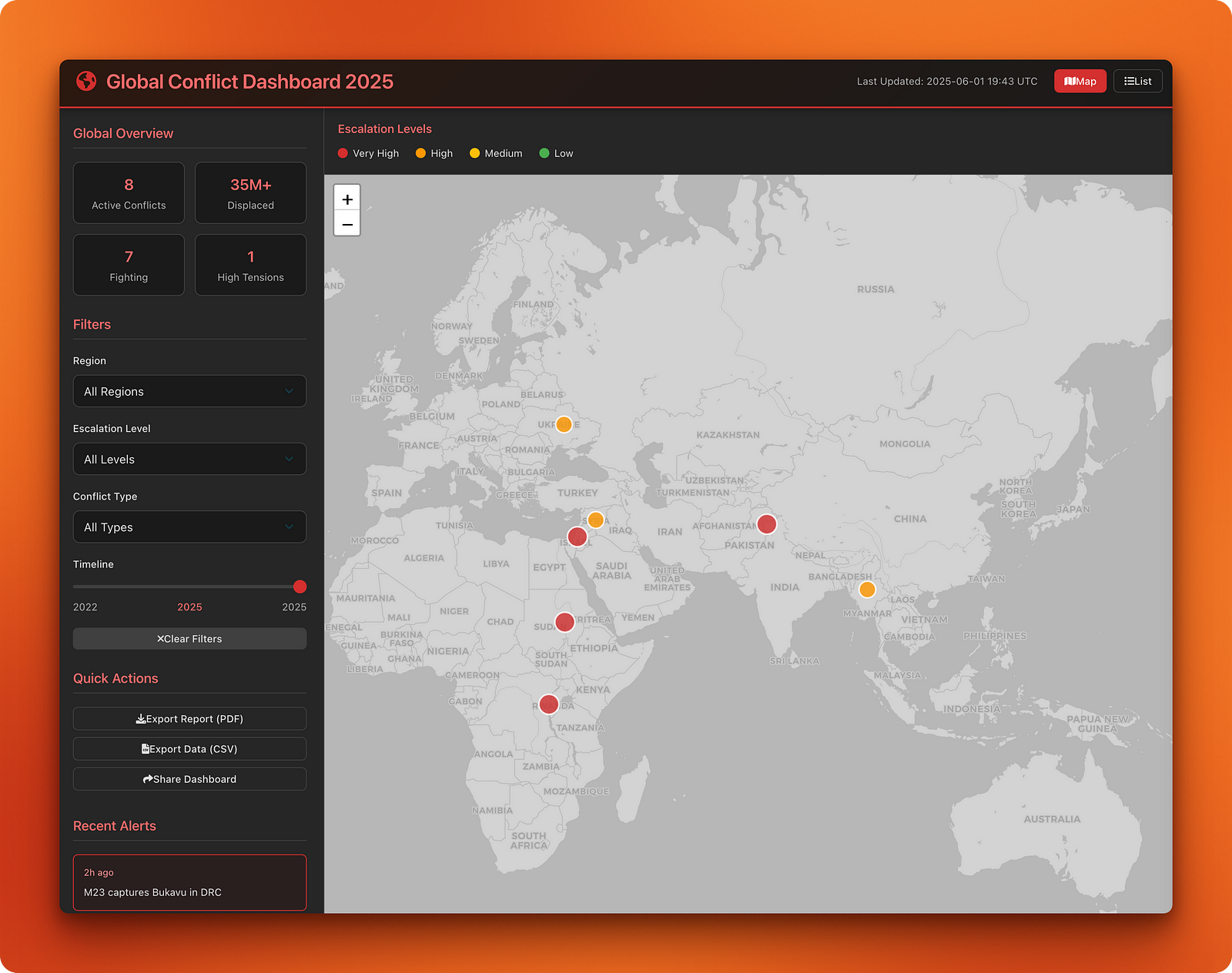
应用的各个方面都很到位——数据准确、控件可用、支持实时警报,尚未实现的功能也有友好的弹窗,提示用户添加后端能力。
此外,应用的黑红配色契合主题。应用列出了 8 处活跃冲突,并按升级程度使用不同颜色标记。
点击任一活跃冲突会弹出详细卡片:
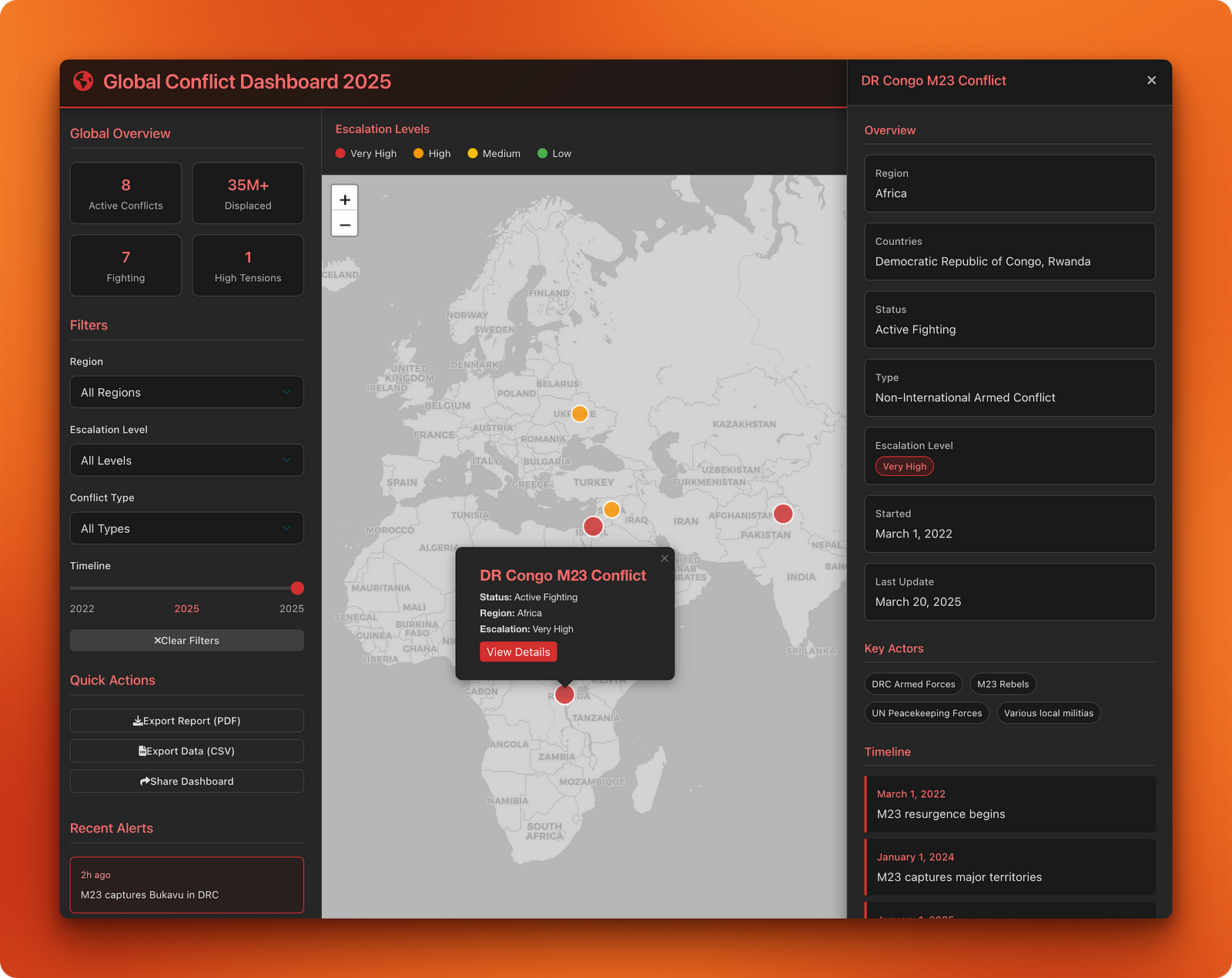
列表视图展示了完整的冲突清单,并对要点进行了总结:
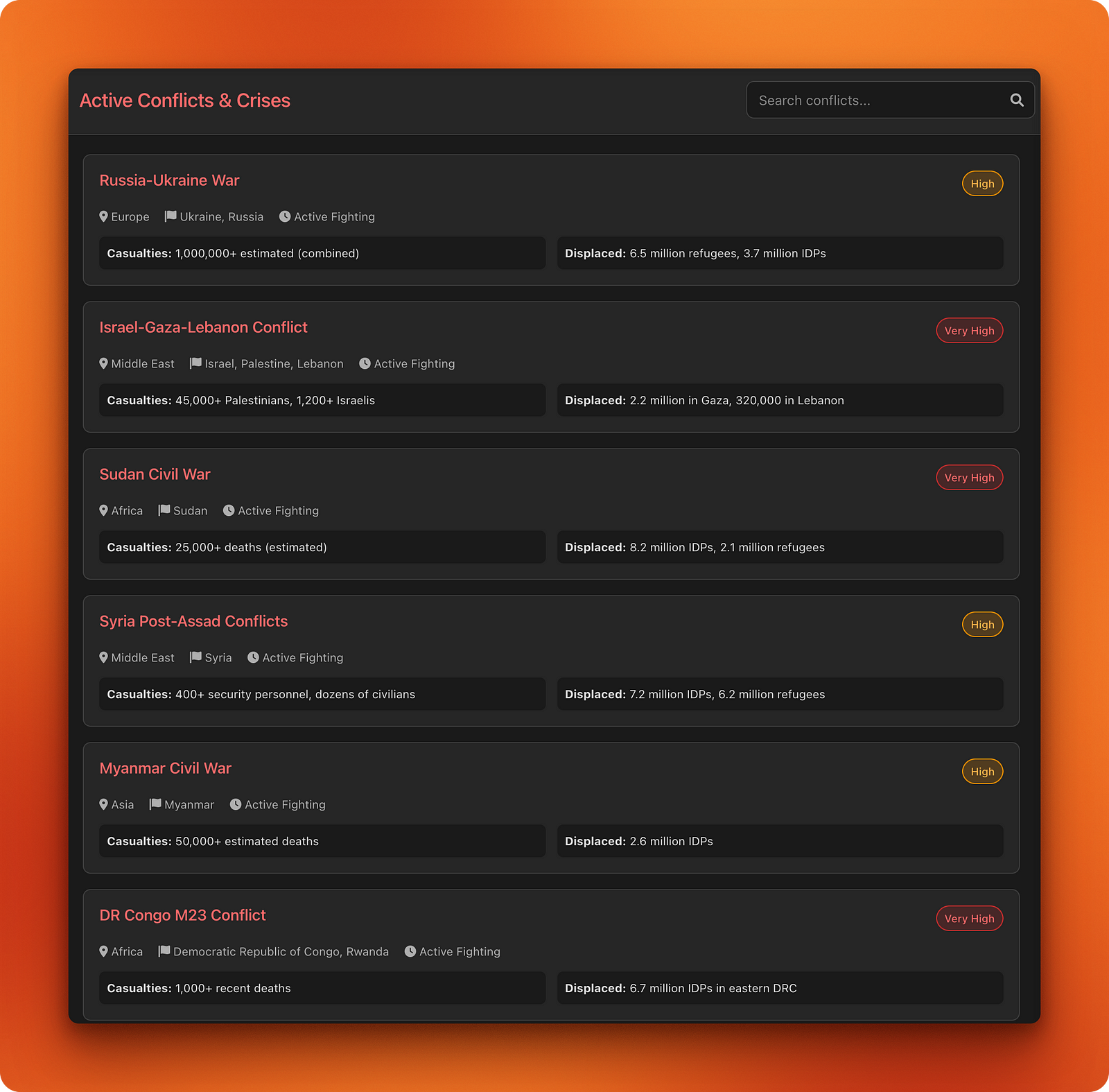
在 此处探索该仪表盘。
与任何编程助手一样,写好提示至关重要,而我们刚看到的示例也印证了这一点。为生成这些项目的提示,我把自己的粗略想法和需求交给 ChatGPT 进行润色。
我发现这种方式往往比手动进行提示工程更有效,因为大型语言模型在为自身“撰写”指令方面正变得越来越强。不过,提示工程是一个迭代过程——如您所见,即便是由 ChatGPT 生成的提示,在没有您的把关时也可能在某些方面失手。
当您在不同项目类型上测试 Perplexity Labs 时,会发现它在将研究、数据分析和网页开发整合为单一工作流方面具备令人印象深刻的能力。
我们的示例显示,如果您提供结构良好、细节充分的提示,就能期待具有干净界面和可用功能的应用;而模糊的指令则会带来令人失望的结果。
测试还揭示了一些在将 Labs 用于重要项目前应考虑的限制。例如,我们看到实时数据的准确性仍不稳定,尤其是像体育统计或时事这类快速变化的信息;当您请求迭代改进时,系统也倾向于过度工程化。
尽管如此,每月 20 美元的订阅即可让您获得一款通常需要跨多领域专业能力——从研究和数据分析到 UX 设计和网页开发——才能完成的工具,对快速原型和探索性项目来说相当有价值。
如果您想继续探索更多 AI 工具,欢迎查看以下教程:
用这些课程学习 AI!
课程
课程
实践并学习路径你的进步。
使用 Google 继续