
Have this cheat sheet at your fingertips
Download PDFRun and edit the code from this cheat sheet online
Run codeThe Different Dialects of SQL
Although SQL languages all share a basic structure, some of the specific commands and styles can differ slightly. Popular dialects include MySQL, SQLite, SQL Server, Oracle SQL, and more. PostgreSQL is a good place to start—since it’s close to standard SQL syntax and is easily adapted to other dialects.
Analytics engines such as DuckDB, BigQuery, Snowflake, and Databricks SQL use the same core syntax shown here.
Sample Data
Throughout this cheat sheet, we’ll use the columns listed in this sample table of airbnb_listings
| id | city | country | number_of_rooms | year_listed |
| 1 | Paris | France | 5 | 2018 |
| 2 | Tokyo | Japan | 2 | 2017 |
| 3 | New York | USA | 2 | 2022 |
Querying tables
Get all the columns from a table
SELECT *
FROM airbnb_listings;Return the city column from the table
SELECT city
FROM airbnb_listings;Get the city and year_listed columns from the table
SELECT city, year_listed
FROM airbnb_listings;Get the listing id, city, ordered by the number_of_rooms in ascending order
SELECT id, city
FROM airbnb_listings
ORDER BY number_of_rooms ASC;Get the listing id, city, ordered by the number_of_rooms in descending order
SELECT id, city
FROM airbnb_listings
ORDER BY number_of_rooms DESC;Get the first 5 rows from the airbnb_listings table
SELECT *
FROM airbnb_listings
LIMIT 5;Get a unique list of cities where there are listings
SELECT DISTINCT city
FROM airbnb_listings;Get the listing id, city, ordered by country, then by number_of_rooms in descending order
SELECT id, city
FROM airbnb_listings
ORDER BY country ASC, number_of_rooms DESC;Skip the first 5 rows, then get the next 10 rows
SELECT *
FROM airbnb_listings
LIMIT 10 OFFSET 5;Rename the city column to location using an alias
SELECT city AS location
FROM airbnb_listings;Label each listing as 'Large' or 'Small' based on its number_of_rooms
SELECT city,
CASE WHEN number_of_rooms >= 3 THEN 'Large'
ELSE 'Small'
END AS size
FROM airbnb_listings;Add comments to explain your code
-- A single-line comment
/* A comment that spans
several lines */
SELECT *
FROM airbnb_listings;Filtering on numeric columns
Get all the listings where number_of_rooms is more or equal to 3
SELECT *
FROM airbnb_listings
WHERE number_of_rooms >= 3;Get all the listings where number_of_rooms is more than 3
SELECT *
FROM airbnb_listings
WHERE number_of_rooms > 3;Get all the listings where number_of_rooms is exactly equal to 3
SELECT *
FROM airbnb_listings
WHERE number_of_rooms = 3;Get all the listings where number_of_rooms is lower or equal to 3
SELECT *
FROM airbnb_listings
WHERE number_of_rooms <= 3;Get all the listings where number_of_rooms is lower than 3
SELECT *
FROM airbnb_listings
WHERE number_of_rooms < 3;Get all the listings with 3 to 6 rooms
SELECT *
FROM airbnb_listings
WHERE number_of_rooms BETWEEN 3 AND 6;Filtering on text columns
Get all the listings that are based in 'Paris'
SELECT *
FROM airbnb_listings
WHERE city = 'Paris';Get the listings based in the 'USA' and in 'France'
SELECT *
FROM airbnb_listings
WHERE country IN ('USA', 'France');Get all the listings where the city starts with 'j' and where the city does not end in 't'
SELECT *
FROM airbnb_listings
WHERE city LIKE 'j%' AND city NOT LIKE '%t';Get all the listings where the city is 'P', any single character, then 'ris'
SELECT *
FROM airbnb_listings
WHERE city LIKE 'P_ris';Filtering on multiple columns
Get all the listings in 'Paris' where number_of_rooms is bigger than 3
SELECT *
FROM airbnb_listings
WHERE city = 'Paris' AND number_of_rooms > 3;Get all the listings in 'Paris' OR the ones that were listed after 2012
SELECT *
FROM airbnb_listings
WHERE city = 'Paris' OR year_listed > 2012;Upskill Your Team in SQL
Mastering SQL is crucial for effective data management and analysis. To leverage the power of data, your team needs to build strong SQL skills alongside other essential data tools. With DataCamp for Business, you can access comprehensive SQL training resources to upskill your team, ensuring they are well-prepared to navigate the complexities of database management and data analysis.
With our SQL training solutions, your team benefits from:
- Extensive learning resources: Access a rich library of interactive courses focused on SQL fundamentals, advanced queries, database design, and optimization techniques. Tailored learning paths guide your team through the most relevant topics for your organization’s needs.
- Practical experience: Gain hands-on practice with real-world scenarios, reinforcing core SQL concepts such as data retrieval, manipulation, aggregation, and performance tuning. Build confidence through active learning exercises that simulate real database environments.
- Scalable solutions: Whether your organization is a small team or a large enterprise, our solutions scale to meet your training needs, fostering a culture of continuous learning and data-driven decision-making.
- Progress monitoring: Utilize a variety of tools to track your team’s learning progress, ensuring they meet their SQL training objectives and are ready to apply their skills to real-world challenges.
Investing in SQL training for your team empowers them to make informed decisions, optimize database performance, and efficiently manage your organization’s data assets. Request a demo today to explore how our SQL training solutions can help your team excel.
Filtering on missing data
Return the listings where number_of_rooms is missing
SELECT *
FROM airbnb_listings
WHERE number_of_rooms IS NULL;Return the listings where number_of_rooms is not missing
SELECT *
FROM airbnb_listings
WHERE number_of_rooms IS NOT NULL;Simple aggregations
Get the total number of rooms available across all listings
SELECT SUM(number_of_rooms)
FROM airbnb_listings;Get the average number of rooms per listing across all listings
SELECT ROUND(AVG(number_of_rooms), 1)
FROM airbnb_listings;Get the listing with the highest number of rooms across all listings
SELECT MAX(number_of_rooms)
FROM airbnb_listings;Get the listing with the lowest number of rooms across all listings
SELECT MIN(number_of_rooms)
FROM airbnb_listings;Count all the rows in the table
SELECT COUNT(*)
FROM airbnb_listings;Count the listings where number_of_rooms is not missing
SELECT COUNT(number_of_rooms)
FROM airbnb_listings;Count the number of unique cities
SELECT COUNT(DISTINCT city)
FROM airbnb_listings;Grouping, filtering, and sorting
Get the total number of rooms for each country
SELECT country, SUM(number_of_rooms)
FROM airbnb_listings
GROUP BY country;Get the average number of rooms for each country
SELECT country, ROUND(AVG(number_of_rooms), 1)
FROM airbnb_listings
GROUP BY country;Get the listing with the maximum number of rooms per country
SELECT country, MAX(number_of_rooms)
FROM airbnb_listings
GROUP BY country;Get the listing with the lowest amount of rooms per country
SELECT country, MIN(number_of_rooms)
FROM airbnb_listings
GROUP BY country;For each country, get the average number of rooms per listing, sorted by ascending order
SELECT country, ROUND(AVG(number_of_rooms), 1) AS avg_rooms
FROM airbnb_listings
GROUP BY country
ORDER BY avg_rooms ASC;For Japan and the USA, get the average number of rooms per listing in each country
SELECT country, ROUND(AVG(number_of_rooms), 1)
FROM airbnb_listings
WHERE country IN ('USA', 'Japan')
GROUP BY country;Get the number of listings per country
SELECT country, COUNT(id) AS number_of_listings
FROM airbnb_listings
GROUP BY country;Get all the years where there were more than 100 listings per year
SELECT year_listed
FROM airbnb_listings
GROUP BY year_listed
HAVING COUNT(id) > 100;Order of SQL clauses
Clauses always appear in this order. WHERE filters rows before grouping; HAVING filters groups after
SELECT columns
FROM table
WHERE row_condition
GROUP BY columns
HAVING group_condition
ORDER BY columns
LIMIT n;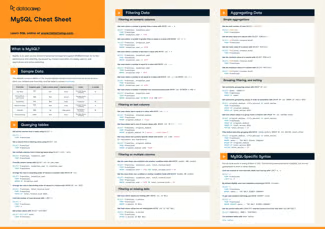
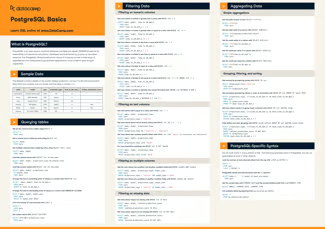
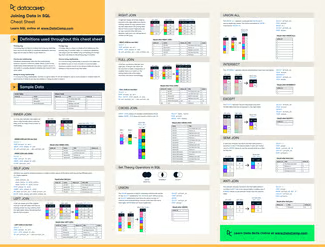



SQL (Structured Query Language) is the standard language for working with data in relational databases. You use it to select, filter, sort, and summarize the rows stored in tables, which makes it a core skill for data analysts, data engineers, and data scientists.
This SQL basics cheat sheet covers querying tables, filtering numeric, text, and missing values, aggregating and grouping data, and the order SQL clauses must follow. Every example runs on one sample table,
airbnb_listings, and uses PostgreSQL syntax, which carries over to other dialects with small changes.To learn these queries step by step, take our SQL Fundamentals skill track. When you're ready to combine tables, Joining Data in SQL and the SQL Joins Cheat Sheet are the next step.
To run the examples yourself, create a DataLab workbook for free. It comes with the
airbnb_listingsdataset already loaded.