
Kursus
Merancang Sistem Agentic dengan LangChain
3 jam
14.8K
Anda dapat mengakses kode lengkap demo ini di sini.
Nemotron 3 Super adalah model penalaran terbuka dari NVIDIA untuk alur kerja agentic dan konteks panjang. Model ini menggunakan arsitektur hibrida Mamba-Transformer Latent MoE dengan total 120B parameter dan 12B parameter aktif, menyertakan multi-token prediction (MTP), dan dirancang untuk tugas yang berat pada penalaran seperti coding, penggunaan tool, dan analisis konteks panjang.
NVIDIA memposisikannya secara khusus untuk aplikasi multi-agen yang kompleks dan penalaran menyeluruh atas codebase.
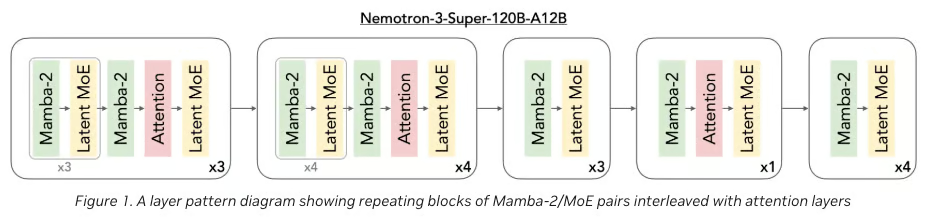
Gambar 1: Arsitektur Nemotron 3 Super (NVIDIA Blog)
Beberapa gagasan inti di balik Nemotron 3 Super meliputi:
Untuk tutorial ini, kita akan menggunakan endpoint gratis milik OpenRouter, karena baik varian penuh maupun terkuantisasi dari model ini umumnya memerlukan setidaknya GPU H100 untuk inferensi praktis. Endpoint terkelola ini saat ini mendukung jendela konteks 262K token (alih-alih 1M penuh), yang tetap memadai untuk menganalisis repositori berukuran menengah dalam demo ini.
Keluarga Nemotron 3 dari NVIDIA diperkenalkan sebagai keluarga model terbuka untuk sistem AI agentic, dengan berbagai ukuran yang ditujukan untuk kebutuhan deployment dan penalaran yang berbeda, dinamai tier Nemotron Nano, Super, dan Ultra.
Secara praktis, Anda bisa memandang keluarga ini seperti berikut:
Jadi, Nemotron 3 Super adalah pilihan tepat di sini karena kita menginginkan model yang bisa menalar seluruh repositori sekaligus, bukan hanya menyelesaikan sub-tugas coding yang terisolasi.
Pada bagian ini, kita akan membangun analyzer repo menggunakan Nemotron 3 Super yang dibungkus dalam antarmuka Gradio. Secara garis besar, inilah yang dilakukan aplikasi akhir:
Mari kita bangun selangkah demi selangkah.
Sebelum membangun repo analyzer, kita memerlukan lingkungan minimal yang dapat menangani tiga tanggung jawab inti, termasuk perenderan UI, pemrosesan repositori, dan interaksi model. Karena kita tidak menjalankan Nemotron secara lokal, penyiapannya tetap ringan dan terfokus.
Instal semuanya dengan menjalankan:
!pip -q install gradio openai tiktoken gitpython orjson pandasDalam proyek ini, kita akan menggunakan:
openai untuk berinteraksi dengan API OpenRouter (endpoint Nemotron)gradio untuk membangun UI interaktiftiktoken untuk memperkirakan penggunaan token sebelum mengirim promptorjson untuk parsing JSON cepat dari keluaran modelpandas untuk menampilkan hasil terstruktur sebagai tabelgitpython untuk mengkloning dan bekerja dengan repositoriBerbeda dengan setup LLM lokal (yang memerlukan CUDA, vLLM, atau kuantisasi), pendekatan ini sepenuhnya menghindari ketergantungan GPU dan tetap ramah Colab.
Pada langkah ini, kita menyiapkan Nemotron 3 Super melalui OpenRouter dan mendefinisikan beberapa konstanta inti yang mengontrol bagaimana repositori diproses. Karena kita tidak menjalankan model secara lokal, klien ini menjadi antarmuka pusat untuk mengirim prompt besar yang terkemas dan menerima keluaran analisis terstruktur.
OPENROUTER_API_KEY = os.environ.get("OPENROUTER_API_KEY", "")
MODEL = "nvidia/nemotron-3-super-120b-a12b:free"
WORKDIR = "/content/repo_ui"
if not OPENROUTER_API_KEY:
    raise ValueError("Set OPENROUTER_API_KEY in environment before running.")
client = OpenAI(
    base_url="https://openrouter.ai/api/v1",
    api_key=OPENROUTER_API_KEY,
)
enc = tiktoken.get_encoding("cl100k_base")
Pada tahap ini, aplikasi berkomunikasi dengan Nemotron 3 Super melalui OpenRouter menggunakan klien Python openai yang dikonfigurasi dengan base_url kustom dan kunci API yang disimpan di OPENROUTER_API_KEY.
Model yang dipilih menunjuk ke endpoint terkelola OpenRouter, yang memungkinkan kita menjalankan model yang sangat besar tanpa infrastruktur GPU lokal.
Untuk mengelola ukuran konteks, kita menginisialisasi tokenizer (tiktoken dengan cl100k_base) agar bisa memperkirakan berapa banyak token yang akan dikonsumsi repositori yang dikemas sebelum mengirimkannya ke model. Ini karena model memiliki jendela konteks yang terbatas.
Beberapa pertimbangan praktis di sini:
Sekarang, kita memerlukan dua pengaman, yaitu penyaringan berkas dan grounding prompt.
Yang pertama mencegah kita membuang konteks pada artefak tidak relevan seperti keluaran build, notebook, gambar, atau berkas biner.
Yang kedua memastikan bahwa, setelah repositori dikemas, model tetap berpijak pada kode aktual alih-alih melenceng ke saran perangkat lunak umum.
Bersama-sama, aturan ini membuat analisis repo menjadi lebih efisien.
BASE_IGNORE_DIRS = {
    ".git", ".github", "__pycache__", "node_modules", ".venv", "venv",
    "dist", "build", ".mypy_cache", ".pytest_cache", ".idea", ".vscode"
}
IGNORE_SUFFIXES = {
    ".png", ".jpg", ".jpeg", ".gif", ".webp", ".pdf", ".zip", ".gz",
    ".tar", ".mp4", ".mov", ".onnx", ".pt", ".bin", ".parquet", ".feather",
    ".ico", ".svg", ".lock"
}
MAX_FILE_BYTES = 250_000
SYSTEM_PROMPT = """You are a codebase analysis model.
You are given the complete repository contents in one prompt.
Rules:
1. Use only the provided repository content.
2. Do not invent files, modules, libraries, or dependencies.
3. Every substantial claim must cite one or more file paths.
4. Clearly separate direct observations from engineering inferences or recommendations.
5. For modernization or improvement suggestions, explicitly distinguish:
   - repo-grounded findings
   - general engineering recommendations
6. Return valid JSON only.
7. If uncertain, say so explicitly.
8. For anything involving security, dead code, dependency replacement, or testing gaps,
   present findings as likely candidates unless directly proven by repository content.
"""
Tiga variabel penyaringan berikut mengontrol prapemrosesan repositori:
BASE_IGNORE_DIRS mengecualikan direktori yang tidak relevan untuk analisis kode atau terlalu bising untuk berguna, seperti .git, node_modules, folder build, dan cache khusus editor. IGNORE_SUFFIXES menyaring tipe berkas yang umumnya tidak membantu untuk penalaran repo, termasuk gambar, arsip, video, checkpoint model, dan artefak lainnya. MAX_FILE_BYTES memberikan satu pemeriksaan keselamatan lagi dengan melewati berkas yang terlalu besar, yang membantu menjaga repo yang dikemas tetap dalam anggaran konteks yang praktis.SYSTEM_PROMPT sama pentingnya dengan filter berkas.
Karena model melihat repositori sebagai satu prompt panjang, kita perlu memberikan batasan perilaku yang jelas untuk menghindari mengarang modul, salah membaca abstraksi, atau memberikan rekomendasi yang terlalu umum.
Instruksi ini secara eksplisit memaksa model tetap berpijak pada repositori yang diberikan, mengutip path berkas untuk klaim penting, dan memisahkan bukti langsung dari penilaian umum.
Setelah kita memiliki penyaringan berkas dan system prompt, langkah berikutnya adalah mendefinisikan serangkaian tugas tingkat-repositori, masing-masing dipasangkan dengan skema JSON terstruktur.
Ini memberi dua manfaat besar, seperti model tahu persis jenis keluaran apa yang harus dihasilkan, dan aplikasi dapat secara andal mengurai dan merender hasil dalam tabel spesifik tugas.
TASK_DEFS: Dict[str, Dict[str, Any]] = {
    "Architecture Overview": {
        "description": "Explain the architecture, major modules, likely entrypoints, dependencies, and architectural issues.",
        "schema": {
            "repo_overview": {
                "summary": "",
                "primary_languages": [],
                "likely_entrypoints": []
            },
            "modules": [
                {
                    "name": "",
                    "responsibility": "",
                    "key_files": [],
                    "evidence_paths": []
                }
            ],
            "dependencies": [
                {
                    "from_module": "",
                    "to_module": "",
                    "relationship": "",
                    "evidence_paths": []
                }
            ],
            "issues": [
                {
                    "type": "",
                    "description": "",
                    "severity": "low|medium|high",
                    "evidence_paths": []
                }
            ],
            "unknowns_and_uncertainties": []
        },
    },
    ...
}
Dictionary TASK_DEFS bertindak sebagai registri pusat untuk semua mode analisis yang didukung aplikasi.
Setiap tugas memuat deskripsi berbahasa natural yang memberi tahu model apa yang harus dilakukan, dan skema ketat yang mendefinisikan keluaran JSON yang diharapkan.
Inilah yang memungkinkan repositori yang sama mendukung bentuk penalaran yang sangat berbeda, seperti pemetaan arsitektur, analisis duplikasi, panduan onboarding, atau deteksi celah pengujian.
Sebagai contoh, Architecture Overview meminta model untuk mengidentifikasi:
Tugas lain dalam kode lengkap mencakup:
Code Duplication yang berfokus pada logika berulang dan peluang refactor terkait,Improvement Opportunities yang mengidentifikasi peningkatan keterpeliharaan dan modularitas,Testing Gaps yang menyoroti area yang kurang diuji,Onboarding Guide yang menjelaskan bagaimana engineer baru sebaiknya mendekati codebase,Library Modernization yang menampilkan library usang atau tumpang tindih,Code Quality Hotspots yang menunjukkan area rapuh atau rawan bug,Security atau Config Hygiene yang menandai default berisiko atau isu operasional.FULL_REVIEW_TASKS = [
"Architecture Overview",
"Improvement Opportunities",
"Code Quality Hotspots",
"Testing Gaps",
"Refactor Roadmap",
]
TASK_CHOICES = [
"Architecture Overview",
"Code Duplication",
"Improvement Opportunities",
"Refactor Roadmap",
"Testing Gaps",
"Onboarding Guide",
"Library Modernization",
"Code Quality Hotspots",
"Security / Config Hygiene",
"Full Review",
]
def safe_str(value: Any) -> str:
if value is None:
return ""
if isinstance(value, str):
return value.strip()
return str(value).strip()Daftar FULL_REVIEW_TASKS mendefinisikan review multi-langkah yang dibundel.
Alih-alih menjalankan semua tugas yang ada, daftar ini menjalankan subset terkurasi yang memberikan pandangan rekayasa yang luas atas repositori. TASK_CHOICES kemudian digunakan langsung di dropdown Gradio sehingga pengguna bisa memilih satu tugas atau review bundelan.
Bagian terakhir, safe_str(), menyelesaikan isu stabilitas yang ternyata penting. Selama pengembangan, salah satu mode kegagalan umum adalah:
'NoneType' object has no attribute 'strip'Ini bisa terjadi ketika:
None,Dengan menormalkan semua nilai tersebut melalui fungsi safe_str(), kita membuat aplikasi jauh lebih tangguh.
Sebelum kita dapat mengirim apa pun ke model, kita perlu mengubah repositori GitHub menjadi satu prompt terstruktur.
Langkah ini menangani seluruh jalur ingestion termasuk, mengkloning repo, menyaring berkas yang tidak relevan, mengekstrak hanya teks yang dapat digunakan, dan mengemas semuanya ke dalam format yang dapat dikonsumsi model sekaligus.
Berbeda dengan pipeline RAG tradisional, kita tidak melakukan chunking atau embedding. Sebaliknya, kita memadatkan seluruh repositori menjadi satu input konteks panjang, jadi bersikap selektif dan terstruktur di sini sangat krusial untuk kinerja dan kualitas.
def clone_repo(repo_url: str, branch: str = "main") -> str:
    repo_url = safe_str(repo_url)
    branch = safe_str(branch)
    if not repo_url:
        raise ValueError("Repository URL is empty.")
    if os.path.exists(WORKDIR):
        shutil.rmtree(WORKDIR)
    cmd = ["git", "clone", "--depth", "1"]
    if branch:
        cmd += ["--branch", branch]
    cmd += [repo_url, WORKDIR]
    subprocess.run(cmd, check=True, capture_output=True, text=True)
    return WORKDIR
def is_probably_text(path: Path) -> bool:
    try:
        with open(path, "rb") as f:
            chunk = f.read(2048)
        if b"\x00" in chunk:
            return False
        chunk.decode("utf-8")
        return True
    except Exception:
        return False
def iter_repo_files(root: str, exclude_tests: bool, exclude_docs: bool, exclude_notebooks: bool):
    root = Path(root)
    for path in root.rglob("*"):
        if not path.is_file():
            continue
        rel = path.relative_to(root)
        parts = set(rel.parts)
        rel_str = str(rel).lower()
        if any(part in BASE_IGNORE_DIRS for part in rel.parts):
            continue
        if exclude_tests and ("test" in parts or "tests" in parts or "/tests/" in f"/{rel_str}/"):
            continue
        if exclude_docs and ("docs" in parts or rel_str.endswith(".md") or rel_str.endswith(".rst")):
            continue
        if exclude_notebooks and rel_str.endswith(".ipynb"):
            continue
        if path.suffix.lower() in IGNORE_SUFFIXES:
            continue
        try:
            if path.stat().st_size > MAX_FILE_BYTES:
                continue
        except Exception:
            continue
        if not is_probably_text(path):
            continue
        yield path
def repo_tree_string(root: str, exclude_tests: bool, exclude_docs: bool, exclude_notebooks: bool) -> str:
    root = Path(root)
    lines: List[str] = []
    for path in sorted(root.rglob("*")):
        rel = path.relative_to(root)
        rel_str = str(rel).lower()
        parts = set(rel.parts)
        if any(part in BASE_IGNORE_DIRS for part in rel.parts):
            continue
        if path.is_file() and path.suffix.lower() in IGNORE_SUFFIXES:
            continue
        if exclude_tests and ("test" in parts or "tests" in parts or "/tests/" in f"/{rel_str}/"):
            continue
        if exclude_docs and ("docs" in parts or rel_str.endswith(".md") or rel_str.endswith(".rst")):
            continue
        if exclude_notebooks and rel_str.endswith(".ipynb"):
            continue
        lines.append(f"{rel}/" if path.is_dir() else str(rel))
    return "\n".join(lines)
def pack_repo(root: str, exclude_tests: bool, exclude_docs: bool, exclude_notebooks: bool):
    root = Path(root)
    tree = repo_tree_string(root, exclude_tests, exclude_docs, exclude_notebooks)
    files: List[Tuple[str, int, str]] = []
    total_tokens = len(enc.encode(tree))
    for path in iter_repo_files(root, exclude_tests, exclude_docs, exclude_notebooks):
        rel = path.relative_to(root)
        try:
            content = path.read_text(encoding="utf-8", errors="ignore")
        except Exception:
            continue
        block = f"\n=== FILE START: {rel} ===\n{content}\n=== FILE END: {rel} ===\n"
        tok = len(enc.encode(block))
        files.append((str(rel), tok, block))
        total_tokens += tok
    return tree, files, total_tokens
def build_repo_context(tree: str, files: List[Tuple[str, int, str]]) -> str:
    joined_files = "".join(block for _, _, block in files)
    return f"""=== REPO TREE START ===
{tree}
=== REPO TREE END ===
=== REPOSITORY FILES START ===
{joined_files}
=== REPOSITORY FILES END ===
"""
Langkah ini mendefinisikan seluruh jalur ingestion dan pengemasan repositori, tetapi setiap fungsi memiliki tanggung jawab khusus:
fungsi clone_repo(): Mengkloning repositori GitHub ke direktori kerja sementara menggunakan shallow clone (--depth 1) untuk menghindari penarikan riwayat penuh. Masukan seperti URL repo dan branch dinormalkan menggunakan safe_str() untuk mencegah error runtime. Keluaran berupa path lokal (WORKDIR) yang akan digunakan pipeline selanjutnya.fungsi iter_repo_files(): Bertindak sebagai lapisan penyaringan utama. Memindai repositori secara rekursif dan hanya menghasilkan berkas dengan sinyal tinggi. Mengeluarkan direktori sistem, tipe berkas yang tidak didukung, berkas berukuran besar, dan secara opsional menyaring tests, dokumentasi, dan notebook. fungsi is_probably_text(): Pemeriksaan keselamatan ringan yang digunakan selama penyaringan. Membaca potongan kecil dari setiap berkas dan memverifikasi tidak adanya byte null (yang biasanya menunjukkan konten biner) dan keberhasilan decoding UTF-8. Hanya berkas yang lolos pemeriksaan ini yang dianggap teks valid dan disertakan dalam dataset akhir.fungsi repo_tree_string(): Membangun representasi string dari struktur repositori. Fungsi ini membangun pohon direktori (menerapkan aturan penyaringan yang sama) dan menghasilkan daftar direktori serta berkas yang digunakan dalam prompt agar model mendapatkan pemahaman tingkat tinggi tentang tata letak codebase sebelum membaca isi berkas.fungsi pack_repo(): Fungsi pengemasan inti. Mengiterasi semua berkas yang difilter, membaca isinya, dan membungkus setiap berkas di dalam penanda eksplisit seperti === FILE START === dan === FILE END ===. Juga memperkirakan penggunaan token menggunakan tiktoken dan mengakumulasikan jumlah token total. fungsi build_repo_context(): Menggabungkan semuanya ke dalam satu prompt terstruktur. Menempatkan pohon repo terlebih dahulu, diikuti seluruh isi berkas. Model terlebih dahulu memahami struktur, lalu membaca detail implementasi aktual.Efek akhirnya adalah repositori GitHub mentah yang diubah menjadi satu input konteks panjang yang terstruktur.
Setelah repositori disaring dan dikemas menjadi satu input konteks panjang, langkah berikutnya adalah memberi tahu model jenis analisis apa yang harus dilakukan dan bagaimana memformat hasilnya.
Alih-alih mengirim instruksi generik yang sama untuk setiap kasus penggunaan, kita membuat prompt spesifik tugas yang mencakup nama tugas yang dipilih, deskripsinya, dan skema JSON yang tepat yang diharapkan pada respons.
def build_task_prompt(task_name: str, repo_context: str) -> str:
    task_name = safe_str(task_name)
    if not task_name:
        raise ValueError("Task name is empty.")
    if task_name not in TASK_DEFS:
        raise ValueError(f"Unknown task: {task_name}")
    task_def = TASK_DEFS[task_name]
    return f"""Analyze this full repository.
Task Name:
{task_name}
Task Description:
{task_def["description"]}
Return JSON matching this schema exactly:
{json.dumps(task_def["schema"], indent=2)}
{repo_context}
"""
def try_parse_json(text: str) -> Dict[str, Any]:
    text = safe_str(text)
    if not text:
        raise ValueError("Model returned empty text.")
    try:
        return orjson.loads(text)
    except Exception:
        start = text.find("{")
        end = text.rfind("}")
        if start != -1 and end != -1 and end > start:
            return orjson.loads(text[start:end+1])
        raise ValueError("Could not parse model output as JSON.")
Cuplikan kode di atas mendefinisikan dua fungsi yang saling terkait erat dan membentuk jembatan antara repositori yang dikemas dan keluaran analisis spesifik tugas.
fungsi build_task_prompt() : Membuat prompt final yang dikirim ke model. Pertama menormalkan nama tugas dengan safe_str() agar input kosong tidak merusak pipeline. Lalu memvalidasi apakah tugas ada di TASK_DEFS, yang mencegah aplikasi mengirim nama tugas yang tidak didukung atau salah eja. Setelah tugas divalidasi, fungsi mengambil deskripsi dan skema JSON milik tugas tersebut, lalu menyematkan keduanya ke dalam prompt final bersama konteks repositori yang sudah dikemas penuh.fungsi try_parse_json(): Menangani keluaran model setelah inferensi. Dalam praktiknya, model konteks panjang terkadang membungkus JSON dengan teks ekstra, artefak pemformatan, atau konten penjelas parsial. Untuk membuat aplikasi lebih tangguh, fungsi try_parse_json() pertama mencoba parsing langsung dengan orjson.loads(). Dengan menggabungkan pemanggilan yang ketat dan parsing yang toleran, aplikasi menjadi jauh lebih stabil.Pada langkah berikutnya, kita akan menghubungkan logika pemanggilan ini ke panggilan model itu sendiri dan mulai menghasilkan hasil analisis repositori terstruktur.
Pada tahap ini, kita menjalankan analisis dengan mengirim prompt ke Nemotron 3 Super melalui OpenRouter.
Alih-alih melakukan chunking atau mengambil bagian-bagian repo, kita mengirim seluruh codebase yang sudah difilter dalam satu permintaan dan membiarkan model menalar secara global lintas berkas, modul, dan dependensi.
def call_model(prompt: str, max_tokens: int = 5000) -> str:
    prompt = safe_str(prompt)
    if not prompt:
        raise ValueError("Prompt is empty.")
    resp = client.chat.completions.create(
        model=MODEL,
        messages=[
            {"role": "system", "content": SYSTEM_PROMPT},
            {"role": "user", "content": prompt},
        ],
        temperature=0.2,
        max_tokens=max_tokens,
        extra_headers={
            "HTTP-Referer": "https://colab.research.google.com",
            "X-Title": "Whole Repo Analysis Demo"
        }
    )
    if not getattr(resp, "choices", None):
        raise ValueError("Model response has no choices.")
    message = getattr(resp.choices[0], "message", None)
    if message is None:
        raise ValueError("Model response has no message.")
    content = getattr(message, "content", None)
    content = safe_str(content)
    if not content:
        raise ValueError("Model returned empty content.")
    return content
Fungsi call_model() bertanggung jawab mengeksekusi panggilan model aktual dan mengekstrak respons. Berikut pipeline lengkapnya:
0.2, yang menjaga keluaran deterministik dan parameter max_tokens membatasi ukuran respons, memastikan model fokus pada keluaran terstruktur.Akhirnya, kita dapat beralih ke bagian inferensi model berikutnya dan memahami bagaimana kita menjalankan analisis melalui model terkelola OpenRouter.
Yang kita butuhkan berikutnya adalah beberapa fungsi pembantu kecil yang memudahkan UI dan penanganan keluaran.
def to_df(items, columns=None):
    if items is None:
        return pd.DataFrame(columns=columns or [])
    if isinstance(items, dict):
        return pd.DataFrame([items])
    if not items:
        return pd.DataFrame(columns=columns or [])
    return pd.DataFrame(items)
def get_tasks_to_run(task: str) -> List[str]:
    task = safe_str(task)
    if not task:
        raise ValueError("Task is empty.")
    return FULL_REVIEW_TASKS if task == "Full Review" else [task]
def visible_for_task(task: str) -> Dict[str, bool]:
    task = safe_str(task)
    if task == "Full Review":
        return {
            "modules": True,
            "deps": True,
            "issues": True,
            "dups": False,
            "refactor": False,
            "improvements": True,
            "roadmap": True,
            "testing": True,
            "onboarding": False,
            "libs": False,
            "hotspots": True,
            "security": False,
        }
    return {
        "modules": task == "Architecture Overview",
        "deps": task == "Architecture Overview",
        "issues": task == "Architecture Overview",
        "dups": task == "Code Duplication",
        "refactor": task == "Code Duplication",
        "improvements": task == "Improvement Opportunities",
        "roadmap": task == "Refactor Roadmap",
        "testing": task == "Testing Gaps",
        "onboarding": task == "Onboarding Guide",
        "libs": task == "Library Modernization",
        "hotspots": task == "Code Quality Hotspots",
        "security": task == "Security / Config Hygiene",
    }
def render_markdown_summary(repo_url: str, total_tokens: int, files, results: Dict[str, Dict[str, Any]]) -> str:
    repo_url = safe_str(repo_url)
    lines = [
        "# Whole-Repo Analysis Report",
        f"**Repository:** {repo_url}",
        f"**Files included:** {len(files)}",
        f"**Estimated input tokens:** {total_tokens}",
        "",
    ]
    if "Architecture Overview" in results:
        overview = results["Architecture Overview"].get("repo_overview", {})
        lines += [
            "## Architecture",
            overview.get("summary", "No summary returned."),
            "",
            f"**Primary languages:** {', '.join(overview.get('primary_languages', [])) or 'N/A'}",
            f"**Likely entrypoints:** {', '.join(overview.get('likely_entrypoints', [])) or 'N/A'}",
            "",
        ]
    if "Improvement Opportunities" in results:
        lines += [
            "## Improvement Opportunities",
            f"- Identified: {len(results['Improvement Opportunities'].get('improvement_opportunities', []))}",
            "",
        ]
    if "Code Quality Hotspots" in results:
        lines += [
            "## Code Quality Hotspots",
            f"- Identified: {len(results['Code Quality Hotspots'].get('quality_hotspots', []))}",
            "",
        ]
    if "Testing Gaps" in results:
        lines += [
            "## Testing Gaps",
            f"- Identified: {len(results['Testing Gaps'].get('testing_gaps', []))}",
            "",
        ]
    if "Code Duplication" in results:
        dup = results["Code Duplication"]
        lines += [
            "## Duplication & Refactor Summary",
            f"- Duplication candidates: {len(dup.get('duplication_candidates', []))}",
            f"- Design smells: {len(dup.get('design_smells', []))}",
            f"- High risk files: {len(dup.get('high_risk_files', []))}",
            f"- Refactor recommendations: {len(dup.get('refactor_recommendations', []))}",
            "",
        ]
    if "Library Modernization" in results:
        lines += [
            "## Library Modernization",
            f"- Recommendations: {len(results['Library Modernization'].get('library_recommendations', []))}",
            "",
        ]
    if "Security / Config Hygiene" in results:
        lines += [
            "## Security / Config Hygiene",
            f"- Findings: {len(results['Security / Config Hygiene'].get('security_and_config_findings', []))}",
            "",
        ]
    if "Refactor Roadmap" in results:
        lines += [
            "## Refactor Roadmap",
            f"- Planned items: {len(results['Refactor Roadmap'].get('refactor_roadmap', []))}",
            "",
        ]
    if "Onboarding Guide" in results:
        onboarding = results["Onboarding Guide"].get("onboarding_guide", {})
        lines += [
            "## Onboarding Guide",
            onboarding.get("summary", "No summary returned."),
            "",
            f"**Recommended reading order:** {', '.join(onboarding.get('recommended_reading_order', [])) or 'N/A'}",
            f"**Entrypoints:** {', '.join(onboarding.get('entrypoints', [])) or 'N/A'}",
            "",
        ]
    return "\n".join(lines)
def hidden_update():
    return gr.update(value=pd.DataFrame(), visible=False)
def visible_update(df):
    return gr.update(value=df, visible=True)
def empty_outputs(stats, status_message):
    return (
        status_message,
        "",
        *all_hidden(),
        "{}",
        json.dumps(stats, indent=2),
    )
Langkah ini mendefinisikan sekumpulan kecil fungsi pembantu, tetapi jika digabungkan, mereka menangani sebagian besar logika presentasi aplikasi.
fungsi to_df(): Mengonversi keluaran model menjadi DataFrame pandas sehingga bisa ditampilkan rapi dalam tabel Gradio. fungsi get_tasks_to_run(): Menentukan apakah aplikasi harus menjalankan satu tugas atau Full Review yang dibundel. Jika tugas yang dipilih adalah "Full Review", ini akan diperluas menjadi daftar tugas review yang telah ditentukan. Jika tidak, fungsi hanya mengembalikan daftar satu item dengan tugas yang dipilih. fungsi visible_for_task(): Mengontrol tabel laporan mana yang sebaiknya ditampilkan di UI. Misalnya, jika pengguna memilih Onboarding Guide, tidak ada manfaat menampilkan tabel duplikasi atau keamanan. fungsi render_markdown_summary(): Alih-alih menampilkan JSON mentah, fungsi ini menghasilkan ringkasan yang mudah dibaca dengan metadata repositori, jumlah token, dan sorotan spesifik tugas.fungsi hidden_update() dan visible_update(): Pembantu kecil Gradio untuk mengontrol status komponen. hidden_update() membersihkan tabel dan menyembunyikannya, sementara visible_update() mengisi tabel dengan data dan menampilkannya. Pola ini penting karena Gradio mengharapkan nilai kembali untuk setiap komponen keluaran, dan tanpa reset eksplisit.fungsi empty_outputs(): Menangani keluar awal dan kondisi error. Jika repo terlalu besar, tugas tidak valid, atau hal lain gagal, aplikasi tetap perlu mengembalikan keluaran valid untuk setiap komponen UI. Bersama-sama, fungsi pembantu ini tidak mengubah logika model inti, tetapi membentuk sebuah aplikasi yang dapat digunakan.
Fungsi ini mengorkestrasi seluruh alur kerja. Fungsi memvalidasi input, menyiapkan repositori, menjalankan satu atau beberapa tugas analisis, dan mengembalikan keluaran terstruktur ke UI Gradio.
def analyze_repo(repo_url, branch, task, token_budget, exclude_tests, exclude_docs, exclude_notebooks):
    repo_url = safe_str(repo_url)
    branch = safe_str(branch)
    task = safe_str(task)
    try:
        if not repo_url:
            stats = {"repo_url": "", "branch": branch}
            return empty_outputs(stats, "Error: Repository URL is empty.")
        if not task:
            stats = {"repo_url": repo_url, "branch": branch}
            return empty_outputs(stats, "Error: Task is empty.")
        repo_path = clone_repo(repo_url, branch)
        tree, files, total_tokens = pack_repo(repo_path, exclude_tests, exclude_docs, exclude_notebooks)
        stats = {
            "repo_url": repo_url,
            "branch": branch,
            "files_included": len(files),
            "estimated_input_tokens": total_tokens,
            "token_budget": token_budget,
            "fits_budget": total_tokens <= token_budget,
            "sample_files": [f[0] for f in files[:30]],
            "tasks_requested": get_tasks_to_run(task),
        }
        if total_tokens > token_budget:
            msg = (
                f"Repo too large for current budget.\n\n"
                f"Estimated tokens: {total_tokens}\n"
                f"Budget: {token_budget}\n\n"
                f"Try excluding tests/docs/notebooks or use a smaller repo."
            )
            return empty_outputs(stats, msg)
        repo_context = build_repo_context(tree, files)
        tasks_to_run = get_tasks_to_run(task)
        results: Dict[str, Dict[str, Any]] = {}
        for task_name in tasks_to_run:
            prompt = build_task_prompt(task_name, repo_context)
            raw_text = call_model(prompt)
            results[task_name] = try_parse_json(raw_text)
        report_md = render_markdown_summary(repo_url, total_tokens, files, results)
        vis = visible_for_task(task)
        arch_json = results.get("Architecture Overview", {})
        dup_json = results.get("Code Duplication", {})
        imp_json = results.get("Improvement Opportunities", {})
        roadmap_json = results.get("Refactor Roadmap", {})
        testing_json = results.get("Testing Gaps", {})
        onboarding_json = results.get("Onboarding Guide", {})
        lib_json = results.get("Library Modernization", {})
        hotspot_json = results.get("Code Quality Hotspots", {})
        security_json = results.get("Security / Config Hygiene", {})
        modules_df = to_df(arch_json.get("modules", []), ["name", "responsibility", "key_files", "evidence_paths"])
        deps_df = to_df(arch_json.get("dependencies", []), ["from_module", "to_module", "relationship", "evidence_paths"])
        issues_df = to_df(arch_json.get("issues", []), ["type", "description", "severity", "evidence_paths"])
        dups_df = to_df(dup_json.get("duplication_candidates", []), ["summary", "files_involved", "why_it_looks_duplicate", "confidence"])
        refactor_df = to_df(dup_json.get("refactor_recommendations", []), ["title", "description", "target_files", "expected_benefit"])
        improvements_df = to_df(imp_json.get("improvement_opportunities", []), ["title", "description", "why_it_matters", "affected_files", "suggested_change", "expected_impact", "effort", "evidence_paths"])
        roadmap_df = to_df(roadmap_json.get("refactor_roadmap", []), ["priority", "title", "description", "target_files", "impact", "effort", "why_now"])
        testing_df = to_df(testing_json.get("testing_gaps", []), ["module_or_file", "why_it_needs_tests", "likely_missing_cases", "recommended_test_type", "evidence_paths"])
        onboarding_df = to_df(onboarding_json.get("onboarding_guide", {}), ["summary", "recommended_reading_order", "entrypoints", "important_directories", "debugging_start_points", "common_confusion_points"])
        libs_df = to_df(lib_json.get("library_recommendations", []), ["current_library_or_pattern", "where_used", "suggested_alternative", "why_better", "migration_difficulty", "confidence", "evidence_paths", "recommendation_type"])
        hotspots_df = to_df(hotspot_json.get("quality_hotspots", []), ["file_or_module", "risk_level", "why_it_is_a_hotspot", "evidence_paths", "recommended_cleanup"])
        security_df = to_df(security_json.get("security_and_config_findings", []), ["title", "severity", "description", "affected_files", "evidence_paths", "recommended_fix", "confidence"])
        status = (
            f"Done.\n\n"
            f"Files included: {len(files)}\n"
            f"Estimated input tokens: {total_tokens}\n"
            f"Tasks run: {', '.join(tasks_to_run)}"
        )
        return (
            status,
            report_md,
            visible_update(modules_df) if vis["modules"] else hidden_update(),
            visible_update(deps_df) if vis["deps"] else hidden_update(),
            visible_update(issues_df) if vis["issues"] else hidden_update(),
            visible_update(dups_df) if vis["dups"] else hidden_update(),
            visible_update(refactor_df) if vis["refactor"] else hidden_update(),
            visible_update(improvements_df) if vis["improvements"] else hidden_update(),
            visible_update(roadmap_df) if vis["roadmap"] else hidden_update(),
            visible_update(testing_df) if vis["testing"] else hidden_update(),
            visible_update(onboarding_df) if vis["onboarding"] else hidden_update(),
            visible_update(libs_df) if vis["libs"] else hidden_update(),
            visible_update(hotspots_df) if vis["hotspots"] else hidden_update(),
            visible_update(security_df) if vis["security"] else hidden_update(),
            json.dumps(results, indent=2),
            json.dumps(stats, indent=2),
        )
    except subprocess.CalledProcessError as e:
        stats = {"repo_url": repo_url, "branch": branch}
        stderr = safe_str(getattr(e, "stderr", "")) or safe_str(e)
        return empty_outputs(stats, f"Git clone failed:\n{stderr}")
    except Exception as e:
        stats = {"repo_url": repo_url, "branch": branch}
        return empty_outputs(stats, f"Error: {safe_str(e)}")
Fungsi ini mengorkestrasi seluruh pipeline, dari repo mentah hingga keluaran terstruktur.
results.to_df() dan dipetakan ke komponen UI. Visibilitas dikontrol melalui visible_for_task(), memastikan hanya tabel yang relevan yang ditampilkan untuk tugas yang dipilih.empty_outputs() untuk menjaga UI tetap stabil.Akhirnya, kini kita bungkus semuanya dalam antarmuka Gradio sederhana.
with gr.Blocks(title="Nemotron Repo Analyzer") as demo:
    gr.Markdown("# Nemotron Repo Analyzer")
    # gr.Markdown("Analyze a public GitHub repository without RAG using a single packed prompt.")
    with gr.Tab("Analyze"):
        with gr.Row():
            repo_url = gr.Textbox(
                label="GitHub Repo URL",
                value="https://github.com/AashiDutt/Nemotron-3-Nano.git"
            )
            branch = gr.Textbox(label="Branch", value="main")
        with gr.Row():
            task = gr.Dropdown(
                choices=TASK_CHOICES,
                value="Full Review",
                label="Task"
            )
            token_budget = gr.Slider(
                minimum=40000,
                maximum=180000,
                step=5000,
                value=120000,
                label="Token Budget"
            )
        with gr.Row():
            exclude_tests = gr.Checkbox(value=False, label="Exclude tests")
            exclude_docs = gr.Checkbox(value=False, label="Exclude docs / markdown")
            exclude_notebooks = gr.Checkbox(value=True, label="Exclude notebooks")
        analyze_btn = gr.Button("Analyze Repo", variant="primary")
        status = gr.Textbox(label="Status", lines=7)
    with gr.Tab("Report"):
        report_md = gr.Markdown()
        modules_df = gr.Dataframe(label="Modules", visible=False)
        deps_df = gr.Dataframe(label="Dependencies", visible=False)
        issues_df = gr.Dataframe(label="Architecture Issues", visible=False)
        dups_df = gr.Dataframe(label="Duplication Candidates", visible=False)
        refactor_df = gr.Dataframe(label="Refactor Recommendations", visible=False)
        improvements_df = gr.Dataframe(label="Improvement Opportunities", visible=False)
        roadmap_df = gr.Dataframe(label="Refactor Roadmap", visible=False)
        testing_df = gr.Dataframe(label="Testing Gaps", visible=False)
        onboarding_df = gr.Dataframe(label="Onboarding Guide", visible=False)
        libs_df = gr.Dataframe(label="Library Modernization", visible=False)
        hotspots_df = gr.Dataframe(label="Code Quality Hotspots", visible=False)
        security_df = gr.Dataframe(label="Security / Config Hygiene", visible=False)
    with gr.Tab("Raw JSON"):
        all_results_json_box = gr.Code(label="All Task Results JSON", language="json")
        stats_box = gr.Code(label="Run Stats", language="json")
    analyze_btn.click(
        analyze_repo,
        inputs=[repo_url, branch, task, token_budget, exclude_tests, exclude_docs, exclude_notebooks],
        outputs=[
            status,
            report_md,
            modules_df,
            deps_df,
            issues_df,
            dups_df,
            refactor_df,
            improvements_df,
            roadmap_df,
            testing_df,
            onboarding_df,
            libs_df,
            hotspots_df,
            security_df,
            all_results_json_box,
            stats_box,
        ]
    )
demo.launch(debug=True, share=True)
Kontainer gr.Blocks() mendefinisikan tata letak keseluruhan aplikasi, sementara Markdown level teratas menetapkan judul dan konteks. Antarmuka dibagi menjadi tiga tab untuk menjaga alur kerja tetap terstruktur.
Ini menghubungkan input pengguna langsung ke fungsi analyze_repo() dan memetakan keluarannya kembali ke komponen UI. Urutan keluaran sangat krusial di sini, karena setiap nilai yang dikembalikan diarahkan ke elemen UI tertentu.
Terakhir, aplikasi dijalankan menggunakan:
demo.launch(debug=True, share=True)Flag debug=True membantu menampilkan error runtime selama pengembangan, sementara share=True membuat tautan publik, memudahkan berbagi aplikasi tanpa deployment.
Dalam tutorial ini, saya mendemonstrasikan cara membangun analyzer codebase repo menggunakan NVIDIA Nemotron 3 Super, OpenRouter, dan Gradio.
Alih-alih mengandalkan chunking, embedding, dan retrieval, aplikasi ini mengkloning repositori GitHub publik, menyaring dan mengemas codebase ke dalam satu prompt, dan meminta model menalar seluruh repositori sekaligus.
Pendekatan konteks menyeluruh ini berguna untuk tugas yang membutuhkan pandangan global atas codebase, seperti penjelasan arsitektur, panduan onboarding, analisis celah pengujian, peluang peningkatan, dan perencanaan refactor.
Dari sini, Anda dapat memperluas proyek dengan beberapa cara:
Kursus Teratas di DataCamp
Kursus
Kursus
Kursus
blogs
David Woods
13 mnt
blogs
Hugo Bowne-Anderson
13 mnt
blogs
Javier Canales Luna
14 mnt
blogs
Dario Radečić
15 mnt