%22%3E%3Cpath%20d%3D%22m-369%200h408v79h-408z%22%20fill%3D%22%237933ff%22%2F%3E%3Cpath%20d%3D%22m-148%200h306v45h-306z%22%20fill%3D%22%23974dff%22%2F%3E%3C%2Fg%3E%3C%2Fsvg%3E)
%22%2F%3E%3C%2FclipPath%3E%3Cg%20clip-path%3D%22url(%23a)%22%3E%3Cpath%20d%3D%22m76%200h484v36h-484z%22%20fill%3D%22%23974dff%22%2F%3E%3Cpath%20d%3D%22m0%200h384v24h-384z%22%20fill%3D%22%2306bdfc%22%20transform%3D%22matrix(1%200%200%20-1%200%2060)%22%2F%3E%3C%2Fg%3E%3C%2Fsvg%3E)
Wat is Claude Code?
Claude Code is Anthropics agentische coderingstool voor de terminal. Het draait in je projectmap, leest je bestanden, bewerkt ze, voert commando’s uit en handelt meerstaps-taken af zonder dat je iets naar een browsertab hoeft te kopiëren.
De reden dat het geld kost, is structureel en niet puur commercieel. Elke actie is een API-call, en agentische sessies zijn van nature praatgraag: het model leest context opnieuw, roept tools aan, controleert resultaten en probeert het nog eens. Een drukke middag in een grote repository kan enkele dollars aan tokens kosten zonder dat het buitengewoon productief voelt.
Wil je het volledige beeld van wat de tool dagelijks doet, dan behandelt onze Claude Code-tutorial configuratie, refactoring en debuggen in de praktijk.
Is Claude Code gratis?
Het directe antwoord is nee. Anthropics set-updocumentatie stelt dat Claude Code een Pro-, Max-, Team-, Enterprise- of Console-account vereist, en dat het gratis Claude.ai-plan geen toegang bevat. Pro begint bij $20 per maand, of $17 per maand als je $200 vooraf voor het jaar betaalt.
Het alternatief is console-billing, waarbij je per token betaalt zonder abonnement. Claude Sonnet 5 kost meestal $3 per miljoen inputtokens en $15 per miljoen outputtokens. Claude Opus 5 zit op $5 en $25, en Haiku 4.5 op $1 en $5.
Die twee routes rekenen op totaal verschillende logica af, en de verkeerde kiezen is hoe mensen te veel betalen of halverwege een taak worden afgeremd. Zo vergeleken ze.
|
Claude-abonnement (Pro, Max, Team) |
Console per token betalen | |
|
Waar je voor betaalt |
Een vast maandelijks bedrag dat een gebruiksruimte dekt |
Alleen de tokens die je daadwerkelijk verstuurt en ontvangt |
|
Kosten |
$20/maand voor Pro, $100 of $200 voor Max, $125 per Team Premium-seat |
Geen maandelijkse kosten. Sonnet 5 op $2/$10 per miljoen tokens, Opus 5 op $5/$25, Haiku 4.5 op $1/$5 |
|
Modeltoegang |
Standaard Sonnet 5, met Opus beschikbaar op Pro en hoger |
Elk model op de prijslijst, inclusief Haiku 4.5 voor goedkoop werk en Fable 5 bovenaan |
|
Wat je begrenst |
Een rollend venster van vijf uur plus een wekelijkse cap, gedeeld door Claude chat, Cowork en Claude Code |
Rate limits zijn gekoppeld aan je gebruikstier (Start, Build of Scale) in plaats van een berichtentegoed |
|
Wanneer je de muur raakt |
Je wacht tot het venster reset, of koopt extra gebruik aan API-tarieven |
Niets stopt totdat je prepaidtegoed op is; daarna falen verzoeken met een billingfout |
|
Kostenvoorspelbaarheid |
Vast. Je kent het bedrag voordat de maand begint |
Variabel. Een zware refactorweek kost meerdere keren zoveel als een rustige |
|
Gratis startpunt |
Geen. Er is geen proef op Pro of Max |
Een eenmalig starttegoed op nieuwe accounts |
|
Beste voor |
Gestaag dagelijks gebruik, waar het vaste bedrag goedkoper per token uitpakt dan meter-billing |
Spikes of incidenteel gebruik, evaluatie, en iedereen die geen maandelijkse verplichting wil |
Het kruispunt zit in gebruiksconsistentie, niet in volume. Een abonnement koopt tokens tegen een veel beter effectief tarief dan de API, tot je de plaffondlimiet raakt, dus dagelijkse gebruikers komen bijna altijd beter uit met Pro. Metered billing wint wanneer je weken totaal niet op elkaar lijken, omdat je in de stille weken helemaal niets betaalt.
Waar komt "gratis" dan vandaan? Grofweg drie plekken.
- Starttegoed dat Anthropic aan nieuwe API-accounts geeft
- Het feit dat Claude Code met elk server kan praten die het Anthropic Messages-formaat spreekt, inclusief gratis varianten, gehost (OpenRouter) of lokaal (Ollama)
- Een beurzenprogramma gericht op open-source maintainers
Die tweede categorie verdient vooraf een waarschuwing. Claude Code naar een gratis model wijzen levert je de interface en de agentloop op, niet Claude. Het kwaliteitsverschil bij meerstaps-redeneren is reëel, en ik kom daar op terug.
Zit Claude Code in het gratis plan?
Laat ik eerst de meest voorkomende misvatting behandelen, want die kost veel mensen een avond.
De gratis laag bevat niet Claude Code. Geen beperkte versie, geen proefversie, niets daarvan. Anthropics eigen documentatie is ondubbelzinnig: het gratis plan dekt Claude op web, iOS, Android en desktop; de terminalagent valt er niet onder.
Wat je wel krijgt, is oprecht prima. Sinds 1 juli 2026 draait het gratis plan met Claude Sonnet 5 als standaardmodel, naast web search, bestandsuploads, Projects en Artifacts, die voorheen achter de paywall zaten. Voor het plakken van een stacktrace en vragen wat er misging, houdt het zich goed staande.
Limieten van de gratis laag waar developers als eerste tegenaan lopen
Anthropic publiceert geen berichtenaantal, en iedereen die een exact getal noemt, gokt. Het bedrijf beschrijft Pro als minstens vijf keer het gebruik per sessie van Free, wat Free de basis maakt in plaats van een vaste quota. In de praktijk clusteren meldingen rond 15 tot 40 berichten per rollend 5-uurvenster, waarbij langere berichten en bijlagen het sneller opmaken.
Een paar limieten doen er meer toe dan het aantal berichten:
- Het vijfuursvenster gaat rollen zodra je je eerste bericht verstuurt.
- Geen Claude Code CLI-toegang. Dit is de lastige, en geen workaround verandert dat.
- Limieten schalen mee met serverload, wat betekent dat piekuren slechter zijn.
- Lange gesprekken kosten meer per bericht omdat elke beurt de hele thread opnieuw wordt gelezen.
Waar dit op neerkomt: de gratis chatlaag is prima voor losse vragen en code review, en valt uit elkaar zodra je langdurig heen-en-weer over een codebase wilt. En precies daarvoor is Claude Code bedoeld.
Optie 1: Anthropic API-gratis tegoeden
Dit is de minst bekende officiële route en, naar mijn mening, degene waarmee de meeste mensen zouden moeten beginnen.
Een account aanmaken op platform.claude.com levert een eenmalig starttegoed op. Anthropics prijsdocumentatie beschrijft dit slechts als "een kleine hoeveelheid gratis tegoed" zonder een bedrag te noemen, al plaatsen externe rapporten het consequent rond de $5.
API-tegoeden authenticeren de Claude Code CLI. Je krijgt de echte agent, die echte Claude-modellen draait, op je echte codebase. De tegoeden vernieuwen niet en verlopen na 14 dagen, dus beschouw dit als een proef, niet als een voorraad.
Een API-account instellen en tegoed claimen
Het hele pad loopt van een koude signup naar een werkende agent in ongeveer 10 minuten, en het meeste daarvan is wachttijd op de installer. Ik heb het in vijf stappen opgedeeld omdat de derde een valkuil bevat die mensen een herstart kost.
Stap 1: Maak je Console-account aan
Ga naar platform.claude.com en meld je aan met je e-mailadres. De console is een apart product van de claude.ai-chatinterface, dus een bestaand Claude-account draagt niet over en je moet mogelijk opnieuw registreren met hetzelfde adres.
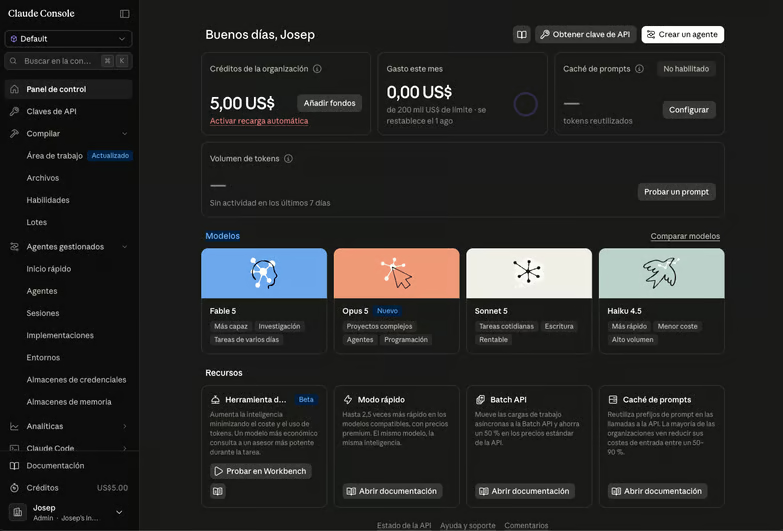
Ter verduidelijking: sommige accounts worden in dit stadium gevraagd om hun telefoonnummer te verifiëren. Zodra je erdoorheen bent, wordt het starttegoed automatisch toegepast in plaats van dat je het via een promoveld claimt.
Stap 2: Controleer je tegoedsaldo
Open de Billing-sectie vanuit de console-navigatie. Je startsaldo verschijnt daar, samen met de optie om een betaalmethode toe te voegen, wat nu nog niet hoeft.
Controleer dit voordat je iets anders doet. Als het saldo nul aangeeft, zal geen enkele correcte configuratie later een werkende sessie opleveren.
Stap 3: Maak een API-sleutel
Ga naar Settings > API Keys en maak een nieuwe sleutel aan. Geef hem een naam die je over drie maanden nog herkent, want de meeste mensen eindigen met meerdere sleutels.
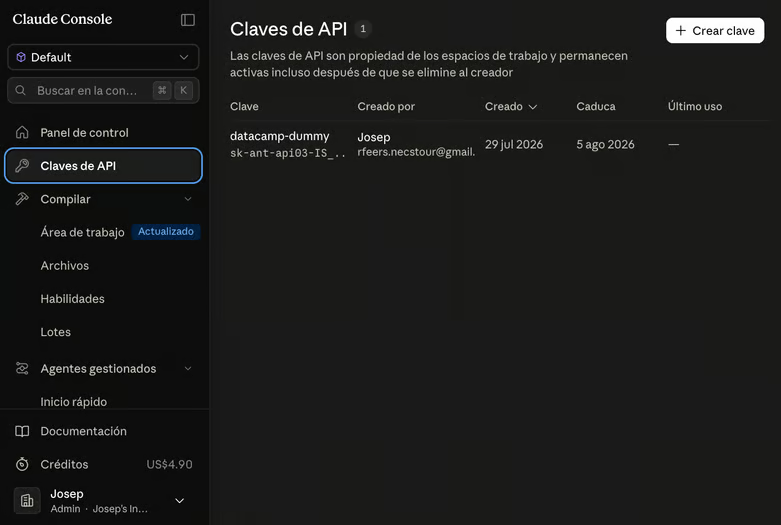
De volledige sleutelwaarde wordt exact één keer weergegeven. Kopieer hem direct naar je wachtwoordmanager zodra hij verschijnt, want dat venster sluiten zonder te kopiëren betekent de sleutel kwijtraken en deze stap opnieuw doen.
Stap 4: Exporteer de sleutel en installeer Claude Code
Exporteer de sleutel als een omgevingsvariabele in je shell en installeer vervolgens de CLI. Anthropic raadt de native installer aan, die zijn eigen runtime bevat en helemaal geen Node.js nodig heeft.
export ANTHROPIC_API_KEY="sk-ant-your-key-here"
curl -fsSL https://claude.ai/install.sh | bash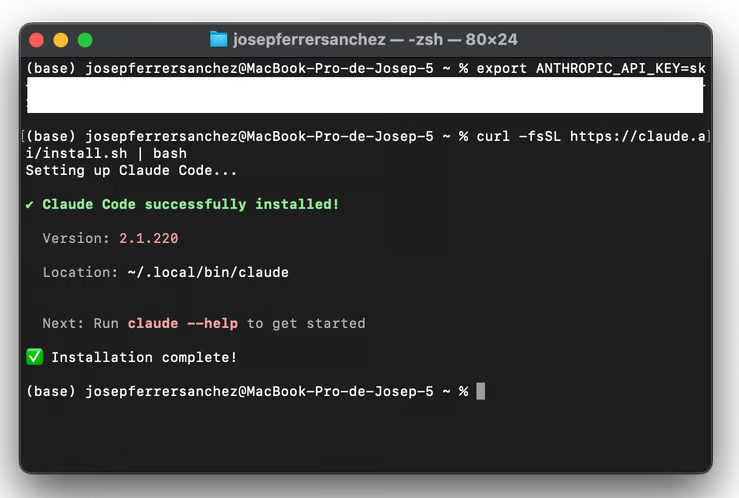
In Windows PowerShell is de installer irm https://claude.ai/install.ps1 | iex. Als je liever npm gebruikt: vanaf Claude Code v2.1.198 verwacht het pakket Node.js 22 of hoger, wat een verandering is ten opzichte van de Node.js 18-ondergrens die oudere gidsen nog noemen:
npm install -g @anthropic-ai/claude-codeVoeg de export-regel toe aan je ~/.zshrc of ~/.bashrc als je wilt dat de sleutel een nieuw terminalvenster overleeft. Bevestig daarna dat de installatie gelukt is:
claude --versionStap 5: Start je eerste sessie
Ga naar een projectmap en start de agent. claude draaien vanuit je thuismap werkt technisch gezien, maar de tool is weinig waard zonder een codebase om te lezen.
cd ~/projects/my-app
claudeBij de eerste start met ANTHROPIC_API_KEY ingesteld, vraagt Claude Code je één keer om de sleutel goed te keuren in plaats van een browser voor OAuth te openen. Keur hem goed en je belandt op het welkomstscherm, met onderaan je werkmap bevestigd:
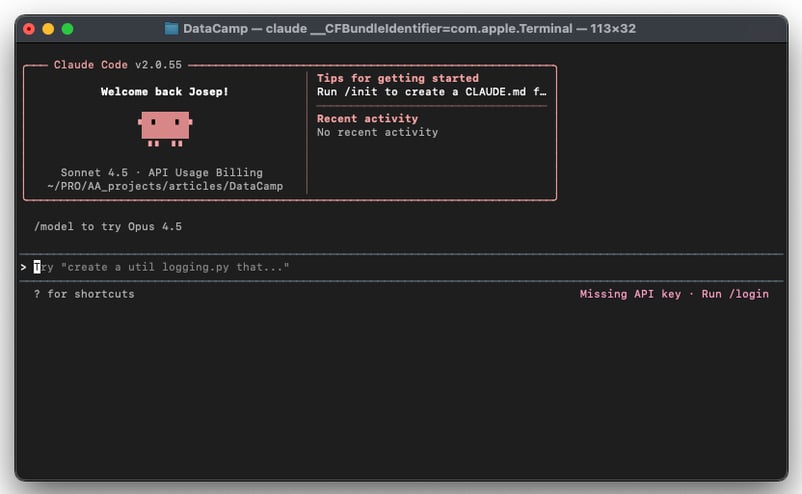
Om het billingpad te bevestigen in plaats van alleen de installatie, voer je /status uit binnen de sessie. De regel API key met ANTHROPIC_API_KEY vertelt je dat de sessie Console-tegoeden gebruikt in plaats van een opgeslagen claude.ai-login.
Als er nu iets mis lijkt, geeft claude doctor diagnose-info over installatie en instellingen zonder een sessie te starten, en dat is een snellere eerste stap dan foutstrings zoeken.
Hoe ver kom je met de gratis tegoeden?
Grove rekensom, met Sonnet 5 tegen de huidige introductietarieven. Stel vijftien uitwisselingen op een echte repository voor, elk met zo’n 30.000 tokens aan context en ongeveer 1.500 tokens output. De eerste beurt betaalt de volledige inputprijs, en de veertien daarna raken vooral de promptcache tegen 10% van die prijs.
|
Post |
Berekening |
Kost |
|
Eerste beurt, niet-gecachete input |
30.000 tokens aan $2/MTok |
$0,06 |
|
Veertien latere beurten, cache-reads |
420.000 tokens aan $0,20/MTok |
$0,08 |
|
Output over alle vijftien beurten |
22.500 tokens aan $10/MTok |
$0,23 |
|
Totaal per sessie |
$0,37 | |
|
Dezelfde sessie zonder caching |
450.000 inputtokens aan volle prijs |
$1,13 |
Zie dat als een orde van grootte in plaats van een offerte. Het model hierboven gaat uit van vlakke context en negeert de cache-write-premie, die 1,25 keer de basisinputprijs is voor een cache van vijf minuten, dus je echte sessies komen ergens aan weerszijden hiervan uit.
Het gat tussen de laatste twee rijen is het deel dat je moet internaliseren. Caching haalt ruwweg drie kwart van de rekening af, daarom kosten Claude Code-sessies veel minder dan een naïeve tokentelling suggereert, en daarom verdrievoudigt alles wat de cache breekt (wisselen tussen repositories, sessies constant herstarten, midden in een sessie van model wisselen) stilletjes wat je betaalt. Anthropics prijsdocumentatie bevat de volledige multipliertabel als je dit goed wilt modelleren.
Verschillen in modeltarieven
De modelkeuze verschuift het bedrag meer dan wat dan ook wat je zelf beheerst. Dezelfde sessie met vijftien beurten over de hele linie:
|
Model |
Input / output per MTok |
Kost per sessie |
Sessies per $5 |
|
Haiku 4.5 |
$1 / $5 |
$0,18 |
ongeveer 27 |
|
Sonnet 5 (introductie, t/m 31 aug 2026) |
$2 / $10 |
$0,37 |
ongeveer 13 |
|
Sonnet 5 (standaard, vanaf 1 sept 2026) |
$3 / $15 |
$0,55 |
ongeveer 9 |
|
Opus 5 |
$5 / $25 |
$0,92 |
ongeveer 5 |
|
Fable 5 |
$10 / $50 |
$1,85 |
minder dan 3 |
Dus met vijf dollar saldo koop je ergens tussen de vijf en zevenentwintig sessies, volledig afhankelijk van het model waar je op wijst. Sonnet 5 is de verstandige standaard voor evaluatie.
Besteed dat saldo aan één echte taak in plaats van aan speelgoedvoorbeelden. Refactor een module die je daadwerkelijk bezit, of jaag een bug door drie bestanden, want dat is de enige manier om te leren of de tool een plek in je week verdient.
Als het saldo nul raakt, is er geen vangnet. Console-billing is pay-as-you-go, en Claude Code heeft geen gratis laag daaronder.
Optie 2: OpenRouter gratis modellen
OpenRouter is een API-gateway voor een paar honderd modellen, en een wisselende handvol daarvan kost niets om aan te roepen. Geen creditcard, geen maandelijkse kosten, geen abonnement.
De reden dat dit überhaupt aan Claude Code te koppelen is, is dat de CLI zijn endpoint uit een omgevingsvariabele leest. Verander de variabele, en je verandert waar de verzoeken heen gaan. OpenRouter draait wat het een "Anthropic Skin" noemt, een endpoint dat het Anthropic Messages-formaat accepteert en thinking-blokken en native tool use ongewijzigd doorlaat, dus er is geen lokale proxy nodig.
Wees duidelijk over wat je krijgt, want dit zijn geen Claude-modellen. Je behoudt de Claude Code-interface, de agentloop, het bewerken van bestanden en de slash-commando’s, terwijl een Qwen- of Llama-variant het redeneren doet.
OpenRouters eigen documentatie waarschuwt dat Claude Code alleen gegarandeerd werkt met Anthropics first-party-provider en "mogelijk niet correct werkt met andere providers". Ik citeer dat liever dan te doen alsof het anders is.
Hoe de redirect werkt
Drie variabelen doen het werk:
-
ANTHROPIC_BASE_URLwijst naarhttps://openrouter.ai/apiin plaats van Anthropics endpoint. -
ANTHROPIC_AUTH_TOKENdraagt je OpenRouter-sleutel en wordt verstuurd als eenAuthorization: Bearer-header. -
ANTHROPIC_API_KEYmoet expliciet op een lege string staan; anders kan Claude Code terugvallen op authenticatie tegen Anthropic.
Je kunt deze instellen in je shellprofiel of in een Claude Code-instellingenbestand. Eén ding om te vermijden: een project-.env-bestand werkt niet, omdat de native installer geen standaard-.env-bestanden leest.
json
{
"env": {
"ANTHROPIC_BASE_URL": "https://openrouter.ai/api",
"ANTHROPIC_AUTH_TOKEN": "sk-or-v1-your-openrouter-key",
"ANTHROPIC_API_KEY": ""
}
}Waar je dat bestand plaatst, is belangrijker dan het lijkt. Gebruik ~/.claude/settings.json voor een globale configuratie, of .claude/settings.local.json voor één project, want Claude Code voegt die laatste toe aan je gitignore.
Zet geen credential in .claude/settings.json van een project, want dat bestand wordt gecommit en gedeeld met iedereen die de repository clonet.
Claude Code instellen met OpenRouter
-
Installeer Claude Code met de native installer als je dat nog niet hebt gedaan.
-
Maak een gratis account aan op openrouter.ai en genereer een sleutel onder Settings > Keys. Er is geen kaart vereist voor een account dat alleen gratis modellen aanroept.
-
Schrijf de configuratie in
~/.claude/settings.jsonmet het blok hierboven, of exporteer dezelfde drie variabelen in je shellprofiel. -
Als je ooit bij Claude Code bent ingelogd met een Anthropic-account, voer dan
/logoutuit in de CLI, sluit af en start opnieuw. Een gecachte sessie overschrijft je variabelen en uit zich als verwarrende model-not-found-fouten. -
Start
claudeen controleer waar de verzoeken heen gaan.
> /status
Auth token: ANTHROPIC_AUTH_TOKEN
Anthropic base URL: https://openrouter.ai/apiJe verzoeken zouden ook binnen enkele seconden in het OpenRouter-activiteitendashboard moeten verschijnen, de snelste manier om te bevestigen dat de redirect werkt.
Een gratis model kiezen op OpenRouter
Gratis model-ID’s eindigen op :free, en het aanbod verschuift voortdurend naarmate providers modellen toevoegen, weghalen of herprijzen. De OpenRouter-collectie met gratis modellen laat zien welke modellen kosteloos beschikbaar zijn. openrouter/free is OpenRouters autorouter voor gratis modellen. Die kiest wat beschikbaar is en bij je verzoek past, waardoor je setup blijft werken nadat individuele modellen uitfaseren. Het eenvoudigste startpunt, maar de kwaliteit varieert sterk.
Prijzen, kredietbedragen en het gratis modellenaanbod op OpenRouter wijzigen maandelijks, en sommige veranderden terwijl ik dit schreef. Controleer Anthropics prijspagina en OpenRouters gratis filter voordat je je op een plan baseert dat op welk getal hier dan ook leunt.
Dan zijn er nog de rate limits, die harder bijten dan de modelkeuze. Gratis modellen staan 20 verzoeken per minuut toe ongeacht je account, en 50 per dag als je nog nooit tegoed hebt gekocht. Koop één keer $10 tegoed, ooit, en die dagelijkse limiet stijgt naar 1.000 en blijft daar zelfs nadat het saldo weer nul is.
Vijftig verzoeken per dag klinkt werkbaar totdat je bedenkt dat een agentische sessie verzoeken uitgeeft zoals een praatgrage collega je middag. Eén redelijk betrokken taak kan een derde van de dagelijkse limiet verbruiken. Mislukte pogingen tellen ook mee, dus blind opnieuw proberen verergert de situatie in plaats van die te verbeteren.
Om specifieke modelrollen te routeren, stelt Claude Code aparte variabelen bloot voor elke tier:
bash
export ANTHROPIC_DEFAULT_SONNET_MODEL="cohere/north-mini-code:free"
export ANTHROPIC_DEFAULT_HAIKU_MODEL="cohere/north-mini-code:free"
export CLAUDE_CODE_SUBAGENT_MODEL="cohere/north-mini-code:free"Eenvoudige refactors, single-file-edits en uitleg-taken houden zich aardig. Toch verslechtert lang meerstaps-werk merkbaar, en de faalmodus is meestal tool-calling in plaats van ruwe codekwaliteit: het model kiest de verkeerde tool, leest een resultaat verkeerd, of loopt vast in een lus.
Wil je doelgerichter modellen mixen per taak, dan behandelt onze Claude Code Router-gids multi-model routing in detail.
Optie 3: Ollama lokale modellen
Ollama draait open modellen op je eigen machine. Geen API-sleutels, geen rate limits en geen internetverbinding nodig zodra de weights zijn gedownload.
In januari 2026 voegde Ollama compatibiliteit met de Anthropic Messages API toe in v0.14.0, wat deze workflow praktisch maakte. Daarvoor had je een vertaalproxy ertussen nodig. Nu praat Claude Code direct met localhost.
De kosten verdwijnen niet; ze verschuiven naar hardware — specifiek naar geheugenbandbreedte, niet alleen capaciteit.
-
Op Apple Silicon is unified memory het getal om in de gaten te houden: 16 GB draait een ~14B-model zoals
gpt-oss:20b, maar de 30B-klasse codemodellen die de moeite waard zijn, willen 32 GB of meer zodra je een 32K-contextvenster toevoegt. -
Op een Windows- of Linuxmachine is de relevante waarde GPU-VRAM, niet systeem-RAM — een model dat in RAM past maar op CPU draait, is te traag voor agentisch werk, waar elke taak tientallen calls afvuurt.
Ollama instellen met Claude Code
-
Installeer Ollama. Op macOS en Linux is dat
curl -fsSL https://ollama.com/install.sh | sh, en op Windows download je de installer van ollama.com en voer je die uit. -
Haal een codemodel binnen. Hoewel het niet kan concurreren met de huidige Claude-modellen, is Qwen3-Coder een goede keuze:
ollama pull qwen3-coder. -
Bevestig dat het model aanwezig is met
ollama list. -
Verhoog de contextlengte, want dit is de instelling die mensen vergeten en dan het model de schuld geven. Ollama raadt minstens 32K tokens aan voor Claude Code.
-
Wijs Claude Code naar de lokale endpoint en kies je model.
bash
export OLLAMA_CONTEXT_LENGTH=32768
export ANTHROPIC_AUTH_TOKEN=ollama
export ANTHROPIC_BASE_URL=http://localhost:11434
claude --model qwen3-coderDe auth token is vereist door het protocol en wordt genegeerd door Ollama, dus de waarde maakt niet uit. Wil je de configuratie blijvend maken, dan gaan dezelfde drie keys in het env-blok van ~/.claude/settings.json.
Twee hiaten zijn het waard om te kennen voordat je het resultaat beoordeelt:
-
Anthropics promptcaching is niet van toepassing, dus elk verzoek verwerkt de systemprompt en de volledige conversatiegeschiedenis van nul af, wat hier traag is in plaats van duur.
-
Ollama’s compatibiliteitslaag negeert ook
tool_choice, het veld dat Claude Code af en toe gebruikt om een specifieke toolcall af te dwingen, en wanneer dat ertoe doet, kan de agent de verkeerde tool kiezen en vastlopen in een lus.
Voor een diepere walkthrough van deze setup hebben we een aparte tutorial over Claude Code gebruiken met lokale Ollama-modellen, en aparte gidsen voor lokaal draaien van Qwen 3 en DeepSeek R1.
Hardware-realiteitscheck
|
Unified memory / VRAM |
Wat draait |
Eerlijke beoordeling |
|
8 GB |
Alleen 7B-modellen |
Worstelt met redeneren over meerdere bestanden. Prima voor single-function-vragen, frustrerend voor iets agentisch. |
|
16 GB |
7B-14B comfortabel: |
Werkbaar voor rechttoe-rechtaan edits en uitleg bij 32K context. |
|
24 GB |
|
De praktische ondergrens voor agentisch coderen. Een enkele 24 GB-kaart (RTX 3090/4090) of een 24 GB Mac valt hier. |
|
32 GB+ |
30B-klasse codemodellen op volledige 32K context |
Hier voelt lokaal niet meer als een compromis en begint het te concurreren met de gratis cloudopties. |
Voor de meeste developers is OpenRouter beter dan Ollama, tenzij je 32 GB of meer unified memory/VRAM hebt, offline toegang nodig hebt of wilt dat je code de machine nooit verlaat. Die laatste reden is goed, en daarom zou ik deze route niet alleen op performance afschrijven.
Optie 4: Het Claude for Open Source-programma
De meeste gidsen over dit onderwerp stoppen bij drie opties en missen degene die je het daadwerkelijke product geeft, op het hoogste niveau, voor een half jaar.
Anthropic lanceerde Claude for Open Source in februari 2026 en breidde het in juli uit. In aanmerking komende maintainers en bijdragers ontvangen zes maanden Claude Max 20x, het $200-per-maand-plan, kosteloos. Dat omvat Claude Code, met royale gebruiksruimte op het hoogste consumentenniveau.
De gepubliceerde toelatingscriteria zijn breder dan de meeste mensen aannemen:
- Maintainers van pakketten met 500 of meer afhankelijke repositories, 100 of meer afhankelijke pakketten, of 200.000 of meer gecombineerde maandelijkse downloads over npm, PyPI, crates.io, RubyGems of vergelijkbare registries.
- Genoemde committers op erkende foundation- of taalprojecten zoals CPython, het Rust-team, de Node.js TSC, een Apache PMC, CNCF, Kubernetes, de Linux-kernel, Django of Rails.
- Iedereen die in de afgelopen twaalf maanden 100 of meer gemergede pull requests heeft geschreven naar repositories die ze niet bezitten.
- Communitybouwers wier repository in het afgelopen jaar 20 of meer unieke externe bijdragers met gemergede pull requests heeft aangetrokken.
- Maintainers van alles met een OpenSSF-criticalityscore van 0,4 of hoger.
Anthropics pagina nodigt borderline-gevallen expliciet uit om toch te solliciteren en uit te leggen waar het ecosysteem stilletjes op leunt. Het programma is gemaximeerd op 10.000 ontvangers en wordt doorlopend beoordeeld; aanvragen gaan via claude.com/contact-sales/claude-for-oss.
Eén kanttekening: dit dekt het abonnement, niet de API-tegoeden. Je ANTHROPIC_API_KEY-gebruik wordt nog steeds apart gefactureerd, dus het is een persoonlijk plan en niet iets om een CI-pipeline op te richten.
De juiste gratis optie kiezen voor jou
Twee vragen beslissen dit. Waarvoor wil je Claude Code gebruiken, en hoeveel set-up ben je bereid te doen voordat je je verveelt?
Vergelijkingstabel
|
Optie |
Echt Claude-model? |
Claude Code CLI |
Limieten |
Beste voor |
Setup-inspanning |
|
Claude.ai gratis laag (niet Claude Code) |
Ja (Sonnet 5) |
Nee |
~15 tot 40 berichten per 5 uur, dynamisch |
Incidentele codevragen en code review |
Geen |
|
API-gratis tegoeden |
Ja (elk model) |
Ja |
Eenmalig starttegoed, rond $5 |
Echt evalueren van Claude Code |
Laag |
|
OpenRouter gratis modellen |
Nee (Qwen, Llama, GPT-OSS) |
Ja |
20 req/min, 50/dag (1.000/dag na een eenmalige aankoop van $10) |
Doorlopend gratis gebruik zonder lokale hardware |
Middel |
|
Ollama lokale modellen |
Nee (lokale open modellen) |
Ja |
Hardwaregebonden, geen rate limits |
Offline werk, privacy, geen kosten per token |
Hoog |
|
Claude for Open Source |
Ja (Max 20x) |
Ja |
6 maanden, beperkt programma, toelating vereist |
In aanmerking komende OSS-maintainers |
Laag, plus een aanvraag |
Welke moet je kiezen?
- Als je nog nooit Claude Code hebt gebruikt en wilt weten of het $20 per maand waard is, neem dan de API-starttegoeden. Het is de enige route die je het echte product laat zien, en een dozijn sessies is ruim genoeg om een mening te vormen.
- Als je doorlopend gratis toegang wilt en niet per se Claude nodig hebt, biedt OpenRouter de beste verhouding kwaliteit/inspanning. Reken op een avond voor de eerste set-up en verwacht de dagelijkse verzoeklimiet sneller te raken dan je zou willen.
- Als je offline toegang nodig hebt, of je werkgever heeft meningen over waar broncode heengaat, dan is Ollama het antwoord, ondanks de hardwarekosten. Onder 16 GB unified memory/VRAM zou ik het niet proberen.
- Als je iets onderhoudt waar anderen op bouwen, check dan eerst de open-sourcebeurs voordat je dit alles doet. Zes maanden op het hoogste niveau haalt de hele vraag weg.
Probleemoplossing voor de redirect-setups
Opties 3 en 4 delen een faalvlak, en dezelfde handvol problemen verklaart het meeste. Omdat noch Anthropic noch de gatewayproviders je specifieke combinatie kunnen debuggen, is dit wat je eerst controleert.
-
Claude Code blijft vragen om in te loggen. De CLI heeft geen eigen credentials, en een bereikbaar base-URL geldt niet als credential. Een env-blok in
.claude/settings.jsonvan een project geldt pas na de first-run-wizard, dus zetANTHROPIC_AUTH_TOKENergens neer dat eerder wordt gelezen: een shellexport of~/.claude/settings.json. -
Een startwaarschuwing noemt twee credentialbronnen. Er is zowel een gatewaycredential als een opgeslagen login actief. Voer
/logoutuit om de opgeslagen login te wissen, of unset de variabele om terug te keren naar de vorige login. -
400-fouten met melding van onherkende velden. Claude Code stuurt velden naar Anthropic-format-endpoints die sommige upstreams afwijzen.
CLAUDE_CODE_DISABLE_EXPERIMENTAL_BETAS=1onderdrukt de meeste prerelease-velden en maakt dit duidelijker. -
400-fouten met melding van thinking of adaptive. Het upstreammodel accepteert geen adaptive reasoning, wat Claude Code aanvraagt voor recente Claude-modellen. Dit vereist meestal een update van de upstream van de gateway in plaats van een clientside fix.
-
Remote control en spraakdicteren stoppen.Beide vertrouwen op een claude.ai-identiteit en zijn niet beschikbaar terwijl een gatewaycredential is ingesteld. Sinds v2.1.196 is remote control ook uitgeschakeld wanneer
ANTHROPIC_BASE_URLnaar een niet-Anthropic host wijst.
Wanneer iets zich misdraagt en je niet zeker weet welke laag de oorzaak is, vertelt /status binnen de sessie je welke base-URL en credentialbron daadwerkelijk actief zijn. Dat ene commando lost er meer op dan welk her-exporteren dan ook.
Slotgedachten
Vier routes om Claude Code gratis te gebruiken, geen ervan perfect, en de trade-offs zijn het interessante deel, niet een bijzaak.
Mijn eigen aanbeveling is smal. Als je de Claude Code CLI-agent wilt in plaats van een chatvenster, begin dan met de API-tegoeden, want je leert meer van één echte sessie op het daadwerkelijke product dan van een avond een vervanger configureren. Als het een plek in je workflow verdient, is $20 per maand een verdedigbare post. Zo niet, dan heb je niets verloren en weet je nu waarom.
Voor de lange termijn is OpenRouter de meest duurzame gratis optie, en Ollama wint zodra privacy of offline toegang niet-onderhandelbaar is in plaats van nice-to-have.
Voor de gewoonten die het verschil maken tussen een nuttige en een frustrerende sessie, behandelt onze Claude Code Best Practices planning, contextoverdracht en testgedreven ontwikkeling op echte projecten. En als je vanaf nul begint, leert Claude Code 101 de basis via interactieve, gestructureerde lessen die je van de eerste installatie naar een werkende workflow brengen.
Veelgestelde vragen over gratis toegang tot Claude Code
Is Claude Code gratis?
Nee. Claude Code heeft een betaald Claude-abonnement (Pro, Max, Team of Enterprise) of een Console-account met afrekening per token nodig. Wat er wél is, zijn een paar legitieme gratis routes, en elk levert iets in.
Kan ik Claude Code gebruiken met het gratis Claude-plan?
Nee. Het gratis plan dekt de chatinterface op web, mobiel en desktop, maar Anthropics eigen set-updocumentatie stelt duidelijk dat het geen toegang tot Claude Code bevat. De terminalagent zit achter de paywall.
Hoe ver kom je met de gratis API-tegoeden?
Anthropic geeft nieuwe Console-accounts een klein starttegoed, naar verluidt rond de $5, al publiceert Anthropic het bedrag niet. Tegen Sonnet 5-tarieven, met promptcaching die zijn werk doet, komt een gefocuste sessie op een echte repository uit op zo’n 30 of 40 cent. Dat is ruwweg een dozijn sessies, genoeg om te beoordelen of de tool bij je workflow past.
Werkt Claude Code met de gratis modellen van OpenRouter?
Technisch gezien wel, aangezien OpenRouter een endpoint aanbiedt dat het Anthropic Messages-formaat spreekt. OpenRouter zelf waarschuwt dat Claude Code alleen gegarandeerd werkt wanneer verzoeken naar Anthropics eigen modellen worden gerouteerd, dus een gratis Qwen- of Llama-backend is een best-effort-regeling in plaats van een ondersteunde.
Wat heb ik nodig om Claude Code tegen Ollama te laten draaien?
Ollama v0.14.0 of later, want die release voegde compatibiliteit met de Anthropic Messages API toe. Je wilt ook een model met minstens 32K context en genoeg RAM om dat te dragen, wat in de praktijk 16 GB als ondergrens betekent en 32 GB voordat de resultaten niet meer als een compromis voelen. Twee omgevingsvariabelen doen de rest van de bedrading.

Josep is een freelance Data Scientist die zich richt op Europese projecten, met expertise in dataopslag, -verwerking, geavanceerde analyses en impactvolle data storytelling.
Als docent geeft hij Big Data in de masteropleiding aan de Universiteit van Navarra en deelt hij inzichten via artikelen op platforms als Medium, KDNuggets en DataCamp. Josep schrijft ook over Data en Tech in zijn nieuwsbrief Databites (databites.tech).
Hij heeft een bachelor in Engineering Physics van de Polytechnische Universiteit van Catalonië en een master in Intelligent Interactive Systems van de Pompeu Fabra-universiteit.


Je installeert Claude Code in zo’n dertig seconden, voert
claudeuit in een projectmap en ontdekt dat het account dat je al hebt, de deur niet opent. Daar begint voor de meeste mensen de zoektocht naar een gratis versie — en daar wordt het troebel, want "gratis" betekent iets anders afhankelijk van of je de terminalagent wilt, de chatinterface, of de Claude Code-workflow met een ander model dat onder de motorkap het denkwerk doet.Dit artikel behandelt vier routes naar een setup die je niets kost, ruwweg geordend op hoe dicht ze in de buurt komen van het echte werk. De vereisten zijn minimaal: een terminal en de door Claude Code ondersteunde platforms (macOS 13+, Windows 10 build 1809+, Ubuntu 20.04 of Debian 10+, 4 GB RAM). De native installer brengt zijn eigen runtime mee, dus Node.js is alleen relevant als je voor de npm-route kiest.
Kort samengevat
Het gratis Claude.ai-abonnement bevat geen Claude Code.
Nieuwe console-accounts ontvangen een eenmalige API-tegoedbon die CLI-toegang geeft voor een proefperiode.
Claude Code leest zijn endpoint uit
ANTHROPIC_BASE_URL, wat de OpenRouter- en Ollama-routes mogelijk maakt.Die twee routes geven je de Claude Code-workflow met een ander model eronder, niet met Claude.
Open-source maintainers kunnen zes maanden toegang krijgen tot het topabonnement.