%22%3E%3Cpath%20d%3D%22m-369%200h408v79h-408z%22%20fill%3D%22%237933ff%22%2F%3E%3Cpath%20d%3D%22m-148%200h306v45h-306z%22%20fill%3D%22%23974dff%22%2F%3E%3C%2Fg%3E%3C%2Fsvg%3E)
%22%2F%3E%3C%2FclipPath%3E%3Cg%20clip-path%3D%22url(%23a)%22%3E%3Cpath%20d%3D%22m76%200h484v36h-484z%22%20fill%3D%22%23974dff%22%2F%3E%3Cpath%20d%3D%22m0%200h384v24h-384z%22%20fill%3D%22%2306bdfc%22%20transform%3D%22matrix(1%200%200%20-1%200%2060)%22%2F%3E%3C%2Fg%3E%3C%2Fsvg%3E)
Qu’est-ce que Claude Code ?
Claude Code est l’outil de développement « agentique » d’Anthropic pour le terminal. Il s’exécute dans votre répertoire de projet, lit vos fichiers, les modifie, exécute des commandes et gère des tâches multi-étapes sans que vous ayez à copier quoi que ce soit dans un navigateur.
S’il est payant, c’est pour des raisons structurelles plutôt que commerciales. Chaque action est un appel d’API, et les sessions agentiques sont naturellement bavardes : le modèle relit le contexte, appelle des outils, vérifie les résultats et réessaie. Un après-midi chargé sur un grand dépôt peut coûter plusieurs dollars en jetons sans donner l’impression d’une productivité exceptionnelle.
Pour une vue complète de ce que l’outil fait au quotidien, notre tutoriel Claude Code couvre l’installation, le refactoring et le débogage en pratique.
Claude Code est-il gratuit ?
La réponse directe est non. La documentation d’installation d’Anthropic indique que Claude Code nécessite un compte Pro, Max, Team, Enterprise ou Console, et que l’offre gratuite Claude.ai n’inclut pas l’accès. Pro démarre à 20 $ par mois, ou 17 $ par mois si vous réglez 200 $ à l’année.
L’alternative est la facturation via la Console, où vous payez à l’usage, sans abonnement. Claude Sonnet 5 est généralement à 3 $ par million de jetons en entrée et 15 $ par million de jetons en sortie. Claude Opus 5 est à 5 $ et 25 $, et Haiku 4.5 à 1 $ et 5 $.
Ces deux voies reposent sur des logiques de facturation très différentes, et choisir la mauvaise, c’est soit surpayer, soit être bridé en plein milieu d’une tâche. Voici comment elles se comparent.
|
Abonnement Claude (Pro, Max, Team) |
Console à l’usage (pay-per-token) | |
|
Ce que vous payez |
Un forfait mensuel couvrant un volume d’usage |
Uniquement les jetons réellement envoyés et reçus |
|
Coût |
20 $/mois pour Pro, 100 $ ou 200 $ pour Max, 125 $ par licence Team Premium |
Pas de frais mensuels. Sonnet 5 à 2 $/10 $ par million de jetons, Opus 5 à 5 $/25 $, Haiku 4.5 à 1 $/5 $ |
|
Accès aux modèles |
Sonnet 5 par défaut, avec Opus disponible sur Pro et plus |
Tous les modèles de la grille tarifaire, dont Haiku 4.5 pour les tâches économiques et Fable 5 au sommet |
|
Ce qui vous limite |
Une fenêtre glissante de cinq heures plus un plafond hebdomadaire, partagés entre Claude chat, Cowork et Claude Code |
Les limites de débit dépendent de votre palier d’usage (Start, Build ou Scale), pas d’un quota de messages |
|
Quand vous heurtez le mur |
Vous attendez le reset de la fenêtre, ou vous achetez du volume additionnel aux tarifs API |
Rien ne s’arrête avant la fin de vos crédits prépayés, après quoi les requêtes échouent avec une erreur de facturation |
|
Prévisibilité des coûts |
Fixe. Vous connaissez le montant avant le début du mois |
Variable. Une semaine de gros refactoring coûte plusieurs fois plus qu’une semaine calme |
|
Point de départ gratuit |
Aucun. Pas d’essai sur Pro ou Max |
Un crédit de démarrage ponctuel pour les nouveaux comptes |
|
Idéal pour |
Un usage quotidien régulier, où le forfait revient moins cher par jeton que le comptage à l’usage |
Un usage ponctuel ou irrégulier, l’évaluation, et toute personne refusant l’engagement mensuel |
Le seuil de bascule tient à la régularité d’usage, pas au volume. Un abonnement achète des jetons à un tarif effectif bien meilleur que l’API jusqu’à toucher le plafond du plan, donc les utilisateurs quotidiens gagnent presque toujours avec Pro. La facturation à l’usage gagne quand vos semaines ne se ressemblent pas, car vous ne payez rien les semaines creuses.
Alors d’où vient le « gratuit » ? De trois endroits, en gros.
- Crédit de démarrage qu’Anthropic accorde aux nouveaux comptes API
- Le fait que Claude Code communique avec tout serveur parlant le format Anthropic Messages, y compris des services gratuits, hébergés (OpenRouter) ou locaux (Ollama)
- Un programme de bourses destiné aux mainteneurs open source
La deuxième catégorie mérite un avertissement clair. Pointer Claude Code vers un modèle gratuit vous donne l’interface et la boucle agent, pas Claude. L’écart de qualité sur le raisonnement multi-étapes est réel, j’y reviens plus loin.
L’offre gratuite inclut-elle Claude Code ?
Commençons par la confusion la plus fréquente, car elle fait perdre bien des soirées.
Le niveau gratuit n’inclut pas Claude Code. Ni version limitée, ni version d’essai, rien. La documentation d’Anthropic est sans ambiguïté : le plan gratuit couvre Claude sur le web, iOS, Android et desktop ; l’agent en terminal n’est pas inclus.
Ce que vous obtenez reste très correct. Depuis le 1er juillet 2026, l’offre gratuite utilise Claude Sonnet 5 par défaut, avec la recherche web, le dépôt de fichiers, Projects et Artifacts, qui étaient auparavant derrière le paywall. Pour coller une stack trace et demander ce qui a cloché, c’est tout à fait valable.
Limites du palier gratuit qui touchent les développeurs en premier
Anthropic ne publie pas de nombre de messages, et quiconque cite un chiffre précis devine. L’entreprise décrit Pro comme offrant au moins cinq fois l’usage par session de Free, ce qui fait de Free une base glissante plutôt qu’un quota fixe. En pratique, les retours se regroupent autour de 15 à 40 messages par fenêtre glissante de 5 heures, les messages longs et pièces jointes l’épuisant plus vite.
Quelques limites comptent davantage que le nombre de messages :
- La fenêtre de cinq heures commence à tourner dès votre premier message.
- Pas d’accès CLI à Claude Code. C’est le point bloquant, et aucune astuce ne le contourne.
- Les limites varient avec la charge serveur, donc les heures de pointe sont pires.
- Les conversations longues coûtent plus cher par message, car tout l’historique est relu à chaque tour.
Conclusion : le chat gratuit convient aux questions ponctuelles et à la relecture de code, et s’effondre dès que vous voulez un échange soutenu sur une base de code. Ce que Claude Code vise précisément.
Option 1 : crédits gratuits de l’API Anthropic
C’est la voie officielle la moins connue et, à mon sens, celle par laquelle la plupart devraient commencer.
Creation d’un compte sur platform.claude.com offre un crédit de démarrage ponctuel. La page tarifs d’Anthropic parle d’« un petit montant de crédits gratuits » sans chiffre, mais des sources tierces l’estiment régulièrement autour de 5 $.
Les crédits API authentifient la CLI Claude Code. Vous utilisez le véritable agent, avec les vrais modèles Claude, sur votre véritable codebase. Les crédits ne se renouvellent pas et expirent après 14 jours : considérez cela comme un essai, pas comme une réserve.
Créer un compte API et réclamer les crédits
Tout le chemin, d’une inscription à froid à un agent opérationnel, prend environ 10 minutes, dont la majorité à attendre l’installateur. Je l’ai découpé en cinq étapes car la troisième contient un piège qui oblige souvent à recommencer.
Étape 1 : créez votre compte Console
Allez sur platform.claude.com et inscrivez-vous avec votre adresse e-mail. La Console est un produit distinct de l’interface de chat claude.ai ; un compte Claude existant ne se transfère pas, vous devrez peut-être vous réinscrire avec la même adresse.
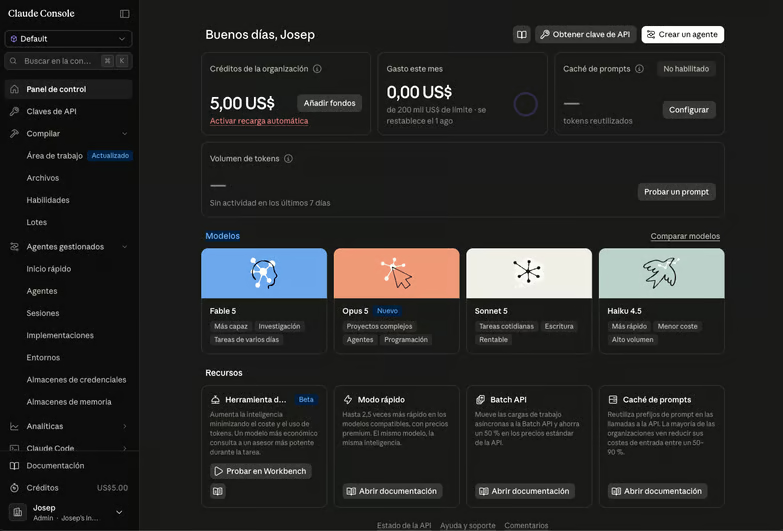
À noter : certains comptes doivent vérifier leur numéro de téléphone à cette étape. Une fois passé, le crédit de démarrage s’applique automatiquement, sans code promo.
Étape 2 : vérifiez votre solde de crédits
Ouvrez la section Billing depuis la navigation de la Console. Votre solde apparaît, avec l’option d’ajouter un moyen de paiement, dont vous n’avez pas besoin pour l’instant.
Vérifiez cela avant toute autre action. Si le solde est à zéro, aucune configuration correcte plus tard ne débloquera une session.
Étape 3 : créez une clé API
Allez dans Settings > API Keys et créez une nouvelle clé. Donnez-lui un nom que vous reconnaîtrez dans trois mois, car la plupart finissent par en avoir plusieurs.
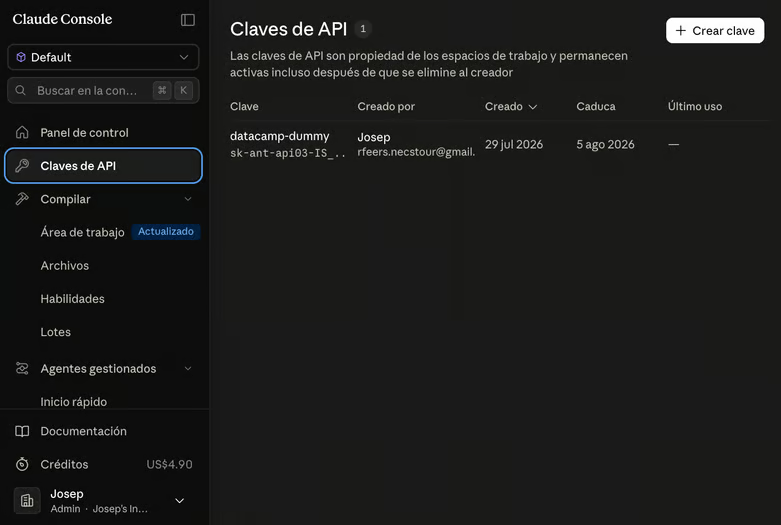
La valeur complète de la clé n’est affichée qu’une seule fois. Copiez-la immédiatement dans votre gestionnaire de mots de passe ; fermer la boîte sans copier revient à perdre la clé et à refaire l’étape.
Étape 4 : exportez la clé et installez Claude Code
Exportez la clé comme variable d’environnement dans votre shell, puis installez la CLI. Anthropic recommande l’installateur natif, qui embarque son runtime et ne nécessite pas Node.js.
export ANTHROPIC_API_KEY="sk-ant-your-key-here"
curl -fsSL https://claude.ai/install.sh | bash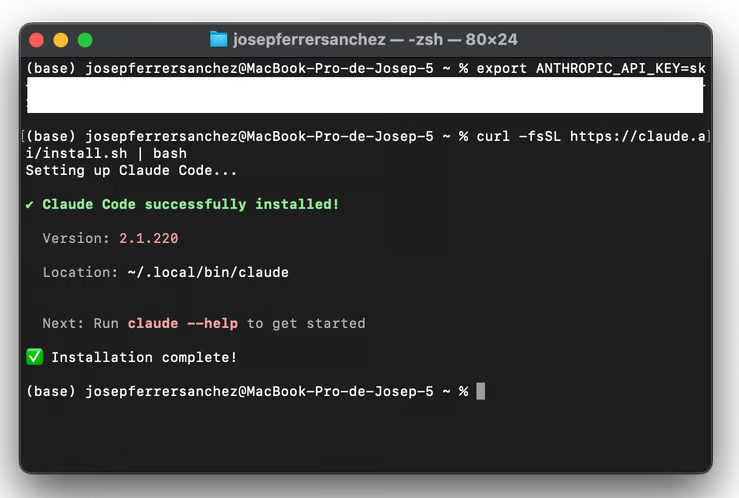
Sous Windows PowerShell, l’installateur est irm https://claude.ai/install.ps1 | iex. Si vous préférez npm, notez qu’à partir de Claude Code v2.1.198, le package exige Node.js 22 ou plus, ce qui change du plancher Node.js 18 encore cité par d’anciens guides :
npm install -g @anthropic-ai/claude-codeAjoutez la ligne export à votre ~/.zshrc ou ~/.bashrc si vous voulez que la clé survive à l’ouverture d’un nouveau terminal. Puis vérifiez l’installation :
claude --versionÉtape 5 : lancez votre première session
Placez-vous dans un répertoire de projet et démarrez l’agent. Lancer claude depuis votre home fonctionne techniquement, mais l’outil est quasi inutile sans codebase à lire.
cd ~/projects/my-app
claudeAu premier lancement avec ANTHROPIC_API_KEY défini, Claude Code vous demande une fois d’approuver la clé plutôt qu’ouvrir un navigateur pour OAuth. Approuvez, et vous arrivez sur l’écran d’accueil avec votre répertoire de travail confirmé en bas :
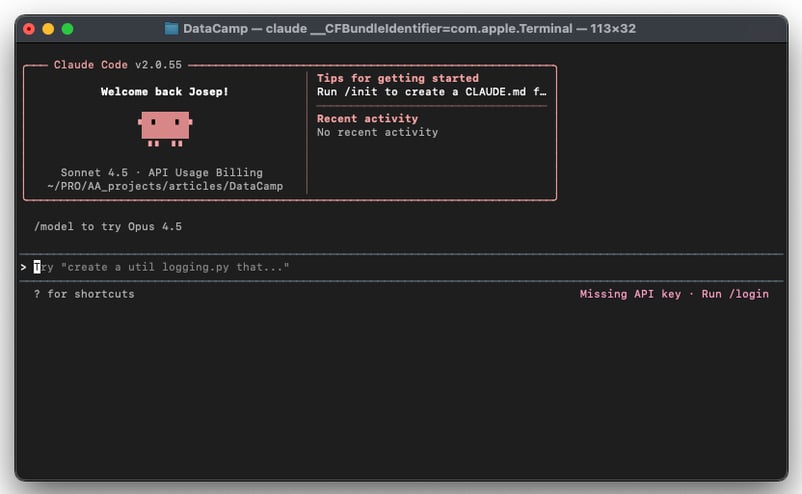
Pour confirmer la voie de facturation, pas seulement l’installation, exécutez /status dans la session. La ligne API key mentionnant ANTHROPIC_API_KEY indique que la session consomme des crédits Console et non une connexion claude.ai enregistrée.
Si quelque chose cloche à ce stade, claude doctor affiche un diagnostic de l’installation et des réglages sans démarrer de session ; c’est un meilleur réflexe que de chercher chaque message d’erreur.
Jusqu’où vont les crédits gratuits ?
Un ordre de grandeur, avec Sonnet 5 à ses tarifs d’introduction actuels. Imaginez quinze échanges sur un vrai dépôt, chacun envoyant environ 30 000 jetons de contexte et produisant 1 500 jetons en sortie. Le premier tour paie le plein tarif d’entrée, et les quatorze suivants passent surtout par le cache de prompt à 10 % du prix.
|
Poste |
Calcul |
Coût |
|
Premier tour, entrée non mise en cache |
30 000 jetons à 2 $/Mjetons |
0,06 $ |
|
Quatorze tours suivants, lectures de cache |
420 000 jetons à 0,20 $/Mjetons |
0,08 $ |
|
Sortie sur quinze tours |
22 500 jetons à 10 $/Mjetons |
0,23 $ |
|
Total session |
0,37 $ | |
|
Même session sans cache |
450 000 jetons d’entrée au plein tarif |
1,13 $ |
Prenez ceci comme un ordre de grandeur, pas comme un devis. Le modèle ci-dessus suppose un contexte constant et ignore la prime d’écriture de cache, qui est de 1,25 fois le prix d’entrée de base pour un cache de cinq minutes ; vos sessions réelles tomberont de part et d’autre.
L’écart entre les deux dernières lignes est la leçon à retenir. Le cache réduit la facture d’environ trois quarts ; c’est pourquoi les sessions Claude Code coûtent bien moins qu’un simple décompte de jetons, et pourquoi tout ce qui casse le cache (passer d’un dépôt à l’autre, redémarrer sans cesse, changer de modèle en cours de route) triple discrètement ce que vous payez. La tarification Anthropic présente la table complète des multiplicateurs si vous voulez modéliser cela proprement.
Différences de tarifs par modèle
Le choix du modèle déplace la facture plus que tout autre paramètre à votre main. La même session de quinze échanges sur la gamme :
|
Modèle |
Entrée / sortie par Mjetons |
Coût par session |
Sessions pour 5 $ |
|
Haiku 4.5 |
1 $ / 5 $ |
0,18 $ |
environ 27 |
|
Sonnet 5 (introductif, jusqu’au 31 août 2026) |
2 $ / 10 $ |
0,37 $ |
environ 13 |
|
Sonnet 5 (standard, dès le 1er sept. 2026) |
3 $ / 15 $ |
0,55 $ |
environ 9 |
|
Opus 5 |
5 $ / 25 $ |
0,92 $ |
environ 5 |
|
Fable 5 |
10 $ / 50 $ |
1,85 $ |
moins de 3 |
Ainsi, un solde de cinq dollars vous achète entre cinq et vingt-sept sessions, selon le modèle ciblé. Sonnet 5 est le choix par défaut le plus sensé pour évaluer.
Dépensez ce solde sur une vraie tâche plutôt que des exemples-jouets. Refactorez un module que vous possédez vraiment, ou traquez un bug sur trois fichiers : c’est la seule façon de savoir si l’outil mérite sa place dans votre semaine.
Quand le solde tombe à zéro, il n’y a pas de filet. La Console facture à l’usage, et Claude Code n’a pas de palier gratuit en dessous.
Option 2 : modèles gratuits OpenRouter
OpenRouter est une passerelle API devant quelques centaines de modèles, dont une poignée tournante sont gratuits à l’appel. Pas de carte, pas de frais mensuels, pas d’abonnement.
Le lien avec Claude Code vient du fait que la CLI lit son endpoint depuis une variable d’environnement. Changez la variable, changez la destination des requêtes. OpenRouter expose ce qu’il appelle une « Anthropic Skin », un endpoint qui accepte le format Anthropic Messages et transmet les thinking blocks et l’usage natif des outils inchangés, sans proxy local.
Soyez clair sur ce que vous obtenez : ce ne sont pas des modèles Claude. Vous conservez l’interface Claude Code, la boucle agent, l’édition de fichiers et les slash commands, pendant qu’un Qwen ou Llama fait le raisonnement.
La documentation d’OpenRouter prévient elle-même que Claude Code n’est garanti de fonctionner qu’avec le fournisseur de première partie d’Anthropic et « peut ne pas fonctionner correctement avec d’autres fournisseurs ». Mieux vaut le citer que prétendre le contraire.
Comment fonctionne la redirection
Trois variables font le travail :
-
ANTHROPIC_BASE_URLpointe vershttps://openrouter.ai/apiplutôt que l’endpoint d’Anthropic. -
ANTHROPIC_AUTH_TOKENtransporte votre clé OpenRouter et est envoyé dans l’entêteAuthorization: Bearer. -
ANTHROPIC_API_KEYdoit être défini sur une chaîne vide explicite ; sinon, Claude Code peut retomber sur une authentification Anthropic.
Vous pouvez définir cela dans votre profil de shell ou dans un fichier de configuration Claude Code. À éviter : un fichier .env de projet ne fonctionnera pas ; l’installateur natif ne lit pas les fichiers .env standards.
json
{
"env": {
"ANTHROPIC_BASE_URL": "https://openrouter.ai/api",
"ANTHROPIC_AUTH_TOKEN": "sk-or-v1-your-openrouter-key",
"ANTHROPIC_API_KEY": ""
}
}L’emplacement de ce fichier compte plus qu’il n’y paraît. Utilisez ~/.claude/settings.json pour une configuration globale, ou .claude/settings.local.json pour un seul projet, Claude Code ajoutant ce dernier à votre gitignore.
Ne mettez pas de secret dans .claude/settings.json d’un projet, car ce fichier est commité et partagé avec toute personne clonant le dépôt.
Configurer Claude Code avec OpenRouter
-
Installez Claude Code avec l’installateur natif si ce n’est pas déjà fait.
-
Créez un compte gratuit sur openrouter.ai et générez une clé dans Settings > Keys. Aucune carte n’est requise si vous n’appelez que des modèles gratuits.
-
Écrivez la configuration dans
~/.claude/settings.jsonen utilisant le bloc ci-dessus, ou exportez les trois mêmes variables dans votre profil de shell. -
Si vous vous êtes déjà connecté à Claude Code avec un compte Anthropic, exécutez
/logoutdans la CLI, puis quittez et relancez. Une session mise en cache outrepasse vos variables et se manifeste par des erreurs de type « modèle introuvable ». -
Démarrez
claudeet vérifiez la destination des requêtes.
> /status
Auth token: ANTHROPIC_AUTH_TOKEN
Anthropic base URL: https://openrouter.ai/apiVos requêtes doivent aussi apparaître sur le tableau de bord d’activité OpenRouter en quelques secondes, le moyen le plus rapide de confirmer la redirection.
Choisir un modèle gratuit sur OpenRouter
Les IDs de modèles gratuits se terminent par :free, et la liste évolue sans cesse au gré des ajouts/retraits/revalorisations. La collection des modèles gratuits OpenRouter indique ceux disponibles sans frais. openrouter/free est l’auto-routeur d’OpenRouter pour les modèles gratuits : il choisit ce qui est disponible et adapté à votre requête, ce qui maintient votre configuration quand des modèles sortent. Point de départ le plus simple, mais qualité très variable.
Tarifs, montants de crédits et liste de modèles gratuits sur OpenRouter changent mensuellement, et certains ont changé pendant la rédaction. Vérifiez la page tarifs d’Anthropic et le filtre « free » d’OpenRouter avant de bâtir un plan sur les chiffres ici.
Viennent ensuite les limites de débit, plus cinglantes que le choix du modèle. Les modèles gratuits autorisent 20 requêtes/minute quel que soit votre compte, et 50/jour si vous n’avez jamais acheté de crédits. Achetez 10 $ de crédits une fois, et l’allocation passe à 1 000/jour et y reste même une fois le solde retombé à zéro.
Cinquante requêtes par jour semblent gérables jusqu’à se rappeler qu’une session agentique dépense des requêtes comme un collègue bavard votre après-midi. Une tâche un tant soit peu impliquée peut en consommer un tiers. Les échecs comptent aussi ; relancer en aveugle aggrave la situation.
Pour router des rôles de modèle précis, Claude Code expose des variables séparées pour chaque « tier » :
bash
export ANTHROPIC_DEFAULT_SONNET_MODEL="cohere/north-mini-code:free"
export ANTHROPIC_DEFAULT_HAIKU_MODEL="cohere/north-mini-code:free"
export CLAUDE_CODE_SUBAGENT_MODEL="cohere/north-mini-code:free"Les petits refactorings, les modifications mono-fichier et les demandes d’explication tiennent la route. En revanche, les travaux longs multi-étapes se dégradent nettement ; la panne typique concerne l’appel d’outil plutôt que la qualité brute du code : mauvais outil, mauvaise lecture d’un résultat, ou boucle.
Si vous voulez une approche plus réfléchie du panachage de modèles selon la tâche, notre guide Claude Code Router couvre le routage multi-modèles en détail.
Option 3 : modèles locaux avec Ollama
Ollama exécute des modèles ouverts sur votre machine. Pas de clés API, pas de limites de débit, et pas d’internet une fois les poids téléchargés.
En janvier 2026, Ollama a ajouté la compatibilité avec l’API Anthropic Messages en v0.14.0, rendant ce flux de travail viable. Avant, un proxy de traduction était nécessaire. Désormais, Claude Code parle directement à localhost.
Le coût ne disparaît pas ; il se déplace vers le matériel — en particulier la bande passante mémoire, pas seulement la capacité.
-
Sur Apple Silicon, surveillez la mémoire unifiée : 16 Go font tourner un modèle ~14B comme
gpt-oss:20b, mais les modèles 30B dédiés au code qui valent le coup demandent 32 Go ou plus dès que vous ajoutez une fenêtre de contexte 32K. -
Sur Windows ou Linux, regardez la VRAM GPU, pas la RAM système — un modèle qui tient en RAM mais tourne sur CPU est trop lent pour l’agentique, où chaque tâche déclenche des dizaines d’appels.
Configurer Ollama avec Claude Code
-
Installez Ollama. Sur macOS et Linux :
curl -fsSL https://ollama.com/install.sh | sh, et sur Windows, téléchargez l’installateur sur ollama.com et exécutez-le. -
Téléchargez un modèle pour le code. Sans rivaliser avec les modèles Claude actuels, Qwen3-Coder est un bon choix :
ollama pull qwen3-coder. -
Vérifiez la présence du modèle avec
ollama list. -
Augmentez la longueur de contexte, réglage qu’on oublie souvent avant d’accuser le modèle. Ollama suggère au moins 32K jetons pour Claude Code.
-
Pointez Claude Code vers l’endpoint local et sélectionnez votre modèle.
bash
export OLLAMA_CONTEXT_LENGTH=32768
export ANTHROPIC_AUTH_TOKEN=ollama
export ANTHROPIC_BASE_URL=http://localhost:11434
claude --model qwen3-coderLe jeton d’authentification est requis par le protocole et ignoré par Ollama, sa valeur importe donc peu. Pour une configuration persistante, placez ces trois clés dans le bloc env de ~/.claude/settings.json.
Deux écarts sont bons à connaître avant de juger le résultat :
-
Le cache de prompts d’Anthropic ne s’applique pas, donc chaque requête reprocesse le prompt système et tout l’historique à partir de zéro ; c’est lent ici, plutôt que coûteux.
-
La couche de compatibilité d’Ollama ignore aussi
tool_choice, le champ que Claude Code utilise parfois pour forcer un outil ; quand c’est crucial, l’agent choisit le mauvais outil et boucle.
Pour un pas-à-pas plus détaillé, nous avons un tutoriel dédié sur l’utilisation de Claude Code avec des modèles locaux Ollama, ainsi que des guides séparés pour exécuter Qwen 3 et DeepSeek R1 en local.
Réalité matérielle
|
Mémoire unifiée / VRAM |
Ce qui tourne |
Verdict honnête |
|
8 Go |
Modèles 7B uniquement |
Peine sur le raisonnement multi-fichiers. Bien pour des questions de fonction, frustrant pour l’agentique. |
|
16 Go |
7B–14B confortablement : |
Faisable pour des edits simples et des explications à 32K. |
|
24 Go |
|
Le plancher pratique pour le code agentique. Une carte 24 Go (RTX 3090/4090) ou un Mac 24 Go vous y amène. |
|
32 Go+ |
Modèles 30B pour le code avec contexte 32K plein |
Ici, le local cesse d’être un compromis et rivalise avec les options cloud gratuites. |
Pour la plupart des développeurs, OpenRouter bat Ollama sauf si vous avez 32 Go ou plus de mémoire unifiée/VRAM, besoin d’accès hors ligne, ou souhaitez que votre code ne quitte jamais la machine. Ce dernier point est excellent, raison pour laquelle je ne balayerais pas cette voie au seul motif des performances.
Option 4 : le programme Claude for Open Source
La plupart des guides s’arrêtent à trois options et passent à côté de celle qui vous donne le produit réel, au niveau le plus élevé, pendant six mois.
Anthropic a lancé Claude for Open Source en février 2026 et l’a élargi en juillet. Les mainteneurs et contributeurs éligibles reçoivent six mois de Claude Max 20x, le plan à 200 $ par mois, sans frais. Cela inclut Claude Code, avec de la marge d’usage au plafond grand public.
Les critères publiés sont plus larges qu’on ne le pense :
- Mainteneurs de packages avec 500 dépôts dépendants ou plus, 100 packages dépendants ou plus, ou 200 000 téléchargements mensuels combinés ou plus sur npm, PyPI, crates.io, RubyGems, ou équivalents.
- Committers listés sur des fondations/projets de langage reconnus (CPython, équipe Rust, Node.js TSC, un PMC Apache, CNCF, Kubernetes, noyau Linux, Django, Rails, etc.).
- Toute personne ayant signé 100 pull requests fusionnées ou plus dans des dépôts qu’elle ne possède pas, sur les douze derniers mois.
- Animateurs de communauté dont le dépôt a attiré 20 contributeurs externes uniques ou plus avec PR fusionnées sur la dernière année.
- Mainteneurs de projets avec un score de criticité OpenSSF de 0,4 ou plus.
La page d’Anthropic invite explicitement les cas limites à candidater et à expliquer ce sur quoi l’écosystème compte discrètement. Le programme est plafonné à 10 000 bénéficiaires et examiné au fil de l’eau ; candidatures via claude.com/contact-sales/claude-for-oss.
Un bémol : cela couvre l’abonnement, pas les crédits API. Votre usage ANTHROPIC_API_KEY est toujours facturé à part ; c’est un plan personnel, pas une solution à brancher sur un pipeline CI.
Choisir l’option gratuite qui vous convient
Deux questions tranchent. Pourquoi voulez-vous Claude Code, et quel niveau de configuration êtes-vous prêt à accepter avant de vous lasser ?
Tableau comparatif
|
Option |
Vrai modèle Claude ? |
CLI Claude Code |
Limites |
Idéal pour |
Effort de setup |
|
Palier gratuit Claude.ai (pas Claude Code) |
Oui (Sonnet 5) |
Non |
~15 à 40 messages par 5 heures, dynamique |
Questions de code ponctuelles et relectures |
Aucun |
|
Crédits API gratuits |
Oui (n’importe quel modèle) |
Oui |
Crédit de démarrage ponctuel, ~5 $ |
Évaluer réellement Claude Code |
Faible |
|
Modèles gratuits OpenRouter |
Non (Qwen, Llama, GPT-OSS) |
Oui |
20 req/min, 50/jour (1 000/jour après un achat unique de 10 $) |
Usage gratuit continu sans matériel local |
Moyen |
|
Modèles locaux Ollama |
Non (modèles ouverts locaux) |
Oui |
Limité par le matériel, pas de rate limits |
Hors ligne, confidentialité, zéro coût par jeton |
Élevé |
|
Claude for Open Source |
Oui (Max 20x) |
Oui |
6 mois, programme plafonné, éligibilité requise |
Mainteneurs OSS éligibles |
Faible, plus une candidature |
Que choisir ?
- Si vous n’avez jamais utilisé Claude Code et voulez savoir s’il vaut 20 $ par mois, prenez les crédits API de démarrage. C’est la seule voie qui montre le vrai produit, et une douzaine de sessions suffisent largement pour se faire un avis.
- Si vous visez un accès gratuit continu sans nécessiter Claude spécifiquement, OpenRouter offre le meilleur ratio qualité/effort. Prévoyez une soirée pour la mise en place initiale et attendez-vous à toucher le plafond quotidien plus vite que vous ne l’aimeriez.
- Si vous avez besoin d’un accès hors ligne, ou si votre employeur a des exigences sur la circulation du code source, Ollama est la réponse, malgré le coût matériel. En dessous de 16 Go de mémoire unifiée/VRAM, je ne m’y essaierais pas.
- Si vous maintenez quelque chose sur lequel d’autres bâtissent, regardez la bourse open source avant tout. Six mois au top palier font disparaître la question.
Dépanner les configurations avec redirection
Les options 3 et 4 partagent la même surface de panne, et une poignée de problèmes explique l’essentiel. Ni Anthropic, ni les passerelles ne peuvent déboguer votre pile précise ; voici les vérifications prioritaires.
-
Claude Code vous redemande de vous connecter. La CLI n’a pas d’identifiants propres, et un base URL joignable n’en est pas un. Un bloc env dans
.claude/settings.jsond’un projet ne s’applique qu’après l’assistant de premier lancement ; définissezANTHROPIC_AUTH_TOKENplus tôt : export shell ou~/.claude/settings.json. -
Un avertissement au démarrage cite deux sources d’identifiants. Un identifiant de passerelle et une connexion enregistrée sont actifs. Exécutez
/logoutpour purger la connexion enregistrée, ou supprimez la variable pour revenir à l’état précédent. -
Erreurs 400 mentionnant des champs non reconnus. Claude Code envoie des champs à des endpoints au format Anthropic que certains upstreams rejettent. Définir
CLAUDE_CODE_DISABLE_EXPERIMENTAL_BETAS=1supprime la plupart des champs préversion et clarifie. -
Erreurs 400 mentionnant thinking ou adaptive. Le modèle amont n’accepte pas le raisonnement adaptatif, que Claude Code demande pour les modèles Claude récents. Il faut généralement mettre à jour l’upstream côté passerelle plutôt qu’un correctif client.
-
Le contrôle à distance et la dictée vocale cessent de fonctionner. Les deux reposent sur une identité claude.ai et sont indisponibles tant qu’un identifiant de passerelle est défini. Depuis la v2.1.196, le contrôle à distance est aussi désactivé dès que
ANTHROPIC_BASE_URLpointe vers un hôte non Anthropic.
Quand quelque chose se comporte mal et que vous ne savez pas quelle couche est en cause, /status dans la session vous dit quel base URL et quelle source d’identifiants sont réellement utilisés. Cette seule commande résout plus de cas que n’importe quelle série de réexports.
Dernières réflexions
Quatre voies pour utiliser Claude Code gratuitement, aucune parfaite, et les compromis sont la partie intéressante, pas un post-scriptum.
Ma recommandation est étroite. Si vous voulez l’agent CLI Claude Code plutôt qu’une fenêtre de chat, commencez par les crédits API : vous apprendrez plus en une vraie session sur le produit réel qu’en une soirée à configurer un substitut. S’il gagne sa place dans votre flux de travail, 20 $ par mois restent un poste défendable. Sinon, vous n’avez rien perdu — et vous savez pourquoi.
Sur le long terme, OpenRouter est l’option gratuite la plus durable, et Ollama s’impose dès que la confidentialité ou l’hors-ligne ne sont pas négociables.
Pour les habitudes qui font la différence entre une session utile et une session frustrante, notre Claude Code Best Practices couvre la planification, le transfert de contexte et le développement piloté par les tests sur des projets réels. Et si vous partez de zéro, Claude Code 101 enseigne les fondamentaux via des leçons interactives et structurées, de la première installation à un flux de travail opérationnel.
FAQ sur l’accès gratuit à Claude Code
Claude Code est-il gratuit ?
Non. Claude Code nécessite un abonnement Claude payant (Pro, Max, Team ou Enterprise) ou un compte Console facturé à l’usage. Il existe en revanche quelques voies gratuites légitimes, chacune avec ses concessions.
Puis-je utiliser Claude Code avec l’offre gratuite de Claude ?
Non. Le plan gratuit couvre l’interface de chat sur le web, mobile et desktop, mais la documentation d’Anthropic est claire : il n’inclut pas l’accès à Claude Code. L’agent en terminal est derrière le paywall.
Jusqu’où vont réellement les crédits API gratuits ?
Anthropic accorde aux nouveaux comptes Console un petit crédit de démarrage, souvent estimé à environ 5 $, même si le montant n’est pas publié. Aux tarifs de Sonnet 5, avec le cache de prompt actif, une session ciblée sur un vrai dépôt revient à 30–40 cents. Cela représente grosso modo une douzaine de sessions, suffisant pour juger si l’outil convient à votre flux de travail.
Claude Code fonctionne-t-il avec les modèles gratuits d’OpenRouter ?
Techniquement oui, puisque OpenRouter expose un endpoint parlant le format Anthropic Messages. OpenRouter prévient toutefois que Claude Code n’est garanti de fonctionner que lorsque les requêtes visent les modèles d’Anthropic ; un backend gratuit Qwen ou Llama reste un « best effort », pas une intégration officiellement prise en charge.
De quoi ai-je besoin pour faire tourner Claude Code avec Ollama ?
Ollama v0.14.0 ou supérieur, car cette version ajoute la compatibilité avec l’API Anthropic Messages. Il vous faut aussi un modèle avec au moins 32K de contexte et assez de RAM pour le tenir : en pratique 16 Go minimum, et 32 Go avant que le résultat ne cesse de paraître compromis. Deux variables d’environnement assurent le reste du câblage.

Josep est data scientist et chef de projet à l'Office du tourisme de Catalogne, où il utilise les données pour améliorer l'expérience des touristes en Catalogne. Son expertise comprend la gestion du stockage et du traitement des données, associée à des analyses avancées et à la communication efficace des données.
Il est également un éducateur dévoué, enseignant le programme de Master Big Data à l'Université de Navarre, et contribuant régulièrement à des articles perspicaces sur la science des données sur Medium et KDNuggets.
Il est titulaire d'une licence en ingénierie physique de l'université polytechnique de Catalogne et d'une maîtrise en systèmes interactifs intelligents de l'université Pompeu Fabra.
Actuellement, il s'engage avec passion à rendre les technologies liées aux données plus accessibles à un public plus large par le biais de la publication ForCode'Sake sur Medium.
%22%3E%0A%20%20%20%20%20%20%20%20%3Crect%20fill%3D%22%23EFEBE4%22%20height%3D%22180%22%20width%3D%22336%22%20%2F%3E%0A%20%20%20%20%20%20%20%20%3Crect%0A%20%20%20%20%20%20%20%20%20%20fill%3D%22%23DD3400%22%0A%20%20%20%20%20%20%20%20%20%20height%3D%22106.6%22%0A%20%20%20%20%20%20%20%20%20%20transform%3D%22rotate(-30%20-208.588%20220.18)%22%0A%20%20%20%20%20%20%20%20%20%20width%3D%22456.125%22%0A%20%20%20%20%20%20%20%20%20%20x%3D%22-208.588%22%0A%20%20%20%20%20%20%20%20%20%20y%3D%22220.18%22%0A%20%20%20%20%20%20%20%20%2F%3E%0A%20%20%20%20%20%20%20%20%3Crect%0A%20%20%20%20%20%20%20%20%20%20fill%3D%22%23FFEC3C%22%0A%20%20%20%20%20%20%20%20%20%20height%3D%2235.875%22%0A%20%20%20%20%20%20%20%20%20%20transform%3D%22rotate(-30%20-208.588%20220.18)%22%0A%20%20%20%20%20%20%20%20%20%20width%3D%22347.576%22%0A%20%20%20%20%20%20%20%20%20%20x%3D%22-208.588%22%0A%20%20%20%20%20%20%20%20%20%20y%3D%22220.18%22%0A%20%20%20%20%20%20%20%20%2F%3E%0A%20%20%20%20%20%20%20%20%3Crect%0A%20%20%20%20%20%20%20%20%20%20fill%3D%22%23FF931E%22%0A%20%20%20%20%20%20%20%20%20%20height%3D%2235.875%22%0A%20%20%20%20%20%20%20%20%20%20transform%3D%22rotate(-30%20-226.525%20189.111)%22%0A%20%20%20%20%20%20%20%20%20%20width%3D%22347.576%22%0A%20%20%20%20%20%20%20%20%20%20x%3D%22-226.525%22%0A%20%20%20%20%20%20%20%20%20%20y%3D%22189.111%22%0A%20%20%20%20%20%20%20%20%2F%3E%0A%20%20%20%20%20%20%20%20%3Crect%0A%20%20%20%20%20%20%20%20%20%20fill%3D%22%23DD3400%22%0A%20%20%20%20%20%20%20%20%20%20height%3D%22106.6%22%0A%20%20%20%20%20%20%20%20%20%20transform%3D%22rotate(-30%2085.5879%20256.055)%22%0A%20%20%20%20%20%20%20%20%20%20width%3D%22456.125%22%0A%20%20%20%20%20%20%20%20%20%20x%3D%2285.5879%22%0A%20%20%20%20%20%20%20%20%20%20y%3D%22256.055%22%0A%20%20%20%20%20%20%20%20%2F%3E%0A%20%20%20%20%20%20%20%20%3Crect%0A%20%20%20%20%20%20%20%20%20%20fill%3D%22%23FFEC3C%22%0A%20%20%20%20%20%20%20%20%20%20height%3D%2235.875%22%0A%20%20%20%20%20%20%20%20%20%20transform%3D%22rotate(-30%2085.5879%20256.055)%22%0A%20%20%20%20%20%20%20%20%20%20width%3D%22184.5%22%0A%20%20%20%20%20%20%20%20%20%20x%3D%2285.5879%22%0A%20%20%20%20%20%20%20%20%20%20y%3D%22256.055%22%0A%20%20%20%20%20%20%20%20%2F%3E%0A%20%20%20%20%20%20%20%20%3Crect%0A%20%20%20%20%20%20%20%20%20%20fill%3D%22%23FF931E%22%0A%20%20%20%20%20%20%20%20%20%20height%3D%2235.875%22%0A%20%20%20%20%20%20%20%20%20%20transform%3D%22rotate(-30%20227.432%20132.736)%22%0A%20%20%20%20%20%20%20%20%20%20width%3D%22271.625%22%0A%20%20%20%20%20%20%20%20%20%20x%3D%22227.432%22%0A%20%20%20%20%20%20%20%20%20%20y%3D%22132.736%22%0A%20%20%20%20%20%20%20%20%2F%3E%0A%20%20%20%20%20%20%3C%2Fg%3E%0A%20%20%20%20%20%20%3Cdefs%3E%0A%20%20%20%20%20%20%20%20%3CclipPath%20id%3D%22clip%22%3E%0A%20%20%20%20%20%20%20%20%20%20%3Crect%20fill%3D%22white%22%20height%3D%22180%22%20width%3D%22336%22%20%2F%3E%0A%20%20%20%20%20%20%20%20%3C%2FclipPath%3E%0A%20%20%20%20%20%20%3C%2Fdefs%3E%0A%20%20%20%20%3C%2Fsvg%3E)

%22%3E%0A%20%20%20%20%20%20%20%20%3Crect%20fill%3D%22%2305192D%22%20height%3D%22180%22%20width%3D%22336%22%20%2F%3E%0A%20%20%20%20%20%20%20%20%3Crect%0A%20%20%20%20%20%20%20%20%20%20fill%3D%22%23B08EFF%22%0A%20%20%20%20%20%20%20%20%20%20height%3D%22106.6%22%0A%20%20%20%20%20%20%20%20%20%20transform%3D%22rotate(-30%20-208.588%20220.18)%22%0A%20%20%20%20%20%20%20%20%20%20width%3D%22456.125%22%0A%20%20%20%20%20%20%20%20%20%20x%3D%22-208.588%22%0A%20%20%20%20%20%20%20%20%20%20y%3D%22220.18%22%0A%20%20%20%20%20%20%20%20%2F%3E%0A%20%20%20%20%20%20%20%20%3Crect%0A%20%20%20%20%20%20%20%20%20%20fill%3D%22%237933FF%22%0A%20%20%20%20%20%20%20%20%20%20height%3D%2235.875%22%0A%20%20%20%20%20%20%20%20%20%20transform%3D%22rotate(-30%20-208.588%20220.18)%22%0A%20%20%20%20%20%20%20%20%20%20width%3D%22347.576%22%0A%20%20%20%20%20%20%20%20%20%20x%3D%22-208.588%22%0A%20%20%20%20%20%20%20%20%20%20y%3D%22220.18%22%0A%20%20%20%20%20%20%20%20%2F%3E%0A%20%20%20%20%20%20%20%20%3Crect%0A%20%20%20%20%20%20%20%20%20%20fill%3D%22%2372E5FE%22%0A%20%20%20%20%20%20%20%20%20%20height%3D%2235.875%22%0A%20%20%20%20%20%20%20%20%20%20transform%3D%22rotate(-30%20-226.525%20189.111)%22%0A%20%20%20%20%20%20%20%20%20%20width%3D%22347.576%22%0A%20%20%20%20%20%20%20%20%20%20x%3D%22-226.525%22%0A%20%20%20%20%20%20%20%20%20%20y%3D%22189.111%22%0A%20%20%20%20%20%20%20%20%2F%3E%0A%20%20%20%20%20%20%20%20%3Crect%0A%20%20%20%20%20%20%20%20%20%20fill%3D%22%235EB1FF%22%0A%20%20%20%20%20%20%20%20%20%20height%3D%22106.6%22%0A%20%20%20%20%20%20%20%20%20%20transform%3D%22rotate(-30%2085.5879%20256.055)%22%0A%20%20%20%20%20%20%20%20%20%20width%3D%22456.125%22%0A%20%20%20%20%20%20%20%20%20%20x%3D%2285.5879%22%0A%20%20%20%20%20%20%20%20%20%20y%3D%22256.055%22%0A%20%20%20%20%20%20%20%20%2F%3E%0A%20%20%20%20%20%20%20%20%3Crect%0A%20%20%20%20%20%20%20%20%20%20fill%3D%22%23B08EFF%22%0A%20%20%20%20%20%20%20%20%20%20height%3D%2235.875%22%0A%20%20%20%20%20%20%20%20%20%20transform%3D%22rotate(-30%2085.5879%20256.055)%22%0A%20%20%20%20%20%20%20%20%20%20width%3D%22184.5%22%0A%20%20%20%20%20%20%20%20%20%20x%3D%2285.5879%22%0A%20%20%20%20%20%20%20%20%20%20y%3D%22256.055%22%0A%20%20%20%20%20%20%20%20%2F%3E%0A%20%20%20%20%20%20%20%20%3Crect%0A%20%20%20%20%20%20%20%20%20%20fill%3D%22%2372E5FE%22%0A%20%20%20%20%20%20%20%20%20%20height%3D%2235.875%22%0A%20%20%20%20%20%20%20%20%20%20transform%3D%22rotate(-30%20227.432%20132.736)%22%0A%20%20%20%20%20%20%20%20%20%20width%3D%22271.625%22%0A%20%20%20%20%20%20%20%20%20%20x%3D%22227.432%22%0A%20%20%20%20%20%20%20%20%20%20y%3D%22132.736%22%0A%20%20%20%20%20%20%20%20%2F%3E%0A%20%20%20%20%20%20%3C%2Fg%3E%0A%20%20%20%20%20%20%3Cdefs%3E%0A%20%20%20%20%20%20%20%20%3CclipPath%20id%3D%22clip%22%3E%0A%20%20%20%20%20%20%20%20%20%20%3Crect%20fill%3D%22white%22%20height%3D%22180%22%20width%3D%22336%22%20%2F%3E%0A%20%20%20%20%20%20%20%20%3C%2FclipPath%3E%0A%20%20%20%20%20%20%3C%2Fdefs%3E%0A%20%20%20%20%3C%2Fsvg%3E)

%22%3E%0A%20%20%20%20%20%20%20%20%3Crect%20fill%3D%22%23F7F3EB%22%20height%3D%22180%22%20width%3D%22336%22%20%2F%3E%0A%20%20%20%20%20%20%20%20%3Crect%0A%20%20%20%20%20%20%20%20%20%20fill%3D%22%23000820%22%0A%20%20%20%20%20%20%20%20%20%20height%3D%22106.6%22%0A%20%20%20%20%20%20%20%20%20%20transform%3D%22rotate(-30%20-208.588%20220.18)%22%0A%20%20%20%20%20%20%20%20%20%20width%3D%22456.125%22%0A%20%20%20%20%20%20%20%20%20%20x%3D%22-208.588%22%0A%20%20%20%20%20%20%20%20%20%20y%3D%22220.18%22%0A%20%20%20%20%20%20%20%20%2F%3E%0A%20%20%20%20%20%20%20%20%3Crect%0A%20%20%20%20%20%20%20%20%20%20fill%3D%22%2300C74E%22%0A%20%20%20%20%20%20%20%20%20%20height%3D%2235.875%22%0A%20%20%20%20%20%20%20%20%20%20transform%3D%22rotate(-30%20-208.588%20220.18)%22%0A%20%20%20%20%20%20%20%20%20%20width%3D%22347.576%22%0A%20%20%20%20%20%20%20%20%20%20x%3D%22-208.588%22%0A%20%20%20%20%20%20%20%20%20%20y%3D%22220.18%22%0A%20%20%20%20%20%20%20%20%2F%3E%0A%20%20%20%20%20%20%20%20%3Crect%0A%20%20%20%20%20%20%20%20%20%20fill%3D%22%23FF931E%22%0A%20%20%20%20%20%20%20%20%20%20height%3D%2235.875%22%0A%20%20%20%20%20%20%20%20%20%20transform%3D%22rotate(-30%20-226.525%20189.111)%22%0A%20%20%20%20%20%20%20%20%20%20width%3D%22347.576%22%0A%20%20%20%20%20%20%20%20%20%20x%3D%22-226.525%22%0A%20%20%20%20%20%20%20%20%20%20y%3D%22189.111%22%0A%20%20%20%20%20%20%20%20%2F%3E%0A%20%20%20%20%20%20%20%20%3Crect%0A%20%20%20%20%20%20%20%20%20%20fill%3D%22%23D87300%22%0A%20%20%20%20%20%20%20%20%20%20height%3D%22106.6%22%0A%20%20%20%20%20%20%20%20%20%20transform%3D%22rotate(-30%2085.5879%20256.055)%22%0A%20%20%20%20%20%20%20%20%20%20width%3D%22456.125%22%0A%20%20%20%20%20%20%20%20%20%20x%3D%2285.5879%22%0A%20%20%20%20%20%20%20%20%20%20y%3D%22256.055%22%0A%20%20%20%20%20%20%20%20%2F%3E%0A%20%20%20%20%20%20%20%20%3Crect%0A%20%20%20%20%20%20%20%20%20%20fill%3D%22%23000820%22%0A%20%20%20%20%20%20%20%20%20%20height%3D%2235.875%22%0A%20%20%20%20%20%20%20%20%20%20transform%3D%22rotate(-30%2085.5879%20256.055)%22%0A%20%20%20%20%20%20%20%20%20%20width%3D%22184.5%22%0A%20%20%20%20%20%20%20%20%20%20x%3D%2285.5879%22%0A%20%20%20%20%20%20%20%20%20%20y%3D%22256.055%22%0A%20%20%20%20%20%20%20%20%2F%3E%0A%20%20%20%20%20%20%20%20%3Crect%0A%20%20%20%20%20%20%20%20%20%20fill%3D%22%2300C74E%22%0A%20%20%20%20%20%20%20%20%20%20height%3D%2235.875%22%0A%20%20%20%20%20%20%20%20%20%20transform%3D%22rotate(-30%20227.432%20132.736)%22%0A%20%20%20%20%20%20%20%20%20%20width%3D%22271.625%22%0A%20%20%20%20%20%20%20%20%20%20x%3D%22227.432%22%0A%20%20%20%20%20%20%20%20%20%20y%3D%22132.736%22%0A%20%20%20%20%20%20%20%20%2F%3E%0A%20%20%20%20%20%20%3C%2Fg%3E%0A%20%20%20%20%20%20%3Cdefs%3E%0A%20%20%20%20%20%20%20%20%3CclipPath%20id%3D%22clip%22%3E%0A%20%20%20%20%20%20%20%20%20%20%3Crect%20fill%3D%22white%22%20height%3D%22180%22%20width%3D%22336%22%20%2F%3E%0A%20%20%20%20%20%20%20%20%3C%2FclipPath%3E%0A%20%20%20%20%20%20%3C%2Fdefs%3E%0A%20%20%20%20%3C%2Fsvg%3E)

%22%3E%0A%20%20%20%20%20%20%20%20%3Crect%20fill%3D%22%2372E5FE%22%20height%3D%22180%22%20width%3D%22336%22%20%2F%3E%0A%20%20%20%20%20%20%20%20%3Crect%0A%20%20%20%20%20%20%20%20%20%20fill%3D%22%237933FF%22%0A%20%20%20%20%20%20%20%20%20%20height%3D%22106.6%22%0A%20%20%20%20%20%20%20%20%20%20transform%3D%22rotate(-30%20-208.588%20220.18)%22%0A%20%20%20%20%20%20%20%20%20%20width%3D%22456.125%22%0A%20%20%20%20%20%20%20%20%20%20x%3D%22-208.588%22%0A%20%20%20%20%20%20%20%20%20%20y%3D%22220.18%22%0A%20%20%20%20%20%20%20%20%2F%3E%0A%20%20%20%20%20%20%20%20%3Crect%0A%20%20%20%20%20%20%20%20%20%20fill%3D%22%235EB1FF%22%0A%20%20%20%20%20%20%20%20%20%20height%3D%2235.875%22%0A%20%20%20%20%20%20%20%20%20%20transform%3D%22rotate(-30%20-208.588%20220.18)%22%0A%20%20%20%20%20%20%20%20%20%20width%3D%22347.576%22%0A%20%20%20%20%20%20%20%20%20%20x%3D%22-208.588%22%0A%20%20%20%20%20%20%20%20%20%20y%3D%22220.18%22%0A%20%20%20%20%20%20%20%20%2F%3E%0A%20%20%20%20%20%20%20%20%3Crect%0A%20%20%20%20%20%20%20%20%20%20fill%3D%22%23000820%22%0A%20%20%20%20%20%20%20%20%20%20height%3D%2235.875%22%0A%20%20%20%20%20%20%20%20%20%20transform%3D%22rotate(-30%20-226.525%20189.111)%22%0A%20%20%20%20%20%20%20%20%20%20width%3D%22347.576%22%0A%20%20%20%20%20%20%20%20%20%20x%3D%22-226.525%22%0A%20%20%20%20%20%20%20%20%20%20y%3D%22189.111%22%0A%20%20%20%20%20%20%20%20%2F%3E%0A%20%20%20%20%20%20%20%20%3Crect%0A%20%20%20%20%20%20%20%20%20%20fill%3D%22%237933FF%22%0A%20%20%20%20%20%20%20%20%20%20height%3D%22106.6%22%0A%20%20%20%20%20%20%20%20%20%20transform%3D%22rotate(-30%2085.5879%20256.055)%22%0A%20%20%20%20%20%20%20%20%20%20width%3D%22456.125%22%0A%20%20%20%20%20%20%20%20%20%20x%3D%2285.5879%22%0A%20%20%20%20%20%20%20%20%20%20y%3D%22256.055%22%0A%20%20%20%20%20%20%20%20%2F%3E%0A%20%20%20%20%20%20%20%20%3Crect%0A%20%20%20%20%20%20%20%20%20%20fill%3D%22%235EB1FF%22%0A%20%20%20%20%20%20%20%20%20%20height%3D%2235.875%22%0A%20%20%20%20%20%20%20%20%20%20transform%3D%22rotate(-30%2085.5879%20256.055)%22%0A%20%20%20%20%20%20%20%20%20%20width%3D%22184.5%22%0A%20%20%20%20%20%20%20%20%20%20x%3D%2285.5879%22%0A%20%20%20%20%20%20%20%20%20%20y%3D%22256.055%22%0A%20%20%20%20%20%20%20%20%2F%3E%0A%20%20%20%20%20%20%20%20%3Crect%0A%20%20%20%20%20%20%20%20%20%20fill%3D%22%23000820%22%0A%20%20%20%20%20%20%20%20%20%20height%3D%2235.875%22%0A%20%20%20%20%20%20%20%20%20%20transform%3D%22rotate(-30%20227.432%20132.736)%22%0A%20%20%20%20%20%20%20%20%20%20width%3D%22271.625%22%0A%20%20%20%20%20%20%20%20%20%20x%3D%22227.432%22%0A%20%20%20%20%20%20%20%20%20%20y%3D%22132.736%22%0A%20%20%20%20%20%20%20%20%2F%3E%0A%20%20%20%20%20%20%3C%2Fg%3E%0A%20%20%20%20%20%20%3Cdefs%3E%0A%20%20%20%20%20%20%20%20%3CclipPath%20id%3D%22clip%22%3E%0A%20%20%20%20%20%20%20%20%20%20%3Crect%20fill%3D%22white%22%20height%3D%22180%22%20width%3D%22336%22%20%2F%3E%0A%20%20%20%20%20%20%20%20%3C%2FclipPath%3E%0A%20%20%20%20%20%20%3C%2Fdefs%3E%0A%20%20%20%20%3C%2Fsvg%3E)

%22%3E%0A%20%20%20%20%20%20%20%20%3Crect%20fill%3D%22%23EFEBE4%22%20height%3D%22180%22%20width%3D%22336%22%20%2F%3E%0A%20%20%20%20%20%20%20%20%3Crect%0A%20%20%20%20%20%20%20%20%20%20fill%3D%22%2372E5FE%22%0A%20%20%20%20%20%20%20%20%20%20height%3D%22106.6%22%0A%20%20%20%20%20%20%20%20%20%20transform%3D%22rotate(-30%20-208.588%20220.18)%22%0A%20%20%20%20%20%20%20%20%20%20width%3D%22456.125%22%0A%20%20%20%20%20%20%20%20%20%20x%3D%22-208.588%22%0A%20%20%20%20%20%20%20%20%20%20y%3D%22220.18%22%0A%20%20%20%20%20%20%20%20%2F%3E%0A%20%20%20%20%20%20%20%20%3Crect%0A%20%20%20%20%20%20%20%20%20%20fill%3D%22%23000820%22%0A%20%20%20%20%20%20%20%20%20%20height%3D%2235.875%22%0A%20%20%20%20%20%20%20%20%20%20transform%3D%22rotate(-30%20-208.588%20220.18)%22%0A%20%20%20%20%20%20%20%20%20%20width%3D%22347.576%22%0A%20%20%20%20%20%20%20%20%20%20x%3D%22-208.588%22%0A%20%20%20%20%20%20%20%20%20%20y%3D%22220.18%22%0A%20%20%20%20%20%20%20%20%2F%3E%0A%20%20%20%20%20%20%20%20%3Crect%0A%20%20%20%20%20%20%20%20%20%20fill%3D%22%235EB1FF%22%0A%20%20%20%20%20%20%20%20%20%20height%3D%2235.875%22%0A%20%20%20%20%20%20%20%20%20%20transform%3D%22rotate(-30%20-226.525%20189.111)%22%0A%20%20%20%20%20%20%20%20%20%20width%3D%22347.576%22%0A%20%20%20%20%20%20%20%20%20%20x%3D%22-226.525%22%0A%20%20%20%20%20%20%20%20%20%20y%3D%22189.111%22%0A%20%20%20%20%20%20%20%20%2F%3E%0A%20%20%20%20%20%20%20%20%3Crect%0A%20%20%20%20%20%20%20%20%20%20fill%3D%22%23000820%22%0A%20%20%20%20%20%20%20%20%20%20height%3D%22106.6%22%0A%20%20%20%20%20%20%20%20%20%20transform%3D%22rotate(-30%2085.5879%20256.055)%22%0A%20%20%20%20%20%20%20%20%20%20width%3D%22456.125%22%0A%20%20%20%20%20%20%20%20%20%20x%3D%2285.5879%22%0A%20%20%20%20%20%20%20%20%20%20y%3D%22256.055%22%0A%20%20%20%20%20%20%20%20%2F%3E%0A%20%20%20%20%20%20%20%20%3Crect%0A%20%20%20%20%20%20%20%20%20%20fill%3D%22%23D87300%22%0A%20%20%20%20%20%20%20%20%20%20height%3D%2235.875%22%0A%20%20%20%20%20%20%20%20%20%20transform%3D%22rotate(-30%2085.5879%20256.055)%22%0A%20%20%20%20%20%20%20%20%20%20width%3D%22184.5%22%0A%20%20%20%20%20%20%20%20%20%20x%3D%2285.5879%22%0A%20%20%20%20%20%20%20%20%20%20y%3D%22256.055%22%0A%20%20%20%20%20%20%20%20%2F%3E%0A%20%20%20%20%20%20%20%20%3Crect%0A%20%20%20%20%20%20%20%20%20%20fill%3D%22%235646A5%22%0A%20%20%20%20%20%20%20%20%20%20height%3D%2235.875%22%0A%20%20%20%20%20%20%20%20%20%20transform%3D%22rotate(-30%20227.432%20132.736)%22%0A%20%20%20%20%20%20%20%20%20%20width%3D%22271.625%22%0A%20%20%20%20%20%20%20%20%20%20x%3D%22227.432%22%0A%20%20%20%20%20%20%20%20%20%20y%3D%22132.736%22%0A%20%20%20%20%20%20%20%20%2F%3E%0A%20%20%20%20%20%20%3C%2Fg%3E%0A%20%20%20%20%20%20%3Cdefs%3E%0A%20%20%20%20%20%20%20%20%3CclipPath%20id%3D%22clip%22%3E%0A%20%20%20%20%20%20%20%20%20%20%3Crect%20fill%3D%22white%22%20height%3D%22180%22%20width%3D%22336%22%20%2F%3E%0A%20%20%20%20%20%20%20%20%3C%2FclipPath%3E%0A%20%20%20%20%20%20%3C%2Fdefs%3E%0A%20%20%20%20%3C%2Fsvg%3E)

Vous installez Claude Code en une trentaine de secondes, vous lancez
claudedans le répertoire de votre projet, et vous découvrez que le compte que vous possédez déjà ne suffit pas. C’est à ce moment-là que la plupart des gens cherchent une version gratuite — et que les réponses se brouillent, car « gratuit » ne signifie pas la même chose selon que vous voulez l’agent en terminal, l’interface de chat, ou le flux de travail Claude Code avec un autre modèle qui raisonne en dessous.Cet article présente quatre voies pour une configuration qui ne vous coûte rien, classées selon leur proximité avec l’expérience réelle. Les prérequis sont minimes : un terminal, et l’une des plates-formes prises en charge par Claude Code (macOS 13+, Windows 10 build 1809+, Ubuntu 20.04 ou Debian 10+, 4 Go de RAM). L’installateur natif embarque son propre runtime, donc Node.js n’est nécessaire que si vous optez pour la voie npm.
En bref
L’offre gratuite de Claude.ai n’inclut pas Claude Code.
Les nouveaux comptes Console reçoivent un crédit API ponctuel qui donne un accès CLI pour essai.
Claude Code lit son endpoint depuis
ANTHROPIC_BASE_URL, ce qui rend possibles les voies OpenRouter et Ollama.Ces deux voies conservent le flux de travail Claude Code avec un autre modèle en dessous, pas Claude.
Les mainteneurs open source peuvent obtenir six mois d’accès au plan le plus haut de gamme.