course
Claude Code 101
3 godz.
26.6K
Update (July 1, 2026): Access to Claude Fable 5 has been restored, now available globally on Claude Platform, Claude.ai, Claude Code, and Claude Cowork after the export control order was lifted. Mythos 5 remains limited to vetted Project Glasswing partners.
Update (September 2, 2026): Anthropic has published the successor model of Fable 5. I recommend reading our Claude Fable 5.1 guide for all the details.
When I test a new model through an API, I care less about the launch notes and more about the parts I have to wire into code: what does the API call look like, what changed from the previous model, how much will it cost, and what happens when the safety layer says no?
Our overview article on Claude Fable 5 covered the launch, benchmark results, and the safety setup that makes Fable 5 unique. The code below picks up from there. Specifically, we'll use a Developer Task Assistant that takes a software feature request and returns a structured implementation plan, then add streaming, tool use, cost tracking, and a FastAPI endpoint.
We'll go through:
Claude Fable 5 is an Anthropic model released on June 9, 2026, with the API model string claude-fable-5. Anthropic describes it as the same base model as Claude Mythos 5, but with safety classifiers applied for general availability. Mythos 5 stays limited to Project Glasswing, a restricted program for trusted security organizations.
For developers, the relevant API details are:
A 1M token context window and up to 128k output tokens per request
Priced at $10 per million input tokens and $50 per million output tokens, double Opus 4.8
Adaptive thinking is always on. You cannot disable it. The effort parameter controls depth; the model's internal reasoning is generated and billed regardless of whether you display it
It is a "Covered Model," meaning 30-day data retention is mandatory. Zero Data Retention is not available for this model.
I would not use it for every API call. It makes more sense for tasks that require reasoning across architecture, edge cases, and implementation detail. For simpler work, Sonnet 4.6 or Haiku 4.5 is probably enough.
The assistant we’ll build accepts a software feature request and returns a structured plan: a technical summary, ordered implementation steps, likely file changes, risks, and tests.
I use this example because it forces the API details that usually matter in a real integration: structured output, streaming, tool calls, cost, and refusal handling. It is small, but it is not just a Hello World.
The sections below build those pieces one at a time.
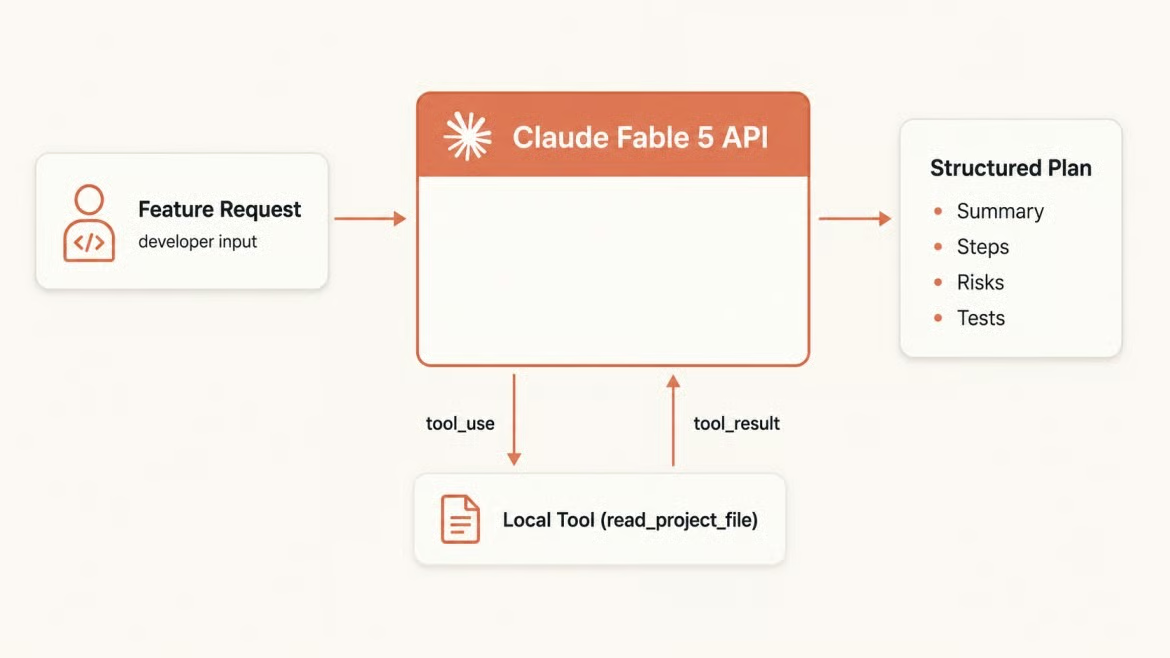
Feature request flows to structured plan. Image by Author.
The main code lives in task_assistant.py for the local script and app.py for the FastAPI endpoint.
To follow along, you will need:
Python 3.9 or newer (the tutorial uses 3.10+ features like built-in type hints in Pydantic models, but the SDK itself supports 3.9+)
An Anthropic API key with access to claude-fable-5
Basic familiarity with environment variables, JSON, and HTTP APIs
A terminal and a code editor
Start by creating a project folder and a virtual environment.
mkdir task-assistant
cd task-assistant
python -m venv .venv
source .venv/bin/activate   # Windows: .venv\Scripts\activate
Install the Anthropic SDK, FastAPI, and a few helpers.
pip install anthropic fastapi uvicorn python-dotenv pydanticCreate a .env file at the project root with your API key. Never commit this file to version control.
ANTHROPIC_API_KEY=sk-ant-...Load it at the top of your script. Anthropic() reads ANTHROPIC_API_KEY from the environment automatically.
from dotenv import load_dotenv
from anthropic import Anthropic

load_dotenv()
client = Anthropic()
Initialize the client once at module level and reuse it across the tutorial.
Before adding project logic, I like to send a minimal request to confirm the setup works. The Messages API takes a model string, a max_tokens cap, and a messages array. max_tokens is required; the SDK raises a TypeError if you omit it.
MODEL = "claude-fable-5"

def get_text(response):
    """Return the first text block, skipping thinking or tool blocks."""
    return next((b.text for b in response.content if b.type == "text"), "")

response = client.messages.create(
    model=MODEL,
    max_tokens=512,
    messages=[{"role": "user", "content": "Reply in one sentence to confirm the API connection is working."}]
)

print(get_text(response))
print(f"Model: {response.model}")
print(f"Input tokens: {response.usage.input_tokens}")
print(f"Output tokens: {response.usage.output_tokens}")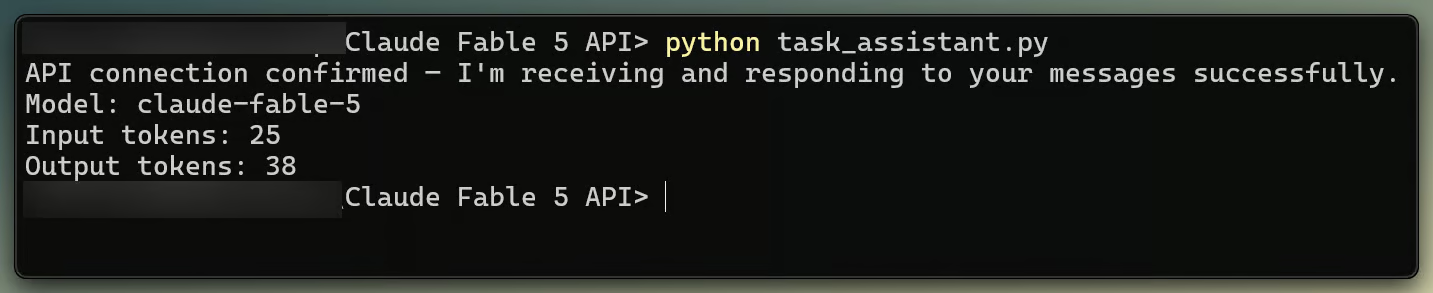
Fable 5 API response and tokens. Image by Author.
response.content is a list of content blocks, not a plain string. Because of the adaptive thinking behavior noted above, the first block is often a thinking block, and content[0].text can raise an AttributeError. The get_text helper filters by block.type == "text" instead.
The usage object gives you input and output token counts after each request. response.model reports which model answered, which matters when fallbacks are configured.
The effort parameter, passed inside output_config, is the control for that reasoning depth.
response = client.messages.create(
    model=MODEL,
    max_tokens=2048,
    output_config={"effort": "high"},  # low | medium | high | xhigh | max
    messages=[{"role": "user", "content": feature_request}]
)
The default is "high". I would start there, then use "low" or "medium" when latency matters more and "xhigh" or "max" for longer problems. Effort changes how many thinking tokens the model generates, not whether it generates them.
The system parameter is a top-level field in the request, separate from the messages array. Whatever you put there applies to every turn, which means it does more work per word than any single turn instruction.
For the Developer Task Assistant, I keep the system prompt narrow: return a concise engineering plan instead of a broad analysis.
SYSTEM_PROMPT = """You are a senior software engineer who reviews feature requests and returns
implementation plans. For every request:
- Write a one sentence technical summary
- List the implementation steps in order
- Name the files or components most likely to change
- Call out at most three risks or edge cases
- Suggest concrete tests
Do not narrate options you won't pursue. Act on what you know; ask only when key details are missing."""
That last instruction matters. Fable 5 can add too much planning for simple requests, so the prompt bounds the output before the response drifts.
Pass the system prompt alongside every call.
response = client.messages.create(
    model=MODEL,
    max_tokens=2048,
    system=SYSTEM_PROMPT,
    messages=[{"role": "user", "content": feature_request}]
)
Assistant turn prefilling is not supported on Fable 5. If you have older Claude code that starts the assistant turn with {"role": "assistant", "content": "{"} to force JSON output, remove it. That pattern returns a 400 on Fable 5, which is an easy trap when porting older code.
Planning a feature means tracking architecture, failure modes, and test strategy in one response. This is a good first workflow because it is small enough to inspect, but not just a toy prompt.
feature = (
    "Add password reset to our Django app. "
    "Users should receive a token via email and land on a form to set a new password."
)

response = client.messages.create(
    model=MODEL,
    max_tokens=2048,
    output_config={"effort": "high"},
    system=SYSTEM_PROMPT,
    messages=[{"role": "user", "content": feature}]
)

print(get_text(response))
A typical response covers token generation, email delivery, form handling, and expiry cleanup in one pass.
Plain text is fine in the terminal. Once the plan needs to become app data, structured output is easier to work with. The Claude API supports structured outputs through client.messages.parse() and a Pydantic model, and it works with claude-fable-5.
Define the expected output shape as a Pydantic model.
from pydantic import BaseModel

class FeaturePlan(BaseModel):
    summary: str
    steps: list[str]
    files: list[str]
    risks: list[str]
    tests: list[str]
Pass the class as output_format. The SDK turns it into a JSON schema, runs constrained decoding on Anthropic's servers, and returns a typed object at response.parsed_output.
response = client.messages.parse(
    model=MODEL,
    max_tokens=2048,
    system=SYSTEM_PROMPT,
    messages=[{"role": "user", "content": feature}],
    output_format=FeaturePlan
)

plan = response.parsed_output
if plan is not None:
    print(f"Summary: {plan.summary}")
    print(f"Steps: {plan.steps}")
Check parsed_output for None before using it. A refusal during streaming or early max_tokens cutoff can leave it empty. This path also avoids the thinking block issue because you read parsed_output instead of reaching into content.
If you need structured output on a model without API support for it, ask for JSON in the prompt and validate it with FeaturePlan.model_validate_json(text), retrying once if it fails. Do not pair structured output with assistant turn prefilling; Fable 5 returns a 400 for that pattern.
That same adaptive thinking behavior can increase the wait before the first token on complex prompts. Streaming prints text chunks as they arrive.
Use the client.messages.stream() context manager. stream.text_stream yields text chunks and skips thinking blocks automatically.
with client.messages.stream(
    model=MODEL,
    max_tokens=2048,
    system=SYSTEM_PROMPT,
    messages=[{"role": "user", "content": feature}]
) as stream:
    for chunk in stream.text_stream:
        print(chunk, end="", flush=True)

final = stream.get_final_message()
print(f"\nInput tokens: {final.usage.input_tokens}")
print(f"Output tokens: {final.usage.output_tokens}")
Call get_final_message() after the with block closes, not inside it. That is where the stop reason and usage counts live.
Streaming and structured output can coexist, but accumulate the full response before you parse it. Partial JSON is not valid JSON.
Tool use lets the model request information instead of relying only on the prompt. I keep the first tool small: read_project_file. The model asks to read a file, your code reads it, and the model uses what it finds.
The tool loop has a fixed shape. Claude returns stop_reason: "tool_use" when it wants to call a tool, you execute the tool and send back a tool_result block, and the loop continues until stop_reason is "end_turn" or "refusal".
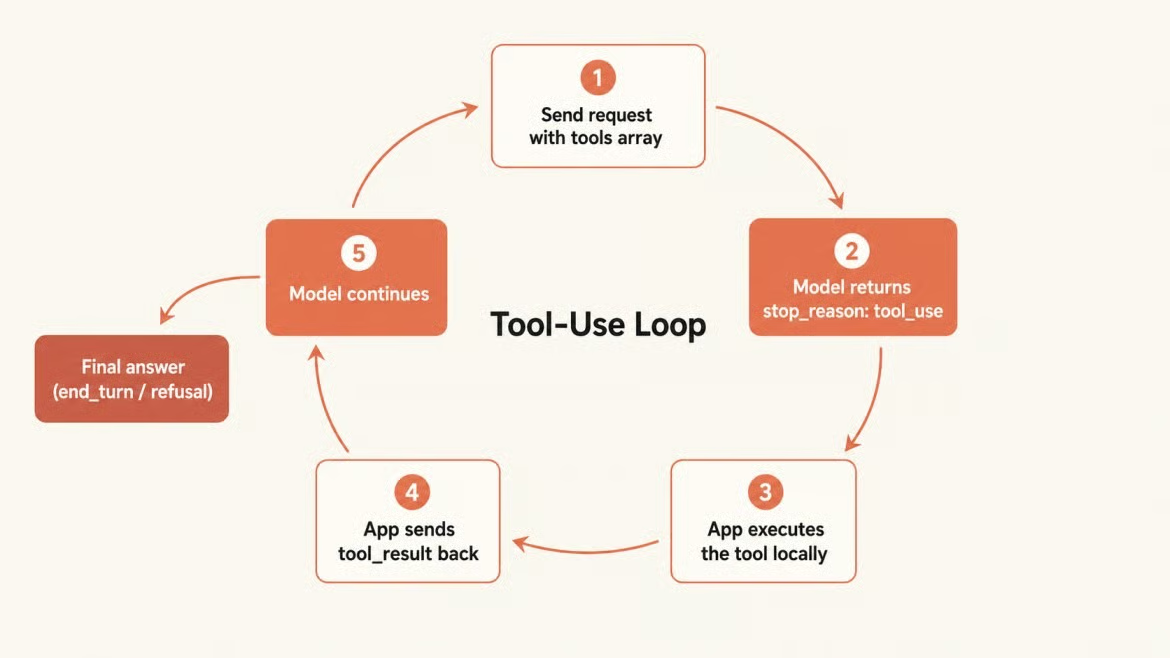
Tool loop from request to answer. Image by Author.
READ_FILE_TOOL = {
    "name": "read_project_file",
    "description": "Read the contents of a file in the project.",
    "input_schema": {
        "type": "object",
        "properties": {
            "path": {"type": "string", "description": "Relative path to the file"}
        },
        "required": ["path"]
    }
}

messages = [{"role": "user", "content": feature}]

while True:
    response = client.messages.create(
        model=MODEL,
        max_tokens=2048,
        system=SYSTEM_PROMPT,
        tools=[READ_FILE_TOOL],
        messages=messages
    )

    if response.stop_reason in ("end_turn", "refusal"):
        break

    if response.stop_reason == "tool_use":
        tool_block = next(b for b in response.content if b.type == "tool_use")

        # Execute the tool locally
        try:
            with open(tool_block.input["path"]) as f:
                result = f.read()[:2000]
        except FileNotFoundError:
            result = f"File not found: {tool_block.input['path']}"

        messages.append({"role": "assistant", "content": response.content})
        messages.append({
            "role": "user",
            "content": [{
                "type": "tool_result",
                "tool_use_id": tool_block.id,
                "content": result
            }]
        })

# Read the final answer
text_block = next((b for b in response.content if b.type == "text"), None)
print(text_block.text if text_block else "No text in final response")
The model never executes this code. It emits a structured request with a tool name and JSON inputs; your application runs the file read. Do not append conversational text inside the same user turn as a tool_result block, or the model may stop instead of continuing the plan.
Before turning this into an app, check the cost shape. Fable 5 costs $10 per million input tokens and $50 per million output tokens. Output is usually the larger line item: a 2,000-token plan costs $0.10 in output alone.
Here is the price table across the Anthropic family.
|
Model |
Input (per MTok) |
Output (per MTok) |
Notes |
|
Haiku 4.5 |
$1 |
$5 |
Fastest, near-frontier quality |
|
Sonnet 4.6 |
$3 |
$15 |
Strong balance of speed and depth |
|
Opus 4.8 |
$5 |
$25 |
Top Opus tier |
|
Fable 5 |
$10 |
$50 |
Most capable widely released model |
Prompt caching can reduce repeated system prompt cost. Once the system prompt block is cached, repeated reads cost $1 per million tokens instead of $10. The minimum cacheable block is 512 tokens on the Claude API.
# Count tokens before sending an expensive request
count = client.messages.count_tokens(
    model=MODEL,
    system=SYSTEM_PROMPT,
    messages=[{"role": "user", "content": feature}]
)
print(f"Estimated input tokens: {count.input_tokens}")

# Calculate actual cost after each request
INPUT_PRICE = 10.0 / 1_000_000
OUTPUT_PRICE = 50.0 / 1_000_000

response = client.messages.create(...)
cost = (
    response.usage.input_tokens * INPUT_PRICE +
    response.usage.output_tokens * OUTPUT_PRICE
)
print(f"Total cost: ${cost:.6f}")
count_tokens does not cost money and does not count against your output rate limit. Use it to gate expensive requests. For jobs that do not need interaction, the Batch API cuts both input and output prices in half.
Fable 5 uses the tokenizer introduced with Opus 4.7, which can produce roughly 30% more tokens on the same text than older Claude models. Factor that into migrations from Claude 4.6.
Fable 5 runs safety classifiers alongside generation. When one triggers, the API returns a successful HTTP 200, not an error, and the only signal is stop_reason: "refusal". Error handling that only catches exceptions will miss refusals entirely, and your app will silently return nothing.
Always check the stop reason.
response = client.messages.create(
    model=MODEL,
    max_tokens=2048,
    system=SYSTEM_PROMPT,
    messages=[{"role": "user", "content": user_input}]
)

if response.stop_reason == "refusal":
    category = (
        response.stop_details.category
        if response.stop_details else "policy"
    )
    print(f"Request declined ({category}). Please rephrase and try again.")
else:
    print(get_text(response))
In my tests, Fable 5 often turned down borderline requests in plain text, returning a normal end_turn. The hard classifier refusal, with stop_reason: "refusal" and empty content, is rarer. The check above handles that path so your app does not silently return nothing.
stop_details.category can be "cyber", "bio", or "reasoning_extraction". The last one fires when a prompt tries to extract the model's internal chain of thought. For developer tools that inspect network security scanners or biological data pipelines, you may hit classifier false positives. Rephrasing to make the task clearly defensive often resolves it.
For deployed systems, you can configure an automatic fallback to Opus 4.8 with the fallbacks beta that runs on the server in the Claude API and Claude Platform on AWS. That is not the same as Amazon Bedrock: Bedrock, Vertex AI, and Foundry need fallback logic in your application.
response = client.beta.messages.create(
    model=MODEL,
    max_tokens=2048,
    system=SYSTEM_PROMPT,
    messages=[{"role": "user", "content": user_input}],
    fallbacks=[{"model": "claude-opus-4-8"}],
    betas=["server-side-fallback-2026-06-01"]
)
A refused request that generates no output is not billed. A mid-stream refusal bills for whatever was generated before the classifier fired.
If your app only handles text, you can skip this section. This part is separate from the planning flow, but it uses the same Messages API shape. Fable 5 accepts image inputs as base64-encoded blocks or URLs. One use case is UI screenshot review against a feature requirement.
import base64

with open("login_form.png", "rb") as f:
    img_data = base64.standard_b64encode(f.read()).decode("utf-8")

response = client.messages.create(
    model=MODEL,
    max_tokens=1024,
    messages=[{
        "role": "user",
        "content": [
            {
                "type": "image",
                "source": {
                    "type": "base64",
                    "media_type": "image/png",
                    "data": img_data
                }
            },
            {
                "type": "text",
                "text": "Review this UI against the requirement: add a 'Forgot password' link below the login button. Is it present? If not, describe what needs to change."
            }
        ]
    }]
)
print(get_text(response))
A full size image costs roughly 4,784 input tokens regardless of what it shows, so resize or compress before sending if you do not need full resolution. Fable 5 processes images up to 2,576 px wide and scales down anything larger. Supported formats are JPEG, PNG, GIF, and WebP.
At this point, the local script has the full workflow. Wrap the assistant in a FastAPI route so a frontend or service can call it. Use AsyncAnthropic inside async routes, since the sync client blocks the event loop. Initialize it once at startup, not per request.
from contextlib import asynccontextmanager
from fastapi import FastAPI, HTTPException
from pydantic import BaseModel
from anthropic import AsyncAnthropic

client_instance: AsyncAnthropic | None = None

@asynccontextmanager
async def lifespan(app: FastAPI):
    global client_instance
    client_instance = AsyncAnthropic()
    yield
    await client_instance.close()

app = FastAPI(lifespan=lifespan)

class PlanRequest(BaseModel):
    feature_request: str

@app.post("/plan")
async def create_plan(body: PlanRequest):
    response = await client_instance.messages.create(
        model="claude-fable-5",
        max_tokens=2048,
        system=SYSTEM_PROMPT,
        messages=[{"role": "user", "content": body.feature_request}]
    )

    if response.stop_reason == "refusal":
        raise HTTPException(status_code=400, detail="Request declined by safety classifier.")

    return {
        "plan": get_text(response),
        "input_tokens": response.usage.input_tokens,
        "output_tokens": response.usage.output_tokens
    }
Run it with uvicorn app:app --reload and test the /plan endpoint through the FastAPI docs at http://localhost:8000/docs.
Learn with DataCamp
course
course
course
cheat-sheet
DataCamp Team
5 min
Tutorial
Khalid Abdelaty
15 min
Tutorial
Abid Ali Awan
12 min
Tutorial
Bexruz (Bex) Tuychiev
11 min
Tutorial
Aashi Dutt
12 min
code-along
Aimée Gott