In this tutorial, we'll walk through a small Java module that exposes custom tools, stores notes as JSON in Oracle AI Database, and retrieves them with full-text search.
If you're building AI agents, short-term chat history is usually not enough. Real assistants often need a small amount of durable memory so they can store important facts and retrieve them later.
This tutorial shows how to build that pattern with a minimal Java module. You'll use LangChain4j tools, a simple agent interface, and Oracle AI Database as the backing store. Instead of adding embeddings or a full retrieval pipeline, this sample keeps the design intentionally small: notes are saved as JSON documents and searched with Oracle Text.
By the end, you will understand how the module wires together:
- A
LangChain4j agent interface
- Two custom
@Tool methods
- A
JDBC repository for durable note storage
- A console application that ties the whole flow together
LangChain4j lets you expose ordinary Java methods as tools that a model can call when it needs external capabilities. In this module, those capabilities are memory-oriented:
searchMemories(String question) finds relevant saved notes-
storeMemory(String note) writes a new durable note
That is different from standard chat history that stores chat messages in an in-memory context window.
Persistent tool-based memory decides when it needs to search or store notes, and the underlying data lives in a database.
This pattern is useful when you want an agent to remember facts like incident notes, runbook reminders, or follow-up actions without building a larger retrieval system too early.
Persistent, database-backed memory can also be accessed concurrently by one or more agents without data contention.
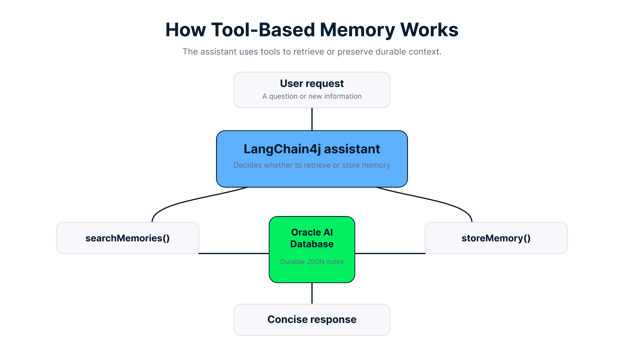
Tool-based memory lets the assistant retrieve existing notes or store new notes in a durable database.
Key Features of the LangChain4j and Oracle AI DB Module
This sample is small, but it demonstrates several important agent design ideas.
The MemoryTools class exposes two methods annotated with @Tool. That means LangChain4j can make them available to the agent without extra wrapper code.
@Tool(
"Search saved memory notes when earlier context might help answer the user."
)
public String searchMemories(String question) {
List<MemoryRepository.Note> matches = repository.search(question, 3);
if (matches.isEmpty()) {
return "No saved memory matched that question.";
}
StringBuilder builder = new StringBuilder();
for (int i = 0; i < matches.size(); i++) {
MemoryRepository.Note note = matches.get(i);
builder.append(i + 1)
.append(". [M")
.append(note.id())
.append("] ")
.append(note.text());
if (i + 1 < matches.size()) {
builder.append('\n');
}
}
return builder.toString();
}
This method does two useful things. It delegates retrieval to the repository, and it formats the results in a model-friendly way such as [M12] some note text.
That makes the tool output easy for the agent to cite in its final response.
Durable memory in Oracle AI Database
Notes are stored in an agent_memories table as native JSON documents. Each row contains:
- An identity column
id
- A JSON column named
memory_doc
- A
created_at timestamp
The module initializes the schema automatically:
CREATE TABLE IF NOT EXISTS agent_memories (
id NUMBER GENERATED ALWAYS AS IDENTITY PRIMARY KEY,
memory_doc JSON NOT NULL,
created_at TIMESTAMP DEFAULT CURRENT_TIMESTAMP NOT NULL
)
This keeps the storage model simple while still giving you structured data and database-managed durability.
Keyword search with Oracle Text
The repository does not generate embeddings. Instead, it extracts keywords from the user’s question, removes stop words, builds an Oracle Text expression with ACCUM, and searches the JSON document content with json_textcontains.
That is especially helpful for identifiers and operational terms like CHG2145, where exact or near-exact token matching often matters more than semantic similarity.
A minimal console workflow
The Application class creates the repository, initializes the schema, seeds a few notes, constructs the chat model, and starts a terminal loop. That makes the example easy to run and easy to adapt into another service later.
Getting Started With Your LangChain4j Memory Project
Before running the module, make sure your local environment matches the project’s requirements.
Prerequisites
You need:
- Java 21 or later
- Maven 3.9 or later
- Oracle AI Database Free running locally or remotely
- An
OPENAI_API_KEY environment variable
The Maven project depends on:
langchain4jlangchain4j-open-aiojdbc11- JUnit and
Testcontainers for integration tests
Run the sample
Set your OpenAI API key first:
export OPENAI_API_KEY=<your key>
Then run the app from the project directory:
mvn compile exec:java \
-Dexec.args="jdbc:oracle:thin:@localhost:1521/freepdb1 testuser testpwd"
The application expects exactly three arguments:
1. JDBC URL
2. Database username
3. Database password
If those are missing, Application.main() throws an IllegalArgumentException. If OPENAI_API_KEY is missing, it throws an IllegalStateException.
What happens on startup
When the app starts, it:
1. Creates a MemoryRepository
2. Initializes the database schema
3. Seeds three sample notes if the table is empty
4. Builds an OpenAiChatModel
5. Wires the model and tools into AiServices
6. Starts a CLI loop that reads user input until you type exit
That means you can try memory retrieval immediately without manually inserting rows first.
How to Build a Memory-Enabled Java Agent With LangChain4j
Now let’s walk through the module in the same order the application uses it.
Define the agent interface
LangChain4j uses a Java interface to describe the agent contract. In this project, that interface is MemoryAssistant.
public interface MemoryAssistant {
@SystemMessage("""
You are a simple assistant with access to durable memory notes.
Use searchMemories when earlier notes might help answer the user.
If the user explicitly asks you to remember something for later, call storeMemory.
Keep answers concise.
""")
@UserMessage("{{message}}")
String chat(@V("message") String message);
}
The important part is the system message. It tells the model when to use each tool:
- Search when earlier notes might help
- Store when the user explicitly asks the assistant to remember something
That is a good example of lightweight tool policy. The prompt is short, but it is specific enough to guide tool selection.
The agent does not talk to the repository directly. Instead, it calls the MemoryTools layer.
Here is the storage method:
@Tool(
"Store a new memory note when the user asks you to remember something "
+ "important for later."
)
public String storeMemory(String note) {
long id = repository.store(note);
return "Stored memory M" + id + ".";
}
This is intentionally compact. A user might say:
Remember that the next shift should verify the checkout retry queue stays below 50.
If the model follows the system prompt correctly, it calls storeMemory(), the repository persists the note, and the tool returns something like:
Later, the user can ask:
What should the next shift verify?
At that point, the agent can call searchMemories() and use the returned note to answer.
Create the repository layer
The repository is where most of the durable memory logic lives. It is still plain JDBC, which makes the design easy to inspect.
At a high level, MemoryRepository is responsible for:
- Schema creation
- Optional seeding
- Note insertion
- Keyword extraction
Oracle Text search- Fallback retrieval of recent notes when there are no useful keywords
The insertion path normalizes and validates note text before storing it:
public long store(String note) {
String normalized = normalizeNote(note);
Instant createdAt = Instant.now();
try (
Connection connection = dataSource.getConnection();
PreparedStatement statement = connection.prepareStatement(
INSERT_SQL,
new String[]{"id"})
) {
statement.setObject(
1,
toJsonDocument(normalized, createdAt),
OracleTypes.JSON
);
statement.setTimestamp(2, Timestamp.from(createdAt));
statement.executeUpdate();
try (ResultSet keys = statement.getGeneratedKeys()) {
if (keys.next()) {
return keys.getLong(1);
}
}
throw new IllegalStateException(
"No generated id returned for stored memory."
);
} catch (SQLException e) {
throw new RuntimeException("Failed to store memory", e);
}
}
The JSON document itself looks like this:
{
 	"noteText": "Runbook note: use section 3 to validate checkout recovery after a rollback.",
 	"createdAt": "2026-04-27T17:00:00Z"
 }
This structure is simple, but it is enough to support both persistence and text search.
Understand the search strategy
The most interesting part of the repository is the search() method:
public List<Note> search(String question, int maxResults) {
List<String> keywords = extractKeywords(question);
if (keywords.isEmpty()) {
return findRecent(maxResults);
}
return textSearch(buildTextExpression(keywords), maxResults);
}
This method follows a practical flow:
1. Tokenize the user question
2. Lowercase the tokens
3. Remove stop words such as the, what, and remember
4. Keep meaningful short tokens when they include digits
5. Build an Oracle Text expression with ACCUM
6. Search the JSON data with json_textcontains
That “digits are allowed” detail is important. It helps terms like CHG2145 survive keyword extraction, which is exactly the kind of identifier-heavy lookup many operational agents need.
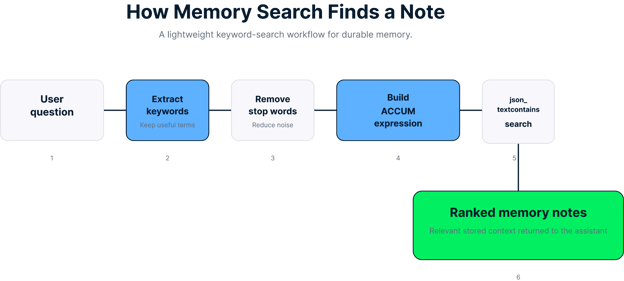
The search workflow converts a question into a keyword expression and returns ranked memory notes.
The SQL search query is:
SELECT id,
JSON_VALUE(
memory_doc,
'$.noteText' RETURNING VARCHAR2(2000 CHAR)
) AS note_text,
created_at,
SCORE(1) AS text_score
FROM agent_memories
WHERE JSON_TEXTCONTAINS(memory_doc, '$', ?, 1)
ORDER BY SCORE(1) DESC, id DESC
FETCH FIRST ? ROWS ONLY
If the question does not yield useful keywords, the repository falls back to recent notes. That gives the agent a reasonable default instead of returning an empty search too early.
Wire everything together in the application
The application ties the pieces together with AiServices.builder():
ChatModel chatModel = OpenAiChatModel.builder()
.apiKey(apiKey)
.modelName("gpt-5-nano")
.build();
MemoryAssistant assistant = AiServices.builder(MemoryAssistant.class)
.chatModel(chatModel)
.tools(new MemoryTools(repository))
.build();
This is the full pattern in one place:
- Build a chat model
- Expose tool methods
- Bind those tools to an interface-driven agent
After that, the console loop simply passes user input into assistant.chat(input).
Try the demo prompts
The application prints a few starter prompts:
What do we know about CHG2145?
 Remember that the next shift should verify the checkout retry queue stays below 50.
 What should the next shift verify?
These prompts are useful because they exercise the full memory lifecycle:
- Retrieve an existing seeded note
- Store a new note
- Retrieve the newly stored note later
Tips and Troubleshooting
This module is intentionally narrow, which is a strength when you are learning the pattern. Still, there are a few practical details to keep in mind.
The system prompt tells the model to store memory only when the user explicitly asks for it. That helps reduce accidental writes. If you broaden the prompt carelessly, the model may start persisting low-value notes.
Treat this as durable note memory, not full knowledge retrieval
This repository is best for short operational notes, reminders, and identifiers. It is not yet a full retrieval-augmented generation system with embeddings, chunking, hybrid search, or ranking.
Use Oracle Text when identifiers matter
For strings like incident IDs, ticket numbers, and change request references, keyword-oriented retrieval is often a better starting point than semantic search. This sample reflects that tradeoff clearly.
Validate your database and Docker setup separately
The project’s tests are integration tests powered by Testcontainers. If Docker is not available, mvn test will fail before the repository logic runs. That is an environment issue, not necessarily an application bug.
Run the tests with:
The tests cover two important behaviors:
- Notes can be stored and retrieved through the repository
- Tool output includes memory IDs and relevant note text
Start simple before adding more memory features
A common mistake in agent projects is adding vector storage, conversation history, summarization, and retrieval policies all at once. This sample shows a better progression:
1. Define a concrete memory use case
2. Expose explicit tools
3. Back those tools with durable storage
4. Verify the retrieval behavior
5. Only then consider more advanced memory patterns
Keep Learning
If you want to keep building agent skills after this tutorial, these DataCamp resources are a good next step:
Conclusion
You have now seen how to build a small but useful memory-enabled agent with LangChain4j, Java, and Oracle AI Database. The core idea is simple: give the model explicit memory tools, store notes durably as JSON, and retrieve them with a straightforward search strategy.
This design is a strong foundation because it is easy to understand and easy to extend. Once this pattern is working, you can add better filtering, richer note schemas, user scoping, or even vector search if the use case demands it.
If you want to keep learning about agent design, the next good step is to compare this tool-based memory pattern with broader agent frameworks and orchestration workflows. In particular, it is worth exploring how explicit tools, retrieval patterns, and multi-step agents fit together in larger AI systems.
%22%3E%3Cpath%20d%3D%22m-369%200h408v79h-408z%22%20fill%3D%22%237933ff%22%2F%3E%3Cpath%20d%3D%22m-148%200h306v45h-306z%22%20fill%3D%22%23974dff%22%2F%3E%3C%2Fg%3E%3C%2Fsvg%3E)
%22%2F%3E%3C%2FclipPath%3E%3Cg%20clip-path%3D%22url(%23a)%22%3E%3Cpath%20d%3D%22m76%200h484v36h-484z%22%20fill%3D%22%23974dff%22%2F%3E%3Cpath%20d%3D%22m0%200h384v24h-384z%22%20fill%3D%22%2306bdfc%22%20transform%3D%22matrix(1%200%200%20-1%200%2060)%22%2F%3E%3C%2Fg%3E%3C%2Fsvg%3E)

%22%3E%0A%20%20%20%20%20%20%20%20%3Crect%20fill%3D%22%23EFEBE4%22%20height%3D%22180%22%20width%3D%22336%22%20%2F%3E%0A%20%20%20%20%20%20%20%20%3Crect%0A%20%20%20%20%20%20%20%20%20%20fill%3D%22%23DD3400%22%0A%20%20%20%20%20%20%20%20%20%20height%3D%22106.6%22%0A%20%20%20%20%20%20%20%20%20%20transform%3D%22rotate(-30%20-208.588%20220.18)%22%0A%20%20%20%20%20%20%20%20%20%20width%3D%22456.125%22%0A%20%20%20%20%20%20%20%20%20%20x%3D%22-208.588%22%0A%20%20%20%20%20%20%20%20%20%20y%3D%22220.18%22%0A%20%20%20%20%20%20%20%20%2F%3E%0A%20%20%20%20%20%20%20%20%3Crect%0A%20%20%20%20%20%20%20%20%20%20fill%3D%22%23FFEC3C%22%0A%20%20%20%20%20%20%20%20%20%20height%3D%2235.875%22%0A%20%20%20%20%20%20%20%20%20%20transform%3D%22rotate(-30%20-208.588%20220.18)%22%0A%20%20%20%20%20%20%20%20%20%20width%3D%22347.576%22%0A%20%20%20%20%20%20%20%20%20%20x%3D%22-208.588%22%0A%20%20%20%20%20%20%20%20%20%20y%3D%22220.18%22%0A%20%20%20%20%20%20%20%20%2F%3E%0A%20%20%20%20%20%20%20%20%3Crect%0A%20%20%20%20%20%20%20%20%20%20fill%3D%22%23FF931E%22%0A%20%20%20%20%20%20%20%20%20%20height%3D%2235.875%22%0A%20%20%20%20%20%20%20%20%20%20transform%3D%22rotate(-30%20-226.525%20189.111)%22%0A%20%20%20%20%20%20%20%20%20%20width%3D%22347.576%22%0A%20%20%20%20%20%20%20%20%20%20x%3D%22-226.525%22%0A%20%20%20%20%20%20%20%20%20%20y%3D%22189.111%22%0A%20%20%20%20%20%20%20%20%2F%3E%0A%20%20%20%20%20%20%20%20%3Crect%0A%20%20%20%20%20%20%20%20%20%20fill%3D%22%23DD3400%22%0A%20%20%20%20%20%20%20%20%20%20height%3D%22106.6%22%0A%20%20%20%20%20%20%20%20%20%20transform%3D%22rotate(-30%2085.5879%20256.055)%22%0A%20%20%20%20%20%20%20%20%20%20width%3D%22456.125%22%0A%20%20%20%20%20%20%20%20%20%20x%3D%2285.5879%22%0A%20%20%20%20%20%20%20%20%20%20y%3D%22256.055%22%0A%20%20%20%20%20%20%20%20%2F%3E%0A%20%20%20%20%20%20%20%20%3Crect%0A%20%20%20%20%20%20%20%20%20%20fill%3D%22%23FFEC3C%22%0A%20%20%20%20%20%20%20%20%20%20height%3D%2235.875%22%0A%20%20%20%20%20%20%20%20%20%20transform%3D%22rotate(-30%2085.5879%20256.055)%22%0A%20%20%20%20%20%20%20%20%20%20width%3D%22184.5%22%0A%20%20%20%20%20%20%20%20%20%20x%3D%2285.5879%22%0A%20%20%20%20%20%20%20%20%20%20y%3D%22256.055%22%0A%20%20%20%20%20%20%20%20%2F%3E%0A%20%20%20%20%20%20%20%20%3Crect%0A%20%20%20%20%20%20%20%20%20%20fill%3D%22%23FF931E%22%0A%20%20%20%20%20%20%20%20%20%20height%3D%2235.875%22%0A%20%20%20%20%20%20%20%20%20%20transform%3D%22rotate(-30%20227.432%20132.736)%22%0A%20%20%20%20%20%20%20%20%20%20width%3D%22271.625%22%0A%20%20%20%20%20%20%20%20%20%20x%3D%22227.432%22%0A%20%20%20%20%20%20%20%20%20%20y%3D%22132.736%22%0A%20%20%20%20%20%20%20%20%2F%3E%0A%20%20%20%20%20%20%3C%2Fg%3E%0A%20%20%20%20%20%20%3Cdefs%3E%0A%20%20%20%20%20%20%20%20%3CclipPath%20id%3D%22clip%22%3E%0A%20%20%20%20%20%20%20%20%20%20%3Crect%20fill%3D%22white%22%20height%3D%22180%22%20width%3D%22336%22%20%2F%3E%0A%20%20%20%20%20%20%20%20%3C%2FclipPath%3E%0A%20%20%20%20%20%20%3C%2Fdefs%3E%0A%20%20%20%20%3C%2Fsvg%3E)

%22%3E%0A%20%20%20%20%20%20%20%20%3Crect%20fill%3D%22%23EFEBE4%22%20height%3D%22180%22%20width%3D%22336%22%20%2F%3E%0A%20%20%20%20%20%20%20%20%3Crect%0A%20%20%20%20%20%20%20%20%20%20fill%3D%22%23FF931E%22%0A%20%20%20%20%20%20%20%20%20%20height%3D%22106.6%22%0A%20%20%20%20%20%20%20%20%20%20transform%3D%22rotate(-30%20-208.588%20220.18)%22%0A%20%20%20%20%20%20%20%20%20%20width%3D%22456.125%22%0A%20%20%20%20%20%20%20%20%20%20x%3D%22-208.588%22%0A%20%20%20%20%20%20%20%20%20%20y%3D%22220.18%22%0A%20%20%20%20%20%20%20%20%2F%3E%0A%20%20%20%20%20%20%20%20%3Crect%0A%20%20%20%20%20%20%20%20%20%20fill%3D%22%23F7F3EB%22%0A%20%20%20%20%20%20%20%20%20%20height%3D%2235.875%22%0A%20%20%20%20%20%20%20%20%20%20transform%3D%22rotate(-30%20-208.588%20220.18)%22%0A%20%20%20%20%20%20%20%20%20%20width%3D%22347.576%22%0A%20%20%20%20%20%20%20%20%20%20x%3D%22-208.588%22%0A%20%20%20%20%20%20%20%20%20%20y%3D%22220.18%22%0A%20%20%20%20%20%20%20%20%2F%3E%0A%20%20%20%20%20%20%20%20%3Crect%0A%20%20%20%20%20%20%20%20%20%20fill%3D%22%23000820%22%0A%20%20%20%20%20%20%20%20%20%20height%3D%2235.875%22%0A%20%20%20%20%20%20%20%20%20%20transform%3D%22rotate(-30%20-226.525%20189.111)%22%0A%20%20%20%20%20%20%20%20%20%20width%3D%22347.576%22%0A%20%20%20%20%20%20%20%20%20%20x%3D%22-226.525%22%0A%20%20%20%20%20%20%20%20%20%20y%3D%22189.111%22%0A%20%20%20%20%20%20%20%20%2F%3E%0A%20%20%20%20%20%20%20%20%3Crect%0A%20%20%20%20%20%20%20%20%20%20fill%3D%22%23000820%22%0A%20%20%20%20%20%20%20%20%20%20height%3D%22106.6%22%0A%20%20%20%20%20%20%20%20%20%20transform%3D%22rotate(-30%2085.5879%20256.055)%22%0A%20%20%20%20%20%20%20%20%20%20width%3D%22456.125%22%0A%20%20%20%20%20%20%20%20%20%20x%3D%2285.5879%22%0A%20%20%20%20%20%20%20%20%20%20y%3D%22256.055%22%0A%20%20%20%20%20%20%20%20%2F%3E%0A%20%20%20%20%20%20%20%20%3Crect%0A%20%20%20%20%20%20%20%20%20%20fill%3D%22%23D87300%22%0A%20%20%20%20%20%20%20%20%20%20height%3D%2235.875%22%0A%20%20%20%20%20%20%20%20%20%20transform%3D%22rotate(-30%2085.5879%20256.055)%22%0A%20%20%20%20%20%20%20%20%20%20width%3D%22184.5%22%0A%20%20%20%20%20%20%20%20%20%20x%3D%2285.5879%22%0A%20%20%20%20%20%20%20%20%20%20y%3D%22256.055%22%0A%20%20%20%20%20%20%20%20%2F%3E%0A%20%20%20%20%20%20%20%20%3Crect%0A%20%20%20%20%20%20%20%20%20%20fill%3D%22%23FF931E%22%0A%20%20%20%20%20%20%20%20%20%20height%3D%2235.875%22%0A%20%20%20%20%20%20%20%20%20%20transform%3D%22rotate(-30%20227.432%20132.736)%22%0A%20%20%20%20%20%20%20%20%20%20width%3D%22271.625%22%0A%20%20%20%20%20%20%20%20%20%20x%3D%22227.432%22%0A%20%20%20%20%20%20%20%20%20%20y%3D%22132.736%22%0A%20%20%20%20%20%20%20%20%2F%3E%0A%20%20%20%20%20%20%3C%2Fg%3E%0A%20%20%20%20%20%20%3Cdefs%3E%0A%20%20%20%20%20%20%20%20%3CclipPath%20id%3D%22clip%22%3E%0A%20%20%20%20%20%20%20%20%20%20%3Crect%20fill%3D%22white%22%20height%3D%22180%22%20width%3D%22336%22%20%2F%3E%0A%20%20%20%20%20%20%20%20%3C%2FclipPath%3E%0A%20%20%20%20%20%20%3C%2Fdefs%3E%0A%20%20%20%20%3C%2Fsvg%3E)

%22%3E%0A%20%20%20%20%20%20%20%20%3Crect%20fill%3D%22%2305192D%22%20height%3D%22180%22%20width%3D%22336%22%20%2F%3E%0A%20%20%20%20%20%20%20%20%3Crect%0A%20%20%20%20%20%20%20%20%20%20fill%3D%22%23B08EFF%22%0A%20%20%20%20%20%20%20%20%20%20height%3D%22106.6%22%0A%20%20%20%20%20%20%20%20%20%20transform%3D%22rotate(-30%20-208.588%20220.18)%22%0A%20%20%20%20%20%20%20%20%20%20width%3D%22456.125%22%0A%20%20%20%20%20%20%20%20%20%20x%3D%22-208.588%22%0A%20%20%20%20%20%20%20%20%20%20y%3D%22220.18%22%0A%20%20%20%20%20%20%20%20%2F%3E%0A%20%20%20%20%20%20%20%20%3Crect%0A%20%20%20%20%20%20%20%20%20%20fill%3D%22%237933FF%22%0A%20%20%20%20%20%20%20%20%20%20height%3D%2235.875%22%0A%20%20%20%20%20%20%20%20%20%20transform%3D%22rotate(-30%20-208.588%20220.18)%22%0A%20%20%20%20%20%20%20%20%20%20width%3D%22347.576%22%0A%20%20%20%20%20%20%20%20%20%20x%3D%22-208.588%22%0A%20%20%20%20%20%20%20%20%20%20y%3D%22220.18%22%0A%20%20%20%20%20%20%20%20%2F%3E%0A%20%20%20%20%20%20%20%20%3Crect%0A%20%20%20%20%20%20%20%20%20%20fill%3D%22%2372E5FE%22%0A%20%20%20%20%20%20%20%20%20%20height%3D%2235.875%22%0A%20%20%20%20%20%20%20%20%20%20transform%3D%22rotate(-30%20-226.525%20189.111)%22%0A%20%20%20%20%20%20%20%20%20%20width%3D%22347.576%22%0A%20%20%20%20%20%20%20%20%20%20x%3D%22-226.525%22%0A%20%20%20%20%20%20%20%20%20%20y%3D%22189.111%22%0A%20%20%20%20%20%20%20%20%2F%3E%0A%20%20%20%20%20%20%20%20%3Crect%0A%20%20%20%20%20%20%20%20%20%20fill%3D%22%235EB1FF%22%0A%20%20%20%20%20%20%20%20%20%20height%3D%22106.6%22%0A%20%20%20%20%20%20%20%20%20%20transform%3D%22rotate(-30%2085.5879%20256.055)%22%0A%20%20%20%20%20%20%20%20%20%20width%3D%22456.125%22%0A%20%20%20%20%20%20%20%20%20%20x%3D%2285.5879%22%0A%20%20%20%20%20%20%20%20%20%20y%3D%22256.055%22%0A%20%20%20%20%20%20%20%20%2F%3E%0A%20%20%20%20%20%20%20%20%3Crect%0A%20%20%20%20%20%20%20%20%20%20fill%3D%22%23B08EFF%22%0A%20%20%20%20%20%20%20%20%20%20height%3D%2235.875%22%0A%20%20%20%20%20%20%20%20%20%20transform%3D%22rotate(-30%2085.5879%20256.055)%22%0A%20%20%20%20%20%20%20%20%20%20width%3D%22184.5%22%0A%20%20%20%20%20%20%20%20%20%20x%3D%2285.5879%22%0A%20%20%20%20%20%20%20%20%20%20y%3D%22256.055%22%0A%20%20%20%20%20%20%20%20%2F%3E%0A%20%20%20%20%20%20%20%20%3Crect%0A%20%20%20%20%20%20%20%20%20%20fill%3D%22%2372E5FE%22%0A%20%20%20%20%20%20%20%20%20%20height%3D%2235.875%22%0A%20%20%20%20%20%20%20%20%20%20transform%3D%22rotate(-30%20227.432%20132.736)%22%0A%20%20%20%20%20%20%20%20%20%20width%3D%22271.625%22%0A%20%20%20%20%20%20%20%20%20%20x%3D%22227.432%22%0A%20%20%20%20%20%20%20%20%20%20y%3D%22132.736%22%0A%20%20%20%20%20%20%20%20%2F%3E%0A%20%20%20%20%20%20%3C%2Fg%3E%0A%20%20%20%20%20%20%3Cdefs%3E%0A%20%20%20%20%20%20%20%20%3CclipPath%20id%3D%22clip%22%3E%0A%20%20%20%20%20%20%20%20%20%20%3Crect%20fill%3D%22white%22%20height%3D%22180%22%20width%3D%22336%22%20%2F%3E%0A%20%20%20%20%20%20%20%20%3C%2FclipPath%3E%0A%20%20%20%20%20%20%3C%2Fdefs%3E%0A%20%20%20%20%3C%2Fsvg%3E)



%22%3E%0A%20%20%20%20%20%20%20%20%3Crect%20fill%3D%22%2372E5FE%22%20height%3D%22180%22%20width%3D%22336%22%20%2F%3E%0A%20%20%20%20%20%20%20%20%3Crect%0A%20%20%20%20%20%20%20%20%20%20fill%3D%22%237933FF%22%0A%20%20%20%20%20%20%20%20%20%20height%3D%22106.6%22%0A%20%20%20%20%20%20%20%20%20%20transform%3D%22rotate(-30%20-208.588%20220.18)%22%0A%20%20%20%20%20%20%20%20%20%20width%3D%22456.125%22%0A%20%20%20%20%20%20%20%20%20%20x%3D%22-208.588%22%0A%20%20%20%20%20%20%20%20%20%20y%3D%22220.18%22%0A%20%20%20%20%20%20%20%20%2F%3E%0A%20%20%20%20%20%20%20%20%3Crect%0A%20%20%20%20%20%20%20%20%20%20fill%3D%22%235EB1FF%22%0A%20%20%20%20%20%20%20%20%20%20height%3D%2235.875%22%0A%20%20%20%20%20%20%20%20%20%20transform%3D%22rotate(-30%20-208.588%20220.18)%22%0A%20%20%20%20%20%20%20%20%20%20width%3D%22347.576%22%0A%20%20%20%20%20%20%20%20%20%20x%3D%22-208.588%22%0A%20%20%20%20%20%20%20%20%20%20y%3D%22220.18%22%0A%20%20%20%20%20%20%20%20%2F%3E%0A%20%20%20%20%20%20%20%20%3Crect%0A%20%20%20%20%20%20%20%20%20%20fill%3D%22%23000820%22%0A%20%20%20%20%20%20%20%20%20%20height%3D%2235.875%22%0A%20%20%20%20%20%20%20%20%20%20transform%3D%22rotate(-30%20-226.525%20189.111)%22%0A%20%20%20%20%20%20%20%20%20%20width%3D%22347.576%22%0A%20%20%20%20%20%20%20%20%20%20x%3D%22-226.525%22%0A%20%20%20%20%20%20%20%20%20%20y%3D%22189.111%22%0A%20%20%20%20%20%20%20%20%2F%3E%0A%20%20%20%20%20%20%20%20%3Crect%0A%20%20%20%20%20%20%20%20%20%20fill%3D%22%237933FF%22%0A%20%20%20%20%20%20%20%20%20%20height%3D%22106.6%22%0A%20%20%20%20%20%20%20%20%20%20transform%3D%22rotate(-30%2085.5879%20256.055)%22%0A%20%20%20%20%20%20%20%20%20%20width%3D%22456.125%22%0A%20%20%20%20%20%20%20%20%20%20x%3D%2285.5879%22%0A%20%20%20%20%20%20%20%20%20%20y%3D%22256.055%22%0A%20%20%20%20%20%20%20%20%2F%3E%0A%20%20%20%20%20%20%20%20%3Crect%0A%20%20%20%20%20%20%20%20%20%20fill%3D%22%235EB1FF%22%0A%20%20%20%20%20%20%20%20%20%20height%3D%2235.875%22%0A%20%20%20%20%20%20%20%20%20%20transform%3D%22rotate(-30%2085.5879%20256.055)%22%0A%20%20%20%20%20%20%20%20%20%20width%3D%22184.5%22%0A%20%20%20%20%20%20%20%20%20%20x%3D%2285.5879%22%0A%20%20%20%20%20%20%20%20%20%20y%3D%22256.055%22%0A%20%20%20%20%20%20%20%20%2F%3E%0A%20%20%20%20%20%20%20%20%3Crect%0A%20%20%20%20%20%20%20%20%20%20fill%3D%22%23000820%22%0A%20%20%20%20%20%20%20%20%20%20height%3D%2235.875%22%0A%20%20%20%20%20%20%20%20%20%20transform%3D%22rotate(-30%20227.432%20132.736)%22%0A%20%20%20%20%20%20%20%20%20%20width%3D%22271.625%22%0A%20%20%20%20%20%20%20%20%20%20x%3D%22227.432%22%0A%20%20%20%20%20%20%20%20%20%20y%3D%22132.736%22%0A%20%20%20%20%20%20%20%20%2F%3E%0A%20%20%20%20%20%20%3C%2Fg%3E%0A%20%20%20%20%20%20%3Cdefs%3E%0A%20%20%20%20%20%20%20%20%3CclipPath%20id%3D%22clip%22%3E%0A%20%20%20%20%20%20%20%20%20%20%3Crect%20fill%3D%22white%22%20height%3D%22180%22%20width%3D%22336%22%20%2F%3E%0A%20%20%20%20%20%20%20%20%3C%2FclipPath%3E%0A%20%20%20%20%20%20%3C%2Fdefs%3E%0A%20%20%20%20%3C%2Fsvg%3E)


In this tutorial, we'll walk through a small Java module that exposes custom tools, stores notes as JSON in Oracle AI Database, and retrieves them with full-text search.
If you're building AI agents, short-term chat history is usually not enough. Real assistants often need a small amount of durable memory so they can store important facts and retrieve them later.
This tutorial shows how to build that pattern with a minimal Java module. You'll use LangChain4j tools, a simple agent interface, and Oracle AI Database as the backing store. Instead of adding embeddings or a full retrieval pipeline, this sample keeps the design intentionally small: notes are saved as JSON documents and searched with
Oracle Text.By the end, you will understand how the module wires together:
LangChain4jagent interface@ToolmethodsJDBCrepository for durable note storageWhat Is LangChain4j Tool-Based Memory?
LangChain4jlets you expose ordinary Java methods as tools that a model can call when it needs external capabilities. In this module, those capabilities are memory-oriented:searchMemories(String question)finds relevant saved notesstoreMemory(String note)writes a new durable noteThat is different from standard chat history that stores chat messages in an in-memory context window.
Persistent tool-based memory decides when it needs to search or store notes, and the underlying data lives in a database.
This pattern is useful when you want an agent to remember facts like incident notes, runbook reminders, or follow-up actions without building a larger retrieval system too early.
Persistent, database-backed memory can also be accessed concurrently by one or more agents without data contention.
Tool-based memory lets the assistant retrieve existing notes or store new notes in a durable database.
Key Features of the LangChain4j and Oracle AI DB Module
This sample is small, but it demonstrates several important agent design ideas.
Custom LangChain4j tools
The
MemoryToolsclass exposes two methods annotated with@Tool. That meansLangChain4jcan make them available to the agent without extra wrapper code.This method does two useful things. It delegates retrieval to the repository, and it formats the results in a model-friendly way such as
[M12] some note text.That makes the tool output easy for the agent to cite in its final response.
Durable memory in Oracle AI Database
Notes are stored in an
agent_memoriestable as native JSON documents. Each row contains:idmemory_doccreated_attimestampThe module initializes the schema automatically:
This keeps the storage model simple while still giving you structured data and database-managed durability.
Keyword search with Oracle Text
The repository does not generate embeddings. Instead, it extracts keywords from the user’s question, removes stop words, builds an
Oracle Textexpression withACCUM, and searches the JSON document content withjson_textcontains.That is especially helpful for identifiers and operational terms like
CHG2145, where exact or near-exact token matching often matters more than semantic similarity.A minimal console workflow
The
Applicationclass creates the repository, initializes the schema, seeds a few notes, constructs the chat model, and starts a terminal loop. That makes the example easy to run and easy to adapt into another service later.Getting Started With Your LangChain4j Memory Project
Before running the module, make sure your local environment matches the project’s requirements.
Prerequisites
You need:
OPENAI_API_KEYenvironment variableThe Maven project depends on:
langchain4jlangchain4j-open-aiojdbc11Testcontainersfor integration testsRun the sample
Set your OpenAI API key first:
Then run the app from the project directory:
The application expects exactly three arguments:
1.
JDBCURL2. Database username
3. Database password
If those are missing,
Application.main()throws anIllegalArgumentException. IfOPENAI_API_KEYis missing, it throws anIllegalStateException.What happens on startup
When the app starts, it:
1. Creates a
MemoryRepository2. Initializes the database schema
3. Seeds three sample notes if the table is empty
4. Builds an
OpenAiChatModel5. Wires the model and tools into
AiServices6. Starts a CLI loop that reads user input until you type
exitThat means you can try memory retrieval immediately without manually inserting rows first.
How to Build a Memory-Enabled Java Agent With LangChain4j
Now let’s walk through the module in the same order the application uses it.
Define the agent interface
LangChain4juses a Java interface to describe the agent contract. In this project, that interface isMemoryAssistant.The important part is the system message. It tells the model when to use each tool:
That is a good example of lightweight tool policy. The prompt is short, but it is specific enough to guide tool selection.
Expose memory operations as tools
The agent does not talk to the repository directly. Instead, it calls the
MemoryToolslayer.Here is the storage method:
This is intentionally compact. A user might say:
If the model follows the system prompt correctly, it calls
storeMemory(), the repository persists the note, and the tool returns something like:Later, the user can ask:
At that point, the agent can call
searchMemories()and use the returned note to answer.Create the repository layer
The repository is where most of the durable memory logic lives. It is still plain
JDBC, which makes the design easy to inspect.At a high level,
MemoryRepositoryis responsible for:Oracle TextsearchThe insertion path normalizes and validates note text before storing it:
The JSON document itself looks like this:
This structure is simple, but it is enough to support both persistence and text search.
Understand the search strategy
The most interesting part of the repository is the
search()method:This method follows a practical flow:
1. Tokenize the user question
2. Lowercase the tokens
3. Remove stop words such as
the,what, andremember4. Keep meaningful short tokens when they include digits
5. Build an
Oracle Textexpression withACCUM6. Search the JSON data with
json_textcontainsThat “digits are allowed” detail is important. It helps terms like
CHG2145survive keyword extraction, which is exactly the kind of identifier-heavy lookup many operational agents need.The search workflow converts a question into a keyword expression and returns ranked memory notes.
The SQL search query is:
If the question does not yield useful keywords, the repository falls back to recent notes. That gives the agent a reasonable default instead of returning an empty search too early.
Wire everything together in the application
The application ties the pieces together with
AiServices.builder():This is the full pattern in one place:
After that, the console loop simply passes user input into
assistant.chat(input).Try the demo prompts
The application prints a few starter prompts:
These prompts are useful because they exercise the full memory lifecycle:
Tips and Troubleshooting
This module is intentionally narrow, which is a strength when you are learning the pattern. Still, there are a few practical details to keep in mind.
Keep the tool instructions explicit
The system prompt tells the model to store memory only when the user explicitly asks for it. That helps reduce accidental writes. If you broaden the prompt carelessly, the model may start persisting low-value notes.
Treat this as durable note memory, not full knowledge retrieval
This repository is best for short operational notes, reminders, and identifiers. It is not yet a full retrieval-augmented generation system with embeddings, chunking, hybrid search, or ranking.
Use Oracle Text when identifiers matter
For strings like incident IDs, ticket numbers, and change request references, keyword-oriented retrieval is often a better starting point than semantic search. This sample reflects that tradeoff clearly.
Validate your database and Docker setup separately
The project’s tests are integration tests powered by
Testcontainers. If Docker is not available,mvn testwill fail before the repository logic runs. That is an environment issue, not necessarily an application bug.Run the tests with:
The tests cover two important behaviors:
Start simple before adding more memory features
A common mistake in agent projects is adding vector storage, conversation history, summarization, and retrieval policies all at once. This sample shows a better progression:
1. Define a concrete memory use case
2. Expose explicit tools
3. Back those tools with durable storage
4. Verify the retrieval behavior
5. Only then consider more advanced memory patterns
Keep Learning
If you want to keep building agent skills after this tutorial, these DataCamp resources are a good next step:
Conclusion
You have now seen how to build a small but useful memory-enabled agent with
LangChain4j, Java, and Oracle AI Database. The core idea is simple: give the model explicit memory tools, store notes durably as JSON, and retrieve them with a straightforward search strategy.This design is a strong foundation because it is easy to understand and easy to extend. Once this pattern is working, you can add better filtering, richer note schemas, user scoping, or even vector search if the use case demands it.
If you want to keep learning about agent design, the next good step is to compare this tool-based memory pattern with broader agent frameworks and orchestration workflows. In particular, it is worth exploring how explicit tools, retrieval patterns, and multi-step agents fit together in larger AI systems.