Courses
Oracle SQL เบื้องต้น
4 ชม.
18.3K
Every LLM has the same problem: it forgets everything the moment the conversation ends, sometimes even during long conversations. Spend twenty minutes explaining your project setup, your constraints, and your preferences, and it nails the answer. Close the tab, open a new session, and it greets you like a stranger. All that context, gone.
If you want to build an AI agent, something that actually remembers context and knows things about your domain, you need to give it memory. The practical kind, where it actually remembers what you said and can look up facts you taught it.
This is a POC I built to do exactly that. Three types of memory, one database, not much code. The complete source code is available on GitHub.
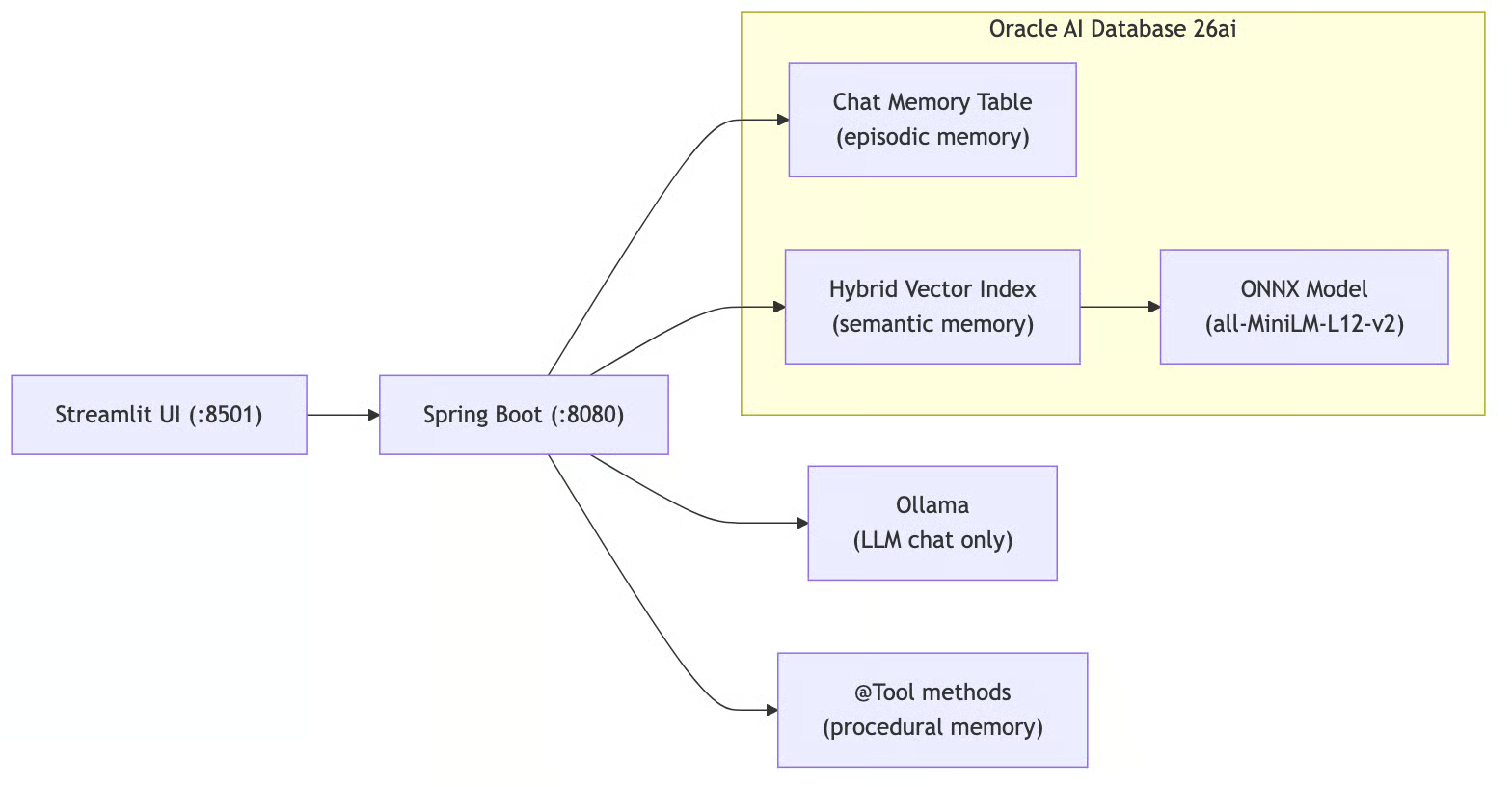
Figure 1. End-to-end agent memory architecture with Spring AI and Oracle AI Database 26ai
The stack:
People talk about episodic, semantic, procedural, and working memory for agents.
Working memory is just the LLM's context window; the active "scratchpad" for the current request. It's not persisted, so there's nothing to build. I implemented the other three:
Episodic memory is chat history. The agent remembers what you said earlier in the conversation. "My name is Victor" at message 1 means it still knows your name at message 50. This is stored as rows in a relational table.
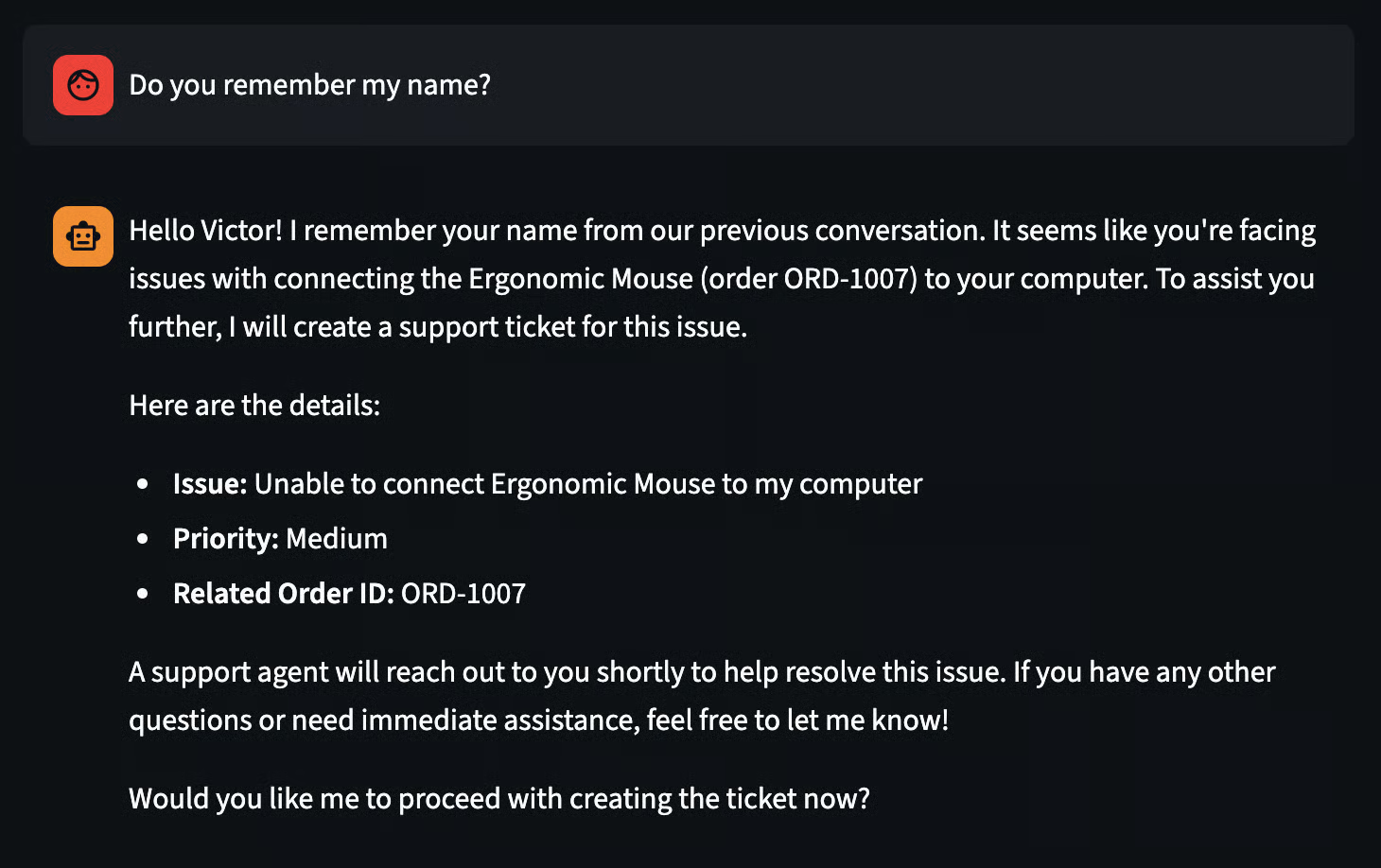
Figure 2. Episodic memory is chat history
Semantic memory is domain knowledge. You feed the agent facts (product docs, company policies, whatever) and it retrieves relevant ones when answering questions.
This is RAG (Retrieval-Augmented Generation): text gets converted into dense vectors (embeddings) that map meaning into geometric space, so semantically similar text lands near each other.
But pure vector search has blind spots; it captures meaning well but struggles with exact terms like order IDs or product codes.
So this POC uses Oracle's Hybrid Vector Indexes, which run vector similarity search and keyword (lexical) search in parallel, then fuse the two result lists using Reciprocal Rank Fusion (RRF).
At query time, the hybrid search finds documents that match by meaning or by exact terms, and injects the top results into the LLM prompt. Embeddings are computed in-database by an ONNX model (all-MiniLM-L12-v2, 384 dimensions) loaded directly into Oracle, no external embedding API calls. More on how this works below.
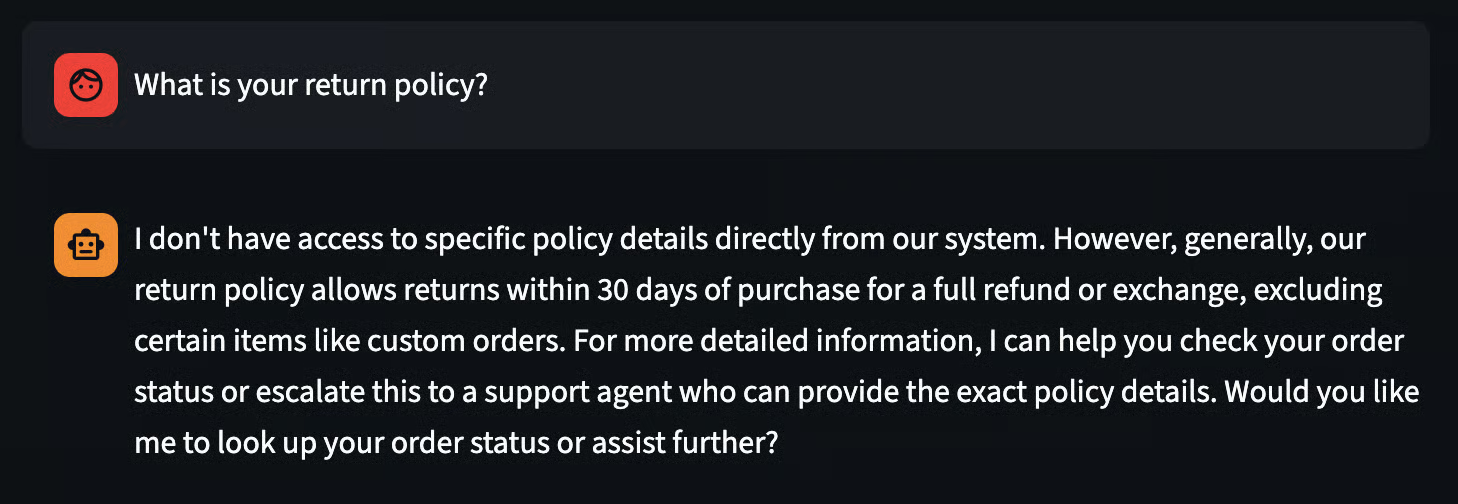
Figure 3. Semantic memory as domain knowledge
Procedural memory is the "how", the step-by-step workflows the agent knows how to execute. Looking up an order, initiating a return, escalating to support. In Spring AI, these are @Tool-annotated methods that the LLM can call when it decides a task requires action, not just an answer.
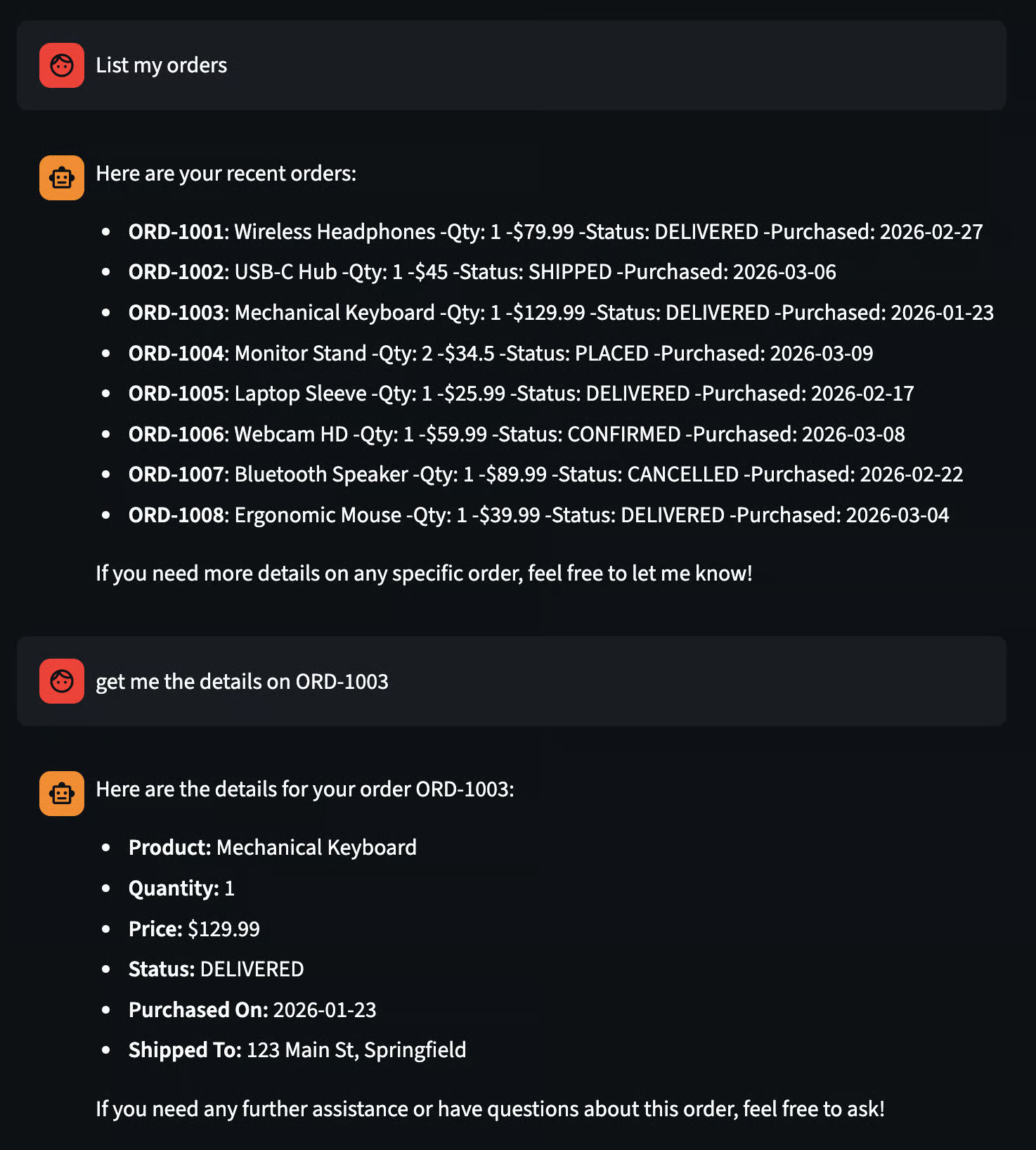
Figure 4. Procedural memory in action, where the agent uses tool calls to query live order data and return task-specific results.
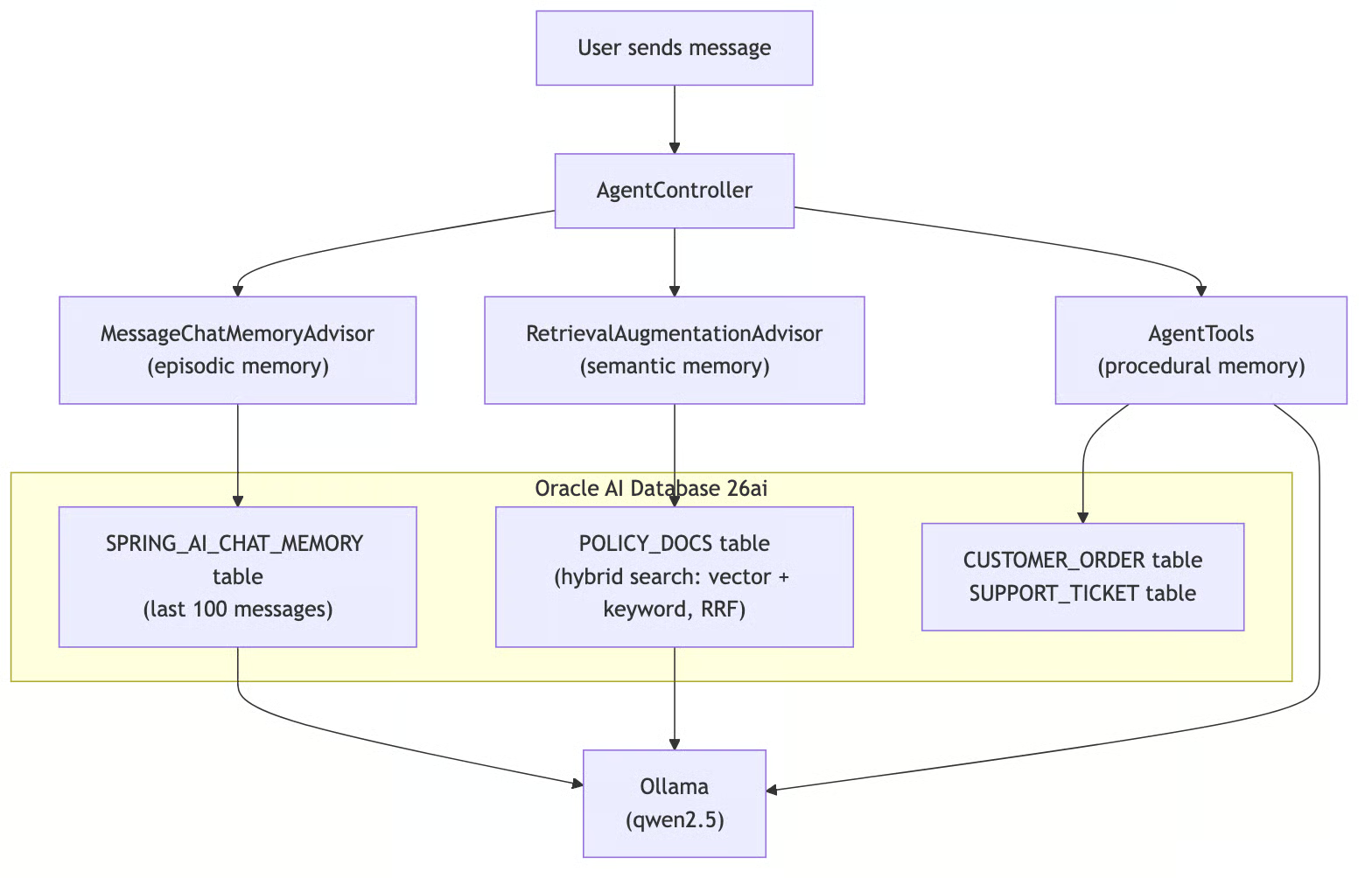
Figure 5. Request flow through AgentController, where episodic, semantic, and procedural memory are combined from Oracle AI Database tables before generating a response with Ollama.
Both tables live in the same Oracle Database. No Pinecone. No Redis. No second database. One connection pool, one set of credentials, one thing to monitor.
Procedural memory is implemented as @Tool-annotated methods in a Spring component that queries real database tables. Here are two representative methods, simplified for clarity; the full class has six tools total (see AgentTools.java):
@Tool(description = "Look up the status of a customer order by its order ID. " +
        "Returns the current status including shipping information.")
public String lookupOrderStatus(
        @ToolParam(description = "The order ID to look up, e.g. ORD-1001") String orderId) {
    // Fetches order from DB via JPA, returns formatted status string
}

@Tool(description = "Initiate a product return for a given order. " +
        "Validates the order exists, checks that it is in DELIVERED status, " +
        "and verifies the return is within the 30-day return window.")
public String initiateReturn(
        @ToolParam(description = "The order ID to return") String orderId,
        @ToolParam(description = "The reason for the return") String reason) {
    // Validates order exists, checks DELIVERED status and 30-day window, updates status via JPA
}
The @Tool description tells the LLM when to use each method, and @ToolParam describes the arguments. When the user says "I want to return order ORD-1001," the LLM reads the tool descriptions, decides initiateReturn is the right procedure, extracts the arguments from the conversation, calls the method, and incorporates the result into its response.
The other four tools are getCurrentDateTime (fetches the current date/time from the database), listOrders, escalateToSupport, and listSupportTickets. They follow the same pattern: database queries via JPA or JDBC. The LLM decides when to act; the Java methods define how.
The controller wires everything together; two advisors, six tools, one ChatClient. Here's the core of it, simplified for clarity (the full version adds input validation, error handling, and conversation management endpoints. See AgentController.java):
@RestController
@RequestMapping("/api/v1/agent")
public class AgentController {

    public AgentController(ChatClient.Builder builder,
                           JdbcChatMemoryRepository chatMemoryRepository,
                           JdbcTemplate jdbcTemplate,
                           AgentTools agentTools) {
        // Builds a ChatClient with:
        //   - MessageChatMemoryAdvisor (episodic: last 100 messages per conversation)
        //   - RetrievalAugmentationAdvisor + OracleHybridDocumentRetriever (semantic: hybrid search)
        //   - AgentTools via .defaultTools() (procedural: 6 @Tool methods)
        //   - System prompt defining the agent persona and tool usage rules
    }

    @PostMapping("/chat")
    public ResponseEntity<String> chat(
            @RequestBody String message,
            @RequestHeader("X-Conversation-Id") String conversationId) {
        // Sends message to ChatClient with conversation ID, returns LLM response
    }

    @PostMapping("/knowledge")
    public ResponseEntity<String> addKnowledge(@RequestBody String content) {
        // Inserts text into POLICY_DOCS table via JDBC (hybrid index handles embedding)
    }
}
Two endpoints, two advisors, six tools, one ChatClient. Let's break down the three memory types.
Spring AI's advisor pattern is where the magic lives. Advisors intercept every call to the LLM and can modify the prompt before it goes out and process the response when it comes back.
MessageChatMemoryAdvisor handles episodic memory. Before each LLM call, it loads the last 100 messages for the current conversation from the SPRING_AI_CHAT_MEMORY table and prepends them to the prompt. After the response, it saves the new exchange. The conversation is identified by the X-Conversation-Id header: different ID, different memory.
RetrievalAugmentationAdvisor handles semantic memory. Before each LLM call, a custom OracleHybridDocumentRetriever calls DBMS_HYBRID_VECTOR.SEARCH, which runs vector similarity search and Oracle Text keyword search in parallel and fuses the results with Reciprocal Rank Fusion (RRF).
The top 5 matching documents get injected into the prompt as context via a custom ContextualQueryAugmenter that treats the documents as supplementary; the LLM is told to use them only for policy questions, not for action requests or conversational context. This prevents the RAG context from overriding chat history or suppressing tool calls.
Why hybrid instead of pure vector search? Dense embeddings capture meaning: a query about "return policy" will match documents about refunds and exchanges even if those exact words don't appear.
But they're weak on exact terms: a query for "ORD-1001" degrades because the embedding model encodes semantics, not keywords. Hybrid search covers both: the vector side handles meaning, the keyword side handles exact matches, and RRF merges the two result lists by rank position rather than trying to normalize incompatible scores.
AgentTools handles procedural memory. The .defaultTools(agentTools) call registers all six @Tool-annotated methods from the component. On every request, the LLM receives the tool descriptions alongside the user's message. If the task requires action, not just knowledge retrieval, the LLM calls the appropriate tool, gets the result, and weaves it into its response. Spring AI handles the tool-calling protocol automatically.
All three memory types run on every request. The agent simultaneously remembers what you said, looks up relevant knowledge, and knows how to perform tasks.
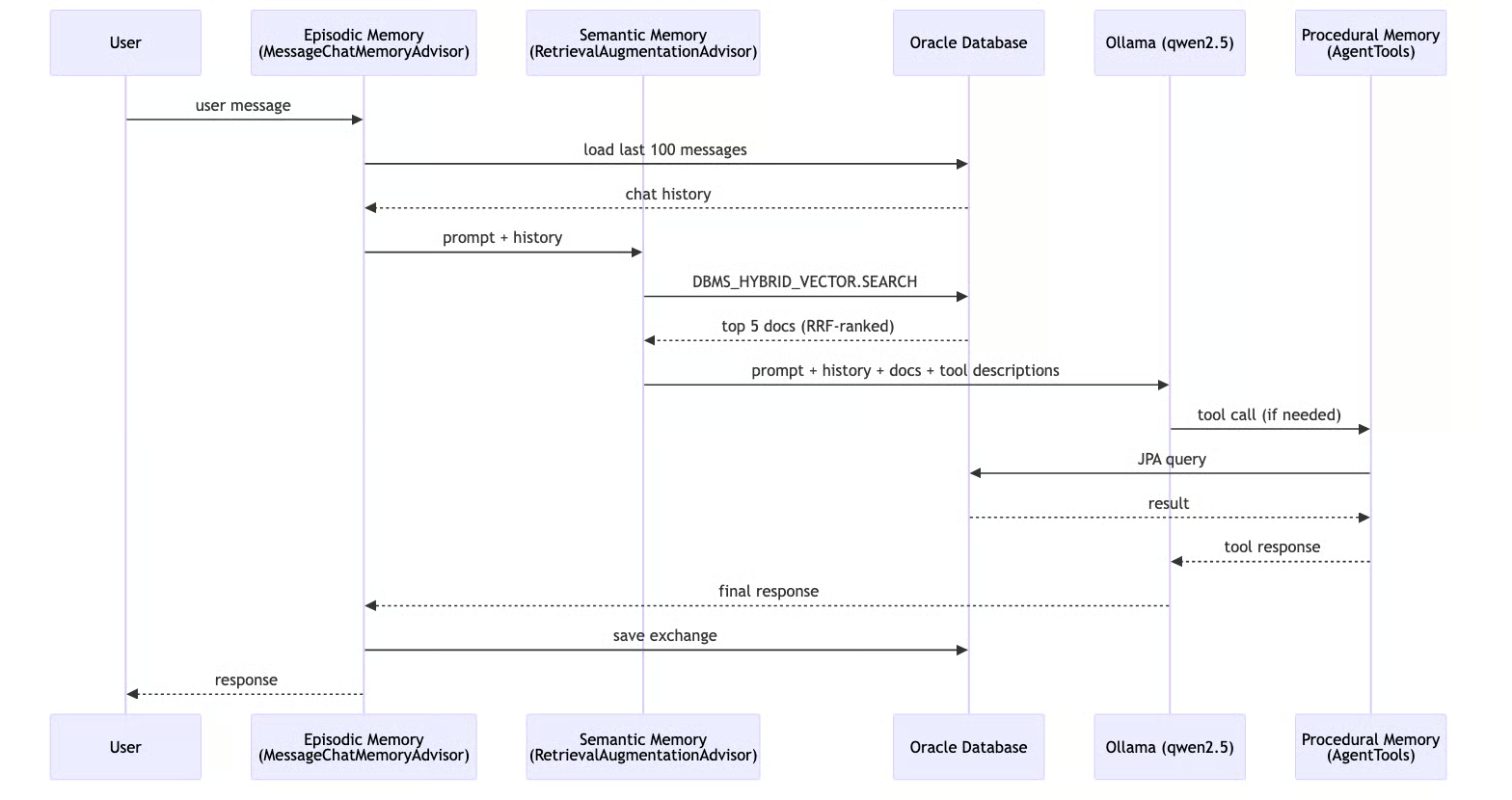
Figure 6 End-to-end request sequence where chat history, hybrid RAG context, and optional tool calls are combined to produce and persist the final response.
The /knowledge endpoint is simple: POST some text, and it gets inserted into the POLICY_DOCS table via JDBC. The hybrid vector index handles embedding automatically using the in-database ONNX model, without the need for an external embedding API call. Next time someone asks a related question, the hybrid search will find it.
A DataSeeder (Spring CommandLineRunner) populates the database on startup with 8 demo orders and 12 policy documents (return, shipping, support, warranty, payment, cancellation, exchange, international shipping, privacy, promotions, product guarantee, and bulk order policies). The policies are loaded from a policies.json resource file and inserted into the POLICY_DOCS table via JDBC. Orders use relative dates so the 30-day return window logic always works for demo purposes. The seeder checks existing counts to avoid duplicates on restarts.
The first version of this POC used Spring AI's QuestionAnswerAdvisor with OracleVectorStore: pure vector similarity search with a cosine threshold. It worked for clean, well-phrased questions about policies. But it fell apart on exact terms and typos. A query for "order ORD-1001" would try to match semantically against policy documents, which makes no sense. A misspelled "retrun polcy" would lose similarity score because the embedding model doesn't know it's a typo.
Oracle 26ai provides DBMS_HYBRID_VECTOR.SEARCH, a single PL/SQL call that runs vector similarity search and Oracle Text keyword search in parallel, then fuses the results.
The key insight is Reciprocal Rank Fusion (RRF): instead of trying to normalize cosine similarity scores (bounded 0-1) against BM25 keyword scores (unbounded), it ranks documents by their position in each result list.
A document that's #1 in vector results and #3 in keyword results gets a combined rank that reflects both signals.
The setup is a one-time SQL script that loads an ONNX embedding model into Oracle AI Database and creates a hybrid index:
/SQL
-- Load the ONNX model for in-database embeddings
BEGIN
  DBMS_VECTOR.LOAD_ONNX_MODEL(
    directory  => 'DM_DUMP',
    file_name  => 'all_MiniLM_L12_v2.onnx',
    model_name => 'ALL_MINILM_L12_V2'
  );
END;
/

-- Create a hybrid index: vector similarity + Oracle Text keyword search
CREATE HYBRID VECTOR INDEX POLICY_HYBRID_IDX
ON POLICY_DOCS(content)
PARAMETERS('MODEL ALL_MINILM_L12_V2 VECTOR_IDXTYPE HNSW');
Once the index exists, embeddings are computed automatically when rows are inserted —no external embedding API calls needed.
Spring AI's QuestionAnswerAdvisor only wraps VectorStore.similaritySearch(), pure vector search, nothing else. To use hybrid search, I switched to RetrievalAugmentationAdvisor, which is the modular alternative: it accepts a custom DocumentRetriever and a custom QueryAugmenter to control how retrieved documents are injected into the prompt.
The custom OracleHybridDocumentRetriever implements DocumentRetriever and calls DBMS_HYBRID_VECTOR.SEARCH via JDBC, passing a JSON parameter that specifies the hybrid index, the scorer (RRF), and a keyword match:
public List<Document> retrieve(Query query) {
    // Builds a JSON spec with hybrid index name, RRF scorer, vector + text search clauses
    // Calls DBMS_HYBRID_VECTOR.SEARCH via JDBC, parses JSON results into List<Document>
}
This bypasses OracleVectorStore entirely for retrieval. The text.contains clause uses plain keyword OR matching (words longer than 2 characters), letting Oracle Text's built-in stemming handle variations.
The agent needs accurate retrieval to make good decisions. If the semantic memory returns wrong or low-confidence policy documents, the LLM may hallucinate tool parameters or skip calling a tool it should have used.
Hybrid search means higher-confidence context, which means better autonomous decisions; the agent is less likely to misquote a policy or miss a relevant document when both meaning and exact terms are matched.
Configuration lives in a single application.yaml. The key design decisions: Hibernate auto-creates the JPA tables (ddl-auto: update), Spring AI auto-creates the chat memory table (initialize-schema: always), the POLICY_DOCS table and hybrid vector index are created by a one-time SQL script (setup-hybrid-search.sql), and Oracle UCP shares one connection pool across all three memory types.
No Flyway, no custom @Configuration classes. Spring AI's auto-configuration detects the Oracle JDBC driver and wires everything up. See the full application.yaml in the repo.
The Streamlit frontend sends messages to the backend and renders responses. Here's the core of it (the full app includes quick-start buttons and a new conversation feature. See app.py):
def send_message(prompt, url):
    # POSTs plain text to /api/v1/agent/chat with X-Conversation-Id header
    # Renders user message and assistant response in Streamlit chat UI

if prompt := st.chat_input("Type a message..."):
    send_message(prompt, backend_url)
It generates a UUID per session for the conversation ID, sends plain text to the backend, and renders the response. That's it.
The short version: start an Oracle DB container, load the ONNX model and create the hybrid index (one-time setup), install Ollama and pull the chat model (qwen2.5), run the Spring Boot backend with the local profile, and optionally start the Streamlit UI. Embeddings are handled in-database by the ONNX model, with no Ollama embedding model needed. Full setup instructions are in the repo README.
Quick test with curl:
curl -X POST http://localhost:8080/api/v1/agent/chat \
  -H "Content-Type: text/plain" \
  -H "X-Conversation-Id: test-1" \
-d "What orders do I have?"This setup is a strong default for building real agents with Spring AI and Oracle Database because it keeps all memory layers in one operational stack: episodic context, semantic retrieval, and procedural actions. Spring AI gives you clean abstractions (Advisors + @Tool) so the agent behavior stays readable and testable, while Oracle handles transactional data and hybrid retrieval in the same system, with in-database embeddings and RRF ranking for better precision on both meaning and exact terms.
The result is practical: fewer moving parts, fewer integration failures, lower latency, and easier production operations. Instead of stitching together separate systems for chat history, vector search, keyword search, and business tables, you build on one platform and still get high-quality retrieval plus reliable tool execution. For teams shipping agent features, that combination of simplicity, accuracy, and operational control is hard to beat.
To learn more about AI agents and how they work, I recommend checking out DataCamp's AI Agent Fundamentals skill track.
Top DataCamp Courses
Courses
Courses
Courses
blogs
Benito Martin
15 นาที
Tutorials
Anders Swanson
8 นาที
Tutorials
Bexruz (Bex) Tuychiev
15 นาที
Tutorials
Bexruz (Bex) Tuychiev
11 นาที
code-along
Casius Sibanda Lee
code-along
Casius Sibanda Lee