
Course
Claude Code in Action
3 hr
3.7K
Practice and track your progress.
Continue with GoogleMeta shipped Muse Spark 1.3 on September 2, 2026, and the upgrade instructions fit on one line: change the model ID. This means it uses the same endpoints, the same software development kit (SDK), and the same pricing.
What that one-line edit buys you, according to Meta, is a model that finishes the same task with roughly 20% fewer tool calls and 25% fewer tokens than Muse Spark 1.2. Those numbers come from comparisons run by Meta's own engineers, on tasks they don't name, with no methodology write-up.
That is exactly the kind of claim I want to check before repeating it.
So I installed Muse Code, broke a real open source project on purpose, and ran the same three tasks on both models.
To follow on with this Muse Code tutorial, you'll need a Meta developer account, a terminal you're comfortable in, and macOS or Linux for the Muse Code agent. Windows users are still out of luck in the current beta.
muse-spark-1.3-contributor by default, which means Meta trains on your code unless you switch. Training is the opt-out, not the opt-in.ultra reasoning level exists in the command-line interface (CLI) and the in-session picker, but the backend refuses it with a named feature gate.Muse Spark 1.3 is Meta's flagship multimodal reasoning model, released by Meta Superintelligence Labs on September 2, 2026 and built for long agentic sessions and coding across large repositories. It holds 1,048,576 tokens of context and accepts text, images, video, and files.
Six things changed from Muse Spark 1.2:
All this looks good, but Meta's published scorecard runs Muse Spark 1.3 at max reasoning against Muse Spark 1.2 at xhigh, and max was still gated at launch.
Artificial Analysis scored the shipping xhigh variant at Intelligence Index 61 and max at 62. So only one point of difference.
Matt Crabtree already covered the full benchmark tables, the pricing breakdown, and how this stacks up against GPT-5.6 Sol and Claude Opus 5 in his Muse Spark 1.3 release analysis. I'm not repeating any of it. What follows is what happens when you install the thing and make it work.
Three routes exist, and the right one depends on what you're building. Pick from the table, then jump to the matching section.
|
If you want to... |
Use |
Why |
|
Let an agent work across a whole repo from your terminal |
Muse Code |
Built for Muse Spark, ships the event log and worktree isolation |
|
Call the model from your own Python or JavaScript |
Meta Model API |
OpenAI SDK compatible, cheapest per token |
|
Drop it into tooling that already points at a gateway |
OpenRouter |
One slug change, but you pay a routing tax |
Muse Code is Meta's terminal coding agent, in beta for macOS and Linux. It's the harness that runs Muse Spark, and the two version independently, so muse --version tells you nothing about which model you're talking to. Keep those separate in your head.
curl -fsSL https://dev.meta.ai/install.sh | bashThat pulls a 230 MB binary and drops it at ~/.local/bin/muse, which isn't on everyone's PATH.
Then check what you got:
muse --versionOn September 4, 2026 that gave me Muse Code 1.0.2 (1.0.2-R2040.1).
A slightly odd thing for a beta to say, since third-party tooling was documenting Muse Code as 0.2.1 only weeks earlier. Pin whatever version you get to the date you got it.
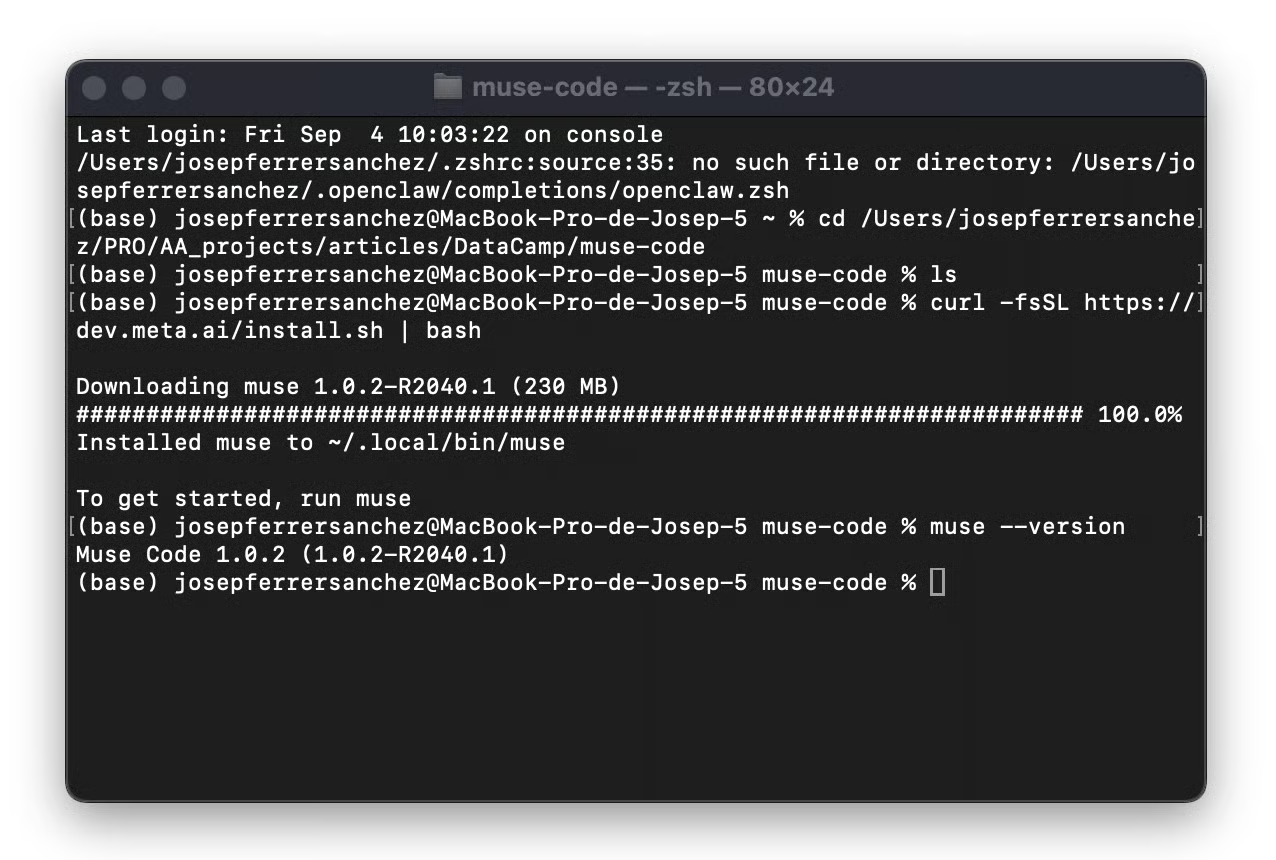
Screenshot by Author. Installing Muse Code with the one-line script, then confirming version 1.0.2 on macOS.
Now run muse. The first time, it printed Not logged in. Run muse again to log in. and exited. So you run it twice, which is the kind of small thing that makes you think the install broke.
The second run starts an OAuth device flow. It prints a sign-in URL containing a short code, shows the same code separately, and asks you to confirm they match before approving in the browser.
Sign in at this page:
  https://auth.meta.com/oauth/device/?code=XXXX-XXXX
confirm this code matches:
  XXXX-XXXX

Waiting for approval…
And then you should see the following view:
Screenshot by Author. The Meta Model API sign-in flow, confirming account details before issuing credentials.
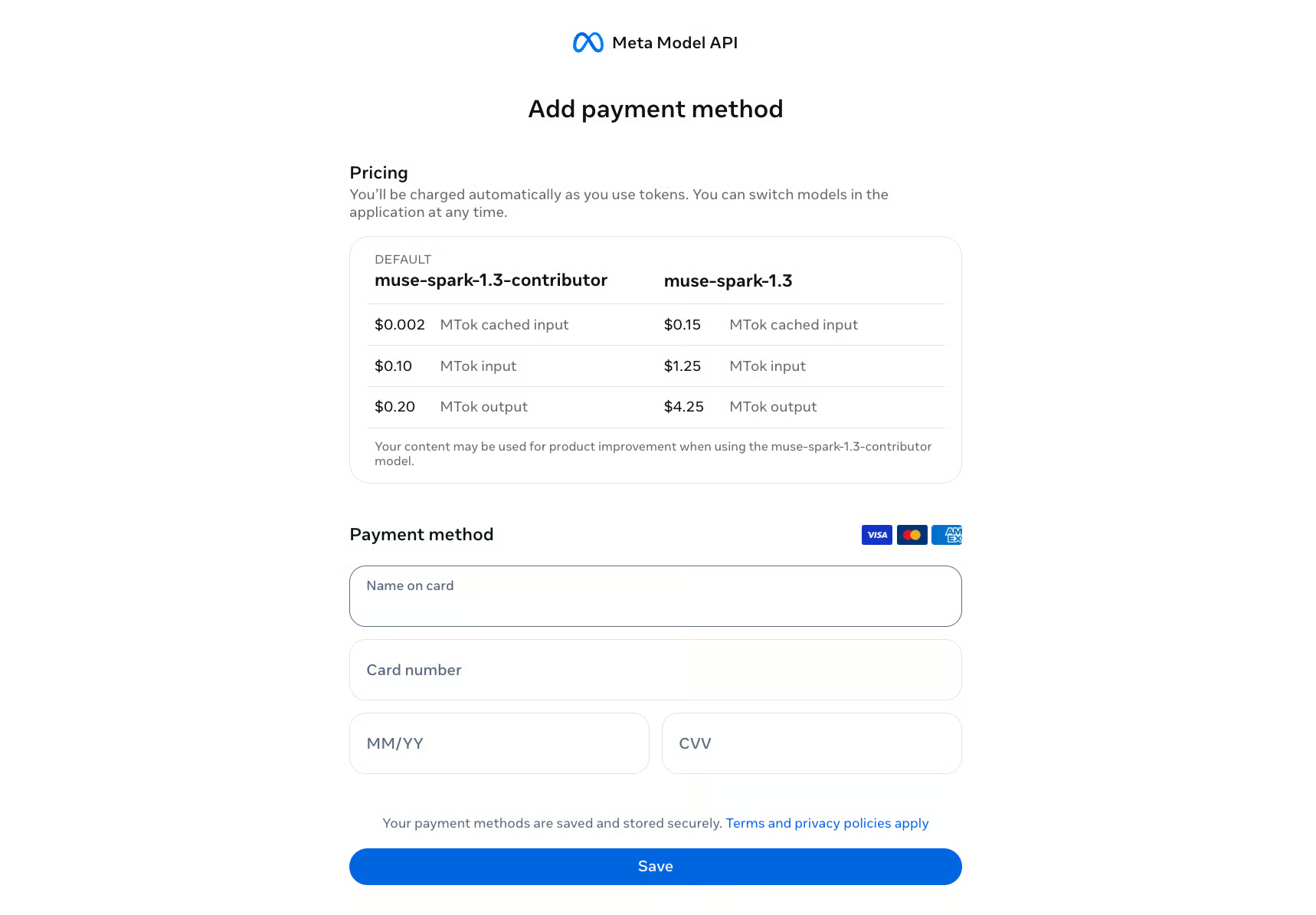
The browser side confirms your name, accepts the terms, and takes a card. Read the pricing panel on that payment screen rather than clicking through it, for reasons that become clear in about thirty seconds.
Back in the terminal, the session header tells you what you're running:
Muse Code 1.0.2
You are logged in.
Model set to muse-spark-1.3-contributor
└ Discounted tokens: your content, including inter-session messages, may be
  used for product improvement.
Read that model name again. The contributor variant, set as the default, on a fresh install, without anyone asking.
Meta isn't hiding it. The disclosure sits under the model name, the payment screen labels contributor as DEFAULT, and the status bar keeps muse-spark-1.3-contributor visible while you work.
But the burden is inverted from what most developers expect.
If you open Muse Code inside a client repo and start working, you have already sent that code to a training-eligible endpoint. Check the status bar before your first prompt, not after.
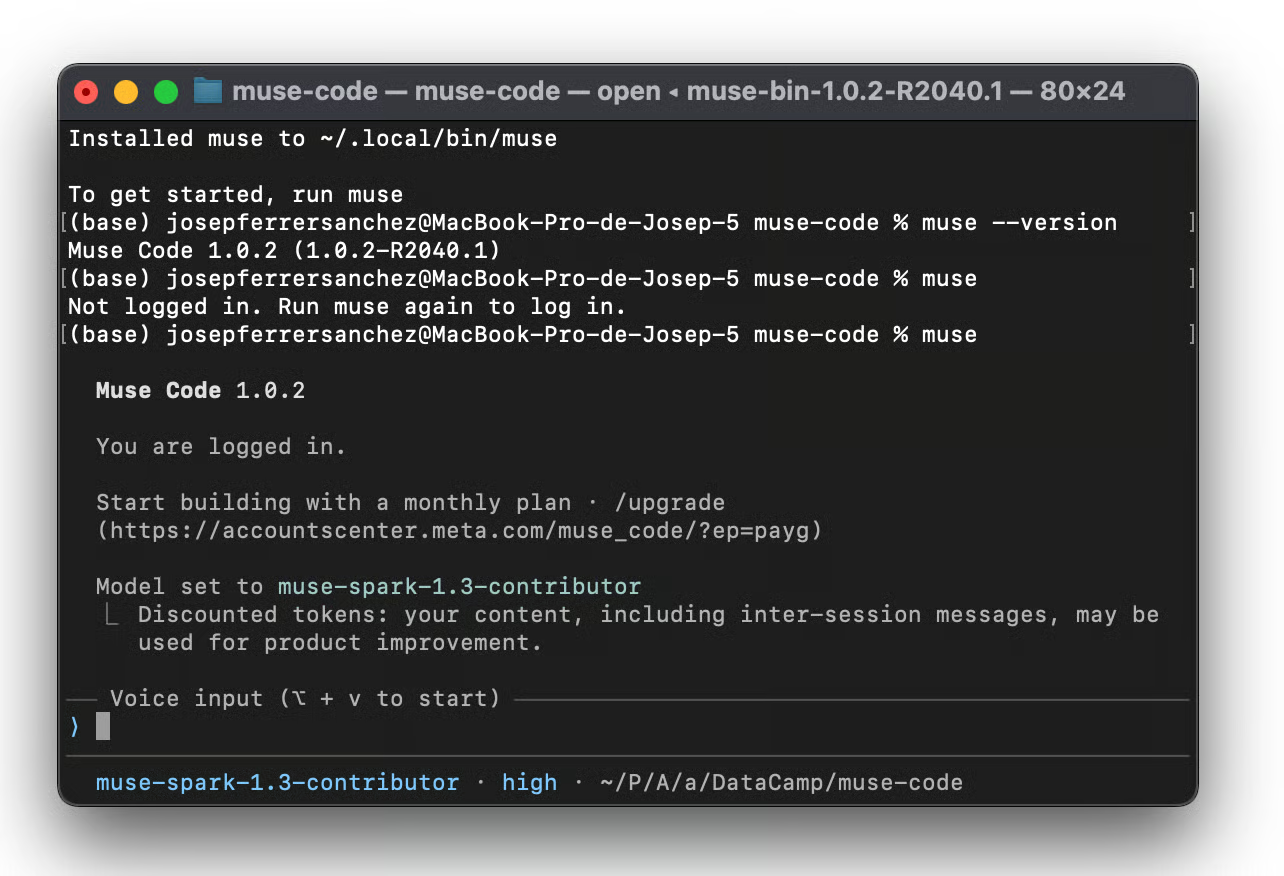
Screenshot by Author. A first Muse Code session, with the default model set to muse-spark-1.3-contributor and the product improvement disclosure underneath.
The status bar also shows reasoning effort, which sat at high for me. Not xhigh, the variant Artificial Analysis benchmarked. This is worth remembering when you compare your results against any published number.
Run /model and you get an interactive picker with four options and their rates. These figures match Meta's own payment screen:
|
Tier |
Model ID |
Cached |
Input |
Output |
Trains on your data |
|
Contributor (default) |
muse-spark-1.3-contributor |
$0.002 |
$0.10 |
$0.20 |
Yes |
|
Standard |
muse-spark-1.3 |
$0.15 |
$1.25 |
$4.25 |
No |
Contributor is roughly 12 times cheaper on input and 21 times cheaper on output.
What buys that discount is your intellectual property (IP). Meta's wording is "your content, including inter-session messages, may be used for product improvement," which covers more than just the code you hand it.
Both Muse Spark 1.2 variants are still in the picker at identical prices, which matters for the comparison later: since the rates don't move between generations, a token comparison is a cost comparison with nothing to normalize.
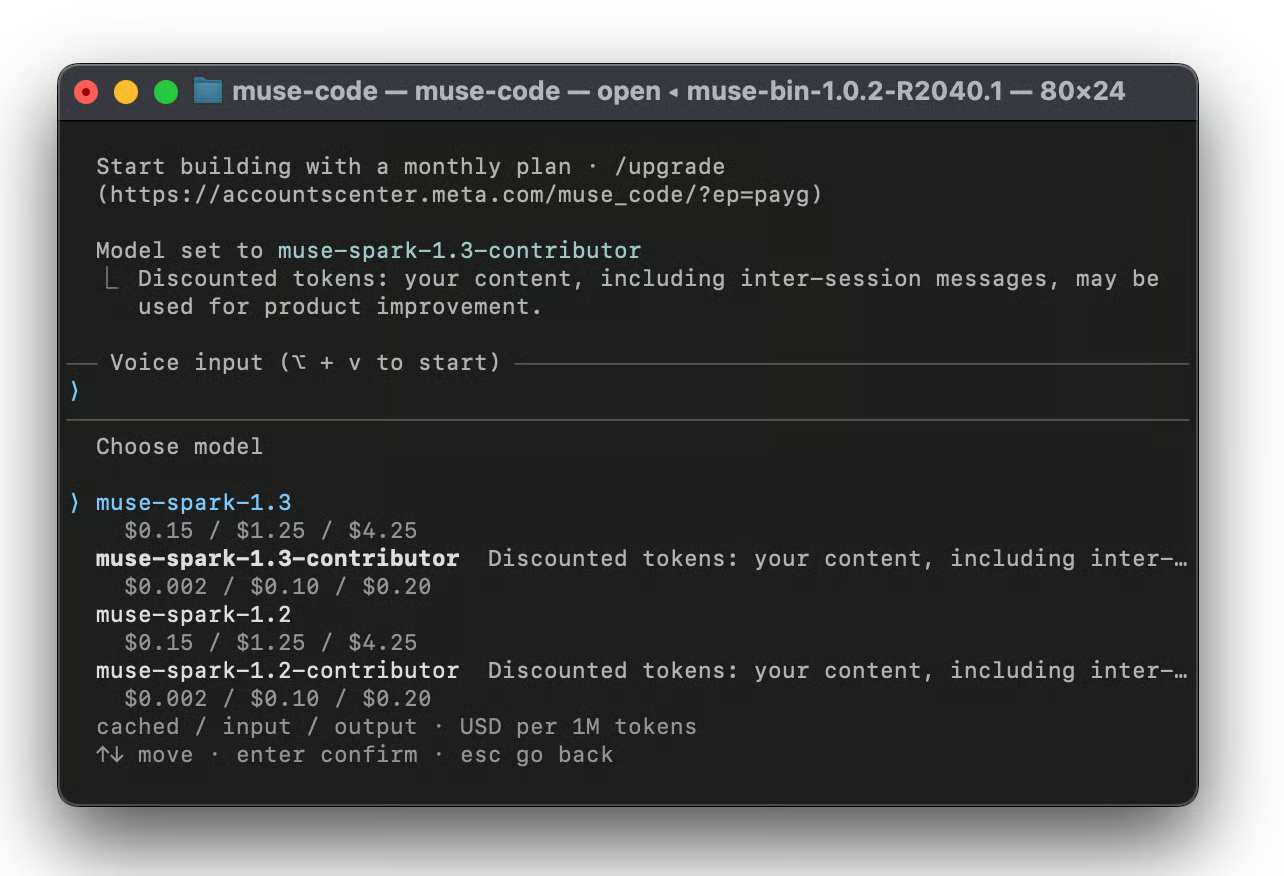
Screenshot by Author. The /model picker showing all four Muse Spark variants with cached, input and output rates.
To opt out, arrow up to muse-spark-1.3 and press enter. The "Discounted tokens" line disappears from the header.
For client work, there's a stronger option that never appears in the terminal. Meta says it has started accepting zero data retention requests, handled through sales rather than a toggle.
Retention and training are separate questions, and agency contracts usually need both answered.
Rate limiting works differently between tiers, though sources disagree on how. Meta's developer blog describes the contributor tier as capped by tokens in a rolling 5-hour window rather than by request count. Press coverage at the 1.2 launch reported a 60 requests per minute cap instead, which is a different mechanism entirely. I never hit either limit across roughly 90 model completions in an afternoon.
The Meta Model API is OpenAI SDK compatible, so migrating means changing the model ID and keeping your client code. Model IDs are muse-spark-1.3 and muse-spark-1.3-contributor.
OpenRouter carries it under the slug meta/muse-spark-1.3. That costs you something: OpenRouter measured throughput around 81 tokens per second against the 182 Artificial Analysis recorded going direct, with availability near 92% across the first three days. Meta is the sole provider, so there's no second provider to fail over to.
Everything below runs against python-humanize/humanize, pinned to commit 823ad6096. It's 1,676 lines of source across 6 modules, the test suite runs in under a second, and the domain needs no explanation. Nothing here modifies the repo.
These are read-only questions to see how the agent explores a codebase before I hand it anything that writes.
Two prompts to get a feel for how it reads code, let’s start with the first one:
Map the dependency graph of this project and tell me which module has the most inbound imports.It ran two commands, listed the project structure, then wrote an AST parser rather than grepping for import. Answer: i18n with 4 inbound imports, broken down as i18n 4, number 2, and filesize, lists, time and _version 1 each.
I checked with my own script and got different numbers, which looked like a catch. My script was wrong. It counted only relative imports (from ._version import ...) and missed the absolute form (from humanize.i18n import ...), which is how most of this package imports. The model handled both.
The second prompt is the one worth running, because you can grade it:
List every public function in src/humanize, grouped by module, with a count per module.It answered 20 total: filesize 1, i18n 5, lists 1, number 8, time 5. All correct. It then added, unprompted, that i18n.get_translation is public by name but absent from i18n.__all__, which exports only the other four. Also correct.
That session cost $0.01 across 8 turns.
muse --help documents this:
--reasoning-effort <EFFORT>
    Meta reasoning effort: none|minimal|low|medium|high|xhigh|ultra
    (default: high)
The in-session /effort picker offers six of those seven, dropping none.
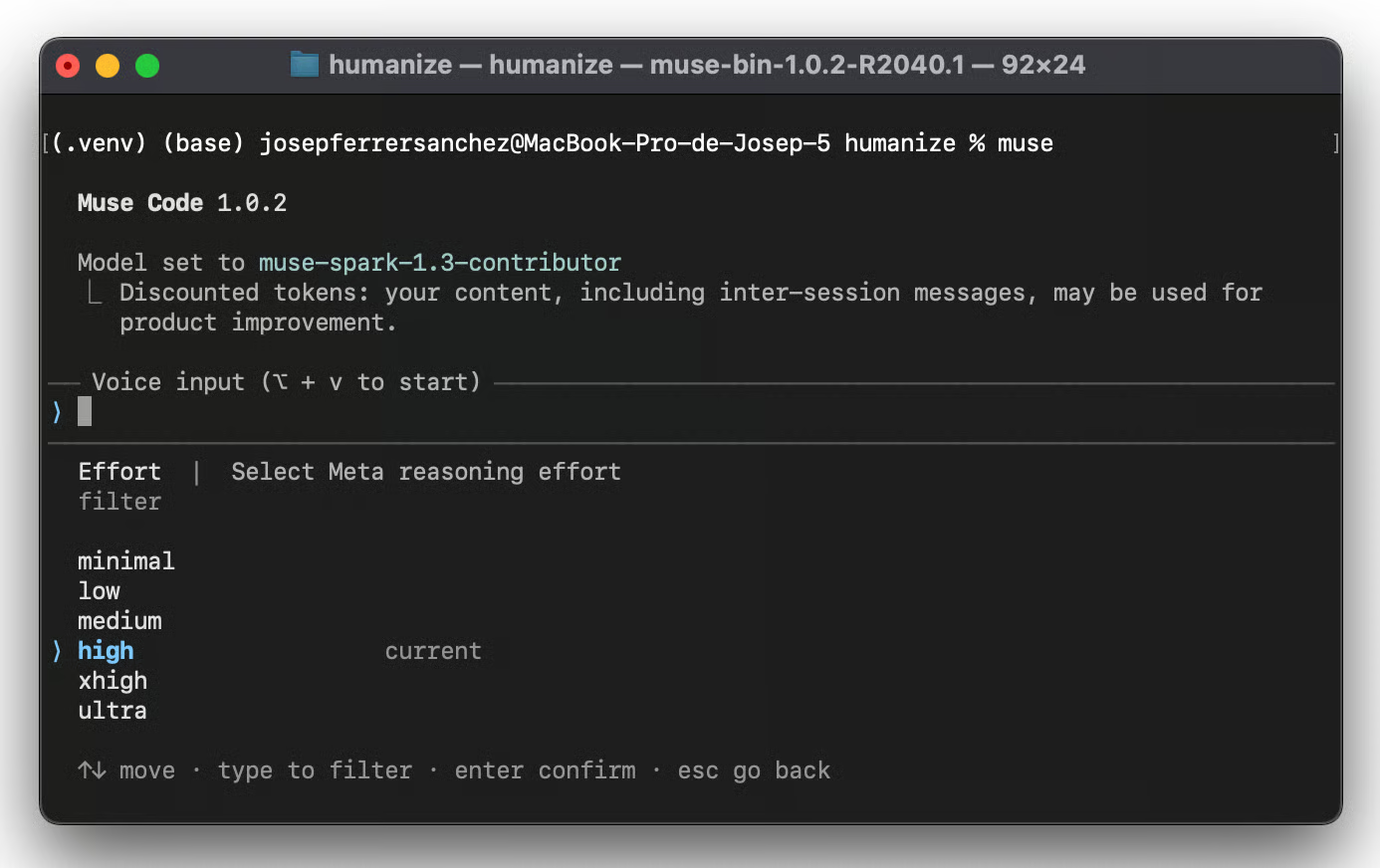
Screenshot by Author. The /effort picker listing six selectable reasoning levels, with high marked as current.
Both list a level called ultra, which appears in no Meta announcement. Meta's public position is that max reasoning is "coming shortly after we finish additional safety testing."
So I asked for it:
muse exec --model muse-spark-1.3-contributor --reasoning-effort ultra 'Reply with exactly: ok'

tbh: reasoning effort ultra is not available (gate ultra_reasoning_effort is closed); using xhigh
There's a named feature gate, ultra_reasoning_effort, and it's closed. The capability is built, and the switch is off server-side. That's a more specific picture than "pending safety testing," and it arrived in a warning message that also contains the word "tbh."
Two practical points. The client advertises a level the backend won't serve, in both the CLI and the picker. And it downgrades silently to xhigh with a single line of stderr, which in a script or a continuous integration log scrolls past unnoticed. You would believe you were running a configuration you weren't.
Then I tried a value that appears nowhere in the documentation:
muse exec --model muse-spark-1.3-contributor --reasoning-effort max 'Reply with exactly: ok'No warning at all. It ran and returned ok. So an undocumented value passes validation without comment while a documented one gets gated, and you cannot tell from the output which effort level actually served your request.
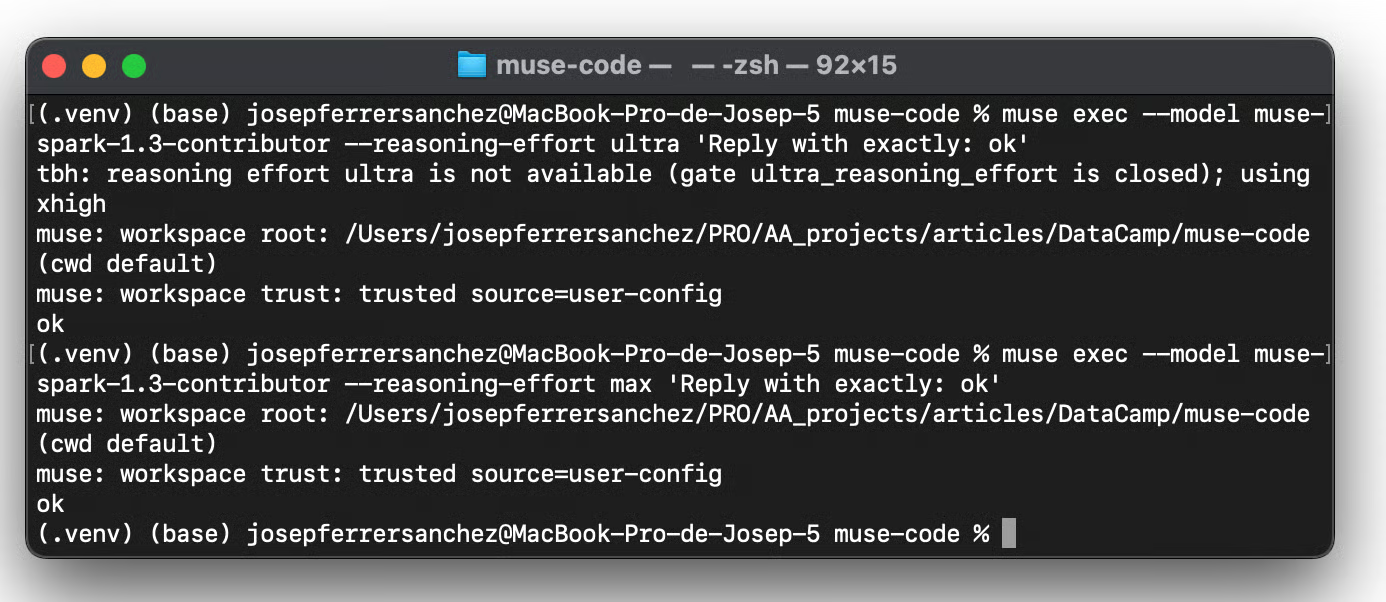
Screenshot by Author. Requesting ultra returns a closed feature gate and a silent downgrade to xhigh, while the undocumented max passes without comment.
If you care which reasoning level you're running, set it explicitly and read stderr. Don't assume the flag you passed is the flag that was used.
Here's the test. Take one open source repo, revert a real bugfix commit so a test suite genuinely fails, then run three coding tasks on both models with the same prompts and the same flags.
These are separate from the exploratory session above. Every one of them writes code.
Reverting the source half of commit 823ad6096 while keeping its tests leaves 6 failing tests, and that's the starting state:
git checkout 823ad6096e1e5ba82ea876ce761fc2efebd76157
git show 823ad6096 -- src/humanize/filesize.py | git apply -R -
python -m pytest tests/test_filesize.py -q
Every run used the same command shape, changing only the model ID and the prompt:
muse exec \
  --model muse-spark-1.3-contributor \
  --reasoning-effort high \
  --no-parallel-tool-calls \
  --approval-mode never \
'PROMPT GOES HERE'Success here is binary: the 6 tests pass, or they don't.
The test suite tests/test_filesize.py is failing.
Fix the source code in src/humanize/ so that all tests pass.
Do not modify any file in tests/.Open enough that the two models can disagree about scope, which turned out to matter.
Add a function called natural_list_with_limit to src/humanize/lists.py.
It formats a list but truncates after a given number of items, appending "and N more".
Export it from the package and add tests.The heaviest of the three, touching several files.
src/humanize/number.py is 571 lines.
Split it into two modules along a sensible boundary,
update all imports across the package, and make sure the full test suite still passes.
The three tasks ran in sequence without a reset between them, so tasks 2 and 3 built on whatever the model produced before. Both models walked the same path.
Token counts come from the session logs at ~/.local/share/muse/sessions/, counted once per model completion. All six runs passed their tests.
|
Task |
Model |
Completions |
Input |
Cached |
Uncached |
Output |
Reasoning |
Cost |
|
Bug fix |
1.2 |
13 |
584,063 |
526,028 |
58,035 |
1,737 |
422 |
$0.0072 |
|
Bug fix |
1.3 |
10 |
373,519 |
326,649 |
46,870 |
3,573 |
2,150 |
$0.0061 |
|
Feature |
1.2 |
19 |
672,060 |
629,731 |
42,329 |
7,209 |
3,577 |
$0.0069 |
|
Feature |
1.3 |
13 |
368,556 |
335,564 |
32,992 |
3,315 |
1,117 |
$0.0046 |
|
Refactor |
1.2 |
33 |
2,451,691 |
2,337,184 |
114,507 |
17,734 |
9,203 |
$0.0197 |
|
Refactor |
1.3 |
56 |
4,181,027 |
4,072,135 |
108,892 |
40,725 |
29,348 |
$0.0272 |
And the deltas, where negative means 1.3 used less:
|
Task |
Completions |
Uncached input |
Output |
Reasoning |
Cost |
|
Bug fix |
-23.1% |
-19.2% |
+105.7% |
+409.5% |
-15.9% |
|
Feature |
-31.6% |
-22.1% |
-54.0% |
-68.8% |
-33.2% |
|
Refactor |
+69.7% |
-4.9% |
+129.6% |
+218.9% |
+38.2% |
Two tasks out of three came in cheaper, with 23% and 32% fewer model completions. That's right on Meta's tool-call claim. Then the refactor went the other way: 70% more completions and 38% more cost.
Across all three, 1.3 cost 12% more than 1.2. So the efficiency claim is real but task-dependent, and a single headline percentage hides that completely.
Uncached input fell on every task by 19%, 22%, and 5%. Never by 25%.
Meta doesn't say which tokens it counted, and the answer changes a lot depending on whether you mean input, output, uncached, or total.
Cache hit rates ran 88% to 97% and rose with task length. Reporting raw input tokens without splitting cached from uncached would be close to meaningless, since the refactor's 4.18M input is really 109k of new context plus 4.07M of re-reads billed at a fiftieth the rate.
Look at what 1.3 actually did on that task before calling it inefficient.
It verified every moved block was byte-identical to the original, programmatically.
It ran --doctest-modules on both new files. It tested import resolution from a throwaway directory in /tmp. Then it flagged two things nobody asked about: that humanize.scientific the function shadows the new submodule, and that a naturaldelta doctest fails identically on the pristine tree, so the failure isn't attributable to the change.
Muse Spark 1.2 duplicated a helper function to dodge a circular import and moved on. 1.3 imported it and explained why there was no cycle.
You cannot separate "burned more tokens" from "did a more thorough job" with this design. The honest statement is that 1.3 spent more and delivered more, and whether that's a win depends on whether you wanted the extra rigor.
The feature task shows the opposite pattern and is the cleanest illustration of Meta's "less verbose" claim. Muse Spark 1.2 invented max_items, n and max_len parameter aliases nobody requested and wrote 28 tests.
Muse Spark 1.3 wrote one signature with a sensible default and 20 tests, for 54% fewer output tokens.
Four things, and the article would be dishonest without them.
None of that invalidates the direction of the results. It does mean a 12% aggregate difference is a weaker signal than three matching runs per cell would give you.
A few things I'd have liked to know on day one.
Muse Spark 1.3 asks clarifying questions on ambiguous prompts, so an over-specified prompt switches off a feature you're paying for. Counterintuitive if you've spent two years learning to front-load every instruction.
Scope still matters, though. "Split up number.py" leaves the model guessing at the boundary, the import updates, and what counts as done. The version I actually used spells all three out:
src/humanize/number.py is 571 lines. Split it into two modules along a sensible boundary, update all imports across the package, and make sure the full test suite still passes.One more thing worth knowing. My refactor prompt said number.py is 571 lines. It's 567. Both models corrected me without being asked, and 1.3 did it in its opening sentence. My number came from measuring the repo tip instead of the pinned commit.
Put the stable part of your prompt at the front so it stays cacheable. At 88% to 97% hit rates, your cache behavior moves the bill far more than your choice of model does.
The three tasks cost $0.034 total on contributor. The same work on standard would have run $0.91, a 27x difference. That's the tier decision stated in money: three cents against ninety.
If you go through OpenRouter, web search bills separately at $2.50 per 1,000 calls.
muse: command not found after a clean install. The script installs to ~/.local/bin/muse, which isn't on PATH in every shell.Not logged in. Run muse again to log in. Exactly what it says. The first muse exits, the second starts sign-in./model before opening anything proprietary.ultra reasoning silently becomes xhigh. The gate is closed. Read stderr rather than trusting the flag you passed.Reports circulated that EU users were still being served Muse Spark 1.1 after 1.3 shipped. I ran all of this from the Netherlands and got 1.3 throughout. Those reports concerned Meta.ai, the consumer assistant, and they don't appear to apply to Muse Code or the Model API. Two different rollouts.
Meta's efficiency claim held on two of my three tasks and reversed on the third, for a net 12% cost increase across the set. The tool-call side of the claim looks solid at 23% and 32% reductions, where 1.3 won. The token side depends entirely on which tokens you count.
If you're already on the Meta Model API or in Muse Code, swapping the model ID costs a minute, and you'll probably come out ahead on routine work. If you're choosing fresh for production agents, the gated max variant and the absent reasoning traces are concrete reasons to wait a few weeks.
The thing I'd actually act on isn't the efficiency number. It's that Muse Code puts you on a training-eligible tier by default, and that a documented reasoning level silently downgrades when you ask for it. Both are one line to check and easy to miss.
Run the comparison on your own workload. My three tasks aren't your three tasks, and the spread between them was larger than the difference between the models.
For the full benchmark picture, Matt's Muse Spark 1.3 release analysis has the tables. To build the skills to evaluate models like this yourself, start with our AI Agent Fundamentals skill track.
Top DataCamp Courses
Course
Track
Practice and track your progress.
Continue with Googleblog
Matt Crabtree
10 min
blog
Khalid Abdelaty
14 min
blog
Matt Crabtree
8 min
blog
Tom Farnschläder
13 min
blog
Matt Crabtree
10 min
blog
Matt Crabtree
10 min